

Can you sell WordPress plugins on multiple marketplaces?
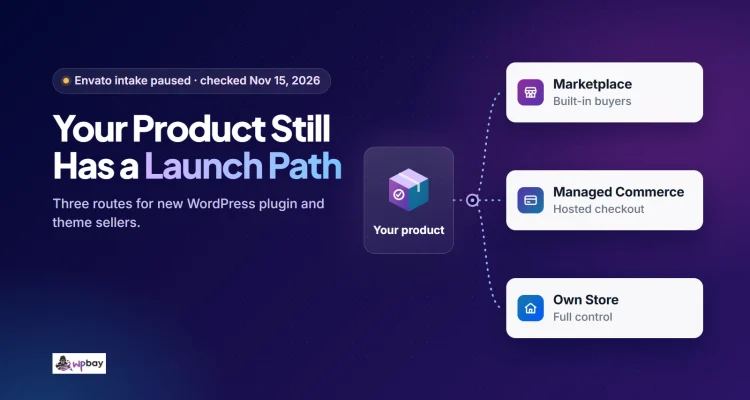
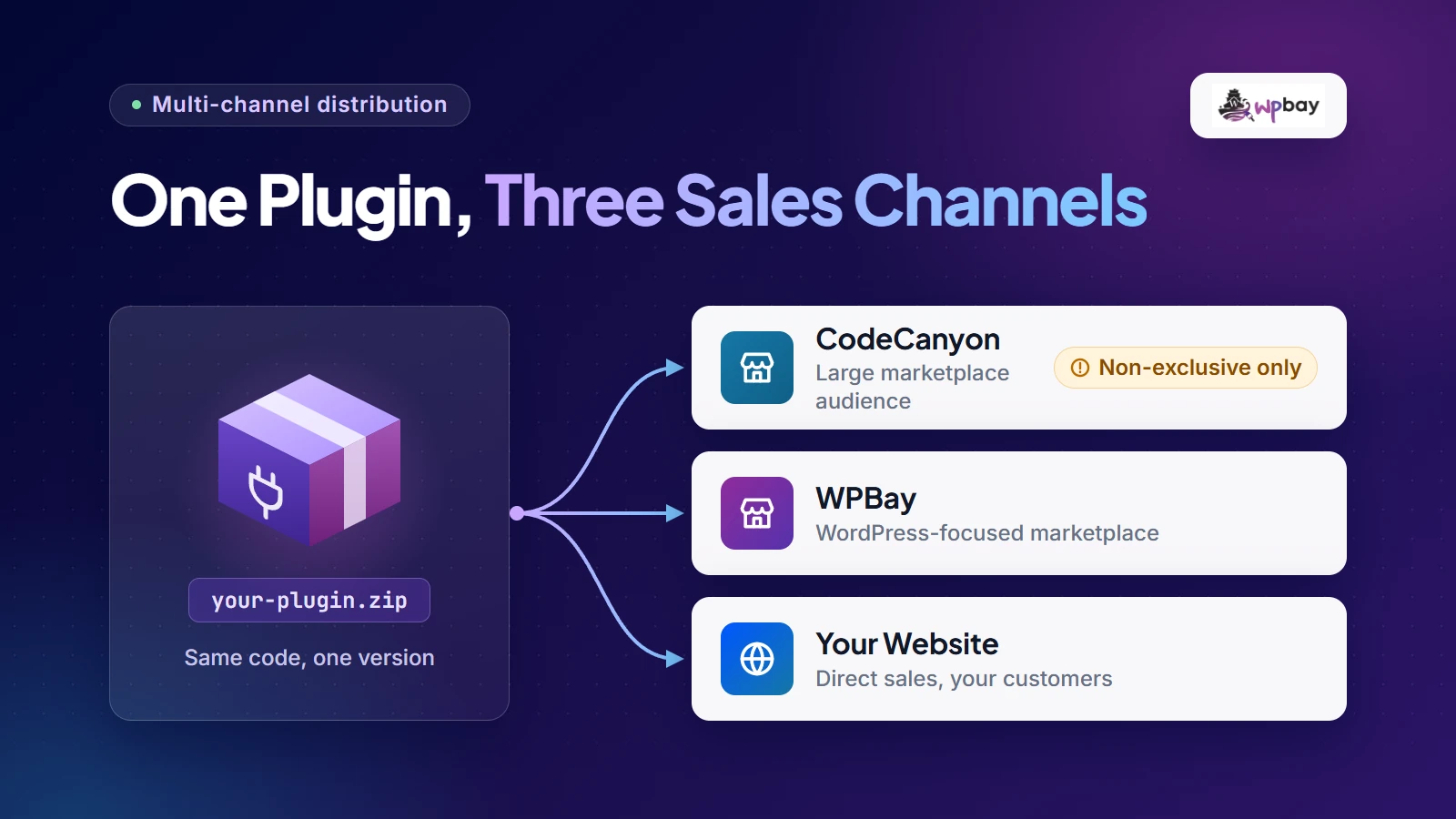
Yes. If you already have CodeCanyon access, the standard Envato Market terms let you sell the same plugin through WPBay and your own store. As of November 20, 2026, clause 9 of the Envato Market Author Terms (revised July 1, 2026) lets authors distribute Market items on other sites, platforms and services. Under those standard terms you don’t switch your account to a non-exclusive status first, but a separate written arrangement with Envato can still restrict you. If you don’t have Code access yet, CodeCanyon isn’t open to you right now. You can still sell WordPress plugins on multiple marketplaces by applying to WPBay and selling directly. Before you upload the same ZIP to WPBay, check that you can redistribute everything in it and that your regular prices match for the same offer.
WPBay publishes this guide and runs the WPBay marketplace.
| Your situation | What you can do now | First action |
|---|---|---|
| You have a live CodeCanyon item or an approved Code author account | Keep the item live and add WPBay and a direct store. Any new CodeCanyon item still goes through Envato’s review (clause 11). | Check for a separate written agreement with Envato. Then submit a new item from the Author Dashboard via Upload an Item, or start your WPBay seller application. |
| First-time seller, or an Envato author without Code access | Envato has paused author applications. Code and Theme aren’t in its current reopening plans, and existing authors can’t add categories during the pause. No reopening date has been given. | Submit to WPBay (seller and product approval apply), set up your own checkout, and follow Envato’s notice. More options are in our post on launching during Envato’s intake pause. |
| Seller with a separate written agreement, or also selling through Envato Elements | Check any separate agreement for restrictions on the item. If you also distribute it through Elements, read the Elements Author Terms. | Read the agreement before you list anywhere else. |
Clause 25 of the Envato terms requires you to hold the rights to license the item and publish its description and preview content. On WPBay, the Seller Agreement allows outside distribution unless you’ve agreed otherwise in writing, puts the obligation to hold distribution rights for libraries and assets on you, and leaves maintenance and any support you advertise with you. For every asset in the ZIP, find the clause that lets you redistribute it to customers, and include fonts and images used only in the demo. An icon set licensed for “use in one product” or for a single marketplace may not cover a second storefront, because the asset’s own license decides that, not the plugin’s.
Match the license before you compare the price
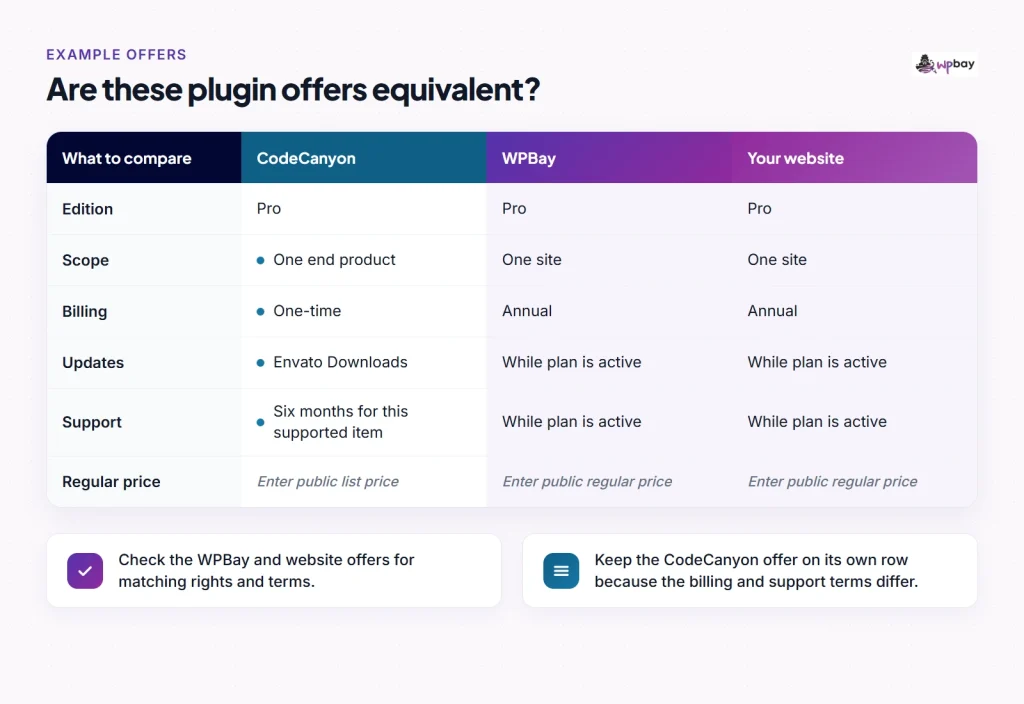
For each checkout, record what the purchase includes and where the buyer will get updates. Two listings with the same plugin name and a “1 site” label can still be different offers. One might be an annual subscription with a year of updates and support, while the other is a one-time purchase with six months of support. Compare prices only after you’ve matched the term, site allowance, permitted use, updates and support behind each one.
CodeCanyon’s standard licenses count end products, while a WPBay listing or your own store usually counts site activations. The CodeCanyon License FAQ says the Regular and Extended licenses each cover one end product. The Extended License is for an end product that end users are charged to use. A booking site that takes payment for the underlying service, such as a haircut, while letting people use the booking form for free can still fit the Regular License, so read the paid-use test carefully. Neither license adds sites. When an item is designated 100% GPL, the GPL applies to the whole item in place of the standard licenses. Most WordPress plugins use Envato’s default split license instead, and Envato’s split-licensing guide puts the PHP and integrated HTML under the GPL. The other components, such as CSS, JavaScript and images, fall under the Envato license and its one-end-product limit, and any third-party components keep their own licenses.
GNU’s page on selling free software says you may charge for copies of GPL software, and people who receive GPL code may redistribute it. So each store sells a copy plus whatever its terms bundle with that copy: activation, update delivery, support and, on a split-licensed CodeCanyon item, rights in the non-GPL parts. Keep those layers apart in your records. GPL rights in the covered code are the same in every store, while update access and support are storefront terms you set for each offer.
An offer worksheet with one row per offer
Use the same offer ID in this worksheet, your price ledger, your release log and your helpdesk. The rows below show how that works for a fictional plugin, Example Booking Pro. The staging slots, 12-month support and post-term behavior in the direct and WPBay rows are assumed configurations. The CodeCanyon row follows Envato’s published policies for a supported, split-licensed item.
| Offer ID | Channel | Term | Allowance | Updates | Support |
|---|---|---|---|---|---|
| EBP-DIR-1S-Y | Direct | Annual, auto-renews | 1 site plus 1 staging slot (assumed) | Direct updater until the paid-through date | Seller helpdesk, 12 months (assumed) |
| EBP-WPB-1S-Y | WPBay | Annual subscription | 1 site plus 1 staging slot (assumed) | WPBay SDK or account download until the paid-through date | Route set on the listing, 12 months (assumed) |
| EBP-CC-REG | CodeCanyon | One-time, license continues | 1 end product (split license) | Envato Downloads while the item remains available to the buyer | Item support, 6 months for a supported item, extendable |
Both annual examples include one site and 12 months of support, so they can be compared once their features and expiry behavior also match. The CodeCanyon example covers one end product and includes six months of support, so it sits on its own row and no saving should be advertised between it and either annual plan.
Paste the full worksheet into a spreadsheet. Activation allowance and permitted use have separate columns, because “1 site” and “1 end product” answer different questions.
offer_id,channel,license_type,features_and_addons,term,activation_allowance,permitted_use,staging,activation_method,update_source,support_route,support_duration,paid_through_behavior,installed_plugin_after_term,download_access_after_term,acquisition_source,code_and_asset_licenses
EBP-DIR-1S-Y,Direct,Seller license with GPL code,Pro plus all add-ons,12 months auto-renewing,1 production site plus 1 staging slot (assumed),GPL code: any use; updates and support for 1 activated site,1 free staging slot (assumed),Direct license key,Direct updater,Seller helpdesk,12 months (assumed),Updates and support continue to paid-through date after auto-renew is turned off,Bookings kept; Pro add-ons off (assumed),Ends at paid-through date,Own site traffic and own affiliates,GPL code; demo fonts under OFL (example)
EBP-WPB-1S-Y,WPBay,WPBay subscription license,Pro plus all add-ons,12 months subscription,1 production site plus 1 staging slot (assumed),Per WPBay License Information and listing,1 free staging slot (assumed),WPBay SDK,WPBay SDK or WPBay account download,WPBay tickets (as set on listing),12 months (assumed),Valid to paid-through date; no grace period configured (assumed),Bookings kept; Pro add-ons off (assumed),Ends with license status,WPBay organic or WPBay affiliate,GPL code; demo fonts under OFL (example)
EBP-CC-REG,CodeCanyon,Regular License (split: PHP and integrated HTML under GPL),Pro plus all add-ons,One-time; license continues,Not activation-based,1 end product; end users not charged to use it,Per Envato staging guidance,Optional purchase-code check,Envato Downloads or Envato Market plugin,Seller helpdesk within item support,6 months (supported item) plus extensions,Support ends; published releases stay downloadable,Keeps working,While the item remains available to the buyer,Envato marketplace,Envato license for CSS/JS/images; third-party assets under own licenses
For the CodeCanyon offer, record whether the buyer’s staging setup needs a second license. Envato’s staging guidance says a test or staging site still needs a valid license, that a subdomain setup may avoid a second purchase depending on how it’s configured, and that buyers can ask the author, for example about a registration reset after a domain move. Write down what your build actually does when a buyer moves domains, because that’s the question support will get.
Give installed features and future downloads separate expiry fields, because a booking form can keep running after access to new ZIPs ends. WPBay’s License Information page says a subscription license stops being valid when it expires or payment fails, that access to updates, support or premium features can be removed, that what the product keeps doing depends on your implementation, and that grace periods are optional. If your plugin keeps existing bookings and disables Pro add-ons after expiry, the checkout could say: “You pay today and the plan renews every 12 months until you turn off auto-renewal. Updates and support continue until the end of the year you’ve paid for. After that, the Pro add-ons switch off and your existing bookings stay in place.” Don’t put similar copy on CodeCanyon. Clause 12 of the Envato terms bars authors from adding different or additional buyer terms, so summarize the Envato license and item support policy there instead.
Set regular prices and schedule discounts by channel
WPBay’s seller page says you “may sell the same product through your own website or other marketplaces, provided that you comply with their terms and do not offer it elsewhere at a lower regular price.” The older Seller Guidelines use selling-price wording for other marketplaces, and Details for WPBay Sellers asks sellers to avoid offering the same product at a cheaper price elsewhere. None of these pages defines how to compare different billing terms, bundles, coupons, currencies or tax bases, and the Seller Agreement’s non-exclusivity clause contains no price formula.
What WPBay’s published wording settles, and what it doesn’t
The table applies the published wording to the cases sellers actually run into. Where the status says unresolved, the public pages genuinely don’t answer it, so get a written answer from WPBay before you publish the offer.
| Case | What the published wording covers | How to treat it now |
|---|---|---|
| The same offer sold permanently cheaper on your site | Directly covered: no lower regular price elsewhere | Don’t. Match the regular price or make the offers genuinely different. |
| A public weekend coupon on your site, regular price unchanged | The seller page addresses regular price, while Details for WPBay Sellers uses broader “cheaper price” wording | Unresolved. Ask before running it. |
| An always-on or widely shared discount code | Not addressed directly | Treat it as a lower regular price unless WPBay confirms otherwise in writing. |
| A bundle with a genuine extra, such as an included setup service | Not addressed | Unresolved. Give it its own offer ID and describe the extra and what it would cost on its own. |
| A one-time CodeCanyon license compared with a WPBay annual plan | No formula for unlike terms | Unresolved. Send both worksheet rows. |
Send parity questions through WPBay support and keep the reply with your price ledger. A request WPBay can answer quickly looks like this:
Subject: Price parity check -
WPBay listing: [URL]
Offers compared: [offer IDs, with worksheet rows attached]
External offer: [URL] | [price] | [currency] | [tax included: yes/no]
[term and site allowance] | [date checked, screenshot attached]
Proposed change: [coupon or bundle] | [code] | [start and end dates]
[who can see it and where it is published]
Question: Does this comply with the lower-regular-price condition
on the Sell on WPBay page? If not, what change would?

Keep prices out of the offer worksheet and in a ledger keyed by the same offer ID, with dated evidence for every figure. That way a price change doesn’t silently alter what you’ve recorded about rights and support.
offer_id,currency,tax_basis,price_shown,first_charge,renewal_amount,renewal_cadence,renewal_owner,date_checked,evidence,written_policy_confirmation
EBP-DIR-1S-Y,USD,Tax added at checkout,59.00,59.00,59.00,Every 12 months,Direct billing provider,2026-11-20,Screenshot of checkout,Not needed (identical to WPBay row)
EBP-WPB-1S-Y,USD,Price before tax; WPBay adds applicable tax,59.00,59.00,59.00,Every 12 months,WPBay,2026-11-20,Screenshot of listing,Not needed (identical to direct row)
EBP-CC-REG,USD,List price includes $5 buyer fee; tax per Envato,59.00,59.00,None,None,None,2026-11-20,Screenshot of item page,Pending: one-time vs annual comparison
For CodeCanyon, the list price is the item price plus a buyer fee (Introduction to Earnings). The fixed buyer fee in the WordPress category is $5 for a Regular License and $25 for an Extended License, as of November 2026. The ledger prices above are fictional.
What each store pays you at the same price
Use the same $59 pre-tax price in every row to compare fees. The base each store applies its share to is different: Envato’s author fee applies to the item price after the buyer fee, while WPBay calculates the seller share on the sale amount before customer taxes (WPBay pricing). The direct rows are placeholders for your own provider’s rates.
| Channel | Calculation | Proceeds before refunds and support | Acquisition cost to add |
|---|---|---|---|
| CodeCanyon, WordPress category | ($59 − $5 buyer fee) × 50% standard author share. Separately agreed rates can apply (clause 13), and withholding can reduce payouts. | $27.00 | Your own ads or promotion pointing to the item |
| WPBay, organic, first tier | $59 × 70% | $41.30 | None from WPBay on organic sales |
| WPBay, organic, after $2,000 cumulative sales | $59 × 80% | $47.20 | None from WPBay on organic sales |
| WPBay, first-tier affiliate sale, first tier (example) | $59 × (70% − 25%), assuming the affiliate deduction comes off the same base | $26.55 | Included in the calculation |
| WPBay, two-tier affiliate sale, first tier (example) | $59 × (70% − 30%), same assumption | $23.60 | Included in the calculation |
| WPBay with Freemius licensing | Any WPBay row above, minus any charge your Freemius agreement applies to licenses issued for sales outside Freemius checkout | Depends on your agreement | As for the WPBay row |
| Direct, payment processor (placeholder) | $59 − 5% − $0.50 = $59 − $3.45. You also handle sales tax and VAT yourself. | $55.55 | Your traffic, ads and affiliate commissions |
| Direct, Merchant of Record | $59 − the provider’s fee, which covers tax collection | Enter your provider’s rate | Your traffic, ads and affiliate commissions |
WPBay’s standard shares are 70% from $0, 75% from $500, 80% from $2,000, 85% from $10,000 and 88% from $50,000 in cumulative WPBay sales. The pricing page describes the affiliate commission as an additional deduction for that order: 25% for a standard first-tier referral and up to 30% in a qualifying two-tier arrangement. It doesn’t publish a worked example, so confirm the exact calculation with WPBay before relying on the two affiliate rows. WPBay acts as Merchant of Record for marketplace purchases, so it handles checkout, payments and applicable buyer transaction taxes. Your own accounting and income tax stay with you.
To estimate what a sale is worth, weight the two outcomes instead of subtracting a flat percentage. Expected proceeds = (1 − refund rate) × proceeds on a kept sale + refund rate × proceeds on a refunded sale, then subtract expected support and acquisition cost. For the direct processor row, assume 3% of orders are refunded in full and the processor keeps its original $3.45 fee. A refunded order then costs you $3.45, so 0.97 × $55.55 + 0.03 × (−$3.45) = $53.78, which is the same as taking $1.77 (3% of $59) off $55.55. Add an equal-cost support assumption of 15 minutes at $40 an hour ($10) and you get $43.78 before acquisition cost. Replace every input with your real refund rate, your provider’s fee-return rules, and the sales volume and buyer acquisition spend you actually see in each store.
Promotions follow each channel’s own price history
Each store judges a sale against its own price history, not against your other storefronts. The table covers author-run and seller-run sales. Envato’s official campaigns are treated separately, and an official WPBay campaign can set its own duration.
| Rule | CodeCanyon (author-run sales) | WPBay (seller-run promotions) |
|---|---|---|
| New item or plan | No sale or discount advertising in the first 30 days. Introductory wording may run only during those first 30 days, and at launch you must genuinely intend to raise the price after the launch period. | A new listing or new plan builds its own history. For 30 days it can’t show crossed-out prices, percentage discounts, claimed savings or wording implying a previous sale. Launch or introductory wording is allowed only if the offer ends within the first month, shows its end date, and you genuinely plan to raise the price afterward. You can’t invent former prices or savings. |
| Reference price | A qualifying higher price held for at least 30 consecutive days. The item generally shouldn’t have sold at or below the promotional price before, except in a prior promotion. | The lowest public WPBay price for the same listing and plan in the previous 30 calendar days, including public coupon prices. A genuinely personalized offer may be treated differently if it isn’t public, is tied to a specific buyer or their circumstances, and isn’t used to support a broader savings claim. |
| Length and frequency | Up to 30 days per sale, at least 30 days between sales, no more than 60 sale days in any rolling 365-day period. No tiered or graded promotions. | Generally up to 30 consecutive days. No separate annual cap, but earlier promotional prices stay in the 30-day lookback, which limits immediate repeats. |
| Source | Envato Discount and Promotional Pricing Guidelines | WPBay’s Discount and Promotional Pricing Guidelines (WPBay Wiki), as of November 2026 |
Here’s a hypothetical WPBay ledger for a plan with a regular price of $79. A public coupon brought it to $69 from October 20 to 31, 2026, and a public flash price of $63 ran from November 10 to 12. You want a sale from November 27 to December 10. The lookback runs from October 28 to November 26, so both earlier prices fall inside it, and the reference is $63, the lower of the two. A $59 sale saves $4 (about 6%), so advertising “25% off” against $79 would overstate it. A $67 sale sits above the reference and can’t be presented as a saving at all.
The same policy says a discounted checkout price must respect WPBay’s current minimum price. WPBay’s July 2026 marketplace announcement set that minimum at US$5 for listed products, so confirm the current figure with WPBay if your discount goes near it. For a subscription, the promotion has to say whether the discount covers only the first billing period, what the price and billing frequency are afterward, whether renewal is at the standard or discounted price, that renewal is automatic, and how to cancel. If renewals in the example are charged at $79, show that next to the first-year price.
On a WPBay listing, you may compare against an external price only if the product and license are genuinely equivalent, the external price is current and verifiable, and differences in support, renewals, taxes or features are explained. It can’t appear as a crossed-out former WPBay price, and WPBay may ask for evidence. Those are rules for comparisons advertised on WPBay. They don’t approve the external offer itself under the lower-regular-price condition, which is what the parity table above is for.
Ship one release through three update paths
WordPress identifies an installed plugin by its path relative to the plugins directory (see plugin_basename()), so every channel’s ZIP should use the same folder and main file. That also lets a buyer replace one store’s build with another’s without losing settings. If the plugin isn’t on WordPress.org, add an Update URI header. The header requirements explain that it helps stop an update for a similarly named WordPress.org plugin from overwriting yours. The header doesn’t deliver a package. Since WordPress 5.8, an updater can use the update_plugins_{$hostname} filter to supply update data for that hostname.
Decide how the direct store sells and delivers
If you’re opening the direct store from scratch, settle these before you build anything. Our guide to choosing a checkout and licensing stack for your own store covers the options in more depth.
- Choose a payment processor (you collect and remit sales tax and VAT) or a Merchant of Record (the provider sells to the buyer and handles tax, for a higher fee).
- Decide who sends renewal reminders, takes card updates and processes cancellations. With a Merchant of Record, that’s usually the provider’s customer portal.
- Put the ZIP behind the buyer’s account or a signed, expiring link, never at a public URL.
- Pick the updater and license server, and decide what the plugin does when the license server is unreachable. It should keep working and keep buyer data intact rather than locking the admin.
- Find out where a failed renewal and a chargeback show up in the provider’s dashboard, and who submits evidence for a dispute.
Pick one updater per installation
Every installation should have exactly one authoritative update source, chosen by the entitlement that site holds. If two updaters can see the same plugin basename, both can inject an update offer into WordPress, and the buyer may get whichever one ran last, including a package their license doesn’t cover. The simplest way to prevent that is a store-specific build: the CodeCanyon ZIP contains no direct or WPBay updater, the WPBay ZIP contains only the WPBay route, and the direct ZIP contains only your updater.
For existing CodeCanyon installations, the safe default is to leave them on Envato Downloads or the official Envato Market plugin. Don’t ship a release that quietly activates another feed on those sites. The trigger to switch is a buyer’s own decision: they buy the direct or WPBay offer and approve replacing the installed build. After the switch, open Dashboard → Updates, click “Check again,” and confirm the next version is offered once, from the new source. With WP-CLI, wp transient get update_plugins --network --format=json shows the package URL WordPress has stored for each plugin. The old feed has disengaged when that URL points at the new store’s host.
Decide whether WPBay and your store share a license feed
Your direct store and WPBay can share a license and update feed, or each can use its own build. On WPBay, the shared route is the optional Freemius integration, released October 14, 2026 according to the WPBay changelog. Under WPBay’s Freemius setup guide in the WPBay Wiki, Freemius issues the license while WPBay keeps checkout, billing and renewals. Each WPBay offer (plan × site count × term) must match a Freemius pricing entry in USD. The guide’s checkpoint is “View automatic licensing checks in Pricing”: when every offer matches, the badge reads “Ready to save,” and saving switches the product to Active. WPBay re-reads your Freemius plans daily, so editing a Freemius pricing entry later can make a WPBay offer unpurchasable until you fix it. Free trials and plan switches such as 1 site to 5 sites aren’t supported.
The licensing choice is effectively permanent once a product sells. A Freemius-licensed product can’t switch back to WPBay licensing, and a WPBay-licensed product with sales can’t move to Freemius. Disconnecting works differently depending on sales. A product with no Freemius sales simply returns to WPBay licensing. After Freemius sales, existing licenses keep working in Freemius, but the product can’t be sold and renewal and refund syncing stop until you reconnect. That gap matters for subscribers: each license expires on its recorded paid-through date, so a buyer who keeps paying WPBay can still lose access when that date arrives because the renewal never reached Freemius. Talk to WPBay before disconnecting a product with active subscribers.
A shared feed also adds a timing dependency. WPBay account downloads always come from the reviewed upload, but anything you deploy to Freemius reaches every site on that feed, so the guide says to “only deploy versions to Freemius that have been approved on WPBay.” Direct buyers on the same Freemius product then wait for WPBay’s approval too. WPBay reviews every new listing before publication and can review later releases again, fully or in a targeted way. Separate packages built from one tagged release avoid the dependency, at the cost of an extra build step.
Where each buyer’s update comes from
Eligible CodeCanyon buyers can re-download the current release from Envato Downloads while the item remains available to them. Update notifications are available on some items and depend on the author choosing to send one. Eligible purchases can also update from the dashboard through the official Envato Market plugin with a personal token.
WPBay buyers can always download the reviewed release manually from their WPBay account. The WPBay SDK can also deliver an uploaded release as a WordPress dashboard update to a site with a valid, activated license, and Freemius is another supported route. The Seller Agreement allows other WPBay infrastructure and supported integrations as well. If you run your own updater for WPBay buyers, it has to serve every authorized WPBay buyer, you’re responsible for keeping it running, and WPBay’s Technical Requirements for WordPress Plugins (WPBay Wiki) say the build can’t require a CodeCanyon purchase code or a second purchase. WPBay can also accept a build with no mandatory activation. For direct buyers, record which license controls the download and how the plugin finds the new ZIP.
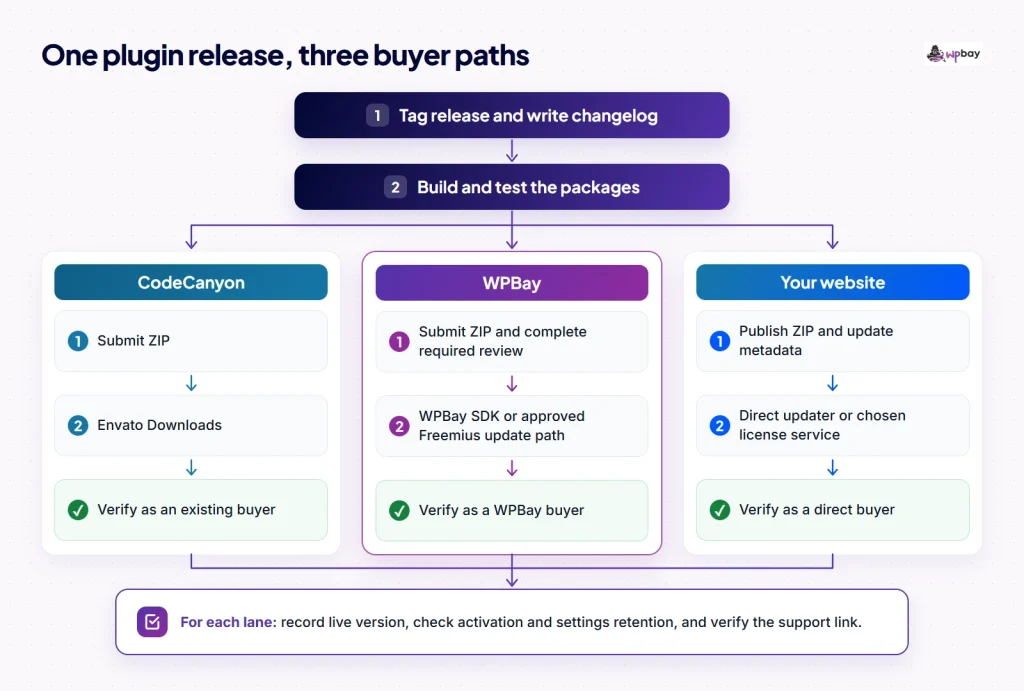
In this example, CodeCanyon and the direct store have 2.5.0 while WPBay still serves 2.4.3.
Keep a release log with expected and observed results
Suppose 2.5.0 goes live on CodeCanyon and your store on December 2, while WPBay’s review comes back with a question. Give the uploaded package and the version customers can download separate columns, then test updates over existing installs as well as clean installs. Note that the WPBay SDK still offers 2.4.3 to a site running an older version, so “WPBay offers nothing” is only true for sites already on 2.4.3.
| Offer | Live version | Submitted, not live | Test | Expected | Observed |
|---|---|---|---|---|---|
| EBP-CC-REG | 2.5.0 | None | Buyer downloads from Envato and installs over 2.4.3 | 2.5.0 installed, settings and bookings kept | Record result |
| EBP-DIR-1S-Y | 2.5.0 | None | Activated test key, site on 2.4.3 | Direct updater offers 2.5.0, and no other source offers anything | Record result |
| EBP-WPB-1S-Y | 2.4.3 | 2.5.0 (review question) | Activated license, site on 2.4.3 | No update offered | Record result |
| EBP-WPB-1S-Y | 2.4.3 | 2.5.0 | Activated license, site on 2.4.1 | SDK offers 2.4.3, never 2.5.0 | Record result |
| EBP-DIR-1S-Y | 2.5.0 | None | CodeCanyon purchase code entered in the direct build | Activation refused with a message naming the right store, and no update offered | Record result |
| EBP-CC-REG | 2.5.0 | None | CodeCanyon build with Envato Market plugin and a leftover direct updater installed | Only Envato’s route offers 2.5.0 | Record result |
Before a release changes the database, test both reinstalling the previous ZIP and restoring a backup. If an update conflicts with something on the buyer’s site, replacing the files may be enough, because WordPress has been able to replace an installed plugin from an uploaded ZIP since 5.5. Replacing files doesn’t reverse a schema migration, though, so keep the old ZIP and a database backup and test both on staging. If one channel can’t publish a fix right away, for example during review, tell those buyers when it’s coming. Keep the previous ZIP for recovery, and confirm the marketplace’s process before trying to put that build back in buyers’ downloads.
Demo and link rules
Envato’s guidance on links in descriptions, previews and downloads allows documentation and support links, and links to your own add-ons that depend on the Envato purchase. It bars links to the same item for sale elsewhere and suggests a separate Envato preview where needed. WPBay’s Seller Guidelines ask for a link to the WPBay listing in the product demo, and its Product and Service Promotion Guidelines (WPBay Wiki) allow documentation, demo, changelog and support links but not moving WPBay buyers to outside checkout or renewals. Reuse the demo content on separate preview URLs and change the purchase link for each marketplace. Your own site’s demo can link to your checkout.
Route billing and support to the store that made the sale
Ask where the customer bought the plugin before you reset a license or discuss a refund. Product support follows the route and scope advertised on each listing, while billing problems belong to whoever took the payment.
| Function | CodeCanyon | WPBay | Direct store |
|---|---|---|---|
| Proof of purchase | Purchase code in the license certificate. A copy bundled with a theme may have none. | WPBay order and license | Your order number or key |
| Billing, renewals and cancellation | Envato. No renewals; support extensions are bought on Envato. | WPBay, as Merchant of Record, through the buyer’s WPBay account | Your processor’s billing system, or your Merchant of Record’s portal |
| Downloads and updates | Envato Downloads or the Envato Market plugin | WPBay account download, WPBay SDK or the configured integration. Account download problems go to WPBay support. | Your account area and updater |
| Refunds | Most requests reach you in the Refunds tab with five days to respond. Approval goes to Envato to process, and the buyer can escalate if you decline or don’t respond (Envato refund workflow). | Buyer requests through My Account. WPBay reviews and decides under its Refund Policy. See the September 8 refund-request update for the Request a refund route. | Your policy, or your Merchant of Record’s process |
| Payment disputes and chargebacks | Between the buyer’s bank and Envato, which took the payment. Separate from the item refund escalation above. | WPBay keeps final authority over transaction disputes and payment reversals, and related seller earnings may be deducted (Seller Agreement). | Processor: you submit evidence in its dashboard. Merchant of Record: usually the provider, per its terms. |
| Technical support | Your helpdesk, within item support while it’s active | The route and scope on your listing | Your helpdesk |
The September 8 update added a dedicated Request a refund route and says eligible EU and UK withdrawal requests can be processed automatically when the buyer hasn’t downloaded the files or activated a license. The formal Refund Policy sets the eligibility rules, so link it rather than the announcement in your own documentation. If you use Freemius, revealing a Freemius license key can count as access. You still handle troubleshooting when a refund request is about a product problem you can fix.
The refund’s effect on the license depends on the licensing setup. Under WPBay’s Freemius guide, a full refund, cancelled order or failed order cancels the Freemius license, a partial refund leaves it active, and a renewal refund moves the expiry back to the previous paid-through date. A buyer who turns off auto-renewal keeps access until the end of the paid period. For native WPBay licensing, the License Information page allows revocation in refund cases but doesn’t spell out the result for each refund type, so confirm the behavior for your offer with WPBay before you promise anything. On CodeCanyon, the buyer’s rights to use and download the item are revoked once Envato processes the refund.
Put one intake prompt on your helpdesk form so every ticket starts with the facts you need to route it. Ask for an existing ticket number or an order reference your helpdesk can see, not a full purchase code in ticket metadata or a public forum.
Where did you buy this plugin? (CodeCanyon / WPBay / our website / it came with a theme)
Order reference or existing ticket number:
Plugin version installed (Plugins screen):
WordPress version:
What's wrong? (download or billing / activation / renewal / bug or setup question)
Steps to reproduce, if it's a bug:
When you do need to verify a CodeCanyon purchase, collect the full code through a private form and check it with Envato’s author sale lookup in the Envato API. A buyer whose copy came bundled with a theme may have no separate purchase code, because that isn’t a CodeCanyon purchase of your item, so check what you agreed with the theme author before offering item support. Handoffs then follow the table. Send failed WPBay account downloads and failed WPBay renewals to WPBay support rather than emailing a ZIP. If a WPBay buyer’s license is valid but activation fails, or their booking form won’t save, ask for the plugin version and steps to reproduce through the support channel on the listing. When CodeCanyon support expires, the Item Support Policy still gives the buyer the releases you publish. Envato also warns that downloads can disappear if an item is permanently removed, and recommends buyers keep a copy.
When a buyer wants to move to another store
The workflow we recommend treats a move as a voluntary new purchase, not a license transfer. Don’t solicit the move from the CodeCanyon listing, preview or download, and don’t pull WPBay buyers off-platform. If a CodeCanyon buyer asks about your direct annual plan, point them to the public offer and let them buy through your checkout, so the first charge and renewal are the ones they agreed to there. Then:
- Write down what continues from the original purchase. The CodeCanyon license, its downloads and any remaining item support stay with Envato, and only Envato can refund that purchase.
- Have the buyer keep the old ZIP and take a database backup before switching.
- The buyer replaces the installed build with the direct build on their own site, or approves you doing it.
- Confirm that only your updater now offers updates, using the check in the updater section above.
- If the switch fails, the buyer reinstalls the old ZIP. If the direct build changed the schema, they also restore the backup.
Test each channel before you open it
License mechanics and money movements need different tests. For WPBay, the SDK’s Developer Mode tests activation in a sandbox and skips production license verification. Put WPBAY_<SLUG>_DEVELOPER_MODE and WPBAY_<SLUG>_SECRET_KEY in the test site’s wp-config.php, list the plugin directory name under Allowed Testing Slugs in your dashboard, and use the Developer Testing Purchase Code. Sandbox activations on the default internal plan expire after 24 hours, and you can revoke one manually, so Developer Mode covers activation, expiry and revocation. It doesn’t simulate refunds, cancellations or renewals, and it doesn’t prove the production update feed or download authorization. For those on WPBay or WPBay with Freemius, use a live test WPBay approves or ask WPBay to help with the transaction cases. Remove the Developer Mode constants and test secrets before you package the release.
For your store, use your provider’s documented test mode and the test events it supports, such as Stripe’s test cards and simulated events if you use Stripe. Don’t buy your own CodeCanyon item, because clause 27(c) prohibits self-purchase. Instead, have a legitimate buyer test their own entitlement on a site they’re allowed to use and report the result, or ask Envato for an approved test procedure. The buyer’s credentials and keys stay with the buyer.
| Test | CodeCanyon | WPBay | Direct |
|---|---|---|---|
| Clean install of the live download | Buyer-reported | Approved live test | Test mode |
| Update over an existing install, settings kept | Buyer-reported | SDK or integration | Your updater |
| Another store’s key entered | Build ignores it | Refused, names the right store | Refused, names the right store |
| Staging site or domain move | Per your stated staging rule | Activation slot freed or reused as documented | Same |
| License server unreachable | Not applicable without activation | Plugin keeps working, data intact | Same |
| Download authorization | Envato Downloads | WPBay account download | Only signed-in buyers get the ZIP |
| Nonrenewal | Not applicable | Access through the paid-through date, then the recorded post-term behavior | Same |
| Refund | Envato revokes rights | License result as confirmed with WPBay | Key disabled as your policy says |
| Rollback | Previous ZIP plus backup on staging | Same | Same |
Assign an owner for releases and support before you open the new checkout. After launch, read the first billing and activation tickets yourself. If buyers keep sending them to the wrong team, fix the link in the receipt or the plugin. Someone should also check live versions and promotion end dates every week.
Where to start, depending on what you already sell
If your CodeCanyon listing is already live, test one additional checkout end to end before adding the third:
- Snapshot what current buyers were promised: the listing text, the support policy you follow, and how activation behaves today.
- Fill in the offer worksheet and price ledger, and send WPBay any unresolved parity cases.
- Open either WPBay or your direct store, and run one full release through it and CodeCanyon.
- Add the third checkout once that release log is clean.
If you don’t have Code access, build the offer worksheet, submit to WPBay, and validate direct delivery separately: checkout, private download, activation, an update over an existing install, and a refund in test mode. Open the direct store once both routes pass.
In either case, hold a channel back if it can’t deliver the current release to an authorized buyer, or if you can’t say who processes its refunds.
For background on the July change, CodeRevolution TV published a reaction video on May 18, 2026. The presenter is Szabi Kisded, a WPBay co-founder who began selling WordPress plugins on CodeCanyon in 2016 (WordPress.org profile). It’s commentary on the announcement, so use Envato’s Author Terms and current fee schedule when you make a selling decision. If the embed doesn’t load, watch it on YouTube.
Frequently asked questions
Can my own site charge less or run a coupon?
Not at a lower regular price for the same product: WPBay’s seller page rules that out. The public pages don’t settle short direct-store coupons, bundles, different terms or currencies, so send WPBay the details using the template above. On WPBay itself, public coupon prices count toward the same plan’s 30-day price history, and seller-run promotions generally last up to 30 consecutive days. A genuinely personalized offer may be treated differently only if it isn’t public, is tied to a specific buyer or circumstance, and isn’t used in a broader savings claim.
Does an Extended License cover more sites?
No. The Regular and Extended licenses each cover one end product, and the Extended License is for an end product that end users are charged to use. A buyer who needs more sites needs more licenses. If the item is designated 100% GPL, the GPL replaces both standard licenses for the whole item.
Can I use the same demo for every store?
Yes, the same demo content can sit on separate preview URLs. For example, demo.example.com/codecanyon/ links to documentation and the CodeCanyon item, demo.example.com/wpbay/ links to the WPBay listing as the Seller Guidelines ask, and demo.example.com/ on your own site links to your checkout. What Envato doesn’t allow is a link to the same item for sale elsewhere inside its preview.
Can buyers carry an existing license to another store?
Not automatically. A CodeCanyon purchase code isn’t a WPBay license, and the WPBay build can’t require one. If a buyer wants to move, the recommended path is a voluntary new purchase through the receiving store, followed by a buyer-approved switch of the installed build.
Does a staging copy need another license?
On CodeCanyon, Envato says a staging site still needs a valid license, though a subdomain setup may avoid a second purchase, so buyers should ask the author. On WPBay and your own store, staging rules are whatever your license tiers and activation logic say. Put them in the worksheet so support can answer consistently.
Does CodeCanyon support expiry also end updates?
No. Under the Item Support Policy, releases you publish are available to buyers of supported and unsupported items alike, through Envato Downloads while the item remains available to them. That access ends if Envato processes a refund or the item is permanently removed, so buyers should keep a copy.
Can I switch an existing WPBay listing to Freemius after its first sale?
No. Once a WPBay-licensed product has sales, it can’t move to Freemius, and a Freemius-licensed product can’t switch back to WPBay licensing. Products that haven’t sold yet can still choose, so connect Freemius before the first sale or contact WPBay about the existing listing.
Last reviewed: November 20, 2026. Marketplace fees, pricing rules and terms change, so check the linked sources before you launch.