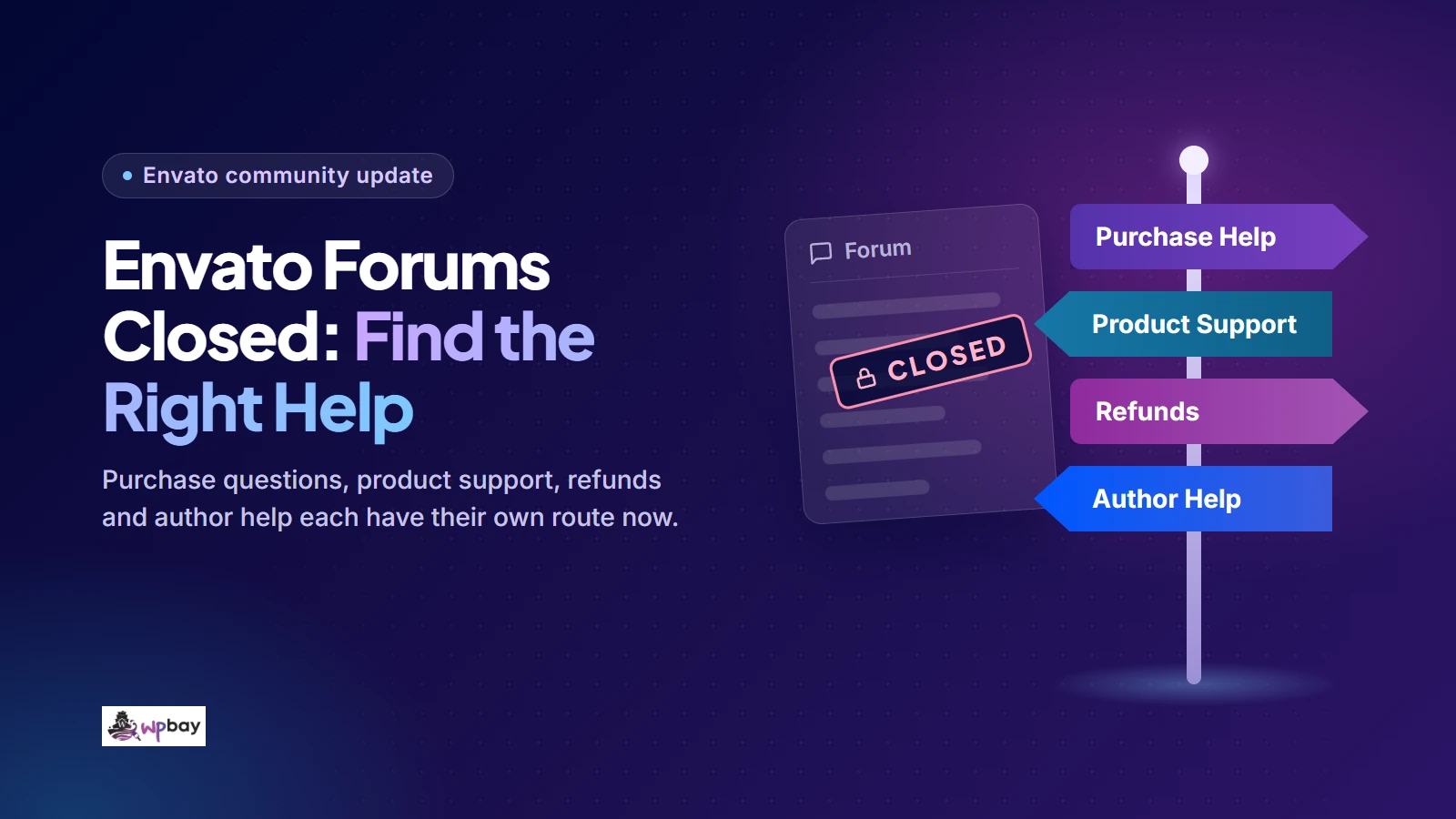
The Envato forum closed, and the old address now redirects. If you open forums.envato.com today, you land in Envato’s Author Support help center. For a ThemeForest or CodeCanyon purchase, account, payment and download problems go to Envato, while technical questions go to the item’s author, as long as your purchase includes support. Elements subscription billing goes to Envato’s subscription support, and author account questions go to Author Support. For peer advice, use an independent community. Envato order problems still need Envato.
Links checked November 17, 2026. WPBay publishes this article and runs one of the independent communities listed below. WPBay is not affiliated with Envato and cannot see Envato accounts, orders or refund decisions.
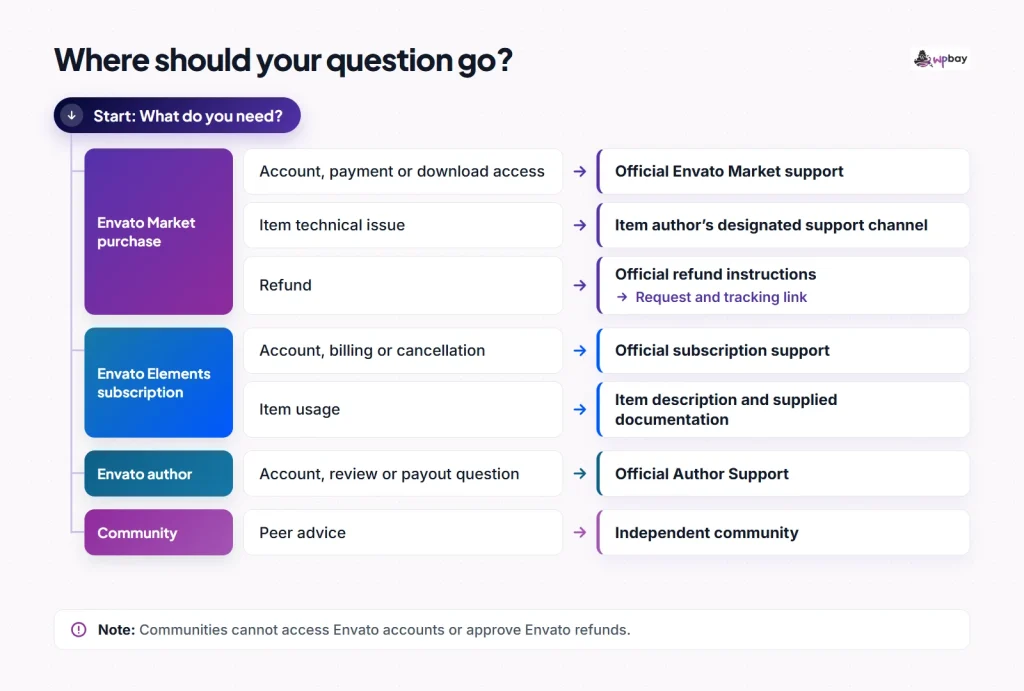
Choose the right Envato support route
Start with whether you bought the item separately on Envato Market (ThemeForest, CodeCanyon and the other Market sites) or downloaded it through an Envato Elements subscription. The two have different support terms and different help centers. The subscription contact page links Market customers to the separate Market help center, so if you land there with a ThemeForest order, follow that link rather than filing the ticket anyway.
| Problem | Destination | Operator | What it can resolve | Next step if it fails |
|---|---|---|---|---|
| Missing purchase, download access, invoice, payment or account problem for a ThemeForest or CodeCanyon item | Envato Market support request | Envato (Market Customer Success) | Account, checkout, payment and download access for one-off purchases | Reply on the same ticket with your reference number. If the item was disabled or withdrawn, a ticket may not restore it (see missing or withdrawn downloads) |
| Bug, feature or usage question about a supported Market item | The item’s Support tab, via Downloads | The item’s author | Defects, questions about built-in features, help with included third-party assets | If there’s no answer within a reasonable time, contact Market support and include your correspondence |
| Refund for a Market purchase | Envato’s refund instructions and request form | The author for product and support issues on ThemeForest and CodeCanyon; Envato for payment issues and other Market marketplaces | Refund decisions under Envato’s rules | Raise a dispute from the tracking link in your confirmation email, or reply on the existing Customer Success thread for Envato-handled requests |
| Elements subscription billing, cancellation or account | Self-service cancellation in your account; Envato subscription support for everything else | Envato | Subscription account, billing and cancellation | Reply on the existing ticket with any new details, such as the charge date and the account email |
| Technical problem with an item downloaded through Elements | The item description and any documentation in the download; Envato’s report-an-item route for a faulty item | Envato (reports); no item-level support from the author | Investigation of items that are broken or don’t work as described | A separate Market purchase, only if the same item is sold there as supported |
| Author reviews, uploads, payouts, tax profile, verification | Envato Author Support request | Envato | Account-specific author administration | Follow up on the existing ticket rather than opening a new one |
| General WordPress question (core, WordPress.org-hosted plugins and themes) | WordPress.org support forums | Volunteers | Advice on WordPress itself and products hosted on WordPress.org | Commercial product questions go back to the vendor |
| Peer advice on building, selling or maintaining plugins and themes | WPBay community, Post Status and other independent groups | Independent operators | Discussion and experience, not official decisions | Use the official routes above for anything involving a transaction |
In the flowchart, start with how you obtained the item: a Market purchase or a subscription download. When you’re ready to write the ticket, the support request template further down lists what to include.
What happened to the old forum address?
Search results still surface old Envato forum threads, and at least one outage tracker, IsDown, still lists the forums as operational. Neither means there’s a forum you can post in. When we checked on November 17, 2026, the former forum homepage redirected to Envato Author Support, and so did the old closure announcement URL, so the announcement text is no longer readable at that address. We couldn’t verify the exact closure date or whether a read-only archive was ever kept, so this guide doesn’t state either. If an old thread turns up in search, treat it as history and check the current help-center article before relying on any policy it quotes.
For the community’s history, read our reflection on losing the Envato forums, written in August 2025 around the closure.
Get technical help for a ThemeForest or CodeCanyon purchase
Envato Market doesn’t provide technical support for individual items itself. According to Envato’s item support FAQ, support comes from the author, and only for items sold as supported. Start by signing into the account that made the purchase. If a client bought the theme on their own Envato account, the purchase record, the purchase code and the support entitlement all sit in that account, so ask the client to retrieve the purchase details or open the request from their account.
Envato’s guide on how to contact a Market author describes this sequence:
- Sign into the purchasing account and open Downloads.
- Find the item, go to its item page, open the Support tab and scroll to the bottom of it.
- Click the support button. Its label depends on how the author set things up: Go to item support opens the author’s external support site, while Contact Author appears instead when there’s no external site and shows the author’s own support instructions. Use whichever method the author lists, whether that’s a ticket system, a support site or email, and note any response time they publish, because that’s your first benchmark for when to escalate.
Two other routes exist, separately from that button. Some authors enable a contact form on their profile page, which is private, though not every profile has one. The item’s Comments tab is also open to buyers, but comments are public, so never post credentials there: no purchase code, license key, password, API token or admin login. Be careful with client details too. A public URL is fine if the client has agreed to share it, but private client information isn’t, and a sanitized staging copy that reproduces the problem is often the better thing to link.
Your purchase code is under Downloads, in the item’s Download menu, under “Licence certificate & purchase code” (Envato’s purchase code article), and the purchase confirmation email links to the same certificate. If you can’t find it, check that you’re signed into the account that actually paid for the item.
Bundled plugins work differently. They don’t have a separate purchase code, so if you need help with a slider or page builder that came inside a theme, start with the theme author. Support for the bundled plugin runs through the theme’s support period, not a period of its own.
Before you write, check the scope. Supported items come with six months of author support by default, and you can buy an extension or renewal while the author still supports the item, up to a maximum of 12 months of active support. Item support covers fixing defects, answering questions about the item’s built-in features and functionality, and help with included third-party assets. It doesn’t cover installation, customization beyond the item’s features, hosting configuration, or third-party software that wasn’t bundled with the item.
As a hypothetical example, “how do I switch on the sticky header option the demo uses?” is a usage question about an existing setting and is in scope. “Write CSS so the header matches this mockup” is custom development. A layout that breaks only with your host’s caching enabled needs diagnosing first, because it could be a server setting or a defect in the item, so describe exactly what you see and include steps that reproduce it.
If the author doesn’t respond within a reasonable timeframe, Envato’s FAQ tells buyers to contact Market Customer Success and keep the correspondence. Envato doesn’t define “reasonable” as a fixed number of days for technical support, so don’t treat the five-day refund threshold below as a support deadline. Keep the dates of every message you sent, because that record may support an escalation.
If the item is unsupported or your support has expired
These are two different situations. An item sold as unsupported never came with author support, but Envato’s comparison of supported and unsupported items says you still get released updates, can report bugs, and can expect the item to work as described. So read the documentation and the existing comments first, since someone may already have hit the same problem. If it’s a genuine defect, report it through whatever contact route the author makes available, without expecting personal troubleshooting. If the item doesn’t work as described, that’s a question for the refund rules rather than a support ticket.
A supported item whose support period has ended is easier to fix. If the author still supports the item, you can renew support from Downloads, and an extension may be offered while you have less than six months remaining. Once support is active again, use the Support tab route above.
When a purchased item has disappeared from Downloads
A missing download isn’t always an access problem. Envato’s article on why a Market item may be removed lists several reasons, including temporary unavailability while the author updates it, a temporary disable because of a technical issue, a copyright complaint, permanent withdrawal and the closure of an entire marketplace. Some of those are temporary and some aren’t, so the cause matters before you decide what to do.
First confirm you’re signed into the purchasing account. Then look at the item page. A page that’s still live points away from removal, and a missing page suggests the item is unavailable, but neither tells you whether the situation is temporary or permanent, or rules out a problem with your account. If the status is still unclear, ask Market support what happened to the item, and include the item name and your purchase details.
The same article says Envato doesn’t guarantee continued download availability and recommends saving purchases locally. Permanent removal can mean no further downloads, a ticket can’t promise to bring a withdrawn item back, and removal doesn’t automatically qualify you for a refund; whether it does depends on the refund eligibility rules. For anything running on client sites, keep the original ZIP files and license certificates in your own backups.
Request a refund or escalate a Market dispute
A refund is a separate process from a technical ticket, and it isn’t automatic. Envato says Market refund eligibility is assessed case by case, and that page links to the refund rules and the request form (you’ll need to sign in to submit). As of November 2026, the refund policy sets a 180-day limit for supported ThemeForest and CodeCanyon items and a 30-day limit for unsupported items and Envato’s other listed marketplaces, such as AudioJungle and VideoHive.
The 30-day wording also covers products you bought but haven’t downloaded, and the policy has a separate section on undownloaded purchases that explains when they qualify (you’ll need to give the author your purchase code). It also says purchases older than 180 days aren’t eligible for dispute. Local consumer law still applies where it covers you, so those limits aren’t the last word in every country. Check which provision matches your circumstances before you submit.
The deadline is only the first test. Under the policy, an item that doesn’t work gives the author a chance to fix it with an update first, while an item that’s materially different from its description or preview can justify a refund in its own right. A security vulnerability works similarly: the author should patch it promptly, and a refund is expected if they don’t within an appropriate timeframe. Changing your mind after downloading isn’t grounds for a refund, and neither is an item that works as described but turns out not to suit your project. So “the booking calendar ignores the timezone setting it advertises” is a defect worth reporting, and if it stays unfixed it may support a refund. “I’d rather have used a different plugin” isn’t.
Who decides depends on the marketplace and the type of problem. According to Envato’s refund process page, on ThemeForest and CodeCanyon the author generally handles refund requests about the product and item support, while Envato handles payment and checkout issues. On Envato’s other Market marketplaces, refund requests go straight to Envato. So a duplicate charge is Envato’s to resolve, while a plugin that doesn’t work as described goes to the author first.
Be careful with your payment provider. Envato’s refunds FAQ says opening a PayPal dispute or bank chargeback disables your Market account until the dispute is resolved, and Envato can’t process a refund for you in the meantime. That’s why it’s better to contact Envato first. If you’ve already opened a payment dispute, tell Customer Success about it, including the provider and the date, so they know why the account is locked and what’s pending.
When a request goes to an author, Envato sends a confirmation email with a tracking link. Keep it, because that’s where escalation happens. If the author declines a request you think qualifies, or doesn’t respond within five days, you can use Raise a Dispute from that link. Add a clear description and your evidence: the support thread, the dates of your messages and the steps that reproduce the defect. Screenshots must be PNG or JPEG and no more than 10MB in total.
Envato says it reviews disputes within five business days, which is a review window rather than a promise of a final decision or payment by then. If Envato asks you for more information and you don’t answer within five days, it may decide using what it already has. For requests Envato handles directly, there’s no author to escalate past, so follow up on the existing Customer Success correspondence.
The chart separates the two clocks: five days waiting for the author before you can escalate, then five business days for Envato to review the dispute.
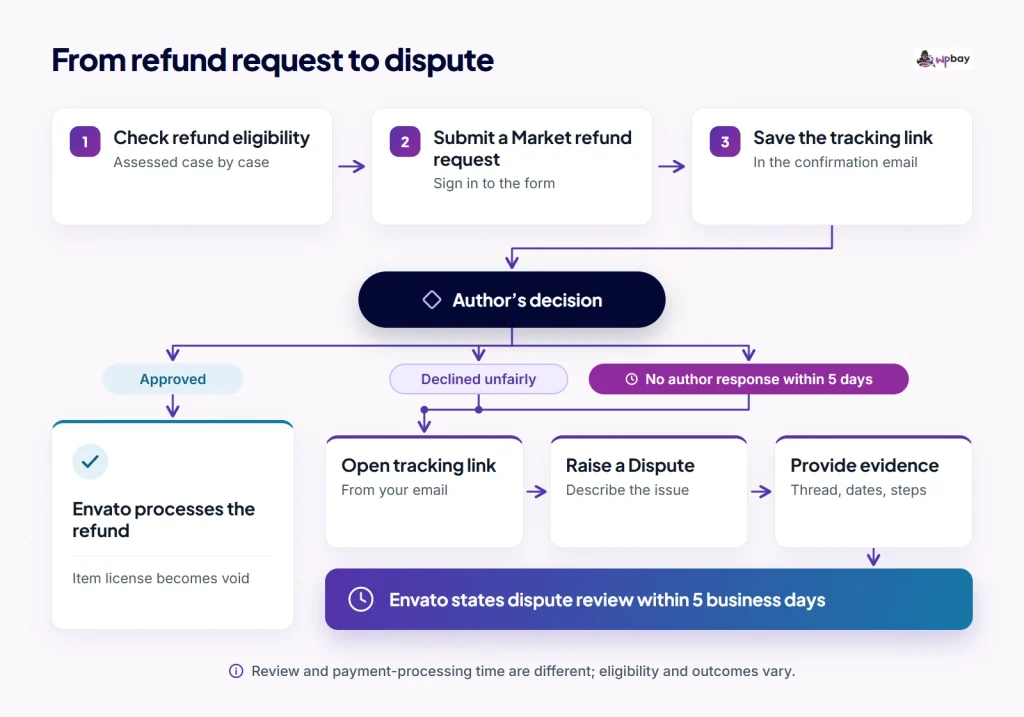
Prepare for the license to end if the refund is approved. Once an approved refund is processed, the item license is void and your rights to use and download the item are revoked. If the theme or plugin runs on a live client site, line up a replacement and migrate before the refund goes through.
If you downloaded the item through Envato Elements
Check whether you downloaded the item through Elements or bought it separately on Market. Items downloaded with an Elements subscription aren’t Market purchases. They don’t appear under Market Downloads, they come with an Elements item license certificate rather than a Market purchase code, and they don’t include the same support. Envato’s item support article for subscriptions says Elements downloads don’t include direct item-level technical support from Envato or the author. Documentation may be included, but it isn’t required.
That difference shows up quickly when a theme asks for a purchase code to activate or register. An Elements license code is not a Market purchase code and can’t stand in for one, because they come from separate systems. The license certificate guide explains this, including that some optional services an item offers may require a separate Market purchase.
Start a technical problem with the item description and whatever documentation came in the download. If the item still seems faulty after you’ve ruled out your own setup, for example a template whose import fails on a clean install or a feature it advertises that doesn’t exist, use Envato’s guide on how to report an item. Include the item name and URL, a clear description of the fault and screenshots. A report asks Envato to investigate the item’s quality, which can lead to it being updated or removed. It won’t get you personal help configuring the item on your site.
Canceling or questioning a subscription charge
You don’t need a ticket to cancel. Envato’s cancellation guide gives this route: click your account name, open My Account, choose Manage subscription, then Cancel subscription, and confirm with Cancel My Subscription. Keep the confirmation. If that route doesn’t work, or you have a billing or account question, use subscription support.
For a current paid subscription, canceling stops the next renewal and you keep access until the end of the billing period. The exception is an account in past-due status: canceling then ends the subscription immediately, including your ability to download items and register new licenses, so finish any downloads and licensing you need first. Canceling and getting a refund are different things, too. Envato says it generally doesn’t refund subscription payments, subject to applicable consumer protection law and its terms.
If you need author support for something you downloaded through Elements, you can buy the item separately on Market. According to Envato, that only gets you support if the same item is sold on Market and marked as supported, so check both before you pay.
Where Envato authors should ask for help
Authors used to ask the forums about rejected items, missing payouts and tax forms, often while waiting on a ticket. Those questions now go to Envato Author Support, which handles account-specific matters: item reviews, uploads, payouts, tax profile and identity verification. Give the agent something they can look up: the item ID or name, its current status, the relevant dates (upload, rejection, payout period) and any previous ticket reference. If you already have an open ticket, reply on it, so the whole history stays in one place.
Peers can help you interpret feedback and improve a submission. Another developer can read your item description, spot a missing escaping function, or tell you which part of a rejection note to address first. They can’t change an official review outcome or an account decision, and nobody outside Envato can promise a review time or a reversal.
If you’re hoping to become an author, check the intake status first. Envato states that open author applications are paused with no confirmed reopening date. Theme, Code, Photo and Audio aren’t currently planned to reopen, though Envato says that could change. Our separate piece on the current Envato author application status covers what that means and the launch options for new sellers.
Where to find peer discussion after the closure
Choose a community by the question you need answered: product development, WordPress troubleshooting or business advice.
WPBay runs a public community forum for WordPress developers, sellers and customers to discuss products and development. It suits plugin and theme development questions, marketplace experience and the business side of selling. It isn’t an Envato channel: WPBay states that it isn’t affiliated with or endorsed by Envato, and it can’t look up or resolve an Envato order, license or refund. The WPBay community has no guaranteed response time.
Post Status is an independent community for WordPress professionals, from solo business owners to agencies and larger companies. Its Slack is members-only, so check the current membership terms on its site before counting on it. It’s a better fit for business and industry conversations than for item-level troubleshooting.
The WordPress.org support forums are run by volunteers and are the right place for questions about WordPress core and products hosted on WordPress.org. Their forum guidelines send support questions about commercial themes and plugins to the product’s official support channel, so a problem specific to a ThemeForest theme will be pointed back to the author. You can still ask whether a behavior comes from core. To find out, reproduce it on a staging site or an isolated test install with a default theme and other plugins disabled, never by switching themes on a live client site.
If you bought something on WPBay rather than Envato, WPBay’s support page explains which contact handles which problem: account, order, billing and download-access issues go to the WPBay team, product questions normally go to the developer, and WPBay can step in if the seller’s contact route doesn’t work. Support terms vary by product: sellers can use WPBay’s ticket system, an external support site or email, and some listings disclose that they offer no product support at all, so read the listing before you buy.
Prepare a support request that someone can act on
Include enough detail for someone else to reproduce the problem. This template works for technical problems on any platform:
Platform: Envato Market (CodeCanyon) / Envato Elements / WPBay / other
Item name and URL:
Expected behavior:
Actual behavior:
Steps to reproduce (on staging or a clean test install if possible):
1.
2.
3.
Versions: WordPress, PHP, item version, active theme, relevant plugins
Exact error message or log line:
Previous contact: dates and channel (ticket number, email date)
Hypothetical example: a booking plugin sends admin notifications but no customer email.
Platform: Envato Market (CodeCanyon)
Item name and URL: Example Booking Form, https://codecanyon.net/item/...
Expected behavior: Submitting the form sends a confirmation email to the customer.
Actual behavior: The form shows "Booking received", but no email is sent.
  Admin notification emails still arrive.
Steps to reproduce (staging site, Twenty Twenty-Five, only this plugin active):
1. Create a form with the default template.
2. Submit it with a valid customer email address.
3. Check the customer inbox and the mail log.
Versions: WordPress 6.9, PHP 8.3, plugin 2.4.1
Exact error message or log line: none on screen; the mail log shows no attempt
  to send the customer email
Previous contact: ticket #1234 opened November 3, 2026, no reply yet
For a billing or access question, replace the reproduction steps and versions with the purchase or order reference, the transaction date, the account email you bought with, and what you see when you try to download. Send purchase codes, account details and screenshots that show personal data through a verified private channel only. Before you post anything publicly, inspect debug logs and screenshots and remove passwords, API tokens, license keys, payment details and customer information. Include the exact error and any existing ticket number so the recipient can check the earlier investigation.
Frequently asked questions
Can I still read old Envato forum threads?
Some old threads still appear in search results. But the forum homepage and the closure notice we checked both redirect to Author Support, and we couldn’t verify a current public archive. Treat any old thread as a historical snapshot and check its policy claims against the current help center.
Can WPBay refund an Envato purchase or contact an author for me?
No. WPBay is independent of Envato and has no access to Envato orders, licenses or author accounts. Market refunds go through Envato’s refund instructions, and disputes over author-handled requests go through the tracking link in your confirmation email.
My support period expired. Does that make me eligible for a refund?
Not by itself. Under the refund policy’s section on support promised but not provided, that claim requires a current support entitlement, so it applies to the period when you were actually entitled to support. The policy also separates the item refund (when support came with the purchase) from a refund of a support extension you bought and needed during its term, and unused extensions aren’t refundable. If you still need help, check whether the author offers a renewal from your Downloads page.
Does the forum closure mean ThemeForest or CodeCanyon is shutting down?
No. The forum redirect alone isn’t evidence that either marketplace is closing. For current availability, check Envato’s status page, and for ownership background, see who owns ThemeForest in 2026.
Is it safe to post my purchase code in the item comments?
No. Comments are public, and a purchase code is proof of a license, so treat it like a credential. Share it only through the author’s private support channel or Envato’s own request forms.
Last reviewed: November 17, 2026. Support routes, redirects and policy wording can change, so check the linked Envato help-center pages before relying on a specific timeframe.