



Catalog Audit Studio — Product, Stock & Sales Audit for WooCommerce

 Recently Updated
Well Documented
Find what’s wrong in your WooCommerce store — in one minute
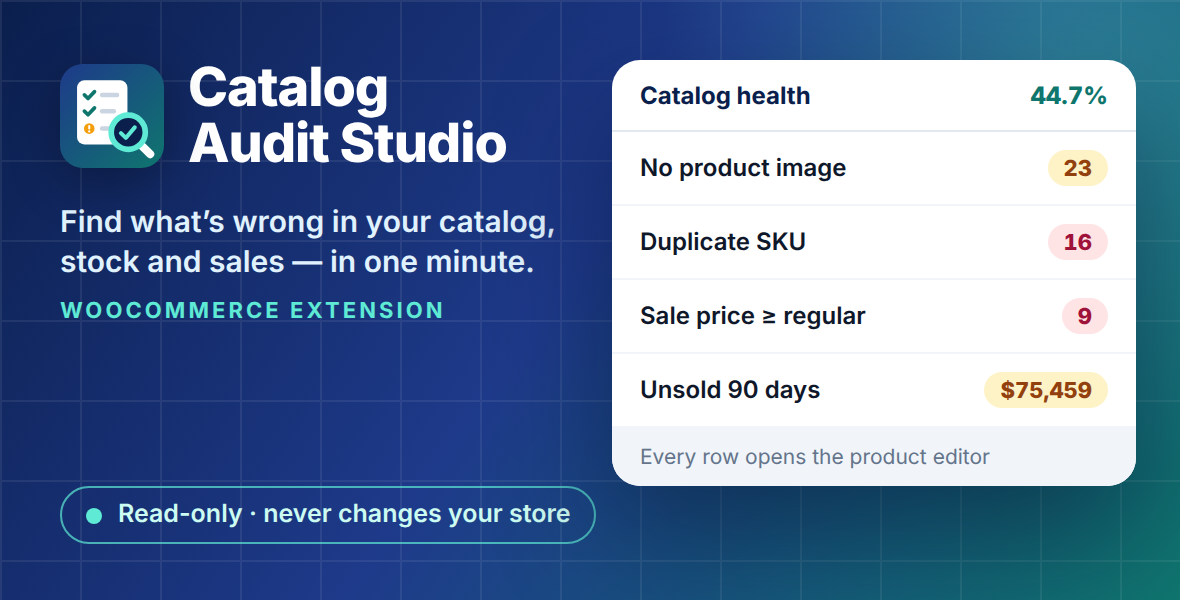
Every catalog drifts. A product goes live without a photo. A supplier import reuses an SKU. A sale ends, but the sale price stays. Stock that hasn’t moved in months quietly ties up cash. Nobody notices — until a customer does, or an import breaks. Finding all of this by hand means exports, spreadsheets and an afternoon you don’t have. Catalog Audit Studio reads your store and shows you, on one screen:- 23 products have no image — here they are, one click from the editor.
- 16 products share an SKU with another product — see which ones before your next import, feed or stock sync.
- $75,459 of stock hasn’t sold in 90 days — 53 products, their quantities and what they are worth.
Read-only: it never changes your products, prices or orders
This is the main promise, and we built the plugin around it.- No writes to your store. Catalog Audit Studio only reads products, stock and order statistics. It never edits a product, a price, stock, an order, a category or any product meta. You fix things yourself, in the standard WooCommerce product editor — every row of every report links straight to it.
- Its own data only. The plugin stores just its settings and a cache of the last calculated reports. Uninstalling it removes exactly that, and nothing else.
- No external requests. No tracking, no telemetry, no ads, no account, no API key. Your data never leaves your server.
- Tested. Our integration test takes a snapshot of the store’s tables, runs every report, and checks the tables are identical afterwards.
What you get
Initial setup- On the first visit a short setup checks the store (WooCommerce, products, order storage, whether WooCommerce Analytics has your orders — and what to do if not), sets the two audit rules and runs the first audit. Each step says why it matters; you can skip it with Set up later and open it again from the plugin header.
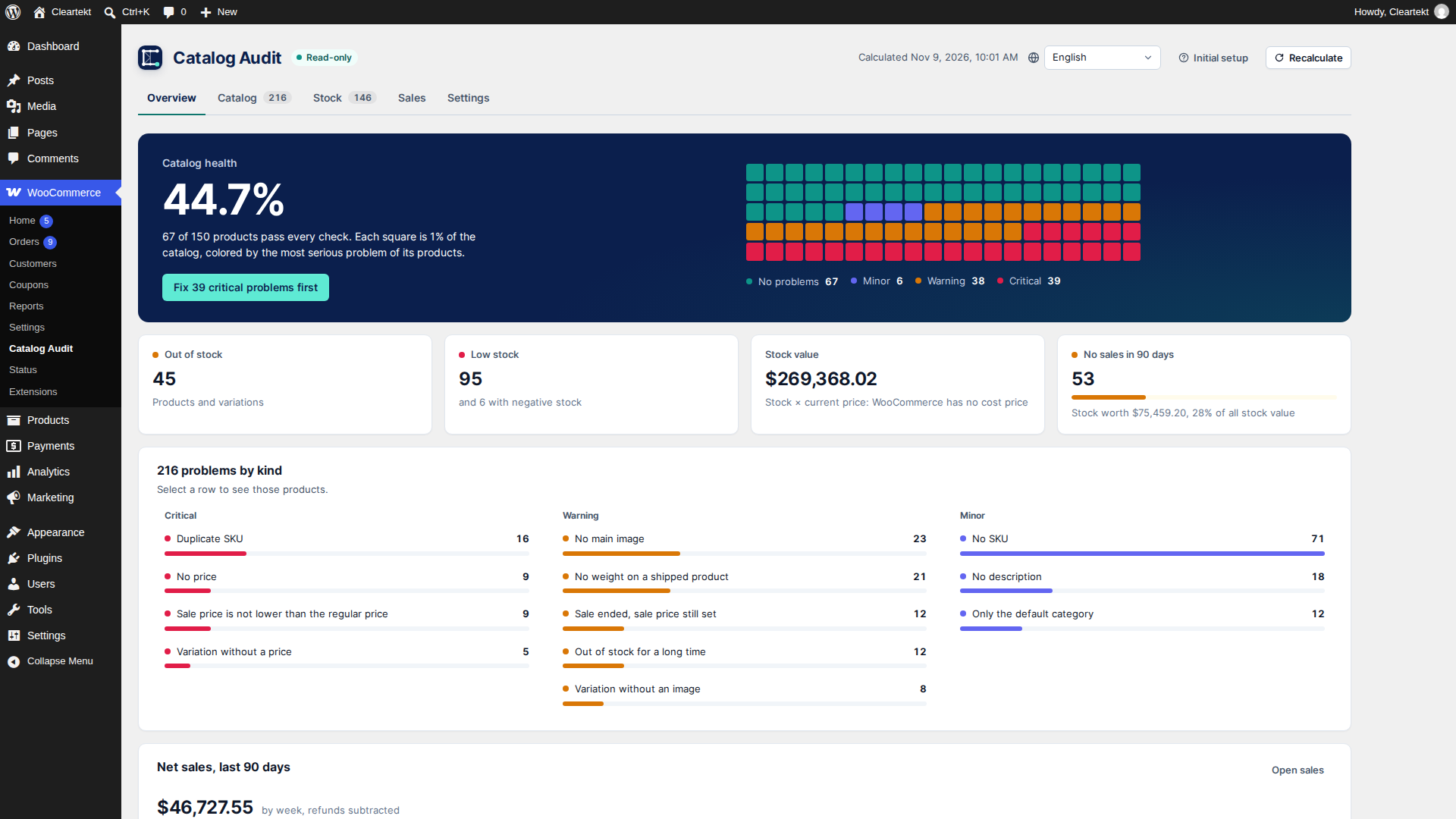
- Catalog health score: the share of products with no problems, in %, and 100 squares that show the catalog by the most serious problem of its products (no problems, minor, warning, critical).
- Cards for out of stock, low stock, stock value and products with no sales in 90 days (with their share of stock value).
- Problems by kind, grouped by severity, and net sales of the last 90 days by week.
- Click a card or a problem to open the matching report, already filtered.
- No featured image
- No SKU
- Duplicate SKU (across products and variations)
- No price on a purchasable product
- Sale price equal to or higher than the regular price
- Sale has ended, but the sale price is still set
- No short and no full description
- Only in the default “Uncategorized” category
- Variation without a price, or without an image when its sibling variations have one
- No weight on a shippable product (when shipping is enabled)
- Published, but out of stock with no backorders for longer than N days (you choose N, 30 by default)
- Out of stock, low stock (WooCommerce’s threshold, or the product’s own), negative stock, on backorder.
- Stock value = quantity × current price. (WooCommerce has no cost price field, so this is retail value — and we say so on screen.)
- Period: 7, 30, 90, 365 days or your own dates.
- Net sales by day (by week for long periods), with the exact value on hover or with the arrow keys.
- Best sellers by revenue and by units.
- Products with no sales in the period — dead stock, with the quantity on hand and its value.
- Revenue by category.
- Built on WooCommerce Analytics data. If Analytics hasn’t imported your history yet, the plugin tells you where to click.
- A table with a filter chip on each column (lists, “contains”, from–to for numbers and dates), sorting by any column and “showing N of M”; counters above the table filter by severity or stock state.
- Catalog problems by problem or by product, “how to fix” right in the row.
- Search; on phones the rows become cards.
- Export to CSV (UTF-8 with BOM, semicolon — opens correctly in Excel) and Excel.
- Each row opens the product (or the parent product of a variation) in the editor.
- Large catalogs: calculated in batches (one request per batch, progress on screen) and cached, so a big catalog does not hit a request timeout. A Recalculate button refreshes the cache.
- HPOS (High-Performance Order Storage) compatible.
- Who can see it: users with the “View WooCommerce reports” capability — administrators and shop managers.
- 13 interface languages: English, Russian, German, Spanish, French, Portuguese (Brazil), Indonesian, Filipino (Tagalog), Arabic, Hebrew, Japanese, Korean and Chinese (Simplified) — every label of the tables included. Pick the language from the list in the plugin header; numbers and dates follow it, prices keep the store format.
- Right-to-left layout for Arabic and Hebrew.
Who it’s for
- Store owners with 100 to 5,000 products who want a monthly health check without spreadsheets.
- Store managers who need a to-do list of product fixes, sorted by severity.
- Agencies auditing a client store before a redesign, a migration or an import — safely, because it’s read-only.
Requirements
- WordPress 6.6 or later
- WooCommerce 9.0 or later
- PHP 7.4 or later (tested on 7.4 and 8.3)
- For the Sales report: WooCommerce Analytics enabled (it is by default)
Installation
- Download
catalog-audit-studio.zipfrom your WPBay account. - In WordPress go to Plugins → Add New → Upload Plugin, choose the zip, click Install Now, then Activate.
- Open WooCommerce → Catalog Audit.
FAQ
Does Catalog Audit Studio change anything in my store? No. It only reads data and shows reports. Products, prices, stock, orders, categories and product meta are never modified. You make every fix yourself in the standard WooCommerce editor. Will it slow down my store? No for your visitors: the plugin runs only on its own admin screen, nothing loads on the storefront. Reports are calculated in batches and cached; click Recalculate to refresh them. Does it send my data anywhere? No. There are no external requests, no tracking and no account. Everything stays on your server. How is “catalog health” calculated? It’s the share of audited products that have no catalog issues. 44.7% means 67 of 150 products passed all checks. A variation’s problem counts for its product: a product with one bad variation is not “healthy”. What is “stock value” based on? Quantity on hand × current price (the sale price while a sale is active). WooCommerce doesn’t store a cost price, so this is the retail value of your stock, not its cost. The Sales tab says there is no data. Why? The Sales report uses WooCommerce Analytics. If your store’s order history hasn’t been imported into Analytics yet, go to Analytics → Settings → Import historical data and run the import. The plugin shows this hint with a link. Does it work with variable products? Yes. Variations are checked on their own (price, image, SKU, stock), and a duplicate SKU is found across products and variations. Each variation row links to its parent product’s editor. Is it compatible with HPOS? Yes. Compatibility with High-Performance Order Storage is declared and tested. How large a catalog can it handle? The audit runs in batches of 200 products, one request each, with progress on screen, so a large catalog doesn’t hit PHP time limits on typical hosting. Sales are a few database queries over the WooCommerce Analytics tables, which are indexed by date. Our demo store has 150 products and 6 months of orders; we haven’t published a benchmark for very large stores yet. Can I export the reports? Yes. Every report exports to CSV (UTF-8 with BOM, semicolon-separated — Excel opens it correctly) and to Excel. Who can open the reports? Users with the “View WooCommerce reports” capability: administrators and shop managers by default. What happens when I uninstall it? Only the plugin’s own settings and report cache are removed. Your store data is untouched.Support & updates
- Updates: 12 months of updates, delivered through your WPBay account.
- Support: 12 months, through WPBay tickets or [email protected] — Monday–Friday, 10:00–18:00 Georgia time (GMT+4), reply within 1 business day.
- Support covers: installation, how reports are calculated, bugs. It does not cover fixing your catalog for you or custom development.
Credits
- Made by Cleartekt — https://cleartekt.dev
- All graphics and icons — made by Cleartekt for this product.
- No third-party JavaScript or PHP libraries are bundled: the admin screen uses the WordPress scripts (React, i18n, API fetch) and the Cleartekt admin UI library (GPLv2 or later, sources in
packages/wp-admin-ui/inside the zip); Excel files are built without a library. - Inter typeface — SIL Open Font License 1.1 (
build/fonts/OFL-inter.txt).
Changelog:
0.1.3 — 2026-11-13
- New: the interface in 13 languages — English, Russian, German, Spanish, French, Portuguese (Brazil), Indonesian, Filipino (Tagalog), Arabic, Hebrew, Japanese, Korean and Chinese (Simplified).
- New: a language selector in the plugin header; the choice is saved per user.
- New: numbers and dates follow the format of the selected language.
- New: initial setup wizard — store check, audit rules and the first audit; it can be postponed and opened again from the plugin header.
- New: right-to-left layout for Arabic and Hebrew.
- Changed: redesigned screens on the Cleartekt admin UI library.
0.1.2
- Fixed: the select-all checkbox in table headers (and every row checkbox) has a 24 × 24 px touch area (WCAG 2.2 target size); it looks the same.
0.1.1
- New interface: catalog health as 100 squares by the most serious problem, net sales charts by day and week, filter chips on every column, summary counters above tables, "by product" view, "how to fix" in the row, cards instead of tables on phones, keyboard and screen reader support (WCAG 2.1 AA).
- Numbers and percentages follow the language of the user; prices keep the store format.
- The zip includes the human-readable sources of the admin UI library.
0.1.0
- New: Overview — catalog health score and problem cards that open filtered reports.
- New: Catalog issues — 12 checks with severity and "how to fix" text; every row links to the product editor.
- New: Stock — out of stock, low stock, negative stock, backorders, stock value.
- New: Sales — best sellers, products with no sales in the period (dead stock) with stock value, revenue by category; 7/30/90/365 days or custom range.
- New: Every report — column filters, sorting, search, CSV (UTF-8 BOM, ";") and Excel export.
- New: Large catalogs — batched calculation with cache and a Recalculate button.
- New: HPOS compatibility; English and Russian translations.
- Read-only by design: no writes to products, prices, stock or orders; no external requests.
Only logged in customers who have purchased this product may leave a review.
Loading...
WPBay support
 Support by Cleartekt
Cleartekt supports this product through WPBay
Questions are handled in WPBay's private ticket system, keeping your purchase details and support conversation together.
Go to My Downloads
After purchase, open this item in My Downloads and choose Get Support.
What support includes
- Answers to product-related questions
- Help with reported bugs and issues
- Guidance for included third-party assets
What support does not include
- Customizations or new features
- Installation or setup services
Plugin
Maintenance snapshot
See recent updates, compatibility, support, and developer activity.
- Updated today
- Developer active recently
- WPBay support available
- WordPress 7.1 tested
Snapshot updated 7 hours ago
View details Hide details
Maintenance details
This is maintenance data. It does not measure product quality or sales.
- Last update Updated today
- Compatibility WordPress 7.1 tested · PHP 8.3 tested, one version behind · WooCommerce 11 tested
- Releases 1 release in the 1 days since listing
- Developer activity Developer active recently
- Support No recent support tickets to measure
- Docs and demo Documentation available · Changelog available · Demo available
How this snapshot works
Plugin Health
The score is out of 100 and uses data WPBay can check. Ratings, popularity, and sales are not used.
- Last update 30 points
-
Plugins receive full recency points under 30 days, then step down at 90, 180, 365, and 545 days.
- Compatibility 20 points
-
WordPress, PHP, and WooCommerce (when relevant) are scored separately. The latest two PHP lines count as current. Nearby previous versions keep most of the points.
- Current version 100%
- One version behind 75%
- Two versions behind 50%
- Three versions behind 25%
- Older or not listed 0%
- Releases 15 points
-
One release earns 10, two or three earn 13, and four or more earn 15. Each accepted product ZIP counts once; reprocessing the same upload and listing-only edits do not count.
- Developer activity 15 points
-
Based on WPBay login and dashboard activity. Exact last-login dates are never shown.
- Support 15 points
-
There are no recent WPBay tickets to measure.
- Docs and demo 5 points
-
Documentation: 2. Changelog: 1. Working demo or preview: 2.
Score ranges
- 90–100 Excellent
- 75–89 Healthy
- 60–74 Fair
- 40–59 Needs attention
- 0–39 Limited
Long gaps
WPBay also checks for long gaps between updates, developer activity, support replies, and releases. Buyers do not see this score.
- Time since update 35 points
- Last developer activity 25 points
- WordPress compatibility 15 points
- Support replies 15 points
- Fewer releases 10 points
-
Quality verified by WPBay
WPBay review- Reviewed version
- 0.1.3
- Review completed
- Reviewer
- CodeRevolution
- Review type
- Initial
No unresolved approval blocker was identified during WPBay’s proportionate review of this release. This is not a security certification or a guarantee that the product contains no defects.
-
 Future updates
-
WPBay support from Cleartekt
-
Fully GPL licensed
-
Covered by the WPBay refund policy
-
Plugin maintenance snapshot
Relevant picks
You may also like
Similar products selected by category, features, popularity and freshness.



 15 days free
Reviews
There are no reviews yet.