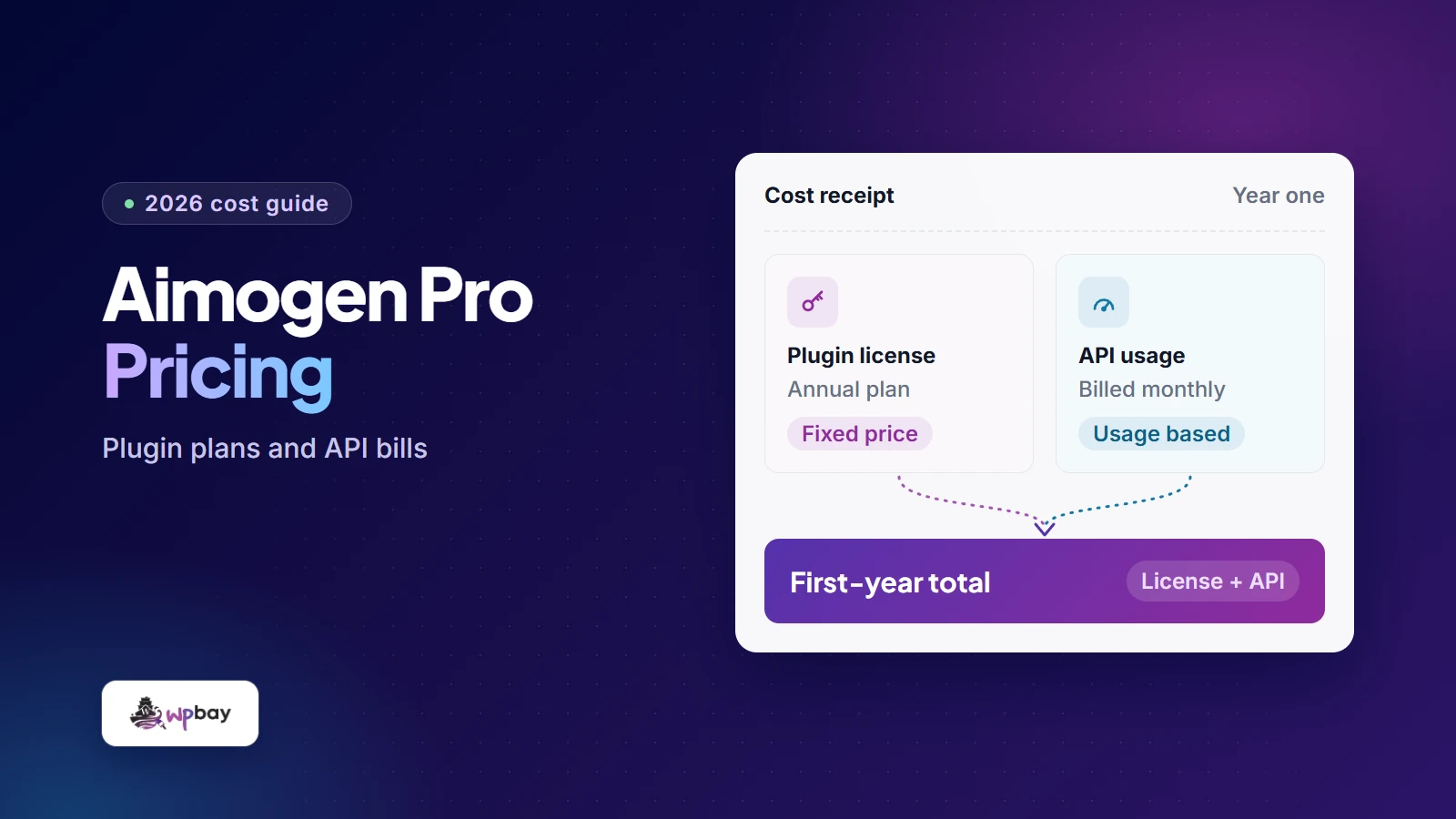
As of November 20, 2026, Aimogen Pro pricing on WPBay starts at $9 a month, $59 a year or $249 once for one site, in USD before applicable tax. On CodeCanyon, a Regular License for one end product costs $249 and comes with six months of support. Neither price includes AI usage. When you connect your own provider key, OpenAI or whichever provider you pick bills you separately for the model and the volume you use, and Aimogen adds no markup. The worksheet below gives three text-only estimates, from a one-site blog up to a 20-site chatbot deployment.
Aimogen Pro pricing at a glance
Every plan on the Aimogen Pro listing on WPBay has the same Pro features. Plans differ only in how many sites you can activate and how often you pay. You can get 1, 5 or 20 sites on monthly, annual or lifetime billing. The 500- and 2,000-site allowances are sold as lifetime purchases only.
| Active sites | Monthly | 12 monthly payments | Annual | Lifetime |
|---|---|---|---|---|
| 1 | $9 | $108 | $59 | $249 |
| 5 | $14 | $168 | $89 | $399 |
| 20 | $24 | $288 | $129 | $549 |
| 500 | Not offered | Not offered | Not offered | $849 |
| 2,000 | Not offered | Not offered | Not offered | $1,399 |
WPBay acts as Merchant of Record and shows applicable VAT or similar tax before you confirm payment, so the amount you actually pay today may be higher than the table. For features and setup instead of cost, see our Aimogen Pro overview.
Compare WPBay and CodeCanyon for the same sites and support
Disclosure: WPBay publishes this article and sells Aimogen Pro. CodeRevolution develops the plugin, and its founder, Szabi Kisded, co-founded WPBay. Keep that in mind when reading the comparison, which includes a case where CodeCanyon costs less.
The two stores sell different things. A WPBay plan is a number of activation seats. A CodeCanyon license for Aimogen Pro covers one end product: $249 for the Regular License, $1,480 for the Extended. CodeCanyon prices include Envato’s buyer fee and exclude tax. Envato’s fee glossary charges no extra handling fee on orders over $150, so the initial orders below have none. A later support-only order should be checked for the fee on its own. Your bank or payment provider may also charge currency conversion fees, which are separate from anything Envato charges (the Envato Market User Terms say this is outside Envato’s control).
The CodeCanyon totals assume one eligible Regular License per project. Renewal amounts are estimates that assume list prices stay the same. Copy the actual renewal amount and date from your own checkout quote. We checked public listings only, not a signed-in checkout.
| Option | Support add-on | Due today | Paid by month 6 | Paid by month 12 | Next scheduled charge (estimate) | Support period |
|---|---|---|---|---|---|---|
| WPBay monthly | None | $9 | $54 | $108 | $9, monthly | While subscribed |
| WPBay annual | None | $59 | $59 | $59 | $59, yearly from the anniversary | While subscribed |
| WPBay lifetime | None | $249 | $249 | $249 | None | Not published |
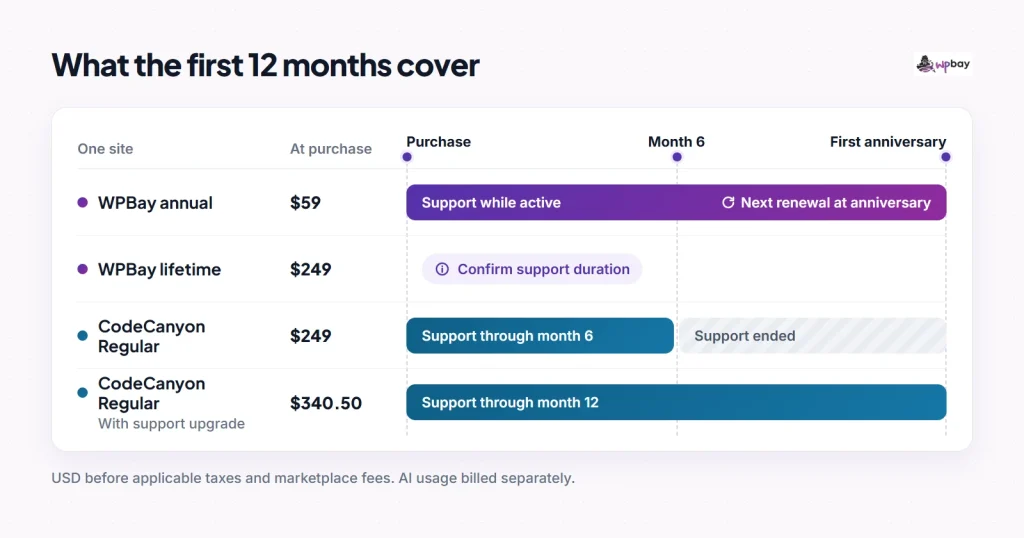
| CodeCanyon Regular | $0 | $249 | $249 | $249 | None | 6 months |
| CodeCanyon Regular + 12-month support | $91.50 | $340.50 | $340.50 | $340.50 | None | 12 months |
| CodeCanyon Extended | Price not confirmed | $1,480 | $1,480 | $1,480+ | None | Check listing |
On CodeCanyon, base support runs out six months after purchase. WPBay hasn’t published how long support lasts on its one-time plans. Annual subscribers aren’t charged again until the first anniversary, which falls outside year one.
Five or 20 projects make the gap much larger, because every CodeCanyon project needs its own license. Five Regular Licenses cost $1,245, or $1,702.50 if each gets the 12-month upgrade. On WPBay, five seats cost $89 a year, $168 over 12 monthly payments, or $399 once. For 20 projects, CodeCanyon costs $4,980, or $6,810 with upgrades, while WPBay costs $129 a year, $288 monthly, or $549 once. The short-term picture flips for a single site you keep for a long time. Over five years at today’s prices, one CodeCanyon Regular License stays at $249 while five WPBay annual payments add up to $295. That only works if you can live without support after month six.
Price is only one of four things that differ. The first is seats versus projects, covered above. The second is permitted use. Envato’s license guide asks whether visitors pay to get into the part of the site that uses the item. A public shop can stay on Regular. A chatbot that only paying members can reach generally needs the $1,480 Extended License, which still covers one project. If you’re building a membership project, read WPBay’s licensing terms and ask before you buy whether paid-access use and handing a site over to a client are allowed on your tier. The third is support scope, meaning who answers your tickets and for how long. The fourth is how updates arrive, explained next.
Updates reach you two ways: through a marketplace download and through the updater in your WordPress dashboard. Envato’s item support policy says buyers can download released updates from Downloads in their Envato account even after support has ended. You then upload the new version yourself. That access is lost if the item is permanently removed, which is different from being temporarily unavailable, so keep a local copy of each ZIP. CodeRevolution’s licensing and updates guide says that once a support window expires, existing features keep working but the dashboard stops offering new updates until you renew. If you buy through WPBay, ask how long dashboard updates and account downloads stay available on your plan.
Envato charges 37.5% of the item price (excluding the buyer fee) for six extra months of support bought at checkout. Per its support extension rules, the rate is 62.5% to extend while fewer than six months remain and 87.5% to renew after support has lapsed. Both later options also depend on the author still offering support. If you know you’ll want a year, buy it at checkout.
Count seats before you compare prices
Every activated install takes a seat, including staging. CodeRevolution’s activation and licensing documentation says a staging activation needs a spare seat, so four client sites plus one activated staging copy fill a five-seat plan. If you leave staging unactivated, it shows only the Activation tab, so plan for a spare seat if you need the full Pro interface there. WordPress Multisite works differently: activate on the main site and that one registration covers the whole network. On CodeCanyon, Envato’s staging policy says a test subdomain of the same project may not need another purchase. That’s a licensing rule, though, and it doesn’t tell you how Aimogen counts a staging activation on an Envato code, so ask CodeRevolution.
A 20-client agency that also wants one activated staging install needs 21 seats. The 500-site lifetime tier covers that for $849 upfront. If one WPBay account can hold two Aimogen subscriptions and give each its own keys, then a 20-site annual plan plus a one-site annual plan would cost $188 for the first year at current list prices. Ask the seller to confirm that setup before you rely on it.
To free a seat, go to Aimogen Pro › Settings › Activation and choose Revoke License. Your settings, posts and logs stay, and the setup wizard resets. If you clone a site to a new domain, revoke the copied activation on the clone before activating it again. When the old site no longer exists, CodeRevolution’s documentation sends you to support (include System & Logs › System Info if you can). WPBay’s general licensing terms describe revoking activations from your account dashboard, but whether that self-service works for Aimogen isn’t confirmed.
When monthly, annual or lifetime pricing pays off
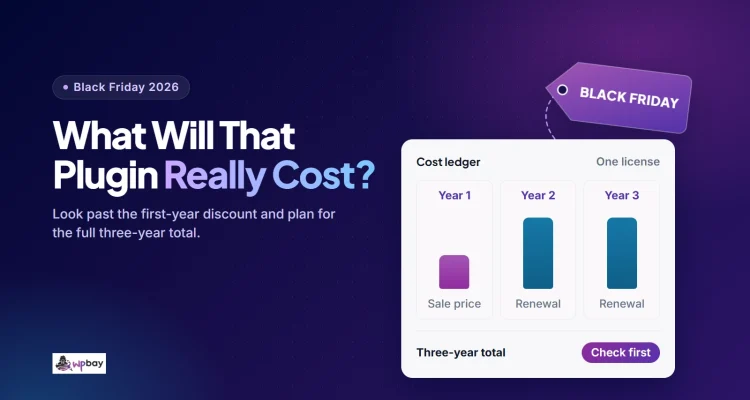
At list prices, monthly billing passes the annual price on the seventh payment for one site ($63 against $59) and five sites ($98 against $89), and on the sixth payment for 20 sites ($144 against $129). If a project has a known end date, count the months you’ll actually pay. A four-month job on one site costs $36. Lifetime becomes cheaper than annual at the fifth annual payment on all three shared tiers: $295 against $249, $445 against $399, and $645 against $549. That fifth payment falls at the start of year five, and the math only holds if prices stay the same and lifetime support lasts long enough to matter to you.
WPBay renews subscriptions automatically, and you cancel in My Account. According to WPBay’s subscription guide, after cancelling you keep the version you downloaded and lose updates and support unless you reactivate. WPBay’s license information adds that an expired or failed subscription can affect premium features, depending on how the seller built licensing. Refunds are a separate request under the WPBay refund policy or Envato’s refund process. Several Aimogen-specific points aren’t published: how long lifetime support and updates last, whether a cancellation takes effect immediately or at the end of the paid period, the grace period after a failed payment, whether scheduled jobs keep running, and whether plan changes are prorated. Under WPBay’s seller rules, recurring products are supported while active, and sellers set their own support period for one-time purchases. My Downloads › Get Support only works after you’ve bought, so send pre-sale questions through WPBay’s contact page and keep the written answer.
Envato buyers have one more option. CodeRevolution still accepts legacy purchase codes and hasn’t set a cutoff, according to its migration documentation. If you plan to switch to a WPBay annual subscription, enter your Envato purchase code in the listing’s migration section and use Generate Coupon. The coupon gives $59 off a yearly plan whether your Envato support is active or expired. It can be used once and doesn’t apply to items already on sale. Before paying, check which tier it applies to and what the renewal amount will be.
WPBay’s Black Friday sale runs November 26 through December 1, 2026. The seller announcement says discounted annual plans renew at the sale rate and monthly plans are excluded. Which Aimogen plans qualify is only confirmed at checkout. Every figure in this article uses list prices.
What the AI provider bills you for
With a direct paid key, the provider bills you by model and usage. Some providers offer free access on specific models (see Gemini API pricing), and Aimogen also supports self-hosted Ollama. Local inference has no per-token charge, but you still pay for hosting, hardware and electricity. If a text draft and its featured image use different services, price them separately.
AimogenAPI is an optional prepaid alternative. AI Hatchling costs $15 a month for 10,000 credits ($180 a year), Worker costs $30 for 21,000, and AI Enthusiast costs $50 for 38,000. On its rate card, gpt-5.4-mini uses 0.75 credits per 1,000 input tokens and 4.5 per 1,000 output tokens. Once you go over your allowance, the AimogenAPI documentation says requests get a rate-limit error, and counts reset monthly on UTC time. The exact reset moment, whether there are any overage charges, and whether unused credits roll over aren’t stated, so get written terms if any of that affects your budget.
OpenAI’s GPT-5.4 mini page lists standard rates of $0.75 per million uncached input tokens, $0.075 per million cached input tokens and $4.50 per million output tokens. Output that the API reports as billable includes any reasoning tokens. Support for this model arrived in Aimogen Pro 2.7.6 on March 19, 2026, according to the WPBay changelog. If a rule makes an outline, a draft and SEO metadata in separate calls, the job costs the total of all three. CodeRevolution’s guide to controlling cost lists the settings that change how many calls a job makes.
Chat history and knowledge-base chunks add to input whenever Aimogen sends them. The first turn has no history, history can be capped, and retrieval may return nothing. The relevant settings are Max Chat Messages To Send As API Context and Max Chat Context Size (Characters) in the chatbot troubleshooting guide, plus the chunks retrieved per message under knowledge and context. Check billed input by turn across a multi-turn sample, and record cached and uncached input separately.
OpenAI’s usage data reports total input with cached tokens included (in the Responses API, input_tokens includes input_tokens_details.cached_tokens). So for OpenAI, subtract the cached count before pricing the rest at the uncached rate. Otherwise the estimate counts cached input twice. Here’s an example: a draft reports 6,000 input tokens, 2,000 of them cached, and 3,000 output tokens. That works out to $0.003 + $0.00015 + $0.0135 = $0.01665, against $0.018 with no caching. Other providers may report uncached input separately or charge a different rate for cache writes, so use the fields each one documents.
Calculate your first-year cost
Year one runs from checkout through the day before the first anniversary. Give each workflow its own row with the rate-card link and the date you checked it, then work out cost per job:
cost per job = uncached input / 1M x input rate
             + cached input / 1M x cached rate
             + output / 1M x output rate
yearly usage = cost per job x jobs per month x months used
The three cases below are hypothetical. Each one is on a WPBay annual plan with GPT-5.4 mini at uncached standard rates, steady monthly volume and no tax. The solo publisher writes 20 drafts a month at 6,000 input and 3,000 output tokens. The content team writes 50 posts per site per month on five sites at 10,000 and 4,000 tokens. The agency handles 500 chatbot turns per site per month on 20 sites at 2,500 and 350 tokens. Copy the table and fill in the last column with your own numbers.
| Line | Solo publisher | Content team | Agency | Yours |
|---|---|---|---|---|
| A. License due today | $59 | $89 | $129 | |
| B. Support add-on | $0 | $0 | $0 | |
| C. Additional marketplace handling fee (not the buyer fee already in the price) | $0 | $0 | $0 | |
| D. Other license payments in year one | $0 | $0 | $0 | |
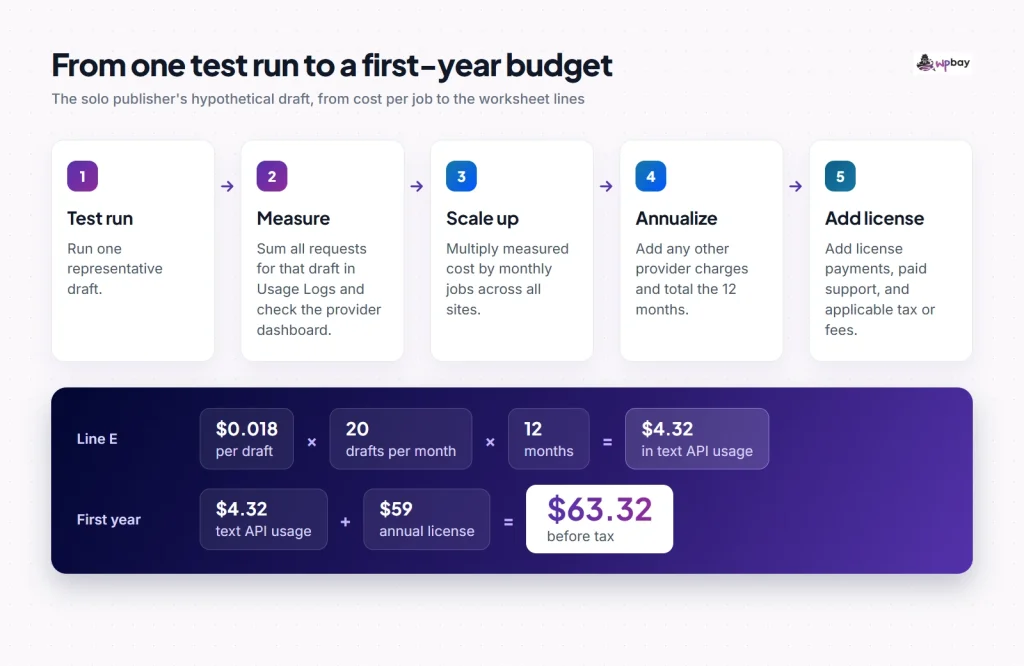
| E. Text usage incurred over 12 months | $4.32 (240 x $0.018) | $76.50 (3,000 x $0.0255) | $414 (120,000 x $0.00345) | |
| F. Other metered services (one row each: unit x rate x volume) | $0 | $0 | $0 | |
| G. Tax, from each invoice | Per invoice | Per invoice | Per invoice | |
| First-year cost (A to G, before tax) | $63.32 | $165.50 | $543 | |
| Same text usage on AimogenAPI, 12 months | $180 (Hatchling) | $180 (Hatchling) | $600 (AI Enthusiast) | |
| Cash due today | A + B + C + tax + any prepaid provider funding | Same | Same | |
| Next scheduled charge (outside year one, estimate) | $59 at anniversary | $89 at anniversary | $129 at anniversary |
Line E is the usage you build up over the year. It doesn’t tell you when you’ll pay for it. OpenAI supports prepaid credits and automatic card charges, and the timing can depend on thresholds, payment method and country. If you load credits upfront, put that amount under cash due today and don’t add it to line E again. For line F, give each extra service its own row with its billing unit. For example, 20 featured images a month at a hypothetical $0.04 per image comes to $9.60 a year. Replace that rate with your provider’s actual price.
The solo publisher has other options. On WPBay monthly, year one costs $108 plus $4.32, or $112.32. On CodeCanyon Regular with the 12-month upgrade, it costs $249 + $91.50 + $4.32 = $344.82, with no license charge scheduled and support ending about a year after purchase. For the agency, usage is the number to watch. Across all 20 sites, going from 10,000 to 20,000 turns a month doubles the text estimate to $828 a year. Doubling input alone, from 2,500 to 5,000 tokens per turn, adds $225.
Prepaid credit needs a peak-month check. The agency uses about 34,500 AimogenAPI credits a month, which leaves 3,500 in the Enthusiast tier, or roughly 1,014 more identical turns. That spare capacity also has to cover fallbacks, retries and any other caller sharing the allowance. When it runs out, requests get rate-limit errors, so test what your chatbot actually shows visitors in that case.
The graphic below follows the solo publisher’s hypothetical draft from cost per job through to the worksheet lines.
Before you pay, copy these from the checkout quote: seats, the tax-inclusive amount due today, the next charge date and amount, the renewal amount, the support end date, and how you get updates (dashboard, account download, or both).
Measure and cap one workflow before launch
The worksheet uses assumed token counts. Run one draft or a few typical chats with your production settings to get real ones. The Aimogen Pro quick start covers connecting a provider. Test runs are real requests and are billed like any other.
- Turn on Aimogen Pro › Settings › Statistics › Enable Usage Tracking. Without it, the Usage Logs stay empty and usage limits can’t count anything.
- For a draft, open AI Content Creators › Keywords/Titles, set the post status to Draft, use one or two keywords, save the rule as inactive so the scheduler stays off, and click Run now. Leave featured images and metadata set exactly as they will be in production. Delete the test drafts and media afterwards.
- For a chatbot, run several multi-turn sessions of typical length with the knowledge base attached, and write down the number of turns.
- In System & Logs › Usage Logs, add up the estimated price of each test row. A $0 row for a model missing from Aimogen’s price table means the estimate is missing, not that the call was free. Price that row from its token counts.
- Reconcile against the provider. Add up the charges posted to every project and service the workflow used, and check the plugin logs for any key rotation or fallback destinations. Count billed retries and tool calls once. If the usage hasn’t posted yet, check again later. The provider’s figure is the one that counts.
- Divide by drafts or turns, multiply by monthly volume per site, and record the plugin version, date, model and settings. Repeat whenever you change the model, prompt, history length or retrieval.
Next, set a low guest cap and test it from two different visitor IPs. Under System & Logs › AI Usage Limits, turn on Enable Global Usage Limits and give Max Guest Credits a test value of a few queries with a short Time Frame. Open two logged-out sessions on different networks, such as a phone on mobile data and a laptop on Wi-Fi, and confirm the Usage Logs show two different visitor IPs. Use up one IP’s allowance and check that the Message When Limit Reached (Not Logged In Users) text appears while the other IP can still submit. If both are blocked, check the logged IPs (a CDN or proxy can make all visitors look like one IP), the configured allowance, AI Chatbot › Limitations › Limit User Messages, and any provider limits before you decide it’s a proxy problem. A blank Max Guest Credits field means no limit, and 0 blocks guest AI completely.
CodeRevolution’s tutorial below walks through the usage logs, graphs and limit settings. It was recorded under the older Aiomatic interface, so use the menu names above. If the embed doesn’t play, the System & Logs guide links to it.
On the provider side, OpenAI’s guide to project limits explains that alerts don’t block requests. Hard enforcement does, but spend can run slightly past the limit while enforcement catches up, and it only applies to traffic billed to that project. If each client has a separate WordPress install, use a dedicated project key for each one. Send a test request and check which project it’s billed to, and check your OpenAI settings, including the organization field, key rotation and fallbacks, which can send usage somewhere else. Put the license owner, the provider account owner and the usage payer in the client agreement. When a client leaves, revoke that site’s activation, remove your access to their provider organization, and settle who keeps the purchase code or WPBay account.
Frequently asked questions
Can I test Aimogen before paying for a license?
Yes. The free Aimogen plugin does manual generation. CodeRevolution’s Free manual also describes editing posts when they’re published and cron-scheduled bulk editing of existing posts, but the WordPress.org listing puts bulk rewriting under Pro, so check the version you install. Scheduled generation of new posts through the bulk creators is clearly Pro. If you’re still comparing features, see our Aimogen Pro and AI Engine comparison.
Do I need an AimogenAPI subscription?
No. Aimogen Pro works with your own key from a supported provider, with no markup. AimogenAPI is a prepaid alternative that’s convenient if you’d rather pay a fixed monthly amount. Convert your measured tokens into credits and check that your busiest month fits the tier with room to spare.
Can my ChatGPT subscription pay for the API requests?
No. ChatGPT and the API platform bill separately. Some eligible Pro and Business subscriptions include API credits for a linked API organization once activated. Check the amount and expiry date in that organization before you subtract it from line E.
How do I confirm what my renewal will cost?
Save the checkout quote showing both the first charge and the renewal amount, and write down the renewal date. That matters most with a coupon or sale price, because those can change what you pay later. If the quote doesn’t show a renewal amount, ask the seller before you pay.
How do I keep update access after support ends?
On CodeCanyon, download released versions from your Envato account and keep a copy of each ZIP, since the dashboard updater stops when support expires. On a WPBay lifetime plan, get the update term in writing before you count on dashboard updates in year three or four.
Last reviewed: November 20, 2026. Plugin prices, provider rates and support terms can change, so confirm them at checkout and on your provider’s pricing page.