In MarketKing vs Dokan, the choice usually comes down to two things. Pick MarketKing if your seller contracts combine per-product and per-order fees, or if you want the lower of two competing commission rates to apply by default. Pick Dokan Professional if sellers should receive their Stripe transfer only once an order is marked Completed, or after a delay of up to 29 days. Both plugins turn one checkout into vendor suborders and both keep a ledger for paying sellers by hand. In both, automatic Stripe splitting needs a paid module. As of November 20, 2026, Dokan Professional costs $660 over three years at its first-purchase promotion ($747 at regular price). MarketKing’s one-site Startup license costs $748 over the same period. King’s Plugins doesn’t publish which tier includes Stripe Connect and Complex Commissions, though, so the cheapest MarketKing license that actually covers those modules is still unknown.
Disclosure: WPBay publishes this article and lists MarketKing on its marketplace.
The workflows below come from each developer’s documentation, changelogs and pricing pages as of November 20, 2026. The cart, refund and cost figures are hypothetical. Where the documentation doesn’t settle a behavior, the article says so, and those gaps are the things to check before you launch.
MarketKing vs Dokan at a glance
| Question | MarketKing | Dokan |
|---|---|---|
| Best fit | Seller agreements with competing rates, or a mix of per-product and once-per-order fees | Stripe transfers timed to payment, order completion or a delay of up to 29 days |
| Vendor registration | Fixed fields in Core. The paid Vendor Registration module adds custom fields and uploads. Manual approval by default (registration guide) | Seller setup wizard. Enable Selling is under Vendors → Vendor Onboarding (settings map) |
| Product moderation | Vendor Publish Products Directly, set globally with a per-vendor override | Product Status (Pending Review or Published) under Vendors → Vendor Capabilities |
| Overlapping commission rates | Lowest applicable rule of the same type wins by default. A filter switches it to highest | A product-specific rate beats a vendor rate |
| Mixed cart | One composite order plus vendor suborders | One parent order plus vendor suborders |
| Manual settlement | Payouts screen with vendor balances. Optional Vendor Withdrawals module | Withdrawal requests in Free. Scheduled request creation from Starter |
| Stripe splitting | Premium Stripe Connect module. Which tier includes it isn’t published | Stripe Express or Dokan Stripe Connect, both from Professional (pricing matrix) |
| Buyer refund requests | Refund Requests module, from My Account | Return and Warranty Request (RMA) module, from Professional |
| After the license lapses | Direct license keeps working, updates and support stop | Premium modules stop working |
| One-site direct price | Startup: $189 year one, $279.50 renewal | Professional (3 sites): $162 first purchase, $249 regular |
From seller application to the first product
Approving a seller, approving their products and connecting their Stripe account are separate steps, so a seller can be fully approved while still unable to receive automatic payouts. Decide whether a seller can publish products before connecting Stripe, then check whether buyers can actually pay for those products. The section on unconnected sellers below covers what each plugin documents.
In MarketKing, the applicant fills in a registration form whose Core fields are fixed. Settings live under MarketKing → Settings → Registration, and the operator approves an applicant from their user profile. Use MarketKing Pro’s Vendor Registration module if applicants need to upload a business license or tax certificate. It collects files for you to review (with optional VIES VAT validation), but it doesn’t verify identity. Stripe runs its own connected-account verification when the seller connects. Once approved, the seller adds products from the vendor dashboard (simple products only in Core). With Vendor Publish Products Directly turned off, new products wait as Ready for Review, and the product management guide documents a per-vendor override for trusted sellers.
Dokan’s wizard asks the seller for store details. Enable Selling can be set to Automatically, Manually or Verified Only, and Product Status sends new products to Pending Review or publishes them straight away. The old New Vendor Product Upload checkbox appears in the legacy Selling Options reference, but Dokan’s current settings map leaves it out, so don’t plan your moderation around it until you’ve found it in your installed build. Dokan’s documentation also doesn’t say what a pending seller can do in the meantime, or whether editing an approved product sends it back for review (seller product guide). If you rely on moderation, those two behaviors decide your review workload.
This December 2, 2022 video from King’s Plugins (MarketKing’s developer) shows how the MarketKing, Dokan and WCFM vendor dashboards looked at the time. Dokan has since redesigned its vendor dashboard, so treat the Dokan footage as historical.
Commissions and split orders on the same cart
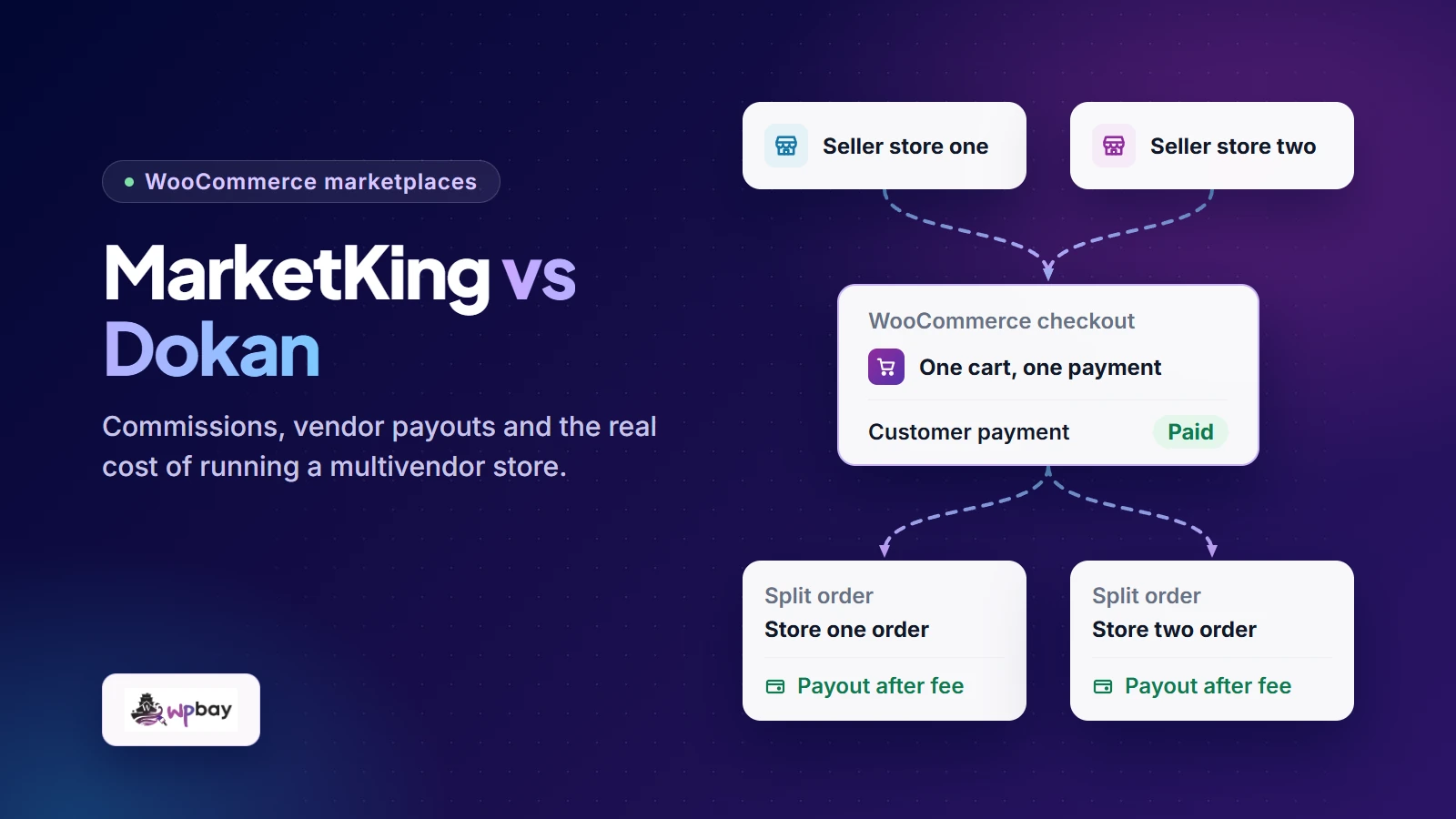
MarketKing’s order-splitting guide calls the buyer-facing order a composite order. Each vendor sees only their own suborder, and the customer sees both the composite summary and each suborder. Cart-wide discounts are split proportionally, product discounts stay with their product, and composite orders are left out of analytics by default. Dokan’s suborder documentation says the customer pays against the parent, each seller manages their own suborder, and the parent completes automatically once every suborder is complete. One WooCommerce parent order can correspond to more than one Stripe charge, which matters in the payments section.
Take a hypothetical $100 cart: Vendor A’s $60 product, Vendor B’s $40 product, a 10% commission, and no shipping, tax or processor fees. The operator earns $10, Vendor A is credited $54 and Vendor B $36. Now give Vendor A a 10% rate and its $60 product a 15% rate. If both MarketKing rules are set to calculate per product, the Complex Commissions rules resolve competing rules of the same type to the lowest, so the commission is $6. A developer can reverse that by returning 'highest' from the marketking_competing_rules_calculation_direction filter. Per-product and once-per-order rules are calculated separately, so they add together rather than compete. Dokan’s commission tutorial gives the product rate priority, so the same setup there produces $9. In Dokan, check who can set a product-level commission before you promise a seller 10% across their whole catalog.
Categories make it harder. MarketKing’s guide works through a 20% global rule, a 10% category rule and a 5% product rule, and the product ends up at 5%. In Dokan, with Multiple category selection enabled, a category-based rate uses the first category selected, and a product-specific rate still overrides it. The settings map also includes Apply Parent Category Commission to All Subcategories, which affects parent and child category conflicts. Dokan’s tutorial and its pricing matrix describe Lite’s commission options differently: the tutorial treats some category and product rates as free, while the matrix lists Multiple Commission Types as a paid feature. Check which tier exposes each rule before you build your seller agreements around it.
Flat fees depend on quantity. For two $40 units, a 10% commission starts at $8, and the fixed-fee rule decides what gets added. Dokan’s documented fixed example applies the flat part per item, so a $2 plus 10% rule takes $12. In MarketKing, a $2 once-per-order rule plus 10% comes to $10, but only for a single-vendor order. The guide doesn’t work through a per-product flat fee at quantity two, and it doesn’t say whether “once per order” means the composite order or each vendor’s suborder in a mixed cart.
Shipping and tax change the base. MarketKing’s Shipping Fee Recipient and Tax Fee Recipient settings offer Vendor, Admin and Admin + Vendor. Set to Vendor, the amount is left out of commission. Set to Admin + Vendor, the applicable amount is included. Dokan puts Shipping Fee, Product Tax Fee and Shipping Tax Fee under Transaction → Fees (settings map). Those settings decide who receives each amount, but Dokan doesn’t document whether commission is calculated before or after them. Neither plugin documents whether commission uses the list price or what the buyer paid after a cart coupon. If your seller agreement defines commission on the net amount, settle that before launch.
Who moves the money and handles refunds?
Treat the buyer’s charge, the operator’s commission, the seller’s transfer (or the amount you owe them) and the bank payout as four separate events, each with its own record. In a manual workflow there’s no transfer: you match the amount owed in the plugin to a payment you made outside it.
Manual settlement
With a non-adaptive gateway, all the money lands in the operator’s account and the plugin acts as a ledger. MarketKing’s Payouts screen shows each vendor’s balance and payout history. You pay by bank transfer or PayPal and record the payment, and the screen also accepts manual adjustments. The manual balance is credited when an order is completed (balance release guide). The optional Vendor Withdrawals module adds a Withdraw button and a minimum threshold. Dokan Free accepts withdrawal requests, and from Starter, automatic withdraw disbursement creates those requests on a schedule. The operator still sends the money. Keep the bank or PayPal reference with each payout record.
Stripe split payments
MarketKing’s premium Stripe Connect module supports direct charges, destination charges, and separate charges and transfers (used for its 3D Secure flow), and sellers onboard from their own dashboard. In MarketKing’s setup, processing fees fall on the vendor in direct mode and on the operator in destination mode and the 3D Secure transfer flow. The guide notes that the 3D Secure flow requires the operator and vendor to be in the same region and use the same currency. If your sellers are in other countries or settle in other currencies, confirm a supported mode before going further. Stripe bills direct-charge fees according to the Connect account configuration, and a plugin can also deduct fees from seller earnings, so check both. The changelog lists PaymentIntents support across all three modes in version 2.1.90 (November 16, 2026).
With two vendors in the cart, count the charges in Stripe as well as the suborders in WooCommerce. According to Stripe’s charge-type guide, a direct or destination charge involves one connected account, while separate charges and transfers can split one platform charge across several. MarketKing’s guide doesn’t go through the two-vendor case mode by mode, so a parent order with two suborders doesn’t tell you how many charges were created or who owns them.
Dokan Stripe Express can send the vendor’s share when payment completes, when the order completes, or after a delay. Dokan’s separate Express setup guide gives a 29-day maximum. Express can also deduct Stripe processing fees from seller earnings, and Dokan Pro 5.3.6 (November 19, 2026) fixed seller earnings when the operator pays the fees. If you want payment to wait until dispatch, restrict who can mark a suborder Completed. Dokan doesn’t say whether the parent order or each vendor’s suborder triggers the transfer on a two-vendor order, so read the order notes.
Dokan also sells a separate Dokan Stripe Connect module. Its July 14, 2026 rebuild announcement moves checkout to Stripe Payment Elements, adds Google Pay, Apple Pay and Block checkout support, and makes Strong Customer Authentication always on. The old “3D Secure and SCA” toggle now applies only to legacy orders. The announcement doesn’t name the charge type for new checkouts, so check the charge records in Stripe.
A transfer lands in the seller’s Stripe balance, which isn’t the same as the seller’s bank account. The funds have to become available in the connected account, Stripe pays them out on that account’s payout schedule, and then the bank adds its own processing time. Test mode simulates transfers but not real bank settlement. Dokan’s June 3, 2026 Express walkthrough shows seller onboarding and the Stripe dashboard. It predates the August non-connected seller option and the November fixes, so some labels may differ in your version.
When one seller hasn’t connected Stripe
MarketKing’s Non-connected sellers setting is under WooCommerce → Settings → Payments → MarketKing Stripe Connect (Split Pay). With it disabled, the gateway shows an error when the cart contains an unconnected seller’s product. With it enabled, payment goes to the operator’s Stripe account and that vendor’s ledger is credited with what you owe them. The guide doesn’t say what happens to the connected seller’s share in that same cart, whether behavior differs by charge mode, or whether another gateway is offered.
Dokan 5.0.14 (August 19, 2026) added “Allow ordering from non-connected sellers” to Stripe Express. With it on, the seller’s share is held until they finish onboarding. The release note doesn’t explain what releases the held share, what checkout does with the option off, or how the connected seller’s transfer behaves in the same order. Dokan Stripe Connect has its own option that sends the whole order amount to the admin Stripe account. With any of these options, plan to settle the unconnected seller’s share yourself until you’ve seen the release happen.
A $20 partial refund on Vendor A’s suborder
In this scenario, Vendor A’s $60 suborder is complete, the commission is $6, and the seller has been credited $54. The buyer asks for $20 back. Under MarketKing’s Refund Requests module, commission falls in proportion, so Vendor A’s earnings drop by $18 (to $36) and the operator’s commission by $2 (to $4). On cash-on-delivery orders where the vendor collected the cash, the vendor refunds the buyer, the operator records it, and the None, Ignored and Reversed settings decide what happens to commission. Dokan’s refund guide has the vendor submit a request and the operator process it, partial refunds included, and buyers can start one through the RMA module. Dokan’s guide gives no partial-refund commission formula.
| $20 refund | MarketKing, manual ledger | MarketKing Stripe Connect | Dokan Stripe Express |
|---|---|---|---|
| Who starts it | Customer, from My Account | Customer request, vendor approval. Operator can refund 3D Secure orders from the backend | Not documented for Express. The guide points to the Dokan Stripe Connect refund docs |
| Who executes it | Operator refunds the payment | Vendor approval sends an eligible refund to Stripe automatically | Not documented |
| Commission | $6 to $4 (proportional rule) | Proportional transfer reversal on partial refunds, fixed in Pro 2.1.90 | Not documented |
| Vendor A already paid | No documented ledger entry or automatic offset | Transfer reversal, depending on charge mode | Reversal path exists. 5.3.6 fixed it for zero-decimal currencies, which says nothing about USD |
| Failure handling | Recovery is up to you | Not documented | Not documented |
| Check | Vendor B’s balance before and after, the refund ID and status, any reversal ID, and the amount actually recovered from Vendor A |
For MarketKing’s manual ledger, the documentation doesn’t show what the balance looks like when you refund after already paying the $54 by bank transfer, or whether it goes negative on its own. Look at the balance history before adding a manual adjustment, because a second entry could double-count an automatic one. Getting the money back from the seller, by netting future earnings or sending an invoice, is a matter for your seller agreement, separate from the ledger entry.
Dokan documents one failure path, for the legacy 3D Secure flow of Dokan Stripe Connect, and its example is a full refund. If the operator-funded buyer refund succeeds but the vendor reversal fails for insufficient funds, the amount becomes a negative balance offset against future orders. If the operator’s balance is too low, the automatic refund fails and needs manual follow-up. Don’t assume that applies to a partial refund on a new Payment Elements checkout.
Which balance pays for the refund depends on the Stripe charge type. Here’s how Stripe documents it:
| Charge type | Refund debits | Recovering the vendor share | When funds are short |
|---|---|---|---|
| Direct | Connected account | No transfer to reverse. The platform decides whether to refund its application fee | Refund stays pending, and fails if still unfunded after 45 days |
| Destination | Platform | Transfer reversal from the connected account | Low platform balance can leave the refund pending. A combined refund and reversal with too little in the connected account returns an error |
| Separate charges and transfers | Platform | A separate transfer reversal that the platform has to reconcile | The refund and the reversal can succeed or fail independently |
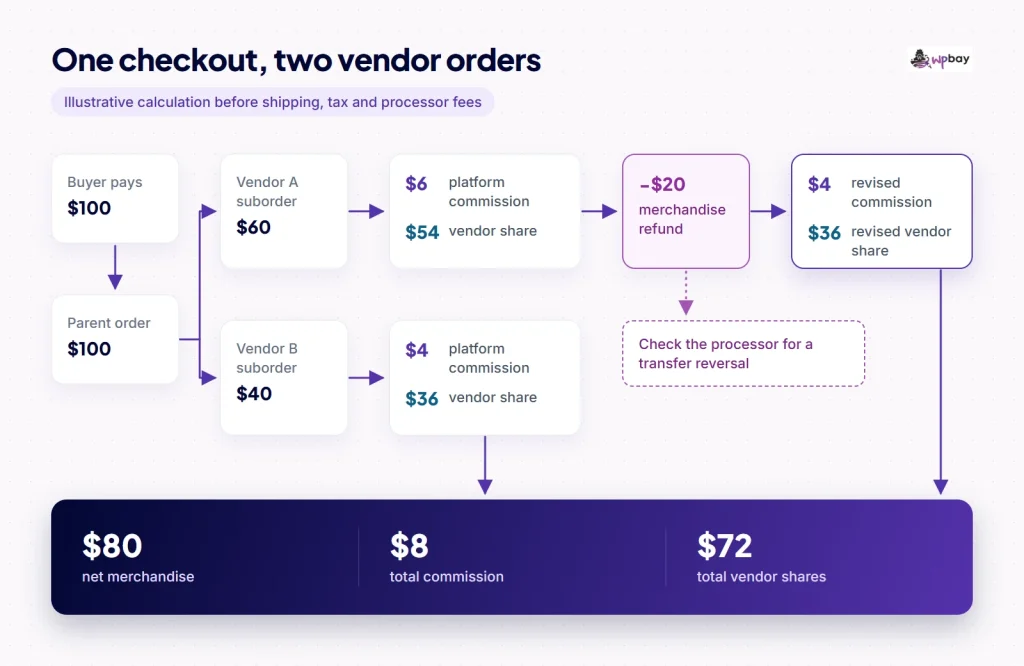
Hypothetical example: a two-vendor checkout traced through the parent order, each suborder, the Stripe charge and transfers (labeled by plugin and gateway), and a $20 refund with transfer reversal on Vendor A’s suborder only. Vendor B’s ledger is shown as a check, not a result.
The first-year and three-year cost
Prices below are in USD before tax, observed November 20, 2026. Dokan’s lower year-one figures are first-purchase promotions. We didn’t complete a checkout, so confirm the pre-tax total before you buy.
| License (one site needed) | Channel and price basis | Year 1 | Years 2 and 3, each | 36 months |
|---|---|---|---|---|
| MarketKing Startup | Direct; introductory, renews at full price | $189 | $279.50 | $748 license only. Cost with Stripe and Complex Commissions: unknown until entitlement is confirmed |
| Dokan Starter (scheduled withdrawals, no Stripe) | Direct; first-purchase promo, then regular | $104 | $149 | $402 ($447 at regular price) |
| Dokan Professional (3 sites, both Stripe modules) | Direct; first-purchase promo, then regular | $162 | $249 | $660 ($747 at regular price) |
| MarketKing, 1 site | WPBay marketplace; indexed listing price | $119 | Not confirmed | Not confirmed |
King’s Plugins sells through Paddle, which adds applicable tax at checkout. Its price grid shows the same headline features at each annual tier and differs only in site count and support, so ask King’s Plugins in writing (or check an activated Startup install) whether Startup includes Stripe Connect, Complex Commissions, Refund Requests and Vendor Withdrawals. Dokan quotes prices without VAT, starts Stripe and RMA at Professional, and starts PayPal Marketplace at Business, which also needs live platform approval from PayPal.
The two developers handle lapsed licenses very differently. King’s Plugins’ FAQ says a directly bought MarketKing license keeps working with no data loss, and only updates and support end. Dokan’s terms say premium modules stop working on expiry or cancellation, and they describe automatic renewal. Neither source says what happens to Stripe transfers or refunds that are still in progress, so reconcile those before a renewal date you don’t plan to pay.
Starting from nothing, Dokan Professional’s $660 pays for itself if automation saves 27.5 minutes a month at $40 an hour. MarketKing Startup’s $748 needs 31.2 minutes, if Startup turns out to include the modules. Starting from Dokan Starter, moving up to Professional adds $258 over 36 months at promo prices, or about 10.8 minutes a month. License cost is the smaller part, though. Here is a fully hypothetical US example to show the shape of the rest:
- 150 checkouts a month at $100, one Stripe charge each, 20 active vendors with a 90% share ($13,500 a month paid out)
- The platform handles Connect pricing with Express accounts, at Stripe’s published US list rates: 2.9% + 30¢ per domestic card charge, $2 per monthly active account, and 0.25% + 25¢ per payout (Connect pricing, Payments pricing)
- Manual sellers are paid monthly by ACH at an assumed 50¢ each. Stripe sellers are paid weekly (80 payouts a month)
Card processing comes to 2.9% of $540,000 plus 30¢ times 5,400 charges, or $17,280, in both setups. Dispute fees and the fees Stripe keeps on refunded charges are also the same in both, so the table leaves those out and shows only the lines that differ.
| 36-month line (hypothetical) | Manual, Dokan Starter | Stripe Express, Dokan Professional |
|---|---|---|
| License (promo) | $402 | $660 |
| Active accounts: $2 × 20 × 36 | None | $1,440 |
| Payout fees: 0.25% × $486,000 + 25¢ × 2,880 | None | $1,935 |
| Manual payouts: 50¢ × 720 | $360 | None |
| Setup at $40/h | 6 h: $240 | 12 h: $480 |
| Monthly settlement at $40/h | 4 h: $5,760 | 1 h: $1,440 |
| Failed reversal follow-up | None | 6 h: $240 |
| Total of differing lines | $6,762 | $6,195 |
In this example, automation saves $567 over three years, and most of that saving goes to payout fees. Switching to monthly Stripe payouts would cut the per-payout charges, and if Stripe bills connected accounts directly, the platform pays no Connect fees at all. Instant Payouts and cross-border payouts are priced separately. Refund cash is a separate question: at four $100 refunds a month inside a 30-day window, keep at least $400 available in whichever Stripe balance gets debited (the platform’s for destination and separate charges, the seller’s for direct charges), and decide how you’ll top it up. You can put your own numbers into WPBay’s three-year plugin cost worksheet.
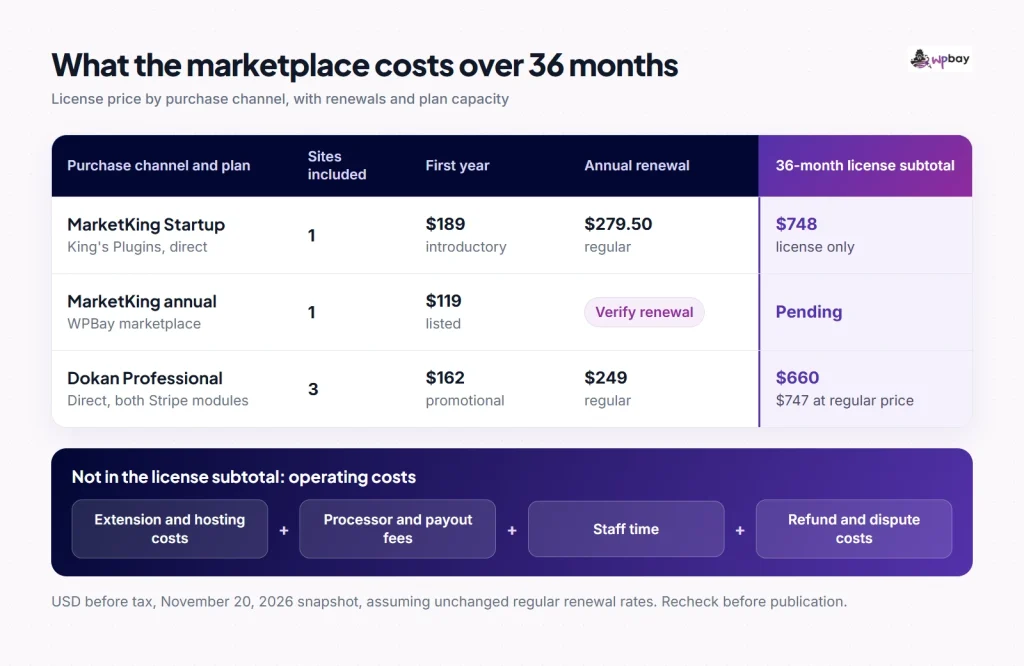
Annotated 36-month worksheet with editable assumptions. The MarketKing row shows the Startup license subtotal separately from the cost of the modules you need, which stays blank until entitlement is confirmed.
WPBay’s indexed MarketKing listing shows $119, $169 and $229 a year for one, three and unlimited sites, plus a Lifetime selector, with support from King’s Plugins through WPBay’s ticket system. The live page timed out when we checked, so availability, renewal amount, lifetime terms, support duration, activation and update delivery are all unverified. The listing’s version label (2.0.50) doesn’t tell you which build you’ll download, and 2.1.90 is the release with the partial-refund reversal fix.
Which marketplace plugin should you choose?
Choose MarketKing when your seller agreements decide the question: per-unit charges alongside once-per-order fees, category rates that should defer to a lower product rate, or buyers asking for refunds from My Account with the vendor reviewing. Before you buy, get the module-by-tier answer from King’s Plugins. Choose Dokan Professional when transfer timing decides it, such as paying sellers only after completion or after a holding period. Choose Dokan Business if you need PayPal Marketplace, and apply for PayPal’s approval early. If your sellers are in different countries or currencies from you, check MarketKing’s region and currency limits for 3D Secure before choosing it. For a pilot, MarketKing Core (on WordPress.org) and Dokan Free both handle seller signup, split orders and a manual ledger at no license cost. If vendors also need wholesale tiers or quotes, WPBay’s B2B and wholesale comparison covers B2BKing for Dokan, which is sold separately.
Before launch, on staging with matched WordPress, WooCommerce, theme, checkout type (Block or Classic), HPOS and currency settings, record the Core and Pro builds and confirm at least MarketKing 2.1.90 and Dokan Pro 5.3.6. Then run:
- A pending seller saving, submitting and publishing a product, then editing an approved one.
- The $60 and $40 cart with both sellers connected. Count the Stripe charges and transfers and note who owns each.
- The same cart with Vendor B unconnected, with the non-connected option on and off.
- Completing Vendor A’s suborder alone, then checking the parent status and Vendor B’s transfer.
- The cart with shipping, tax and a cart coupon, comparing each vendor’s commission base.
- A $20 refund before transfer (using delayed disbursement) and after it, then with a low operator balance and a low vendor balance.
Frequently asked questions
How do I check whether a seller’s money is actually available?
Open the connected account in Stripe and look at its available balance, which differs from its pending balance, along with its payout schedule. A transfer created by the plugin only moves money into that Stripe balance. On a manual ledger, the plugin balance is what you owe, and the seller is paid when you send the money and record it.
Can I recover a refund after the vendor has been paid?
A transfer reversal debits the seller’s connected Stripe balance, and it can fail if that balance is too low. That is a different mechanism from Stripe’s own negative-balance recovery, which in eligible configurations can debit the seller’s linked bank account. If the seller was paid outside Stripe, recovery depends on your seller agreement, by netting future earnings or invoicing.
What should I confirm before turning on automatic refunds?
Confirm which balance pays the refund under your charge type and how much you keep there. Check whether a vendor can approve a refund without the operator, and what the plugin records when a reversal fails. In MarketKing, vendor approval sends eligible refunds to Stripe automatically, so your vendor agreement should set limits on partial refunds.
What happens to pending withdrawals and open orders if I switch plugins?
Neither developer documents a migration path for seller balances, pending withdrawals or connected Stripe accounts. Before switching, settle or record every pending withdrawal and refund, export seller balances and open orders, and make sure no transfers are still waiting on a completion trigger. Sellers will probably need to connect Stripe again in the new plugin.
Is buying MarketKing on WPBay the same as buying it directly?
Not necessarily. WPBay acts as Merchant of Record for standard purchases on WPBay (WPBay pricing), and the indexed listing names King’s Plugins as the support provider. Renewal price, support length, the build you can download and how updates arrive aren’t confirmed, so check them before you compare the $119 price with the direct $189.
Last reviewed: November 20, 2026. Prices, promotions and module entitlements can change, so confirm them at checkout.