


Flipa – PDF Flipbook for WordPress (RTL & 20 Languages)

 Recently Updated
Well Documented
Recently Updated
Well Documented
Flipa – PDF Flipbook for WordPress
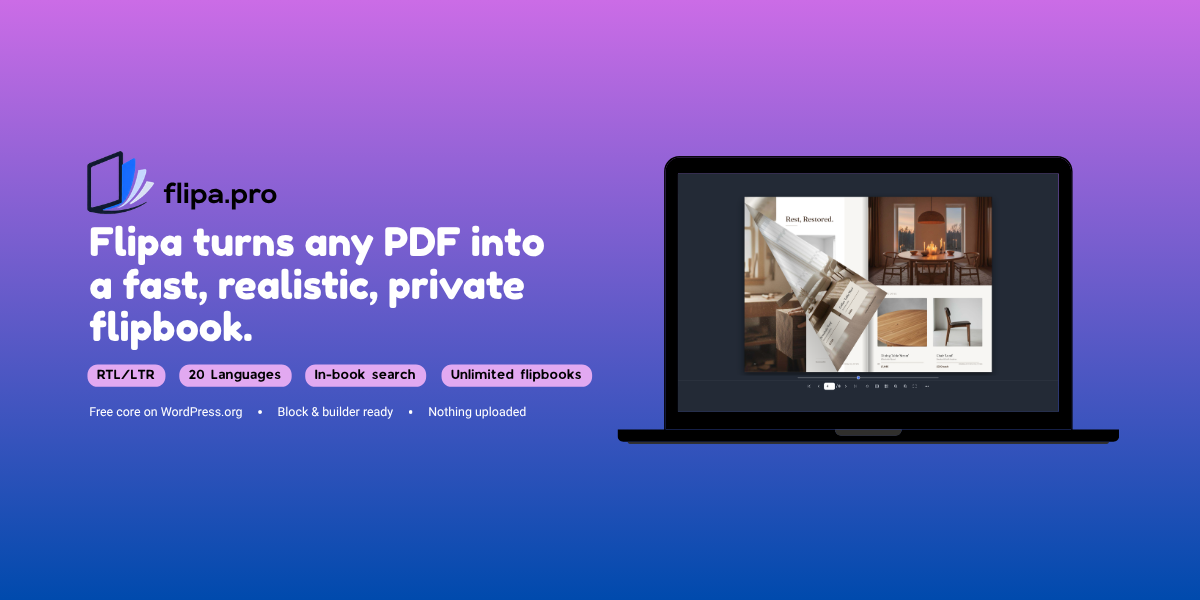
Flipa turns any PDF into a beautiful, realistic page-flip book that renders entirely in the visitor’s browser – your file is served from your own site and never sent to a third-party service. Drag a corner to turn the page, jump with thumbnails, zoom, and embed it anywhere with a shortcode, block, or page-builder widget.
Why Flipa
* Best-in-class right-to-left support – proper Hebrew, Arabic and Persian reading order, mirrored controls and correct cover/back behavior.
* Calendar mode – pages that turn upward over a spiral binding, the way a wall or desk calendar opens, instead of sideways. Rare in a WordPress flipbook, and the natural fit for calendars, planners and any landscape document.
* 20-language reader interface – English, Hebrew, Arabic, Persian, Spanish, French, German, Russian, Portuguese, Italian, Dutch, Polish, Turkish, Ukrainian, Czech, Swedish, Chinese, Japanese, Korean, Hindi.
* Find anything instantly – full-text search across the whole PDF with on-page highlighting.
* Lightweight and fast – no heavy 3D dependency; smooth on phones and tablets.
* Self-hosted and private – the PDF stays on your server; nothing phones home.
Features
Every feature listed below is included. Nothing is locked and there is no upsell.
Reading experience
* Realistic drag-to-turn page flip with a natural fold shadow, the lifted corner reaching past the edge of the book the way a real sheet of paper does
* Single-page and double-page (magazine) spreads, with a centered cover and back
* Calendar mode – the pages turn upward over a binding rather than sideways, in a wall shape that hangs two pages with the binding between them or a table shape that stands one page up with the binding above it. On a narrow screen the wall calendar shows one page at a time so it stays readable
* Four bindings to choose from in calendar mode, drawn along the turning edge: a spiral coil, a twin loop wire, a plastic comb, or no binding at all
* Vertical-scroll reading mode, and a mouse-follow 3D tilt mode
* Thumbnails, seek bar, zoom and fullscreen
* Light or dark reader theme, plus a custom background color or background image
* Page-flip sounds, including your own audio file, plus a page-stack depth graphic
* Autoplay, with loop and autostart
* A real progress bar with a percentage while the PDF loads, so a large book never looks stuck
* Resume reading – each visitor reopens the book on the page where they stopped
* Choose the page a book opens on
* Link straight to any page, and Share gives a link to the page on screen
* Keep the page number out of the address bar, when you would rather it stayed clean
Content and navigation
* In-book text search – find any word across the whole PDF, jump to a matching page, and highlight every match
* Foldable two-level table of contents (chapters and sub-chapters), which can be imported from the PDF’s own bookmarks
* Bookmarks – readers can save their own, and you can publish your own set
* Clickable PDF links – internal page jumps plus web and email links
* Download the original PDF, and a Print button
* Password protection
* QR code in the Share popup
Where you can put it
* Shortcode anywhere: [flipa id=”123″]
* Gutenberg block and Classic editor button
* Inline (seamless, auto-height) embedding, a fixed iframe, or a lightbox popup
* Elementor / Elementor Pro and WPBakery widgets
* WooCommerce product pages
* Bookshelf grid via [flipa_shelf]
* Unlimited flipbooks – manage them all from one dashboard
Requirements
* WordPress 5.8+
* PHP 7.4+
* A PDF in your Media Library
Live demo & support
Live demo: flipa.pro/documentation · Support: flipa.pro/support
Changelog:
=0.25.1 =
- Fix: the charts on the reading statistics screens stretched downward without stopping and flickered while they did it, which made both the all-flipbooks overview and a single flipbook's own report hard to use. The numbers, the comparisons against the previous period and the page by page tables were correct throughout, and still are; only the charts were affected, and nothing needs to be counted again. A refresh could not help, because nothing was cached: each chart was sized from the box around it while that box was sized from the chart, so the two grew each other a little on every repaint. The charts now sit in a box with a height of its own and settle immediately, at every window width and with the admin menu open or collapsed. Reported by a publisher the day after 0.25.0 with screenshots, and fixed the same day.
= 0.25.0 =
- New: the reading statistics screen now opens on an overview of every flipbook at once, instead of asking you to pick one first. Five headline figures across the top, a chart of reading sessions over time, your most read flipbooks, the days of the week people read on, and a table with one row per flipbook that links through to that book's own report. Every figure is shown with its change against the previous period of the same length, so a 30 day range is compared with the 30 days before it rather than with a whole calendar month. A period with nothing to compare against says "new" rather than inventing a percentage, and read-through, which is itself a percentage, reports its change in points. New: each row of the overview carries the counting switch for that flipbook, so you can turn a book on or off without opening it. It saves the moment you click it, and it is the same setting as the one on the flipbook's own Extras tab, which is still there. A flipbook whose counting is switched off now shows the date of the last day it recorded anything, and marks each figure as frozen instead of showing a change against the previous period; once recording has stopped, that comparison would read as a collapse that never happened. The charts are drawn by a copy of Chart.js bundled with the plugin rather than loaded from the internet, so the report works on a site behind a firewall and your admin makes no third party requests. The whole plugin interface is now fully translated in all 19 bundled languages, including the reading statistics screens, calendar mode and the contents importer; Arabic, Hebrew and Persian are complete, right to left.
= 0.24.1 =
- Fixed: switching reading statistics off for a single flipbook now stops counting for every visitor straight away, including anyone whose copy of the page had already been saved by a caching plugin or a CDN. Before this, turning a book off stopped new visitors being given anywhere to report to, but a visitor still holding a page saved earlier could keep reporting until that copy expired, while the report screen told you counting had stopped. If you switched a flipbook off in 0.24.0 and its figures kept moving for a while afterwards, that is why, and it has stopped. The site-wide switch on the Reading statistics screen was never affected, and nothing that identifies a visitor was ever stored either way.
= 0.24.0 =
- New: reading statistics. Flipa now counts how many people actually read each flipbook, and every number stays on your own site. Nothing is sent to us, and nothing that identifies a visitor is stored anywhere: no cookie, no identifier, no IP address. A Readers column on the Flipbooks list shows this month and the total for each book and opens a report for that flipbook, with a date range and a CSV export you can put in a media kit. The report gives reading sessions, pages turned, average pages read, the share of sessions that reached the last page, average reading time, and a page by page table. That last one is the figure an advertising partner usually asks for: how many sessions displayed the page their advertisement sits on. How a session is counted, because you may be asked: someone opens the flipbook, turns at least one page, and stays longer than five seconds. A visitor who loads the page and never opens the book is not counted, and neither are search engine crawlers, because they load pages but do not turn them. Nor are you and your editors while signed in, so proofreading an issue does not inflate its first week. How a page is counted: in a two-page spread both pages count, because both were shown, and a page must rest on screen for one second, which is the threshold the advertising industry uses for a viewable impression. A page counts once per session however often it is returned to, so the figure can never be higher than the session count and can be quoted as a share of readership. Because nothing identifying is stored, these are reading SESSIONS and not individual readers: the same person reading twice is two sessions, and your own analytics already counts unique visitors for the page the flipbook sits on. Counting can be switched off for the whole site, on the Reading statistics screen, or for a single flipbook on that book's Extras tab, and a flipbook you have excluded says so on its own report instead of showing a row of zeros. Fixed: when a browser blocks page rendering, the message explaining why no longer has the whole reader toolbar sitting live underneath it, with a page counter reading 1 of 0 next to working zoom, spread and thumbnail buttons. Only browsers with anti-fingerprinting protection switched on ever saw this, and the explanation itself was always correct. Fixed: the option for keeping the page number out of the address bar also, invisibly, stopped the reader telling the page it is embedded in which page the visitor was on. The two settings are unrelated, and anything listening for that message, including the statistics above and any analytics you wired up yourself, went quiet with nothing to explain why. The option now does only what it says.
= 0.23.0 =
- New: a flipbook now has a cover picture, and it is taken from the first page of the PDF for you. Open a flipbook for editing and the cover appears by itself; you can replace it with any image from your Media Library, or clear it and have the first page drawn again. The picture is drawn once and kept in your Media Library, so a page showing several books loads like any other page of images. Fixed: the [flipa_shelf] bookshelf has never shown covers. It looked for a cover picture on each flipbook, and nothing in the plugin had ever been able to put one there, so every shelf showed plain tiles with the titles on them, while our own documentation told readers to click a cover. A flipbook opened as a popup from a link had the same problem. Both show the cover now. Fixed: a shelf tile no longer crops a cover that is not roughly its own shape. A landscape PDF, a wall calendar page, or a picture you chose yourself used to lose up to half its width off the sides, with the heading cut at both ends. The whole picture is now shown against the tile's own background, and portrait books look exactly as they did. The new controls in the editor are translated in all nineteen bundled languages, including Hebrew, Arabic and Persian. If you already have a bookshelf, open each flipbook once and press Update, and the covers will fill in.
= 0.22.1 =
Fix: a PDF whose file name contains a space, or any letter outside plain English, stopped working the moment the flipbook was saved. The book showed correctly in the preview while you were editing it, then failed with "Could not read this PDF" once you pressed Update. The address of the file was being cleaned up on its way into the database by a routine that removes the codes a web address uses to stand for a space, so the saved address pointed at a file name with the spaces taken out, which of course does not exist. Hebrew, Arabic, Russian and every other non-Latin file name were affected in the same way. If a book of yours is in this state, open it, put the address back in the PDF file box and save again.
Fix: sites that keep their media library on Amazon S3, or on a CDN with its own address, got a 404 as soon as they added a PDF to a flipbook. Flipa serves a book's file through the site, and on the way through it was moving the address back onto the main domain even when the file genuinely lived elsewhere, so it asked for the file at a place that does not have it.
The example address shown in the empty PDF file box no longer assumes a standard WordPress folder layout, which was misleading on installs that keep their uploads somewhere else.
= 0.22.0 =
Fix: on a great many desktop screens the two-page spread came out wrong from 0.21.0 onwards, with an oversized copy of the pages sitting behind a correct one. The room added around the book in 0.21.0, so a lifted corner has somewhere to go, is applied in two places at once: the drawing surface and the space it occupies on the page. On screens that are not high-density the reader skipped that work, because enlarging the drawing surface there changes nothing, and in skipping it also skipped the second half, so the surface grew and the space did not. Both halves now happen on every screen. This was reported by a reader of a customer's book, who found the cause himself.
The shadow down the middle of the book and the shadow under it now follow the background you choose. They were fixed values, picked against the dark default, so on a very light page they stopped reading as depth and started reading as dirt. On the dark default they are unchanged to three decimal places, so no existing book looks any different; only light backgrounds get lighter. This applies while the book rests and while you are dragging a page, and the dragging half took a great deal more finding than we expected. The fold is drawn by three separate things, not two, and the third lives inside the page turning library with no setting of any kind, fixed at roughly two and a half times the weight we use at rest. That is why taking hold of a page darkened the fold sharply whatever background you had chosen, and why it has done so in every version until this one. All three now take their weight from the same place, so the fold under your finger matches the fold at rest.
Fix: while zoomed in, both pages changed size for as long as you held a page. The sharp copy of the pages that the reader lays over the book while you are zoomed in was being measured in two scales at once: its position came from the screen, which already includes the zoom, while the margin around the book was taken off in the book's own unzoomed units. The two agree exactly at 100%, which is why this never showed there, and why it grew worse the further you zoomed. Taking hold of a page puts that sharp copy away and shows the pages at their real size, so the difference read as the pages shrinking. Both measurements are now in the same scale.
Zoom now has a step at 110%, and the percentage can be typed. The zoom buttons moved in jumps of 25%, so the only levels that existed were 100, 125, 150 and so on, and the figure on screen looked like a field but was not one. The steps are now the ones a PDF reader normally offers, and you can type any level between 100% and 300% and press Enter.
Fix: if you pulled a page partway and let go without turning it, the shadow under the book, the shadow at the fold and the thickness at the page edges all disappeared and did not come back. The reader treats a page turn as finished when the page actually turns, and an abandoned pull never turns a page, so it was left waiting for an end that never came. It now settles on its own shortly after the page stops moving, and it can tell an abandoned pull from a page you are simply holding still mid-fold.
Arabic, Czech, Dutch, Hebrew, Russian and Spanish were shipping fewer translated phrases than they had available. The translations existed and were correct; the compiled files the plugin actually reads had not been rebuilt since they arrived. 244 phrases across those six languages now appear.
= 0.21.0 =
The lifted corner of a page now reaches past the edge of the book while you turn it, instead of being cut off in a straight line at the border. The book was drawn on a surface that ended exactly at its own edge, so anything that rose above the page had nowhere to go. There is room around the book now, and the corner and the shadow it casts spill over it the way a real sheet of paper does. Calendar mode already turned this way; sideways books match it now.
Fix: after dragging the page slider, the arrow keys stopped behaving. A press could move two pages instead of one, or land somewhere you had not asked for, and a page turn could start and then be yanked somewhere else halfway through. The slider keeps the keyboard after you drag it, the way any slider does, so each arrow press was being acted on twice: once by the slider, moving the book, and once by the reader, turning the page. Dragging the slider now hands the keyboard back to the book, and the arrow keys are ignored entirely while you are typing in the page box or the search field.
Fix: in single page view the page changed with no page turn at all. The turn was being drawn the whole time, on a layer the reader had just hidden. The leaf now stays up until its own turn has actually ended.
Fix: in calendar mode the up and down arrow keys did nothing, even though the pages turn up and down. The reader had only ever been taught the left and right keys. Down now turns to the next page and up goes back, and left and right still work as well.
The up and down arrow keys now turn the page in single page view as well as in calendar mode. In both there is no facing page, so up and down are as natural as left and right. In the vertical scroll reading mode they still scroll, as they should.
Fix: the thumbnails strip stayed empty on a long book. The strip is built once when the book opens, from the pages prepared by then, and since 0.19.3 only the pages around you are prepared, so every other thumbnail was a blank that never filled in. Each thumbnail now appears as its page becomes ready.
Fix: after dragging the page slider to somewhere else in the book and then stepping with the arrows, the page picture flickered and the book looked like it was jumping between pages, most noticeably going backwards. A prepared page is now placed into the book already on screen and nothing else is disturbed.
The reader is properly translated again in all 20 languages. Several buttons had lost their tooltip entirely in some languages, because a tooltip that has no translation is not shown in English, it is simply not shown: autoplay, print, bookmarks, the More menu, vertical scroll and 3D tilt were affected, some since 0.16.0. In thirteen languages, copying the embed code popped a message reading "undefined".
The Free vs Pro comparison in the editor was missing calendar mode, which has been the headline Pro feature since 0.20.0. It is listed now.
= 0.20.0 =
- Calendar mode. Your pages can now turn upward over a spiral binding, the way a wall or desk calendar opens, instead of sideways. Choose it under Reading direction, next to left to right and right to left, because that is what it is: which edge the binding is on. It comes in two shapes, picked under Page view. A wall calendar hangs two pages with the binding between them. A table calendar stands one page up with the binding above it. It suits landscape pages best, and a closed calendar opens out to the spread with the size animating between the two.
- Four bindings to choose from once calendar mode is on, drawn along the turning edge: a spiral coil, a twin loop wire, a plastic comb, or no binding at all.
- The settings panel now only shows you what applies. The binding appears when you choose calendar and disappears when you go back to a sideways book, and page-stack depth, which draws the thickness of the paper along the left and right edges, is hidden in calendar mode where there are no side edges to draw. Your choices are remembered either way, so switching back and forth costs you nothing.
- Fixed, and this one matters for every book: on a long book most pages never appeared. They loaded correctly and were then simply never drawn, so you saw a blank white page and waiting did not help. The reader only redrew the book when a freshly prepared page happened to be the one you were sitting on, and relied on a final redraw once every page was ready. Since 0.19.3 prepares only the pages around you and therefore never reaches an end, that final redraw never happened. Every page now reaches the screen.
- Fixed: the loading counter stopped part-way through long books and sat there, which looked like the book had given up. It was only counting one of the two kinds of work the reader does. It now counts both and runs to the end.
- Fixed: the same counter could also climb past the number of pages in the book, because turning back to an earlier page counted it a second time. Each page is counted once now.
- Fixed: in a Hebrew, Arabic or other right to left book, the two numbers in the loading counter appeared the wrong way round, so a 134 page book could read as 134 of 337. The numbers were correct; the browser was laying them out right to left along with the rest of the page.
= 0.19.5 =
- Fixed: in a browser with anti-fingerprinting protection switched on, every page of the book came out as colored stripes instead of the document. Each page image is made by drawing the page onto a canvas and then reading it back, and that protection replaces what comes back rather than refusing it, so nothing reported an error and the whole book was unreadable. LibreWolf turns this protection on by default, which is why it showed up there and not in Firefox. The reader now checks that a canvas gives back what was drawn on it, before the first page is rendered. When it does not, the book is replaced by a short explanation of what the browser is doing and what to change, rather than a few hundred pages of noise. The check reads four pixels and runs once.
= 0.19.4 =
- Fixed: a chapter or bookmark name written in anything beyond plain English was damaged when the book was saved. Hebrew, Arabic, Russian, Chinese and even a French accent came back as a run of letters and numbers. Worse, a chapter or bookmark name containing a double quote emptied the ENTIRE table of contents on save, with nothing shown to say so. Both had one cause: the names were stored in a form that WordPress then took apart. Names damaged by this are repaired for you the first time you open the WordPress admin after updating, and the untouched original is kept alongside so nothing is thrown away. A table that was emptied cannot be brought back, because the names are no longer in the database in any form; if that happened to one of your books you will need to enter it again, and we are sorry. Also fixed: a password containing a backslash was stored without it, so the person who set the password could not open their own book. This has been present since the table of contents was introduced, and it is why right-to-left chapter names never stuck. If you gave up on a Hebrew or Arabic contents list, it works now.
= 0.19.3 =
- Fixed: long books took far too long to become readable and kept the browser busy the whole time. The reader used to draw and compress every page in the book before it considered itself finished, however long the book was, so a few hundred scanned pages could mean minutes of a pegged processor and a loading spinner that would not go away, and on a phone it might never finish at all. It now prepares the pages around you and keeps up as you move, so a long book opens in about the time a short one always did. Searching still covers the whole book, not only the part that has been drawn. Fixed: choosing a preset page-turn sound did not stick if the book also had a sound file uploaded. The picker showed "My sound file" again on the next visit, and the choice was quietly overwritten the next time the book was saved. A preset and an uploaded file can now live together, and the picker shows what is actually stored. New: "Import from PDF" under Contents reads the chapter bookmarks a PDF already carries and fills the contents table in for you, instead of typing several hundred rows by hand. Many PDFs carry none, and merging several files into one often replaces them with the file names, so it is worth checking your file in a PDF reader first. Changed: the Free versus Pro comparison in the editor was missing four features Pro has had since 0.18.2, and now lists resume reading, a chosen opening page, links to a specific page, and keeping the page number out of the address bar.
= 0.19.2 =
- Fix: if you also have the free Flipa from WordPress.org installed on the same site, this edition could refuse to switch on. Pressing Activate did nothing visible, no error appeared, and the plugin simply stayed off. That is fixed, and the two can now sit side by side. Fix: a large part of the settings screens could not be translated into any language, because those labels had never been included in the plugin's translation template. Everything on the Book, Background, Contents, Display, Extras, Embed and Help tabs can now be translated, and the template is generated from the code on every release so it cannot fall behind again. New: the settings screens now ship translations for 19 languages instead of one, so the WordPress admin appears in your language without any setup. The reader your visitors see has had all 20 languages since the start; this release is about the admin. Nothing already translated was lost or reset.
= 0.19.1 =
Fixes a flipbook rendering as an empty reader, showing no pages and no error, on a site that answers at more than one address.
If your site is reachable at both example.com and www.example.com, and the PDF was saved under one form while a visitor arrived on the other, the reader treated its own file as coming from somewhere else and refused it. The file is now served from whichever of your own addresses the visitor is actually using.
This also covers WordPress installed in a subdirectory, and a multilingual site that gives each language its own domain. Sites that put each language in a folder, such as /en/ and /es/, were never affected: a folder is not a separate address.
Nothing about which files the reader will accept has changed. It still only opens a PDF from your own site, and a web address you pasted from somewhere else is left exactly as you entered it.
= 0.19.0 =
Scroll reading mode: on a long book, a page you had already read crisply could quietly drop back to the low-resolution version. Pages are now kept by how recently you looked at them, and a page that does get released is rebuilt from the PDF rather than left blurred.
Hovering near the outer corner of the cover or the back page no longer lifts a blank sheet that is not really there. Dragging that corner was always correct and is unchanged.
Switching the interface language now re-translates the labels inside the More tray and the Zoom menu. They previously stayed in whatever language the book first opened with, both in the editor preview and for a visitor changing the language in the reader itself.
In the editor, the live preview now shows the background you actually chose instead of a fixed dark one, with a checkerboard when you pick Transparent. A width or height the plugin cannot read is now reported, with what was used instead, rather than silently replaced by the default.
New: the shortcode can open a book on a chosen page, resume where each visitor stopped, or keep the page number out of the address, for one placement at a time. So the same book can open at its index on one page and at the order form on another.
Housekeeping: the PDF endpoint now redirects through WordPress's own safe-redirect helper while still allowing a book whose file lives on another domain. The plugin ships a THIRD-PARTY-LICENSES.txt listing the bundled libraries with links to their sources.
= 0.18.6 =
- Fix: a regression in 0.18.5. If you placed a flipbook with a hand-written iframe rather than with the shortcode or the block, the book stopped appearing and an upload box showed in its place. That is fixed, and those embeds work again with nothing to change at your end. If you saw an upload prompt where your book should be, updating is all that is required, and apologies for the disruption. Security: the protection added in 0.18.5 is unchanged in effect. The reader will still only open a PDF that lives on your own site, so nobody can build a link that displays a document of their choosing inside your address bar. 0.18.5 enforced that by refusing the older address format outright, which was stricter than it needed to be and broke working pages; 0.18.6 accepts the older format again and checks where the file actually comes from instead.
= 0.18.5 =
- Security: the reader would load any PDF address handed to it in its own web address. Because the reader file is public, anyone could build a link that displayed a document of their choosing inside your site's address bar, which is useful for phishing. The reader no longer accepts an address at all: WordPress passes it a reference to the flipbook, and WordPress decides which file that reader is allowed to have, applying the same permission rules as the 0.18.4 fix. Reported by an external researcher. Change: the PDF's own address is no longer written into the page. Please note this does not make the file private, and is not meant to: the file stays in your Media Library and anyone who has its address can still open it, exactly as before. Compatibility: nothing to change. Existing flipbooks, shortcodes and blocks keep working untouched, and the download button still names the file properly.
= 0.18.4 =
- Security: a flipbook that was still a draft, pending or private would render for anyone if its shortcode was placed on a page, and with it that book's PDF. The reader now checks that the viewer is allowed to see that flipbook, using WordPress's own rules, so authors still preview their own drafts and editors still see private books. Reported by an external researcher. Fix: long books looked soft or blocky while you were simply reading them. The reader keeps a light-weight image of every page so a book of any length stays within memory, and re-renders the page you are looking at from the PDF at full sharpness; that sharp re-render only ran when you zoomed or switched to single-page view, so a resting two-page spread showed the light-weight image. It now runs at rest as well, and the longer the book the bigger the difference. Fix: a dark band along the bottom edge of every page, visible on the covers, on every page in scroll mode and during a page turn. Fix: on the first spread after the front cover and the last before the back cover, the page shadow and the page-stack depth vanished during a page turn and came back when it settled. Fix: the loading indicator floated in the middle of the browser window instead of sitting on the reader, and the toolbar started at the top of the frame and jumped to the bottom once the book appeared.
= 0.18.3 =
- Wording only; no flipbook behaves any differently. The per-book "Address bar" setting under Extras used to read "Do not show the page number in the address bar", which left it unclear whether unticking it would stop links to a page working. It now reads "Keep the page number out of the address bar", and the hint says plainly that ticking it does both things at once: the address stays clean, and links to a specific page stop working for that book.
= 0.18.2 =
- New: the reader can remember where each visitor stopped and reopen the book on
that page. Nothing is uploaded; the position is kept in the visitor's own browser.
Turn it on per book under Extras.
- New: choose which page a book opens on. Useful when the first page is a cover you
would rather skip, or when a book is really a chapter of something longer. Set it
under Extras; leave it empty to open on page one.
- New: link straight to a page. The address bar follows the page being read even when
the book is embedded in your own page, so a visitor can copy the address and send
someone to exactly that page, and Share hands out a link to the page on screen rather
than the book's first page.
- New: you can switch the page number in the address bar off for a book, under Extras.
With it off the book neither writes the page to the address nor accepts a link to one.
- A link to a specific page always wins over a remembered position and over the opening
page, so a link you send someone opens where you meant it to.
- With more than one book on a page, the one you are reading is the one that controls
the address bar, so a book playing by itself elsewhere on the page cannot take it over.
= 0.18.1 =
- Fix: the loading indicator did not appear at all in the default embed mode.
The reader showed the toolbar and nothing else while a PDF loaded, because
the loading panel had no height to sit in until the book had already been
measured. It now shows in every embed mode, so a large PDF no longer looks
like nothing is happening.
= 0.18.0 =
- Fix: the Download PDF button is now built the same way as every other optional control.
It is off unless a book turns it on, instead of being switched on by the reader and then
suppressed. This corrects a coding fault, not a change to what Free and Pro include.
- Fix: the toolbar no longer draws a background strip behind it. It sits directly on your
background, or straight on your page when Transparent is on, instead of the full-width
band it used to paint.
- Fix: the small flipa mark in the reader corner now follows the chosen light or dark theme
instead of always using the dark version.
- Fix: the book's drop shadow was clipped by the edge of the reader at some sizes, most
visibly along the bottom. The shadow has been made lighter and the reader now reserves
room for it, so it stays complete in narrow containers as well as wide ones.
- Fix: the current page number box is now half transparent, in both the light and the dark
reader theme, so your background color shows through it like the rest of the toolbar.
- Fix: the left and right arrow keys now work as soon as the pointer is over the book.
Previously, in a page that embeds the reader, you had to click the book first.
= 0.17.1 =
- Fixes for the custom page-turn sound added in 0.17.0. Using your own sound is now
an explicit choice in the sound list; before, a saved file quietly overrode whichever
built-in sound was selected, so the editor and the reader disagreed about what would play.
Your sound no longer arrives late: recorded files often begin with a moment of silence, and
Flipa now skips straight to the sound so it lands with the page turn. A single page turn can
no longer play the flip sound twice. A quiet file is raised to a usable level and a loud one
is kept in check. The editor also checks the file you choose and tells you what it found,
including leading silence and files longer than a page turn.
= 0.17.0 =
- New: the reader now shows a real progress bar with a percentage while the PDF
downloads, instead of a spinner that gave no sense of how much was left. A large book on a
slow connection no longer looks like it has frozen. New: use your own page-turn sound. Pick
any audio file from the Media Library and it replaces the built-in ones; if that file will
not play, the reader quietly falls back to a built-in sound, so a bad upload can never stop
the book turning. Fix: the block editor's bundled translations were never loaded, so the
block's own labels stayed in English even on a translated site. Housekeeping: US spelling
used consistently across the reader.
= 0.16.3 =
- Fix: the block editor's own labels and settings carried the wrong text domain, so none of them could be translated. They now translate correctly in every language. Housekeeping: punctuation tidied to plain hyphens across the reader and the editor in all 20 interface languages. Reader behaviour is unchanged.
= 0.16.2 =
- Fixed a 0.16.1 regression: with the default Dark reader theme on a light background colour, the toolbar icons were drawn white-on-white and disappeared. The toolbar now always auto-contrasts against a solid background, whichever theme is chosen. Side panels and popups still follow the chosen theme.
= 0.16.1 =
* Editor live preview overhaul: settings changes now update the running preview instantly. The PDF is only re-rendered when you change the PDF itself or media hotspots. Chapters, bookmarks, display toggles, theme, colours, reading direction, page view, language, vertical scroll and 3D tilt all apply live.
* Vertical scroll smoothness: page rendering no longer competes with your scrolling, sharp re-renders wait until scrolling pauses, and pages streaming in can no longer nudge the layout.
* Reader theme (Dark/Light) now themes the whole reader: toolbar, menus and popups. Your chosen background colour is always respected; the two settings are independent.
* Fixed: the "Powered by flipa" credit could not be hidden once shown. It now follows the setting exactly and sits at the reading-start corner (left in LTR, right in RTL), opposite the page-load counter.
* Fixed: side arrows showed even when disabled; they are now off by default.
* Fixed: "Hide the first / last (jump) arrows" had no effect in the live preview.
* Fixed: the single-page view showed a baked-in edge shadow at rest.
* Fixed: the zoom and More popups were misplaced in right-to-left books.
* Fixed: the zoom controls were invisible in the Light theme popup.
* The "More" toolbar button now hides itself when it has nothing to show.
* Jump to page off now shows the page number as plain text instead of a disabled input.
* Bundled a full Hebrew translation of the editor.
= 0.16.0=
- Download PDF, Print, and Autoplay are now Pro features.
- Refreshed the plugin logo in the editor.
- Display settings labels are now translatable.
- Corrected the Free vs Pro help text (in-book search, bookmarks, vertical scroll and 3D tilt are Pro).
- The editor live preview now updates immediately when you change the background colour.
= 0.15.1=
- The plugin icon now shows correctly on the connect, account and plugins screens (it was falling back to a generic placeholder on some installs).
- Tidied the zoom menu: removed the redundant Fit page option, leaving Automatic Zoom and Actual size.
= 0.15.0 =
* Much sharper reader: pages now render at full device resolution, so text and images stay crisp on high-resolution and Retina screens, both at rest and while flipping.
* Big books: long PDFs (hundreds of pages) now open reliably without the reader running out of memory.
* Sharper zoom: zooming in re-renders the page from the PDF at high resolution, so zoomed-in text stays clear.
* Crisper scroll view: pages sharpen as they scroll into view.
* Fixed clickable PDF links that could turn the page instead of opening the link in single-page view.
* New setting: hide the first / last (jump) side arrows, keeping only the previous / next arrows.
=0.14.1 =
"The reader now adapts to the page background: on a light background the corner logo, side arrows and actions menus switch to a matching light style (they stay dark on dark backgrounds)."
=0.14.0 =
"New reader design: a cleaner dark toolbar, a labelled actions menu (icons with text), and minimalist side arrows (previous/next plus jump to start and end) with the book neatly inset.
New zoom menu: Fit plus a live percentage with zoom out and in.
A small flipa mark now sits in the reader corner (Pro users can hide it).
3D tilt now leans only the book, not the surrounding controls.
Shared and embedded flipbooks now carry the full actions menu (search, autoplay, print, 3D tilt, page depth and QR).
The new reader labels are translated across all 20 languages."
=0.13.1 =
"Maintenance release — PHP compatibility and dependency updates. No feature changes."
= 0.13.0 =
* New: In-book text search (Pro). A search box in the reader finds any word across the whole PDF, lists the matching pages with a snippet, jumps straight to a result, and highlights every match on the page. Works in page-flip and vertical-scroll reading modes.
* Fix: single-page (single-spread) view no longer over-sizes the page in embedded flipbooks; a lone page now matches one page of the two-page spread.
= 0.12.1 =
* Security: stricter validation of the flipbook width/height values to prevent CSS injection via shortcode attributes.
* Change: the "Powered by flipa" viewer credit is now off by default and shown only when you opt in (Background tab).
* Improvement: unified text domain for more reliable translation loading.
* Branding: refreshed plugin icon and logo.
Only logged in customers who have purchased this product may leave a review.
Loading...
Seller support site
 Support by Miotix
Support by Miotix
Miotix provides support on their own website
The seller uses an external help center for product questions, bug reports, and support requests.
Visit support site
Opens the seller's support website in a new tab.
What support includes
- Answers to product-related questions
- Help with reported bugs and issues
- Guidance for included third-party assets
What support does not include
- Customizations or new features
- Installation or setup services
Plugin
Maintenance snapshot
See recent updates, compatibility, support, and developer activity.
- Updated 13 days ago
- Developer active recently
- Developer-site support available
- WordPress 7.0 tested
Snapshot updated 2 hours ago
View details Hide details
Maintenance details
This is maintenance data. It does not measure product quality or sales.
- Last update Updated 13 days ago
- Compatibility WordPress 7.0 tested, one version behind · PHP 8.5 not marked as tested · WooCommerce 10 tested, one version behind
- Releases 26 releases in the 137 days since listing
- Developer activity Developer active recently
- Support Support is offered on the developer's site, not through WPBay tickets
- Docs and demo Documentation available · Changelog available · Demo available
Health reflects increased activity during the last 90 days.
How this snapshot works
Plugin Health
The score is out of 100 and uses data WPBay can check. Ratings, popularity, and sales are not used.
- Last update 30 points
-
Plugins receive full recency points under 30 days, then step down at 90, 180, 365, and 545 days.
- Compatibility 20 points
-
WordPress, PHP, and WooCommerce (when relevant) are scored separately. The latest two PHP lines count as current. Nearby previous versions keep most of the points.
- Current version 100%
- One version behind 75%
- Two versions behind 50%
- Three versions behind 25%
- Older or not listed 0%
- Releases 15 points
-
One release earns 10, two or three earn 13, and four or more earn 15. Each accepted product ZIP counts once; reprocessing the same upload and listing-only edits do not count.
- Developer activity 15 points
-
Based on WPBay login and dashboard activity. Exact last-login dates are never shown.
- Support Not scored
-
WPBay cannot measure response times for email or support on another site, so support is not scored.
- Docs and demo 5 points
-
Documentation: 2. Changelog: 1. Working demo or preview: 2.
Score ranges
- 90–100 Excellent
- 75–89 Healthy
- 60–74 Fair
- 40–59 Needs attention
- 0–39 Limited
Long gaps
WPBay also checks for long gaps between updates, developer activity, support replies, and releases. Buyers do not see this score.
- Time since update 35 points
- Last developer activity 25 points
- WordPress compatibility 15 points
- Support replies Not scored
- Fewer releases 10 points
-
Quality verified by WPBay
WPBay review- Reviewed version
- 0.18.3
- Review completed
- Reviewer
- CodeRevolution
- Review type
- Initial
Version note: The current release is 0.25.1. The last recorded WPBay review applies to version 0.18.3.
No unresolved approval blocker was identified during WPBay’s proportionate review of this release. This is not a security certification or a guarantee that the product contains no defects.
-
 Future updates
-
Support through the seller website
-
GPL code, proprietary assets
-
Covered by the WPBay refund policy
-
Plugin maintenance snapshot
Relevant picks
You may also like
Similar products selected by category, features, popularity and freshness.



From this seller
View seller store
More by Miotix
Explore more bestselling products from this creator.
Reviews
There are no reviews yet.