



VisiBeacon – llms.txt, AI Crawler Tracking and AI Search Visibility

 Recently Updated
Well Documented
Recently Updated
Well Documented
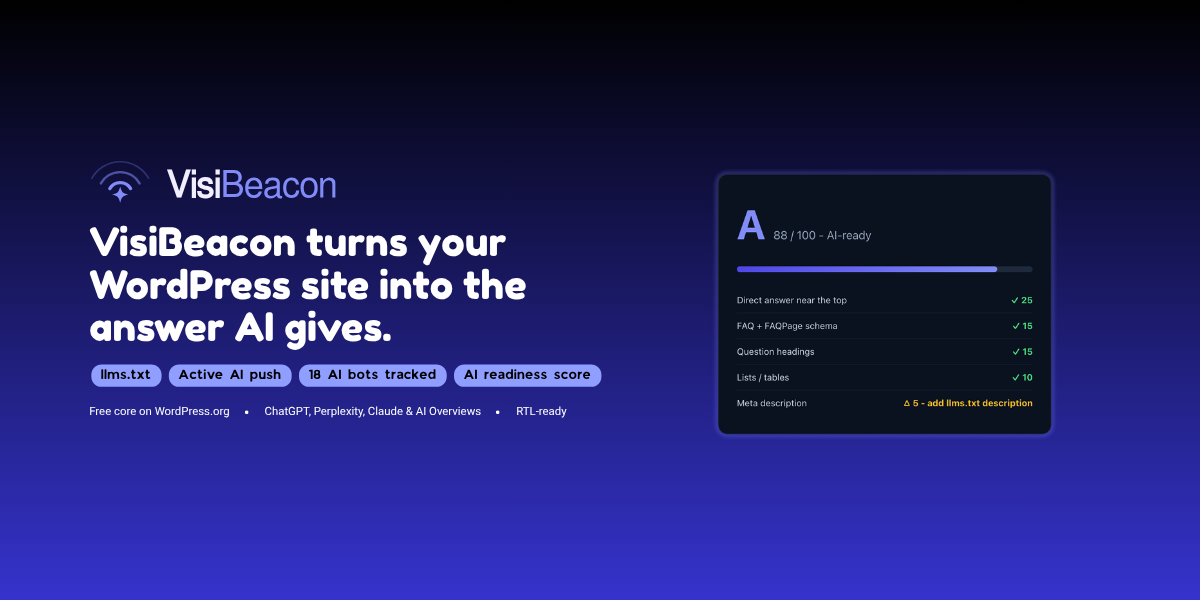
Get your site cited by ChatGPT, Perplexity, Claude and Google AI Overviews. AI answer engines are the new search. VisiBeacon makes your WordPress content visible, readable and quotable for them – a practice known as Generative Engine Optimization (GEO).
What VisiBeacon does
- llms.txt & llms-full.txt generator – serves spec-compliant /llms.txt and optional /llms-full.txt files that give AI models a clean, curated map of your site. Auto-updates as your content changes and reuses meta descriptions from Yoast, Rank Math, SEOPress and AIOSEO.
- Multilingual (WPML & Polylang) – serves a separate llms.txt per language (e.g. /en/llms.txt, /he/llms.txt), each with that language’s content, and the whole panel – summaries, key pages, FAQs, readiness – is managed per language from a language switcher. Single-language sites are unaffected.
- AI traffic dashboard – daily crawl charts, most-crawled URLs and referral visits from ChatGPT, Perplexity, Gemini, Copilot and other AI engines. All data stays in your own database; IPs are salted-hashed by default.
- Readiness score + auto-FAQ – grades every post A-D on what AI engines need (a direct answer up top, question headings, scannable structure, FAQ, freshness) with a fix checklist, and generates an FAQ section per post with valid FAQPage JSON-LD schema.
- Per-bot crawler controls – allow, block via robots.txt, or hard-block (403) each AI bot individually: GPTBot, OAI-SearchBot, ClaudeBot, PerplexityBot, Google-Extended, Applebot-Extended and more. The bot registry refreshes weekly.
- Active AI push (IndexNow) – every publish and update is submitted instantly to the index behind ChatGPT search. One-click full-site push, no account needed.
- AI enhancement (optional) – bring your own OpenAI, Anthropic or Google Gemini key for AI-written summaries, descriptions and FAQs. Fully optional – everything works without it.
Why it matters
Traditional SEO gets you ranked. GEO gets you quoted. As more people ask AI assistants instead of typing into a search box, being readable and citable by those models is how you stay visible. VisiBeacon gives you the files, signals, structure and controls to do exactly that – from one dashboard.
Requirements
WordPress 6.2+ and PHP 7.4+. Works with any theme and alongside your existing SEO plugin.
Changelog:
= 1.9.6 =
* New: "Generate a new key" button on the IndexNow tab. IndexNow caches its verification verdict per domain and key, so a domain that failed verification while the key file was unreachable can keep answering HTTP 403 for weeks even after the file works. A fresh key carries no cached verdict - every domain is verified anew on the next push.
* Fixed: on multilingual sites the llms.txt conflict notice could reappear even after VisiBeacon was correctly serving the file, wrongly naming an installed SEO plugin as the source. The check compared the live file (served in the site's primary language) against the admin language's version - it now recognizes VisiBeacon's own output in any language.
* Improved: when the serving source of /llms.txt cannot be identified from its content, the notice no longer names a plugin whose llms.txt feature is verifiably switched off.
= 1.9.5 =
- Fixed: on multilingual sites, the Key pages and Excluded content pickers mixed every language's items together. The pickers now list only the edited language's items; items of untranslatable post types stay listed in every language, matching how the multilingual plugin serves them.
- Fixed: the published counts next to Content sections (and the max-items overflow warning) counted every language's items on multilingual sites. They now count the edited language's items.
= 1.9.4 =
- New: per-language llms.txt switch on multilingual sites - "Serve llms.txt for this language", set per language. Uncheck it for languages that are defined but not in use: that language's llms.txt returns 404 while every other language keeps serving. Existing sites are unaffected.
- New: "select all" checkbox on every content-type group in the Key pages and Excluded content pickers - one click selects or clears a whole type, with a dash state when only some items are picked.
- New: FAQ status table on the FAQ tab - every published item with its FAQ count and a direct edit link, plus a clear note that FAQs are edited per page from the editor-sidebar box.
- Improved: ticking a content type under "Content sections" reveals that type's items in the pickers immediately - no more saving first just to see them.
- Improved: FAQ placement (append after content vs schema only) is now set per language, like the FAQ heading. A language without its own choice follows the primary language.
= 1.9.3 =
- New: "Free vs Pro" tab - a plain comparison of what the free plugin includes (everything listed stays fully functional) and what the separate Pro plugin adds. Nothing is locked or disabled; the tab is purely informative and disappears when Pro is installed.
- Improved: when an IndexNow push fails for some domains on a multi-domain site, only the failed domains' URLs are kept for the automatic retry - the domains that went through count as pushed and are not re-sent.
- Improved: the IndexNow verification error message now explains that IndexNow re-checks key files periodically, so a 403 can persist for a while after the key file becomes reachable and then clears on its own.
= 1.9.2 =
- Fixed: on multilingual sites, every language's llms-full.txt served the default language's content. It is now built per language exactly like llms.txt itself - translated key pages, language-filtered content, per-language cache - and the "Full Content" title follows the file's language, overridable via String Translation.
- Fixed: the bulk tools' Stop button now stops the job for every language, not only the language being viewed.
- Improved: multi-language runs show combined progress across all languages, and starting a run while jobs are still active shows one summary message instead of a popup per language.
= 1.9.1 =
- Fixed: IndexNow key verification failed (HTTP 403) on servers that answer .txt URLs themselves without reaching WordPress. The key is now also written as a real file in the web root, which every server serves; one file covers every language domain.
- New: sites with a physical robots.txt file get a copy-paste box on the Crawlers tab with the exact rules block the saved per-bot settings produce. Paste it at the end of your file to apply the rules while keeping your own entries.
- New: "All languages at once" checkbox next to the bulk FAQ generation and description tools on multilingual sites. One click starts the job for every language, running in parallel, instead of switching languages one by one.
- Improved: Key pages and Excluded content inherited from the primary language now show in the other languages' pickers as dash-marked checkboxes with an explanation. Ticking any box still replaces the inherited set with that language's own choice.
- Improved: the Dashboard's per-language links now include llms-full.txt next to each llms.txt link when enabled.
- Improved: clearer per-domain IndexNow error messages.
= 1.9.0 =
- Fixed: IndexNow pushes failed with HTTP 422 on multilingual sites using a different domain per language. Pushes are now grouped by domain and sent as one batch per domain, each keyed at that domain's root.
- Fixed: the AI Traffic dashboard counted bot crawls of non-existing URLs. Crawl responses are now recorded, 404 crawls are excluded from the dashboard counts and the most-crawled list, and the Recent activity log marks them "(404)".
- Fixed: the per-item FAQ button ignored the Mode and Target controls and regenerated a fresh 4-6 questions every click. It now behaves exactly like the bulk run: "Top up" adds only the missing questions up to the target.
- Improved: the AI model dropdown is current again (verified against each provider's official model list) and now refreshes itself weekly from a remote registry, so it no longer goes stale between releases. Custom model IDs entered manually keep working unchanged.
- Fixed: OpenAI requests now use the max_completion_tokens parameter required by GPT-5-generation models.
= 1.8.10 =
- Improved: the "Key Pages" section heading in llms.txt now follows the file's language, with built-in translations for over 30 languages. Applied automatically per language on multilingual sites and from the site locale on single-language sites; can be overridden per language via WPML String Translation or Polylang's Strings table.
= 1.8.9 =
- Fixed: on WPML and Polylang sites using String Translation for the llms.txt fields, a served file could lose its translation and fall back to the site tagline when its cache refreshed on the front end. The bridge now serves the translation whenever one exists, and the default-language text otherwise, never the tagline.
- Fixed: the per-language editor fields no longer prefill with the String Translation fallback text, which saving would have stored as a hard per-language copy. The text that will actually be served now shows as the field's placeholder instead.
- Improved: updating the plugin now clears every language's llms.txt cache, not only the default language's.
= 1.8.8 =
- Improved: AI referral counting is now reliable. Visits arriving with AI utm_source markers (such as ChatGPT's utm_source=chatgpt.com) are detected even when no referrer header is sent.
- New: a lightweight first-party browser beacon logs AI referrals on cached pages, where full-page caching previously skipped server-side logging.
- Improved: duplicate protection counts each visitor and source once per 10 minutes across both detection paths.
- New: the referral card has an info tooltip explaining what is measured vs. Search Console's "Generative AI" impressions.
= 1.8.7 =
- New: WPML String Translation support for the llms.txt site name, summary, about text and FAQ heading. The fields register automatically under WPML > String Translation, and a translation entered there is used for any language without its own value in VisiBeacon's per-language fields. No more retyping per language.
- New: the same support for Polylang via its Strings table.
= 1.8.6 =
- Fixed: on WPML "a different domain per language" sites, the dashboard's per-language llms.txt links are now built from WPML's saved domain configuration, so every language shows its own real domain.
- Fixed: Polylang "a different domain per language" sites read the domain map the same way, so per-language links are always real, working URLs.
= 1.8.5 =
- Fixed: on multilingual sites where each language uses its own domain, the dashboard listed per-language llms.txt links that did not exist. Links are now resolved per language, so directory, per-domain and language-parameter setups all show the real, working URL. The served files themselves were always correct.
= 1.8.4 =
- New: Amazon's search crawlers Amzn-SearchBot (feeds Alexa and Rufus answers) and Amzn-User (on-demand fetches) are now detected and controllable per bot, alongside Amazonbot.
- Fixed: Amazonbot is now labeled as Amazon's crawl and AI-training bot; the Alexa and Rufus attribution moved to Amzn-SearchBot, matching Amazon's own documentation.
= 1.8.3 =
- Removed: unused image files that shipped inside the plugin folder, for a smaller download.
- Fixed: the plugin name and description on the Plugins screen now match the product listing.
- Improved: consistent punctuation across all admin messages.
= 1.8.2 =
- Improved: backup folder protection uses Apache 2.4 and 2.2 compatible syntax.
- Improved: API keys are no longer included in data exports or snapshots; restores keep the key already on the site.
= 1.8.1 =
- Improved: custom styling now goes through WordPress's Additional CSS editor, and the FAQ settings document the CSS classes.
= 1.8.0 =
- New: Auto-Optimize. One click runs the full pipeline (scores, site summary, descriptions, FAQs with schema, re-score) and reports the average readiness before and after, with example pages.
- New: Auto-Maintain. New and updated content automatically gets its description, FAQs and score, then the enriched version is pushed via IndexNow.
- New: automatic daily safety snapshot in the uploads folder, with one-click restore.
- New: content sections per language, with published counts and overflow warnings.
- Improved: counts explain exactly what was left out and why; explicitly checked Key Pages are never auto-excluded.
- Improved: the readiness table shows what changed since the last analysis.
- Improved: the IndexNow tab shows how many URLs a full push would send vs. the last push.
= 1.7.15 =
- Improved: database queries hardened with prepared identifier placeholders.
= 1.7.14 =
- New: custom post types that are queryable but not fully public (projects, portfolios) appear in the Content sections picker, and untranslatable post types show in every language on WPML sites.
- Changed: curated Key Pages are now the only pages listed in llms.txt.
- New: FAQ appearance setting with styled accordion or unstyled output, plus a custom CSS box.
- Improved: the bulk FAQ generator remembers your last Target questions count.
- Improved: Enable/Disable schema for all now acts per language.
= 1.7.12 =
- New: "AI Connection" tab, second in the menu, with AI provider, API key, model and Test connection in one obvious place. The push tab is now simply "IndexNow".
- Improved: content excluded from llms.txt, marked noindex by your SEO plugin (Yoast, Rank Math, SEOPress, All in One SEO) or password protected is left out of llms.txt and out of the FAQ, Readiness and description lists, counts and bulk jobs.
= 1.7.11 =
- Improved: on the llms.txt tab, the bulk "llms.txt descriptions" tool now sits directly under Save Changes, with the long file preview moved to the bottom.
= 1.7.10 =
- Changed: the export/import and uninstall-behavior controls moved to their own "Data & Backup" tab.
= 1.7.9 =
- Changed: your data now survives uninstalling. Deleting the plugin keeps all settings, AI traffic history, FAQs, descriptions and readiness scores by default; a new opt-in "Remove ALL VisiBeacon data when the plugin is deleted" checkbox restores the old wipe-everything behavior.
- New: full data export and import. A "Your data" card on the Dashboard downloads everything the plugin stores as a JSON backup and restores it on the same site.
= 1.7.8 =
- Improved: filesystem calls updated to WordPress core wrappers (wp_is_writable, wp_delete_file).
= 1.7.7 =
- Changed: internal naming cleanup; all identifiers now carry the full visibeacon prefix. No functional change.
= 1.7.6 =
- Fixed: the dashboard showed the same llms.txt URL for every language on WPML sites. The served files were always correct.
- Improved: FAQ visibility buttons are placement-aware; "Enable/Disable schema for all" appears in schema-only mode, with a note that schema-off items lose readiness points.
- Improved: added spacing between the two bulk visibility buttons.
= 1.7.5 =
- Fixed: a background job started for one language showed as "running" on the other languages' tabs. Each language now runs its own independent job, in parallel, with each tab showing only its own progress.
= 1.7.4 =
- Fixed: FAQ, Readiness and llms.txt-description counts and item lists showed the same totals for every language. They now count and list each language's own items.
- Improved: background generate, analyze and describe jobs process only the selected language's items.
= 1.7.3 =
- New: language switcher extended to the FAQ and Readiness tabs, so the whole panel is managed per language.
- New: the visible FAQ heading is set per language and shown to each language's visitors in their own language.
= 1.7.2 =
- New: language switcher on the llms.txt tab; site name, summary and "About your site" are stored and edited per language.
- New: Key Pages and Excluded content are chosen per language; an empty language reuses the primary language's picks, mapped to their translations.
- Improved: post-type section headings in each language's llms.txt appear in that language.
- Changed: Key Pages and Excluded content pickers changed from Ctrl-multiselect to checkbox lists.
- Fixed: switching language no longer clears the other language's page selections.
- Improved: "Generate with AI" for the summary and About text writes in the language being edited.
= 1.7.1 =
- Fixed: false "another plugin is serving llms.txt" notice when a stale file was left on disk.
- Improved: the AI key field turns green automatically after the first successful generation.
- Improved: the per-item table (score, FAQ, describe) appears on the FAQ tab too, not only Readiness.
= 1.7.0 =
- New: multilingual llms.txt. On WPML or Polylang sites a separate llms.txt is served per language (e.g. /he/llms.txt, /en/llms.txt), each listing that language's content, with key and excluded pages mapped to their translations.
- Improved: the AI Summary and "About your site" writers write in your site's language, and "About your site" gets its own Generate with AI button.
= 1.6.0 =
- New: redesigned admin with a card-based layout, brand-styled section headers and tab icons.
- Changed: Pro tools reorganized so each lives on the right screen: "Write llms.txt descriptions" on the llms.txt tab, the content-readiness score table on a new Readiness tab, and FAQ generation on the FAQ tab.
= 1.5.14 =
- Changed: admin reorganized around features; every setting now lives on the screen where you use it. The catch-all Settings tab is gone (FAQ output on a FAQ tab; IndexNow and your AI key on an "AI & Push" tab), and tabs now carry icons.
= 1.5.13 =
- Fixed: bulk FAQ generation no longer shows a "could not parse" error for thin-content items such as gallery images; those are skipped quietly and only genuine API errors are flagged.
= 1.5.12 =
- Improved: "Key pages" and "Excluded content" pickers now match your selected content types, and the readiness and FAQ tools cover those types too, custom post types included.
= 1.5.11 =
- Improved: "Key pages" and "Excluded content" now cover every public content type (posts, pages and custom post types), grouped by type. Clearer "About your site" field and generic FAQ-generation wording.
= 1.5.10 =
- Fixed: "Push all URLs now" (IndexNow) on multilingual sites.
- Improved: the AI key field turns green immediately after a successful connection test.
= 1.5.9 =
- Improved: when Pro is installed but not yet licensed, the editor box shows a single "Activate your license" prompt instead of buttons that cannot run yet.
= 1.5.8 =
- Improved: clearer license activation; unlicensed Pro installs show a prominent "Enter your license key" button that opens the right screen.
= 1.5.7 =
- Fixed: the one-click "let VisiBeacon take over" now correctly switches off All in One SEO's llms.txt.
= 1.5.6 =
- Improved: smarter llms.txt conflict handling; names the exact source (All in One SEO, Rank Math, Yoast, SEOPress or a static file) and offers a one-click take-over.
= 1.5.5 =
- Improved: FAQ AI generation no longer reports "could not parse the AI response" on code-fenced, object-wrapped or truncated output, and salvages every complete question and answer pair.
= 1.5.4 =
- Fixed: the free and Pro editions now install and update cleanly side by side.
= 1.5.3 =
- Improved: added a direct-access guard to the shared uninstall-cleanup include.
= 1.5.2 =
- Changed: all Pro functionality now lives entirely in the separately distributed Pro plugin; the free plugin ships zero licensing code and every included feature is fully functional.
- New: admin dashboard, traffic, llms.txt and settings screens expose public action and filter hooks that extensions can build on.
- Changed: llms-full.txt serving moved out of the free plugin completely.
= 1.5.1 =
- Changed: FAQ output, FAQPage schema and accordion styling are always active in the free plugin.
- Changed: llms-full.txt generation moved to the premium plugin.
- Improved: admin menu icon styling now uses wp_add_inline_style().
= 1.5.0 =
- Changed: restructure. The free version ships completely without premium code; manual FAQ with FAQPage schema, llms.txt, Active AI push, bot detection and crawler controls are fully functional with nothing locked.
- Changed: Pro features (readiness scoring, auto-FAQ, AI traffic dashboard, AI writing) are delivered as separate modules in the premium build.
= 1.4.5 =
- New: the AI bot registry refreshes automatically every week, so new crawlers are detected without waiting for a plugin update.
- Improved: clearer FAQ visibility controls with live counts.
= 1.4.4 =
- Improved: FAQ visibility is a single-row segmented control showing active state and displayed vs. hidden counts, updating live.
- Improved: dashboard score cards moved to their own row.
= 1.4.3 =
- Changed: "Push all URLs now" has a once-a-day cooldown; automatic per-publish pushes are unaffected.
- Improved: the IndexNow status line refreshes immediately after a push.
= 1.4.2 =
- Improved: IndexNow first-time key verification is handled gracefully; the batch is queued and retried automatically until verification completes.
= 1.4.1 =
- Fixed: IndexNow 403; the key file is now served directly from the request, reliable on any permalink or cache setup.
- Improved: the AI model is now a dropdown with per-provider options and a recommended choice.
= 1.4.0 =
- New: Active AI push (IndexNow). Publishes and updates are pushed instantly to the index that powers ChatGPT search. Self-generated key, batched pings, one-click full-site push, no account needed.
= 1.3.5 =
- Fixed: admin menu icon enlarged and thickened for small sizes.
= 1.3.4 =
- Fixed: admin menu icon sizing.
= 1.3.3 =
- Improved: the admin menu shows the VisiBeacon beacon icon.
= 1.3.2 =
- Improved: official VisiBeacon logo and indigo brand color applied across the admin.
= 1.3.1 =
- Improved: flat Site Kit-style admin tabs with an underline indicator.
= 1.3.0 =
- New: Google Gemini supported as an AI provider, alongside OpenAI and Anthropic.
- New: interactive daily AI-traffic chart (crawls and referral visits).
- Improved: refreshed dashboard with restyled KPI cards and engine bars.
= 1.0.0 =
- Initial release: llms.txt generator, AI traffic tracker, quotability scoring with auto-FAQ and FAQPage schema, per-bot crawler controls.
Only logged in customers who have purchased this product may leave a review.
Loading...
Seller support site
 Support by Miotix
Support by Miotix
Miotix provides support on their own website
The seller uses an external help center for product questions, bug reports, and support requests.
Visit support site
Opens the seller's support website in a new tab.
What support includes
- Answers to product-related questions
- Help with reported bugs and issues
- Guidance for included third-party assets
What support does not include
- Customizations or new features
- Installation or setup services
Plugin
Maintenance snapshot
See recent updates, compatibility, support, and developer activity.
- Updated 8 days ago
- Developer active recently
- Developer-site support available
- WordPress 7.0 tested
Snapshot updated 19 hours ago
View details Hide details
Maintenance details
This is maintenance data. It does not measure product quality or sales.
- Last update Updated 8 days ago
- Compatibility WordPress 7.0 tested, one version behind · PHP 8.5 tested · WooCommerce 10 tested, one version behind
- Releases 17 releases in the 92 days since listing
- Developer activity Developer active recently
- Support Support is offered on the developer's site, not through WPBay tickets
- Docs and demo Documentation available · Changelog available · No demo listed
Health reflects increased activity during the last 90 days.
How this snapshot works
Plugin Health
The score is out of 100 and uses data WPBay can check. Ratings, popularity, and sales are not used.
- Last update 30 points
-
Plugins receive full recency points under 30 days, then step down at 90, 180, 365, and 545 days.
- Compatibility 20 points
-
WordPress, PHP, and WooCommerce (when relevant) are scored separately. The latest two PHP lines count as current. Nearby previous versions keep most of the points.
- Current version 100%
- One version behind 75%
- Two versions behind 50%
- Three versions behind 25%
- Older or not listed 0%
- Releases 15 points
-
One release earns 10, two or three earn 13, and four or more earn 15. Each accepted product ZIP counts once; reprocessing the same upload and listing-only edits do not count.
- Developer activity 15 points
-
Based on WPBay login and dashboard activity. Exact last-login dates are never shown.
- Support Not scored
-
WPBay cannot measure response times for email or support on another site, so support is not scored.
- Docs and demo 5 points
-
Documentation: 2. Changelog: 1. Working demo or preview: 2.
Score ranges
- 90–100 Excellent
- 75–89 Healthy
- 60–74 Fair
- 40–59 Needs attention
- 0–39 Limited
Long gaps
WPBay also checks for long gaps between updates, developer activity, support replies, and releases. Buyers do not see this score.
- Time since update 35 points
- Last developer activity 25 points
- WordPress compatibility 15 points
- Support replies Not scored
- Fewer releases 10 points
-
Quality verified by WPBay
WPBay review- Reviewed version
- 1.8.4
- Review completed
- Reviewer
- CodeRevolution
- Review type
- Initial
Version note: The current release is 1.9.6. The last recorded WPBay review applies to version 1.8.4.
No unresolved approval blocker was identified during WPBay’s proportionate review of this release. This is not a security certification or a guarantee that the product contains no defects.
-
 Future updates
-
Support through the seller website
-
GPL code, proprietary assets
-
Covered by the WPBay refund policy
-
Plugin maintenance snapshot
Relevant picks
You may also like
Similar products selected by category, features, popularity and freshness.

 1 month free

From this seller
View seller store
More by Miotix
Explore more bestselling products from this creator.
Reviews
There are no reviews yet.