


BirchToad – Accessibility Toolbar

 Recently Updated
Well Documented
Recently Updated
Well Documented
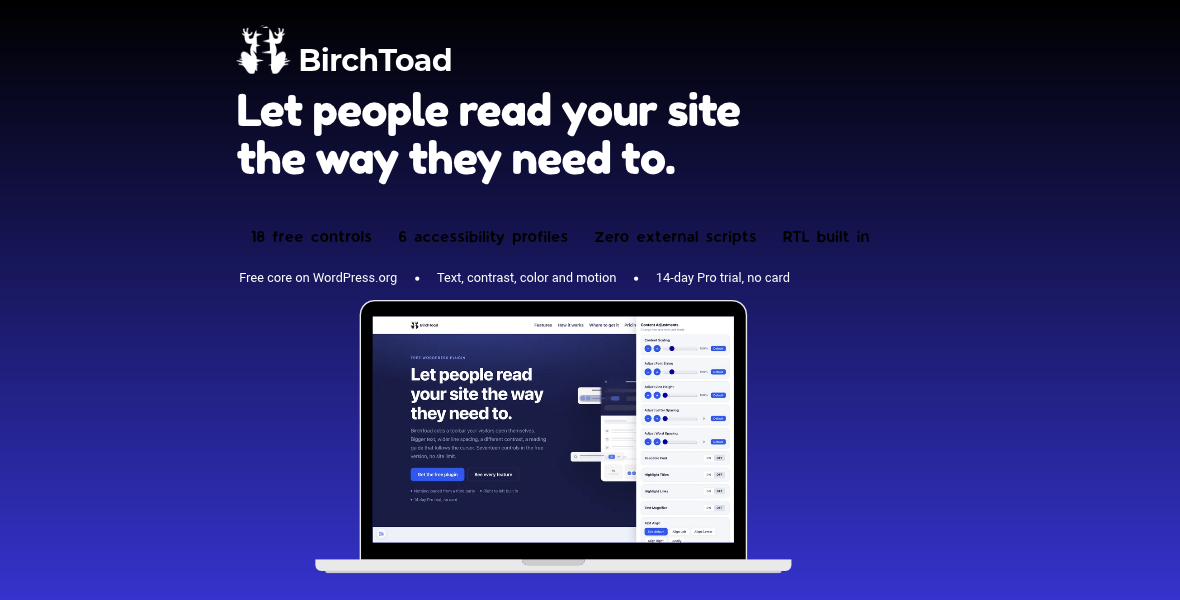
BirchToad adds a small button to your site. A visitor who clicks it gets a panel where they can change how your pages look and behave, to suit how they read: bigger text, more spacing, a readable font, stronger contrast, a dark or light theme, less saturation, highlighted links and headings, a reading guide, a big cursor, animations stopped, images hidden. Their choices are remembered in their own browser, and nothing is sent anywhere. This WPBay edition carries all 34 controls unlocked. There is no license key, no account to connect and no upgrade prompt anywhere in the plugin.
What BirchToad is, and what it is not
BirchToad helps real people use your site, and it supports the accessibility work you do. It does not make a website accessible, compliant or conformant with WCAG, the ADA or the European Accessibility Act, and no toolbar can. Missing alternative text, an unclear heading order, unlabelled form fields and keyboard traps all have to be fixed in the site itself. We would rather tell you that plainly than sell you a badge.No external requests
Every stylesheet, script and icon is served from your own server. BirchToad contacts nothing, loads nothing from a CDN and has no account to sign up for. That is a privacy and performance difference from the hosted overlay services, not a detail.Built for right to left sites
The panel lays out right to left whenever your site does, and that works before any translation exists, because direction is read from the site and not from a language file. Hebrew and Arabic were in the first release rather than added later.The 18 reading and display controls
- Content scaling, font size, line height, letter spacing and word spacing, each with a reset to default
- A readable font
- Highlighted links and highlighted headings
- Text alignment
- Light, dark and high contrast themes
- Saturation: high, low or monochrome
- A big black or white cursor
- Highlighted focus and highlighted hover
- A reading guide
- Animations stopped
- Images hidden
The 16 additional controls in this edition
- Six one click profiles: Seizure Safe, Vision Impaired, ADHD Friendly, Cognitive Disability, Keyboard Navigation and Blind Users
- Adjust text, title and background colors, from a preset palette or a custom picker
- Read Mode, which narrows the reading line and clears sidebars and video from the article
- Page Structure, a jump list of every heading and region on the page
- Reading Mask and Text Magnifier
- Read Aloud and Mute Sound
- Useful Links, a jump menu you define
For the site owner
- Choose which of the 34 controls appear, and in what order
- Pick the button position, size, shape, color and icon, with a visual icon picker
- Hide the button on chosen pages
- Translation ready, with Hebrew included
- Works alongside your theme and page builder rather than replacing their markup
Requirements
WordPress 6.3 or newer and PHP 7.4 or newer.
Changelog:
= 0.1.3 =
* The Blind Users (Screen Reader) profile now turns on the skip link itself, rather than relying on the Keyboard Navigation profile to do it. Switching Keyboard Navigation off by hand used to leave Blind Users switched on without the skip link its own description promises.
* Each profile now provides everything it describes on its own. Switching one profile off never takes away something another enabled profile still offers.
* A profile switch now turns itself off when you change one of the adjustments it applied. A profile that is on means those adjustments are on, so leaving it on after you had changed one of them by hand made the panel say something that was not true. Your adjustment is kept exactly as you set it; only the profile stops claiming it.
= 0.1.2 =
- Switching the Blind Users (Screen Reader) profile off now also switches off the Keyboard Navigation profile it switched on, and takes the skip link with it. Previously the skip link stayed on the page after the profile that created it was switched off.
- Switching off one of that pair no longer clears the focus outline while the other one is still on. An adjustment another active profile still asks for is left alone.
- Either profile can still be switched off on its own. Only the one that was switched on automatically is switched off automatically.
- Reset Settings now clears the skip link as well.
- Read mode no longer throws an error on pages that have an article, a main element or an entry content wrapper, which is most pages.
- The readme listed seventeen visitor controls and left out word spacing and page structure. This edition has all thirty four.
= 0.1.1 =
- The Blind Users (Screen Reader) profile no longer changes your page’s markup. It previously added an empty alt attribute to images that had none, and landmark roles to header, nav, main, footer and aside elements. A missing alt attribute does not mean an image is decorative, and marking it so hides that image from screen readers entirely. Neither change was undone when the profile was switched off. Both have been removed.
- The profile now turns on a skip link and a visible focus outline, and takes both back when it is switched off. Its description says so, and says that it does not alter your markup.
- The keyboard profile now also removes the id it borrows from your main element, if it had none of its own, when the profile is switched off.
- The accessibility scanner only accepts addresses on your own site. A browser will not let it read a page on another domain, so those addresses now get an explanation instead of a failed scan.
= 0.1.0 =
- First release.
Only logged in customers who have purchased this product may leave a review.
Loading...
WPBay support
 Support by Miotix
Support by Miotix
Miotix supports this product through WPBay
Questions are handled in WPBay's private ticket system, keeping your purchase details and support conversation together.
Go to My Downloads
After purchase, open this item in My Downloads and choose Get Support.
What support includes
- Answers to product-related questions
- Help with reported bugs and issues
- Guidance for included third-party assets
What support does not include
- Customizations or new features
- Installation or setup services
Plugin
Maintenance snapshot
See recent updates, compatibility, support, and developer activity.
- Updated 1 day ago
- Developer active recently
- WPBay support available
- WordPress 7.1 tested
Snapshot updated 31 minutes ago
View details Hide details
Maintenance details
This is maintenance data. It does not measure product quality or sales.
- Last update Updated 1 day ago
- Compatibility WordPress 7.1 tested · PHP 8.5 tested
- Releases 5 releases in the 2 days since listing
- Developer activity Developer active recently
- Support No recent support tickets to measure
- Docs and demo Documentation available · Changelog available · Demo available
How this snapshot works
Plugin Health
The score is out of 100 and uses data WPBay can check. Ratings, popularity, and sales are not used.
- Last update 30 points
-
Plugins receive full recency points under 30 days, then step down at 90, 180, 365, and 545 days.
- Compatibility 20 points
-
WordPress, PHP, and WooCommerce (when relevant) are scored separately. The latest two PHP lines count as current. Nearby previous versions keep most of the points.
- Current version 100%
- One version behind 75%
- Two versions behind 50%
- Three versions behind 25%
- Older or not listed 0%
- Releases 15 points
-
One release earns 10, two or three earn 13, and four or more earn 15. Each accepted product ZIP counts once; reprocessing the same upload and listing-only edits do not count.
- Developer activity 15 points
-
Based on WPBay login and dashboard activity. Exact last-login dates are never shown.
- Support 15 points
-
There are no recent WPBay tickets to measure.
- Docs and demo 5 points
-
Documentation: 2. Changelog: 1. Working demo or preview: 2.
Score ranges
- 90–100 Excellent
- 75–89 Healthy
- 60–74 Fair
- 40–59 Needs attention
- 0–39 Limited
Long gaps
WPBay also checks for long gaps between updates, developer activity, support replies, and releases. Buyers do not see this score.
- Time since update 35 points
- Last developer activity 25 points
- WordPress compatibility 15 points
- Support replies 15 points
- Fewer releases 10 points
-
Quality verified by WPBay
WPBay review- Reviewed version
- 0.1.3
- Review completed
- Reviewer
- CodeRevolution
- Review type
- Initial
No unresolved approval blocker was identified during WPBay’s proportionate review of this release. This is not a security certification or a guarantee that the product contains no defects.
-
 Future updates
-
WPBay support from Miotix
-
GPL code, proprietary assets
-
Covered by the WPBay refund policy
-
Plugin maintenance snapshot
Relevant picks
You may also like
Similar products selected by category, features, popularity and freshness.


Reviews
There are no reviews yet.