



CookiePile Pro – Cookie Consent & Consent Mode v2

 Recently Updated
Well Documented
Recently Updated
Well Documented
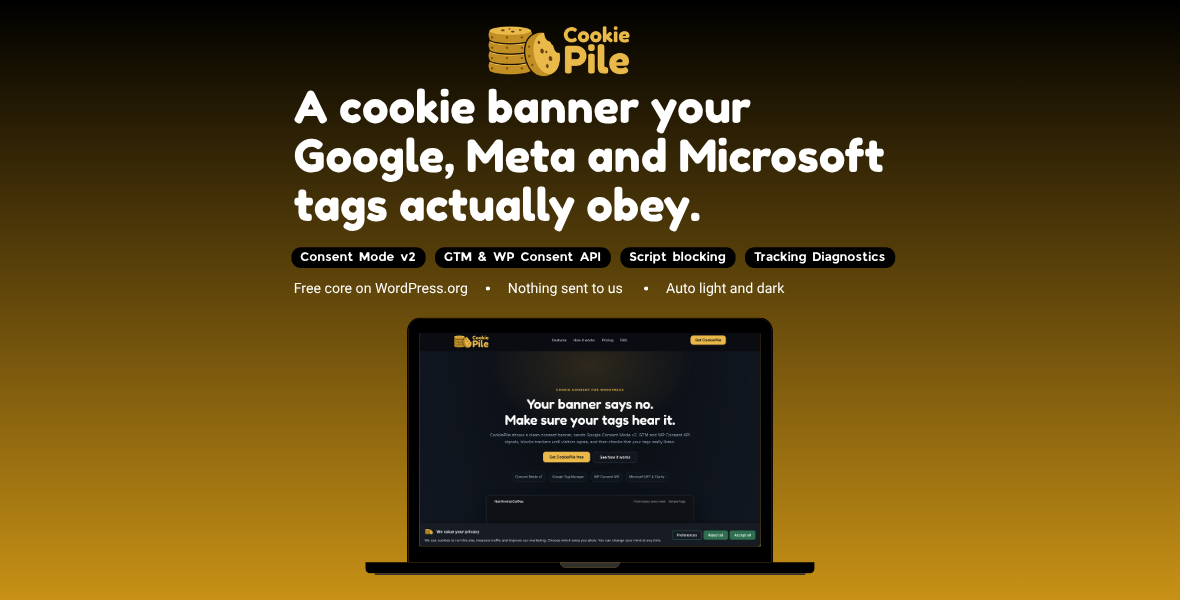
Your banner says no. Make sure your tags hear it.
Most cookie banners stop at the banner. CookiePile also makes sure Google, Meta, TikTok and Microsoft tags actually follow the visitor’s choice, and gives you a diagnostics screen that proves it.
Tracking Diagnostics
Load any page of your site the way a visitor sees it (before a choice, after “Reject all”, after “Accept all”) and get a plain-language report of:
- tracking requests or cookies that fire before the visitor agrees
- Google tags that report consent as granted when it was not
- a consent default that loads after your tags, or that a speed plugin delays
- duplicate GA4 ids, Tag Manager containers and Meta pixels
- a second consent tool fighting the first one
Everything runs on your own site and in your own browser. Nothing is sent to CookiePile or anyone else.
Consent signals
- Google Consent Mode v2, all seven consent types, printed at the top of the page before any Google tag. Basic or Advanced mode.
- Google Tag Manager: a
cookiepile_consent_updatedataLayer event, ready to use as a trigger. - WP Consent API: Site Kit, WooCommerce and other plugins that read it follow the visitor’s choice.
- Microsoft Advertising (UET) and Microsoft Clarity consent.
- Meta and TikTok pixel consent APIs: the pixels load with consent revoked and switch on only after the visitor agrees, so you keep your pixel setup and your ad data stays clean.
Region rules and Global Privacy Control
Show the opt-in banner where the law asks for it, a lighter notice elsewhere, and respect the browser’s Global Privacy Control signal automatically.
Blocking
- About 45 known tracking services (Meta Pixel, TikTok, LinkedIn, Pinterest, Hotjar, HubSpot, X, Snap and more) wait until the visitor allows their category.
- Scripts injected later by tag managers and page builders are caught too.
- YouTube, Vimeo, Google Maps and other embeds become a click-to-load placeholder.
- Add your own services with a simple form.
Monitoring and reports
- Weekly monitoring checks your site and emails you when a new third-party service appears or a consent problem comes back.
- A client-ready report you can send to a client or your legal advisor.
Consent log
- Stored on your own site: random consent ID, choice, version, date and a salted hash of a shortened IP address.
- Search any visitor’s choice by consent ID.
- CSV export and consent statistics.
Banner
- Bar, corner box or center dialog. Your logo, colors, radius and font size, no code needed.
- Automatic light or dark style that matches your site.
- Banner texts follow the site language (English, German, French, Spanish, Italian, Dutch, Brazilian Portuguese and Hebrew included).
- “Reject all” has the same weight as “Accept all” by default.
- A small floating button (or a shortcode) lets visitors change their mind.
- Keyboard and screen reader friendly, full right-to-left support.
Also included
- Cookie scanner and a cookie list shortcode for your cookie policy page.
- Settings export and import.
- Works with page caching: the banner is decided in the browser.
Installation
- Download the zip from your WPBay account.
- In WordPress go to Plugins > Add New > Upload Plugin, choose the zip, click Install Now, then Activate.
- Open CookiePile in the admin menu. The defaults are safe: opt-in, Advanced Consent Mode, blocking on.
- Pick your cookie policy page on the Banner tab.
- Open Tracking Diagnostics and run it on your home page.
- Optional: install the free WP Consent API plugin if you use Site Kit or WooCommerce.
No license key is needed. All Pro features are active right after activation.
Requirements
- WordPress 6.3 or newer (tested up to 7.1)
- PHP 7.4 or newer
FAQ
Does this make my site GDPR compliant? No plugin can do that on its own. CookiePile gives you the technical parts: consent before tracking, signals your tags understand, a log, and a way to verify it. Your legal advisor can tell you what else your site needs. Basic or Advanced Consent Mode? Advanced lets Google tags send cookieless signals until the visitor chooses, which keeps modeled conversions in Google Ads and GA4. Basic blocks Google tags completely until consent. Both are supported. Does it work with Site Kit, GTM4WP and WooCommerce? Yes. The consent default prints before their tags. For Site Kit and WooCommerce, also install the free WP Consent API plugin. My speed plugin delays JavaScript. Exclude cookiepile-head and cookiepile.js from delay, defer and combine features. Tracking Diagnostics tells you when this is needed. Does CookiePile send data anywhere? No. Diagnostics, the scanner and the consent log all run on your own site. This edition contains no licensing SDK and makes no outside calls. How do I get updates? Download the new version from your WPBay account and upload it over the old one (Plugins > Add New > Upload Plugin, then “Replace current with uploaded”). Your settings are kept. What is the difference from the free version? The free core version has the banner, Consent Mode v2, GTM, WP Consent API, Microsoft consent, blocking, Tracking Diagnostics, scanner and consent log. This edition adds Meta and TikTok pixel consent, region rules with Global Privacy Control, weekly monitoring with email alerts, the client report, and consent log export and statistics.
Support
Support covers setup, bugs and questions about CookiePile. We reply within one business day. It does not cover custom development or legal advice. Documentation: cookiepile.com/documentation. CookiePile helps you work toward compliance. It is not legal advice, and no plugin can make a site compliant on its own.
Changelog:
= 0.1.13 =
* Maps, charts and other embeds that a script draws on the page now show the same "blocked until you allow" box that blocked iframes show. The script was being blocked correctly, but the space the embed would have filled was left empty, so visitors saw a blank gap with nothing to click. Advanced Custom Fields map containers are recognized on their own, and any container can be marked up with data-cookiepile-embed="service-id" to get the box.
* Allowing a category now tells the page when the newly allowed scripts have finished loading, with a cookiepile:unblocked event. A theme that draws its own map or chart can listen for that and draw it straight away, instead of the visitor having to reload the page before the embed appears.
= 0.1.12 =
* Button color source "Automatic" no longer borrows a color from things that are not your site's design. It was reading the WordPress admin bar, so a logged-in administrator could see WordPress blue, and a single colored link anywhere on a page, so a site whose only colored link was in an accessibility widget changed color from page to page. A color now has to be your theme's palette, a button fill, or a color your links actually use more than once.
* The floating button's Left and Right settings are now literal. On right-to-left sites "Left" put the button in the right-hand corner.
* Hovering "Save choices" in the preferences dialog no longer slides the Reject and Accept buttons sideways.
* Picking a color no longer throws you back to the top of the settings page. The marker inside the color picker's square is a link, and clicking it without dragging followed that link, which cost you your place on a long screen.
= 0.1.11 =
* Button color source "Automatic" now finds your theme's color on far more sites. It was only looking at one place in the page, which missed Elementor and several block themes entirely, so those sites quietly fell back to the default green.
* The button color you choose is used exactly as you chose it. 0.1.10 lightened it for contrast on dark banners and showed the lightened version, so the buttons were never quite the color in the picker.
* Buttons are now protected from theme and page builder styles, the way the switches already were. On dark banners a theme's own button styling could repaint them, and the rollover left the label unreadable.
* The Preferences button reads as the quiet button again on a dark banner instead of looking like the Accept and Reject buttons.
* The switches in the preferences dialog were too close to the background to see, on light and dark alike. They now meet the contrast a control is supposed to have.
= 0.1.10 =
* Dark banners: the accent color, whether borrowed from your site or chosen on the Banner tab, is now checked against the banner background and lightened when it would be too dark to see. On dark sites this was leaving the cookie icon, the button outline and the switches close to invisible, and the Accept and Reject buttons sinking into the banner.
* The switches read correctly on a dark banner, and "Always on" no longer looks switched off.
* Banner tab: the Button color field is dimmed while Button color source is set to Automatic, with a line saying the color is coming from your theme. It used to look editable while having no effect.
* The translation files for Arabic, Russian, Polish, Czech and Romanian declared more plural forms than they carried, which stricter gettext tools reject.
* Arabic now covers the admin screens as well as the banner.
= 0.1.9 =
* Right to left fix: on a right to left site whose theme does not set the page direction, the small floating button stayed on the left while the banner correctly mirrored. It now follows the banner.
* Thirteen more languages for the banner and the preferences dialog: Arabic, Russian, Polish, European Portuguese, Swedish, Danish, Finnish, Norwegian, Czech, Greek, Romanian, Hungarian and Turkish. Twenty in all, and the banner follows your site language on its own. Arabic and Hebrew lay out right to left.
* The optional CookiePile credit line is translated in every one of those languages too.
= 0.1.8 =
* Fixed: on sites that show a logo, the banner and preferences title was rendered smaller and faded. The credit line added in 0.1.7 shared a style class with the logo row. Please update.
* The cookie icon is now the standard logo on the banner and in the preferences dialog, so the banner says "cookies" at a glance. The Banner tab still offers the site icon, the theme logo, your own image address, or no logo at all.
* The credit line, when you switch it on, now shows the cookie icon next to the text.
= 0.1.7 =
* The small floating button now shows a cookie icon instead of your site logo. On a button that stays on screen after the visitor has already chosen, the site's own logo said nothing about what the button does. Your logo still appears on the banner and in the preferences dialog.
* New "Button color source" setting. On Automatic, the banner borrows your theme's own accent color, looking at the theme palette first, then a button, then a link, and picks readable button text to match. Switch it to the manual option if you would rather set the color yourself.
* New optional line in the preferences dialog crediting CookiePile. Off unless you switch it on, and never shown on the banner itself.
= 0.1.6 =
* The admin menu icon style is enqueued instead of printed inline.
* The blocker now closes its own output buffer explicitly instead of leaving it to PHP.
* Asset versions are read without silencing errors.
* readme: the External services section makes clear that this edition contacts
nothing, and that the tracking addresses in the code are patterns for
recognizing your own tags, not requests this plugin makes.
= 0.1.4 =
* This edition now ships with no licensing code at all: no SDK, no product ids,
no license checks and no upgrade screens, with documentation written for the
WPBay build. No change to the banner, the signals or the diagnostics.
= 0.1.3 =
* The admin menu shows the CookiePile icon in color.
* Preferences dialog: Save sits on the left, Reject and Accept on the right.
* The switches, the close button and the floating button keep their look on
themes and page builders that style every input and button.
= 0.1.1 / = 0.1.0 = (unchanged from the shared readme)
Only logged in customers who have purchased this product may leave a review.
Loading...
WPBay support
 Support by Miotix
Support by Miotix
Miotix supports this product through WPBay
Questions are handled in WPBay's private ticket system, keeping your purchase details and support conversation together.
Go to My Downloads
After purchase, open this item in My Downloads and choose Get Support.
What support includes
- Answers to product-related questions
- Help with reported bugs and issues
- Guidance for included third-party assets
What support does not include
- Customizations or new features
- Installation or setup services
Plugin
Maintenance snapshot
See recent updates, compatibility, support, and developer activity.
- Updated 24 days ago
- Developer active recently
- WPBay support available
- WordPress 7.1 tested
Snapshot updated 6 hours ago
View details Hide details
Maintenance details
This is maintenance data. It does not measure product quality or sales.
- Last update Updated 24 days ago
- Compatibility WordPress 7.1 tested · PHP 8.5 tested · WooCommerce 11 tested
- Releases 11 releases in the 47 days since listing
- Developer activity Developer active recently
- Support No recent support tickets to measure
- Docs and demo Documentation available · Changelog available · Demo available
Health remained stable during the last 90 days.
How this snapshot works
Plugin Health
The score is out of 100 and uses data WPBay can check. Ratings, popularity, and sales are not used.
- Last update 30 points
-
Plugins receive full recency points under 30 days, then step down at 90, 180, 365, and 545 days.
- Compatibility 20 points
-
WordPress, PHP, and WooCommerce (when relevant) are scored separately. The latest two PHP lines count as current. Nearby previous versions keep most of the points.
- Current version 100%
- One version behind 75%
- Two versions behind 50%
- Three versions behind 25%
- Older or not listed 0%
- Releases 15 points
-
One release earns 10, two or three earn 13, and four or more earn 15. Each accepted product ZIP counts once; reprocessing the same upload and listing-only edits do not count.
- Developer activity 15 points
-
Based on WPBay login and dashboard activity. Exact last-login dates are never shown.
- Support 15 points
-
There are no recent WPBay tickets to measure.
- Docs and demo 5 points
-
Documentation: 2. Changelog: 1. Working demo or preview: 2.
Score ranges
- 90–100 Excellent
- 75–89 Healthy
- 60–74 Fair
- 40–59 Needs attention
- 0–39 Limited
Long gaps
WPBay also checks for long gaps between updates, developer activity, support replies, and releases. Buyers do not see this score.
- Time since update 35 points
- Last developer activity 25 points
- WordPress compatibility 15 points
- Support replies 15 points
- Fewer releases 10 points
-
Quality verified by WPBay
WPBay review- Reviewed version
- 0.1.4
- Review completed
- Reviewer
- CodeRevolution
- Review type
- Initial
Version note: The current release is 0.1.13. The last recorded WPBay review applies to version 0.1.4.
No unresolved approval blocker was identified during WPBay’s proportionate review of this release. This is not a security certification or a guarantee that the product contains no defects.
-
 Future updates
-
WPBay support from Miotix
-
GPL code, proprietary assets
-
Covered by the WPBay refund policy
-
Plugin maintenance snapshot
Relevant picks
You may also like
Similar products selected by category, features, popularity and freshness.



From this seller
View seller store
More by Miotix
Explore more bestselling products from this creator.
Reviews
There are no reviews yet.