


DeployPress – WordPress Content Deployment & Staging Sync

 Recently Updated
Well Documented
Recently Updated
Well Documented
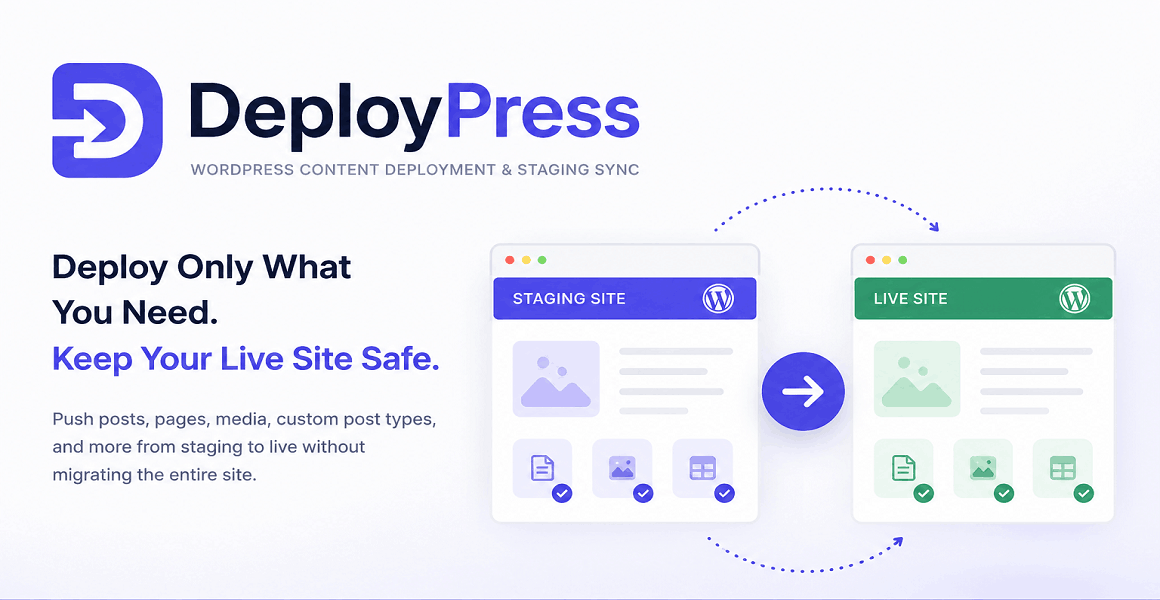
DeployPress is a WordPress content deployment plugin that helps you move selected content from one WordPress website to another without migrating the entire site.
It is made for developers, agencies, freelancers, and website owners who use a staging website, local development site, or test environment before publishing changes to the live website.
Deploy Content Without Replacing the Live Website
Most WordPress migration plugins are built to move the whole website. That is useful when you are changing hosting, but it is risky when your live website is already active.
DeployPress works differently. It lets you deploy only the content you choose.
This means you can prepare pages, posts, landing pages, documentation, or custom post type content on a staging website, then push those changes to the live website while keeping live data safe.
Your live comments, WooCommerce orders, customer accounts, form entries, analytics data, and other production content remain untouched.
Perfect For Staging To Live Workflows
A very common WordPress workflow is simple: build on staging, review with the client, then publish to production.
The hard part is the final step.
Manually copying content is slow and easy to mess up. Full database migration is too aggressive. Export and import tools often miss images, metadata, custom fields, or plugin-specific content.
DeployPress gives you a cleaner way to publish approved content from staging to live.
You select the content, review what will be transferred, and deploy it directly between your WordPress websites.
Built For WordPress Agencies And Developers
DeployPress is especially useful for agencies and developers who manage client websites.
Instead of recreating the same changes twice, you can build safely on a development or staging site and deploy the finished content when it is ready.
This saves time, reduces mistakes, and gives you a more professional publishing workflow.
It is useful for new service pages, SEO landing pages, blog posts, documentation updates, marketing campaigns, product descriptions, client-approved content changes, and custom post type content.
Self-Hosted WordPress Sync
DeployPress works directly between your own WordPress installations.
There are no cloud dashboards, no external synchronization servers, no SaaS platform, no monthly subscription, and no third-party account required.
Your websites communicate over secure authenticated connections that you control.
This makes DeployPress a good choice for users who want a private, self-hosted WordPress deployment workflow.
What DeployPress Can Sync
DeployPress can deploy normal WordPress posts and pages, public custom post types, featured images, media attachments, taxonomies, categories, tags, custom fields, metadata, Gutenberg block content, reusable blocks, shortcodes, and related content data.
When your content uses images or attachments, DeployPress can transfer the required media files too, so the destination page does not end up with broken images.
Safer Than Full Database Migration
Full database migration can overwrite important live website data.
That is a serious problem for websites that receive orders, comments, signups, bookings, contact forms, or user activity after the staging website was created.
DeployPress avoids this problem by focusing on content deployment instead of full-site replacement.
You can publish the content update without replacing the whole production database.
Review Before Deployment
Before sending content to another website, DeployPress helps you understand what is about to be transferred.
This makes the deployment process easier to control and helps prevent accidental overwrites.
Deployment logs also make it easier to check what was sent, when it was deployed, and whether the process completed correctly.
Works With The WordPress Editor
DeployPress fits naturally into the WordPress admin area.
You can keep writing and editing content inside WordPress, then deploy it when it is ready.
The goal is not to replace your workflow, but to remove the risky and repetitive part between staging and production.
Ideal Use Cases
DeployPress is useful when you want to move content from a staging site to a live site, publish approved client changes, sync selected pages between websites, deploy SEO landing pages, transfer custom post type content, update documentation, publish marketing pages, or maintain multiple WordPress environments without using full database migration.
Why Choose DeployPress?
Choose DeployPress if you need a WordPress staging sync plugin that focuses on selected content instead of entire-site migration.
It gives you a practical way to move WordPress content between websites while keeping the live website stable.
For developers, it means less manual copying. For agencies, it means fewer deployment mistakes. For website owners, it means safer updates. For content teams, it means a smoother path from draft to production.
Changelog:
Version 2.0.4 - 02.07.2026
Continued development of the plugin, released it on WPBay
Only logged in customers who have purchased this product may leave a review.
Loading...
WPBay support
 Support by CodeRevolution
Support by CodeRevolution
CodeRevolution supports this product through WPBay
Questions are handled in WPBay's private ticket system, keeping your purchase details and support conversation together.
Go to My Downloads
After purchase, open this item in My Downloads and choose Get Support.
What support includes
- Answers to product-related questions
- Help with reported bugs and issues
- Guidance for included third-party assets
What support does not include
- Customizations or new features
- Installation or setup services
Plugin
Maintenance snapshot
See recent updates, compatibility, support, and developer activity.
- Updated 44 days ago
- Developer active recently
- WPBay support available
- WordPress 7.1 tested
Snapshot updated 22 hours ago
View details Hide details
Maintenance details
This is maintenance data. It does not measure product quality or sales.
- Last update Updated 44 days ago
- Compatibility WordPress 7.1 tested · PHP 8.5 tested · WooCommerce 11 tested
- Releases 1 release in the 91 days since listing
- Developer activity Developer active recently
- Support No recent support tickets to measure
- Docs and demo Documentation available · Changelog available · Demo available
Health reflects increased activity during the last 90 days.
How this snapshot works
Plugin Health
The score is out of 100 and uses data WPBay can check. Ratings, popularity, and sales are not used.
- Last update 30 points
-
Plugins receive full recency points under 30 days, then step down at 90, 180, 365, and 545 days.
- Compatibility 20 points
-
WordPress, PHP, and WooCommerce (when relevant) are scored separately. The latest two PHP lines count as current. Nearby previous versions keep most of the points.
- Current version 100%
- One version behind 75%
- Two versions behind 50%
- Three versions behind 25%
- Older or not listed 0%
- Releases 15 points
-
One release earns 10, two or three earn 13, and four or more earn 15. Each accepted product ZIP counts once; reprocessing the same upload and listing-only edits do not count.
- Developer activity 15 points
-
Based on WPBay login and dashboard activity. Exact last-login dates are never shown.
- Support 15 points
-
There are no recent WPBay tickets to measure.
- Docs and demo 5 points
-
Documentation: 2. Changelog: 1. Working demo or preview: 2.
Score ranges
- 90–100 Excellent
- 75–89 Healthy
- 60–74 Fair
- 40–59 Needs attention
- 0–39 Limited
Long gaps
WPBay also checks for long gaps between updates, developer activity, support replies, and releases. Buyers do not see this score.
- Time since update 35 points
- Last developer activity 25 points
- WordPress compatibility 15 points
- Support replies 15 points
- Fewer releases 10 points
-
Quality verified by WPBay
WPBay review- Reviewed version
- 2.0.4
- Review completed
- Reviewer
- CodeRevolution
- Review type
- Initial
No unresolved approval blocker was identified during WPBay’s proportionate review of this release. This is not a security certification or a guarantee that the product contains no defects.
-
 Future updates
-
WPBay support from CodeRevolution
-
GPL code, proprietary assets
-
Covered by the WPBay refund policy
-
Plugin maintenance snapshot
Relevant picks
You may also like
Similar products selected by category, features, popularity and freshness.




From this seller
View seller store
More by CodeRevolution
Explore more bestselling products from this creator.


Reviews
There are no reviews yet.