



CtrlOrder – Easily Manage Orders in WooCommerce

 Recently Updated
Well Documented
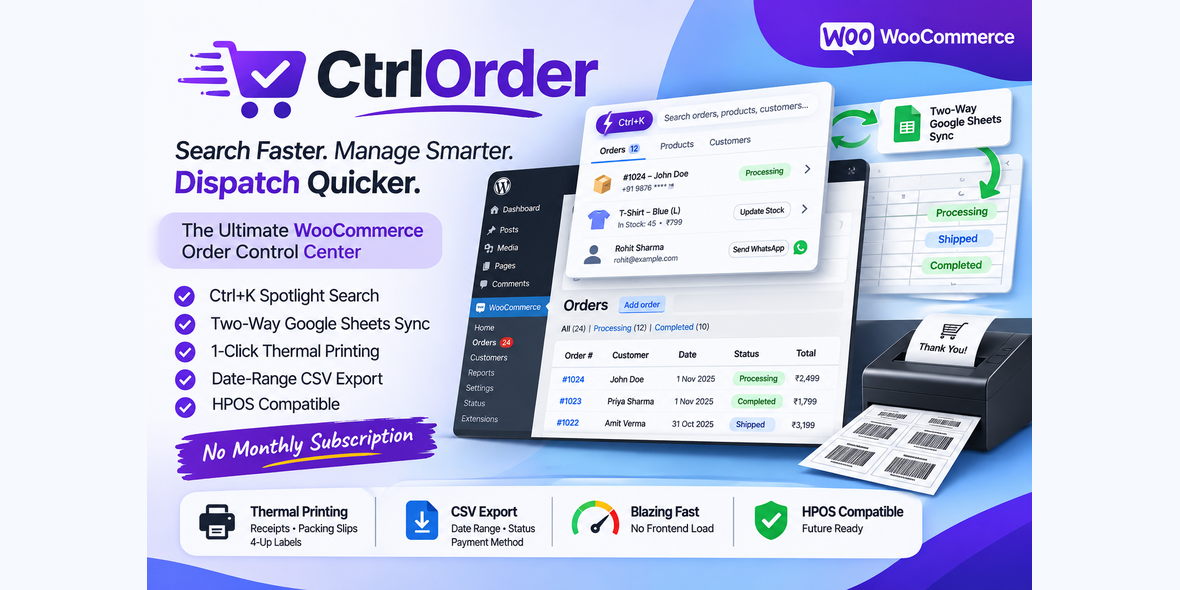
CtrlOrder is a global-first WooCommerce admin toolkit that puts every order, product and customer one keystroke away, keeps your Google Sheet in live two-way sync, and prints thermal receipts, shipping labels and packing slips with offline barcodes and QR codes — no monthly fee, no cloud service, no heavy PDF library.
Built for store owners who pack and dispatch every day: find the order in seconds, change its status, print its receipt, message the customer on WhatsApp, and keep the Sheet updated — without leaving the screen you are on. HPOS-ready, vanilla JavaScript, about 400 KB installed.
Why Store Owners Choose CtrlOrder
- 100% Native WooCommerce & HPOS Compatible: built for High-Performance Order Storage (Custom Order Tables) and classic CPT mode, with zero legacy queries on HPOS stores.
- Ctrl+K Spotlight Search: find any order, product or customer from anywhere in wp-admin and act on it inline — no more opening five screens for one order.
- Two-Way Live Google Sheets Sync: orders and stock push to your Sheet automatically, and Sheet edits push back — through a free Apps Script web app you own. No OAuth, no middleman API, no monthly subscription.
- Zero-Dependency Offline Printing: thermal receipts, shipping labels and packing slips with pure SVG Code-128 barcodes and QR codes generated in the browser. No external cloud APIs, no PDF microservice, no binary dependencies.
- Global-First, Not India-Only: any currency, any country, any payment method. COD / UNPAID / PAID payment badges, UPI and PayPal.me QR modes, US Letter and ISO A4 labels, and WhatsApp with the correct country calling code.
- Lightweight & Fast: about 400 KB installed. No jQuery, no React/Vue build step, no Composer overhead. Search debounced at 250ms; exports stream in batches so large stores never run out of memory.
- Capability-Aware Security: product quick-edit checks the WordPress edit_product capability on the product (or its parent, for variations); order-status changes check edit_shop_orders; the settings page is administrators-only; the webhook secret is never included in exports.
Comprehensive Feature Breakdown
1. Ctrl+K Spotlight Search
Press Ctrl+K (Windows/Linux) or Cmd+K (Mac) anywhere in wp-admin — or click the search node in the admin bar — and start typing:
- Search orders by ID, customer name, email, or phone number, including the last 4 digits of the phone.
- Search products by title, SKU or ID, with live price and stock on the row and a red LOW badge at or below your low-stock threshold.
- Search customers by name or email, with order count, total spent, View All Orders and WhatsApp actions.
- Inline order actions: change status (with a transition guard — refunds can never be set by relabelling, live orders can never be moved into trash or draft), print a thermal receipt or A4 label, or open WhatsApp — all from the result row.
- Inline product editing: change regular price, sale price and stock quantity without opening the product screen. Variable products get a variation picker; the parent’s price range and stock status re-sync automatically.
- Recent searches, four themes (Light, Dark, Minimal, Compact) saved per browser, and full keyboard navigation (arrow keys + Enter) throughout the dialog.
2. Two-Way Live Google Sheets Sync
Your Sheet becomes a live mirror of the store — and a second place to work from:
- Outgoing sync: new and updated orders, and stock changes, push to your Sheet automatically via Action Scheduler — never during checkout, so customers never wait for a sync.
- Incoming sync: edit the status or inventory cell in the Sheet and the change pushes back to WooCommerce through a secured webhook (secret header + body, rate-limited). Order notes record “Status updated via Google Sheets Live Sync”.
- Column mapping A–K, configurable per column: order ID, order date, customer name, billing phone, full address, postal/ZIP code, items summary, order total, payment method, order status, order notes.
- The settings page generates the complete Apps Script (Code.gs) for you — including a “CtrlOrder Sync” menu with 1-Click Enable Two-Way Sync, which registers the installable edit trigger (a plain onEdit cannot call external URLs, so this step matters).
- Sync Log with per-event success/fail status and a Retry button that rebuilds the payload from the live order or product instead of replaying a stale snapshot.
- “Only sync paid orders” filter, a Send Test Sync Payload button to verify the connection, and automatic de-duplication so one order never syncs twice.
3. Print Engine: Thermal Receipts, Labels & Packing Slips
Print from the Orders list, from Spotlight, or in bulk — with barcodes and QR codes generated offline as crisp SVG:
- Thermal receipts for 80mm and 58mm printers, 2×2 shipping labels for ISO A4 and US Letter, and full packing slips — each with its own on-screen toolbar and automatic print dialog.
- Code-128 barcodes (with check digit) and QR codes in five modes: Order Payment Link, Order Status/Tracking Page, Custom URL or PayPal.me (with {order_id}, {order_total} and {currency} placeholders), UPI Dynamic Link, or Disabled.
- Payment badges on every document: [ COD – COLLECT {net total} ] on unpaid cash-on-delivery orders, [ UNPAID / PENDING ] while awaiting payment, [ PAID ({method}) ] once paid. Totals are always net of refunds.
- Refund safety banners: a fully refunded order prints DO NOT SHIP; a partially refunded order prints PARTIALLY REFUNDED — CHECK ITEMS with the refunded amount itemised.
- Store logo upload, custom tax label (“VAT”, “GST”, “Tax” — your wording), your currency symbol throughout, and item SKUs on every line.
4. Bulk Print
Print a whole day’s dispatch without opening orders one by one:
- Date presets (Today, Yesterday, Last 7 Days, This Month, Last Month) or a custom range, plus status chips and print-type choice (Thermal / A4 / Packing Slip).
- 50 orders per chunk with Previous / Next navigation and an exact count line (“1–50 of 312”) — a 500-order day is ten chunks, one click each.
- Job snapshots keep totals stable while you work through the chunks, even if new orders arrive mid-run.
5. Orders CSV Export
Your order data out, in the shape your accountant or your Sheet expects:
- Date range, order-status and payment-method filters, with the Google Sheets column mapping (A–K) or hand-picked fields.
- Streams in batches of 200, so exports of 10,000+ orders never run out of memory. UTF-8 with BOM for clean Excel opening, and formula-injection escaping on every cell.
- Dates use your site timezone, and totals match the store’s own figures.
6. Settings, Security & Control
Everything lives under one WooCommerce submenu, in six tabs — Spotlight & Quick Actions, Print Engine, Google Sheets Sync, Export Orders, Bulk Print, Developer (a read-only reference of the plugin’s hooks and endpoints):
- Settings Import/Export (the webhook secret is deliberately excluded — a copied store gets its own secret), a Sample Test Print to check your printer before going live, and a Shop Manager access toggle.
- The webhook secret is auto-generated, stored in your database, and regenerated with one click — after regenerating, copy the new Code.gs and redeploy.
- Full uninstall cleanup option: when enabled, CtrlOrder removes its settings and sync log on uninstall and leaves nothing behind.
- Translation-ready: includes the ctrlorder.pot catalog (353 strings), with all user-facing text translatable.
Technical Specifications & Compatibility
- Compatible With (WooCommerce): WooCommerce 8.0 through 11.3+ (High-Performance Order Storage / Custom Order Tables & Classic CPT)
- Software Version (WordPress): WordPress 6.2 through 7.1+
- PHP Compatibility: PHP 7.4, 8.0, 8.1, 8.2, 8.3, 8.4, 8.5+
- Compatible Browsers: Chrome, Edge, Firefox, Safari
- External Dependencies: none — except a free Google account, only if you use Google Sheets sync
- Translation Ready: includes ctrlorder.pot catalog
Requirements
- WordPress 6.2 or later (tested up to 7.1)
- WooCommerce 8.0 or later (tested up to 11.3)
- PHP 7.4 or later
- A modern browser (Chrome, Firefox, Safari or Edge) — Spotlight, printing and the barcode/QR generator run in the browser
- A free Google account, only if you use Google Sheets sync (the Sheet and the Apps Script project live in your Google account)
Setup / Installation
- Upload the ctrlorder folder to /wp-content/plugins/ and activate it, or upload the ZIP via Plugins > Add New > Upload Plugin. WooCommerce must be installed and active.
- Go to WooCommerce > CtrlOrder and fill in your store details, QR mode and print defaults on the Print Engine tab.
- For Google Sheets sync: copy the generated Code.gs from the Google Sheets Sync tab into your Sheet (Extensions > Apps Script), deploy it as a Web App (Execute as: Me, Access: Anyone), paste the Web App URL back into settings, then use the “CtrlOrder Sync” menu in the Sheet > “1-Click Enable Two-Way Sync” once. Use “Send Test Sync Payload” to verify.
- Print a sample receipt from the Print Engine tab to check your thermal printer before going live.
Full steps are in the included documentation (INSTALLATION.md and USER_GUIDE.md).
Google Apps Script quotas
Google Sheets sync runs on Google Apps Script, which has daily quotas that depend on whether the Sheet lives in a free Gmail account or a Google Workspace account (URL Fetch calls and installable trigger runtime are quota-limited). A normal store (tens to a few hundred orders a day) stays well within the quotas. A very high-volume store can hit the free tier’s daily limits — failed pushes appear in the Sync Log with a Retry button. Current numbers are on Google’s Apps Script quotas page. The rest of the plugin (Spotlight, printing, CSV export) uses no external service at all.
Security note
The webhook secret in Code.gs gives anyone who can edit the Sheet or its Apps Script write access to order statuses, prices and stock. Share the Sheet only with trusted staff, regenerate the secret and redeploy when someone’s access is removed, and turn off incoming sync when you don’t need it. Full details are in the included SECURITY.md.
Package Contents
- ctrlorder.zip — production-ready, installable WordPress plugin.
- Documentation — browsable index, user guide, installation, FAQ, troubleshooting, security guide, changelog and screenshots list.
What’s included
The CtrlOrder plugin (PHP, JavaScript, CSS) plus documentation (browsable index, user guide, installation, FAQ, troubleshooting, security guide, changelog and screenshots list). No monthly fee, no licence server — updates come through WPBay.
Changelog:
= 1.0.9 (2026-11-15) =
* Fixed: the Developer tab threw a PHP warning — "Undefined variable $allowed_statuses" (includes/views/admin/tab-developer.php:42). The ctrlorder_allowed_order_statuses parameters cell used a double-quoted string, so PHP tried to interpolate $allowed_statuses; it is now a single-quoted string, matching every other parameters cell on the tab. Every double-quoted string in the plugin was scanned for the same mistake (10 interpolated strings in total; the other 9 interpolate defined variables in SQL and uninstall queries) and the Developer tab was verified to load with no PHP warnings under full error reporting.
= 1.0.8 (2026-11-15) =
* Fixed: extending order rows through the documented ctrlorder_sheet_row_data hook moved the revision out of column L and turned off the 1.0.7 ordering protection. The revision now travels only as a top-level payload field, and the Apps Script writes it to its reserved column (Orders L, Products G) separately from the row — mapped cells go to A-K, the revision to L, and any extra filtered cells to M and beyond (Products: H and beyond). A short row is padded so the revision still lands in its column, and rows sent by 1.0.7 (revision also as the last cell) are recognised and handled.
* Fixed: the sample extension told buyers to put their extra column in column L, which is the reserved revision column. It now says column M (Orders), and the readme Hooks section and the Developer tab name the same reserved and extra columns as the generated Code.gs.
* After updating to 1.0.8, re-copy Code.gs from WooCommerce > CtrlOrder > Google Sheets and redeploy the Web App. The revision check and the product-ID keying live in the Apps Script; the old script keeps working (it reads the revision from the top-level field but writes the row as-is, so a filtered row still moves the revision), so the update is not complete until the script is re-copied.
= 1.0.7 (2026-11-14) =
* Fixed: two concurrent sync workers could send different snapshots of the same order or product, and the older one arriving last overwrote newer data in the Sheet. Every push now carries a monotonic revision, refreshed at send time; the Apps Script stores it in a new revision column (Orders L, Products G) and skips any push older than the stored row. Overlapping requests, delayed deliveries and retries always preserve the latest WooCommerce values.
* Fixed: products were matched by SKU in the Sheet, so changing or removing an SKU appended a duplicate row instead of updating the existing record. Products are now keyed by their WooCommerce product ID (column A) — the stable identifier — and the sync deletes any duplicate rows left by the old SKU matching, keeping the first.
* Fixed: a queued sync still sent its stored snapshot after the order or product had been deleted. The handler now checks the live object before sending and skips the push (with a log entry, no payload stored) when the object no longer exists.
* After updating to 1.0.7, re-copy Code.gs from WooCommerce > CtrlOrder > Google Sheets and redeploy the Web App. The revision check and the product-ID keying live in the Apps Script; the old script keeps working (it writes the extra column but does not enforce ordering), so the update is not complete until the script is re-copied.
= 1.0.6 (2026-11-13) =
- Fixed: a non-Google Apps Script URL was silently dropped on save while the page claimed "Settings saved." — the field just came back empty. An invalid URL now shows an error notice ("it must be an https://script.google.com Web App URL") and the previously stored URL is kept, so a typo cannot wipe a working connection. Clearing the field still works. The field help text now states the requirement.
= 1.0.5 (2026-11-13) =
- Fixed: Spotlight price fields returned currency-formatted values (“$499.00”, “499,00 €”) that the numeric-only quick-edit endpoint rejected, so changing only a product's stock failed for priced products. regular_price and sale_price now return canonical decimal strings (“499.99”) in search results, variation results and save responses; formatted prices live in separate *_display fields. The endpoint also accepts locale-typed prices (“499,99” on a comma-decimal store).
- Fixed: Sheets sync deduplicated by timestamp, so two distinct changes to one order or product within the same second lost the second update. Dedupe now compares row content — only a byte-identical row is a duplicate — and every push rebuilds its row from the live order/product at send time, so an older queued job can never overwrite newer state in the Sheet.
- Fixed: WhatsApp numbers lost significant digits — a leading “+” was stripped before detection, and one leading zero was always removed. Explicit international prefixes (+/00) are now preserved, and the trunk zero is kept for Italy, San Marino and Vatican City (+39 06...) while being dropped for other countries. International format is no longer inferred from number length.
= 1.0.4 (2026-11-13) =
- Fixed: with no Google Apps Script URL configured, outgoing sync queued Action Scheduler jobs and wrote customer order rows into the sync log. All three outgoing paths now return early when the URL is empty — no queued action, no log entry. Once a URL is configured, pushes queue exactly as before.
= 1.0.3 (2026-11-13) =
- Fixed: the settings tab menu was too light to read — the tab bar now uses a solid slate background with a white hover pill and the dark active pill, instead of white-on-near-white.
- Fixed: the Spotlight theme button showed the wrong icon and "Switch to light theme" label when the next theme was Compact. All four themes now show their own icon and label.
= 1.0.2 (2026-11-13) =
- New: 18 developer hooks (ctrlorder_ prefix) at every key seam — order status, Spotlight search, print, Sheets sync, settings, bulk print, CSV export. Documented in the readme and the new in-admin Developer tab.
- New: Developer tab in settings — read-only reference of all hooks plus REST routes, AJAX actions and admin-post actions.
- New: order-status webhook-out — POST order ID + old/new status as JSON to a configured URL (Settings → Advanced; empty = disabled).
- New: Spotlight themes Minimal and Compact (now 4 themes: Light, Dark, Minimal, Compact).
- New: first-run onboarding checklist with progress bar; 'Orders — last 7 days' bar chart on the dashboard.
- Improved: settings screens rebuilt on a views layer; admin code split into focused classes; readme rewritten in plain buyer language with Hooks and API sections.
= 1.0.1 =
- Security fix: the product quick-edit endpoint now requires the edit_product capability on the target product (or its parent, for variations) and returns 403 otherwise — a user who can search orders but cannot edit products can no longer change prices or stock. The order-status endpoint now requires edit_shop_orders; the object form (edit_shop_order) was tried and rejected because on HPOS it maps to the published/others variants and locks out roles holding only edit_shop_orders. Spotlight hides the price/stock edit controls for users without product-edit capability.
- New: Security section in the readme and SECURITY.md in the documentation — the webhook secret in Code.gs gives Sheet editors write access to orders and products; includes the share-only-with-trusted-staff guidance, the regenerate-and-redeploy procedure, and the customer-data note.
- Documentation: Google Apps Script quotas note added (FAQ + listing description).
First public release. Spotlight Search (Ctrl+K/Cmd+K) with inline actions; two-way Google Sheets sync via free Apps Script (no OAuth); thermal/A4/US Letter print engine with offline SVG barcode + QR; Bulk Print tab (50 orders per chunk); Orders CSV export with date-range and status/payment filters; sync log with retry; settings import/export; Shop Manager toggle; uninstall cleanup.
Only logged in customers who have purchased this product may leave a review.
Loading...
WPBay support
 Support by DigiLink
DigiLink supports this product through WPBay
Questions are handled in WPBay's private ticket system, keeping your purchase details and support conversation together.
Go to My Downloads
After purchase, open this item in My Downloads and choose Get Support.
What support includes
- Answers to product-related questions
- Help with reported bugs and issues
- Guidance for included third-party assets
What support does not include
- Customizations or new features
- Installation or setup services
Plugin
Maintenance snapshot
See recent updates, compatibility, support, and developer activity.
- Updated today
- Developer active recently
- WPBay support available
- WordPress 7.1 tested
Snapshot updated 5 hours ago
View details Hide details
Maintenance details
This is maintenance data. It does not measure product quality or sales.
- Last update Updated today
- Compatibility WordPress 7.1 tested · PHP 8.5 tested · WooCommerce 11 tested
- Releases 9 releases in the 3 days since listing
- Developer activity Developer active recently
- Support No recent support tickets to measure
- Docs and demo Documentation available · Changelog available · Demo available
How this snapshot works
Plugin Health
The score is out of 100 and uses data WPBay can check. Ratings, popularity, and sales are not used.
- Last update 30 points
-
Plugins receive full recency points under 30 days, then step down at 90, 180, 365, and 545 days.
- Compatibility 20 points
-
WordPress, PHP, and WooCommerce (when relevant) are scored separately. The latest two PHP lines count as current. Nearby previous versions keep most of the points.
- Current version 100%
- One version behind 75%
- Two versions behind 50%
- Three versions behind 25%
- Older or not listed 0%
- Releases 15 points
-
One release earns 10, two or three earn 13, and four or more earn 15. Each accepted product ZIP counts once; reprocessing the same upload and listing-only edits do not count.
- Developer activity 15 points
-
Based on WPBay login and dashboard activity. Exact last-login dates are never shown.
- Support 15 points
-
There are no recent WPBay tickets to measure.
- Docs and demo 5 points
-
Documentation: 2. Changelog: 1. Working demo or preview: 2.
Score ranges
- 90–100 Excellent
- 75–89 Healthy
- 60–74 Fair
- 40–59 Needs attention
- 0–39 Limited
Long gaps
WPBay also checks for long gaps between updates, developer activity, support replies, and releases. Buyers do not see this score.
- Time since update 35 points
- Last developer activity 25 points
- WordPress compatibility 15 points
- Support replies 15 points
- Fewer releases 10 points
-
Quality verified by WPBay
WPBay review- Reviewed version
- 1.0.9
- Review completed
- Reviewer
- CodeRevolution
- Review type
- Initial
No unresolved approval blocker was identified during WPBay’s proportionate review of this release. This is not a security certification or a guarantee that the product contains no defects.
-
 Future updates
-
WPBay support from DigiLink
-
GPL code, proprietary assets
-
Covered by the WPBay refund policy
-
Plugin maintenance snapshot
Relevant picks
You may also like
Similar products selected by category, features, popularity and freshness.

From this seller
View seller store
More by DigiLink
Explore more bestselling products from this creator.

Reviews
There are no reviews yet.