



WooCommerce Shipping Rates by Weight

 Sold Only On WPBay
Add weight based shipping methods and rates. Trigger your weight-based shipping methods based on various conditions, like cart amount, user roles, products, categories, weight, dimensions and more.
Add Weight Based Shipping Conditions & Rates
- Create multiple weight-based shipping methods and fee
- Display shipping methods and fee based on conditions like weight, product, classes, cart items, location, user roles, dimensions and more
- Add fixed or progressing per-unit (kg, lb, etc.) shipping rate
- Ability to add weight-based conditions and rates to existing shipping methods
Are you tired of manually managing your shipping methods and fee based on product weight? The Weight-Based Shipping extension can help. With this extension, you can add weight-based shipping methods and fees, and display them based on various conditions. You can create custom shipping methods or apply weight-based conditions to your existing shipping methods.
The extension enables you to add multiple rules to manage fees and visibility of your shipping methods based on various conditions like cart amounts, quantity, user roles, weight, location, product dimensions, and more. You can add a fixed or variable weight per unit shipping cost.
You can add different per-unit shipping costs and fixed additional fees based on different weight ranges. Apply distinct weight-based costs for specific products, categories, tags, and shipping classes. The following are the detailed features.
Add custom weight-based shipping methods:
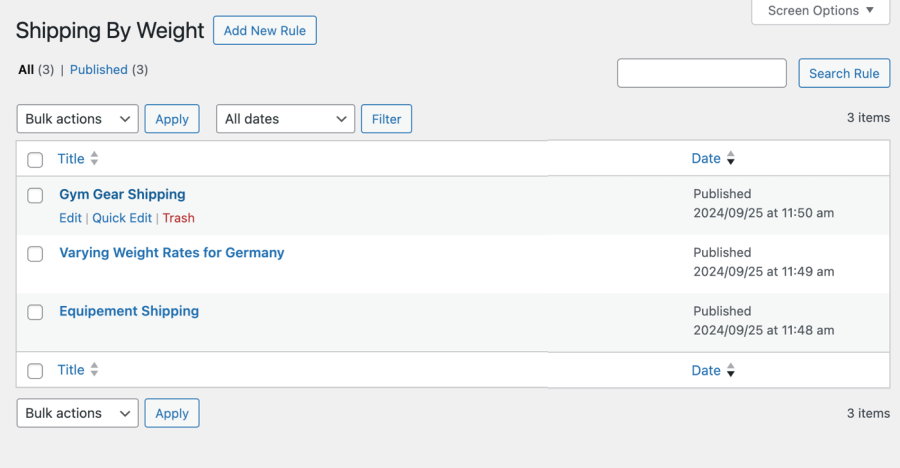
You can create multiple rules to add custom shipping methods. Each shipping method can have its own custom weight-based rates and display conditions like weight, product, cart content, and more. You can add custom labels for the new shipping methods and control its tax status as per your business needs.
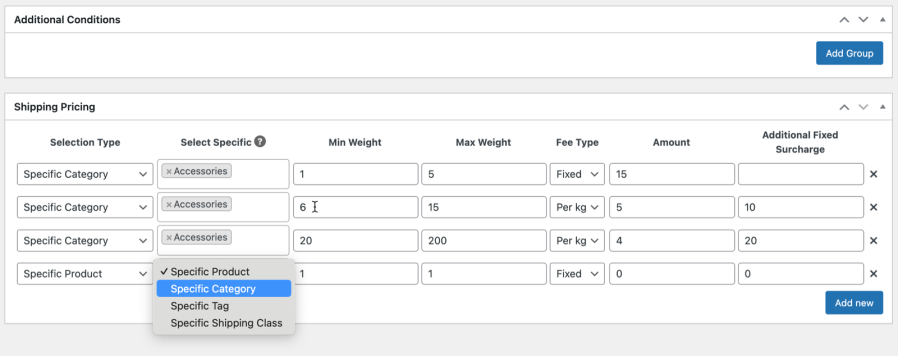
Weight-based shipping rates:
You can add per-unit shipping rates based on different weight ranges. You can choose to add additional fees and apply rates to specific products, categories and tags and shipping classes.
Product:
You can add multiple rows to add different weight-based shipping rates for different products and weight ranges.
Categories:
If you have an entire category that requires a weight-based shipping rate setup, you can do that using the category tab. Set up different rates for different categories and weight ranges.
Tags:
The extension also enables merchants to apply weight-based rates to products by their tag in bulk to facilitate shipping management.
Shipping Classes:
Instead of applying product-specific rates, you can choose to apply weight-based shipping rates to your product shipping classes.
Weight-based Shipping method conditions:
With this extension, you have the option to display shipping methods and apply their rates when specific conditions are met. You can add multiple conditions with “AND” & “OR” relation to apply multi-level restrictions
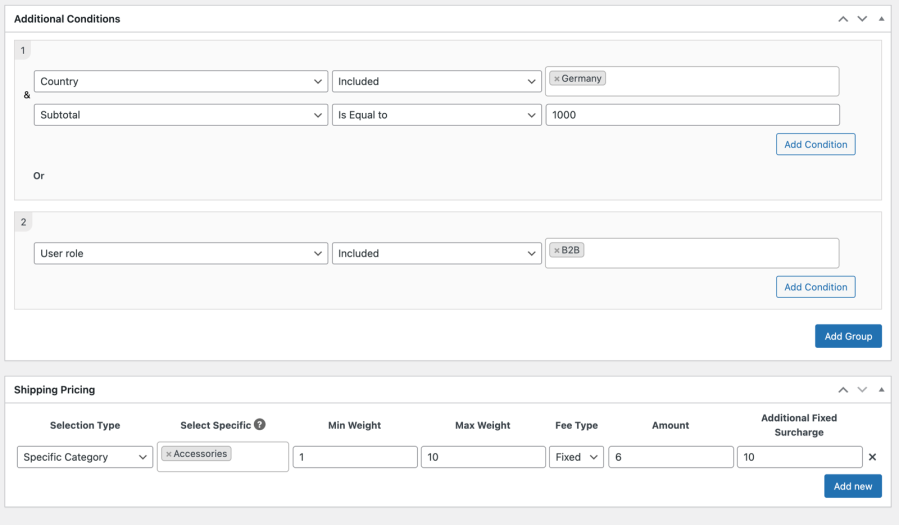
Weight Based Shipping extension offers the following conditions, allowing you to have a complete control on your new and existing shipping methods.
Cart Based Conditions
- Subtotal
- Subtotal Excluding Tax
- Tax
- Quantity
- Coupon
- Weight
User Based Conditions
- Zip Code
- Country
- State
- City
- User Role
- Specific Customer
Product Based Conditions
- Width
- Height
- Length
- Stock
- Stock Status
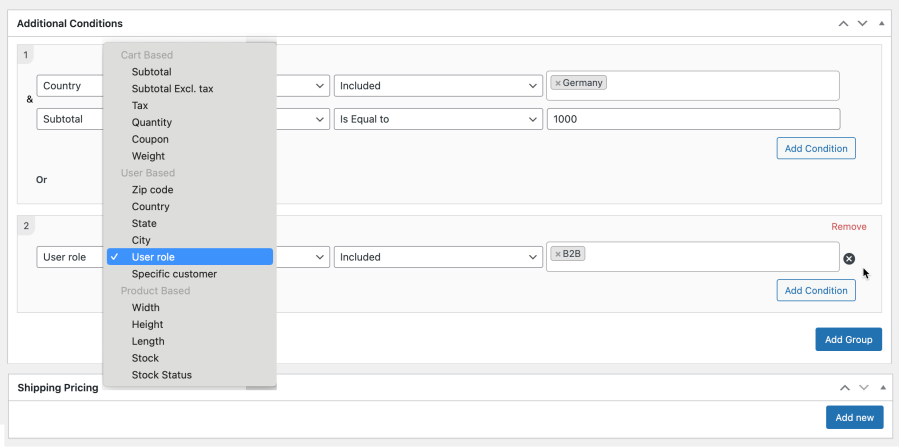
Add weight-based conditions and rates to your existing shipping methods:
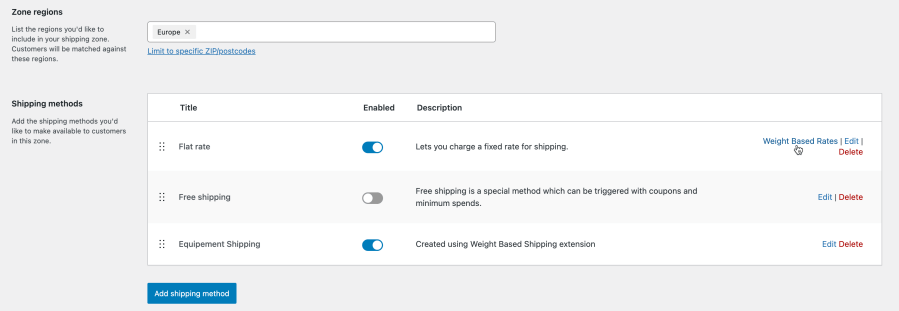
With this extension, you can also apply weight-based shipping conditions and rates to your existing shipping methods. This will override the default settings and display shipping methods and rates according to the new configurations.
Only logged in customers who have purchased this product may leave a review.
Loading...
WPBay support
 Support by Fabaddons
Support by Fabaddons
Fabaddons supports this product through WPBay
Questions are handled in WPBay's private ticket system, keeping your purchase details and support conversation together.
Go to My Downloads
After purchase, open this item in My Downloads and choose Get Support.
What support includes
- Answers to product-related questions
- Help with reported bugs and issues
- Guidance for included third-party assets
What support does not include
- Customizations or new features
- Installation or setup services
Plugin
Maintenance snapshot
See recent updates, compatibility, support, and developer activity.
- Updated 503 days ago
- Developer active recently
- WPBay support available
Snapshot updated 10 hours ago
View details Hide details
Maintenance details
This is maintenance data. It does not measure product quality or sales.
- Last update Updated 503 days ago
- Compatibility WordPress 6.8 tested, three versions behind · PHP 8.5 not marked as tested · WooCommerce 8 tested, three versions behind
- Releases 0 releases in the last 12 months
- Developer activity Developer active recently
- Support No recent support tickets to measure
- Docs and demo Documentation missing · Changelog missing · No demo listed
Health reflects recent activity during the last 90 days.
How this snapshot works
Plugin Health
The score is out of 100 and uses data WPBay can check. Ratings, popularity, and sales are not used.
- Last update 30 points
-
Plugins receive full recency points under 30 days, then step down at 90, 180, 365, and 545 days.
- Compatibility 20 points
-
WordPress, PHP, and WooCommerce (when relevant) are scored separately. The latest two PHP lines count as current. Nearby previous versions keep most of the points.
- Current version 100%
- One version behind 75%
- Two versions behind 50%
- Three versions behind 25%
- Older or not listed 0%
- Releases 15 points
-
One release earns 10, two or three earn 13, and four or more earn 15. Each accepted product ZIP counts once; reprocessing the same upload and listing-only edits do not count.
- Developer activity 15 points
-
Based on WPBay login and dashboard activity. Exact last-login dates are never shown.
- Support 15 points
-
There are no recent WPBay tickets to measure.
- Docs and demo 5 points
-
Documentation: 2. Changelog: 1. Working demo or preview: 2.
Score ranges
- 90–100 Excellent
- 75–89 Healthy
- 60–74 Fair
- 40–59 Needs attention
- 0–39 Limited
Long gaps
WPBay also checks for long gaps between updates, developer activity, support replies, and releases. Buyers do not see this score.
- Time since update 35 points
- Last developer activity 25 points
- WordPress compatibility 15 points
- Support replies 15 points
- Fewer releases 10 points
-
Quality verified by WPBay
WPBay review- Reviewed version
- 1.0.0
- Review completed
- Reviewer
- CodeRevolution
- Review type
- Initial
No unresolved approval blocker was identified during WPBay’s proportionate review of this release. This is not a security certification or a guarantee that the product contains no defects.
-
 Future updates
-
WPBay support from Fabaddons
-
GPL code, proprietary assets
-
Covered by the WPBay refund policy
-
Plugin maintenance snapshot
Relevant picks
You may also like
Similar products selected by category, features, popularity and freshness.



 1 month free
From this seller
View seller store
More by Fabaddons
Explore more bestselling products from this creator.


Reviews
There are no reviews yet.