



Grid and List View For Woocommerce

 Well Documented
Sold Only On WPBay
Well Documented
Sold Only On WPBay
🆓 9 Day Free Trial Included
📦 Description
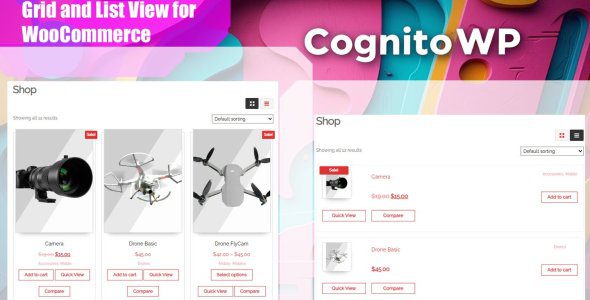
Grid and List View for WooCommerce is a lightweight, performance-optimized plugin that adds a sleek toggle button to your shop pages, empowering your customers to switch effortlessly between grid and list layouts when browsing your products.
✨ Features
-
🔁 Toggle seamlessly between Grid and List product views
-
🧠 Remembers customer’s view preference with cookie support
-
⚙️ Choose the default view (Grid or List) in settings
-
💻 Clean, responsive design — looks great on all devices
-
🎨 Compatible with most popular WooCommerce themes
-
🧱 Full support for block themes (e.g. Twenty Twenty-Two, Twenty Twenty-Three)
-
⚡ Lightweight & optimized for speed
-
🌍 Translation ready for multilingual sites
-
🔄 AJAX-powered transitions — no page reloads
🚀 Benefits
-
🛍️ Enhanced shopping experience
-
🖱️ Customers choose their preferred view style
-
📄 List view shows more product details at a glance
-
🖼️ Grid view delivers a visually appealing layout
-
📈 Boosts engagement and potential conversions
🛠️ Installation
-
Upload the plugin to
/wp-content/plugins/grid-and-list-view-for-woocommerce, or install it via the Plugins screen in WordPress. -
Activate it via the Plugins menu.
-
Go to WooCommerce → Grid/List View to configure settings.
-
Done! The toggle button will now appear on your shop pages.
❓ Frequently Asked Questions
🎨 Does this plugin work with my theme?
Absolutely! It’s built to work with:
-
✅ Classic WooCommerce-compatible themes
-
🧱 Modern block-based themes (e.g., Twenty Twenty-Two, Twenty Twenty-Three)
-
🌟 Popular themes like Storefront, Astra, OceanWP, and more
The plugin uses standard WooCommerce hooks and classes for maximum compatibility.
🧑🎨 Can I style the toggle buttons?
Yes! Easily customize the appearance via CSS. The plugin uses clear, semantic class names that are easy to target in your theme.
🚀 Will this slow down my site?
Not at all. It’s built to be lightweight and loads assets only on WooCommerce shop pages.
⚙️ Can I set a default view?
Yes — choose Grid or List as the default from the plugin settings.
🍪 Will it remember the user’s choice?
Yes. When enabled, the plugin saves the user’s preference using cookies (remembered for 30 days).
🔄 Is it compatible with AJAX product loading?
Yes — it works smoothly with AJAX-based features like infinite scroll and “Load More” buttons.
Only logged in customers who have purchased this product may leave a review.
Loading...
WPBay support
 Support by CognitoWP
Support by CognitoWP
CognitoWP supports this product through WPBay
Questions are handled in WPBay's private ticket system, keeping your purchase details and support conversation together.
Go to My Downloads
After purchase, open this item in My Downloads and choose Get Support.
What support includes
- Answers to product-related questions
- Help with reported bugs and issues
- Guidance for included third-party assets
What support does not include
- Customizations or new features
- Installation or setup services
Plugin
Maintenance snapshot
See recent updates, compatibility, support, and developer activity.
- Updated 481 days ago
- WPBay support available
- Documentation available
- Demo or preview available
Snapshot updated 2 hours ago
View details Hide details
Maintenance details
This is maintenance data. It does not measure product quality or sales.
- Last update Updated 481 days ago
- Compatibility WordPress 6.8 tested, three versions behind · PHP 8.5 not marked as tested · WooCommerce 8 tested, three versions behind
- Releases 0 releases in the last 12 months
- Developer activity No recent developer activity
- Support No recent support tickets to measure
- Docs and demo Documentation available · Changelog missing · Demo available
Health reflects recent activity during the last 90 days.
How this snapshot works
Plugin Health
The score is out of 100 and uses data WPBay can check. Ratings, popularity, and sales are not used.
- Last update 30 points
-
Plugins receive full recency points under 30 days, then step down at 90, 180, 365, and 545 days.
- Compatibility 20 points
-
WordPress, PHP, and WooCommerce (when relevant) are scored separately. The latest two PHP lines count as current. Nearby previous versions keep most of the points.
- Current version 100%
- One version behind 75%
- Two versions behind 50%
- Three versions behind 25%
- Older or not listed 0%
- Releases 15 points
-
One release earns 10, two or three earn 13, and four or more earn 15. Each accepted product ZIP counts once; reprocessing the same upload and listing-only edits do not count.
- Developer activity 15 points
-
Based on WPBay login and dashboard activity. Exact last-login dates are never shown.
- Support 15 points
-
There are no recent WPBay tickets to measure.
- Docs and demo 5 points
-
Documentation: 2. Changelog: 1. Working demo or preview: 2.
Score ranges
- 90–100 Excellent
- 75–89 Healthy
- 60–74 Fair
- 40–59 Needs attention
- 0–39 Limited
Long gaps
WPBay also checks for long gaps between updates, developer activity, support replies, and releases. Buyers do not see this score.
- Time since update 35 points
- Last developer activity 25 points
- WordPress compatibility 15 points
- Support replies 15 points
- Fewer releases 10 points
-
Quality verified by WPBay
WPBay review- Reviewed version
- 1.0.1
- Review completed
- Reviewer
- CodeRevolution
- Review type
- Initial
No unresolved approval blocker was identified during WPBay’s proportionate review of this release. This is not a security certification or a guarantee that the product contains no defects.
-
 Future updates
-
WPBay support from CognitoWP
-
GPL code, proprietary assets
-
Covered by the WPBay refund policy
-
Plugin maintenance snapshot
Relevant picks
You may also like
Similar products selected by category, features, popularity and freshness.


 15 days free
From this seller
View seller store
More by CognitoWP
Explore more bestselling products from this creator.
Reviews
There are no reviews yet.