


WACB – WooCommerce WhatsApp Sales Contacts

 Recently Updated
Well Documented
Recently Updated
Well Documented
WACB – WooCommerce WhatsApp Sales Contacts
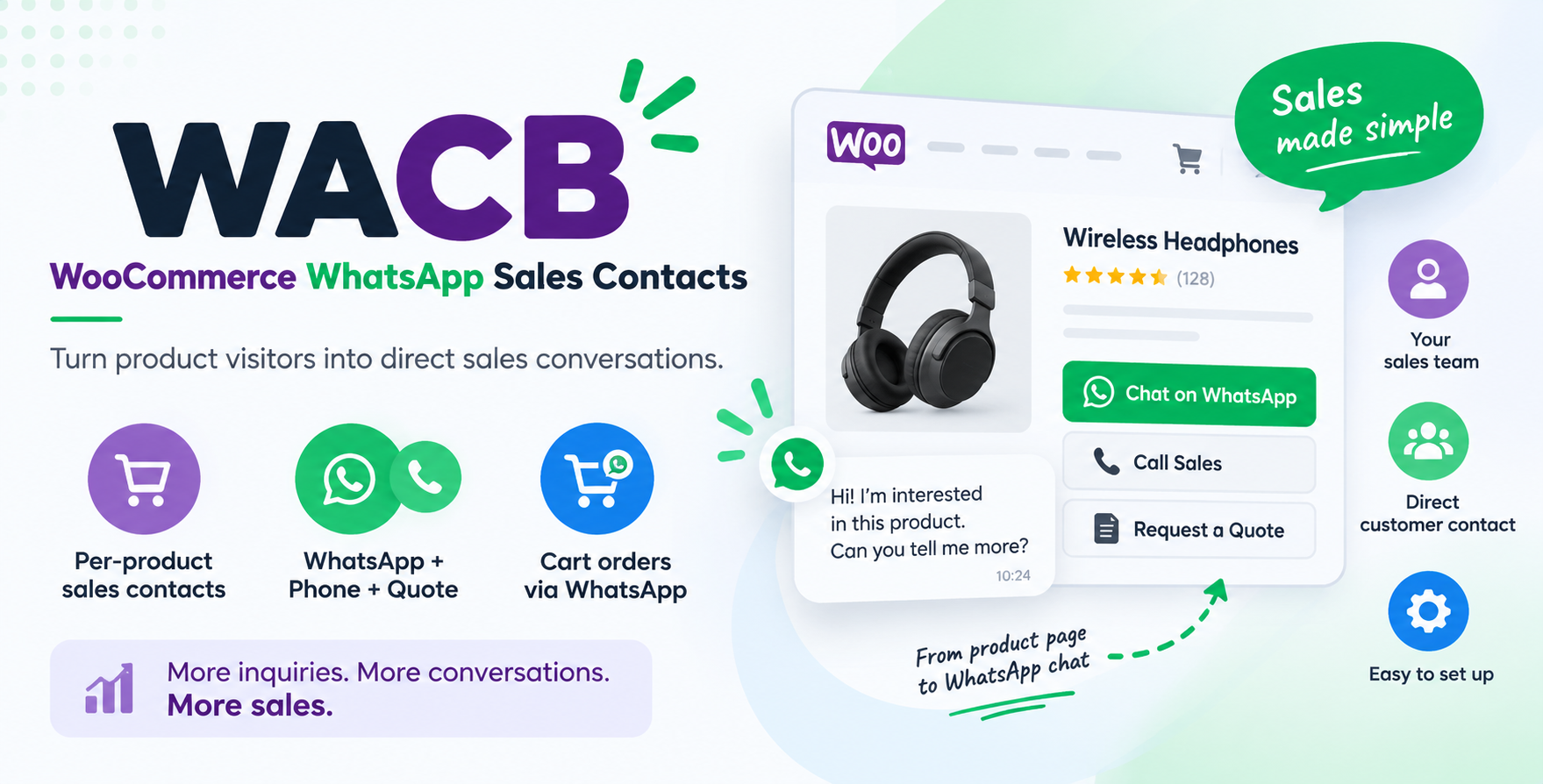
Turn your WooCommerce catalog into an assisted-sales channel with WhatsApp, phone, quote requests, sales contacts, promotions and smart product filtering.
WACB helps WooCommerce stores connect every product with the right sales contact and give customers fast ways to take action.
Instead of forcing every visitor through a traditional checkout flow, WACB lets you add direct WhatsApp, phone, email, quote and sharing actions to your WooCommerce products.
It is designed for stores where customers often need to ask questions, confirm availability, request a quote, negotiate, contact a salesperson or place an order through WhatsApp.
WACB is especially useful for B2B stores, catalogs, distributors, marketplaces, real estate websites, equipment sellers, wholesalers and assisted-sales businesses.
Key Features
Assign Sales Contacts to WooCommerce Products
Assign one or more sales contacts to products and display their contact information directly on the storefront.
WordPress users are the recommended source for sales contacts.
Each contact can have dedicated public information including:
-
WhatsApp number
-
Phone numbers
-
Public email
-
Company
-
Role or position
-
Website
-
Social links
Administrators remain in full control of assignments and settings, while non-admin users can update only their own WACB public information.
WhatsApp Sales Actions
Add direct WhatsApp buttons to WooCommerce products so customers can contact the appropriate salesperson without searching for contact details.
WACB can automatically include relevant product information in the WhatsApp conversation.
This makes it ideal for products where customers normally ask about:
-
Availability
-
Pricing
-
Delivery
-
Product specifications
-
Custom orders
-
Quotes
-
Negotiated sales
Phone, Email, Quote and Share Actions
WhatsApp is only one part of WACB.
Depending on your configuration, products can also display actions for:
-
Phone calls
-
Email
-
Quote requests
-
Product sharing
You can choose which actions fit your sales process.
WooCommerce Cart via WhatsApp
Customers can send their complete WooCommerce cart through WhatsApp.
WACB supports both:
-
Classic WooCommerce Cart
-
Modern WooCommerce Cart Block
The WhatsApp order message can include the products in the cart, quantities and selected product variations.
This gives stores an alternative assisted-order workflow without replacing WooCommerce itself.
Commercial Statuses
Create reusable commercial statuses for your products.
Examples:
-
Available
-
New
-
In stock
-
Limited stock
-
Coming soon
-
Reserved
-
Sold
-
On order
Starting with WACB 1.2.0, statuses are managed through configurable reusable lists.
When editing a product, you can select an existing status instead of repeatedly typing the same text.
This reduces spelling inconsistencies across large catalogs.
If the status you need does not exist yet, simply enter a new status and optionally add it to the reusable list for future products.
Existing product statuses are preserved during upgrades.
Promotions
WACB lets you create and display promotional information independently from WooCommerce pricing.
Promotions can be used for messages such as:
-
Special offer
-
Launch offer
-
Clearance
-
Limited-time promotion
-
Free delivery
-
Seasonal campaign
You can configure promotion appearance and display promotion badges directly on your product catalog.
Promotions can also use optional start and end dates for date-aware storefront display.
Reusable Promotion Lists
WACB 1.2.0 introduces controlled promotion lists.
Instead of manually entering the same promotion on many products, administrators can maintain a reusable list of promotion names.
Product and bulk editors can select promotions directly from this list.
Need a new promotion?
Enter it once and optionally save it to the reusable promotion list.
WACB also performs case-insensitive matching to help prevent duplicate values caused by spelling or capitalization differences.
Clickable Status and Promotion Badges
Status and promotion badges are no longer only visual labels.
They can also become powerful catalog navigation tools.
When a visitor clicks a status badge, WACB opens the WooCommerce product catalog showing all products with that status.
When a visitor clicks a promotion badge, the catalog shows all products participating in that promotion.
For example:
A visitor clicks “Available” → sees all available products.
A visitor clicks “Launch Offer” → sees all products included in the Launch Offer campaign.
This makes WACB useful not only for assisted sales but also for merchandising and product discovery.
WooCommerce Catalog Filters
WACB provides dedicated catalog filters for:
-
Product status
-
Promotion
Use the included:
[wacb_filters]
shortcode to display WACB filters inside shortcode-compatible areas and page builders such as Divi or Gutenberg.
Customers can quickly browse products based on the commercial information that matters to them.
WACB also adds status and promotion filtering to the WooCommerce product list inside WordPress administration.
SEO-Friendly Filtered Catalogs
WACB status and promotion filters are designed to avoid creating unnecessary indexed filter pages.
Filtered URLs use appropriate robots handling, including compatibility with Rank Math, helping you use merchandising filters without turning every filter combination into a thin SEO landing page.
Bulk Management
Managing hundreds or thousands of WooCommerce products one by one is inefficient.
WACB includes bulk tools for managing product information across your catalog.
Bulk operations support the same controlled status and promotion lists introduced in version 1.2.0.
You can also create new reusable values during bulk operations.
WACB processes large catalog operations in controlled batches to reduce memory usage and improve reliability on larger WooCommerce stores.
Product Assignment Manager
Manage sales-contact assignments across your WooCommerce catalog from a dedicated interface.
This is especially useful when:
-
Different salespeople manage different product categories
-
Products belong to different suppliers
-
Regional representatives handle different products
-
A marketplace needs individual product contacts
-
A B2B catalog distributes inquiries between team members
Private Business Contact Directory
WACB also includes a private structured relationship directory for internal business contacts such as:
-
Suppliers
-
Owners
-
Partners
-
External salespeople
-
Customers
-
Prospects
-
Service providers
These contacts are managed separately from public WooCommerce product information.
WACB remains focused on product sales contacts and assisted commerce and does not attempt to become a full CRM.
Built for Assisted WooCommerce Sales
WACB is particularly useful when the customer’s journey looks like this:
Discover product → check status or promotion → contact salesperson → discuss requirements → request quote or order.
This type of workflow is common in:
-
B2B commerce
-
Construction materials
-
Equipment catalogs
-
Furniture
-
Electronics
-
Automotive products
-
Real estate
-
Wholesale
-
Distributor websites
-
High-value products
-
Products requiring consultation before purchase
Example Use Cases
Distributor
Assign different sales representatives to different products and allow buyers to contact the correct representative instantly.
B2B Catalog
Display your products online while letting businesses request prices or quotes through WhatsApp.
Real Estate or Property Listings
Associate listings with an agent and display direct contact actions.
Use statuses such as Available, Reserved or Sold, then allow visitors to click those statuses to browse matching listings.
Promotional Campaign
Create a promotion such as October Offer, apply it to selected products and let visitors click the promotion badge to see every participating product.
Marketplace
Associate products with the person responsible for answering customer inquiries while keeping central administrative control.
Designed for Modern WooCommerce
WACB includes compatibility declarations for:
-
WooCommerce HPOS
-
WooCommerce Cart and Checkout Blocks
-
Classic WooCommerce cart
-
Product variations
-
Divi product modules and product grids
-
Gutenberg and shortcode-compatible layouts
The frontend remains lightweight.
WACB does not add:
-
Font Awesome
-
External icon CDNs
-
A front-end jQuery dependency
Analytics-Friendly
WACB can generate structured dataLayer events for supported customer interactions without installing an analytics script itself.
This allows advanced users to connect WACB actions with their preferred analytics or tag-management setup.
Translation Ready
WACB uses English as its source language and includes a French translation.
It is also compatible with translation tools such as Loco Translate and includes RTL-friendly frontend styles.
Upgrade-Safe
WACB 1.2.0 preserves existing product data.
Existing:
-
Statuses
-
Promotions
-
Legacy WACB promotion values
-
Product assignments
remain compatible.
Existing status and promotion values can be automatically incorporated into the new reusable lists without modifying the original product data.
Large-catalog migrations and updates are processed in controlled batches.
Requirements
-
WordPress 6.6 or later
-
WooCommerce
-
PHP 7.4 or later
Included
With WACB you get:
-
WooCommerce product sales-contact assignments
-
WhatsApp product actions
-
Phone actions
-
Email actions
-
Quote actions
-
Product sharing
-
Floating product CTA option
-
Full-cart ordering through WhatsApp
-
Classic Cart and Cart Block support
-
Product variation information in WhatsApp cart orders
-
Commercial status badges
-
Promotion badges
-
Configurable reusable status lists
-
Configurable reusable promotion lists
-
Custom status and promotion creation
-
Clickable status badges
-
Clickable promotion badges
-
WooCommerce catalog filtering
-
[wacb_filters]shortcode -
WordPress admin product filters
-
Bulk catalog management
-
Product assignment manager
-
Private business contact directory
-
Optional promotion dates
-
Per-product promotion appearance
-
dataLayer events
-
HPOS compatibility
-
WooCommerce Blocks compatibility
-
Divi compatibility
-
Translation support
-
French translation
-
WPBay license activation
-
WPBay automatic updates
What’s New in WACB 1.2.0
Version 1.2.0 introduces a much stronger merchandising workflow.
You can now maintain centralized reusable status and promotion lists, select them directly while editing products, and add new values only when necessary.
This dramatically reduces inconsistent labels and spelling mistakes across the catalog.
Status and promotion badges are also clickable and can act as catalog filters, allowing visitors to discover all products sharing the same commercial status or campaign.
Combined with bulk management, WhatsApp-assisted sales and product-level contacts, WACB turns WooCommerce into a more flexible sales and merchandising platform.
Changelog:
Version 1.2.0
- Added reusable product Status lists.
- Added reusable Promotion lists.
- Added the ability to create new statuses and promotions directly while editing products.
- Added case-insensitive matching to reduce duplicate values and spelling inconsistencies.
- Status badges can now be clicked to display all products with the same status.
- Promotion badges can now be clicked to display all products with the same promotion.
- Added frontend filtering by Status and Promotion.
- Added [wacb_filters] shortcode for displaying catalog filters.
- Added Status and Promotion filters to the WooCommerce admin product list.
- Improved bulk editing for statuses and promotions.
- Improved large-catalog processing with safer batch operations.
- Existing statuses, promotions and product data are preserved during upgrade.
- General compatibility and stability improvements.
Only logged in customers who have purchased this product may leave a review.
Loading...
WPBay support
 Support by venturesages
Support by venturesages
venturesages supports this product through WPBay
Questions are handled in WPBay's private ticket system, keeping your purchase details and support conversation together.
Go to My Downloads
After purchase, open this item in My Downloads and choose Get Support.
What support includes
- Answers to product-related questions
- Help with reported bugs and issues
- Guidance for included third-party assets
What support does not include
- Customizations or new features
- Installation or setup services
Plugin
Maintenance snapshot
See recent updates, compatibility, support, and developer activity.
- Updated 27 days ago
- Developer active recently
- WPBay support available
- WordPress 7.0 tested
Snapshot updated 14 hours ago
View details Hide details
Maintenance details
This is maintenance data. It does not measure product quality or sales.
- Last update Updated 27 days ago
- Compatibility WordPress 7.0 tested, one version behind · PHP 8.4 tested · WooCommerce 11 tested
- Releases 6 releases in the 46 days since listing
- Developer activity Developer active recently
- Support No recent support tickets to measure
- Docs and demo Documentation available · Changelog available · No demo listed
Health reflects recent activity during the last 90 days.
How this snapshot works
Plugin Health
The score is out of 100 and uses data WPBay can check. Ratings, popularity, and sales are not used.
- Last update 30 points
-
Plugins receive full recency points under 30 days, then step down at 90, 180, 365, and 545 days.
- Compatibility 20 points
-
WordPress, PHP, and WooCommerce (when relevant) are scored separately. The latest two PHP lines count as current. Nearby previous versions keep most of the points.
- Current version 100%
- One version behind 75%
- Two versions behind 50%
- Three versions behind 25%
- Older or not listed 0%
- Releases 15 points
-
One release earns 10, two or three earn 13, and four or more earn 15. Each accepted product ZIP counts once; reprocessing the same upload and listing-only edits do not count.
- Developer activity 15 points
-
Based on WPBay login and dashboard activity. Exact last-login dates are never shown.
- Support 15 points
-
There are no recent WPBay tickets to measure.
- Docs and demo 5 points
-
Documentation: 2. Changelog: 1. Working demo or preview: 2.
Score ranges
- 90–100 Excellent
- 75–89 Healthy
- 60–74 Fair
- 40–59 Needs attention
- 0–39 Limited
Long gaps
WPBay also checks for long gaps between updates, developer activity, support replies, and releases. Buyers do not see this score.
- Time since update 35 points
- Last developer activity 25 points
- WordPress compatibility 15 points
- Support replies 15 points
- Fewer releases 10 points
-
Quality verified by WPBay
WPBay review- Reviewed version
- 1.0.4
- Review completed
- Reviewer
- CodeRevolution
- Review type
- Initial
Version note: The current release is 1.2.0. The last recorded WPBay review applies to version 1.0.4.
No unresolved approval blocker was identified during WPBay’s proportionate review of this release. This is not a security certification or a guarantee that the product contains no defects.
-
 Future updates
-
WPBay support from venturesages
-
Fully GPL licensed
-
Covered by the WPBay refund policy
-
Plugin maintenance snapshot
Relevant picks
You may also like
Similar products selected by category, features, popularity and freshness.


 7 days free
Reviews
There are no reviews yet.