


Order Workspace Pro for WooCommerce

 Recently Updated
Well Documented
Recently Updated
Well Documented
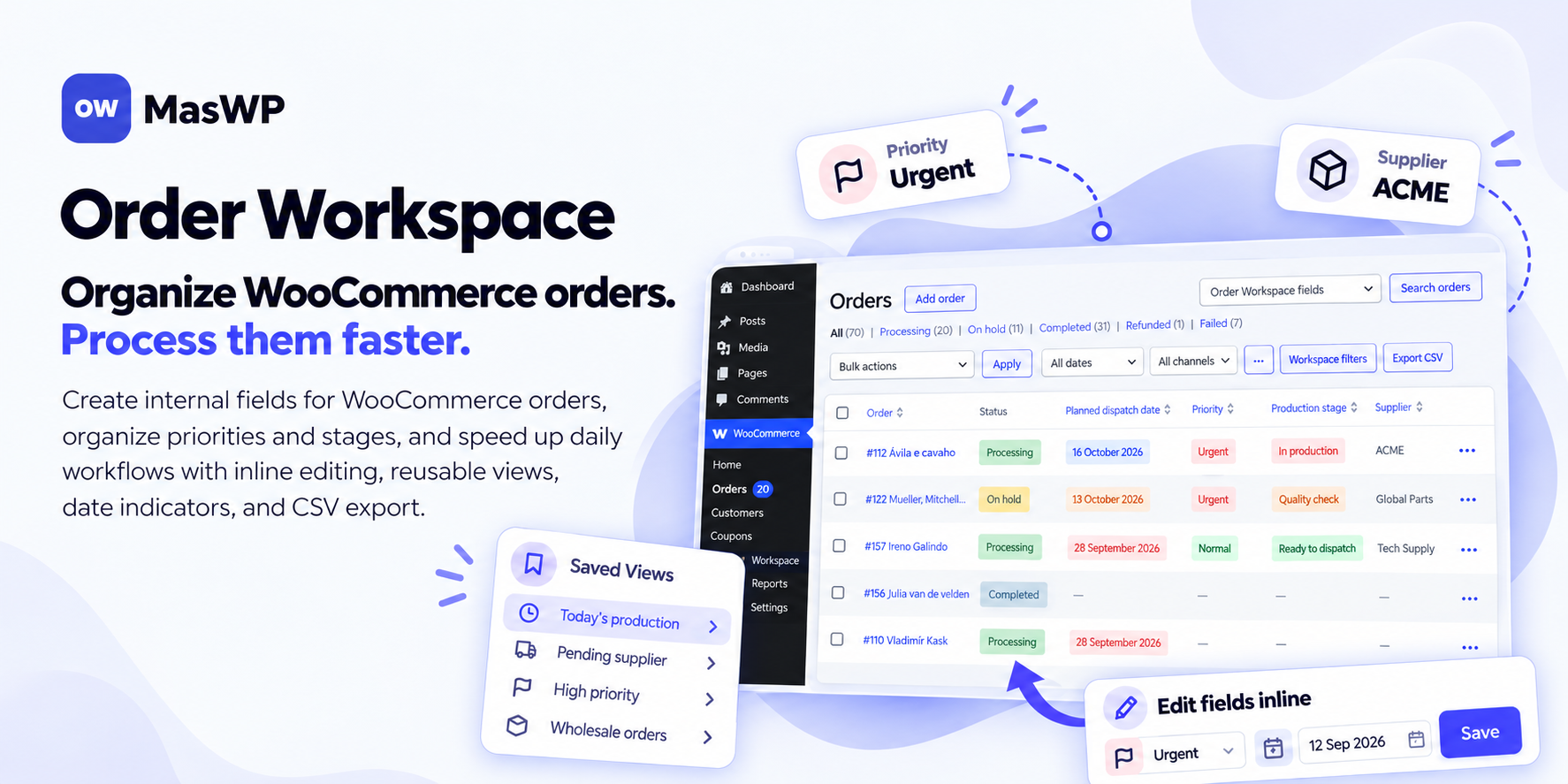
See which WooCommerce orders need attention. Update them faster.
Keep priorities, preparation stages and expected dates visible — and spend less time opening orders one by one. WooCommerce tells you whether an order is processing, on hold or completed. Your team often needs more information: Is it urgent? Is preparation finished? Which supplier is involved? When should it be ready? Order Workspace Pro by MasWP helps you organize that internal information and act on it directly inside WooCommerce. Find the orders that need work, update selected orders and save useful views for your daily routine.Your internal workflow, visible alongside your orders
Keep priorities, production stages, supplier references, planned dates, internal notes and other operational details together inside WooCommerce. Configure the fields your store needs using Text, Long Text, Number, Select, Yes/No and Date. Display important information on individual orders and as order-list columns, with customizable Select and Yes/No colors that make key values easier to recognize. Use inline editing, bulk changes, combined filters and saved views to turn that information into a practical daily workflow.Edit without opening every order
Inline editing lets you update supported Workspace fields directly from the WooCommerce orders list. Need to make the same change across several orders? Bulk editing applies changes to up to 100 selected orders and 10 fields per operation, with processing feedback and per-order results. Inline and bulk editing support Text, Number, Select, Yes/No and Date fields. Long Text is edited on the individual order page and can be included in CSV exports.Find the work that matters now
Combine up to 10 Workspace filter conditions with AND logic to focus your order list. For example, find urgent orders that are in production and have a planned date within the next seven days. Relative date filters help you return to relevant work without entering new dates every day. Personal saved views keep your frequently used filter combinations ready to reopen. Shared views let authorized store users reuse common workflows, while existing WooCommerce permissions continue to control access.Spot upcoming and overdue dates
Add configurable indicators to Workspace Date fields to highlight overdue dates, dates due today and upcoming deadlines. Choose colors and up to five future date ranges, using your store’s timezone.Export a practical working list
Export the operational information you select to CSV:- Up to 100 selected orders and 20 Workspace fields.
- Order ID, order number and status.
- Optional product names and quantities.
- Readable Select labels, comma or semicolon separators, and formula-safe text.
Useful for everyday store operations
Personalized products: Keep preparation stages, internal references and planned dates together. Order preparation: Find urgent work or upcoming deadlines, then update selected orders as work progresses. Team coordination: Share useful views so authorized colleagues can return to the same operational lists.Work inside WooCommerce
Order Workspace uses familiar WooCommerce admin screens and supports High-Performance Order Storage (HPOS) and legacy order storage. It manages the internal fields created with Order Workspace. It complements your existing store tools; it does not manage inventory, shipping, invoicing or accounting, or edit arbitrary metadata created by other plugins.Try the live demo before buying
Explore the workflow with demonstration orders in our interactive live demo.One complete Pro feature set. Choose your site limit.
- Single: 1 website.
- Business: up to 5 websites.
- Agency: up to 20 websites.
Documentation and support
Documentation: Read the documentation Support: Visit our support page · [email protected]Installation and requirements
Order Workspace Pro requires WooCommerce and the Order Workspace for WooCommerce companion plugin, available on WordPress.org at no additional cost.- Install and activate WooCommerce and Order Workspace for WooCommerce 1.2.0 or later.
- Install and activate Order Workspace Pro, then activate your license.
Changelog:
= 1.1.0 =
* Add configurable overdue/today/future Date indicators with up to five editable ranges and custom colors.
* Add tomorrow and next N days filters that remain relative in Saved Views.
* Refresh colors and date labels after inline and bulk saves.
* Add store-shared Saved Views alongside personal views, explicit visibility, manager permissions and concurrent-edit protection.
* Add Select exclusions, including unset values, for combined filters and Saved Views.
* Add operational CSV for selected orders and Workspace fields, optional products/quantities and formula-safe text.
* Replace native browser deletion confirmation with an integrated Saved Views confirmation.
* Improve dialog actions, range controls and responsive toolbar consistency.
* Require Order Workspace Free 1.2.0 or later.
Only logged in customers who have purchased this product may leave a review.
Loading...
Email support
 Support by MasWP
Support by MasWP
MasWP provides support by email
Contact the seller directly by email for product questions and issue reports.
Email support
Opens your default email app.
What support includes
- Answers to product-related questions
- Help with reported bugs and issues
- Guidance for included third-party assets
What support does not include
- Customizations or new features
- Installation or setup services
Plugin
Maintenance snapshot
See recent updates, compatibility, support, and developer activity.
- Updated 1 day ago
- Developer active recently
- Email support available
- WordPress 7.1 tested
Snapshot updated 6 hours ago
View details Hide details
Maintenance details
This is maintenance data. It does not measure product quality or sales.
- Last update Updated 1 day ago
- Compatibility WordPress 7.1 tested · PHP 8.5 tested · WooCommerce 11 tested
- Releases 1 release in the 1 days since listing
- Developer activity Developer active recently
- Support Support is offered by email, not through WPBay tickets
- Docs and demo Documentation available · Changelog available · Demo available
How this snapshot works
Plugin Health
The score is out of 100 and uses data WPBay can check. Ratings, popularity, and sales are not used.
- Last update 30 points
-
Plugins receive full recency points under 30 days, then step down at 90, 180, 365, and 545 days.
- Compatibility 20 points
-
WordPress, PHP, and WooCommerce (when relevant) are scored separately. The latest two PHP lines count as current. Nearby previous versions keep most of the points.
- Current version 100%
- One version behind 75%
- Two versions behind 50%
- Three versions behind 25%
- Older or not listed 0%
- Releases 15 points
-
One release earns 10, two or three earn 13, and four or more earn 15. Each accepted product ZIP counts once; reprocessing the same upload and listing-only edits do not count.
- Developer activity 15 points
-
Based on WPBay login and dashboard activity. Exact last-login dates are never shown.
- Support Not scored
-
WPBay cannot measure response times for email or support on another site, so support is not scored.
- Docs and demo 5 points
-
Documentation: 2. Changelog: 1. Working demo or preview: 2.
Score ranges
- 90–100 Excellent
- 75–89 Healthy
- 60–74 Fair
- 40–59 Needs attention
- 0–39 Limited
Long gaps
WPBay also checks for long gaps between updates, developer activity, support replies, and releases. Buyers do not see this score.
- Time since update 35 points
- Last developer activity 25 points
- WordPress compatibility 15 points
- Support replies Not scored
- Fewer releases 10 points
-
Quality verified by WPBay
WPBay review- Reviewed version
- 1.1.0
- Review completed
- Reviewer
- CodeRevolution
- Review type
- Initial
No unresolved approval blocker was identified during WPBay’s proportionate review of this release. This is not a security certification or a guarantee that the product contains no defects.
-
 Future updates
-
Email support from MasWP
-
Fully GPL licensed
-
Covered by the WPBay refund policy
-
Plugin maintenance snapshot
Relevant picks
You may also like
Similar products selected by category, features, popularity and freshness.


 15 days free
Reviews
There are no reviews yet.