


WooCommerce Pick and Mix Gift Box Builder

 Recently Updated
Well Documented
Recently Updated
Well Documented
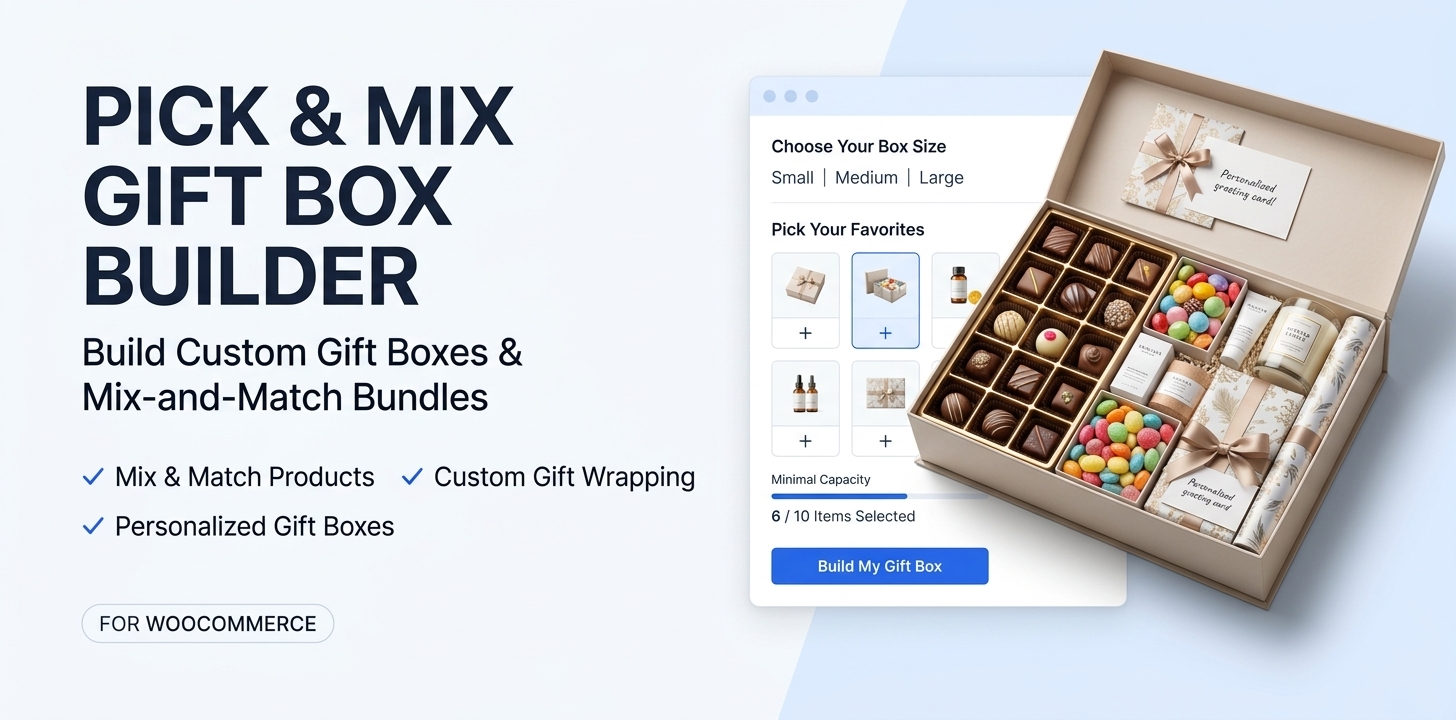
Pick and Mix Gift Box Builder is a customizable WooCommerce gift box builder and mix-and-match product plugin that lets customers create personalized gift boxes, custom gift bags, candy assortments, gift hampers, and product bundles.
Give shoppers the freedom to choose their favorite products, select packaging sizes, customize gift wrapping, and add a personal touch. Set your own product selection rules, capacity limits, pricing, discounts, and promotional gifts while keeping inventory and orders connected to WooCommerce.
From birthday gifts and Christmas boxes to corporate hampers, chocolate assortments, and beauty gift sets, create personalized shopping experiences for different occasions and customers.
Build Your Own Box. Pick Your Products. Personalize Every Gift.
One Gift Box Builder. Endless Gifting Possibilities.
Create custom gift boxes and mix-and-match product collections that suit your business.
Whether you sell sweets, chocolates, snacks, cosmetics, candles, or personalized gifts, Pick and Mix Gift Box Builder gives you control over how customers build and purchase their gifts.
Everything you need to create customizable gifts:
- Mix & Match Products: Let customers select products and quantities from your WooCommerce catalog.
- Custom Gift Boxes & Bags: Offer multiple packaging sizes, capacities, and product combinations.
- Flexible Pricing: Configure fixed prices, product-based pricing, surcharges, and quantity discounts.
- Personalized Gifts: Add gift wrapping, personal messages, and optional customer reference-photo uploads.
- Multiple Gift Collections: Create separate builders for birthdays, Christmas, weddings, and other occasions.
- Targeted Collections: Control availability by customer, user role, country, and date.
- WooCommerce Integration: Use existing products, inventory, cart, checkout, and order management.
Powerful Features for Custom Gift Boxes & Mix and Match Products
1. Build Your Own Gift Box & Product Bundles
Give customers the freedom to create personalized product combinations.
Turn existing WooCommerce products into customizable gift boxes, gift bags, and mix-and-match assortments.
Customers can browse eligible products, select quantities, and create their preferred combinations while following your configured rules.
Key capabilities:
- Select WooCommerce simple products and specific variations.
- Offer multiple gift box and bag sizes.
- Configure minimum and maximum quantities.
- Support exact-fill or partially filled collections.
- Display available capacity as products are selected.
- Validate product availability and quantities before purchase.
Perfect for build-your-own candy boxes, chocolate selections, snack bundles, beauty boxes, and personalized gift sets.
2. Create Multiple Gift Collections
One store. Different occasions. Individual gift-building experiences.
Create up to 50 independent gift collections, each with its own products, sizes, pricing, selection rules, wrapping options, and appearance.
For example, create separate collections for:
Christmas Gifts | Birthday Boxes | Wedding Favors | Corporate Hampers | Valentine’s Gifts
Each collection can be displayed on a dedicated WordPress page using the included Gutenberg block or shortcode.
You can also display all collections available to a shopper in one gift builder.
Collection-Specific Customization
Customize the appearance of each collection independently, including:
- Primary and secondary colors.
- Button and accent colors.
- Builder background colors.
- Main heading and introductory text.
- Collection-specific visual styling.
Create seasonal designs without changing the appearance of your other gift builders.
3. Advanced Gift Box Capacity & Selection Rules
Control what customers can add to every box or bag.
Configure product-selection rules that match your packaging and business requirements.
Set minimum and maximum quantities, required product variety, premium product limits, and category-specific restrictions.
Supported controls include:
- Item-count or fixed-portion gram capacity.
- Minimum and maximum fill requirements.
- Product quantity limits.
- Required product variety.
- Category minimum and maximum quantities.
- Premium product restrictions.
- Product-specific capacity and surcharge settings.
For example, allow customers to select up to 10 candy portions while limiting premium selections to two.
The builder checks configured restrictions to help customers create valid combinations.
Fixed-portion inventory: Gram-based capacity works with WooCommerce products representing defined portions. It does not automatically convert bulk kilogram inventory into individual gram units.
4. Flexible Gift Box Pricing & Quantity Discounts
Choose the pricing model that works for your products.
Configure how gift box prices are calculated while retaining WooCommerce’s tax, shipping, and checkout handling.
Pricing Options
Fixed Contents Pricing: Set a fixed contents price for a gift box size.
Product-Based Pricing: Calculate the contents price using customers’ selected products and quantities.
Premium Product Surcharges: Apply additional charges to configured premium selections.
Quantity Discount Tiers: Offer eligible discounts based on the number of selected product units.
Packaging & Wrapping Charges: Include separately configured packaging and wrapping products.
Prices are calculated and validated on the server before cart changes, helping maintain consistency between the builder and WooCommerce checkout.
5. Gift Wrapping & Personalized Messages
Let customers add the finishing touches to their gifts.
Offer gift wrapping options with images, pricing, and available stock.
Customers can select their preferred wrapping style and include a personal message with their gift.
Features include:
- Multiple gift wrapping options.
- Wrapping images from the WordPress Media Library.
- WooCommerce product-based wrapping charges.
- Personalized gift messages.
- Gift wrapping details associated with the order.
Wrapping selections remain connected to the corresponding gift bag for order fulfillment.
6. Customer Photo Uploads for Personalized Gifts
Accept private reference images for gift preparation.
Allow customers to upload a JPEG or PNG reference photo when enabled for a collection.
This is useful for personalized gift preparation, custom wrapping references, or fulfillment instructions.
Uploaded files are processed and encrypted, with protected access for authorized order managers.
Included safeguards:
- JPEG and PNG support.
- File size and image dimension limits.
- Encrypted private storage.
- Protected order-related access.
- Automatic expiration of abandoned and order-associated uploads.
Customer reference photos are private fulfillment files, not publicly displayed product images or a graphic-design tool.
7. Free Gifts & Promotional Gift Rules
Reward qualifying gift box purchases.
Create promotional gift offers based on configured conditions.
Offer complimentary products when a collection reaches a defined fill threshold, or use promotional rules based on qualifying products, spending requirements, and dates.
Promotion features:
- Complimentary gifts based on capacity thresholds.
- Spend-based promotional rules.
- Product-based qualifying conditions.
- Promotional start and end dates.
- Rule priorities.
- WooCommerce stock validation for reward products.
Promotional products remain part of the corresponding gift configuration and order.
8. Customer, Role, Country & Date-Based Collection Visibility
Show the right gift collections to the right shoppers.
Control who can access individual gift collections without creating separate stores.
Available Restrictions
| Restriction | Function |
|---|---|
| Specific Customers | Display collections to selected registered customer accounts. |
| User Roles | Restrict access by WordPress user roles, including guest visitors. |
| Countries | Choose which WooCommerce countries can access a collection. |
| Start Date | Schedule when a collection becomes available. |
| End Date | Define when collection availability ends. |
Leave a restriction empty to make that setting unrestricted.
When multiple restrictions are configured, all configured conditions must be satisfied.
Example: Create a Christmas gift collection available to selected customers in specific countries during your holiday campaign.
Country-restricted collections require the shopper’s country to be identifiable.
9. Multiple Gift Bags in One Order
Let customers create more than one personalized gift.
Customers can build separate gift bags with different products, quantities, wrapping selections, and messages.
The builder supports:
- Creating multiple gift bags.
- Naming and duplicating bags.
- Editing existing bags.
- Removing individual bags.
- Moving compatible product quantities between bags.
- Saving product selections for later revalidation.
Each gift bag retains its own configuration, allowing customers to purchase gifts for different occasions or recipients through one WooCommerce checkout.
10. Rule Simulator & Configuration Validation
Test your gift box rules before publishing.
The built-in Rule Simulator helps administrators check whether configured product selections satisfy a collection’s requirements.
Test different quantities and combinations to identify capacity, category, and product restrictions.
The admin interface also provides validation messages to help locate configuration issues.
This helps merchants identify conflicting or impossible configurations before making collections available to customers.
11. WooCommerce Inventory, Cart & Order Management
Keep your gift collections connected to WooCommerce.
Pick and Mix Gift Box Builder uses existing WooCommerce products for contents, packaging, wrapping, and eligible gifts.
Product stock remains managed by WooCommerce.
Order Management Features
- Server-side product and pricing validation.
- WooCommerce cart and checkout integration.
- Inventory handling through WooCommerce.
- Gift bag and component order metadata.
- Individual bag identification within orders.
- Grouped packing manifests.
- Printable fulfillment information.
- WooCommerce component refund handling.
- HPOS-compatible order data handling.
Merchants can review gift selections and associated fulfillment details without managing a separate order system.
How Pick and Mix Gift Box Builder Works
Step 1 — Create a Gift Collection
Create a collection for your desired occasion or product range, such as Christmas gifts, birthday boxes, or custom candy assortments.
Step 2 — Configure Products & Box Sizes
Select eligible WooCommerce products, add packaging options, and configure capacity and selection requirements.
Step 3 — Set Pricing & Personalization
Choose pricing rules, discounts, gift wrapping, promotional rewards, and customer customization options.
Step 4 — Publish Your Gift Builder
Display all available gift collections or a specific collection using the Gutenberg block or shortcode.
Step 5 — Customers Build & Purchase
Shoppers choose products, personalize their gifts, review the calculated price, and complete checkout through WooCommerce.
No separate checkout system is required.
Perfect for Gift Shops & Custom Product Bundle Stores
| Business Type | What You Can Create |
|---|---|
| Gift Shops | Personalized gift boxes, birthday gifts, wedding presents |
| Candy & Sweet Stores | Pick-and-mix candy bags, sweet boxes, confectionery assortments |
| Chocolate Stores | Custom chocolate boxes and premium chocolate collections |
| Gift Hamper Stores | Personalized hampers and curated product collections |
| Beauty & Cosmetics | Custom beauty boxes, skincare gift sets, makeup assortments |
| Snack & Food Stores | Snack boxes, food assortments, themed gift packs |
| Corporate Gift Stores | Employee gift boxes, client appreciation hampers |
| Seasonal Retailers | Christmas boxes, Valentine’s gifts, Easter collections |
Use one WooCommerce gift box builder to manage different products, occasions, and customer groups.
Designed for WooCommerce Store Owners
Simple Configuration. Flexible Control.
Manage gift collections directly from WooCommerce → BagCraft.
The administration interface includes searchable product and category selectors, contextual help icons, collection-specific settings, and a Rule Simulator.
Configure products, packaging, pricing, and restrictions without manually entering product IDs.
Display Gift Builders Anywhere
Use the BagCraft Builder Gutenberg block or shortcodes to publish your collections.
Display all eligible collections:
[bagcraft_builder]
Display a specific gift collection:
[bagcraft_builder collection="your-collection-id"]
Create individual landing pages for Christmas gift boxes, birthday gifts, wedding favors, and other campaigns.
Why Choose Pick and Mix Gift Box Builder?
A gift box should be easy for customers to personalize and straightforward for merchants to manage.
Pick and Mix Gift Box Builder brings product selection, gift personalization, capacity restrictions, pricing, promotional rewards, and fulfillment information into one WooCommerce workflow.
For customers: A convenient way to choose products and create personalized gifts.
For merchants: Control over available products, configuration rules, collection visibility, pricing, and inventory.
For fulfillment: Clearly identified gift bags, selected components, wrapping details, and packing information.
Create personalized gift experiences without separating your product catalog, checkout, and order management.
Frequently Asked Questions
Can customers build their own gift boxes in WooCommerce?
Yes. Pick and Mix Gift Box Builder lets customers select eligible products, choose quantities and bag sizes, and personalize their gifts within configured selection rules.
Can I create multiple gift box collections?
Yes. Create up to 50 independent gift collections with their own products, rules, wrapping options, and appearance settings.
Can I display different gift collections on separate pages?
Yes. Use the Gutenberg block’s collection selector or the collection-specific shortcode to display an individual gift builder on a dedicated WordPress page.
Does the plugin support mix-and-match products?
Yes. Customers can select eligible WooCommerce simple products and specific variations to create custom assortments.
Can I offer fixed prices and quantity discounts?
Yes. Configure fixed contents pricing, product-based pricing, applicable surcharges, and quantity discount tiers.
Can customers upload photos for personalized gifts?
Yes. When enabled, customers can upload private JPEG or PNG reference images for gift preparation. Images are encrypted and accessible to authorized order managers.
Can I restrict gift collections to specific customers?
Yes. Collection availability can be controlled using registered customer accounts, user roles, countries, and optional date restrictions.
Can customers create multiple gift boxes in one order?
Yes. Shoppers can create multiple separate gift bags, customize their contents, and purchase them through WooCommerce checkout.
Does the plugin support WooCommerce inventory management?
Yes. Gift contents, packaging, wrapping, and promotional gifts use regular WooCommerce products. Stock handling follows WooCommerce’s inventory system.
Does it include gift cards or subscription boxes?
No. The plugin focuses on configurable physical gifts. Stored-value gift cards, subscription management, and multi-address fulfillment are not included.
Start Creating Custom Gift Boxes with WooCommerce
Turn your WooCommerce products into personalized gift boxes, custom gift bags, and mix-and-match assortments.
Create unique collections, configure your product rules, personalize the gift-building experience, and manage purchases through your existing WooCommerce store.
Pick and Mix Gift Box Builder for WooCommerce
Create Your Own Box. Mix & Match Products. Personalize Every Gift.
Changelog:
*** Pick and Mix Gift Box Builder Changelog ***
2026-10-14 - version 1.0.0
* First release
Only logged in customers who have purchased this product may leave a review.
Loading...
WPBay support
 Support by WPStoreTools
Support by WPStoreTools
WPStoreTools supports this product through WPBay
Questions are handled in WPBay's private ticket system, keeping your purchase details and support conversation together.
Go to My Downloads
After purchase, open this item in My Downloads and choose Get Support.
What support includes
- Answers to product-related questions
- Help with reported bugs and issues
- Guidance for included third-party assets
What support does not include
- Customizations or new features
- Installation or setup services
Plugin
Maintenance snapshot
See recent updates, compatibility, support, and developer activity.
- Updated today
- Developer active recently
- WPBay support available
- WordPress 7.1 tested
Snapshot updated 6 hours ago
View details Hide details
Maintenance details
This is maintenance data. It does not measure product quality or sales.
- Last update Updated today
- Compatibility WordPress 7.1 tested · PHP 8.5 tested · WooCommerce 11 tested
- Releases 2 releases in the 2 days since listing
- Developer activity Developer active recently
- Support No recent support tickets to measure
- Docs and demo Documentation available · Changelog available · No demo listed
How this snapshot works
Plugin Health
The score is out of 100 and uses data WPBay can check. Ratings, popularity, and sales are not used.
- Last update 30 points
-
Plugins receive full recency points under 30 days, then step down at 90, 180, 365, and 545 days.
- Compatibility 20 points
-
WordPress, PHP, and WooCommerce (when relevant) are scored separately. The latest two PHP lines count as current. Nearby previous versions keep most of the points.
- Current version 100%
- One version behind 75%
- Two versions behind 50%
- Three versions behind 25%
- Older or not listed 0%
- Releases 15 points
-
One release earns 10, two or three earn 13, and four or more earn 15. Each accepted product ZIP counts once; reprocessing the same upload and listing-only edits do not count.
- Developer activity 15 points
-
Based on WPBay login and dashboard activity. Exact last-login dates are never shown.
- Support 15 points
-
There are no recent WPBay tickets to measure.
- Docs and demo 5 points
-
Documentation: 2. Changelog: 1. Working demo or preview: 2.
Score ranges
- 90–100 Excellent
- 75–89 Healthy
- 60–74 Fair
- 40–59 Needs attention
- 0–39 Limited
Long gaps
WPBay also checks for long gaps between updates, developer activity, support replies, and releases. Buyers do not see this score.
- Time since update 35 points
- Last developer activity 25 points
- WordPress compatibility 15 points
- Support replies 15 points
- Fewer releases 10 points
-
Quality verified by WPBay
WPBay review- Reviewed version
- 1.0.0
- Review completed
- Reviewer
- CodeRevolution
- Review type
- Initial
No unresolved approval blocker was identified during WPBay’s proportionate review of this release. This is not a security certification or a guarantee that the product contains no defects.
-
 Future updates
-
WPBay support from WPStoreTools
-
GPL code, proprietary assets
-
Covered by the WPBay refund policy
-
Plugin maintenance snapshot
Relevant picks
You may also like
Similar products selected by category, features, popularity and freshness.

 15 days free
From this seller
View seller store
More by WPStoreTools
Explore more bestselling products from this creator.
Reviews
There are no reviews yet.