


 1 month free

 Recently Updated
Well Documented
Recently Updated
Well Documented
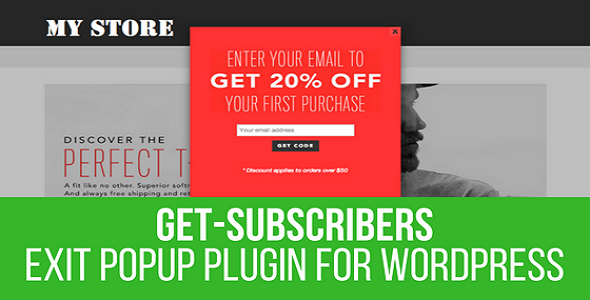




Get Subscribers Popup is a powerful responsive html page popup that can convert your visitors to your subscribers or to your online shoppers. It only requires some quick configurations and it will work on mobile devices and desktop machines no matter which browser is used including older browsers like IE7/IE8. Packed with a serious amount of features like responsive layout, social button on click add, embed your own HTML content and much more. All the available features makes Get Subscribers popup the best and most flexible HTML popup available on sale.
+ Pop-ups are displayed even when Adblockers try to block your content + Mobile and desktop optimized.
+ Support for a wide range of modern web browsers like: Internet Explorer, Edge, Chrome, Firefox
+ Configuring your popup with just clicks from the mouse (including popup title, popup text, image, Facebook like button, Facebook share button, Twitter tweet button, Google Plus +1 button and form close link)
+ Two Color Pickers for popup background and popup text to help match the look of your existing website
+ Ability to choose if popup should appear only once for every visitor (using cookies)
+ Ability to choose if popup should appear only on the main page of the website
+ Possibility to add your own HTML code to be show inside the popup
+ Possibility to add content generated by WordPress shortcodes to be show inside the popup
+ Ability to choose if clicking outside the popup will close the popup
+ Live as you type popup preview in the settings window
+ Possibility to disable popup from the settings panel
+ Support for all web subscriber management providers like Feedburner, Feedblitz, SpecificFeeds, FeedPress, MailChimp or Aweber
+ Responsive layout
+ Multiples display popup trigger options (separate for mobile and desktop): On Page Load/On Page Load With Custom Delay in Seconds/On Page Scroll/On Visitor Leave Intent
+ Ability to choose if clicking outside the popup will close the popup or not
+ Automatic popup update process – new features made for the popup will be automatically deployed on your website with plugin auto-updating
+ Ability to choose the background color of the popup
+ Ability to choose the text color of the popup
+ Instant preview of your popup in the right side of the popup configuration panel
+ In case you write your own HTML code, the popup provides an “update-as-you-write” popup preview panel
+ Popup supports a wide range of image formats, including data URIs
+ Optimized for speed – as less as possible page speed impact
+ Help for installation and configuration (including a live preview) in the zip file.

Please check our knowledge base, it may have the answer to your question or a solution for your issue. If not, just email me at [email protected] and I will respond as soon as I can.


Version 1.0 Release Date 2016-10-10
First version released!
Version 1.1 Release Date 2016-11-10
Fixed plugin auto update process
Version 1.2 Release Date 2016-12-03
Big update in documentation
Added transparent popup background feature
Fixed some minor issues
Version 1.3 Release Date 2017-02-03
Added multisite support
Version 1.4 Release Date 2017-02-22
Fixed plugin auto-updating process
Some minor fixes and enhancements
Version 1.5 Release Date 2017-03-15
Replaced textarea used as HTML editor with WordPress's built-in editor
Plugin now accepts shortcodes (even generated by other plugins) in popups content
Some minor fixes and enhancements
Version 1.6.2 Release Date 2017-03-29
Added the ability to disable the popup on any post, page, 404 page, search page or main page
Added the ability to disable the popup on mobile or desktop devices
Some minor fixes and enhancements
Version 1.6.3 Release Date 2017-04-03
Improved plugin performance
Version 1.7.0 Release Date 2017-07-31
Fixed compatibility with some themes
Added the option to load popup after custom amount at seconds
Version 1.7.1 Release Date 2017-11-13
Added option to display X close link in top right corner
Fixed image displaying
Version 1.7.2 Release Date 2017-11-14
Added an option to define the cookie lifetime
Version 1.7.3 Release Date 2017-11-15
Added option to use cookies only on desktop/mobile
Version 1.7.4 Release Date 2018-02-15
Bugfixes
Version 1.7.5 Release Date 2018-03-27
Fixed issue with sharing buttons, sometimes not being visible
Version 1.7.6 Release Date 2019-04-19
Security update
Version 1.7.7 Release Date 2019-11-15
WordPress 5.3 compatibility update
Version 1.7.8 Release Date 2020-05-11
New features added for content templates
Bugfix update
Version 1.7.9 Release Date 2021-01-16
PHP 8 compatibility update
Version 1.7.9.1 Release Date 2023-10-18
Fixed PHP 8.2 related errors
If you already bought this and you have tried it out, please contact me in the item’s comment section and give me feedback, so I can make it a better WordPress plugin!
WordPress 7.0 and PHP 8.5 Tested! 

Changelog:
Version 1.0 Release Date 2016-10-10
First version released!
Version 1.1 Release Date 2016-11-10
Fixed plugin auto update process
Version 1.2 Release Date 2016-12-03
Big update in documentation
Added transparent popup background feature
Fixed some minor issues
Version 1.3 Release Date 2017-02-03
Added multisite support
Version 1.4 Release Date 2017-02-22
Fixed plugin auto-updating process
Some minor fixes and enhancements
Version 1.5 Release Date 2017-03-15
Replaced textarea used as HTML editor with WordPress's built-in editor
Plugin now accepts shortcodes (even generated by other plugins) in popups content
Some minor fixes and enhancements
Version 1.6.2 Release Date 2017-03-29
Added the ability to disable the popup on any post, page, 404 page, search page or main page
Added the ability to disable the popup on mobile or desktop devices
Some minor fixes and enhancements
Version 1.6.3 Release Date 2017-04-03
Improved plugin performance
Version 1.7.0 Release Date 2017-07-31
Fixed compatibility with some themes
Added the option to load popup after custom amount at seconds
Version 1.7.1 Release Date 2017-11-13
Added option to display X close link in top right corner
Fixed image displaying
Version 1.7.2 Release Date 2017-11-14
Added an option to define the cookie lifetime
Version 1.7.3 Release Date 2017-11-15
Added option to use cookies only on desktop/mobile
Version 1.7.4 Release Date 2018-02-15
Bugfixes
Version 1.7.5 Release Date 2018-03-27
Fixed issue with sharing buttons, sometimes not being visible
Version 1.7.6 Release Date 2019-04-19
Security update
Version 1.7.7 Release Date 2019-11-15
WordPress 5.3 compatibility update
Version 1.7.8 Release Date 2020-05-11
New features added for content templates
Bugfix update
Version 1.7.9 Release Date 2021-01-16
PHP 8 compatibility update
Version 1.7.9.1 Release Date 2023-10-18
Fixed PHP 8.2 related errors
Only logged in customers who have purchased this product may leave a review.
 Support by CodeRevolution
Questions are handled in WPBay's private ticket system, keeping your purchase details and support conversation together.
After purchase, open this item in My Downloads and choose Get Support.
See recent updates, compatibility, support, and developer activity.
Snapshot updated 12 hours ago
This is maintenance data. It does not measure product quality or sales.
Health reflects increased activity during the last 90 days.
The score is out of 100 and uses data WPBay can check. Ratings, popularity, and sales are not used.
Plugins receive full recency points under 30 days, then step down at 90, 180, 365, and 545 days.
WordPress, PHP, and WooCommerce (when relevant) are scored separately. The latest two PHP lines count as current. Nearby previous versions keep most of the points.
One release earns 10, two or three earn 13, and four or more earn 15. Each accepted product ZIP counts once; reprocessing the same upload and listing-only edits do not count.
Based on WPBay login and dashboard activity. Exact last-login dates are never shown.
There are no recent WPBay tickets to measure.
Documentation: 2. Changelog: 1. Working demo or preview: 2.
Score ranges
WPBay also checks for long gaps between updates, developer activity, support replies, and releases. Buyers do not see this score.
No unresolved approval blocker was identified during WPBay’s proportionate review of this release. This is not a security certification or a guarantee that the product contains no defects.
 Future updates
WPBay support from CodeRevolution
GPL code, proprietary assets
Covered by the WPBay refund policy
Plugin maintenance snapshot
Future updates
WPBay support from CodeRevolution
GPL code, proprietary assets
Covered by the WPBay refund policy
Plugin maintenance snapshot
Similar products selected by category, features, popularity and freshness.
Explore more bestselling products from this creator.



Reviews
There are no reviews yet.