


Entries Manager for Contact Form 7

 Recently Updated
Well Documented
Recently Updated
Well Documented
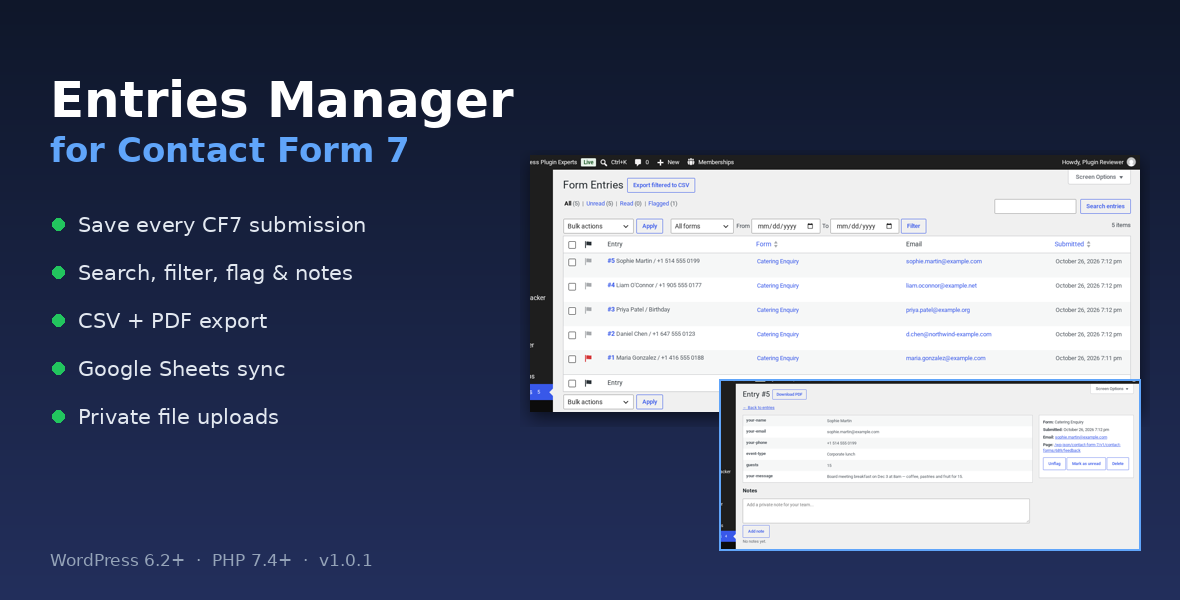
Keep every Contact Form 7 submission on your own site
Contact Form 7 only sends an email. If that email lands in spam or never arrives, the enquiry is gone. Entries Manager saves every valid, non-spam Contact Form 7 submission to your WordPress database, even when the email fails, and gives you a full admin screen to search, flag, annotate and export them.Features
- Entries list: search, filter by form and date, All / Unread / Read / Flagged views, unread count badge in the menu, and bulk actions (read/unread, flag/unflag, export, delete).
- Single entry view: all fields, form, page and submit time, plus private team notes.
- CSV export: export everything matching the current filters, or just the selected entries. Streamed in batches of 500 so large exports don’t run out of memory, with spreadsheet formula-injection protection and UTF-8 for Excel.
- PDF of any entry: generated by built-in code with no external service (Western European characters; use CSV for other scripts).
- Private file uploads: files sent through CF7 file fields are kept in a protected folder with secure download links, and Site Health tells you if your server (for example Nginx) needs an extra rule.
- Optional Google Sheets sync: uses your own Google service account. Up to 50 entries per run with further runs queued automatically, retries on rate-limit and server errors, and automatic retry of failed rows. A lock prevents duplicate rows.
- Duplicate protection: identical submissions sent again within 60 seconds are ignored.
- Privacy tools: IP and user agent storage are off by default, forms or fields can be excluded, entries are included in WordPress personal data export and erase, and optional auto-delete after a set number of days.
- Roles and capabilities for viewing entries, managing entries and managing settings, plus multisite support and an opt-in clean uninstall.
- Built-in documentation inside wp-admin.
Requirements
- WordPress 6.2+ and PHP 7.4+
- Contact Form 7 (free on WordPress.org)
- PHP OpenSSL extension for Google Sheets sync (enabled on almost every host)
External services
The plugin makes no outgoing requests unless you turn on Google Sheets sync. When enabled, it contacts oauth2.googleapis.com and sheets.googleapis.com to send that site’s form entries to the spreadsheet you choose. There is no tracking and no license check.Documentation and support
Full documentation: https://007aj.com/docs/cf7-entries-manager/. For help, message us through WPBay or email [email protected]. Not affiliated with or endorsed by the Contact Form 7 author.
Changelog:
= 1.0.6 =
* Fixed file cleanup: admin deletes now schedule retries, and migration no longer leaves the original file behind.
= 1.0.5 =
* Google Sheets: after a partial failure, remaining Pending or in-progress entries are always rescheduled and the error stays visible until every entry is delivered.
* Attachment deletion: files that cannot be removed are kept in a cleanup list and retried every 15 minutes; erasure, export, retention and an admin notice report them.
1.0.4 - Verified atomic attachment migration; Attachment errors filter works through pagination and export; linear-time PDF wrapping.
1.0.3 – No longer requires mbstring (UTF-8-safe fallback); attachment storage failures are recorded, flagged on the entry and shown in admin notices.
1.0.2 – Multisite-safe private storage, activation restores retention and resumes pending Sheets work, duplicate-safe Google Sheets sync with retries and leases, rolling 60-second duplicate protection.
1.0.1 – Google Sheets sync uses an atomic lock and per-row claim, so overlapping runs can't create duplicate rows; rate-limit and server errors are retried with backoff, rows are sent one by one if a batch fails, and failed rows retry automatically. Retention keeps deleting in background batches when more than 10,000 entries are due, with an admin notice. All Contact Form 7 forms now appear in filters and settings (200-form cap removed). Docs: new Limits and Support sections.
1.0.0 – Initial release.
Only logged in customers who have purchased this product may leave a review.
Loading...
WPBay support
 Support by 007AJ.com
Support by 007AJ.com
007AJ.com supports this product through WPBay
Questions are handled in WPBay's private ticket system, keeping your purchase details and support conversation together.
Go to My Downloads
After purchase, open this item in My Downloads and choose Get Support.
What support includes
- Answers to product-related questions
- Help with reported bugs and issues
- Guidance for included third-party assets
What support does not include
- Customizations or new features
- Installation or setup services
Plugin
Maintenance snapshot
See recent updates, compatibility, support, and developer activity.
- Updated today
- Developer active recently
- WPBay support available
- WordPress 7.1 tested
Snapshot updated 2 hours ago
View details Hide details
Maintenance details
This is maintenance data. It does not measure product quality or sales.
- Last update Updated today
- Compatibility WordPress 7.1 tested · PHP 8.5 tested
- Releases 6 releases in the 1 days since listing
- Developer activity Developer active recently
- Support No recent support tickets to measure
- Docs and demo Documentation available · Changelog available · Demo available
How this snapshot works
Plugin Health
The score is out of 100 and uses data WPBay can check. Ratings, popularity, and sales are not used.
- Last update 30 points
-
Plugins receive full recency points under 30 days, then step down at 90, 180, 365, and 545 days.
- Compatibility 20 points
-
WordPress, PHP, and WooCommerce (when relevant) are scored separately. The latest two PHP lines count as current. Nearby previous versions keep most of the points.
- Current version 100%
- One version behind 75%
- Two versions behind 50%
- Three versions behind 25%
- Older or not listed 0%
- Releases 15 points
-
One release earns 10, two or three earn 13, and four or more earn 15. Each accepted product ZIP counts once; reprocessing the same upload and listing-only edits do not count.
- Developer activity 15 points
-
Based on WPBay login and dashboard activity. Exact last-login dates are never shown.
- Support 15 points
-
There are no recent WPBay tickets to measure.
- Docs and demo 5 points
-
Documentation: 2. Changelog: 1. Working demo or preview: 2.
Score ranges
- 90–100 Excellent
- 75–89 Healthy
- 60–74 Fair
- 40–59 Needs attention
- 0–39 Limited
Long gaps
WPBay also checks for long gaps between updates, developer activity, support replies, and releases. Buyers do not see this score.
- Time since update 35 points
- Last developer activity 25 points
- WordPress compatibility 15 points
- Support replies 15 points
- Fewer releases 10 points
-
Quality verified by WPBay
WPBay review- Reviewed version
- 1.0.6
- Review completed
- Reviewer
- CodeRevolution
- Review type
- Initial
No unresolved approval blocker was identified during WPBay’s proportionate review of this release. This is not a security certification or a guarantee that the product contains no defects.
-
 Future updates
-
WPBay support from 007AJ.com
-
GPL code, proprietary assets
-
Covered by the WPBay refund policy
-
Plugin maintenance snapshot
Relevant picks
You may also like
Similar products selected by category, features, popularity and freshness.


From this seller
View seller store
More by 007AJ.com
Explore more bestselling products from this creator.
Reviews
There are no reviews yet.