



LocalBooking Pro – Self Hosted Appointment Booking & Scheduling for WordPress

 Recently Updated
Well Documented
Recently Updated
Well Documented
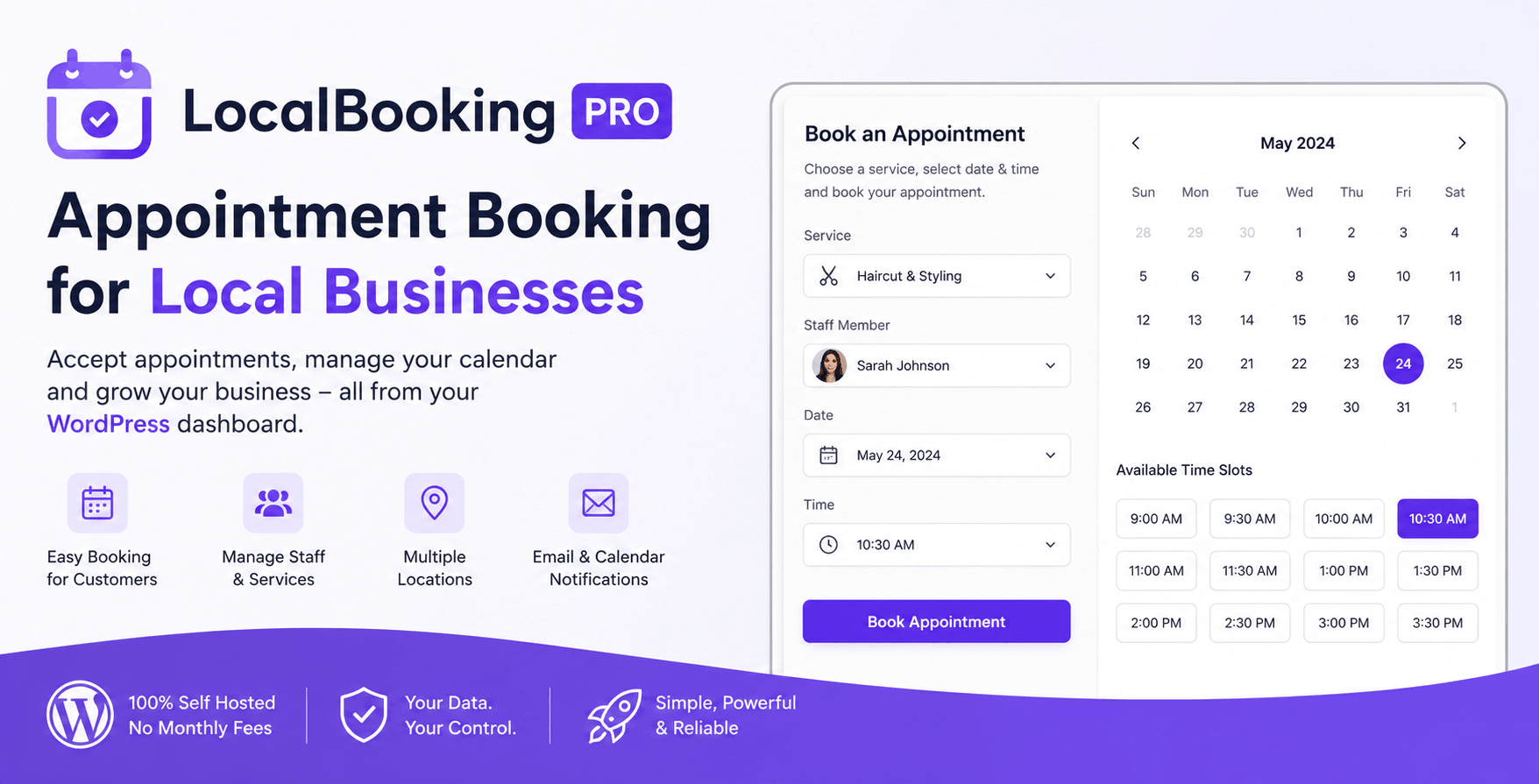
Running a local business means your website should do more than display your services—it should help convert visitors into real appointments.
LocalBooking Pro is a complete self-hosted appointment booking plugin for WordPress that allows customers to request appointments directly from your website. Everything is managed inside your own WordPress dashboard, giving you full control over your booking process without relying on third-party scheduling platforms or paying monthly subscription fees.
Whether you’re a barber, beauty salon, dental practice, repair shop, photography studio, consultancy, cleaning company, fitness coach, agency, or any other appointment-based business, LocalBooking Pro provides a professional booking experience that is easy for customers and efficient for business owners.
Instead of sending visitors to external booking services, you keep everything on your own website. Customers can choose a service, select an available time, enter their details, and submit their booking request in just a few clicks. Every request is stored securely in WordPress, making it simple to review, confirm, update, or complete appointments from a centralized management interface.
The plugin has been designed to fit naturally into WordPress, with a clean administration area, flexible booking forms, and a modern frontend experience that works well on desktops, tablets, and mobile devices.
Everything you need to manage appointments
LocalBooking Pro includes everything required to operate a professional appointment booking system.
Create unlimited services, organize your availability, define working hours, configure appointment time slots, and prevent bookings on holidays or unavailable dates. As your business grows, you can also manage multiple staff members and locations, allowing customers to book with the right person at the right place.
Every booking can be tracked through its entire lifecycle using customizable booking statuses, helping you easily distinguish between new requests, confirmed appointments, completed services, or cancelled bookings.
Automatic email notifications keep both you and your customers informed whenever a booking is created or updated. Calendar invitations can also be included, making it easy for customers to save appointments directly to their preferred calendar application.
For businesses that integrate with other software, LocalBooking Pro supports webhook notifications, allowing bookings to trigger automations in CRM systems, marketing platforms, or custom workflows.
Need to analyze your bookings? Export appointment data to CSV for reporting, accounting, or external processing whenever you need it.
Built for local businesses
Unlike generic booking systems that try to serve every industry, LocalBooking Pro focuses on businesses where appointments are the core of daily operations.
It is an excellent solution for:
- Hair salons
- Barber shops
- Beauty salons
- Dental clinics
- Medical practices
- Massage therapists
- Fitness trainers
- Personal coaches
- Consultants
- Photographers
- Cleaning companies
- Repair services
- Plumbers
- Electricians
- Agencies
- Pet grooming businesses
- Automotive services
- Home service providers
- Any business that schedules appointments
Self-hosted and privacy friendly
Your customer information belongs to you.
All booking requests are stored directly in your WordPress database instead of being sent to an external booking platform. There are no recurring subscription fees, no per-booking commissions, and no dependency on third-party scheduling services.
Because everything runs on your own website, you remain in full control of your customer data, branding, and booking workflow.
Flexible booking forms
Every business collects different information from its customers.
LocalBooking Pro allows you to build booking forms that match your workflow, helping you gather exactly the information you need before confirming an appointment. Whether you’re collecting contact information, service preferences, special requests, or additional booking details, the plugin adapts to your business rather than forcing you into a fixed process.
Easy integration with any WordPress website
Getting started only takes a few minutes.
Install the plugin, configure your services and availability, place the booking shortcode on any page, and your website is ready to start accepting appointment requests.
The plugin works perfectly for new websites as well as existing business websites looking to replace expensive cloud-based booking platforms with a fast, reliable, self-hosted alternative.
Product Plans
LocalBooking Pro is available in three plans, so you can start small and upgrade only when your business needs more.
The Base Plan is made for simple appointment booking on one website. It includes the core booking system, frontend booking shortcode, booking submissions, email notifications, and booking status management. It is a good choice if you only need a clean way for customers to request appointments and for you to manage them from WordPress.
The Professional Plan is the best option for most businesses. It works on up to 3 websites and unlocks the features that make the booking system more flexible: unlimited booking forms, unlimited services, custom form fields, availability rules, time slots, custom email templates, CSV export, calendar attachments, webhook notifications, and dashboard stats. This is the plan to choose if you want more control over how appointments are created, organized, and followed up.
The Agency Plan is built for larger setups, agencies, and businesses that manage more than one location or team member. It includes everything from Professional, works on unlimited websites, and adds staff management, multiple locations, white label options, advanced shortcode attributes, filtered booking exports, internal booking notes, and priority support. This plan is ideal if you want to use LocalBooking Pro across several client sites or build a more complete booking workflow for a growing business.
In simple terms: choose Base if you need the essentials, Professional if bookings are an important part of your business, and Agency if you manage clients, teams, or multiple locations.
Changelog:
Version 1.0.0 - 01.07.2026
First version released
Only logged in customers who have purchased this product may leave a review.
Loading...
WPBay support
 Support by CodeRevolution
Support by CodeRevolution
CodeRevolution supports this product through WPBay
Questions are handled in WPBay's private ticket system, keeping your purchase details and support conversation together.
Go to My Downloads
After purchase, open this item in My Downloads and choose Get Support.
What support includes
- Answers to product-related questions
- Help with reported bugs and issues
- Guidance for included third-party assets
What support does not include
- Customizations or new features
- Installation or setup services
Plugin
Maintenance snapshot
See recent updates, compatibility, support, and developer activity.
- Updated 43 days ago
- Developer active recently
- WPBay support available
- WordPress 7.1 tested
Snapshot updated 3 hours ago
View details Hide details
Maintenance details
This is maintenance data. It does not measure product quality or sales.
- Last update Updated 43 days ago
- Compatibility WordPress 7.1 tested · PHP 8.5 tested
- Releases 1 release in the 90 days since listing
- Developer activity Developer active recently
- Support No recent support tickets to measure
- Docs and demo Documentation available · Changelog available · Demo available
Health reflects increased activity during the last 90 days.
How this snapshot works
Plugin Health
The score is out of 100 and uses data WPBay can check. Ratings, popularity, and sales are not used.
- Last update 30 points
-
Plugins receive full recency points under 30 days, then step down at 90, 180, 365, and 545 days.
- Compatibility 20 points
-
WordPress, PHP, and WooCommerce (when relevant) are scored separately. The latest two PHP lines count as current. Nearby previous versions keep most of the points.
- Current version 100%
- One version behind 75%
- Two versions behind 50%
- Three versions behind 25%
- Older or not listed 0%
- Releases 15 points
-
One release earns 10, two or three earn 13, and four or more earn 15. Each accepted product ZIP counts once; reprocessing the same upload and listing-only edits do not count.
- Developer activity 15 points
-
Based on WPBay login and dashboard activity. Exact last-login dates are never shown.
- Support 15 points
-
There are no recent WPBay tickets to measure.
- Docs and demo 5 points
-
Documentation: 2. Changelog: 1. Working demo or preview: 2.
Score ranges
- 90–100 Excellent
- 75–89 Healthy
- 60–74 Fair
- 40–59 Needs attention
- 0–39 Limited
Long gaps
WPBay also checks for long gaps between updates, developer activity, support replies, and releases. Buyers do not see this score.
- Time since update 35 points
- Last developer activity 25 points
- WordPress compatibility 15 points
- Support replies 15 points
- Fewer releases 10 points
-
Quality verified by WPBay
WPBay review- Reviewed version
- 1.0.0
- Review completed
- Reviewer
- CodeRevolution
- Review type
- Initial
No unresolved approval blocker was identified during WPBay’s proportionate review of this release. This is not a security certification or a guarantee that the product contains no defects.
-
 Future updates
-
WPBay support from CodeRevolution
-
GPL code, proprietary assets
-
Covered by the WPBay refund policy
-
Plugin maintenance snapshot
Relevant picks
You may also like
Similar products selected by category, features, popularity and freshness.



From this seller
View seller store
More by CodeRevolution
Explore more bestselling products from this creator.


Reviews
There are no reviews yet.