


Zoom Compare Pro – Before & After Image Comparison for WordPress

 Recently Updated
Well Documented
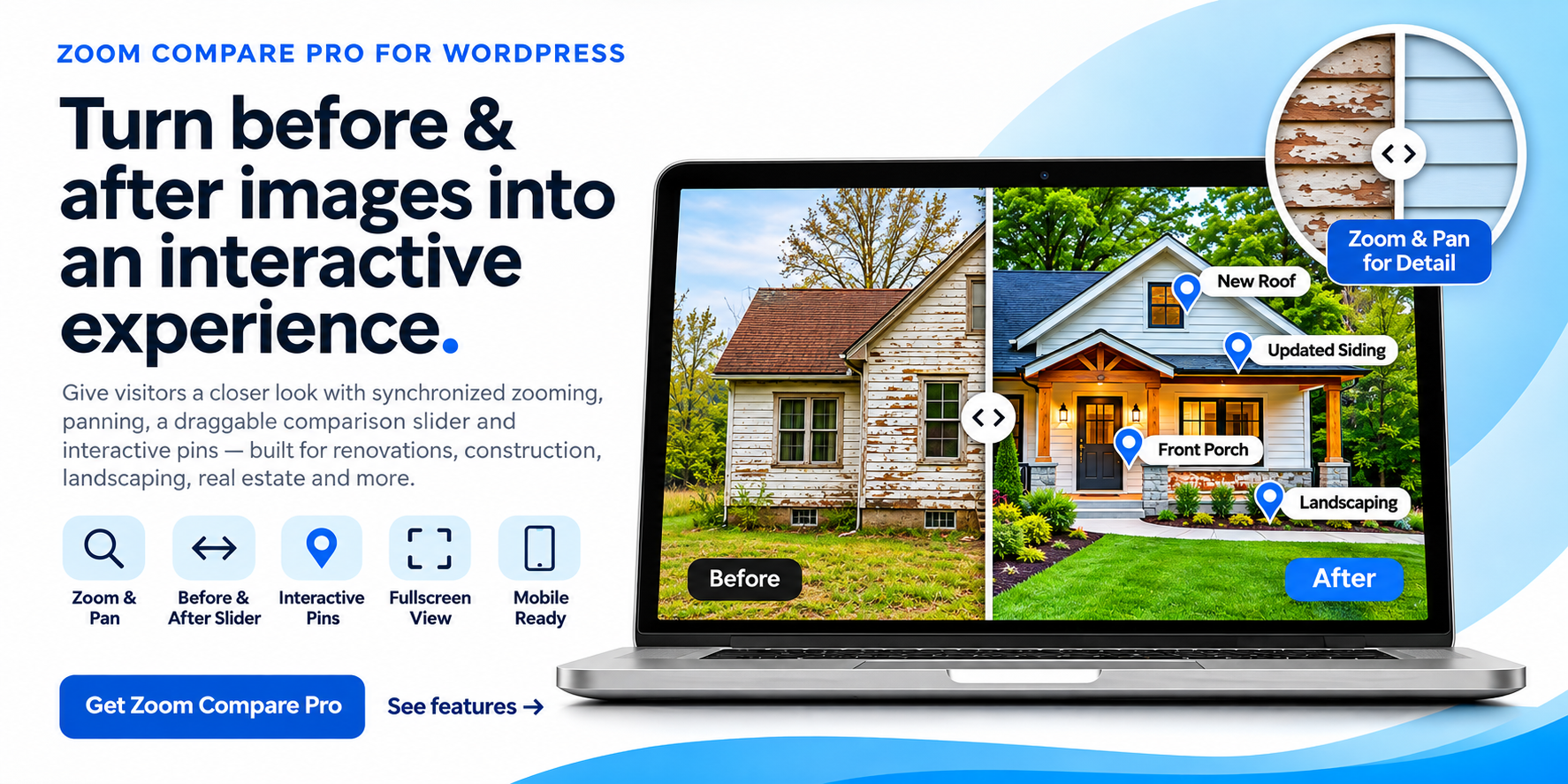
Zoom Compare Pro – Interactive Before & After Image Comparisons for WordPress
Show the difference. Tell the story. Impress your visitors. Zoom Compare Pro transforms ordinary before-and-after photos into interactive image comparisons that visitors can explore directly on your WordPress website. Perfect for contractors, home renovation professionals, real estate businesses, photographers, landscapers, restoration companies, and anyone who wants to showcase visual transformations.Powerful Comparison Features
- Interactive Before & After Slider – Drag the comparison handle to reveal the transformation between two images.
- Synchronized Zoom & Pan – Zoom into details and explore both images while maintaining their alignment.
- Interactive Image Pins – Highlight important areas and details with visual markers.
- Mobile-Friendly Touch Controls – Allow visitors to interact with comparisons on smartphones and tablets.
- Fullscreen Viewing – Give visitors a larger, immersive view of their comparisons.
- Device Frame Options – Present comparisons within supported device-style layouts.
- Multiple Comparisons – Create and manage different before-and-after projects from your WordPress dashboard.
- Shortcode Integration – Embed comparisons in pages, posts, and compatible page builders.
Perfect For
Home Renovation & Remodeling Showcase kitchen renovations, bathroom remodels, flooring installations, exterior improvements, and complete property transformations. Real Estate & Property Investment Present property renovations, restoration projects, and dramatic before-and-after results. Landscaping & Outdoor Services Highlight landscape transformations, lawn improvements, outdoor construction, and property maintenance. Photography & Creative Professionals Demonstrate photo editing, retouching, restoration, and visual enhancements. Web Design & Digital Agencies Show website redesigns, interface improvements, and visual project comparisons.Easy WordPress Management
Create comparisons directly from your WordPress dashboard. Select your images, configure the comparison, and place it on your website using a shortcode. No complicated setup or external image-processing service is required.Licensing & Updates
Zoom Compare Pro uses WPBay purchase-code licensing for activation and product updates. License verification and update checks communicate with WPBay’s services. Your comparison images and settings remain on your WordPress website.Why Choose Zoom Compare Pro?
Most basic before-and-after sliders let visitors drag a handle between two pictures. Zoom Compare Pro goes further with synchronized zooming, interactive details, fullscreen viewing, and flexible presentation options. Turn your before-and-after photos into an interactive experience.
Changelog:
Version 1.0.14
-
Fixed the broken "Activate License" link on the WordPress Plugins screen.
-
Updated the WPBay SDK menu configuration to use a valid administration page.
-
No changes to existing comparison functionality.
Version 1.0.13
-
Completed translations for comparison list headings, error messages, and default Before/After labels.
-
Added a POT translation template.
-
Updated documentation and version references.
Version 1.0.12
-
Corrected the internal plugin version.
-
Improved translations for administrator settings and frontend controls.
-
Added localized JavaScript interface messages.
-
Updated documentation.
Version 1.0.11
-
Preserved existing starting-view settings during upgrades.
-
Added WordPress permission checks for private comparisons.
-
Improved interface translations and readme formatting.
Version 1.0.10
-
Fixed the redirect following WPBay license activation.
-
Improved WPBay SDK integration and installation documentation.
Version 1.0.9 – WPBay Edition
-
Added WPBay purchase-code licensing integration.
-
Added license activation and deactivation settings.
-
Prepared automatic update integration for WPBay.
-
Removed the previous Maintain Hero Cloud licensing dependency.
-
Preserved interactive before-and-after comparisons.
-
Maintained synchronized zoom, pan, fullscreen, and mobile touch functionality.
-
Preserved interactive image pins and device frame options.
-
Maintained existing shortcode compatibility.
Only logged in customers who have purchased this product may leave a review.
Loading...
WPBay support
 Support by Maintain Hero
Maintain Hero supports this product through WPBay
Questions are handled in WPBay's private ticket system, keeping your purchase details and support conversation together.
Go to My Downloads
After purchase, open this item in My Downloads and choose Get Support.
What support includes
- Answers to product-related questions
- Help with reported bugs and issues
- Guidance for included third-party assets
What support does not include
- Customizations or new features
- Installation or setup services
Plugin
Maintenance snapshot
See recent updates, compatibility, support, and developer activity.
- Updated 1 day ago
- Developer active recently
- WPBay support available
- WordPress 7.1 tested
Snapshot updated 4 hours ago
View details Hide details
Maintenance details
This is maintenance data. It does not measure product quality or sales.
- Last update Updated 1 day ago
- Compatibility WordPress 7.1 tested · PHP 8.5 tested
- Releases 5 releases in the 3 days since listing
- Developer activity Developer active recently
- Support No recent support tickets to measure
- Docs and demo Documentation available · Changelog available · Demo available
How this snapshot works
Plugin Health
The score is out of 100 and uses data WPBay can check. Ratings, popularity, and sales are not used.
- Last update 30 points
-
Plugins receive full recency points under 30 days, then step down at 90, 180, 365, and 545 days.
- Compatibility 20 points
-
WordPress, PHP, and WooCommerce (when relevant) are scored separately. The latest two PHP lines count as current. Nearby previous versions keep most of the points.
- Current version 100%
- One version behind 75%
- Two versions behind 50%
- Three versions behind 25%
- Older or not listed 0%
- Releases 15 points
-
One release earns 10, two or three earn 13, and four or more earn 15. Each accepted product ZIP counts once; reprocessing the same upload and listing-only edits do not count.
- Developer activity 15 points
-
Based on WPBay login and dashboard activity. Exact last-login dates are never shown.
- Support 15 points
-
There are no recent WPBay tickets to measure.
- Docs and demo 5 points
-
Documentation: 2. Changelog: 1. Working demo or preview: 2.
Score ranges
- 90–100 Excellent
- 75–89 Healthy
- 60–74 Fair
- 40–59 Needs attention
- 0–39 Limited
Long gaps
WPBay also checks for long gaps between updates, developer activity, support replies, and releases. Buyers do not see this score.
- Time since update 35 points
- Last developer activity 25 points
- WordPress compatibility 15 points
- Support replies 15 points
- Fewer releases 10 points
-
Quality verified by WPBay
WPBay review- Reviewed version
- 1.0.14
- Review completed
- Reviewer
- CodeRevolution
- Review type
- Initial
No unresolved approval blocker was identified during WPBay’s proportionate review of this release. This is not a security certification or a guarantee that the product contains no defects.
-
 Future updates
-
WPBay support from Maintain Hero
-
GPL code, proprietary assets
-
Covered by the WPBay refund policy
-
Plugin maintenance snapshot
Relevant picks
You may also like
Similar products selected by category, features, popularity and freshness.


 15 days free
Reviews
There are no reviews yet.