



Backup Restore Verifier Pro – WordPress Backup, Restore & Migration

 Recently Updated
Well Documented
Recently Updated
Well Documented
SPECIAL LIMITED-TIME PRICE

007AJ
Backup Restore Verifier Pro
SHA-256 Verified Backups, Restore, Migration and Encryption
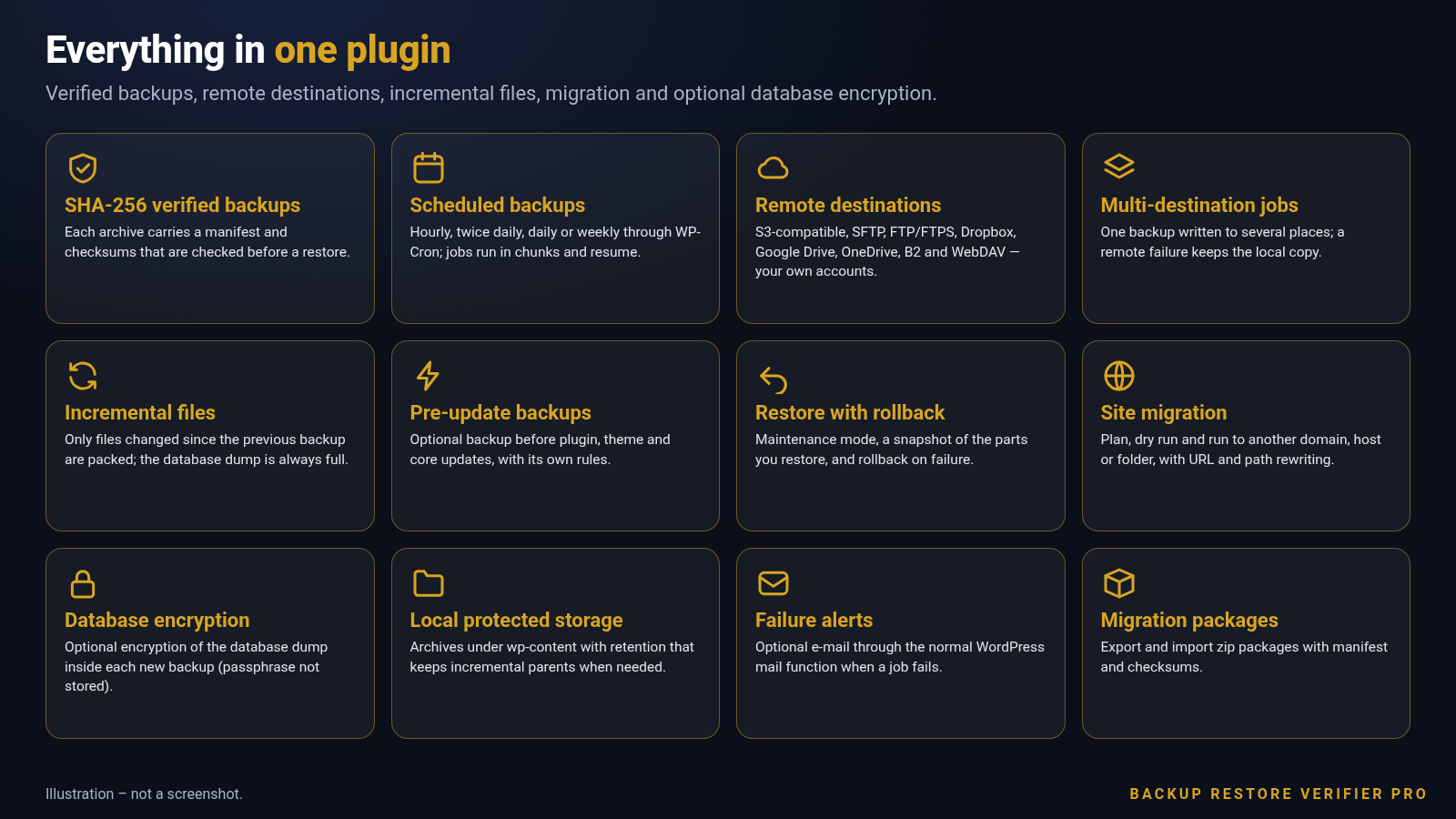
Create WordPress backups as one zip with a manifest and SHA-256 checksums that are checked before a restore. Add remote destinations on your own accounts, incremental file backups, pre-update backups, site migration and optional database encryption.
Fully licensed version — use on your own sites
Fully licensed
use on your own sites
SHA-256 checked
before every restore
Your own destinations
S3, SFTP, Drive and more
WordPress 6.3+
PHP 7.4+
Backups you can trust before you restore
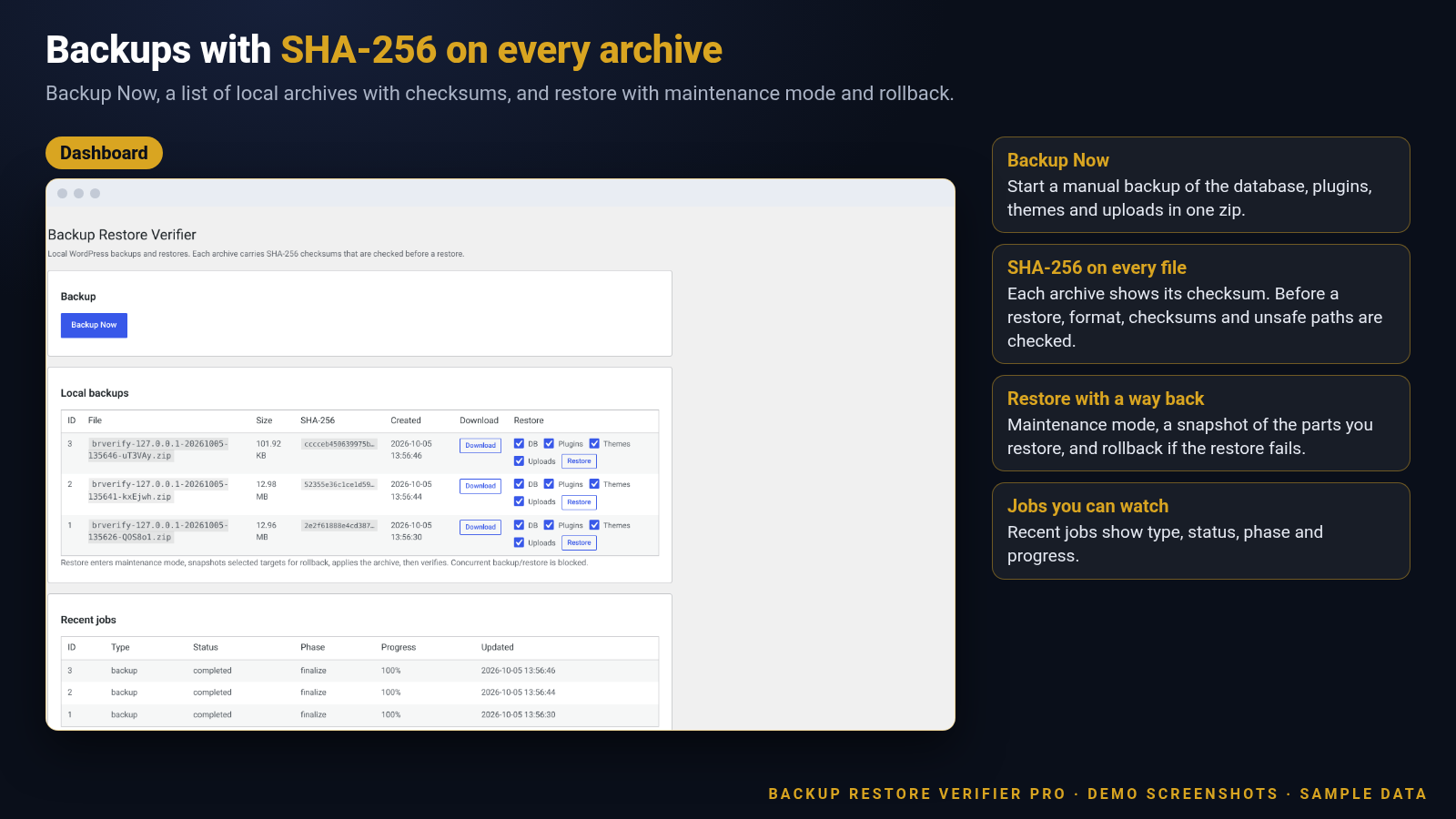
The dashboard shows Backup Now, local archives with SHA-256 checksums, restore controls and recent jobs.
Verified backups, restore and destinations
The core of the plugin: checksums before restore, scheduling, remote copies and a safe restore path.
SHA-256 verified archives
Each backup is one zip with a manifest and SHA-256 checksums. Before anything is restored, format, checksums and unsafe paths are checked, so a damaged or tampered archive is rejected instead of half-applied.
Backup Now and scheduled runs
Run a manual backup any time, or schedule hourly, twice daily, daily or weekly through WP-Cron. Jobs run in chunks and resume, so large sites do not time out.
Local protected storage
Archives are stored under wp-content by default. Retention keeps the last N backups, and parents still needed by a kept incremental child are preserved.
Restore with maintenance mode and rollback
A restore enters maintenance mode, snapshots the parts you chose, applies the archive, then verifies. If the restore fails, the snapshot is used to roll back.
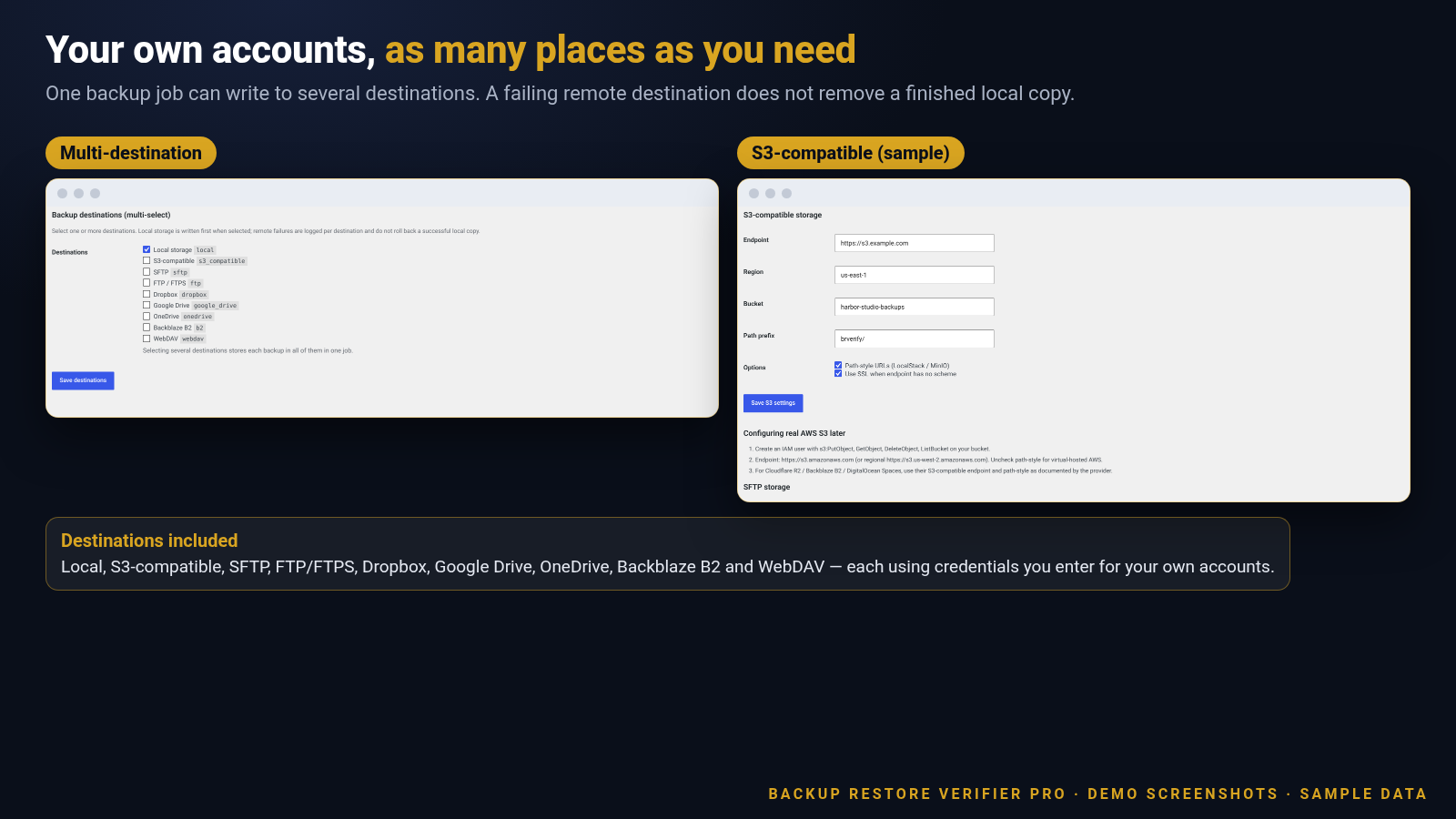
Remote destinations on your accounts
S3-compatible storage, SFTP, FTP/FTPS, Dropbox, Google Drive, OneDrive, Backblaze B2 and WebDAV. Each destination uses credentials you enter for your own accounts.
Multi-destination jobs
One backup can be written to several places in the same job. A failing remote destination is logged and does not remove a finished local copy.
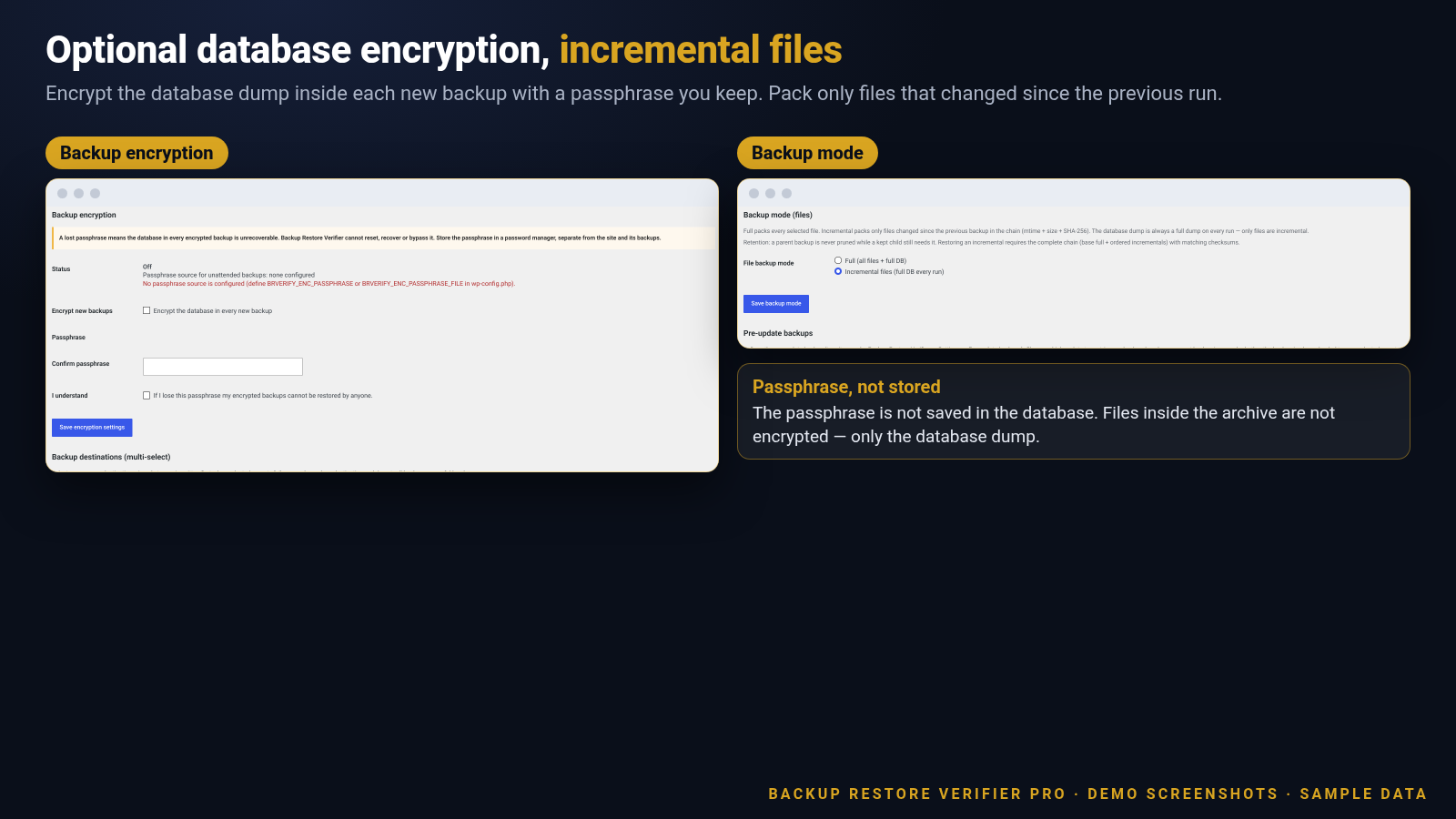
Incremental file backups
Only files changed since the previous backup in the chain are packed (mtime, size and SHA-256). The database dump is a full dump every run. Restoring an incremental needs the complete chain.
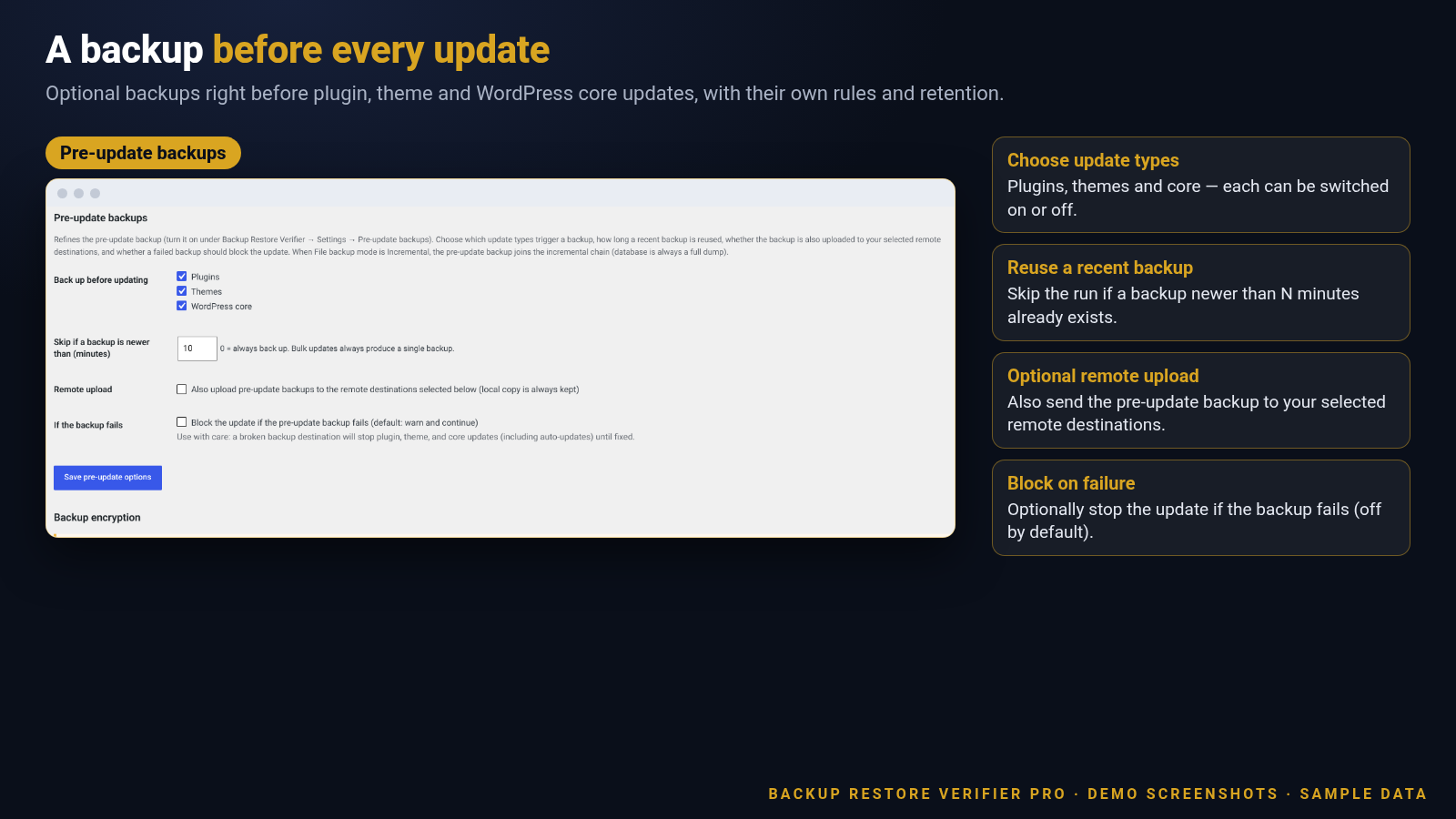
Pre-update backups
Optional backup right before plugin, theme and WordPress core updates, with its own rules (update types, skip window, optional remote upload, optional block when the backup fails) and its own retention.
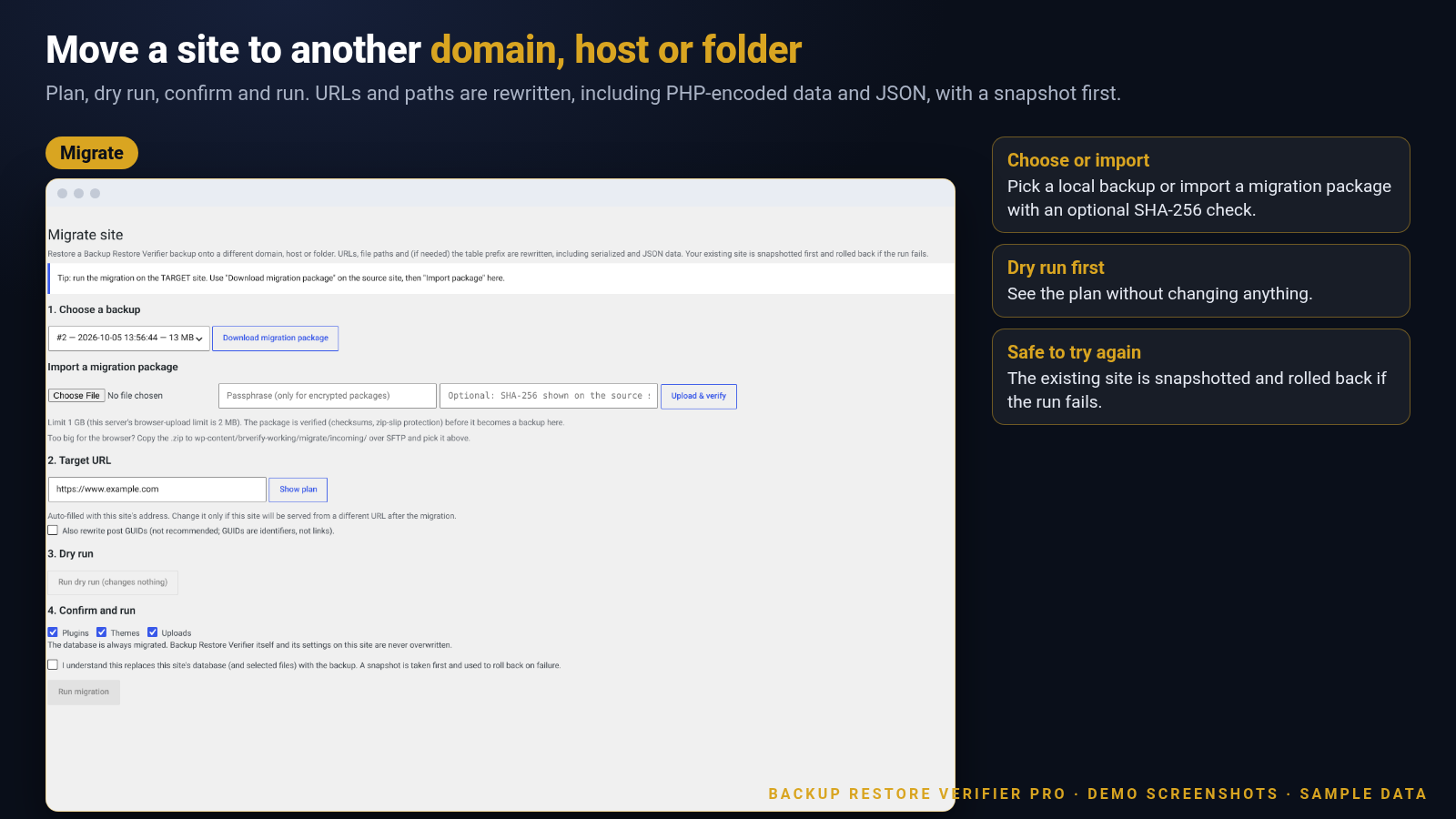
Site migration
Plan, dry run, confirm and run a move to another domain, host or folder. URLs and paths are rewritten (including PHP-encoded data and JSON), the table prefix can change, and the existing site is snapshotted first.
Optional database encryption
Encrypt the database dump inside each new backup (libsodium Argon2id derivation, XChaCha20-Poly1305 stream). Files are not encrypted. The passphrase is not saved in the database.
Migration packages
Export and import migration packages as a zip with manifest and checksums.
Failure alerts
Optional e-mail through the normal WordPress mail function when a job fails.
Schedule, retention and destinations
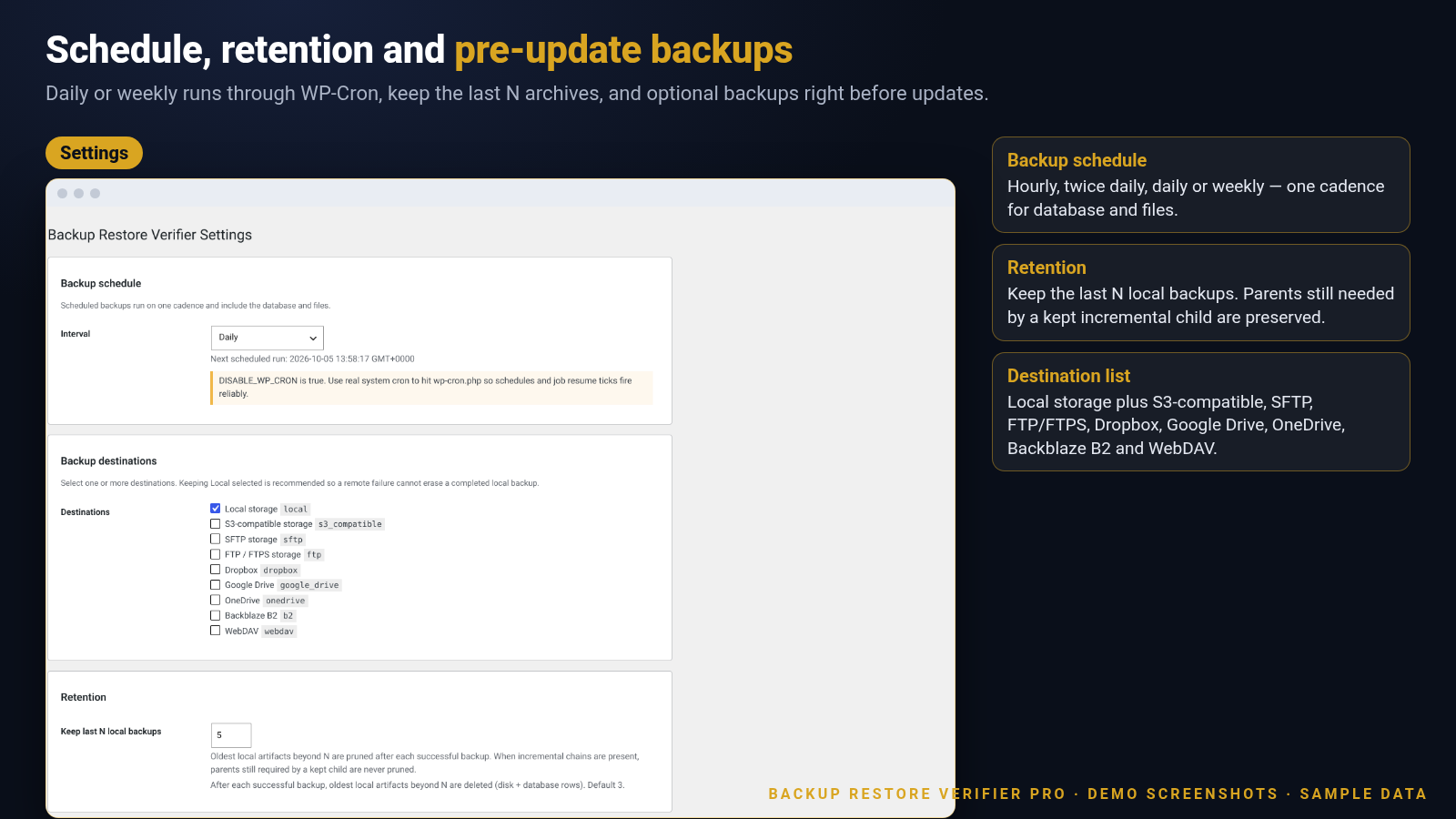
Pick a cadence, keep the last N archives, and choose where copies are stored.
Several places, one job
Select local storage plus remotes. Sample S3-compatible fields are shown with example.com addresses — no real credentials.
A backup before every update
Optional pre-update backups for plugins, themes and WordPress core, with skip window and failure behaviour you control.
Encryption and incremental files
Optional database encryption with a passphrase you keep, and incremental packing of changed files only.
Move a site with a dry run first
Plan, dry run, confirm and run. URLs and paths are rewritten, and the existing site is snapshotted before changes.
Plus the details that keep jobs reliable
Chunked ticks, component restore and settings in plain language.
Chunked and resumable jobs
Backup and restore jobs advance in ticks so a slow host or a large site can finish without timing out.
Component restore
Choose database, plugins, themes and uploads independently when you restore.
Settings you control
Schedule interval, retention count, pre-update options, backup mode, destinations and encryption, each on their own screen.
Full database every run
Even when file mode is incremental, every backup still includes a complete database dump.
How it works
From install to a verified backup in four steps.
1
Install and open the dashboard
Upload the plugin, switch it on, and open Backup Restore Verifier. Press Backup Now for your first archive.
2
Choose schedule and retention
Set how often backups run and how many local archives to keep. Optionally switch on pre-update backups.
3
Add destinations if you want
Configure remote storage with your own accounts and select one or more destinations for each job.
4
Restore or migrate when needed
Restore with maintenance mode and rollback, or migrate to another domain with a dry run first.
Made for real WordPress sites
Use it wherever you need backups you can restore with confidence.
Agency client sitesBusiness and brochure sitesOnline shopsMembership sitesDocumentation sitesStaging and production movesLocal business sitesBlogs and magazines
Fully licensed version
Fully licensed version — use on your own sites. You get the complete plugin, with every feature described on this page.
Requirements
- WordPress 6.3 or newer (shown working on a current WordPress 7.1 install)
- PHP 7.4 or newer with the ZipArchive extension
- A single WordPress site (multisite is not supported; jobs refuse to run)
- Encryption needs libsodium with Argon2id; FTP needs the PHP ftp extension
- Remote destinations use your own accounts and credentials; they are contacted only after you configure and select them
- If DISABLE_WP_CRON is true, configure a real system cron that requests wp-cron.php
Frequently asked questions
What licence do I get?
Each purchase is a fully licensed copy of the plugin for use on your own sites.
What does a verified backup mean?
Each archive carries a manifest and SHA-256 checksums. Before a restore, the plugin checks format, checksums and unsafe paths, and rejects a damaged or tampered archive instead of half-applying it.
Where are backups stored?
By default in a protected folder under wp-content. You can also send copies to remote destinations you configure: S3-compatible storage, SFTP, FTP/FTPS, Dropbox, Google Drive, OneDrive, Backblaze B2 and WebDAV.
Can one backup go to several places?
Yes. Multi-destination jobs write one backup to every destination you select. A failing remote destination does not remove a finished local copy.
What is incremental mode?
Only files changed since the previous backup are packed. The database dump is still a full dump every run. Restoring an incremental needs the complete chain, and retention keeps parents that a kept child still needs.
What happens before updates?
You can switch on an optional backup right before plugin, theme and WordPress core updates. Choose which update types trigger it, how long a recent backup is reused, whether to also upload remotely, and whether a failed backup should block the update.
How does restore stay safe?
Restore enters maintenance mode, snapshots the components you chose, applies the archive, then verifies. If the restore fails, the snapshot is used to roll back. Concurrent backup and restore are blocked.
How does site migration work?
On the target site, choose a backup or import a migration package, set the target URL, run a dry run, then confirm. URLs and paths are rewritten (including PHP-encoded data and JSON), and the existing site is snapshotted first.
What does database encryption protect?
It encrypts the database dump inside each new backup. Files are not encrypted. The passphrase is not saved in the database. A lost passphrase means the encrypted database cannot be recovered by anyone.
Does the plugin contact other sites?
Only for destinations and services you configure and switch on. Remote destinations use your own accounts. The plugin sets no cookies and collects no usage statistics.
Does it work on multisite?
No. Multisite is not supported in this version, and jobs refuse to run on a network.
Can I remove all data when I delete the plugin?
Yes. A setting lets you also delete all settings, tables and backup files when the plugin is deleted. It is off by default.
Is it translation-ready?
Yes. Text is prepared for translation and a languages folder is included.
Backups you can verify before you restore
SHA-256 checksums on every archive, restore with rollback, remote destinations on your own accounts, and migration with a dry run first. Fully licensed version — use on your own sites.
007AJ
Backup Restore Verifier Pro by 007AJ. Screenshots are from a demo install with sample data; the graphic labelled “Illustration” is not a screenshot. Amazon S3, Dropbox, Google Drive, OneDrive, Backblaze B2 and WebDAV are trademarks of their respective owners; this plugin is not affiliated with them.
Only logged in customers who have purchased this product may leave a review.
Loading...
WPBay support
 Support by 007AJ.com
Support by 007AJ.com
007AJ.com supports this product through WPBay
Questions are handled in WPBay's private ticket system, keeping your purchase details and support conversation together.
Go to My Downloads
After purchase, open this item in My Downloads and choose Get Support.
What support includes
- Answers to product-related questions
- Help with reported bugs and issues
- Guidance for included third-party assets
What support does not include
- Customizations or new features
- Installation or setup services
Plugin
Maintenance snapshot
See recent updates, compatibility, support, and developer activity.
- Updated today
- Developer active recently
- WPBay support available
- WordPress 7.1 tested
Snapshot updated 2 hours ago
View details Hide details
Maintenance details
This is maintenance data. It does not measure product quality or sales.
- Last update Updated today
- Compatibility WordPress 7.1 tested · PHP 8.5 not marked as tested
- Releases 5 releases in the 5 days since listing
- Developer activity Developer active recently
- Support No recent support tickets to measure
- Docs and demo Documentation available · Changelog missing · No demo listed
How this snapshot works
Plugin Health
The score is out of 100 and uses data WPBay can check. Ratings, popularity, and sales are not used.
- Last update 30 points
-
Plugins receive full recency points under 30 days, then step down at 90, 180, 365, and 545 days.
- Compatibility 20 points
-
WordPress, PHP, and WooCommerce (when relevant) are scored separately. The latest two PHP lines count as current. Nearby previous versions keep most of the points.
- Current version 100%
- One version behind 75%
- Two versions behind 50%
- Three versions behind 25%
- Older or not listed 0%
- Releases 15 points
-
One release earns 10, two or three earn 13, and four or more earn 15. Each accepted product ZIP counts once; reprocessing the same upload and listing-only edits do not count.
- Developer activity 15 points
-
Based on WPBay login and dashboard activity. Exact last-login dates are never shown.
- Support 15 points
-
There are no recent WPBay tickets to measure.
- Docs and demo 5 points
-
Documentation: 2. Changelog: 1. Working demo or preview: 2.
Score ranges
- 90–100 Excellent
- 75–89 Healthy
- 60–74 Fair
- 40–59 Needs attention
- 0–39 Limited
Long gaps
WPBay also checks for long gaps between updates, developer activity, support replies, and releases. Buyers do not see this score.
- Time since update 35 points
- Last developer activity 25 points
- WordPress compatibility 15 points
- Support replies 15 points
- Fewer releases 10 points
-
Quality verified by WPBay
WPBay review- Reviewed version
- 1.0.6
- Review completed
- Reviewer
- CodeRevolution
- Review type
- Initial
No unresolved approval blocker was identified during WPBay’s proportionate review of this release. This is not a security certification or a guarantee that the product contains no defects.
-
 Future updates
-
WPBay support from 007AJ.com
-
GPL code, proprietary assets
-
Covered by the WPBay refund policy
-
Plugin maintenance snapshot
Relevant picks
You may also like
Similar products selected by category, features, popularity and freshness.

From this seller
View seller store
More by 007AJ.com
Explore more bestselling products from this creator.



Reviews
There are no reviews yet.