



Store Locator For WordPress: Map, List, Opening Hours and a Page For Every Location

 Recently Updated
Well Documented
Recently Updated
Well Documented
SPECIAL LIMITED-TIME PRICE

Waypost
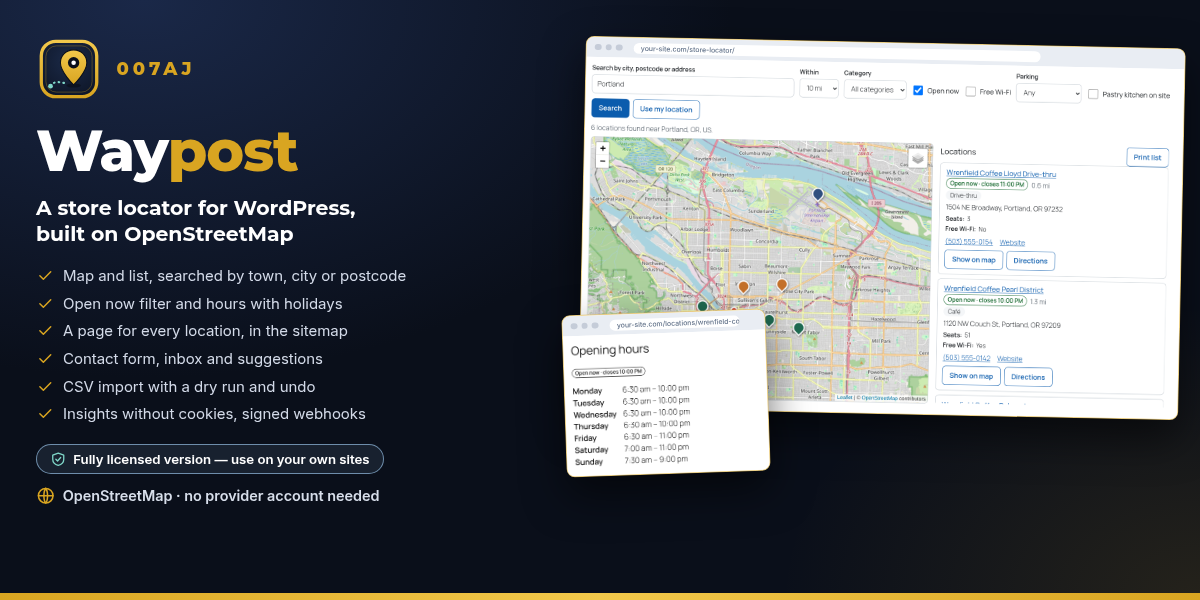
A store locator for WordPress: Map, list, opening hours and a page for every location
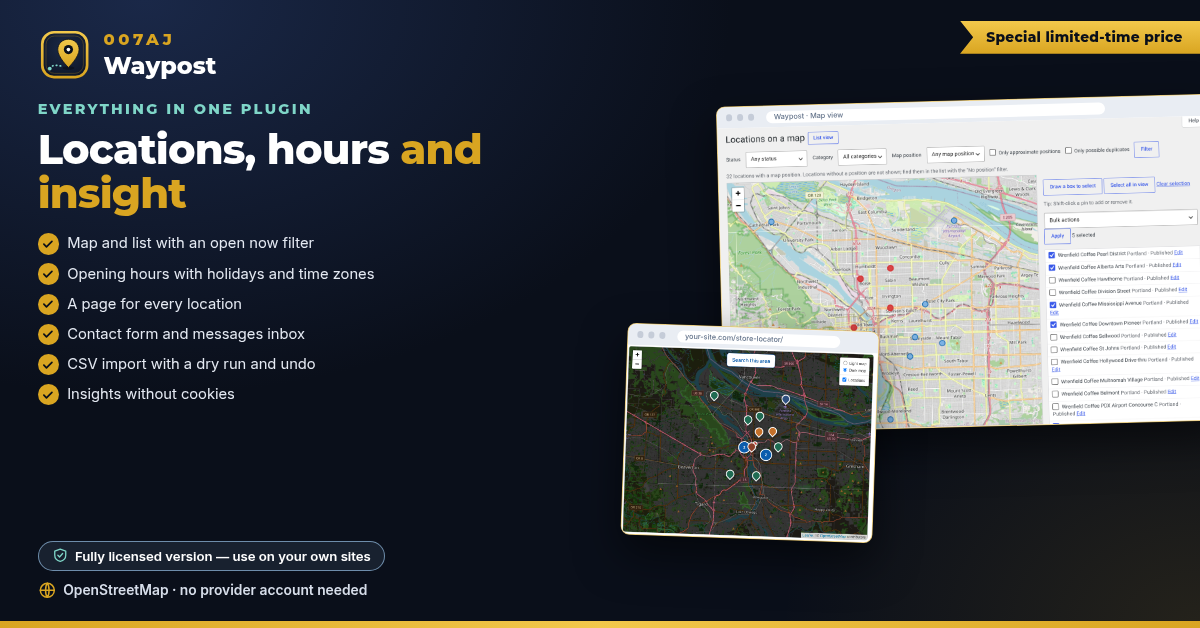
Show your shops, branches or service points on a map and in a list. Visitors search by town, city or postcode, see who is open now, get directions in the map app they prefer and send a message to the right location. It runs on OpenStreetMap from the first minute, and the map waits for the visitor’s consent before it loads.
Fully licensed version — use on your own sites
OpenStreetMap · no provider account needed
Fully licensed
use on your own sites
OpenStreetMap
no provider account needed
Privacy first
consent gate on by default
WordPress 6.3+
PHP 7.4+
No map provider account needed to start. Waypost uses OpenStreetMap map tiles and free address lookups out of the box. Nothing is sent to a map server until the visitor presses Load map.
FOR YOUR VISITORS
Find the nearest location in seconds
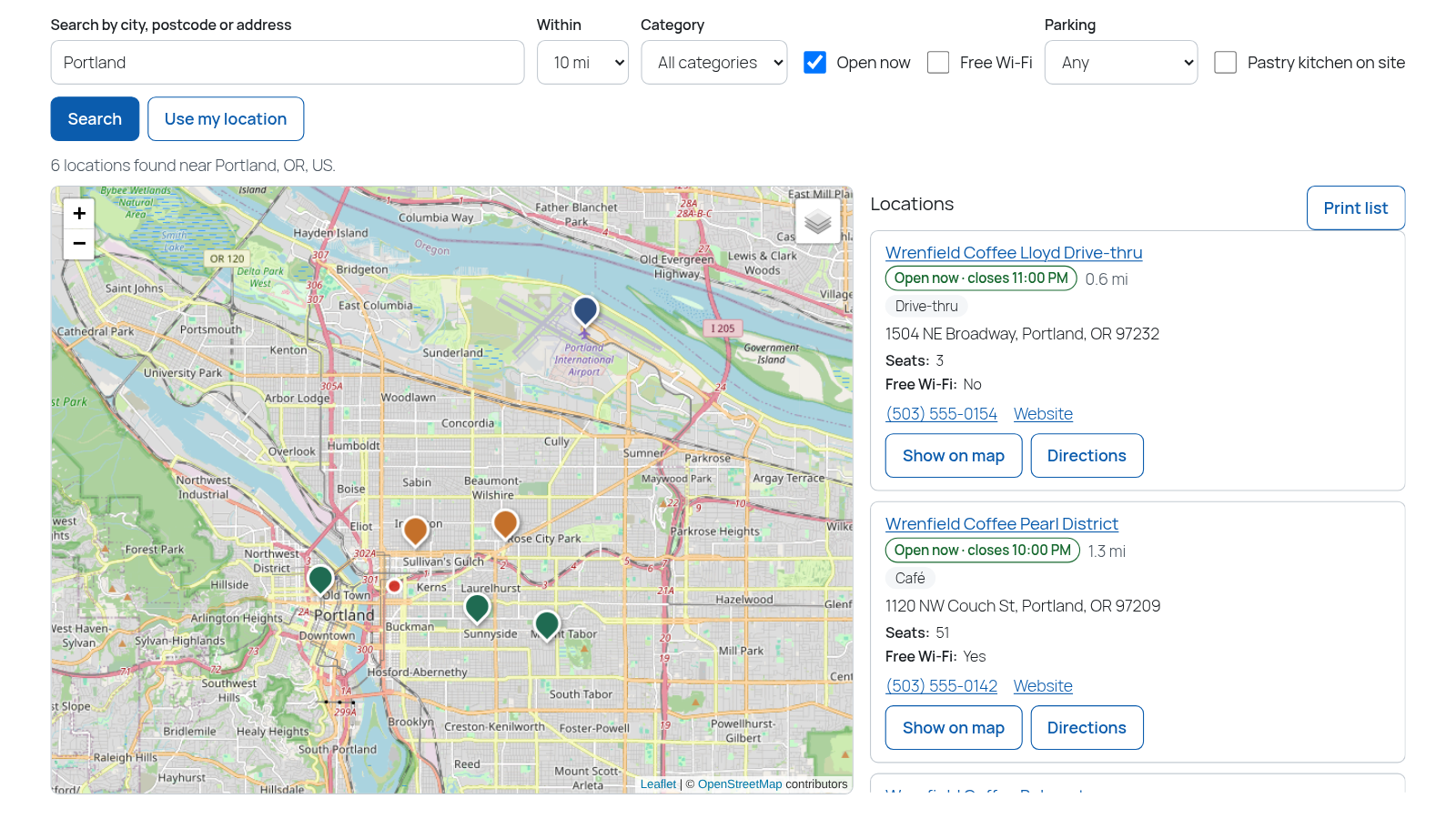
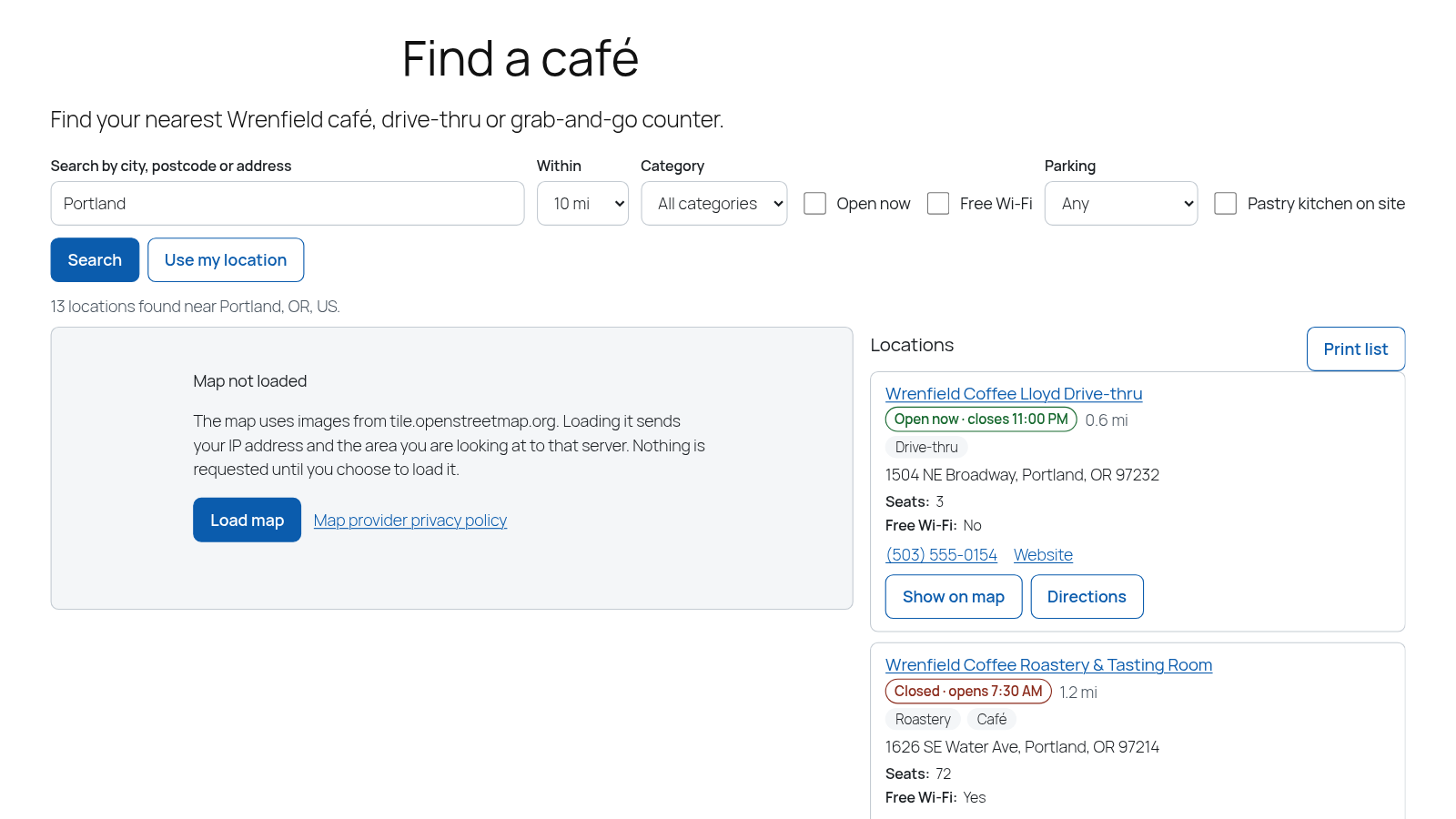
A map and a list side by side, searched by town, city or postcode, with an Open now filter and directions in one tap.
Search by place and distance
Visitors type a town, city or postcode and pick a distance. Results show on the map and as cards in a list, nearest first.
Open now
Tick Open now to see only locations that are open at this moment, worked out in each location’s own time zone.
Filters that fit your business
Filter by category and by your own custom fields, such as free Wi-Fi, parking or a pastry kitchen.
Directions in one tap
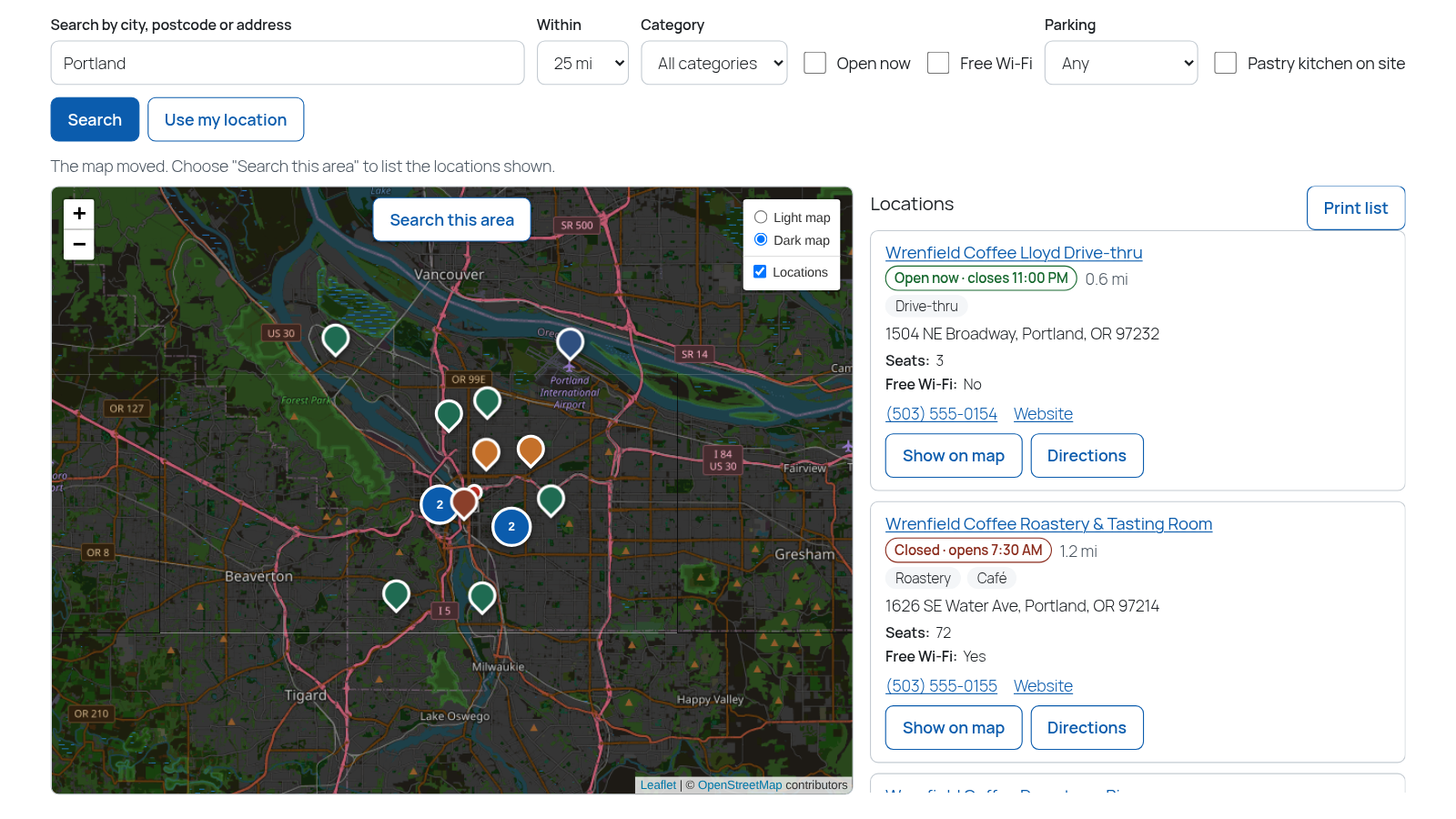
Directions links open Google Maps, Apple Maps, Waze or OpenStreetMap, so visitors use the app they already have.
Map tools
A Search this area button when the map moves, numbered clusters for busy areas, a light or dark map and a printable list.
Built for everyone
Labelled search fields, result counts announced to screen readers, and style presets checked against WCAG AA contrast.
LOCATION PAGES
A page for every location
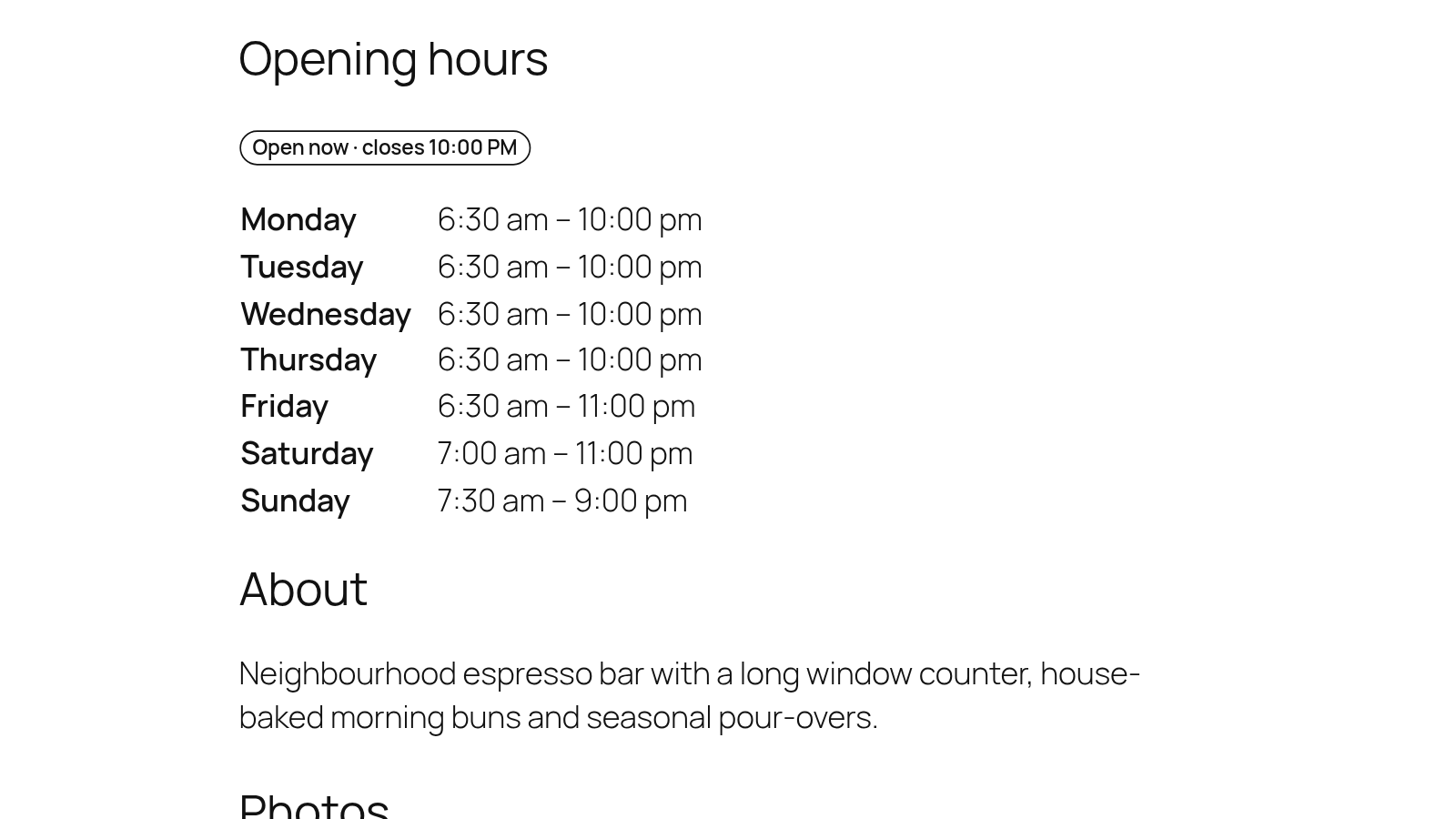
Address, contact details, opening hours, photos and directions, with a contact form that reaches the right team.
A page for every location
Each location gets its own page with address, phone, email, website, opening hours, photos and directions links.
Ready for search engines
Location pages are listed in the WordPress sitemap and carry LocalBusiness structured data.
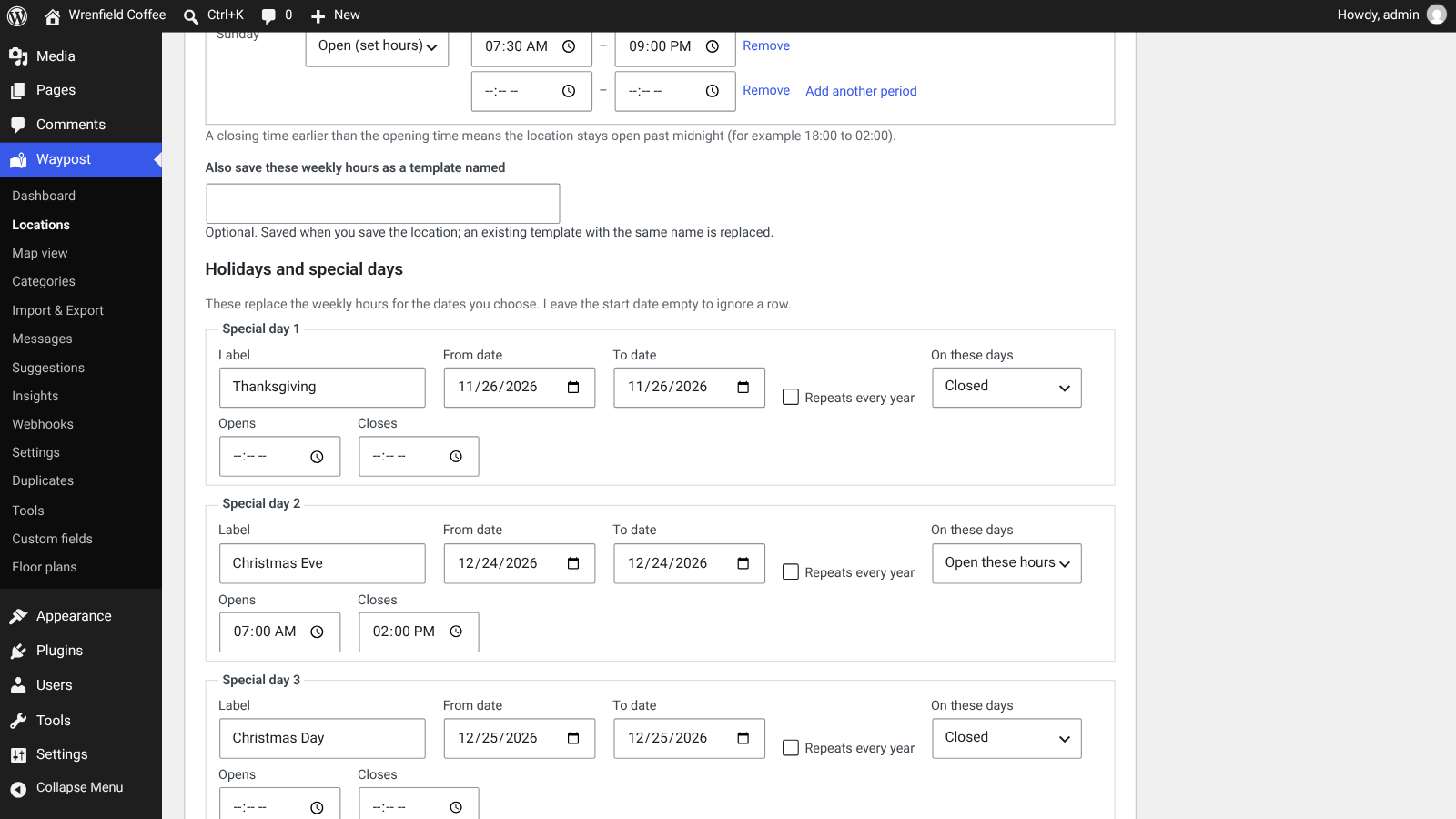
Hours with holidays
Weekly hours with split shifts, plus holidays and special days with their own hours or a closed day.
Contact the right location
A contact form on each location page sends the message to your inbox and by email, tagged with the location.

PRIVACY FIRST
No map request before consent
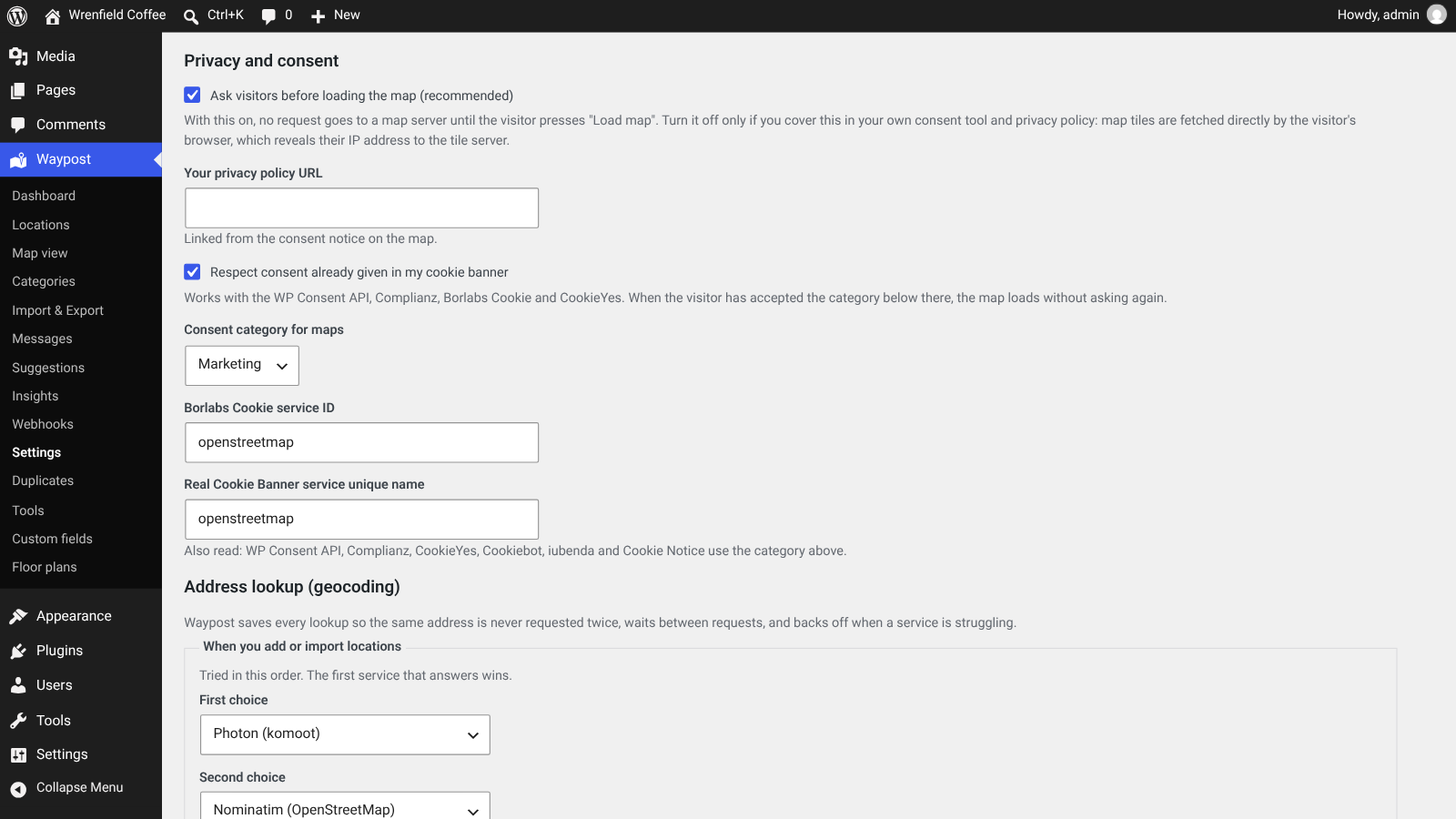
Visitors decide when the map loads, and you can see every outside service the plugin can contact.
Consent gate, on by default
The map area shows Map not loaded until the visitor presses Load map. Before that, no request goes to a map server.
No cookies
Waypost sets no cookies. The visitor’s map choice is kept in their own browser storage.
External services table
Settings list every outside service Waypost can contact, what it receives, when, and whether it is in use.
Insights without cookies
Searches and clicks are counted without cookies and without storing IP addresses.
FOR YOUR TEAM
Simple to set up, quick to keep current
A short wizard to start, a clear editor for each location, and a map view for changes across many.
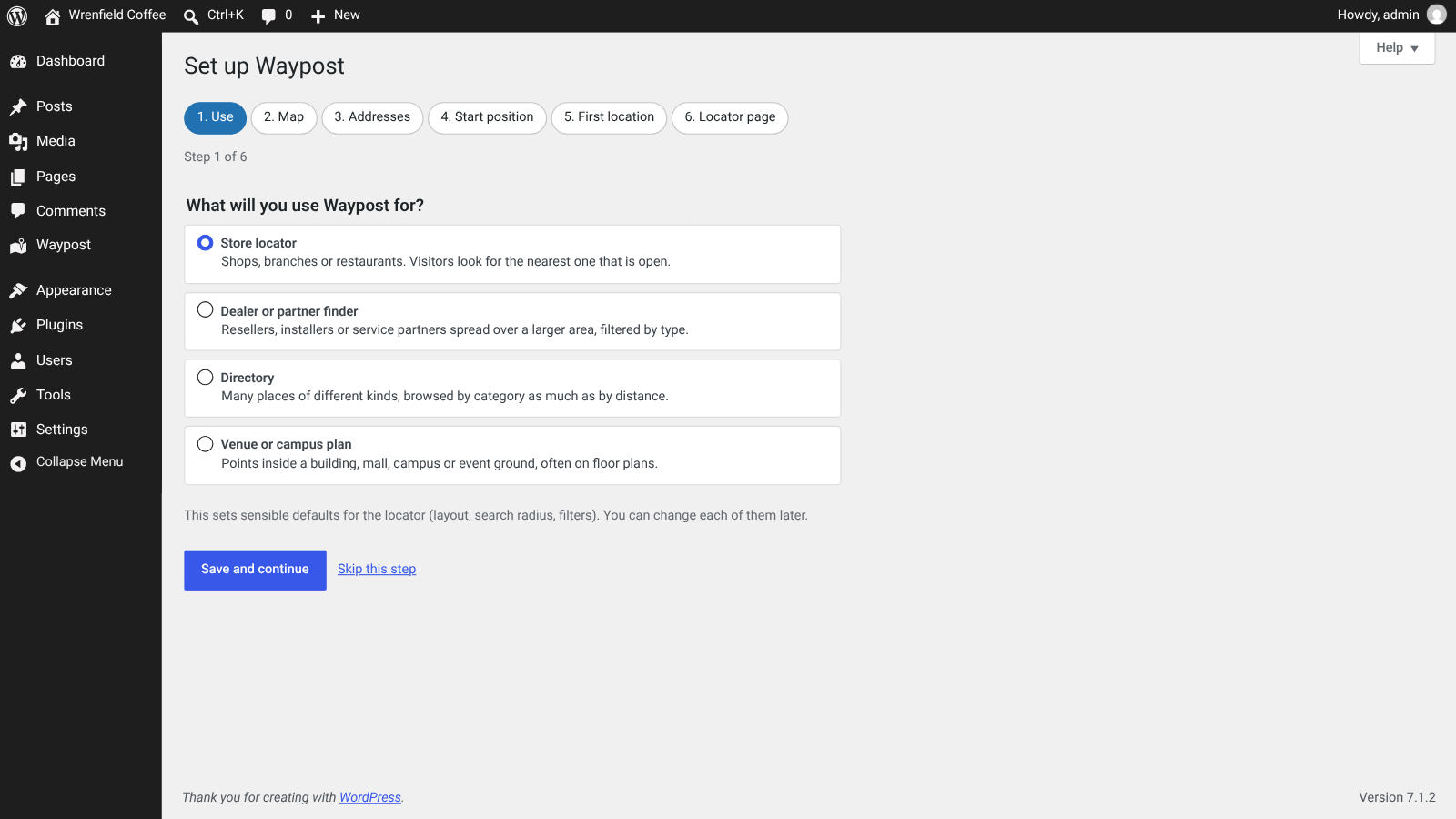
Six-step setup wizard
Choose what you use Waypost for, the map, the address service, a start position, your first location and the locator page.
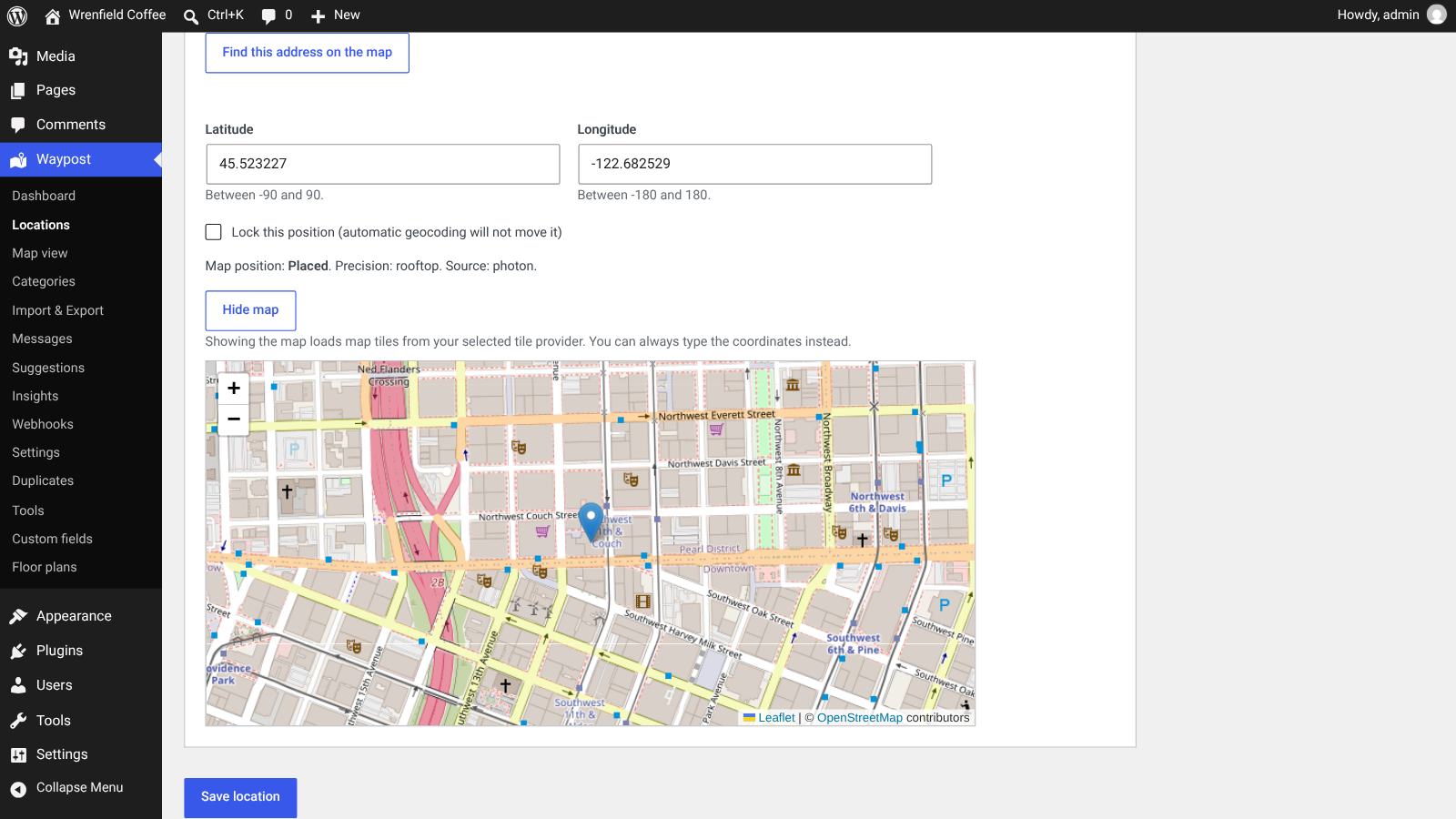
Find this address on the map
One button looks up the address and places the pin, with a map to drag it into the exact spot.
Hours templates
Fill a week of opening hours from a template, and save your own templates for the next location.
Undo last save
Changed your mind? The editor can restore the previous version of a location.
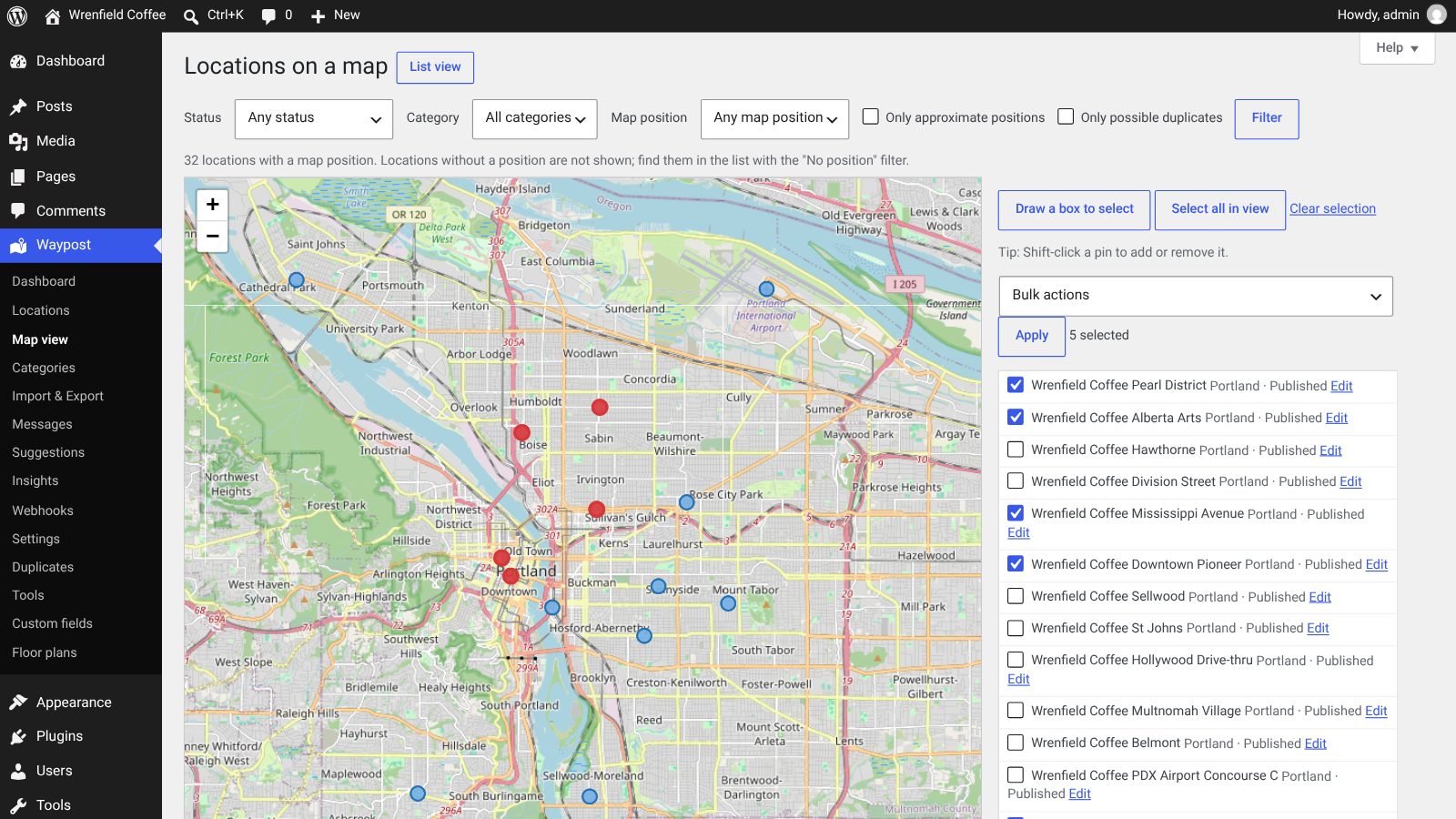
Map view with box select
Draw a box around pins to select locations, then publish, archive, apply an hours template or move them to the trash.
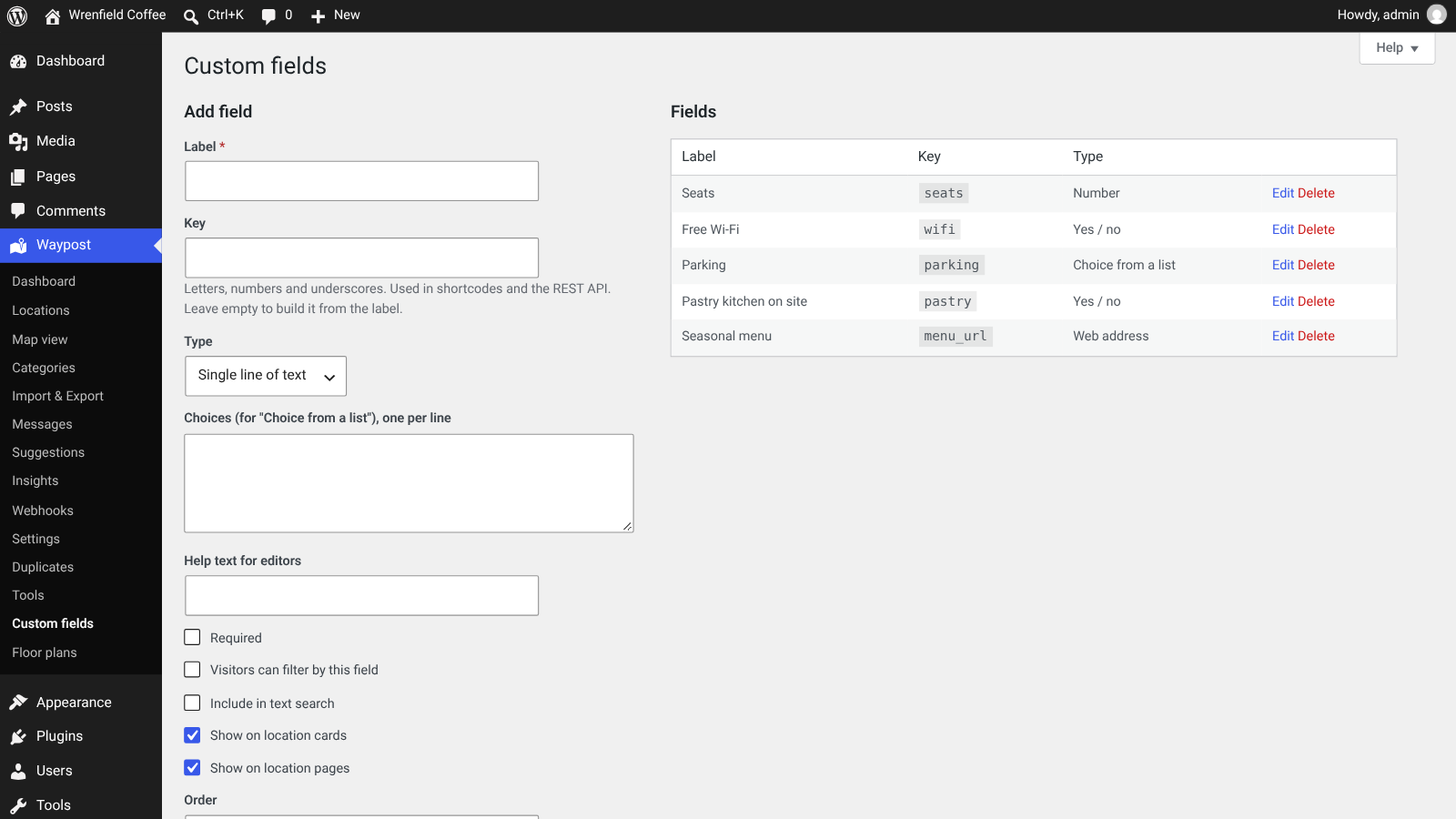
Custom fields
Add numbers, yes/no, choice lists or web addresses, show them on cards and pages, and let visitors filter by them.
IMPORT AND EXPORT
Bring your list, safely
Check every row before it is saved, undo an import if you need to, and export in the format you work with.
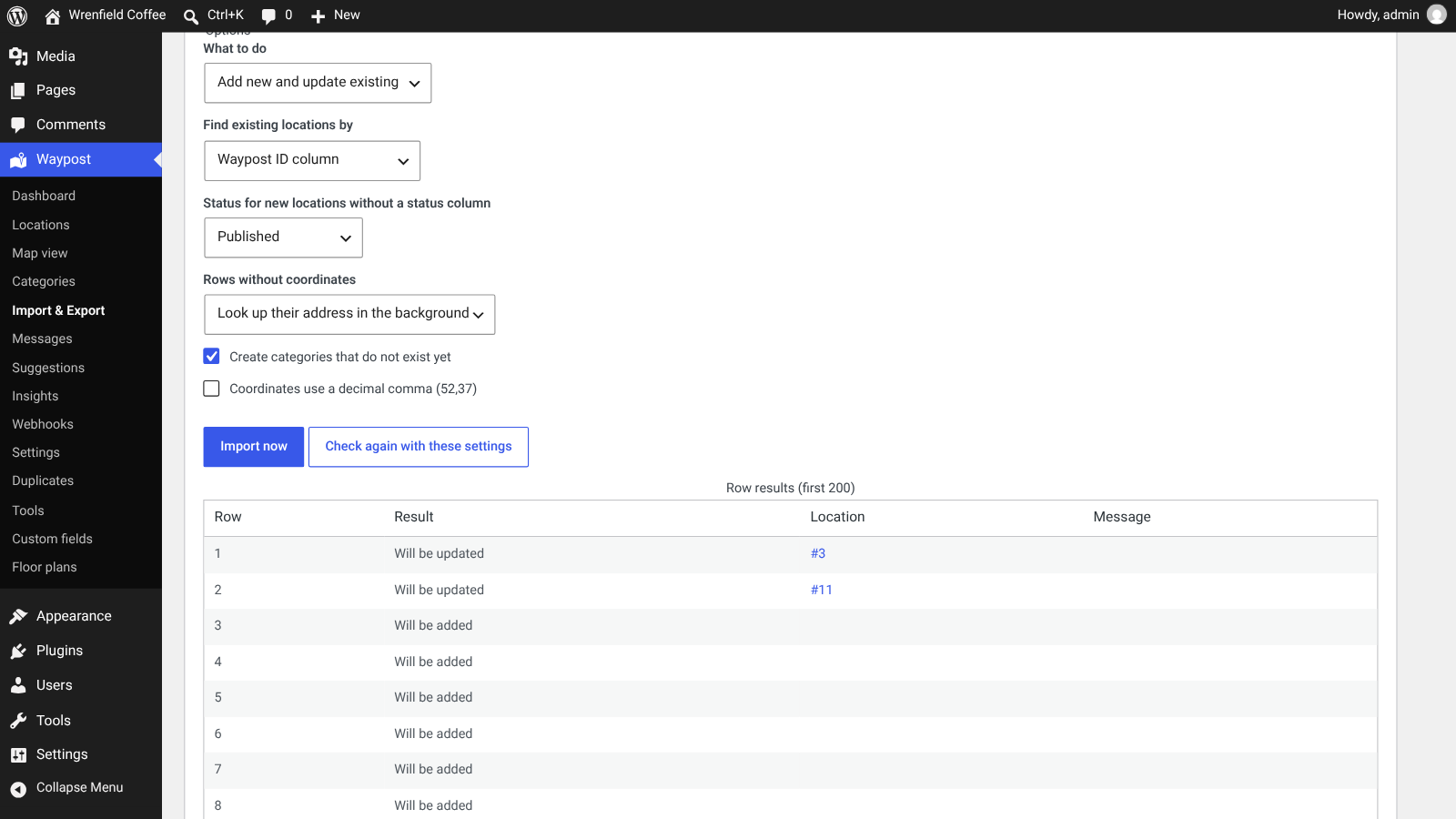
Check before you import
Upload or paste a CSV file and see which rows would be added or updated. Nothing is saved until you confirm.
Undo an import
Every import can be undone: new locations go to the trash and updated locations get their previous values back.
Export in four formats
Export to CSV, Excel, JSON or GeoJSON, filtered by status or category, ready to edit and import again.
WP-CLI for big lists
Import, export and run the background queue from the command line.
INSIGHTS AND MESSAGES
Learn where customers look for you
See what visitors search for, which places they can’t find, and answer their messages in one place.
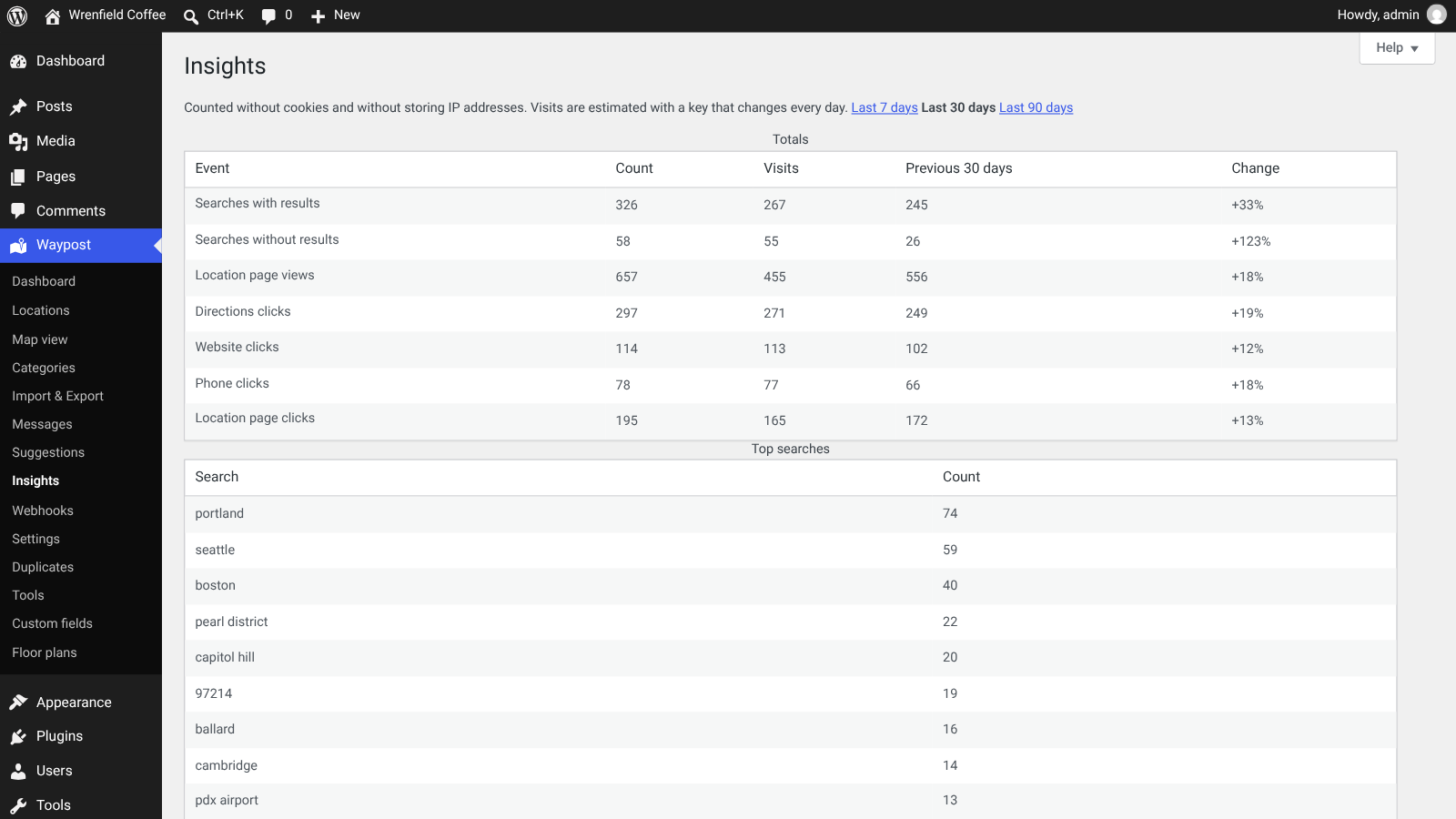
Insights
Searches with and without results, location page views, and directions, website and phone clicks, compared with the previous period.
Where customers look for you
Top searches, searches that found nothing and search demand by area, for the last 7, 30 or 90 days.
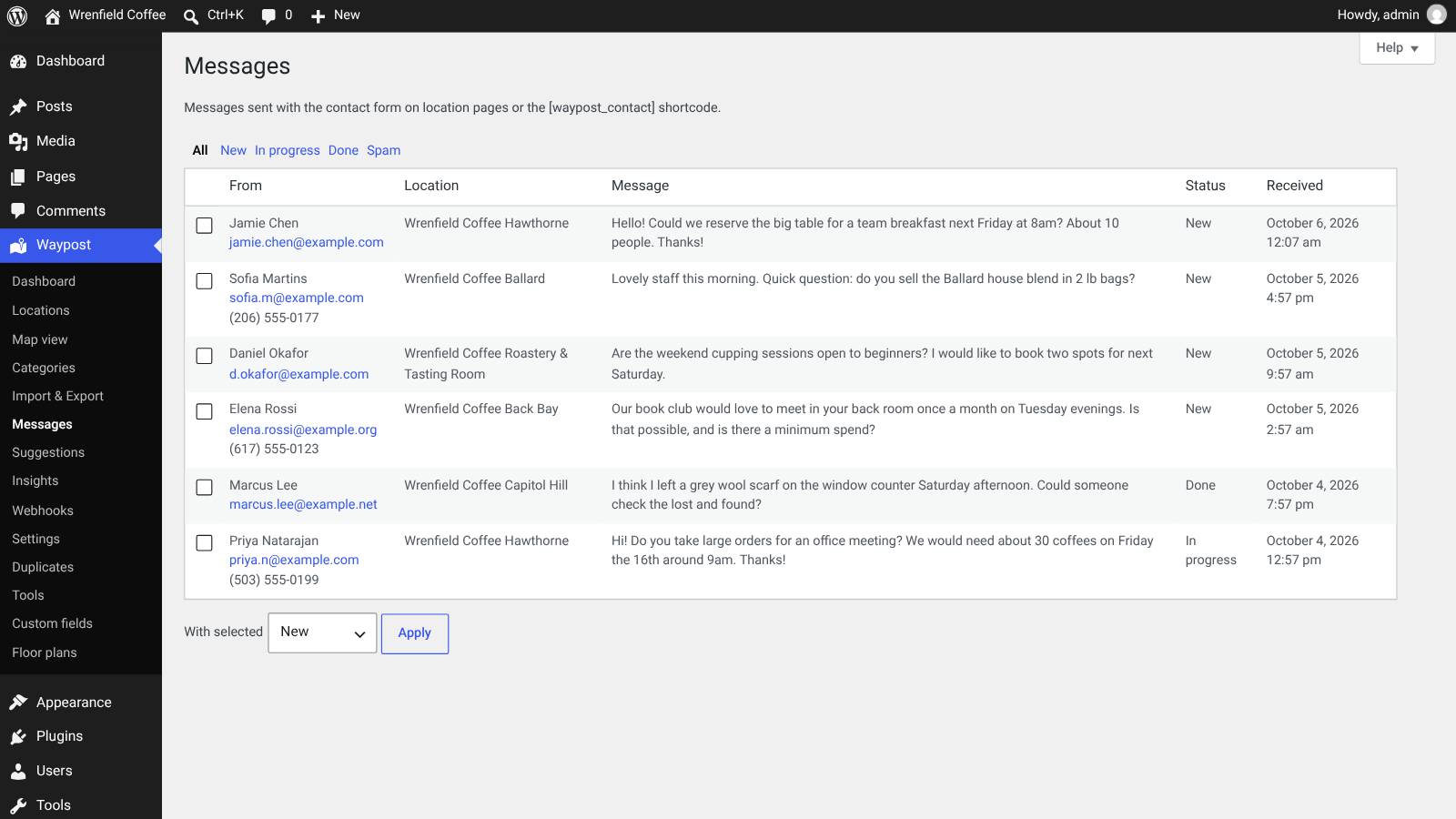
Messages inbox
Contact form messages per location with New, In progress, Done and Spam statuses.
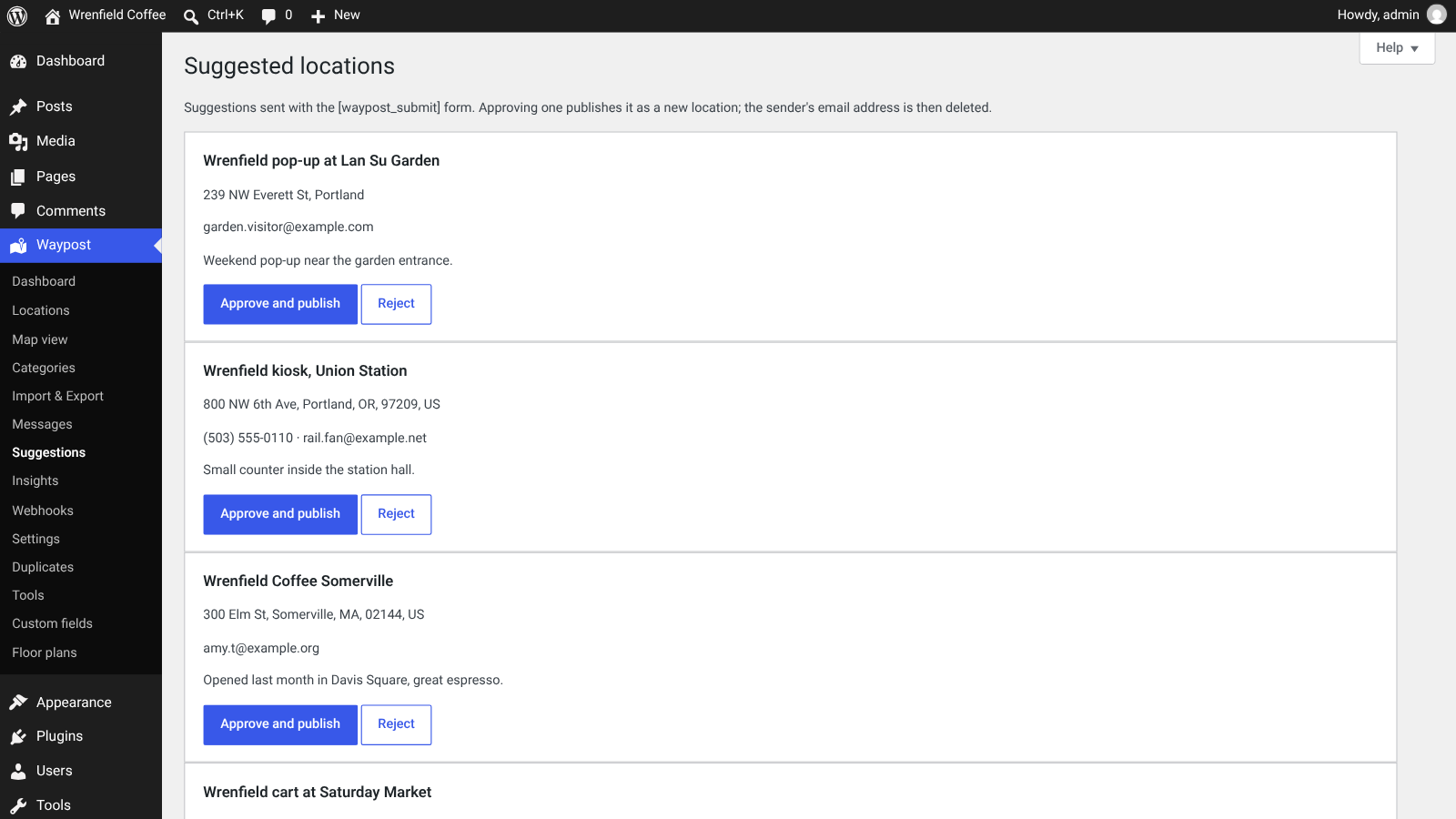
Suggested locations
A suggestion form for visitors; each suggestion waits for review and is only published when you approve it.
CONNECT AND EXTEND
Fits into the rest of your stack
Webhooks, a REST API and WP-CLI for the systems around your website.
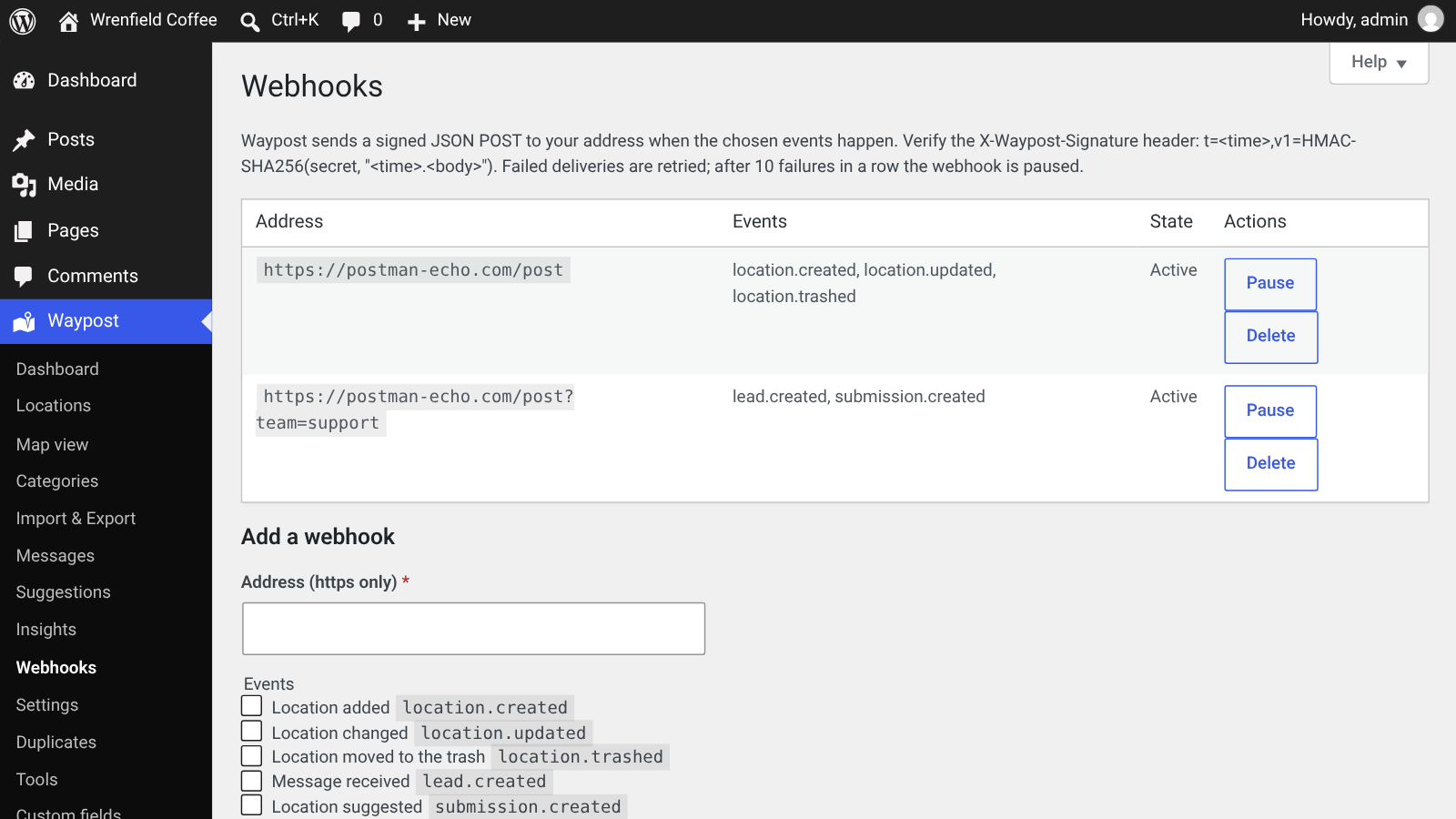
Signed webhooks
A signed JSON POST to your address when a location is added, changed or trashed, a message arrives or a location is suggested.
REST API
Create and edit locations with WordPress application passwords. An OpenAPI document describes the endpoints.
Floor plans
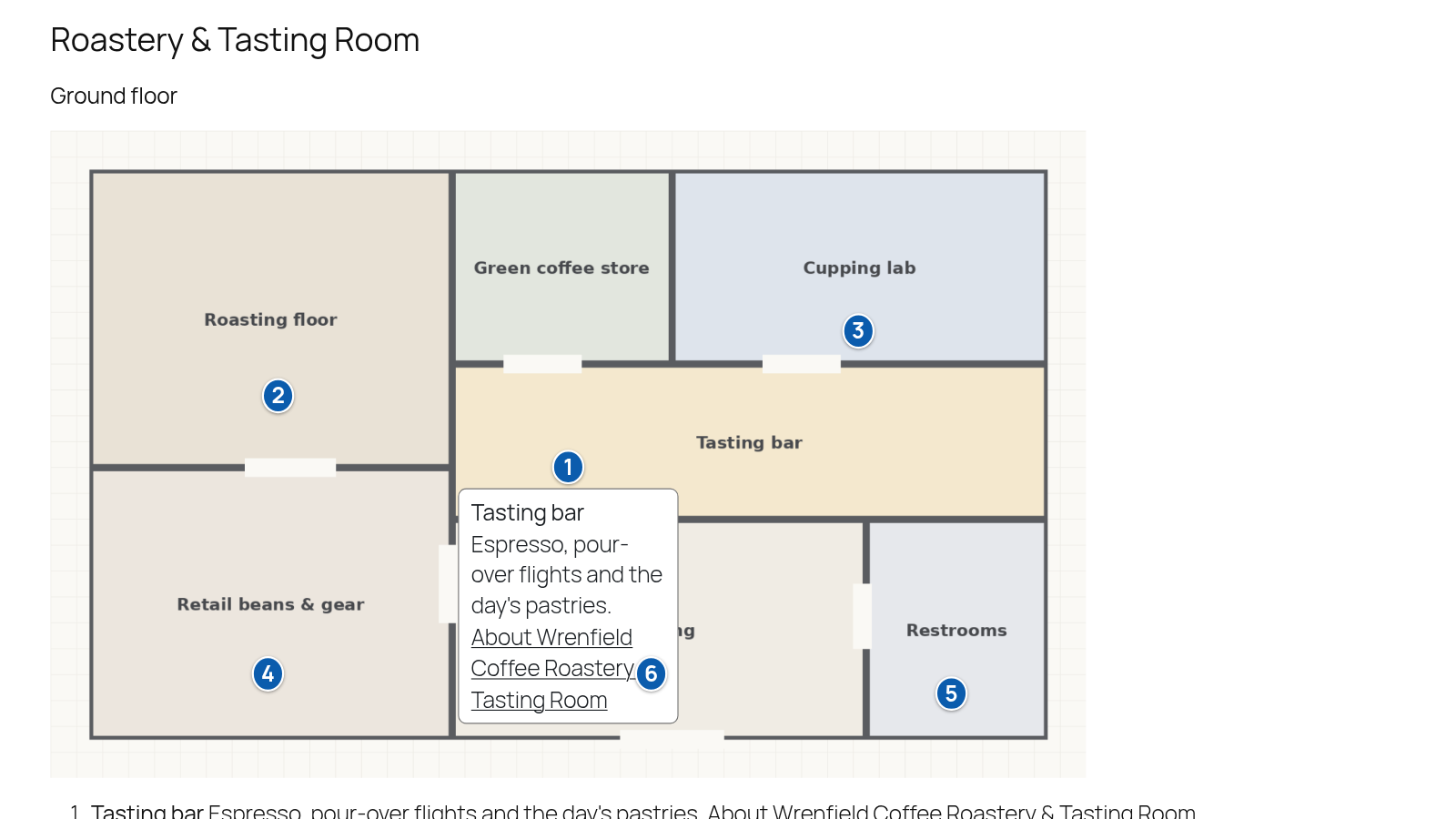
Upload a plan image per level and place pins on it, then show the plan on any page with a shortcode.
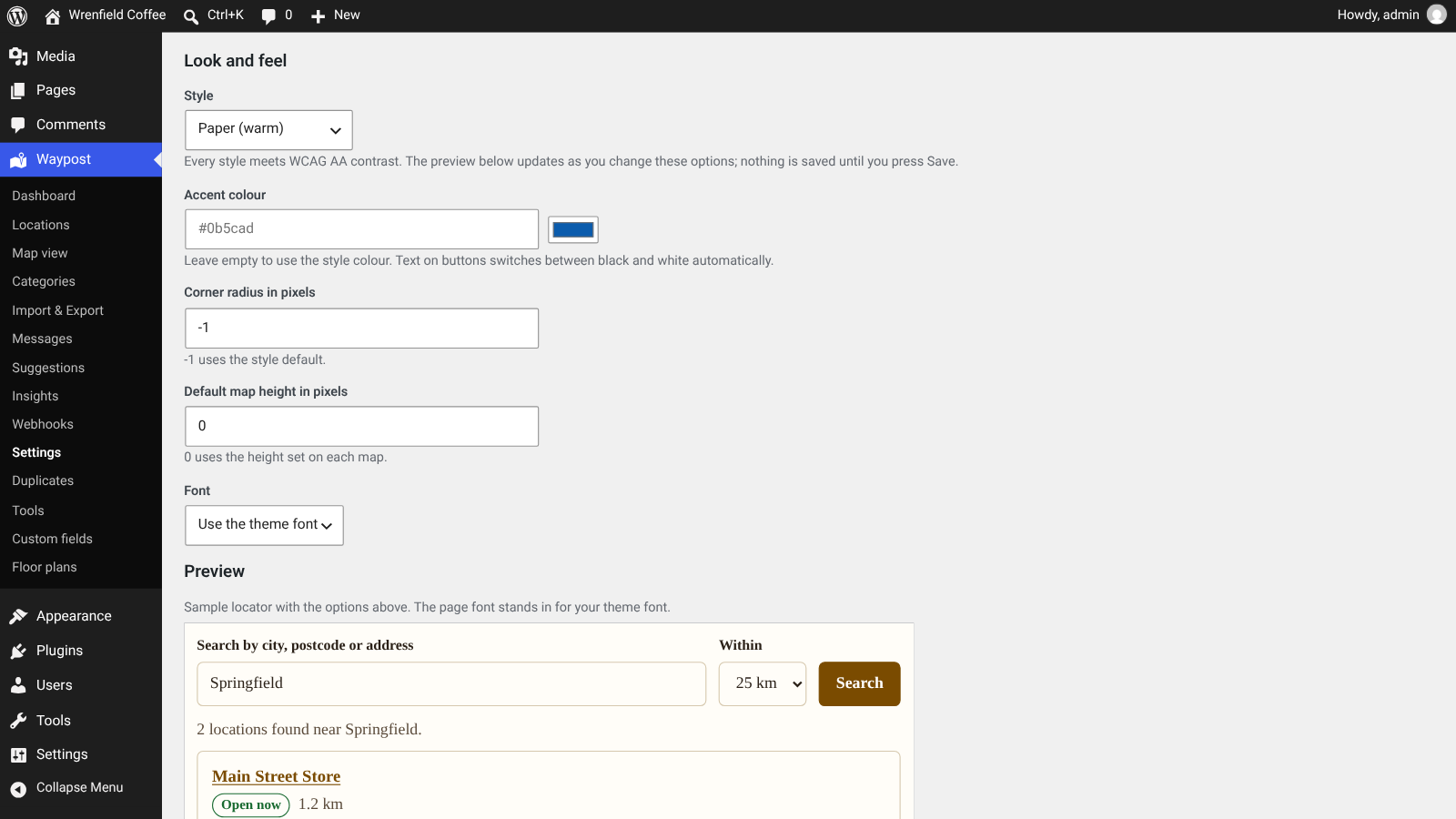
12 style presets
Contrast-checked presets with a live preview, an accent colour, corner radius, map height and font.
Built to last
Sensible foundations, so the locator stays quick and easy to look after.
Locations live in their own database tables with a geographic index, designed for long lists
Address lookups are cached and queued in the background, so imports don’t hammer the free public services
A locator block and a [waypost] shortcode for any page, plus shortcodes for the suggestion form and floor plans
Works with block themes; the screenshots use the Twenty Twenty-Five theme
Help tabs on every Waypost screen

How it works
From upload to a live store locator in four steps.
1
Upload Waypost
Upload the plugin under Plugins → Add New → Upload Plugin and switch it on. Its screens appear under Waypost in the admin menu.
2
Run the setup wizard
Choose what you use it for, the map and the address service, a start position and your first location.
3
Add your locations
Add them one by one, or import a CSV file after a dry run. Pins are placed from the addresses.
4
Publish the locator
The wizard creates a locator page, or add the Waypost block or the [waypost] shortcode to any page.
Made for businesses with more than one place
Anywhere customers need to find the nearest location.
Coffee shops and restaurantsRetail chains and branchesDealers and partnersService points and drop-offsClinics and officesCampuses and venuesFranchise networksDirectories of places
Good to know
- Visitor search matches the towns, cities and postcodes of your own locations; for a place with no location, visitors see a friendly message asking them to try another place
- The default OpenStreetMap tile server is a shared community service for light use. For a busy site, choose another tile provider in the settings
- Location pages use your theme’s styles and show address, hours, photos, directions links and the contact form; they don’t include a map
- Address lookups run in the background and are spaced out, so a large import takes a little while to place every pin
Fully licensed version
Fully licensed version — use on your own sites. You get the complete Waypost plugin with every feature described on this page.
Requirements
- WordPress 6.3 or newer
- PHP 7.4 or newer
- Screenshots were taken with WordPress 7.1 and the Twenty Twenty-Five theme
Frequently asked questions
What licence do I get?
A fully licensed copy of Waypost for use on your own sites, with every feature described on this page.
Do I need an account with a map provider?
No. Waypost starts with OpenStreetMap map tiles and free address lookups, so you can add locations and publish the locator without signing up anywhere.
Does the map load before the visitor agrees?
Not by default. The consent gate shows Map not loaded with a Load map button, and no request goes to a map server until the visitor presses it. The list of locations still works before that.
Does Waypost use cookies?
No. The visitor’s map choice is kept in their own browser storage, and Insights are counted without cookies or stored IP addresses.
How do visitors search?
By town, city or postcode, within a distance they choose, with filters for category, open now and your own custom fields. They can also move the map and press Search this area.
How does Open now work across time zones?
Each location stores its hours in its own time zone, so Open now and the closes at badge are right for a visitor anywhere, including across daylight-saving changes.
Can I add holidays and special hours?
Yes. Add holidays and special days with their own hours or as closed days. Weekly hours can have more than one period per day.
Can I import my existing list?
Yes. Upload or paste a CSV file, match the columns, and check the result first: Waypost shows which rows would be added or updated before anything is saved.
Can I undo an import?
Yes. New locations from that import go to the trash and updated locations get their previous values back.
Which export formats are there?
CSV, Excel, JSON and GeoJSON, filtered by status and category.
Do location pages help with search engines?
Every location page is listed in the WordPress sitemap and includes LocalBusiness structured data with the address and opening hours.
Where do contact messages go?
To the Messages inbox, tagged with the location, and to your email. You can mark each one New, In progress, Done or Spam.
What do Insights show?
Searches with and without results, location page views and directions, website and phone clicks, top searches, searches that found nothing and demand by area, compared with the previous period.
Can other systems talk to Waypost?
Yes. Signed webhooks tell another system when locations, messages or suggestions change, and the REST API lets it create and edit locations with an application password.
Can I change the look?
Pick one of 12 contrast-checked style presets and fine-tune the accent colour, corners, map height and font, with a live preview before you save.
SPECIAL LIMITED-TIME PRICE
Help customers find you
Waypost brings a map and list locator, open-now search, location pages, a consent-first map, safe CSV imports, Insights and a messages inbox to your WordPress site. Fully licensed version — use on your own sites.
007AJ
Waypost by 007AJ. Screenshots are from a test site with a fictional coffee brand (Wrenfield Coffee); its locations, phone numbers, messages and statistics are sample data. The graphic labelled “Illustration” is not a screenshot. Map data © OpenStreetMap contributors. Google Maps, Apple Maps and Waze are trademarks of their respective owners and are named only because Waypost can link to them for directions; Waypost is not affiliated with them.
Only logged in customers who have purchased this product may leave a review.
Loading...
WPBay support
 Support by 007AJ.com
Support by 007AJ.com
007AJ.com supports this product through WPBay
Questions are handled in WPBay's private ticket system, keeping your purchase details and support conversation together.
Go to My Downloads
After purchase, open this item in My Downloads and choose Get Support.
What support includes
- Answers to product-related questions
- Help with reported bugs and issues
- Guidance for included third-party assets
What support does not include
- Customizations or new features
- Installation or setup services
Plugin
Maintenance snapshot
See recent updates, compatibility, support, and developer activity.
- Updated today
- Developer active recently
- WPBay support available
- WordPress 7.1 tested
Snapshot updated 3 hours ago
View details Hide details
Maintenance details
This is maintenance data. It does not measure product quality or sales.
- Last update Updated today
- Compatibility WordPress 7.1 tested · PHP 8.5 not marked as tested
- Releases 4 releases in the 5 days since listing
- Developer activity Developer active recently
- Support No recent support tickets to measure
- Docs and demo Documentation available · Changelog missing · No demo listed
How this snapshot works
Plugin Health
The score is out of 100 and uses data WPBay can check. Ratings, popularity, and sales are not used.
- Last update 30 points
-
Plugins receive full recency points under 30 days, then step down at 90, 180, 365, and 545 days.
- Compatibility 20 points
-
WordPress, PHP, and WooCommerce (when relevant) are scored separately. The latest two PHP lines count as current. Nearby previous versions keep most of the points.
- Current version 100%
- One version behind 75%
- Two versions behind 50%
- Three versions behind 25%
- Older or not listed 0%
- Releases 15 points
-
One release earns 10, two or three earn 13, and four or more earn 15. Each accepted product ZIP counts once; reprocessing the same upload and listing-only edits do not count.
- Developer activity 15 points
-
Based on WPBay login and dashboard activity. Exact last-login dates are never shown.
- Support 15 points
-
There are no recent WPBay tickets to measure.
- Docs and demo 5 points
-
Documentation: 2. Changelog: 1. Working demo or preview: 2.
Score ranges
- 90–100 Excellent
- 75–89 Healthy
- 60–74 Fair
- 40–59 Needs attention
- 0–39 Limited
Long gaps
WPBay also checks for long gaps between updates, developer activity, support replies, and releases. Buyers do not see this score.
- Time since update 35 points
- Last developer activity 25 points
- WordPress compatibility 15 points
- Support replies 15 points
- Fewer releases 10 points
-
Quality verified by WPBay
WPBay review- Reviewed version
- 1.0.0
- Review completed
- Reviewer
- CodeRevolution
- Review type
- Initial
No unresolved approval blocker was identified during WPBay’s proportionate review of this release. This is not a security certification or a guarantee that the product contains no defects.
-
 Future updates
-
WPBay support from 007AJ.com
-
GPL code, proprietary assets
-
Covered by the WPBay refund policy
-
Plugin maintenance snapshot
Relevant picks
You may also like
Similar products selected by category, features, popularity and freshness.



From this seller
View seller store
More by 007AJ.com
Explore more bestselling products from this creator.



Reviews
There are no reviews yet.