



Sabriel AI
$19/mo+

 Recently Updated
Well Documented
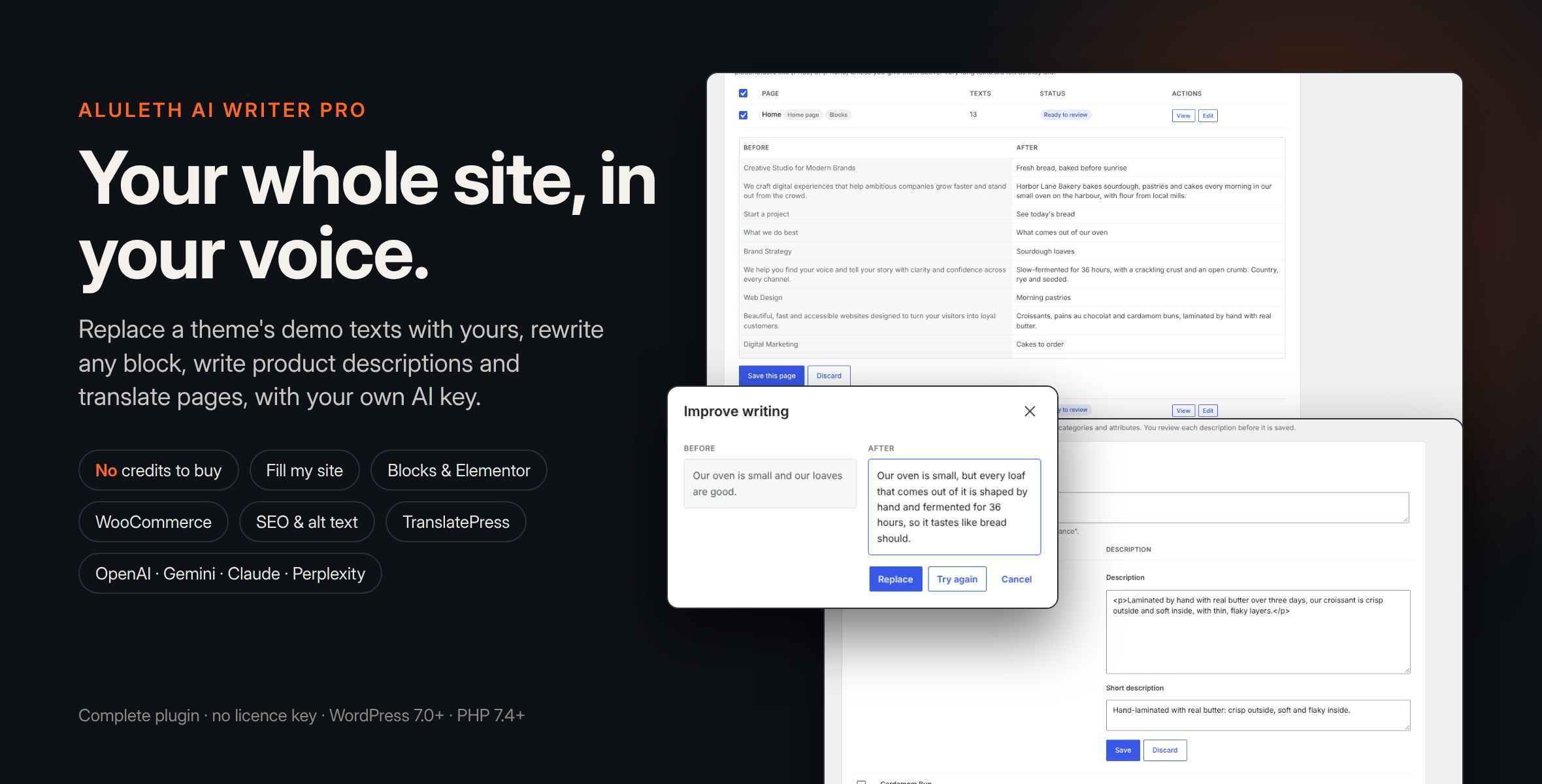
Changelog:
= 1.0.10 =
* Fix, Product descriptions (WooCommerce and FluentCart): a proposal no longer overwrites a change made after it was written. When the proposal is written, AI Writer notes the product's descriptions; Save and Save all check them again on the server. If the product was changed in the meantime (in another tab or by someone else), nothing is saved, the newer change is kept, and the proposal stays in its row with a notice, the description as it is now, and a "Save anyway" button. Save all saves the other products and tells you how many are waiting for your review.
* Fix, Product descriptions: the products/save REST route keeps a long description that is not sent, as it already did for the short description. A description sent empty is still saved empty, and a request with neither is refused.
* Fix, Translate this page (TranslatePress): when texts are still to translate but a batch could not save any (the AI provider sent back nothing, or the TranslatePress dictionary could not be updated), the editor now says that the translation is not complete and why, instead of stopping without a word. The translations already saved are kept and shown, and you can click Translate again.
* Developers: products/write returns "base", a fingerprint of the descriptions; products/save accepts "base" and "force" and answers 409 aluleth_aiwp_changed_since_proposal when the product changed. translate answers 502 aluleth_aiwp_translate_incomplete when a batch saved nothing.
= 1.0.9 =
* Fix, Product descriptions (WooCommerce and FluentCart): a Short description that you empty before clicking Save or Save all is now saved empty. Before, an empty Short description kept the product's old summary. The long description is saved as before, and Undo brings back both original descriptions, the long one and the short one.
* Developers: the products/save REST route clears the short description when "short" is sent as an empty string, and keeps it only when "short" is not sent at all.
= 1.0.8 =
* Accessibility, Product descriptions: each proposed Description and Short description field has its own label, linked to it, that names the product ("Description of Linen shirt"), so keyboard and screen-reader users know which field and which product they are in. The Save, Discard, Edit and Undo buttons and the selection checkbox of each row also name their product, and the Extra instructions field has a label and its example as a description.
* Accessibility, Write a full page (block editor): the text field of each planned section has a label ("What section 2 should say").
= 1.0.7 =
* Fill my site (block editor pages): a paragraph or heading that is itself marked as a testimonial, review, rating, quote or price (by its CSS class, such as "testimonial", or by the name given to it in the editor, such as "Pricing") is now left out before its text is read, not only its inner blocks. Such a block is never sent to the AI and never rewritten. Marked containers (a group named "Testimonials", a group with the class "review"…) and everything inside them stay unchanged as before, and the other texts of the page are rewritten as usual.
* Save: the same rule is applied again when the new texts are written into the page, so a marked block is never changed, even by a request that names it.
= 1.0.6 =
* Listing: the 12 screenshots of this version (settings and AI connection, Fill my site, the review of each text, Save and Undo, product descriptions, block editor tools) are attached to the listing gallery again, with the same captions as the Screenshots section of this readme. No change in the plugin's code.
= 1.0.5 =
* Listing: the 12 screenshots of the customer interface (settings, Fill my site, review, Save and Undo, product descriptions, editor tools) go with this version; the Screenshots section of this readme lists the same 12, in the same order. No change in the code: the plugin works exactly like 1.0.3 and 1.0.4.
= 1.0.4 =
* Readme: a Screenshots section describes the main workflows (settings, Fill my site, review, save, Undo, product descriptions and the editor tools). No change in the code: the plugin works exactly like 1.0.3.
= 1.0.3 =
* Fill my site and Product descriptions: Undo now takes the same lock as Save for that page or product, from before it reads the copy until the copy is deleted. A Save and an Undo of the same page never run at the same time: the second one is told the page is being saved or undone and can be tried again a moment later. A page or product that holds saved AI texts always keeps the copy that Undo needs.
= 1.0.2 =
* Fill my site and Product descriptions, Save and Undo: every write is checked by reading back what the database holds (the copy kept for Undo, the page content, the Elementor data, the descriptions). If the copy for Undo cannot be saved, the page is not changed. If the new texts cannot be saved, the page is left as it was, the review stays on screen and Save works again; a copy made by that save is removed only when the page still matches it. If Undo cannot put the page back, the copy is kept and Undo works again. Each case shows a clear message. A value that was already the same counts as written. The time of a save (used by Undo to warn about later changes by hand) is noted only once the page is saved.
* Fill my site: the business and customers typed on the screen are used for the pages written in that run, also by Editors. They are sent with each request and not saved: only administrators save them in the brand voice (Settings > AI Writer), and the screen says so to the others.
= 1.0.1 =
* Fill my site: a text is saved only where the page still has the text it was written from; one save of a page at a time; Undo keeps the page from before the first AI change and asks first when the page was changed by hand since. Quotes, testimonials, reviews and price tables are left as they are; very long texts are no longer cut.
* Fill my site and Product descriptions list every page and product (read a few dozen at a time).
* Product descriptions: saving twice at once no longer replaces the Undo copy.
* Translation: only people who can use the TranslatePress editor can translate; a translation a person saved meanwhile is never replaced; one batch at a time per page and language; links the original text does not have are taken out; long texts are left for you; only the translated page's cache is cleared.
* Fill review: page texts are read without running any of their HTML.
* Perplexity: a setting to turn web search off; one key check at a time; the cached answer is named with a salted fingerprint of the key.
* Licence: a server error or maintenance of the store no longer turns the Pro features off; no update check without a licence key; updates are offered only with a valid licence; messages after the licence forms are no longer read from the address.
* Every REST route checks its fields; translations of the plugin load from its languages folder; works without the mbstring PHP extension.
* Uninstall: the licence and settings are removed; the Undo copies when you ask for it.
* Complete copies: Aluleth AI Writer can be carried inside this plugin.
= 1.0.0 =
* First release: Fill my site, full pages, product descriptions, page translation, Perplexity connector, licence and updates.
Only logged in customers who have purchased this product may leave a review.
 Support by Aluleth
Questions are handled in WPBay's private ticket system, keeping your purchase details and support conversation together.
After purchase, open this item in My Downloads and choose Get Support.
See recent updates, compatibility, support, and developer activity.
Snapshot updated 2 hours ago
This is maintenance data. It does not measure product quality or sales.
The score is out of 100 and uses data WPBay can check. Ratings, popularity, and sales are not used.
Plugins receive full recency points under 30 days, then step down at 90, 180, 365, and 545 days.
WordPress, PHP, and WooCommerce (when relevant) are scored separately. The latest two PHP lines count as current. Nearby previous versions keep most of the points.
One release earns 10, two or three earn 13, and four or more earn 15. Each accepted product ZIP counts once; reprocessing the same upload and listing-only edits do not count.
Based on WPBay login and dashboard activity. Exact last-login dates are never shown.
There are no recent WPBay tickets to measure.
Documentation: 2. Changelog: 1. Working demo or preview: 2.
Score ranges
WPBay also checks for long gaps between updates, developer activity, support replies, and releases. Buyers do not see this score.
No unresolved approval blocker was identified during WPBay’s proportionate review of this release. This is not a security certification or a guarantee that the product contains no defects.
 Future updates
WPBay support from Aluleth
GPL code, proprietary assets
Covered by the WPBay refund policy
Plugin maintenance snapshot
Similar products selected by category, features, popularity and freshness.
Explore more bestselling products from this creator.

Reviews
There are no reviews yet.