


Aluleth Product Table – WooCommerce & FluentCart Product Table, Order Form and Quick Order

 Recently Updated
Well Documented
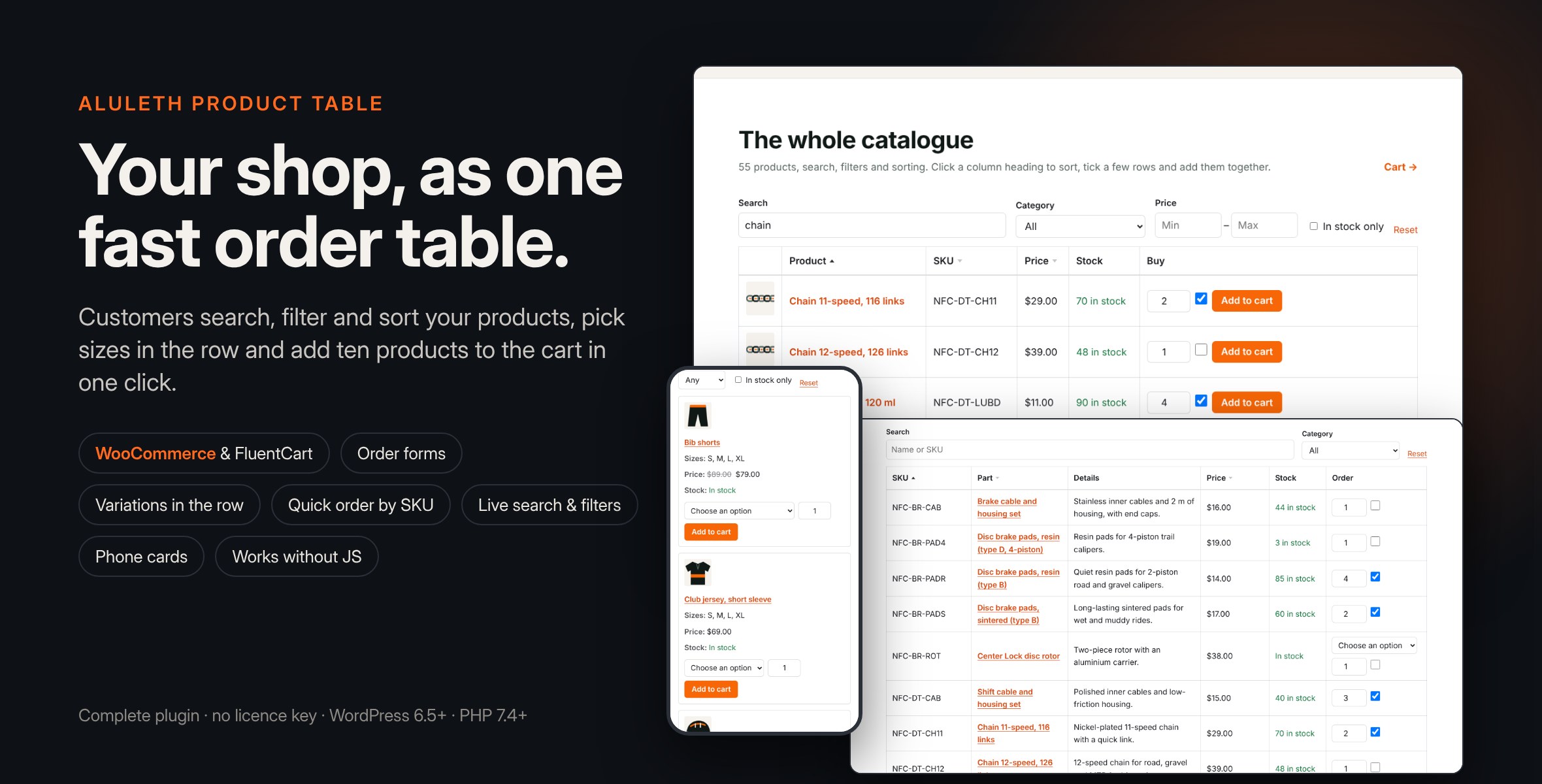
Show your products in a fast table that customers search, filter and sort, then add many products to the cart at once: order forms, variations in the row, quick order by SKU. WooCommerce and FluentCart.
Aluleth Product Table puts your products in a table that customers can search, filter and sort, then add to the cart without opening each product. It suits order forms, wholesale and trade customers, restaurants and take-away menus, spare parts, events and any shop with many products. It works with WooCommerce and FluentCart, on the same site if you use both. No account and no licence key: install it and build your first table.
INSTALLATION
1. In your WordPress admin, go to Plugins › Add New › Upload Plugin.
2. Choose the aluleth-product-table-x.y.z.zip file as you downloaded it (do not unzip it), click Install Now, then Activate. WooCommerce or FluentCart must be active.
3. Go to Product Tables › Add a table: choose the products, the columns and the options, then save.
4. Add the “Product Table” block to a page, or paste the shortcode shown under the table, for example [aluleth_product_table id=”12″].
BUILD A TABLE IN A MINUTE
– Products: all of them, some categories, tags or brands, a hand-picked list in your order, or what the signed-in customer ordered before (“order again”).
– Leave out products, keep only products in stock or on sale.
– Columns in any order: image, name, SKU, description, price, stock, categories, tags or brands, attributes, a custom field, weight, dimensions, date, rating and the buy column.
– Several tables on one page; a preview under the editor.
CUSTOMERS FIND WHAT THEY NEED
– Search by name or SKU as they type; filters by category, attributes, price and “in stock only”; click a heading to sort.
– Page links, a product count, and a link to share or bookmark the exact view.
– Search, filters and sorting run in the database, one page at a time, so large catalogues stay fast.
ORDERING
– A quantity box and an “Add to cart” button on each row, or boxes to tick and one “Add selected to cart” button (an order form), or both.
– Variable products: the customer picks the size or colour in the row; price, stock and quantity limits follow it.
– Quick order by SKU: paste lines such as “AB-123 4” and every product goes to the cart at once; unknown SKUs are listed.
– Several adds at the same time (two clicks, two tabs) all reach the cart, and a click sent twice counts once.
– The mini cart updates right away; the store’s own checks apply (stock, quantity limits, sold individually).
WORKS EVERYWHERE
– On phones each product becomes a card (or the table scrolls sideways).
– Without JavaScript the table still works with plain links and forms.
– Keyboard and screen reader friendly; translated into French, Spanish and Tagalog, ready for other languages.
– “Who can see it”: everyone, signed-in customers, or some roles (for example a wholesale role).
Requirements: WordPress 6.5+, PHP 7.4+, WooCommerce or FluentCart.
Live demo: https://demos.alulethmarketing.com/product-table/
Documentation: https://market.alulethmarketing.com/docs/aluleth-product-table/
Changelog:
= 1.0.5 =
* Narrow content areas: the table now follows the width of its own column, not the width of the screen. In a sidebar layout, a column block or any narrow content area on a computer, it switches to one card per product (or keeps the table with a side scroll, when the table is set to scroll), so every quantity box, option, checkbox and Add to cart button stays visible and usable. Phones keep working as before.
* The table no longer widens a theme's flex or grid column past its share, so a theme that hides overflow can no longer cut off the right side of the table.
* Side scroll: the scroll box keeps all its content inside (hidden labels could widen the page), shadows show there is more to see, a short line says to scroll sideways, and the box can be scrolled with the keyboard. On wide screens the buy column stays in view at the right edge while the other columns scroll.
* Cards: the sortable column titles show as a row of sort buttons above the cards (they were hidden on phones), and in very narrow columns the buy controls take the full width and the button text can wrap.
* Product images keep their size in a crowded table (some themes shrank them to nothing).
= 1.0.4 =
* WooCommerce variations: the quantity limits of each variation now come from the same filters as WooCommerce's quantity box (woocommerce_quantity_input_min, woocommerce_quantity_input_max, woocommerce_quantity_input_step, then woocommerce_quantity_input_args), with the variation as the product, so quantity rules set by other plugins in any of these ways apply in the table. A change made through woocommerce_available_variation (min_qty, max_qty, step) is applied on top of them.
* A variable product's row starts with the product's own limits (the same filters), and gets them back when the chosen variation is cleared.
= 1.0.3 =
* Choosing a variation in a row now sets the quantity field to that variation's own minimum, maximum and step: the browser counts the steps from the variation's minimum (minimum 3, step 3: 3, 6, 9…), so every allowed quantity can be added with the mouse or the keyboard, in the three ways of adding (row buttons, checkboxes, or both). On order forms (checkboxes only) a quantity of 0 still unticks the product. Clearing the choice brings back the product's own limits.
* The stock column follows the chosen variation: in stock (with the count when the store counts it), on backorder (WooCommerce) or out of stock, and shows the product's own stock again when the choice is cleared. WooCommerce and FluentCart.
* When products are added, the quantity of each row added is checked against its limits first, and the browser says which one to fix; a row that is not added never stops the others. A quantity typed between two steps is moved to the next allowed one when the variation changes.
Only logged in customers who have purchased this product may leave a review.
Loading...
WPBay support
 Support by Aluleth
Aluleth supports this product through WPBay
Questions are handled in WPBay's private ticket system, keeping your purchase details and support conversation together.
Go to My Downloads
After purchase, open this item in My Downloads and choose Get Support.
What support includes
- Answers to product-related questions
- Help with reported bugs and issues
- Guidance for included third-party assets
What support does not include
- Customizations or new features
- Installation or setup services
Plugin
Maintenance snapshot
See recent updates, compatibility, support, and developer activity.
- Updated today
- Developer active recently
- WPBay support available
- WordPress 7.1 tested
Snapshot updated 34 minutes ago
View details Hide details
Maintenance details
This is maintenance data. It does not measure product quality or sales.
- Last update Updated today
- Compatibility WordPress 7.1 tested · PHP 8.3 tested, one version behind · WooCommerce 11 tested
- Releases 5 releases in the 2 days since listing
- Developer activity Developer active recently
- Support No recent support tickets to measure
- Docs and demo Documentation available · Changelog available · Demo available
How this snapshot works
Plugin Health
The score is out of 100 and uses data WPBay can check. Ratings, popularity, and sales are not used.
- Last update 30 points
-
Plugins receive full recency points under 30 days, then step down at 90, 180, 365, and 545 days.
- Compatibility 20 points
-
WordPress, PHP, and WooCommerce (when relevant) are scored separately. The latest two PHP lines count as current. Nearby previous versions keep most of the points.
- Current version 100%
- One version behind 75%
- Two versions behind 50%
- Three versions behind 25%
- Older or not listed 0%
- Releases 15 points
-
One release earns 10, two or three earn 13, and four or more earn 15. Each accepted product ZIP counts once; reprocessing the same upload and listing-only edits do not count.
- Developer activity 15 points
-
Based on WPBay login and dashboard activity. Exact last-login dates are never shown.
- Support 15 points
-
There are no recent WPBay tickets to measure.
- Docs and demo 5 points
-
Documentation: 2. Changelog: 1. Working demo or preview: 2.
Score ranges
- 90–100 Excellent
- 75–89 Healthy
- 60–74 Fair
- 40–59 Needs attention
- 0–39 Limited
Long gaps
WPBay also checks for long gaps between updates, developer activity, support replies, and releases. Buyers do not see this score.
- Time since update 35 points
- Last developer activity 25 points
- WordPress compatibility 15 points
- Support replies 15 points
- Fewer releases 10 points
-
Quality verified by WPBay
WPBay review- Reviewed version
- 1.0.5
- Review completed
- Reviewer
- CodeRevolution
- Review type
- Initial
No unresolved approval blocker was identified during WPBay’s proportionate review of this release. This is not a security certification or a guarantee that the product contains no defects.
-
 Future updates
-
WPBay support from Aluleth
-
GPL code, proprietary assets
-
Covered by the WPBay refund policy
-
Plugin maintenance snapshot
Relevant picks
You may also like
Similar products selected by category, features, popularity and freshness.



From this seller
View seller store
More by Aluleth
Explore more bestselling products from this creator.

Reviews
There are no reviews yet.