



NextlerAI Translator – AI WordPress & WooCommerce Translation

 Recently Updated
Well Documented
Recently Updated
Well Documented
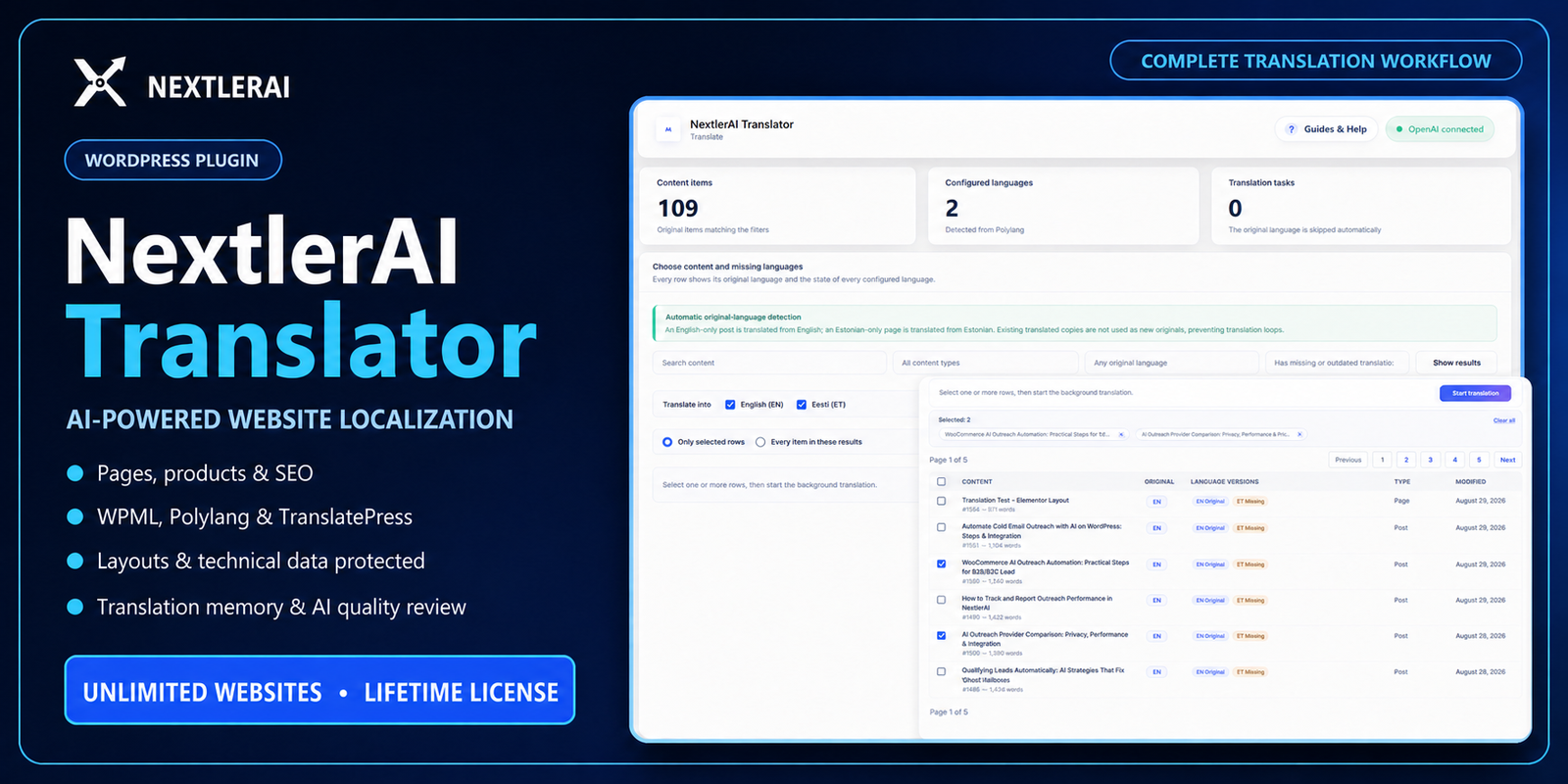
Translate complete WordPress websites without rebuilding pages or products
NextlerAI Translator is a complete AI-powered localization workflow for WordPress and WooCommerce. It discovers the multilingual, commerce, editor and SEO stack already installed on your website, translates the human-readable content, and saves the result through the correct native WordPress integration while preserving layouts, product behavior and technical data.
Instead of copying pages by hand or sending entire builder structures to an AI model, Translator separates visible language from technical structure. It protects HTML, Gutenberg comments, shortcodes, URLs, placeholders, code tokens, IDs and commerce values, then translates and validates only the content customers actually read.
Complete website localization from one WordPress dashboard
- Translate pages, posts and public custom post types including titles, excerpts, body content, slugs, supported metadata and taxonomy relationships.
- Localize WooCommerce catalogs including product names, descriptions, purchase notes, customer-facing variations, attributes, categories, tags, downloads and supported product fields.
- Preserve working layouts across Gutenberg and supported page-builder data instead of flattening content into a separate editor.
- Translate SEO and social metadata for SEOPress, Yoast SEO, Rank Math and All in One SEO.
- Reuse translation memory and send only missing or changed segments to the AI provider.
- Control terminology and brand voice with a mandatory glossary, protected terms, target market, tone and custom instructions.
- Run professional quality checks with strict validation, optional independent AI review and human-review flags for ambiguous content.
- Process large websites safely with background batches, checkpoints, progress, cancellation, retries and truncated-response recovery.
Works with your multilingual WordPress structure
NextlerAI Translator does not replace the multilingual plugin. It automatically loads the correct adapter for the localization system already responsible for language URLs, relationships, routing and hreflang:
- WPML: creates and updates linked native WordPress translation objects.
- Polylang: creates linked translated posts, terms and supported product variations while keeping language relationships intact.
- TranslatePress: writes translated strings into its directional language dictionaries. The TranslatePress default-language page remains the source.
Each item’s actual original language is detected for WPML and Polylang workflows. Existing translated copies are not treated as new originals, preventing translation loops on mixed-language websites.
Translate content while protecting technical structure
The plugin extracts human-readable text and protects the parts that must remain exact. Technical fragments are removed from AI input where possible, restored locally, and checked again before anything is saved.
Translated content includes:
- Titles, headings, paragraphs, labels, excerpts and descriptions
- Product descriptions, purchase notes and customer-facing variation text
- Selected structured custom fields and human-readable shortcode or HTML attributes
- Categories, tags, public custom taxonomies and WooCommerce attributes
- SEO titles, descriptions, keywords and supported social metadata
- Optional translated URL slugs and language-specific media ALT text
Protected or synchronized data includes:
- HTML tags, Gutenberg block comments and builder layout data
- Shortcodes, code fragments, placeholders, entities, URLs and email addresses
- CSS classes, IDs, scripts, technical attributes and internal relationships
- WooCommerce prices, stock, SKUs, dimensions, tax settings and product behavior
- WordPress, multilingual, SEO and commerce configuration values
If a protected token changes, a required segment is missing or natural-language source text remains untranslated, the result is rejected or corrected instead of being silently saved as complete.
Deep WordPress, builder and custom-field coverage
Translator supports standard WordPress content plus identifiable human-readable text stored by many modern editors and structured field systems:
- Gutenberg and standard WordPress HTML/shortcode content
- Elementor, Bricks, Breakdance, Beaver Builder and Oxygen
- Themify, SiteOrigin, Cornerstone, Zion Builder and Visual Composer compatible data
- Advanced Custom Fields and compatible structured metadata
- Common custom product tabs, page fields and proprietary structured text fields
- Easy Digital Downloads customer-facing product content discovery
Unknown IDs, settings and technical values are excluded. Custom metadata is translated only when its stored structure clearly identifies human-readable content.
Professional localization controls
Create consistent target-market content instead of generic word-for-word output:
- Brand protection: keep the company or product name unchanged.
- Never-translate terms: protect legal terms, technical names and identifiers.
- Mandatory glossary: define required source-to-target terminology.
- Market and tone: adapt language for the destination locale and brand style.
- Custom instructions: add project-specific localization rules.
- Professional mode: run a provider/model qualification test and an optional independent senior-editor AI review.
- Human-review routing: keep ambiguous or risky meaning in review instead of inventing an answer.
Translation memory and intelligent updates
Approved source/target segments are stored in local translation memory with language and context information. Current translations and matching memory entries are reused without another provider request. When relevant source content changes, the source hash marks linked translations as outdated so you can update only what changed.
Optional automatic synchronization can queue changed source items for incremental re-translation, while manual-edit locks protect explicitly edited segments from automatic replacement.
Built for large sites and long translation jobs
- Search and filter by content type, original language and translation state
- Select individual items, multiple items across pages or every result matching the current filters
- Translate into one or more configured target languages
- Use bounded background batches that continue through WordPress Cron
- Checkpoint completed batches and resume safely after temporary failures
- Automatically split provider responses that hit output limits
- Retry temporary provider, connection and validation errors with recovery behavior
- Monitor progress, warnings and failures under Jobs & Logs
- Open the original, translated editor, preview or published result directly
Bring your preferred AI provider
Connect your own API key for OpenAI, Google Gemini, Anthropic Claude or xAI Grok. Select the provider and model that match your quality, availability and cost requirements. API usage, quotas and provider fees are not included in the plugin purchase.
Provider keys are encrypted at rest with OpenSSL and installation-specific WordPress salts. If secure encryption is unavailable, key storage is blocked with a clear administrator warning.
Native, editable WordPress output
The result stays in the WordPress ecosystem you already use. WPML and Polylang translations remain linked native content objects; TranslatePress translations remain in its dictionaries. Administrators can review, edit, preview and publish through normal WordPress permissions and editorial controls.
Requirements
- WordPress 6.0 or newer; tested through WordPress 7.1
- PHP 7.4 or newer; verified target range PHP 7.4-8.3
- PHP
mbstringandOpenSSLextensions - WPML, Polylang or TranslatePress configured with at least one target language
- A customer-supplied OpenAI, Gemini, Anthropic Claude or xAI Grok API key
- Working WP-Cron or a real server cron for reliable background processing
- WooCommerce is optional and tested through WooCommerce 11.0
WPBay edition
This dedicated WPBay build works immediately after normal WordPress activation. It has no customer-facing License page, does not request an external marketplace key, requires no domain-deactivation step and does not contact the NextlerAI license server. The allowed number of production websites follows the WPBay plan purchased at checkout.
Important notes
- AI provider usage and third-party plugin or service charges are not included.
- WPML, Polylang or TranslatePress remains responsible for language routing, URLs, hreflang and relationship behavior.
- WooCommerce remains responsible for pricing, inventory, tax, shipping, SKUs and product behavior.
- GTranslate and Weglot may be detected, but their proxy/cloud storage is not written by this release.
- Use a staging clone and current backup before translating a production site or full catalog.
- Review AI-generated translations before publication, especially legal, medical, financial, contractual or regulated content.
Installation
- Install and configure WPML, Polylang or TranslatePress with the required languages.
- Open Plugins > Add New Plugin > Upload Plugin.
- Select the NextlerAI Translator WPBay ZIP, install and activate it.
- Open NAI Translator > Dashboard and verify the detected stack.
- Open Settings, connect the AI provider and run the quality test.
- Configure glossary, protected terms, target market, tone and workflow.
- Run the first translation in Draft mode and review the complete result.
Turn an existing WordPress site into a controlled, scalable multilingual publishing workflow – without rebuilding every page or sacrificing the structure that already works.
Only logged in customers who have purchased this product may leave a review.
Loading...
WPBay support
 Support by NextlerAI
Support by NextlerAI
NextlerAI supports this product through WPBay
Questions are handled in WPBay's private ticket system, keeping your purchase details and support conversation together.
Go to My Downloads
After purchase, open this item in My Downloads and choose Get Support.
What support includes
- Answers to product-related questions
- Help with reported bugs and issues
- Guidance for included third-party assets
What support does not include
- Customizations or new features
- Installation or setup services
Plugin
Maintenance snapshot
See recent updates, compatibility, support, and developer activity.
- Updated 48 days ago
- Developer active recently
- WPBay support available
- WordPress 7.1 tested
Snapshot updated 2 hours ago
View details Hide details
Maintenance details
This is maintenance data. It does not measure product quality or sales.
- Last update Updated 48 days ago
- Compatibility WordPress 7.1 tested · PHP 8.3 tested, one version behind · WooCommerce 11 tested
- Releases 6 releases in the 48 days since listing
- Developer activity Developer active recently
- Support No recent support tickets to measure
- Docs and demo Documentation available · Changelog missing · No demo listed
Health reflects recent activity during the last 90 days.
How this snapshot works
Plugin Health
The score is out of 100 and uses data WPBay can check. Ratings, popularity, and sales are not used.
- Last update 30 points
-
Plugins receive full recency points under 30 days, then step down at 90, 180, 365, and 545 days.
- Compatibility 20 points
-
WordPress, PHP, and WooCommerce (when relevant) are scored separately. The latest two PHP lines count as current. Nearby previous versions keep most of the points.
- Current version 100%
- One version behind 75%
- Two versions behind 50%
- Three versions behind 25%
- Older or not listed 0%
- Releases 15 points
-
One release earns 10, two or three earn 13, and four or more earn 15. Each accepted product ZIP counts once; reprocessing the same upload and listing-only edits do not count.
- Developer activity 15 points
-
Based on WPBay login and dashboard activity. Exact last-login dates are never shown.
- Support 15 points
-
There are no recent WPBay tickets to measure.
- Docs and demo 5 points
-
Documentation: 2. Changelog: 1. Working demo or preview: 2.
Score ranges
- 90–100 Excellent
- 75–89 Healthy
- 60–74 Fair
- 40–59 Needs attention
- 0–39 Limited
Long gaps
WPBay also checks for long gaps between updates, developer activity, support replies, and releases. Buyers do not see this score.
- Time since update 35 points
- Last developer activity 25 points
- WordPress compatibility 15 points
- Support replies 15 points
- Fewer releases 10 points
-
Quality verified by WPBay
WPBay review- Reviewed version
- 1.7.22
- Review completed
- Reviewer
- CodeRevolution
- Review type
- Initial
No unresolved approval blocker was identified during WPBay’s proportionate review of this release. This is not a security certification or a guarantee that the product contains no defects.
-
 Future updates
-
WPBay support from NextlerAI
-
Fully GPL licensed
-
Covered by the WPBay refund policy
-
Plugin maintenance snapshot
Relevant picks
You may also like
Similar products selected by category, features, popularity and freshness.

 1 month free
From this seller
View seller store
More by NextlerAI
Explore more bestselling products from this creator.
Reviews
There are no reviews yet.