



Aluleth Boards Pro – Kanban, Gantt Timeline, Time Tracking and Client Portal for WordPress

 Recently Updated
Well Documented
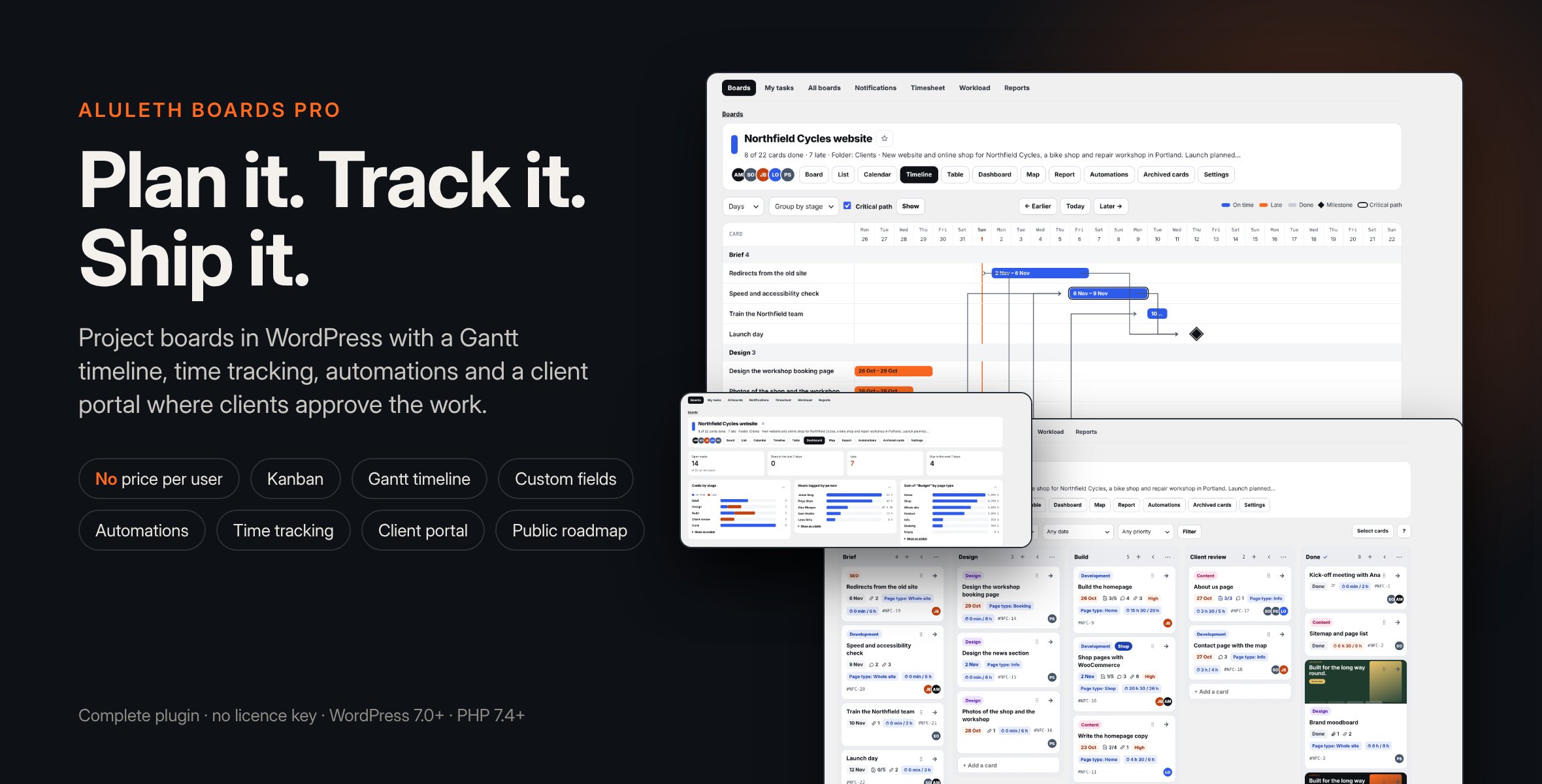
Project and task boards inside WordPress: Kanban, List, Calendar, Gantt Timeline and Table views, custom fields, automations, time tracking, a client portal with approvals and a public roadmap. No per-user price, no licence key.
Aluleth Boards Pro is a complete plugin: it includes Aluleth Boards 0.7.2 (boards, stages, cards, checklists, files, comments, reminders, My tasks, imports) and adds the Pro features. There is nothing else to install and no licence key to enter: everything is on as soon as the plugin is active. Your boards stay in your own WordPress database, with no limit on boards, cards or people and no price per user.
INSTALLATION
1. In your WordPress admin, go to Plugins › Add New › Upload Plugin.
2. Choose the aluleth-boards-pro-x.y.z.zip file as you downloaded it (do not unzip it), click Install Now, then Activate.
3. Open Aluleth › Boards and make your first board: blank, ready-made, or imported from Trello, Asana, FluentBoards or a CSV file.
4. To let your team use boards, give their role access in Aluleth › Settings › Access, then add them to a board.
5. Optional: put [aluleth_boards_portal] on a page for the client portal and [aluleth_boards_roadmap board=”ID”] for a public roadmap.
Already using the separate Aluleth Boards plugin? Leave it active: Aluleth Boards Pro then uses it instead of its included copy, with your boards and settings. It must be version 0.7.2 or newer. With an older version your boards keep working, but the Pro features stay off and a notice asks you to update Aluleth Boards; update it, or deactivate it and the included copy takes over with the same data.
To update, upload the new zip the same way: WordPress offers to replace the current version, and your data is kept.
Keep or remove the separate Aluleth Boards plugin: your boards and settings are kept either way. To delete the separate plugin, update it to 0.7.2 first: older versions delete the boards when “delete data” is ticked in Aluleth › Settings, even though Aluleth Boards Pro still uses them.
BOARDS AND CARDS
– Stages with card limits and a “done” stage, people with roles (admin, member, viewer), labels, folders, backgrounds, 5 ready-made boards and your own board templates.
– Cards with description, people, start and due dates, priority, labels, checklists (person, date and note per item), files, comments with replies, @mentions and reactions, linked cards, reminders, card numbers and history.
– Drag and drop with the mouse or the keyboard (screen-reader friendly), bulk actions, saved filters, keyboard shortcuts, dark mode.
– My tasks across every board, with a private calendar link (iCal).
VIEWS
– Kanban, List and Calendar.
– Timeline (Gantt): bars you drag, dependencies as arrows, critical path, milestones, duplicate a board with new dates.
– Table: every custom field as a column, groups, sums and changes saved in the cells.
– Dashboard with charts, Map of cards with an address (OpenStreetMap, off until a site admin turns it on), and Table and Calendar across all boards.
CUSTOM FIELDS
– 13 types: text, long text, number, money, date, dropdown, several choices, checkbox, link, email, phone, person, address. Up to 40 per board.
AUTOMATIONS
– Rules (When · Only if · Then) with 20+ actions, card and board buttons with Undo, scheduled commands, due-date commands and recurring cards. No run limit; a History of every run.
TIME TRACKING AND WORKLOAD
– Timer and time by hand, estimates, billable time, rates and budgets, Timesheet with CSV and locked weeks, Workload against each person’s hours.
CLIENT PORTAL, PUBLIC LINK, ROADMAP
– Clients sign in with a one-time email link (no password) or their account, see only the cards you share, approve work or ask for changes, and send messages.
– Read-only public link per board (can expire).
– Public roadmap with votes, comments and suggested ideas the team checks; voters get one email when an idea is shipped.
CONNECTIONS (ALL OPTIONAL)
– Email to a board (IMAP), incoming and outgoing webhooks (signed, public https services only), Google Calendar and Outlook sync, private S3 / R2 / Spaces storage for card files.
AI (OPTIONAL)
– New board from a goal, card summaries and checklists, cards from a brief, client updates, through the AI provider connected in WordPress (Settings › Connectors). Nothing is sent before someone presses an AI button.
IMPORT AND EXPORT
– Trello (JSON), Asana (CSV), any CSV, FluentBoards on the same site; JSON and CSV export; REST API and WordPress abilities.
TRANSLATIONS
Two text domains on purpose: aluleth-boards-pro (template languages/aluleth-boards-pro.pot) and aluleth-boards for the included Aluleth Boards (template free/languages/aluleth-boards.pot), so translations made for the free Aluleth Boards work here too. Put the files in wp-content/languages/plugins/.
LIVE DEMO
https://demos.alulethmarketing.com/boards/ is a sample design studio with ready-made boards. The “Try the boards” button opens the boards admin without a password, and the “Client portal as Ana” button shows the client portal as a client sees it. The sample data is reset every night, so feel free to change anything.
Requirements: WordPress 7.0+, PHP 7.4+ (mbstring not needed). Optional: an AI provider, an IMAP mailbox, Google/Microsoft app keys, an S3-compatible bucket.
Documentation: https://market.alulethmarketing.com/docs/aluleth-boards-pro/
Changelog:
= 0.3.9 =
* Timeline, moving the cards that wait for a moved card: each card's new dates are written by one conditional database update, which applies only while the card still has the dates read for the move (and the due-done and reminder settings that change with them) and is still open on the board. A card someone edits while the move runs keeps that edit and is reported as changed, also during a retry round; a card done, archived or moved to another board meanwhile is reported as no longer moved. A moved card still gets the activity line, the reminder change and the automations, webhooks and calendar sync of a date change.
* Timeline: the critical path follows the links until the path ends, however many cards it has (it stopped after 100 before); a loop of links ends the path.
Aluleth Boards Pro 0.3.8
= 0.3.8 =
* Complete plugin: Aluleth Boards 0.7.2 is included (unchanged), nothing else to install.
* Timeline, moving the cards that wait for a moved card: a card counts as moved only when the database, read again after the change, holds its new dates. A card the database did not change is no longer counted as moved: it is kept in the move's list of failed cards, saved with the move, and tried again a little later (after 10 seconds, 1 minute and 5 minutes), also after a stop and when the 5-minute task finishes the move. A card already at its new dates is never moved twice.
* The report at the end tells the cards moved apart from the cards that could not be moved (with their titles), and is shown as a warning when a card was left. While a move waits to try again, the Timeline says so.
* A failed read of the links between cards, or of the cards to move, is no longer taken for "no more cards": the step is tried again a little later, and the move is never reported done with a part of the cards only. After several failed reads in a row the move stops, and the report says what was not done (when the links could not be read, no card is changed).
* The question before a move says "more than" when the cards that wait could not all be read.
Aluleth Boards Pro 0.3.7
= 0.3.7 =
* Complete plugin: Aluleth Boards 0.7.2 is included (unchanged), nothing else to install.
* Timeline: when a card is dragged and the cards that wait for it are moved too, every one of them is moved, however many there are (the earlier limit of about 500 is gone). The move runs a few seconds at a time and is saved after each step: the page shows where it is ("Moving the cards that wait for …: 600 of 1,203 done") and reports it done only once every card that waits has been looked at. If the page is closed, the move goes on with the 5-minute task, and the page shows it when it is opened again.
* The cards that wait are followed through every link, each card once: links that loop back end the walk instead of moving a card twice. A card in the chain without a date is passed through, and the cards after it move. A card whose dates someone else changed during the move is left as it is, and the report says how many. A move stopped halfway goes on where it stopped, without moving any card twice. One move per board at a time.
* The question before the move counts all the cards that wait (or says "more than" for very long chains).
Aluleth Boards Pro 0.3.6
= 0.3.6 =
* Complete plugin: Aluleth Boards 0.7.2 is included (unchanged), nothing else to install.
* "Add a card" in board buttons and scheduled commands: the card is written with the reference of the run and action in the same insert, also when it is made from a card template (whose labels, checklists and fields are then copied step by step, each step noted before it runs). After a stop, the card is looked for by that reference only: no other card of the stage is ever taken for it or renamed. A card made from a template finishes the steps that had not run; a step it can not be sure of (checklists stopped halfway, automations for new cards already starting) is not done twice and is named in the history. A run stopped by an earlier version while it was adding a card from a template is reported in the history (check the stage) without adding the card again or changing any other card.
* "Email each person their cards": each person's open cards are read for that board only, so cards on other boards never take their place, in both ways the command runs. The email lists the first 50 cards (soonest due first), says how many more there are, and links to all of the person's cards on the board.
Aluleth Boards Pro 0.3.5
= 0.3.5 =
* Complete plugin: Aluleth Boards 0.7.2 is included (unchanged), nothing else to install.
* Board buttons and scheduled commands that go through the cards keep their own copy of the automation (actions, their settings and order, conditions) from the moment they start, and use it until they finish, also for the history. Changes saved meanwhile apply from the next run, and the save message says so. A run started by an earlier version goes on only when its automation was not changed since it started; otherwise it stops with a clear line in the history.
* Board actions in those runs are marked before they run: a card added by "Add a card" is found and not added again after a stop, and "Email each person their cards" notes each person before and after their email, so nobody is emailed twice; a person whose email was being sent when the work stopped is named in the history instead of being emailed again.
Aluleth Boards Pro 0.3.4
= 0.3.4 =
* Board buttons and scheduled commands: a card whose action fails (for example an email to the client that can not be sent) is now listed in the history with the card, the action and the reason, and counted apart from the cards that changed. A run where every action failed is "Failed", a run with changes and failures is "Done with errors" (not "Done"). The progress line shows the failures so far.
* A card's action is marked as started before it runs, so if the work stops on that card, the action is not run again on the next try (it is reported on that card instead). Cards already changed are never changed twice.
* Card buttons, tests and rules name the action that failed in the history.
= 0.3.3 =
* The listing description states the included Aluleth Boards version (0.7.2), the minimum version of a separate Aluleth Boards plugin (0.7.2) and the note about updating it before deleting it, as in the readme; it is in English only, with a short Live demo paragraph. No other change.
= 0.3.2 =
* Complete plugin: Aluleth Boards 0.7.2 is included, nothing else to install. If the free Aluleth Boards plugin is already on the site, it is used as before and its boards stay.
* Board-level commands (board buttons and scheduled commands) go through every card of the board: 100 cards at a time, with the progress saved after each card changed, from the last card done. Before, only the first 300 cards were looked at. A command that needs more time goes on in the background (also after a request that stopped, within about 3 minutes) and the history shows it as "Working" until every card was looked at; only then is it "Done", with the number of cards changed and looked at. A second start while a run is still working does nothing. "Archive cards done long ago" and "Move cards due soon" also go through every card.
* Test an automation on any card: by its number, besides the list of the first 200 cards.
* Privacy: erasing a person anonymizes every card made from their emails, 200 cards per step of the WordPress erase tool: the "Sent by email by Name (address)" line becomes "Sent by email (address removed)", so the name goes too. The tool is told "done" only when no such card is left, and a card that could not be saved is reported (run the erasure again) instead of being counted as erased.
* Dashboard: every total, chart and count is worked out in the database over all the cards of the board, whatever is shown. Charts grouped by person, label or field draw their 12 biggest groups and say how many more there are; the table under the chart lists them all.
* Public link of a stage: 200 cards per page with previous and next links (the link's token is kept); counts and the "client cards only" setting are applied in the database.
* Table view: 200 rows per page, group counts and sums over every card. Timeline: every dated card (the critical path uses them all), rows 300 per page, the real number of cards without dates. Map, AI duplicate check and roadmap read every card in batches; roadmap columns get "Show more ideas". Client portal: the work list is paged and the file and date lists say how many more there are. Cross-board reports no longer stop at 5,000 or 20,000 cards.
* When the separate Aluleth Boards plugin is used, it must be 0.7.2 or newer.
Aluleth Boards 0.7.2 (included)
* Big boards: no card is left out of any view any more. The board shows the first 100 cards of each stage with a "Show 100 more (X left)" link (it also works without JavaScript); stage counts come from the database. A card dropped below the last card shown in a stage that is not fully loaded goes right after that card, and the cards not loaded keep their order.
* List view and archived cards are paged (page links, counts of every card). The REST API and the abilities take a page parameter and give the totals (X-WP-Total and X-WP-TotalPages headers).
* Calendar ("No date yet") and board report: the real number of cards, with a link to the full list where a list is cut. The calendar no longer stops at 1,500 cards.
Only logged in customers who have purchased this product may leave a review.
Loading...
WPBay support
 Support by Aluleth
Aluleth supports this product through WPBay
Questions are handled in WPBay's private ticket system, keeping your purchase details and support conversation together.
Go to My Downloads
After purchase, open this item in My Downloads and choose Get Support.
What support includes
- Answers to product-related questions
- Help with reported bugs and issues
- Guidance for included third-party assets
What support does not include
- Customizations or new features
- Installation or setup services
Plugin
Maintenance snapshot
See recent updates, compatibility, support, and developer activity.
- Updated today
- Developer active recently
- WPBay support available
- WordPress 7.1 tested
Snapshot updated 37 minutes ago
View details Hide details
Maintenance details
This is maintenance data. It does not measure product quality or sales.
- Last update Updated today
- Compatibility WordPress 7.1 tested · PHP 8.4 tested
- Releases 9 releases in the 5 days since listing
- Developer activity Developer active recently
- Support No recent support tickets to measure
- Docs and demo Documentation available · Changelog available · Demo available
How this snapshot works
Plugin Health
The score is out of 100 and uses data WPBay can check. Ratings, popularity, and sales are not used.
- Last update 30 points
-
Plugins receive full recency points under 30 days, then step down at 90, 180, 365, and 545 days.
- Compatibility 20 points
-
WordPress, PHP, and WooCommerce (when relevant) are scored separately. The latest two PHP lines count as current. Nearby previous versions keep most of the points.
- Current version 100%
- One version behind 75%
- Two versions behind 50%
- Three versions behind 25%
- Older or not listed 0%
- Releases 15 points
-
One release earns 10, two or three earn 13, and four or more earn 15. Each accepted product ZIP counts once; reprocessing the same upload and listing-only edits do not count.
- Developer activity 15 points
-
Based on WPBay login and dashboard activity. Exact last-login dates are never shown.
- Support 15 points
-
There are no recent WPBay tickets to measure.
- Docs and demo 5 points
-
Documentation: 2. Changelog: 1. Working demo or preview: 2.
Score ranges
- 90–100 Excellent
- 75–89 Healthy
- 60–74 Fair
- 40–59 Needs attention
- 0–39 Limited
Long gaps
WPBay also checks for long gaps between updates, developer activity, support replies, and releases. Buyers do not see this score.
- Time since update 35 points
- Last developer activity 25 points
- WordPress compatibility 15 points
- Support replies 15 points
- Fewer releases 10 points
-
Quality verified by WPBay
WPBay review- Reviewed version
- 0.3.9
- Review completed
- Reviewer
- CodeRevolution
- Review type
- Initial
No unresolved approval blocker was identified during WPBay’s proportionate review of this release. This is not a security certification or a guarantee that the product contains no defects.
-
 Future updates
-
WPBay support from Aluleth
-
GPL code, proprietary assets
-
Covered by the WPBay refund policy
-
Plugin maintenance snapshot
Relevant picks
You may also like
Similar products selected by category, features, popularity and freshness.


From this seller
View seller store
More by Aluleth
Explore more bestselling products from this creator.

Reviews
There are no reviews yet.