


AdSquatch Pro – Ads Manager for WordPress

 Recently Updated
Well Documented
Sold Only On WPBay
Recently Updated
Well Documented
Sold Only On WPBay
Most WordPress ad plugins only help you paste a code snippet somewhere on your site.
AdSquatch Pro goes much further.
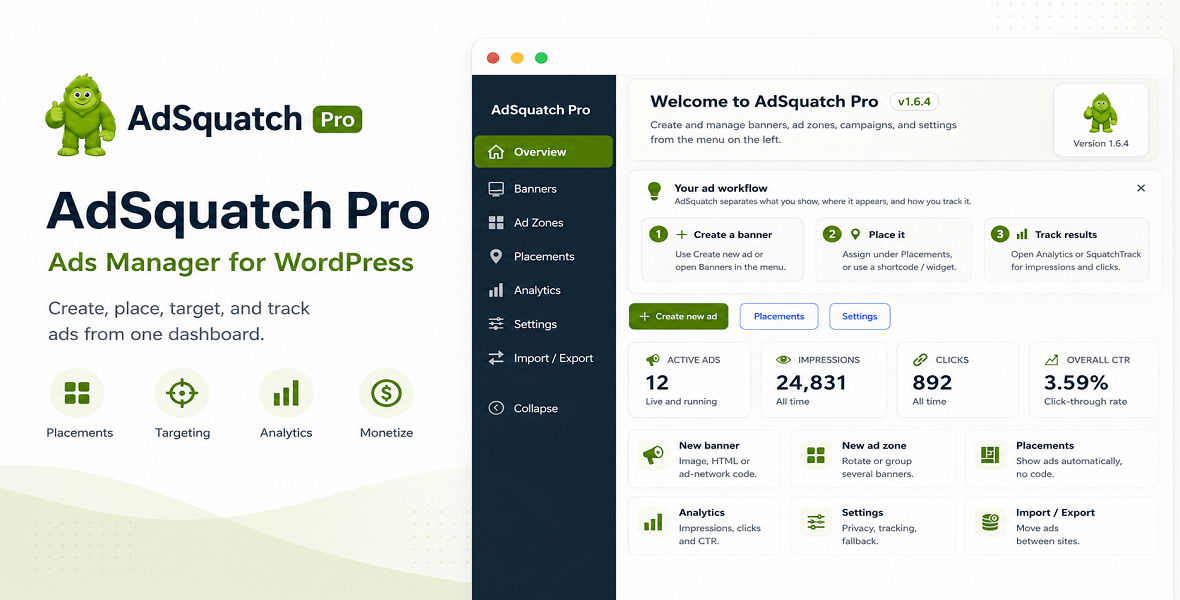
It gives you a full advertising system inside WordPress, so you can manage banners, ad zones, campaigns, automatic placements, targeting rules, reports, advertiser submissions, and sellable ad space without depending on a single ad network or external platform.
You can use it for your own promotions, affiliate banners, Google AdSense, Google Ad Manager, Media.net, Ezoic, Mediavine, Raptive, Taboola, Outbrain, Amazon affiliate ads, direct-sold banners, WooCommerce ad placements, or house ads.
AdSquatch Pro is built for people who want to treat advertising seriously, but still keep everything simple enough to manage from the WordPress admin.
A WordPress ad manager built for real websites
AdSquatch Pro was made for publishers, niche site owners, content creators, WooCommerce shops, community websites, and agencies that need more than a basic banner inserter.
You can create different ad types, group them into zones, rotate them by weight or randomly, schedule campaigns, show ads only to certain visitors, track performance locally, and place ads automatically across your site.
This means you can run a simple banner under your post content, a full campaign across multiple placements, a sticky ad on mobile, an affiliate offer in your sidebar, or a paid advertiser campaign with approval and reporting.
Everything is managed from one place.
Create the type of ad you need
AdSquatch Pro supports the most common ad formats used by modern WordPress sites.
You can upload normal image banners, paste custom HTML, add third-party ad network code, build Google AdSense units, configure Google Ad Manager slots, create sticky or popup ads, run background takeovers, use corner peel ads, create parallax banners, and rotate multiple creatives inside slider zones.
For image ads, you can upload JPG, PNG, or GIF files, set the target URL, enable lazy loading, and track clicks. For network ads, you can paste the code from the platform you already use. For custom campaigns, you can write your own HTML and keep full control over the creative.
AdSquatch Pro also includes admin test mode, so you can preview ads while logged in without showing unfinished campaigns to visitors.
Ad zones, rotations, and campaigns
A single banner is useful. A controlled ad zone is much more powerful.
With AdSquatch Pro, you can group multiple ads into zones and decide how they should be delivered. You can rotate banners randomly, set weighted delivery, use fallback ads when targeting rules exclude all other ads, and prevent the same ad from repeating too often on one page.
Campaigns help you manage bigger ad operations. Instead of setting the same schedule and targeting again and again, you can create a campaign once and connect it to multiple banners or zones.
AdSquatch Pro also includes A/B testing for ad zones, with visitor assignment, variant statistics, and winner promotion based on CTR, clicks, or impressions.
Place ads automatically without editing your theme
You do not need to edit template files just to show ads.
AdSquatch Pro can automatically inject ads into common WordPress positions such as before content, after content, middle of content, header, footer, sidebar, and manual-only placements.
For WooCommerce stores, you can show ads around product pages, shop grids, cart pages, and checkout pages. For bbPress communities, you can place ads around forums, topics, replies, and loops.
Each placement can use one or more ads, with random rotation, weighted rotation, and fallback creatives.
This makes it easy to monetize existing traffic without rebuilding your theme or hiring a developer for every small placement change.
Target the right visitors
Not every ad should be shown to every visitor.
AdSquatch Pro includes display filters for banners and zones, so you can control where and when ads appear.
You can target by device type, logged-in or logged-out status, WordPress user role, post type, category, tag, specific posts or pages, excluded pages, referrer host, and optional country targeting with a local MaxMind database.
This is useful for simple things, like showing a mobile-specific banner only on phones, but also for more advanced workflows, like showing different offers to logged-in users, guests, WooCommerce shoppers, or visitors from specific traffic sources.
When targeting is combined with schedules and campaigns, AdSquatch Pro becomes a practical ad operations tool, not just a display plugin.
Use ads anywhere in WordPress
AdSquatch Pro works with the WordPress editor, widgets, shortcodes, and custom themes.
You can insert ads using Gutenberg blocks, place them in widget areas, copy shortcodes into posts or pages, or render them directly in your theme with PHP functions.
Available blocks include AdSquatch Ad, AdSquatch Ad Group, and AdSquatch Placement.
Common shortcodes include:
[adsquatch_ad id=”123″]
[adsquatch_group id=”456″]
[adsquatch_placement slug=”after-content”]
Developers can also render placements directly:
adsquatch_render_placement( ‘after-content’ );
adsquatch_render_ad( 123 );
adsquatch_render_group( 456 );
This makes AdSquatch Pro flexible enough for simple blogs, custom WordPress builds, WooCommerce stores, and agency projects.
Analytics that stay on your site
AdSquatch Pro includes local ad analytics, so you can track impressions, clicks, and CTR inside WordPress.
Your data is stored in your own database. It is not sent to AdSquatch servers.
You can enable or disable stats per banner, configure retention and cleanup rules, export CSV reports, and review performance from the built-in SquatchTrack reporting area.
SquatchTrack gives you a clearer view of banner and ad zone performance, with chart-based reports, heatmap-style insights, and campaign-level statistics.
For users who want external event tracking, AdSquatch Pro also supports optional Google Analytics integration for ad interactions.
By default, local analytics does not require tracking cookies.
Privacy, GDPR, and ad blocker fallback
AdSquatch Pro is designed for site owners who want more control over privacy and compliance.
You can use local-only analytics, add privacy policy helper text, enable a GDPR consent message, and hold ads until consent is approved when needed.
The plugin also includes ads.txt support, so you can manage your ads.txt content from the WordPress admin.
For visitors using ad blockers, you can configure a softer fallback approach, such as a house ad, alternate message, or replacement placement. The goal is to protect revenue without annoying users with aggressive pop-ups.
Sell ad space directly from your website
AdSquatch Pro can also help you turn your website into a small advertising business.
You can mark ad zones as available for sale, set pricing and availability, allow advertisers to submit banners, review and approve creatives, and give buyers a dashboard where they can manage their ads.
For paid orders, AdSquatch Pro can connect with WooCommerce checkout. PayPal support is also available for direct payment workflows.
This is especially useful for niche blogs, local portals, directories, community sites, and industry websites where direct advertisers are often more valuable than generic ad network traffic.
Built for teams, agencies, and serious publishers
If more than one person manages your site, AdSquatch Pro gives you role-based control over who can create banners, edit zones, manage campaigns, approve advertisers, or access reports.
You can duplicate banners and zones, import or export your configuration as JSON, move setups between sites, and use onboarding guides to understand the main workflows faster.
The plugin is also suitable for more advanced WordPress setups, including agency-managed websites and multisite-aware workflows, depending on your exact network configuration.
Performance tools included
AdSquatch Pro includes practical performance features such as lazy-loaded image ads, optional Intersection Observer loading, click fraud protection through visitor click caps, anchor ad support, AMP-compatible output filters when supported by your AMP plugin, and admin test mode for safe previews.
The plugin is designed to help you monetize your site without turning every page into a slow, overloaded ad mess.
Works with the ad networks you already use
AdSquatch Pro does not force you into one advertising provider.
You can use Google AdSense with the guided unit builder, Google Ad Manager through GPT slot integration, and other networks by pasting their embed code.
It also works well for affiliate campaigns, Amazon banners, direct-sold ads, sponsor banners, internal promotions, seasonal campaigns, and house ads.
You decide what to show, where to show it, and how to measure it.
Who is AdSquatch Pro for?
AdSquatch Pro is a good fit for bloggers, publishers, affiliate site owners, niche website operators, WooCommerce stores, bbPress communities, BuddyPress websites, agencies, and developers who need a flexible WordPress ad manager.
It is especially useful when you want to manage direct-sold ads, rotate affiliate banners, add AdSense or Google Ad Manager placements, sell ad zones, track ad performance locally, or stop hardcoding ad snippets into your theme.
Requirements
WordPress 5.9 or higher
Tested up to WordPress 6.8
PHP 7.4 or higher
License: GPL v2 or later
Optional integrations: WooCommerce, bbPress, BuddyPress, AMP plugins, Google Analytics, Google AdSense, Google Ad Manager, and MaxMind for country targeting.
Installation
Upload and activate AdSquatch Pro from your WordPress admin.
After activation, open the AdSquatch Pro menu, create your first ad, assign it to a placement or zone, and enable the display locations you want.
You can start with a simple image banner, paste an ad network code, or create a custom HTML ad.
There is no license activation step and no external account is required to use the plugin.
FAQ
Does AdSquatch Pro require a license key?
No. All features are available immediately after activation.
Does it send stats to your servers?
No. Local analytics and SquatchTrack data stay in your WordPress database.
Does it use cookies?
Local analytics does not use tracking cookies by default. A consent cookie is only used if you enable the built-in GDPR consent message.
Can I use Google AdSense?
Yes. You can use the guided AdSense builder or paste your AdSense code into an HTML/network ad.
Can I use Google Ad Manager?
Yes. AdSquatch Pro supports Google Ad Manager through GPT slot integration.
Can I use other networks like Ezoic, Mediavine, Raptive, Media.net, Taboola, or Outbrain?
Yes. Paste the ad network code into a custom HTML or network ad.
Can I sell ad space on my site?
Yes. You can create sellable ad zones, allow advertiser submissions, approve banners, and optionally process paid orders through WooCommerce.
Will it work with my theme?
Yes. You can use automatic placements, widgets, Gutenberg blocks, shortcodes, or PHP template functions.
Can I migrate my ad setup to another site?
Yes. You can export and import banners, zones, campaigns, placements, and settings as JSON.
Is AdSquatch Pro only for big publishers?
No. It works for small blogs too. You can start with one banner and one placement, then grow into campaigns, targeting, reporting, and sellable ad zones later.
Changelog:
Version 1.0.0 - 30.06.2026
First version released
Only logged in customers who have purchased this product may leave a review.
Loading...
WPBay support
 Support by CodeRevolution
Support by CodeRevolution
CodeRevolution supports this product through WPBay
Questions are handled in WPBay's private ticket system, keeping your purchase details and support conversation together.
Go to My Downloads
After purchase, open this item in My Downloads and choose Get Support.
What support includes
- Answers to product-related questions
- Help with reported bugs and issues
- Guidance for included third-party assets
What support does not include
- Customizations or new features
- Installation or setup services
Plugin
Maintenance snapshot
See recent updates, compatibility, support, and developer activity.
- Updated 43 days ago
- Developer active recently
- WPBay support available
- WordPress 7.1 tested
Snapshot updated 2 hours ago
View details Hide details
Maintenance details
This is maintenance data. It does not measure product quality or sales.
- Last update Updated 43 days ago
- Compatibility WordPress 7.1 tested · PHP 8.5 tested · WooCommerce 11 tested
- Releases 1 release in the 91 days since listing
- Developer activity Developer active recently
- Support No recent support tickets to measure
- Docs and demo Documentation available · Changelog available · No demo listed
Health reflects increased activity during the last 90 days.
How this snapshot works
Plugin Health
The score is out of 100 and uses data WPBay can check. Ratings, popularity, and sales are not used.
- Last update 30 points
-
Plugins receive full recency points under 30 days, then step down at 90, 180, 365, and 545 days.
- Compatibility 20 points
-
WordPress, PHP, and WooCommerce (when relevant) are scored separately. The latest two PHP lines count as current. Nearby previous versions keep most of the points.
- Current version 100%
- One version behind 75%
- Two versions behind 50%
- Three versions behind 25%
- Older or not listed 0%
- Releases 15 points
-
One release earns 10, two or three earn 13, and four or more earn 15. Each accepted product ZIP counts once; reprocessing the same upload and listing-only edits do not count.
- Developer activity 15 points
-
Based on WPBay login and dashboard activity. Exact last-login dates are never shown.
- Support 15 points
-
There are no recent WPBay tickets to measure.
- Docs and demo 5 points
-
Documentation: 2. Changelog: 1. Working demo or preview: 2.
Score ranges
- 90–100 Excellent
- 75–89 Healthy
- 60–74 Fair
- 40–59 Needs attention
- 0–39 Limited
Long gaps
WPBay also checks for long gaps between updates, developer activity, support replies, and releases. Buyers do not see this score.
- Time since update 35 points
- Last developer activity 25 points
- WordPress compatibility 15 points
- Support replies 15 points
- Fewer releases 10 points
-
Quality verified by WPBay
WPBay review- Reviewed version
- 1.0.0
- Review completed
- Reviewer
- CodeRevolution
- Review type
- Initial
No unresolved approval blocker was identified during WPBay’s proportionate review of this release. This is not a security certification or a guarantee that the product contains no defects.
-
 Future updates
-
WPBay support from CodeRevolution
-
GPL code, proprietary assets
-
Covered by the WPBay refund policy
-
Plugin maintenance snapshot
Relevant picks
You may also like
Similar products selected by category, features, popularity and freshness.




From this seller
View seller store
More by CodeRevolution
Explore more bestselling products from this creator.


Reviews
There are no reviews yet.