


007AJ AI Ready Full – AI Chatbot, llms.txt & AI Crawler Manager

 Recently Updated
Well Documented
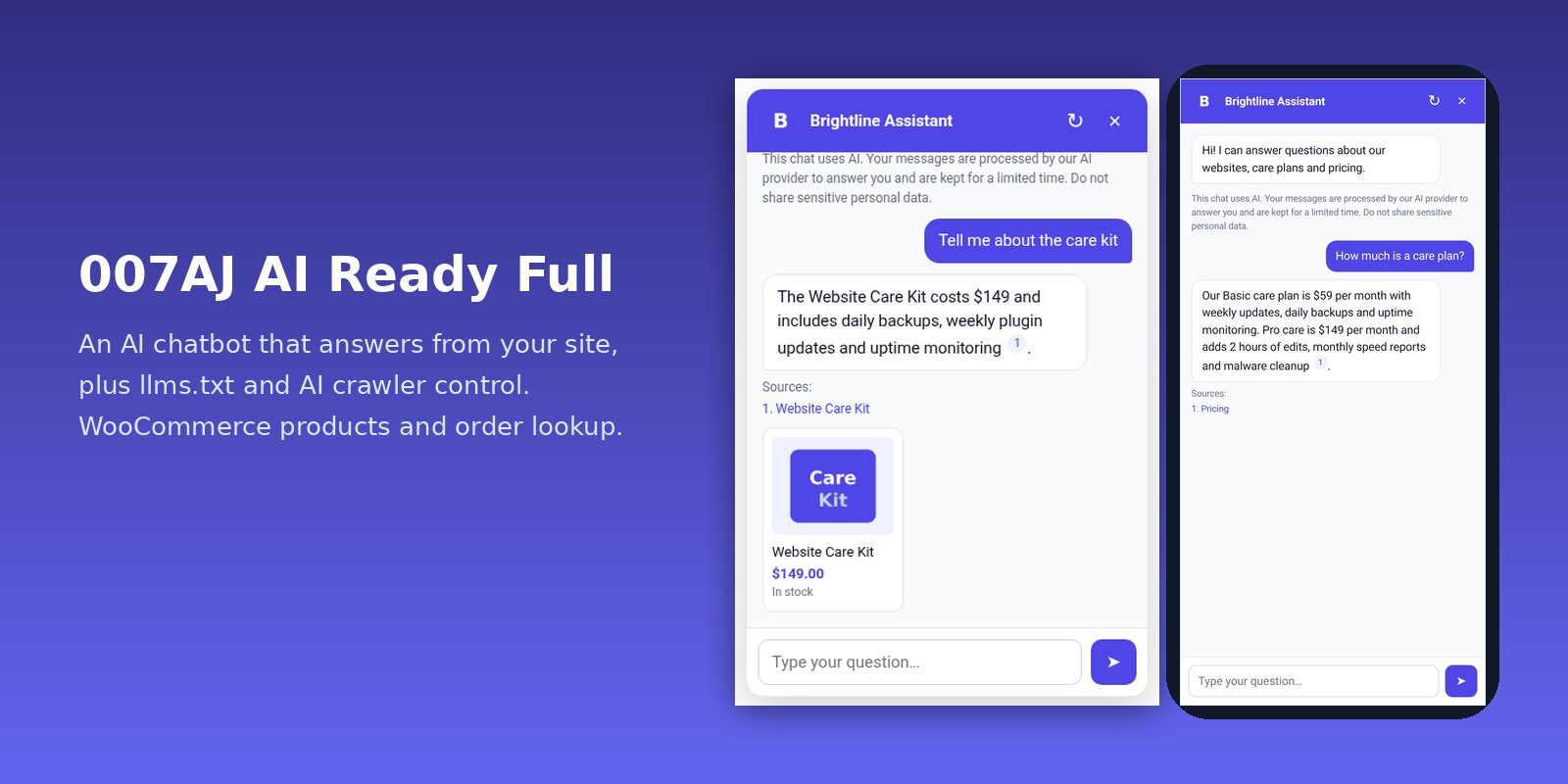
An AI chatbot trained on your site and WooCommerce store, llms.txt and llms-full.txt, and full control over AI crawlers with analytics.
007AJ AI Ready Full is a complete, self-contained plugin. Nothing else needs to be installed. It gets your site ready for AI in two parts: a chatbot that answers visitors from your own content, and tools that control how AI companies read your site.
You use your own AI key (OpenAI, Anthropic, Google Gemini or OpenRouter), so you pay the provider directly, at cost. No account, no tracking, no middleman.
AI chatbot
- Learns from your pages, posts, WooCommerce products, any public custom post type and a list of FAQs you write
- Skip categories, product categories or single pages; or tick “Hide from the chatbot” in the editor
- Updates itself when you publish, edit or delete content
- Fast built-in search (BM25), with optional embeddings (OpenAI or Gemini) for questions phrased differently from your text
- Every answer lists the pages it used; it says so honestly when the answer isn’t on your site
- Choose the model from the provider’s live list; reply length limit and a monthly token budget
- Hand-off to your contact page, email or WhatsApp when it can’t help, or always
- Lead capture before the chat or after a few messages, optional or required (required capture is also enforced by the server), with consent text, email alerts and CSV export
- Name, avatar, greeting, suggested questions, colour and position; works on phones
- Floating button, shortcode
[ajai_chat], an “AI Chatbot” block and an Elementor widget
WooCommerce
- Answers product questions with price, stock and categories
- Product cards with image, price, stock and a link under answers
- Order status: customers enter the order number and billing email to see status, date, items, total and tracking number
Chat insights
- Chat log viewer with full conversations and CSV export
- Top questions and unanswered questions, so you know what content to add
- Daily email digest of unanswered questions
- Dashboard cards: conversations, answer rate and leads
Safety and privacy
- Rate limits per visitor and site-wide, message length limit, monthly token budget
- Profanity filter with your own word list (no AI call is made for those messages)
- GDPR notice with optional consent, log and lead retention periods
- Personal data export and erase for leads and their conversations
- API keys encrypted at rest or defined in wp-config.php; never sent to the browser
llms.txt and llms-full.txt
/llms.txtin the llmstxt.org format, automatic or written by hand, with a live preview/llms-full.txtwith the full text of your content for AI tools that read everything at once- Exclude any page with one tick in the editor
AI crawler manager
- Known AI crawlers grouped by company, each labelled training, AI search or user-triggered
- Three modes per company: Allow, Search only (block training, keep AI search and citations) or Block
- robots.txt rules, plus optional server-level blocking (403) in PHP and in .htaccess, and an nginx snippet
- Crawler analytics: which AI bots visit, how often and which pages, with a 7, 30 or 90-day chart. No IP addresses stored.
- Per-page “noai” and “noimageai” robots meta, or site-wide
- AI visibility checklist: HTTPS, llms.txt, robots.txt, AI search access, sitemap, schema markup, indexability and more
Built right
- Lightweight: assets load only where needed; nothing runs for regular visitors except the chat button
- Works with page caching (the chat uses the REST API)
- Multisite-aware, translation-ready, clean uninstall
Requirements
- WordPress 6.2 or newer, PHP 7.4 or newer (tested up to WordPress 7.1)
- For the chatbot: your own API key from OpenAI, Anthropic, Google Gemini or OpenRouter
- Pretty permalinks for /llms.txt (Settings → Permalinks)
- WooCommerce is optional; the store features turn on when it is active
Pricing
- 1 site, lifetime: $14, paid once
- 5 sites, lifetime: $25, paid once
- Unlimited sites, lifetime: $50, paid once
- 1 site, yearly: $9 a year
Changelog:
= 1.0.3 = (current version)
* Fixed: AI responses that come back without usable answer text (empty, refused or filtered, cut off, or unreadable) are now charged to the monthly token budget. The tokens the AI service reports are kept separately from whether the answer was usable and are returned with the error, so they are counted even when the visitor gets an error message.
* Fixed: each reservation is now settled exactly once in one atomic database update keyed by its id: the hold is removed and the billable tokens are added in the same step, so usage can never be dropped or counted twice, also with many questions at the same time.
* Fixed: when a successful response reports no usage (or zero, or can't be read), the whole reservation is charged: the estimate of the exact request that was sent plus its full reply length limit. Timeouts after sending, gateway timeouts and PHP stopping after sending (fatal error, exit) are charged the same way; requests that were never sent are not charged.
* Fixed: AI errors that still report usage are charged. Usage now includes Anthropic cache tokens and Gemini thinking tokens.
* Fixed: a request the AI service could bill now counts toward the site-wide daily cap even when the visitor got an error.
* Fixed: reservations left by a process that died are settled after 10 minutes at their full amount instead of being dropped.
* Fixed: the admin Test connection button and the admin search preview's query embedding are now added to the month's usage.
* Changed: visitors get a clear message when the AI service returns no usable answer ("please rephrase" for refused questions, "please ask again in other words" for empty answers).
* Docs: what is charged in each case, the fallback for responses without usage, and a troubleshooting entry for the new messages.
= 1.0.2 =
* Fixed: the monthly token budget can no longer be overshot by questions running at the same time. Before any paid call, each question reserves a conservative upper bound of its tokens: the full prompt with the conversation history and the largest source passages in the index, the reply length limit sent to the AI service, and the query embedding when embeddings search is on. One database update accepts the reservation only if usage plus every running reservation plus the new one fits the budget. A question that doesn't fit makes no paid call, not even the embedding.
* Fixed: right before the AI call the reservation is set to the estimate of the exact request that will be sent; if it no longer fits, the call is not made, and a request without a reply length limit is never sent. Reported usage, including paid query embeddings, is added with atomic increments.
* Fixed: required lead capture now follows the server in both "before the first question" and "after N questions" modes. When the server asks for details again, the chat forgets the browser's old capture, shows the form, stays paused, and sends the held question once the details are saved. The browser remembers a capture exactly as long as the server (30 days), and answers carry the current lead settings, so cached pages stay in step.
* Changed: the ajai_token_estimate filter can only raise the reservation. Added the ajai_token_count and ajai_query_embedding_tokens filters.
* Docs: how the token budget is enforced and how exact it is, a "Switching themes, deactivation and removing data" section, and more troubleshooting (connection test, chat not appearing, WP-Cron, email delivery).
= 1.0.1 =
* Fixed: parallel chat requests could get past the site-wide daily cap and the monthly token budget. Each AI request now reserves one message and an estimate of its tokens in a single database update before the AI is called (requests still running count against the limits), the real usage is recorded afterwards, and failed requests give the reservation back.
* Fixed: monthly usage and per-visitor counters use atomic database increments instead of read-then-write options, so parallel chats keep every count. Existing usage moves to the new counters table on update.
* Fixed: Export Personal Data now includes every message of the conversations linked to the email's leads, page by page, each conversation once, and nothing unrelated. Erase Personal Data deletes the same messages and the leads, in batches; email matching ignores letter case.
* Fixed: with lead capture set to Required after N questions, the question box is hidden and disabled until the lead is saved, including after closing, reopening, reloading or restarting the chat. The chat API enforces it too. Optional capture keeps its Skip button.
* Fixed: a lead that fails to save now shows an error instead of unlocking the chat.
* Improved: embeddings retry with backoff after key, quota or network errors, and a passage the provider refuses is skipped so it can't block the rest.
* Added: a Get support button and a Support card on the dashboard.
* Docs: wide tables scroll on phones; privacy section now says exactly what is encrypted and what export and erase cover.
= 1.0.0 =
* First release.
Only logged in customers who have purchased this product may leave a review.
Loading...
WPBay support
 Support by 007AJ.com
007AJ.com supports this product through WPBay
Questions are handled in WPBay's private ticket system, keeping your purchase details and support conversation together.
Go to My Downloads
After purchase, open this item in My Downloads and choose Get Support.
What support includes
- Answers to product-related questions
- Help with reported bugs and issues
- Guidance for included third-party assets
What support does not include
- Customizations or new features
- Installation or setup services
Plugin
Maintenance snapshot
See recent updates, compatibility, support, and developer activity.
- Updated today
- Developer active recently
- WPBay support available
- WordPress 7.1 tested
Snapshot updated 5 hours ago
View details Hide details
Maintenance details
This is maintenance data. It does not measure product quality or sales.
- Last update Updated today
- Compatibility WordPress 7.1 tested · PHP 8.5 tested · WooCommerce 11 tested
- Releases 4 releases in the 1 days since listing
- Developer activity Developer active recently
- Support No recent support tickets to measure
- Docs and demo Documentation available · Changelog available · No demo listed
How this snapshot works
Plugin Health
The score is out of 100 and uses data WPBay can check. Ratings, popularity, and sales are not used.
- Last update 30 points
-
Plugins receive full recency points under 30 days, then step down at 90, 180, 365, and 545 days.
- Compatibility 20 points
-
WordPress, PHP, and WooCommerce (when relevant) are scored separately. The latest two PHP lines count as current. Nearby previous versions keep most of the points.
- Current version 100%
- One version behind 75%
- Two versions behind 50%
- Three versions behind 25%
- Older or not listed 0%
- Releases 15 points
-
One release earns 10, two or three earn 13, and four or more earn 15. Each accepted product ZIP counts once; reprocessing the same upload and listing-only edits do not count.
- Developer activity 15 points
-
Based on WPBay login and dashboard activity. Exact last-login dates are never shown.
- Support 15 points
-
There are no recent WPBay tickets to measure.
- Docs and demo 5 points
-
Documentation: 2. Changelog: 1. Working demo or preview: 2.
Score ranges
- 90–100 Excellent
- 75–89 Healthy
- 60–74 Fair
- 40–59 Needs attention
- 0–39 Limited
Long gaps
WPBay also checks for long gaps between updates, developer activity, support replies, and releases. Buyers do not see this score.
- Time since update 35 points
- Last developer activity 25 points
- WordPress compatibility 15 points
- Support replies 15 points
- Fewer releases 10 points
-
Quality verified by WPBay
WPBay review- Reviewed version
- 1.0.3
- Review completed
- Reviewer
- CodeRevolution
- Review type
- Initial
No unresolved approval blocker was identified during WPBay’s proportionate review of this release. This is not a security certification or a guarantee that the product contains no defects.
-
 Future updates
-
WPBay support from 007AJ.com
-
Fully GPL licensed
-
Covered by the WPBay refund policy
-
Plugin maintenance snapshot
Relevant picks
You may also like
Similar products selected by category, features, popularity and freshness.


 7 days free
From this seller
View seller store
More by 007AJ.com
Explore more bestselling products from this creator.
Reviews
There are no reviews yet.