



AI Customer Support Chatbot & Lead Automator

 Recently Updated
Well Documented
Sold Only On WPBay
Recently Updated
Well Documented
Sold Only On WPBay
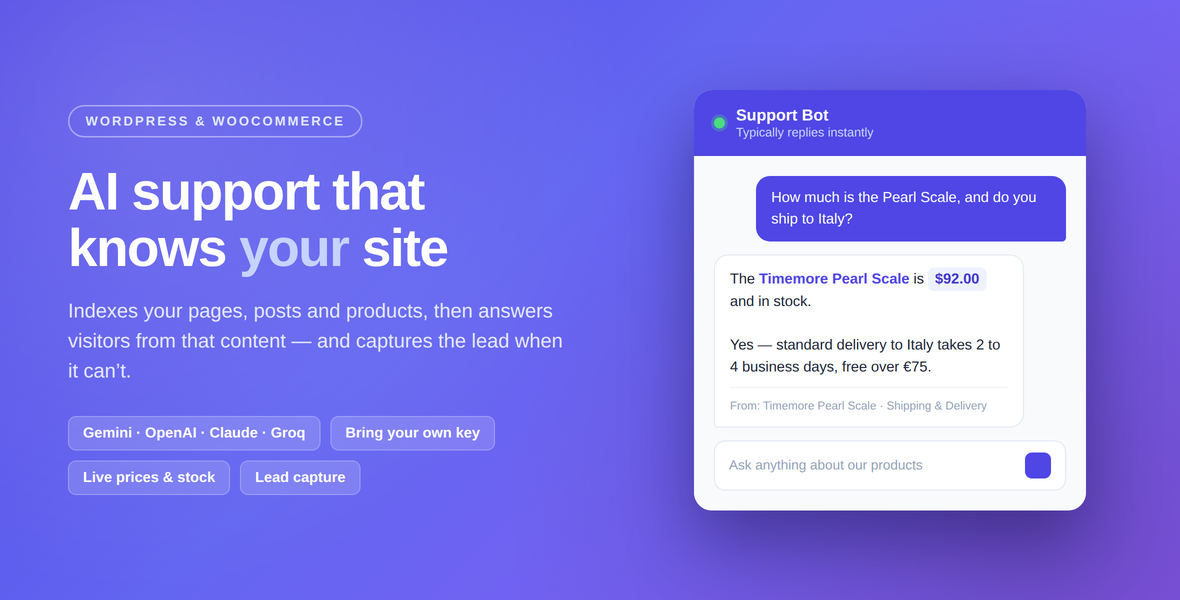
Answer your visitors’ questions automatically, using your own site’s content. AI Customer Support Chatbot indexes your pages, posts and WooCommerce products, then uses them to answer questions in real time — with prices and stock read straight from your catalogue. When it cannot answer, it offers to hand the visitor to a human and captures the lead.
You bring your own API key
There is no per-message fee to us and no usage cap of our own. You connect your own AI provider account, so you keep control of the costs and the terms. Google’s Gemini free tier covers most small sites at no cost.
What it does
- Answers from your content, not from general knowledge. Replies are grounded in the passages retrieved from your own site, so the bot describes your products and your policies rather than inventing plausible ones.
- Knows your shop. WooCommerce products are indexed with their price and stock status, so “how much is it?” and “is it available?” get real answers.
- Captures leads. When the site has no answer, the bot offers to pass the question to a human and stores the visitor’s details in a dedicated table, with an email to the site admin.
- Remembers the conversation. Follow-up questions keep the context of the previous turns, so “and how much does that cost?” works.
- Replies in the visitor’s language.
- Renders properly. Lists, headings, code and links come through as formatted text, not raw markdown.
- Keeps your keys safe. API keys are stored with authenticated AES-256 encryption derived from your site salts, and are never rendered back into the settings form.
- Protects your quota. A per-visitor rate limit is applied before any request reaches your provider, and is tunable with a filter.
Free and PRO
Without a licence the plugin is fully functional on Google Gemini. A PRO licence unlocks three more providers:
- OpenAI (GPT-4o mini)
- Anthropic Claude
- Groq (Llama 3.3 70B)
There is one download either way. Entering your purchase code unlocks the extra providers in place — nothing to re-install, nothing to re-configure.
Getting started
- Install and activate the plugin.
- Paste a Google Gemini API key under AI Chatbot → API & widget settings. A free key takes about a minute to create at Google AI Studio.
- Click Scan & index site content now.
- Open your site — the chat bubble is in the bottom-right corner.
Re-run the indexer after you publish or edit content.
Requirements
- WordPress 6.1 or newer
- PHP 7.4 or newer
- An API key from one of the supported providers
- WooCommerce is optional — product indexing switches on automatically when it is present
Third-party services
Answering a question means sending it to the AI provider you configure, together with the passages retrieved from your site, your site name and the recent turns of that conversation. Visitor names, email addresses, IP addresses and anything typed into the lead form are not sent — those stay on your site. Choose a provider whose terms you are willing to accept on your visitors’ behalf, and mention the service in your own privacy policy.
The plugin also contacts WPBay to validate your licence and check for updates.
Good to know
- Retrieval matches by keyword, so a question and the page answering it should be in the same language. On a site whose content is in your visitors’ language this is not a constraint. When nothing matches, the bot says so plainly and offers a human rather than guessing.
- Google’s free Gemini tier allows 20 requests per minute for the whole site. Busy sites should use a paid tier or tune the rate limit.
Questions worth asking before you buy
What does it cost to run?
Whatever your AI provider charges, and nothing to us per message. You bring your own API key. Google Gemini has a free tier that covers most small sites, and it works without a licence — the licence adds OpenAI, Anthropic Claude and Groq.
Where does visitor data go?
Each message goes to the provider you configured, with up to four passages retrieved from your own indexed content, your site and bot names, and the last few turns of that conversation. It does not send visitor names, email addresses, IP addresses, or anything typed into the lead form — those stay on your site. The readme lists this in full, along with each provider’s terms and privacy policy, because you are accepting them on your visitors’ behalf.
Does it tell visitors it is an AI?
Yes, by default, at the top of the chat window and in the accessible name of the button that opens it. Article 50 of the EU AI Act has applied since 2 August 2026 and requires that a person be informed they are interacting with an AI, before or at the very beginning. You can edit the wording. You can switch it off, because Article 50(1) does not require disclosure where the situation is already obvious — the settings screen explains when that applies and what it costs to be wrong about it. Whether the obligation reaches you is not something this plugin can decide, and nothing in it is legal advice.
Can someone manipulate what the bot says?
This is a real risk in any chatbot that answers from site content, and it is worth understanding before you install one. Anyone who can publish on your site — an Author, or a Shop Manager on a WooCommerce store, not only an administrator — is writing into the material the bot reads. This plugin fences retrieved passages into a block the model is told to treat as untrusted data, and strips the fence marker from indexed content so it cannot be closed from inside. That is a mitigation, not a boundary: no prompt-level measure fully solves prompt injection, and the real control is who you let publish.
Why does it say “I don’t know” sometimes?
Because it answers from your indexed content rather than from a model’s general knowledge, and saying so is the honest outcome when your site does not cover the question. That moment is also where it offers to fetch a human and captures the lead. If it happens too often, re-run the indexer — it is the step people skip.
A fuller statement of what these products claim and what they do not is at groundedwp.com/what-we-claim.
Changelog:
= 2.0.5 =
* Fixed: automatic updates never ran. The plugin did not carry its numeric
WPBay product id, and without it the update check returns immediately — so
no new version was ever offered on the Plugins screen, silently and with no
error. Licence activation was unaffected, and updating by hand always
worked. If your site is running 2.0.4, install 2.0.5 by hand once; updates
work normally from then on.
* Added: with the product id in place the in-plugin feedback form, the upgrade
link for free users and opt-in usage statistics are enabled. Nothing is sent
unless you opt in.
Only logged in customers who have purchased this product may leave a review.
Loading...
WPBay support
 Support by Grounded
Support by Grounded
Grounded supports this product through WPBay
Questions are handled in WPBay's private ticket system, keeping your purchase details and support conversation together.
Go to My Downloads
After purchase, open this item in My Downloads and choose Get Support.
What support includes
- Answers to product-related questions
- Help with reported bugs and issues
- Guidance for included third-party assets
What support does not include
- Customizations or new features
- Installation or setup services
Plugin
Maintenance snapshot
See recent updates, compatibility, support, and developer activity.
- Updated 2 days ago
- Developer active
- WPBay support available
- WordPress 7.1 tested
Snapshot updated 2 hours ago
View details Hide details
Maintenance details
This is maintenance data. It does not measure product quality or sales.
- Last update Updated 2 days ago
- Compatibility WordPress 7.1 tested · PHP 8.5 tested · WooCommerce 11 tested
- Releases 1 release in the 90 days since listing
- Developer activity Developer active
- Support No recent support tickets to measure
- Docs and demo Documentation available · Changelog available · No demo listed
Health reflects increased activity during the last 90 days.
How this snapshot works
Plugin Health
The score is out of 100 and uses data WPBay can check. Ratings, popularity, and sales are not used.
- Last update 30 points
-
Plugins receive full recency points under 30 days, then step down at 90, 180, 365, and 545 days.
- Compatibility 20 points
-
WordPress, PHP, and WooCommerce (when relevant) are scored separately. The latest two PHP lines count as current. Nearby previous versions keep most of the points.
- Current version 100%
- One version behind 75%
- Two versions behind 50%
- Three versions behind 25%
- Older or not listed 0%
- Releases 15 points
-
One release earns 10, two or three earn 13, and four or more earn 15. Each accepted product ZIP counts once; reprocessing the same upload and listing-only edits do not count.
- Developer activity 15 points
-
Based on WPBay login and dashboard activity. Exact last-login dates are never shown.
- Support 15 points
-
There are no recent WPBay tickets to measure.
- Docs and demo 5 points
-
Documentation: 2. Changelog: 1. Working demo or preview: 2.
Score ranges
- 90–100 Excellent
- 75–89 Healthy
- 60–74 Fair
- 40–59 Needs attention
- 0–39 Limited
Long gaps
WPBay also checks for long gaps between updates, developer activity, support replies, and releases. Buyers do not see this score.
- Time since update 35 points
- Last developer activity 25 points
- WordPress compatibility 15 points
- Support replies 15 points
- Fewer releases 10 points
-
Quality verified by WPBay
WPBay review- Reviewed version
- 2.1.0
- Review completed
- Reviewer
- CodeRevolution
- Review type
- Initial
No unresolved approval blocker was identified during WPBay’s proportionate review of this release. This is not a security certification or a guarantee that the product contains no defects.
-
 Future updates
-
WPBay support from Grounded
-
GPL code, proprietary assets
-
Covered by the WPBay refund policy
-
Plugin maintenance snapshot
Relevant picks
You may also like
Similar products selected by category, features, popularity and freshness.

From this seller
View seller store
More by Grounded
Explore more bestselling products from this creator.
 7 days free
Reviews
There are no reviews yet.