


AccessPilot – Accessibility Checker and Fixer for WordPress

 Recently Updated
Well Documented
Recently Updated
Well Documented
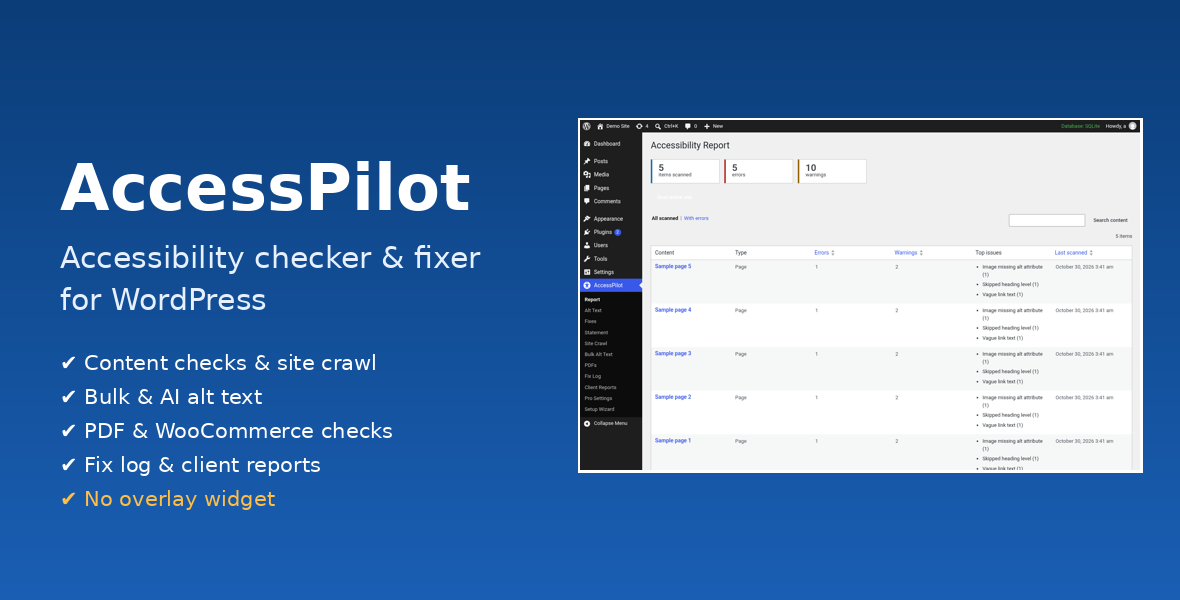
Find and fix common accessibility problems at the source
AccessPilot checks your WordPress content and rendered pages for common WCAG 2.2 AA failures and helps you fix them in the content itself. It doesn’t add an overlay widget. Everything is in one plugin, with no add-on, licence key or other plugin to install.Features
- Content checks: missing alt text, colour contrast, skipped and empty headings, links and buttons with no name, unlabelled form fields and vague link text.
- Block editor sidebar: scan the post you’re writing, including unsaved changes, and fix image alt text without leaving the editor.
- Site-wide report: every page and post with error and warning counts, sortable and searchable, and re-scanned on save.
- Scheduled site crawl: checks rendered pages, including the theme header, menus, footer, page language and title, daily or weekly. It covers every published page by default. If you set a limit, a notice shows how many pages were skipped.
- Alt text tools: one-click fixes from the report, the Alt Text screen or the Media Library, plus bulk suggestions from file names that you review before applying.
- Optional AI alt text: uses your own OpenAI API key and runs only when you click. It has a per-minute rate limit and automatic retries.
- Front-end fixes: skip link, visible focus outline, removal of positive tabindex, underlined content links and missing alt filled from the Media Library.
- PDF and WooCommerce checks: PDFs missing tags, a title or a language, and products missing images, alt text or descriptions. These run as background jobs with progress shown.
- Fix log: every fix recorded with the user, time and before and after values, with CSV export.
- Client reports: branded HTML or PDF reports for agencies and freelancers.
- Multisite: a network overview of every site. Also included: an accessibility statement generator, a setup wizard and translation-ready strings (.pot included).
Requirements
- WordPress 6.2+ and PHP 7.4+
- WooCommerce is optional and only needed for the product checks.
External services
AccessPilot makes no outgoing requests to third parties unless you turn on AI alt text. If you do, clicking Generate sends the image (or its URL) and a short prompt to OpenAI (api.openai.com) using your own API key, under OpenAI’s terms and privacy policy. There’s no tracking and no licence check. Site crawls request only your own site’s pages.Documentation and support
Full documentation: https://007aj.com/docs/accesspilot/. For help, message us through WPBay or email [email protected]. Updates are delivered through the marketplace.
Changelog:
= 1.1.4 =
* Fixed PDF recovery losing the failed-file marker when earlier batch items were replayed.
= 1.1.3 =
* PDF predictor dimensions validated before decoding; invalid or oversized values marked Not checked (unsupported).
* Truncated objects reported as Not checked (incomplete) on the PDF screen and in HTML/PDF reports.
1.1.2 - AI request budget reserved atomically per attempt including retries, with resume; bounded xref-based metadata reading for large PDFs, with uninspectable items shown as Not checked (incomplete).
1.1.1 – Bounded PDF decompression, separate inline-fix forms, paginated full crawl results, automatic job recovery after lease expiry, inherited-colour contrast checks.
1.1.0 – AccessPilot and AccessPilot Pro merged into one plugin; no add-on, licence or other plugin required. New 4-step setup wizard. Site crawl covers every published page by default; an optional page limit shows how many pages were skipped. PDF and WooCommerce checks run as resumable background jobs (batches of 20) covering every item, with progress. Bulk Alt Text, crawl results, PDF and product results, fix log and network overview are fully paginated. Atomic database locks for the crawl, content scan and check jobs. AI alt text: per-minute rate limit, cool-down after 429 responses and up to 3 retries with backoff. OpenAI disclosure in settings, readme and docs. Support section in the docs. Translation template (languages/accesspilot.pot). Full uninstall cleanup.
1.0.0 – Initial release.
Only logged in customers who have purchased this product may leave a review.
Loading...
WPBay support
 Support by 007AJ.com
Support by 007AJ.com
007AJ.com supports this product through WPBay
Questions are handled in WPBay's private ticket system, keeping your purchase details and support conversation together.
Go to My Downloads
After purchase, open this item in My Downloads and choose Get Support.
What support includes
- Answers to product-related questions
- Help with reported bugs and issues
- Guidance for included third-party assets
What support does not include
- Customizations or new features
- Installation or setup services
Plugin
Maintenance snapshot
See recent updates, compatibility, support, and developer activity.
- Updated today
- Developer active recently
- WPBay support available
- WordPress 7.1 tested
Snapshot updated 2 hours ago
View details Hide details
Maintenance details
This is maintenance data. It does not measure product quality or sales.
- Last update Updated today
- Compatibility WordPress 7.1 tested · PHP 8.5 tested · WooCommerce 11 tested
- Releases 5 releases in the 1 days since listing
- Developer activity Developer active recently
- Support No recent support tickets to measure
- Docs and demo Documentation available · Changelog available · No demo listed
How this snapshot works
Plugin Health
The score is out of 100 and uses data WPBay can check. Ratings, popularity, and sales are not used.
- Last update 30 points
-
Plugins receive full recency points under 30 days, then step down at 90, 180, 365, and 545 days.
- Compatibility 20 points
-
WordPress, PHP, and WooCommerce (when relevant) are scored separately. The latest two PHP lines count as current. Nearby previous versions keep most of the points.
- Current version 100%
- One version behind 75%
- Two versions behind 50%
- Three versions behind 25%
- Older or not listed 0%
- Releases 15 points
-
One release earns 10, two or three earn 13, and four or more earn 15. Each accepted product ZIP counts once; reprocessing the same upload and listing-only edits do not count.
- Developer activity 15 points
-
Based on WPBay login and dashboard activity. Exact last-login dates are never shown.
- Support 15 points
-
There are no recent WPBay tickets to measure.
- Docs and demo 5 points
-
Documentation: 2. Changelog: 1. Working demo or preview: 2.
Score ranges
- 90–100 Excellent
- 75–89 Healthy
- 60–74 Fair
- 40–59 Needs attention
- 0–39 Limited
Long gaps
WPBay also checks for long gaps between updates, developer activity, support replies, and releases. Buyers do not see this score.
- Time since update 35 points
- Last developer activity 25 points
- WordPress compatibility 15 points
- Support replies 15 points
- Fewer releases 10 points
-
Quality verified by WPBay
WPBay review- Reviewed version
- 1.1.4
- Review completed
- Reviewer
- CodeRevolution
- Review type
- Initial
No unresolved approval blocker was identified during WPBay’s proportionate review of this release. This is not a security certification or a guarantee that the product contains no defects.
-
 Future updates
-
WPBay support from 007AJ.com
-
GPL code, proprietary assets
-
Covered by the WPBay refund policy
-
Plugin maintenance snapshot
Relevant picks
You may also like
Similar products selected by category, features, popularity and freshness.

From this seller
View seller store
More by 007AJ.com
Explore more bestselling products from this creator.
Reviews
There are no reviews yet.