


Choosing the right AI plugin for WordPress can make or break your site’s content strategy, user engagement and long-term growth. Two names dominate the WP AI plugin conversation right now: Aimogen Pro and AI Engine. Both connect your WordPress installation to the world’s most powerful AI models. Both promise chatbots, content generation and automation and also deliver them well. But they serve very different types of users and picking the wrong one could cost you time and money.
This is the most detailed head-to-head comparison of Aimogen Pro vs AI Engine you’ll find anywhere. We’ve broken down features, pricing, ease of use, MCP support, chatbot capabilities, developer tools and long-term value so you can make a confident, informed decision today.
Very Quick Verdict
- Choose Aimogen Pro if you want the most feature-packed, automation-heavy plugin available, with monthly pricing, a massive model library and specialized tools for e-commerce, YouTube blogging, Amazon reviews, bulk content and much more.
- Choose AI Engine if you want a nice AI experience with well made developer tools, clean MCP support.
Table of Contents
- Overview: What Are These Plugins?
- Supported AI Models
- Chatbot Features
- Content Generation
- AI Forms
- MCP (Model Context Protocol) Support
- Embeddings and Knowledge Bases
- Developer Tools and APIs
- WooCommerce Integration
- Security and Moderation
- Pricing Comparison
- Who Each Plugin Is Best For
- Final Recommendation
Overview: What Are These Plugins?
Aimogen Pro
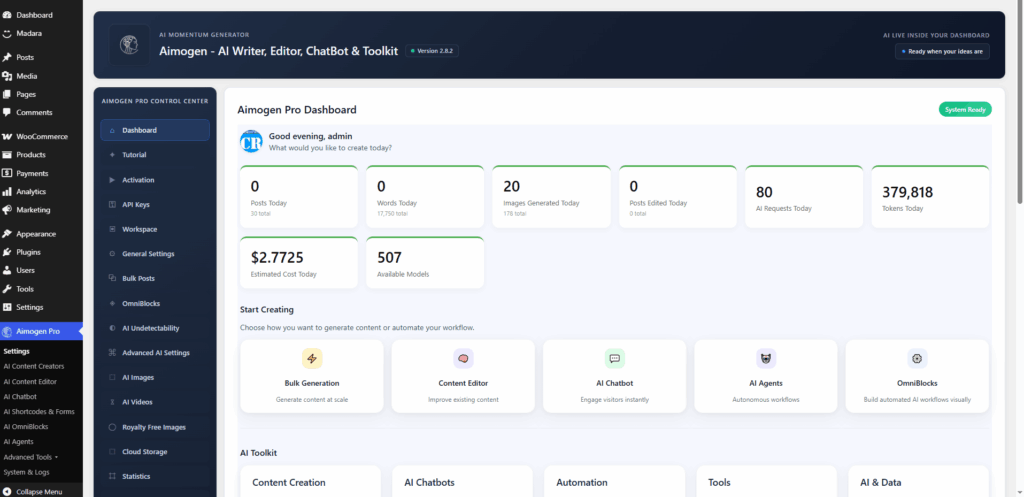
Aimogen Pro started life as a plugin called Aiomatic, as it was a humble auto-blogging tool built by a solo developer named Szabi. Because of a trademark claim, it was renamed to Aimogen and now you can find it under this name. Over the years, thanks to the work invested into it, Aimogen evolved into something far more ambitious: a comprehensive AI content suite covering bulk post generation, AI chatbots, image creation, video creation, realtime audio conversations, Amazon and YouTube content tools, AI agents, MCP server support and much more.
It targets content creators, affiliate marketers, digital agencies and power users who want to automate as much as possible. The recent 2.8.2 update even added full WordPress 7.0 Connectors integration, meaning users can manage all supported AI providers through the native WordPress Settings screen.
Aimogen Pro is comprehensive almost to a fault. The feature list is staggering. If it exists in the AI-for-WordPress space, Aimogen Pro either already has it or is building it. Aimogen Pro also has a free version, distributed through wordpress.org, dropping the Pro from the name, called simply Aimogen.
AI Engine
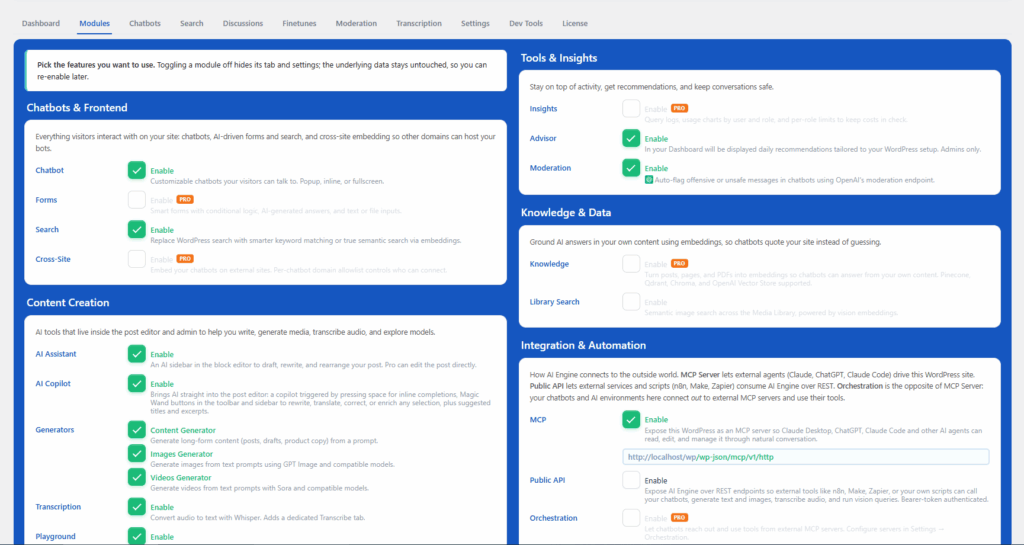
AI Engine is developed by Jordy Meow through Meow Apps and is distributed directly on WordPress.org as a free plugin, with an optional Pro upgrade. AI Engine follows the freemium WordPress plugin tradition: you get a powerful free version and the Pro tier unlocks the most advanced capabilities.
AI Engine positions itself as the “most complete AI toolkit for WordPress” and it earns that description through tight WordPress integration, a clean UI, outstanding MCP support and a developer-first architecture that lets you build AI features on top of it.
It has a strong community, active development and user reviews that consistently praise both the quality of the plugin and the responsiveness of support. It’s the plugin of choice for developers who want AI baked into their workflow, not bolted on.
Supported AI Models
Model support matters. The more flexibility you have, the less you’re locked into any single provider’s pricing or reliability.
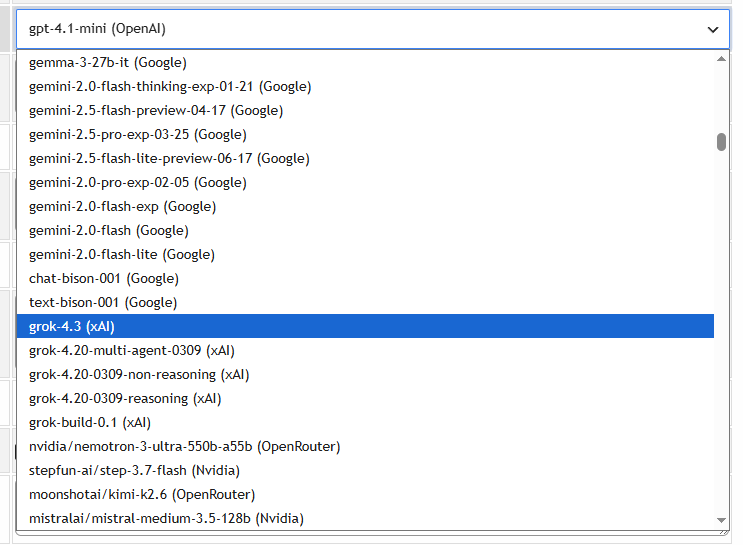
Aimogen Pro – Model Support
Aimogen Pro connects to an extraordinary range of AI providers out of the box:
- OpenAI (GPT-4, GPT-4o and newer models)
- Anthropic (Claude models, including the new claude-fable-5 and claude-mythos-5)
- Google Gemini AI
- xAI / Grok (including the new grok-build-0.1 coding model)
- Mistral
- Perplexity AI
- OpenRouter (which itself provides access to dozens of models)
- Groq (high-speed inference)
- Hugging Face
- NVIDIA NIM (including Nemotron 3 Ultra)
- Ollama (for local, self-hosted models)
- Microsoft Azure OpenAI
- DeepSeek (including DeepSeek R1)
- AimogenAPI (proprietary endpoint)
- Replicate (Flux image models)
- Stability AI (Stable Diffusion)
- Ideogram (image generation)
- OpenAI Assistants API v2 (custom GPTs equivalent)
- Custom / Local / OpenAI-compatible endpoints: covering Ollama, LM Studio, vLLM, llama.cpp, LocalAI and any self-hosted server or any public OpenAI API compatible AI API
That’s an almost unmatched roster. If you want to use a specific model, Aimogen Pro almost certainly has it or will soon.
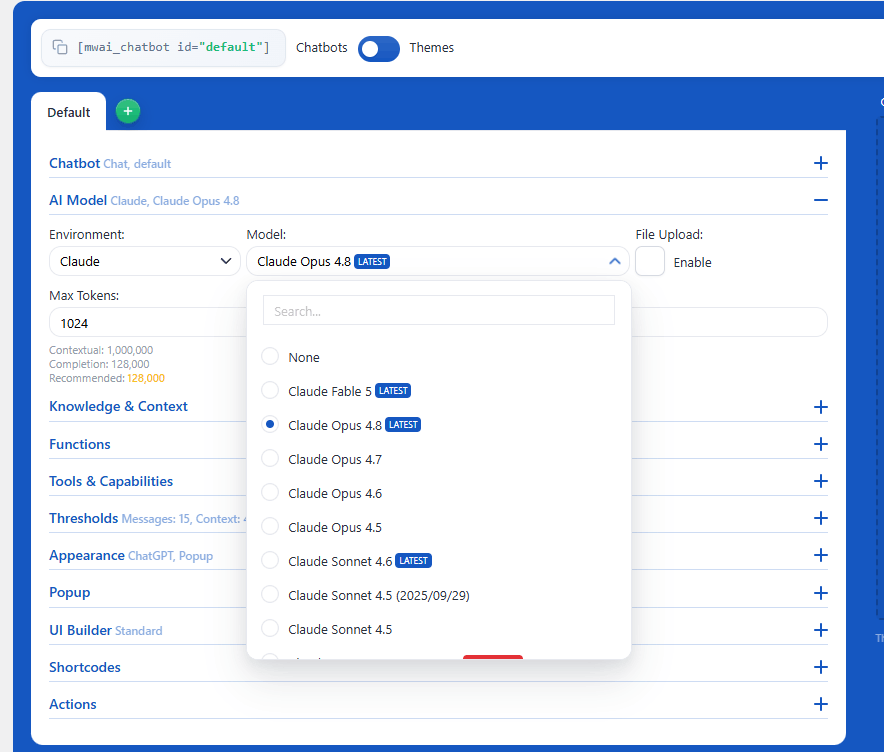
AI Engine – Model Support
AI Engine covers all the major players:
- OpenAI (all current models)
- Anthropic / Claude (full model support)
- Google Gemini
- Mistral
- Perplexity
- OpenRouter
- xAI / Grok
- Replicate
- Azure OpenAI
- Custom / OpenAI-compatible endpoints: covering Ollama, LM Studio, vLLM, llama.cpp, LocalAI and any self-hosted server
AI models work well in AI Engine, out of the box, no workarounds needed.
Verdict: Model Support
Aimogen Pro has a clear edge in raw breadth with OpenAI, Anthropic, xAI, Google Gemini, Ollama, NVIDIA NIM, DeepSeek, Hugging Face, custom APIs and proprietary AimogenAPI access. AI Engine also covers the models most users will use, plus good custom/self-hosted support. For enterprise or specialist needs, Aimogen Pro wins. For 95% of users, both are equivalent.
Chatbot Features
A well-designed chatbot can transform passive visitors into engaged users. Both plugins offer chatbots, but they approach it differently.
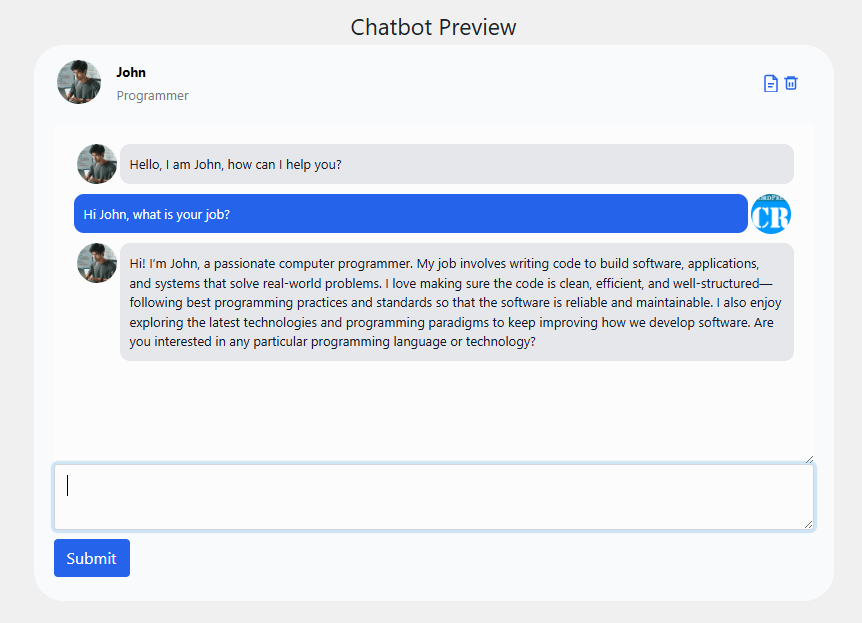
Aimogen Pro – Chatbot Capabilities
Aimogen Pro’s chatbot system is extensive and heavily customizable:
- Multiple chatbot personas with custom names, roles and avatars
- Real-time chatbot with voice input and voice output
- Multi-conversation support (users can start new chats and return to old ones, ChatGPT-style)
- GDPR/Privacy Policy acceptance gating before chat access
- Lead collection, instruct the chatbot to gather emails, phone numbers, names and more
- Trigger-based workflows in the chatbot (fire specific messages based on user role, message content, login status and more)
- AI Vision: users can submit images and the chatbot analyzes them
- PDF chatbot integration
- Site-wide chatbot deployment
- Streaming responses
- Talking head chatbot (visual avatar with speech)
- Chatbot extensions system
- Chatbot style customization
- Embed chatbots globally, filtered by post category, custom post type, language, user agent, OS, user role and device type
The conditional logic in Aimogen Pro’s chatbot workflow system is impressive. You can build sophisticated, branching conversation experiences without writing a line of code.
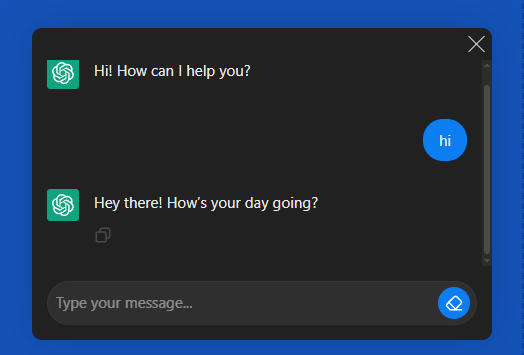
AI Engine – Chatbot Capabilities
AI Engine’s chatbot approach feels WordPress-native:
- Modular UI Builder with customizable containers, headers and footers
- Customizable themes and MacOS-style UI components
- Realtime audio conversations (powered by OpenAI’s GA Realtime API with latest voice reasoning)
- Multi-file upload support in chat
- Persistent discussion memory and conversation history
- Cross-site chatbot embedding
- GDPR compliance tools
- Shortcode builder for easy placement anywhere
- Image bot capabilities in the free version
- Full customization with WordPress-native styling patterns
What sets Aimogen Pro apart is the number of chatbot features it offers. You name a feature, Aimogen Pro has it. On the other hand, AI Engine’s chatbot is set apart by its UI Builder approach, which means you’re not fighting with a one-size-fits-all widget, but you’re assembling a chatbot with purpose-built components. The MacOS-style elements feel modern without being gimmicky and the Realtime audio implementation uses OpenAI’s latest voice reasoning capabilities rather than legacy speech APIs.
Verdict: Chatbot Features
For raw flexibility and marketing-focused chatbot automation (lead capture, triggers, personas, workflows), Aimogen Pro has more tools. For polished user experience AI Engine wins by edging forward a bit. However, power users with complex sales funnels should lean Aimogen Pro.
Content Generation
Content generation is where both plugins earn their keep for bloggers, content marketers and SEO professionals.
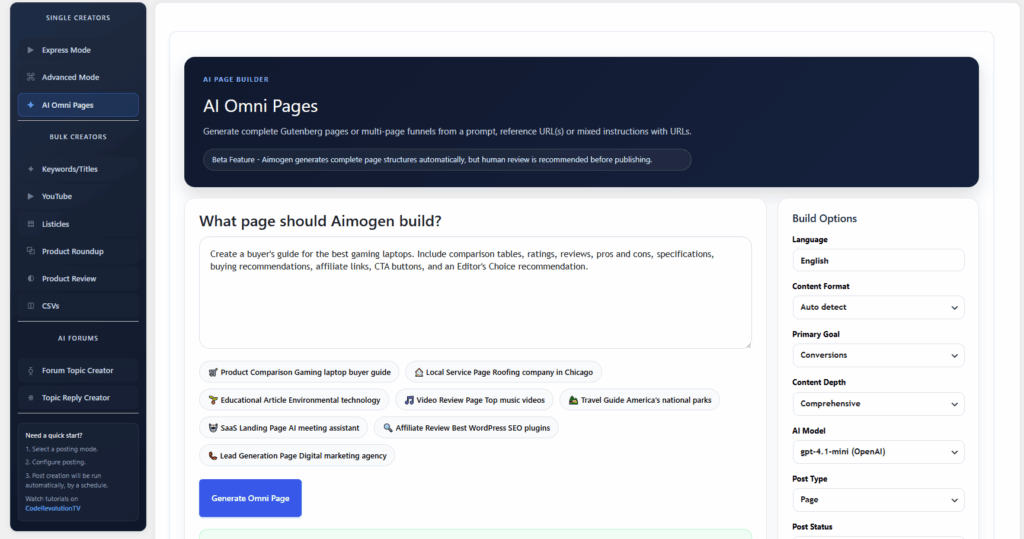
Aimogen Pro – Content Generation
Aimogen Pro approaches content generation like an industrial content machine:
Single Post Creation
- AI-written posts from titles, keywords or prompts
- Control over tone, length, format and focus
- Negative or positive review styles
- Dialogues, commentaries, articles – you define the template
Bulk Post Creation
- Generate dozens or hundreds of posts in a single batch run
- CSV-based post creation, upload a spreadsheet, get posts
- RSS feed AI writer: pull content from any RSS source and let AI rewrite or expand it
Specialized Content Creators
- YouTube video-to-blog-post converter (using video captions/subtitles)
- Amazon product review writer with tables of contents, Q&A sections, pros/cons and affiliate ID support
- Amazon roundup/listicle post creator
- ClickBank product review and roundup creator
- Listicle post creator
AI OmniBlocks This is one of Aimogen Pro’s most powerful differentiators. OmniBlocks let you escape linear AI execution and build your own custom AI workflows allowing dynamically chaining AI calls, web scraping, RSS scraping, Google SERP data, Amazon product data, YouTube captions and social sharing. It’s a no-code automation engine built specifically for content production.
Editor Integration
- AI assistant in Gutenberg Editor and Classic Editor
- Rewrite published content with custom instructions
- Translate entire posts
- Grammar correction and paraphrasing
SEO Integration
- Works with RankMath, Yoast, All-in-One SEO, The SEO Framework and SEOPress
- Auto-generates post categories and tags
- Always produces unique content for SEO value
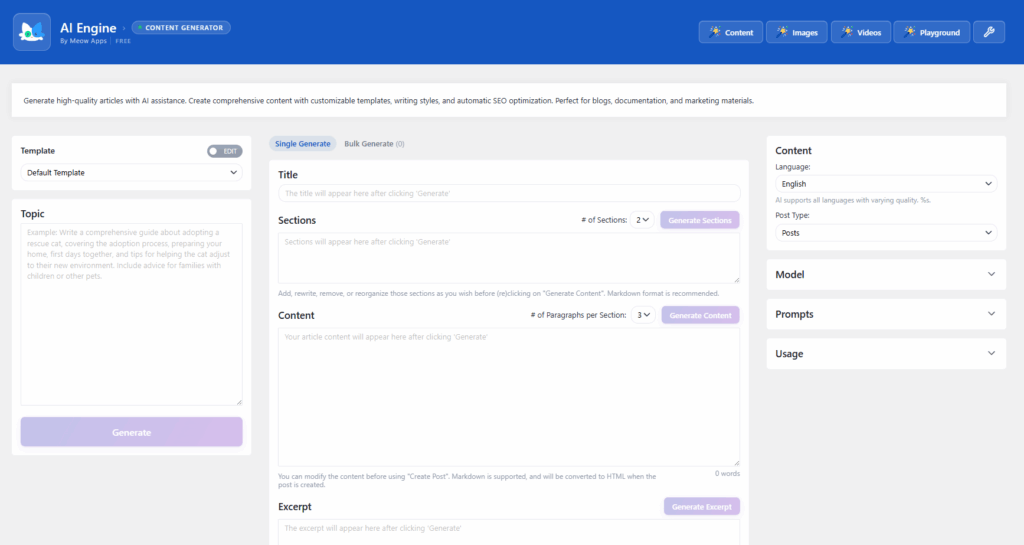
AI Engine – Content Generation
AI Engine takes a more manual approach to creating content using AI:
Copilot (Magic Wand) in the Editor
- Correct grammar and spelling inline
- Enhance text for readability and quality
- Make text longer or shorter with one click
- Translate text and full posts
- Generate content from scratch
- Multi-block support in the WordPress Gutenberg editor
Editor Assistant (Pro) A full AI sidebar in the post editor that can read your content, rewrite it, insert new sections and rearrange blocks through chained function calls. This is closer to having a real editorial assistant than a content machine.
Image and Video Tools
- Generate images from text prompts
- Generate videos with AI (Sora integration)
- Edit existing images with AI
- Vision AI for image analysis
- Automatic alt text generation
Instant Content Generator
- SEO-friendly content creation tailored for your site
- Works across any supported AI provider
Verdict: Content Generation
For bulk content production, affiliate marketing content and automated blogging at scale, Aimogen Pro is in a class of its own. The YouTube converter, Amazon review tools, OmniBlocks and CSV-based batch creation have no equivalent in AI Engine.
For smaller scale mostly manual content creation where a human writer is still in the loop, AI Engine’s Copilot and Editor Assistant provide a good experience. However, if you want to write more, choose Aimogen Pro.
AI Forms
AI-powered forms are a growing category, they let you build interactive tools that accept user input and return AI-generated responses, images or files.
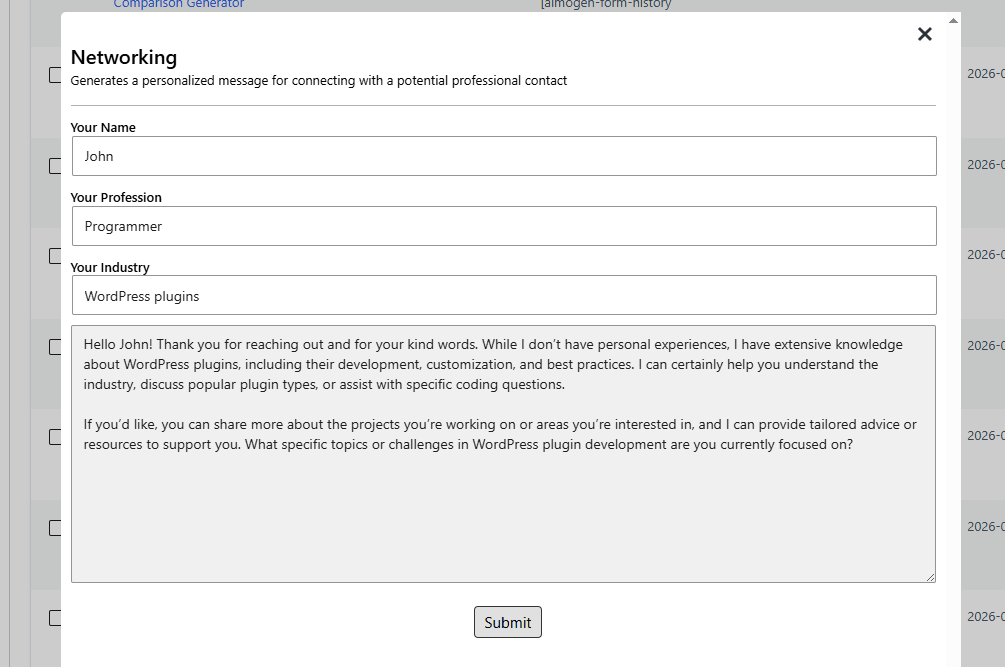
Aimogen Pro – AI Forms
Aimogen Pro’s AI Forms support:
- Text, image, audio and file inputs
- Conditional logic and validation
- Custom AI-powered app creation
- Multi-step workflow support
- Result templates
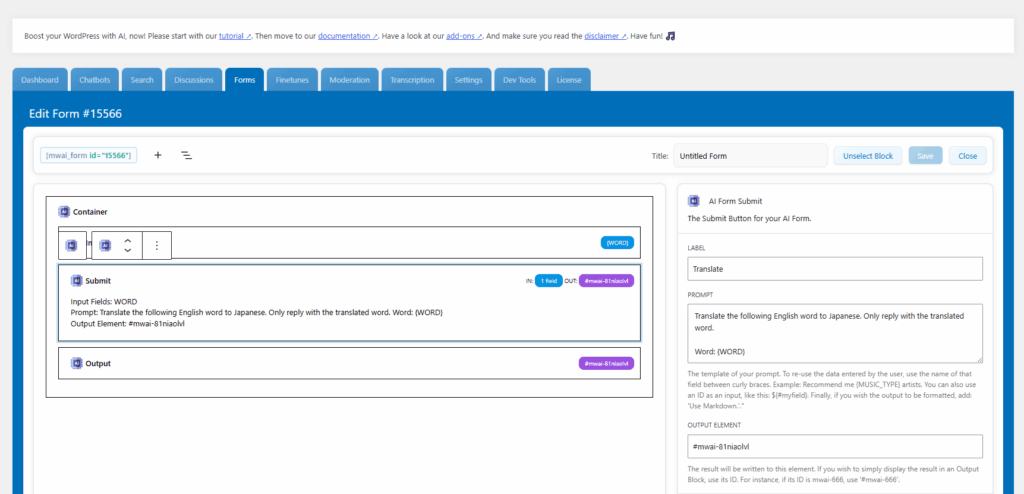
AI Engine – AI Forms
AI Engine’s AI Forms (Pro feature) offer:
- Text, image, audio and file inputs
- Conditional logic
- Custom AI-powered applications
- Multi-step workflows
- Result templates with formatting options
Both plugins offer comparable AI Forms functionality. The core difference is that AI Engine’s forms are available exclusively in the Pro tier, while Aimogen Pro includes form functionality in its standard Pro offering.
Verdict: AI Forms
Roughly equivalent. Both handle the core use cases well. If forms are a primary need and you’re budget-conscious, note that AI Engine’s forms require the Pro upgrade.
MCP (Model Context Protocol) Support
MCP is the emerging standard that lets AI agents like Claude, ChatGPT and others connect to external services and take real actions, browsing your site, editing posts, managing orders and more. This is one of the most exciting and fastest-evolving areas in AI right now.
Aimogen Pro – MCP Support
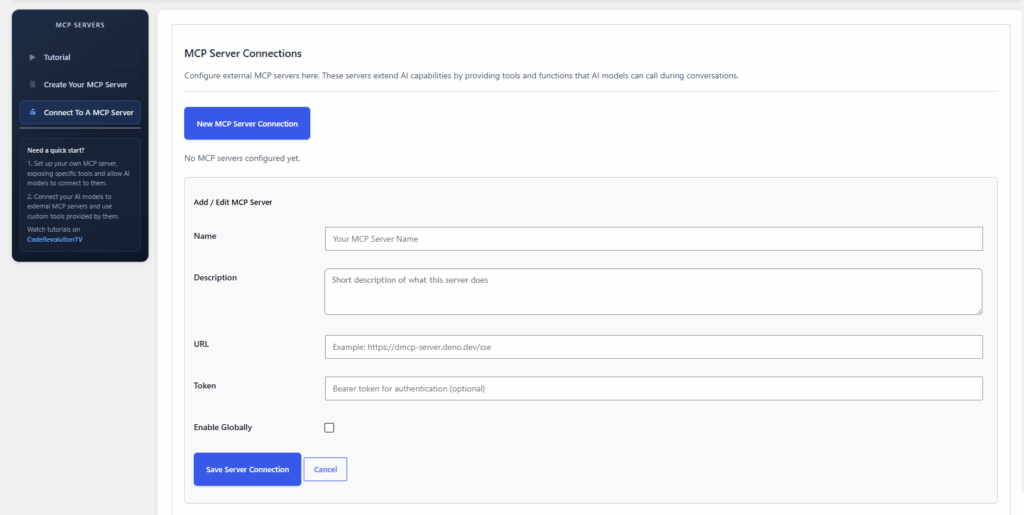
Aimogen Pro’s latest updates have added full MCP Server Creation and Connection support. This allows:
- Creating MCP servers from within WordPress
- Connecting to external MCP servers
- Integration with autonomous AI agents
- Support for all major AI agent clients
The MCP features in Aimogen Pro are newer additions and continue to evolve alongside the broader ecosystem.
Connection is simple: for desktop AI clients, users paste the MCP URL and can use it directly. Aimogen Pro offers abilities of turning your server into a MCP client or a MCP server, both ways around will be possible.
AI Engine – MCP Support
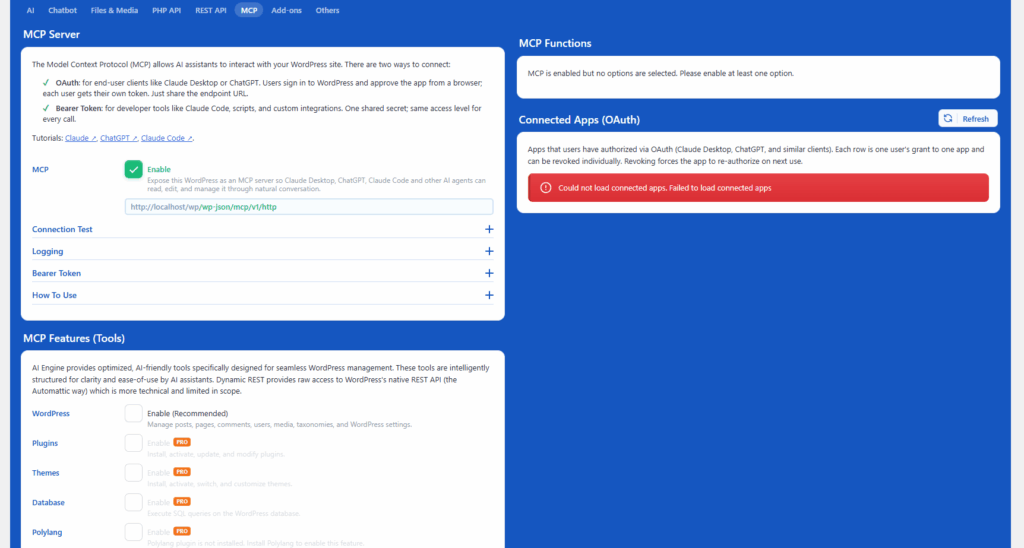
AI Engine’s MCP implementation is one of its strongest differentiators and deserves special attention.
AI Engine turns your entire WordPress installation into an intelligent MCP server. The difference from generic REST API wrappers is significant: AI Engine’s MCP tools are purpose-built for AI agents, with rich context, smart defaults and practical actions designed for how agents actually work.
What AI agents can do with AI Engine’s MCP:
- Create and edit posts
- Moderate comments
- Install and manage plugins
- Customize themes
- Check SEO and analytics
- Manage media files
- Run SQL queries directly
- Manage WooCommerce products orders, inventory and customers
- Handle Polylang translations
The free version already includes a solid WordPress MCP server. The Pro tier adds plugin, theme, database, Polylang and WooCommerce management tools.
Crucially, AI Engine works on any WordPress installation regardless of hosting provider, unlike MCP Adapter from the WordPress team, which was built primarily for WordPress.com hosting.
Connection is also simple: for desktop AI clients, users paste the MCP URL, sign into WordPress and approve the connection. No shared tokens. No API keys passed around in config files.
Verdict: MCP Support
AI Engine has the more mature and purpose-built MCP implementation. The depth of the available tools, the extensibility through partner plugins, the clean authentication model and the cross-hosting compatibility all give it a meaningful edge for users who want to use AI agents to actually manage their WordPress site. Aimogen Pro is catching up quickly, but AI Engine is the current leader here.
Embeddings and Knowledge Bases
Embeddings allow AI to search your own content semantically: finding relevant information based on meaning rather than keyword matching. This is the backbone of truly intelligent, context-aware chatbots and search.
Aimogen Pro – Embeddings
Aimogen Pro supports embeddings via:
- Multiple vector database connectors: Pinecone, Chroma, Qdrant and OpenAI Vector Store (in latest updates)
- Fine-tuning capabilities
- Retrieval-augmented generation (RAG) patterns
- Training AI on custom datasets
- Custom bot pretraining for chatbots
- High performance embedding capabilities
AI Engine – Embeddings
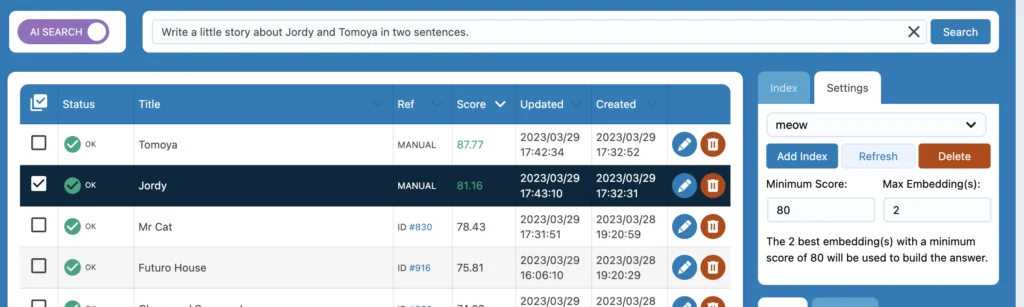
AI Engine’s embeddings system (available in Pro):
- Multiple vector database connectors: Pinecone, Chroma, Qdrant and OpenAI Vector Store
- PDF import with automatic chunking
- AI-powered search in three modes: Simple, Context-Aware and Smart
- Content classification
- Personalized recommendations
- Automatic synchronization of your WordPress content
- Dimension validation across providers
- Build knowledge bases from posts, pages, custom post types and PDFs
The ability to connect with Qdrant and Chroma in addition to Pinecone means you can run a fully self-hosted embeddings stack with no external API dependencies if privacy requires it. However, these providers are implemented in both plugins, you will find them also in Aimogen Pro.
Verdict: Embeddings and Knowledge Bases
We have to call this roughtly equivalent, as both plugins offer similar feature sets for AI embeddings. So, there is no clear winner in this domain.
Developer Tools and APIs
If you’re building on top of an AI plugin rather than just using it, the developer experience matters enormously.
Aimogen Pro – Developer Tools
- Extensive shortcode system (
[aimogen-article]and others) - REST API (Aimogen REST API)
- AI OmniBlocks for custom execution flows
- Integration with third-party plugins and services
- AI Snippets for reusable AI prompts
- MCP server creation and connection
- Many more cool developer oriented features
AI Engine – Developer Tools
- REST API for external applications – the entire REST API is also exposed as MCP tools
- Function Calling framework (Pro) – let AI trigger WordPress functions, WooCommerce actions or any custom API
- Extensive WordPress filters and hooks
Aimogen Pro‘s function calling framework deserves special mention. This isn’t just a REST bridge, it’s a proper mechanism for letting AI understand your site’s capabilities and trigger real actions in real-time. Combined with the MCP layer, it enables agentic WordPress workflows.
Verdict: Developer Tools
Aimogen Pro is the stronger choice for developers. The function calling framework, the extensible MCP server, the hook system and the way the REST API is also exposed as MCP tools all point to a plugin designed by someone who thinks carefully about architectural patterns. AI Engine’s developer tools are capable and improving, but Aimogen Pro feels more intentionally designed.
WooCommerce Integration
Both plugins offer WooCommerce integration, which is essential for store owners looking to automate product content and customer service.
Aimogen Pro – WooCommerce
- WooCommerce product description writer
- Amazon product review tools with affiliate ID support
- Product roundup creators
- ClickBank product content
- AI for product catalog management
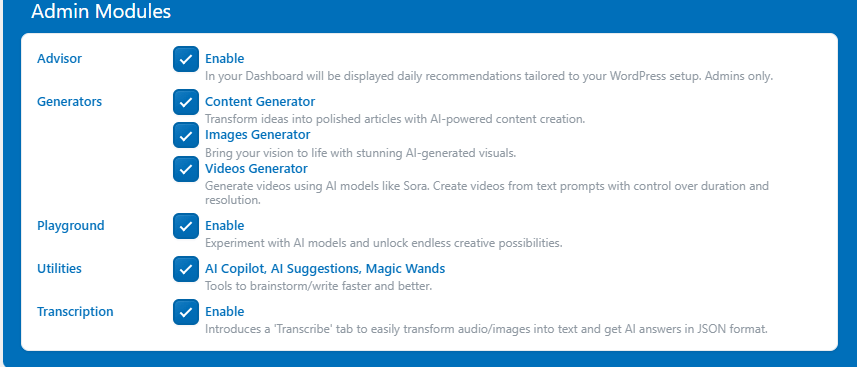
AI Engine – WooCommerce
- WooCommerce management through MCP (Advanced Pro tier): products orders, inventory and customers
- Function Calling can connect AI to WooCommerce data in real-time
- AI-generated product descriptions through content generation tools
Verdict: WooCommerce
For content-focused e-commerce (writing product descriptions, reviews, roundups), Aimogen Pro has more specialized tools. However, if you are an advanced user and want to try setting up advanced AI workflows, for operational e-commerce thus letting an AI agent actually manage your store, process orders or update inventory through conversation, as a result AI Engine’s MCP + WooCommerce tools are more powerful.
Security and Moderation
AI interactions can expose your site to abuse, spam and inappropriate content. Both plugins address this, but in different ways.
Aimogen Pro
- AI text moderator
- Content filtering
- Usage limits and logs
- Per-role usage limits
- Statistics and usage monitoring
- Limits by user role
- IP banning
- Word filtering
- GDPR compliance tools
- Session-based tracking
AI Engine
- IP banning
- Word filtering
- AI-powered content moderation
- Usage statistics (Pro)
- Per-role usage limits (Pro)
- IP hashing for privacy
- GDPR compliance tools
- Secure file handling
- Session-based tracking
Verdict: Security and Moderation
Aimogen Pro edges ahead with functionality like GDPR-specific tooling and a more explicit privacy-first design philosophy. Ai Engine’s usage limits and logging are solid for abuse prevention. For sites operating under GDPR or with strict data handling requirements, Aimogen Pro’s security model is more thoroughly considered.
Pricing Comparison
This is where the two plugins diverge most significantly and it’s worth looking at carefully.
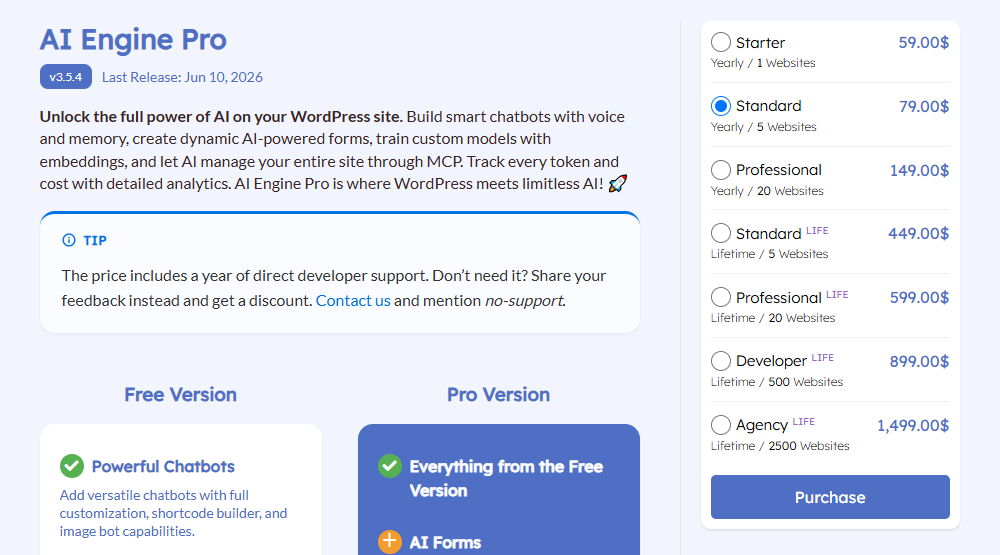
AI Engine Pricing
| Plan | Price | Websites |
|---|---|---|
| Starter | $59/year | 1 site |
| Standard | $79/year | 5 sites |
| Professional | $149/year | 20 sites |
| Standard Life | $449 one-time | 5 sites |
| Professional Life | $599 one-time | 20 sites |
| Developer Life | $899 one-time | 500 sites |
| Agency Life | $1,499 one-time | 2,500 sites |
AI Engine has no monthly billing option. You pay annually or make a one-time lifetime purchase. There’s also a powerful free version available through WordPress.org: chatbots, image AI, content generation, Copilot in editor, AI Playground, REST API and MCP server are all available without paying anything.
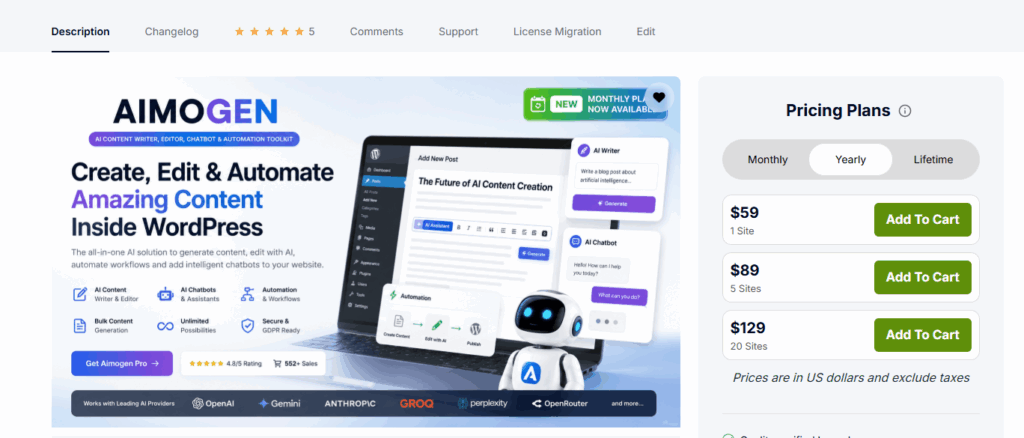
Aimogen Pro Pricing
Monthly Plans
| Plan | Price | Websites |
|---|---|---|
| Basic | $9/month | 1 site |
| Standard | $14/month | 5 sites |
| Agency | $24/month | 20 sites |
Annual Plans
| Plan | Price | Websites |
|---|---|---|
| Basic | $59/year | 1 site |
| Standard | $89/year | 5 sites |
| Agency | $129/year | 20 sites |
Lifetime Plans
| Plan | Price | Websites |
|---|---|---|
| Basic | $249 one-time | 1 site |
| Standard | $399 one-time | 5 sites |
| Agency | $549 one-time | 20 sites |
| Developer | $849 one-time | 500 sites |
| Enterprise | $1,399 one-time | 2,000 sites |
Pricing Analysis
At the entry level, both plugins cost $59/year for a single site. That’s a tie.
Where it gets interesting:
Monthly option: Aimogen Pro starts at just $9/month, making it much more accessible for anyone who wants to try before committing annually. AI Engine has no monthly option, only option is to use the free version or commit to a year.
Five-site annual: Aimogen Pro is $89/year vs AI Engine’s $79/year. AI Engine is slightly cheaper here.
Twenty-site annual: Aimogen Pro is $129/year vs AI Engine’s $149/year. Aimogen Pro wins by $20/year.
Lifetime single site: Aimogen Pro is $249 vs AI Engine’s $599 Standard Life (5 sites). Aimogen Pro is dramatically cheaper for a single site lifetime license.
Lifetime 5 sites: Aimogen Pro at $399 vs AI Engine at $449. Aimogen Pro is cheaper.
Agency scale: Aimogen Pro’s 2,000-site lifetime license at $1,399 is actually cheaper than AI Engine’s 2,500-site lifetime at $1,499, which is close to equivalent.
Free tier: we have a tie here, as both plugins offer a free variant (Aimogen vs AI Engine). Both free versions are useful and include features that would cost money in most plugins.
Value Assessment
If you manage a single site or a small portfolio, Aimogen Pro’s lifetime plans are significantly more affordable. The $249 single-site lifetime license is remarkable value for the feature set it unlocks.
If you’re an agency managing dozens of sites and want a reliable, developer-friendly solution check AI Engine’s pricing.
Who Each Plugin Is Best For
Choose Aimogen Pro If You Are:
An affiliate marketer or content publisher who needs to produce large volumes of posts quickly. The YouTube-to-post converter, Amazon review creator, ClickBank tools, CSV bulk import and RSS AI writer are purpose-built for your workflow and have no real equivalent in AI Engine.
A budget-conscious single-site owner looking for maximum features at minimum cost. The $9/month entry price and $249 lifetime option are compelling for the feature breadth you receive.
An e-commerce content creator who writes product reviews, roundup posts and comparison content at scale. Aimogen Pro’s Amazon and ClickBank integrations are specialized tools built specifically for affiliate content production.
A power user who wants every model and every option. If you want NVIDIA NIM, DeepSeek R1, Hugging Face and a proprietary API fallback all in one plugin, Aimogen Pro is your home.
Someone building automated content pipelines. OmniBlocks, scheduled runs and the breadth of content creation automation tools make Aimogen Pro a strong fit for content operations that run without daily human oversight.
Choose AI Engine If You Are:
A developer building AI-powered WordPress products. The clean API, function calling framework, extensible MCP server and thorough hook system are designed for developers who want to build on top of AI, not just consume it.
An agency building AI features for client sites. The well made embeddings stack make this a strong agency choice.
A user who cares deeply about privacy and GDPR compliance. The IP hashing, GDPR tools, session-based tracking and privacy-first philosophy are more thoroughly executed in AI Engine.
A blogger or content creator who wants a better writing assistant, not an automated content machine. The Copilot, Editor Assistant and AI sidebar tools in AI Engine are built for writers who want AI help, not AI replacement.
Final Recommendation
There’s no universally correct answer here, because these plugins are excellent at different things.
Aimogen Pro is the Swiss Army knife of WordPress AI. It has more tools, more models, more integrations, more automation options and often lower pricing, especially at the lifetime tier. The free tier is useful. If your primary use cases are content volume, e-commerce content, affiliate marketing or you simply want every possible option available to you, Aimogen Pro delivers extraordinary value.
AI Engine is the craftsman’s tool. Every feature is thoughtfully implemented. The MCP support is nicely made. The developer experience is excellent. The free tier is also useful. The privacy tools are properly built. And the editor integration, check especially the Copilot and Editor Assistant, feels like a native WordPress feature rather than a plugin bolted on.
For most readers of this article, here’s the simplest framing:
- If you’re publishing content at scale or running an affiliate site, start with Aimogen Pro.
- If you’re building or developing start with AI Engine.
Both have free ways to get started. AI Engine has the free WordPress.org version. Aimogen Pro is available at wpbay and also has a free version on WordPress.org. Try the one that fits your use case and if you’re still not sure, the pricing on both is reasonable enough that testing isn’t a significant risk.
Frequently Asked Questions
Can I use both plugins together? Technically yes, but it’s not recommended. They’ll likely conflict in the editor and potentially in chatbot deployments. Pick one as your primary AI layer.
Which plugin has better support? Aimogen Pro users consistently praise the responsiveness and quality of Szabi’s support. AI Engine offers support by Jordy Meow. Both are considered above average for WordPress plugins of this type.
Do these plugins include API access or do I bring my own keys? Both plugins require your own API keys for the AI providers you want to use. You pay OpenAI, Anthropic, Google or whichever provider you choose directly. The plugins handle the integration and you control the API relationship and costs.
Which plugin is better for SEO? Both integrate with major SEO plugins (RankMath, Yoast, etc.). Aimogen Pro has slightly deeper SEO tooling baked into the content generation flow. AI Engine’s MCP integration with SEO Engine (a companion plugin) enables AI agents to actively analyze and optimize your content, a more powerful but more complex setup.
Is either plugin suitable for non-technical users? AI Engine’s free version is accessible allowing to connect your API key, drop in a shortcode and your chatbot is running. Aimogen Pro has a similar free version, very accessible. It has more features to configure but also more tutorials and documentation. Neither requires coding knowledge for core functionality.
What about future-proofing? Which plugin is more likely to keep up with AI developments? Both plugins update frequently, Aimogen Pro releases changelogs regularly (new update coming almost every couple of days) based on user feedback, with new model additions and AI Engine has weekly updates. Both have tracked rapidly evolving AI developments including MCP, voice APIs and agent frameworks. You’re in good hands with either choice.
Aimogen Pro available through WPBay. AI Engine is sold on the developer’s website. Use the links in this article to get the most current pricing and feature details before purchasing.



)