Which WordPress Black Friday plugin deals are live, and what they cost over three years
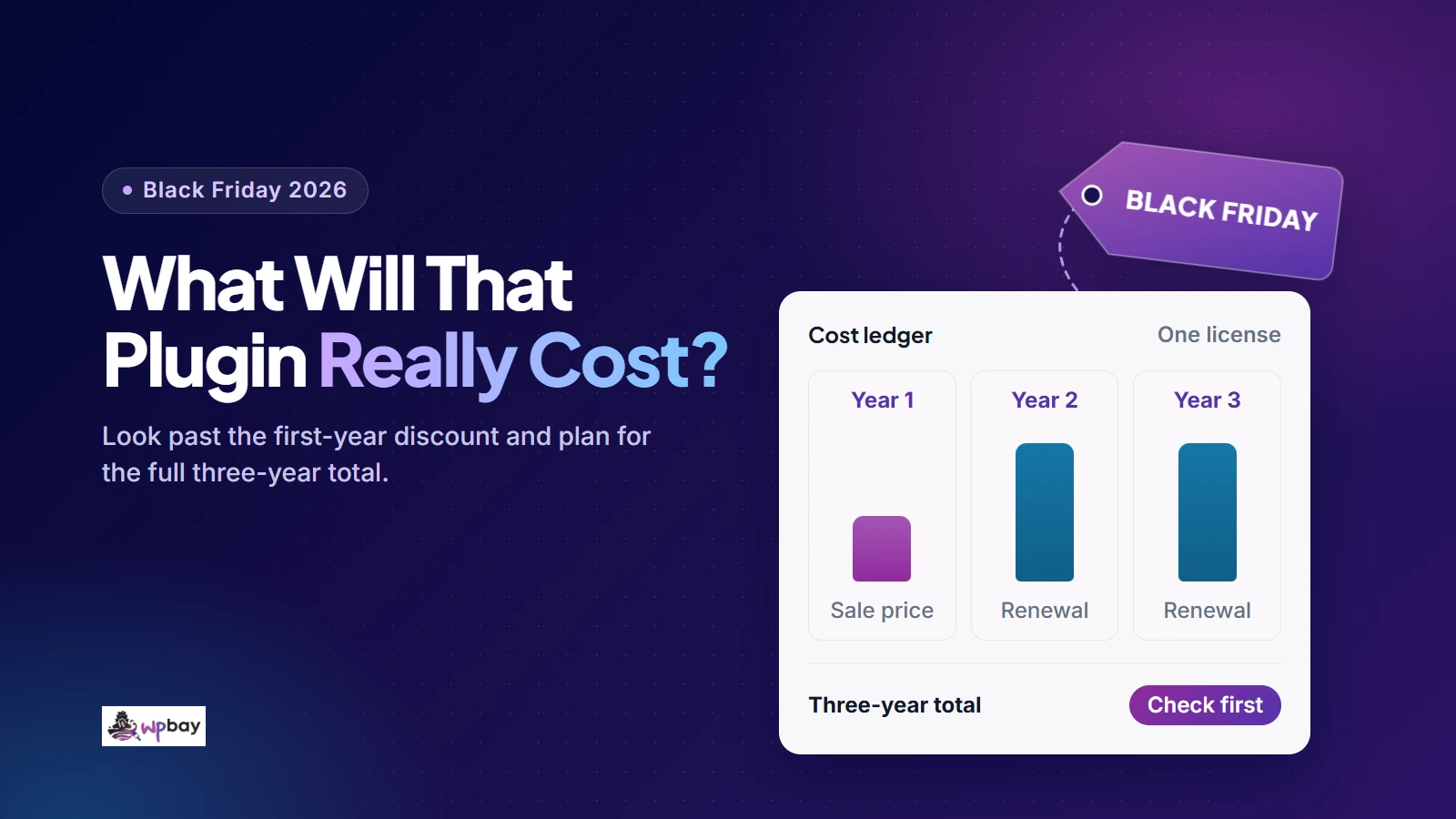
On November 14, 2026, five WordPress Black Friday plugin deals were live on vendor pricing pages. WP Rocket takes 40% off one-year and 60% off three-year licenses for first-time buyers. Rank Math PRO shows $4.99 a month billed annually instead of $8.99. Mailster Starter costs $39 in its first year instead of $79. Unlimited Elements takes 50% off its annual and lifetime plans, and OptinMonster Basic costs $108 up front and renews at $210. In most of these offers the discount only touches the first payment. To judge a deal, add up 36 months: what you pay at checkout, the renewals at months 12 and 24, and any add-ons, services, tax and paid setup you need. The worksheet below gives you two numbers, the amount due today and the three-year total.
The 36 months run from purchase to the day before the third anniversary, so a renewal due on that anniversary falls outside it. Every total here is my own arithmetic on prices the vendors published on November 14, 2026. None of it is a vendor quote, and every projection assumes prices, eligibility and coverage stay the same. WPBay publishes this article and runs its own sale, and I’ve described its offers with the same caveats.
Confirmed Black Friday plugin offers as of November 14, 2026
Each offer below has a Black Friday label on the vendor’s own pricing or sale page. Prices are what those pages showed in US dollars, before tax. Some vendors switch to euros depending on where you are, so record the currency checkout actually uses. Where a page didn’t state a deadline or eligibility rule, the table says so. Treat that gap as a question for the vendor, not as “no restrictions.”
The table covers license prices only. The 36-month column adds the first payment and two renewals at unchanged rates. Where the payable amount or the renewal amount isn’t published, the total is marked unconfirmed.
| Product | First payment and allowance | Renewal basis | 36-month license total | Eligibility and deadline |
|---|---|---|---|---|
| WP Rocket (caching) | Single, 1 site: $3/mo on a one-year term or $1.95/mo on a three-year term. Plus, 3 sites: $6 or $3.91. Multi, 50 sites: $15 or $9.79. These are monthly equivalents; the amount due today is unconfirmed | One-year terms billed yearly, three-year terms billed upfront. After the initial term it renews annually at the regular renewal price (amount not stated) | One-year plan: unconfirmed, because the renewal amount isn’t published. Three-year plan: the single upfront invoice, about $70.20 for Single if it equals 36 × $1.95 (unconfirmed) | First-time purchases; no code advertised. Ends November 27, 2026 per the offer notices; no time zone given |
| Rank Math (SEO) | PRO $4.99/mo, unlimited personal sites, no client sites. Business $14.99/mo, 200 client sites. Billed annually before VAT; invoice unconfirmed | PRO $8.99/mo, Business $27.99/mo, billed annually | Unconfirmed. Roughly $275.64 (PRO) and $851.64 (Business) if each invoice equals 12 × the displayed rate | Eligibility not stated; no code advertised; no deadline on the pricing page |
| Mailster (newsletters) | Starter $39, Professional $49, Agency $99; 1 site each | Full price: $79, $99, $199 | $197, $247, $497 | Eligibility not stated; no code advertised; no deadline stated |
| Unlimited Elements (Elementor widgets) | Annual: $24.50 (1 site), $49.50 (5), $74.50 (100), $99.50 (unlimited). Lifetime: $99.50, $149.50, $274.50, $349.50 for the same tiers | Annual auto-renewals get 25% off, base not stated. The FAQ says the renewal price “will never be increased so long as the subscription is not cancelled” | Lifetime: the one payment. Annual: unconfirmed. Professional is $123.75 if the 25% comes off the sale price, $198.00 if it comes off the implied $99 regular price | Eligibility not stated; no code advertised; countdown timer with no date |
| OptinMonster (popups, hosted service) | Basic $108 (1 site, 2,500 impressions/mo), Plus $288 (2 sites, 10,000), Pro $348 (3 sites, 25,000), Growth $588 (5 sites, 100,000) | Automatic annual renewal at $210, $570, $870, $1,470 | $528, $1,428, $2,088, $3,528 | “Save up to 60% on your first year”; eligibility not stated; no code advertised; no deadline stated |
Two rows need more than the table can hold. OptinMonster’s pricing page says it will “automatically upgrade you to the next tier should you exceed your impression limits,” so pick a tier based on the campaign impressions you expect at your busiest, not your average month. Going from Basic to Plus mid-term would also move your renewal from $210 to $570. For Unlimited Elements, the no-increase promise only holds while the subscription stays active. Ask for the actual renewal amount in writing before you buy, and if you’re counting on that promise, don’t cancel auto-renewal just to be safe and then restart later.
These five cover caching, SEO, email newsletters, Elementor widgets and lead capture. If you’re shopping for WooCommerce extensions, backups or security, I haven’t verified those offers here, so take each vendor’s pricing page or a WPBay deal listing through the same worksheet. WPBay’s own event runs November 26 to December 1, 2026, according to the official November 4 announcement. Participating annual subscriptions keep the sale rate at renewal and monthly plans are excluded. That rule covers participating offers only, not every listing.
Copy this three-year plugin cost worksheet
The worksheet has two tabs. The cost sheet does the arithmetic, and the offer-details sheet records what you’re buying and where each term came from. Use one row per product and plan, because tiers of the same plugin often differ in site allowance and renewal terms. Choose one reporting currency first. If the license is billed in euros and your API provider in dollars, convert both, note the rate and date, and put card or conversion fees in column J.
Copy the block below and paste it into cell A1 of a blank Google Sheets or Excel sheet. It is tab-separated, so every value lands in its own cell, and the formulas calculate as soon as you paste. Row 2 is the hypothetical example from the next section. To add products, copy row 2 down. The references are relative, so each new row calculates its own figures.
Product and plan	License Y1	License Y2	License Y3	Extras Y1	Extras Y2	Extras Y3	Tax (36 mo)	Paid setup/migration	FX and card fees	36-month cash	Plugin checkout today	Other payments today	Total due today	Your unpaid hours	Hourly rate	Economic cost	Missing cost inputs	Notes
AI Engine Pro Standard, annual (hypothetical)	79	79	79	180	180	180	18.96	0	0	=IF(COUNT(B2:J2)=9,SUM(B2:J2),"INCOMPLETE")	85.32	10	=IF(COUNT(L2:M2)=2,L2+M2,"INCOMPLETE")	4	60	=IF(AND(ISNUMBER(K2),COUNT(O2:P2)=2),K2+O2*P2,"INCOMPLETE")	=9-COUNT(B2:J2)	USD; see offer-details sheet
The formulas won’t give you a total that looks final when it isn’t. A plain SUM skips text and blank cells, so a renewal cell reading “unconfirmed” would quietly understate the total. Here, K, N and Q show INCOMPLETE until every input they depend on is a number, and R counts how many of B to J are still missing. A typed 0 counts as a real number. That’s correct for a prepaid or lifetime plan’s later years, so type 0 there and don’t leave the cell empty.
Enter each payment once in B to J. L to N report the part of it due today.
- B to D: license charges by year. If a renewal amount isn’t published, enter today’s list price as a current-list-price scenario and leave the term marked unconfirmed. Then copy the row and enter a higher renewal as a second scenario, so you can see what a price rise would do.
- E to G: other required costs by year, such as add-ons, email, SMS, API usage or storage.
- H: tax on any charge you entered before tax. If a checkout shows only a VAT-inclusive total, enter that total and add no tax for it in H.
- I: real payments for setup or migration, such as a contractor’s invoice. Your own unpaid time goes in O.
- L and M: the plugin checkout total from the final checkout screen, plus anything else payable the same day. On WPBay, checkout tax is calculated from your billing address and the product type. N is already inside K, so never add the two together.
A hypothetical mixed-tax case shows why H works charge by charge. A license whose checkout shows €95.20 including 19% VAT goes into B with nothing added to H. An SMS service at €20 a month plus 19% VAT goes into E to G as €240 a year, and H still needs €136.80, which is 19% of €720. Zero H because the license included tax, and the sheet comes out €136.80 short.
Paste the offer-details block into A1 of a second tab. Keep product names identical across both tabs so the rows line up.
Product and plan	Required features and integrations	Sites Y1	Sites Y2	Sites Y3	Pricing URL	Checked on	Promotion and eligibility	Verified terms	Open questions	Forecast assumptions	Updates and support end	At expiration	Refund deadline
AI Engine Pro Standard, annual (hypothetical)	Chatbot; per-user usage limits; usage cost reporting	3	4	5	https://meowapps.com/products/ai-engine-pro/	2026-11-14	No promotion shown; regular price	$79/yr for 5 sites; renews yearly; AI provider usage billed separately	Exact renewal amount; how staging sites count; support term	Renewals unchanged at $79; API usage $15/mo; 8% tax on license only; $10 credit bought today is part of Extras Y1	Ask vendor	Ask vendor	Ask vendor
Keep vendor terms separate from your estimates, and leave unanswered renewal questions where you can see them. Once a promotion ends, the pricing page changes. The URL, the check date and a saved copy of the page are then the only way to show what you were offered.
A complete row, worked through
Only one input in the example is a verified price: AI Engine Pro Standard costs $79 a year for five sites (checked November 14, 2026). Everything else is a labeled assumption: 8% sales tax on the license only, $15 a month of AI provider usage, a $10 provider credit bought on day one (counted as part of that usage, not on top of it), no paid setup, no conversion fee, and four hours of your own time at $60.
| Item | Columns | Amount |
|---|---|---|
| License, three annual payments | B to D | $237.00 |
| AI provider usage, 36 × $15 | E to G | $540.00 |
| Tax, 8% on the license | H | $18.96 |
| 36-month cash | K | $795.96 |
| Due today: $85.32 checkout + $10 credit | N | $95.32 |
| Economic cost, adding 4 × $60 | Q | $1,035.96 |
The estimates make up most of that result, and usage moves it the most. At a hypothetical $5 a month, 36-month cash falls to $435.96. At $40 it rises to $1,695.96, more than seven times the license spend. If the high case breaks your budget, set usage caps before launch, not after the first provider invoice.
How regular-price billing models play out
None of these three products showed a Black Friday label on its pricing page on November 14, but together they cover the billing patterns you’ll meet in most sales. They illustrate billing terms. They aren’t competing recommendations, and the figures are license-only.
| Example (license only) | Year 1 | Year 2 | Year 3 | 36-month total |
|---|---|---|---|---|
| WPForms Basic, 1 site, introductory price | $49.50 | $99.00 | $99.00 | $247.50 |
| Perfmatters, 1 site, list price, 15% renewals | $29.95 | $25.46 | $25.46 | $80.87 |
| AI Engine Pro Starter, 1 site, annual | $59.00 | $59.00 | $59.00 | $177.00 |
| AI Engine Pro Standard, 5 sites, annual | $79.00 | $79.00 | $79.00 | $237.00 |
| AI Engine Pro Standard, 1 to 5 sites, lifetime | $299.00 | $0 | $0 | $299.00 |
Introductory pricing: calculate both renewals
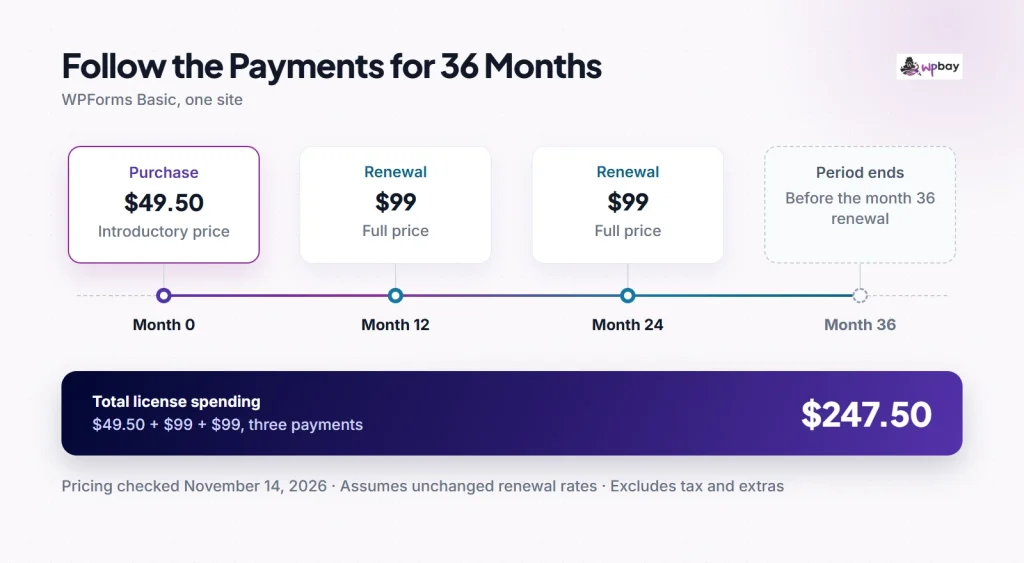
WPForms Basic costs $49.50 in its first year against a normal $99, and the pricing page footnote says “all renewals are at full price.” Over 36 months that’s $247.50 against $297 at full price. The first payment is half off, but across three payments the saving is $49.50, about 16.7%. Mailster and OptinMonster’s sale prices work the same way. WPForms’ current tiers run from Basic (1 site) to Elite (unlimited), all renewing at full price, and none of them carried a separate Black Friday label on November 14.
The timeline shows the three payments: $49.50 at purchase and $99 at months 12 and 24. The month-36 renewal falls outside the period, so the total is $247.50.
Discounted renewals: use the vendor’s actual rule
Perfmatters lists $29.95 for one site, $59.95 for three and $124.95 for unlimited, and every renewal is automatically 15% off. A one-site renewal rounds to $25.46, so starting at list price gives $80.87 over three payments. The pricing banner currently advertises code PERFMATTERS for an extra 10% off. Put your real checkout amount in B and mark it as an open question whether the coupon carries into renewals, because the page doesn’t say.
Lifetime pricing: compare plans that cover the same needs
AI Engine Pro Standard is $79 a year for five sites or $299 once for one to five sites, and the lifetime plan promises “updates forever.” Three annual payments total $237, $62 less than lifetime. The fourth payment, due at month 36, brings the annual total to $316. Lifetime wins at these prices if you’ll still be using the plugin after the third anniversary, and annual wins if you might switch before then. For a single site, Starter at $59 a year stays cheaper than lifetime through five payments ($295) and only passes it with the sixth ($354).
Unlimited Elements runs the same test on sale prices. Its five-site Professional plan costs $49.50 a year or $149.50 lifetime. Over three payments, lifetime is cheaper only if each of the two renewals costs more than $50. Under the regular-price reading of its 25% renewal discount ($74.25), lifetime wins. Under the sale-price reading (about $37.13), annual wins. That’s the question to put to the vendor.
Monthly equivalents and prepaid terms
WP Rocket’s pricing FAQ says the discount applies “when you buy WP Rocket for the 1st time,” and that after the initial period the license “will renew annually at the regular renewal price.” For a prepaid three-year term, put the whole invoice in B and type 0 in C and D. A hypothetical $216 invoice works out to $6 a month, but all of it is due on day one. Don’t reverse-engineer an exact invoice from a rounded monthly display. Copy the figure from checkout, and keep the renewal amount marked unconfirmed until the vendor gives you a number.
Price the plan your sites will actually need
List every feature and integration you can’t do without, then find the cheapest tier that covers the whole list. A tier that has your form builder’s payment integration but lacks the CRM sync you also need isn’t a cheaper option. Next, enter your projected site count for each year. Before you rely on an allowance, ask how staging and multisite installs count, whether client-owned sites are allowed, and whether a license can move when a client leaves. Confirm those rules for each license before you count staging or client sites.
Rank Math’s sale shows how a license rule can decide the tier for you. PRO covers unlimited personal websites but explicitly excludes client sites. An agency managing client sites needs Business or Agency, and Business is the lower-priced of the two at $14.99 a month on sale and $27.99 at renewal, for 200 client websites. The bundle on the same page, PRO plus one-site WP Rocket at $7.99 a month against $4.99 for PRO alone, needs its own comparison. Set the bundle’s annual invoice and renewal against the two standalone licenses you would actually buy.
Outgrowing a plan mid-term adds a charge. Perfmatters’ upgrade documentation sends you to View Licenses, then View Upgrades, then Upgrade License, and says it “automatically applies time-based proration.” It publishes no formula, so the following is an estimate. Buy the three-site plan for $59.95 on November 30, 2026 and upgrade to unlimited around May 30, 2027. Half of the $65 list-price difference is about $32.50. If the 15% renewal discount still applies after an upgrade (the upgrade page doesn’t say), the two unlimited renewals are $106.21 each, for a three-year total of about $304.87, against $337.37 for buying unlimited on day one.
Add the bills outside the plugin license
Transactional email, SMS credits, AI model usage, offsite storage and a CDN can each cost more than a discounted license. Enter them in E to G only if your setup actually needs them, and leave out anything your host already includes.
AI Engine connects to your own AI provider account, usually through your own API key, according to its disclaimer, and the provider bills that usage separately. For steady spending of M a month, add 36 × M. The tutorial covers the Pro controls: turn on Insights under Modules to see queries, tokens and costs, and set guest, user and site-wide caps in the Limits block.
Transaction fees depend on both your tier and your license status. According to WPForms’ Lite versus Pro comparison, Lite, Basic and Plus add a 3% WPForms fee to form payments on top of processor charges, and Pro or higher removes it. The pricing page applies the fee to inactive licenses too. There are two different break-even points here:
- Renew versus lapse, for an existing Pro license: the $399 renewal pays for itself above $13,300 a year in fee-bearing payments. A hypothetical site collecting $20,000 would pay about $600 a year in fees after a lapse.
- Choosing a tier: Pro renews for $300 more than Basic, which breaks even at $10,000 a year in payments. It renews for $200 more than Plus, which breaks even at about $6,666.67.
Fees aren’t the only factor. Required features, site coverage and tax can change the answer either way.
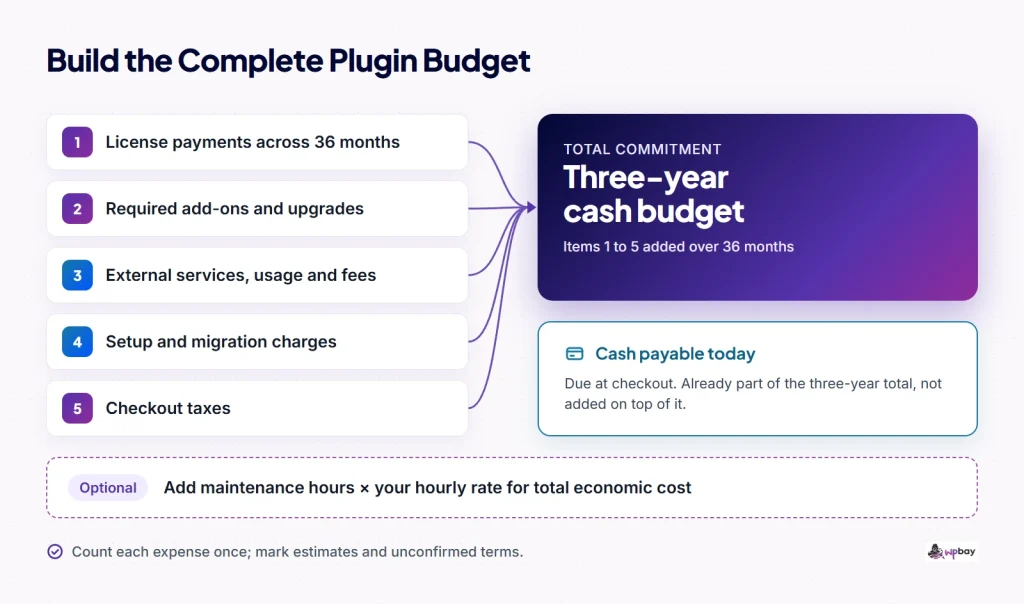
The diagram splits a budget into license, add-ons, external services, tax, paid setup and conversion fees. The amount due today is shown as part of the 36-month total, not something added on top of it.
Check what renewal and lifetime actually include
Running the plugin, getting updates, getting support and using hosted features can each end on a different date, so record them separately. WPForms shows how they split. According to its cancellation documentation, you keep access until the paid term ends and your forms and entries remain, but after expiration “updates, integrations, and support will no longer be available.” On the hosted side, OptinMonster campaigns depend on the subscription itself.
WPBay’s licensing terms let update and support periods differ from your access to the version you bought, and each seller’s product terms set the actual coverage. WPBay reviews each submitted release, but approval isn’t a security certification, and maintenance and support stay with the seller. Before committing for three years, check the update history, make sure you can export your data, and estimate what replacing the plugin would take. If you’re looking at pay-once options, you can compare WordPress lifetime options, and the article on the ongoing cost of plugin support explains why many vendors limit what “lifetime” covers.
A short note on refunds. WPForms’ 14-day guarantee applies only to new purchases. Perfmatters advertises 30 days, but under the commercial refund policy in its terms of use, refunds are discretionary, cover installation or basic-function problems after you’ve contacted support, and exclude third-party conflicts, upgrades and annual renewals. Applicable statutory consumer rights, such as those under the EU Consumer Rights Directive, may give you separate remedies, though digital-content exceptions apply and business buyers shouldn’t assume they qualify. WPBay’s refund policy uses published criteria and individual review, and treats EU withdrawal differently before and after digital content is supplied.
Use the worksheet before checkout
The price on the page may already be a standing introductory offer (WPForms’ $49.50 is one), so compare any seasonal promotion with the price you could get anyway, not with the crossed-out reference.
- Confirm the plan covers every required feature, your projected site count and your type of use.
- Fill in both sheets, and save a dated copy of the pricing page, the renewal disclosure and the coverage terms.
- Before paying, copy the checkout total into L and anything else due today into M. If K still shows INCOMPLETE, find out what’s missing before you buy.
- Buy if the workflow and the 36-month total both fit. If terms are still unresolved, wait, but check the deadline first.
- Test straight away on a staging copy: a real form or checkout, notification emails, the integration you need, a test payment and a data export. Put the refund deadline and the renewal date in your calendar.
When terms are missing, send the vendor one message: “What will the renewal cost in my currency, and does this offer’s price or any coupon apply to it? Does the promotion cover existing customers or upgrades? What stops working when the license expires, and when do updates and support end?”
WPBay’s deal cards show prices and site allowances, but leave renewal and refund terms to the listing and checkout. Each card in the deals directory shows the discount, original and current price, a maintenance label and the billing period with site allowance, such as “Yearly · 1 Site” or “Lifetime · Unlimited Sites.” Some products appear as both a yearly and a lifetime offer, which makes them a direct test case for the lifetime comparison above.
Frequently asked questions
Do Black Friday plugin discounts apply to renewals?
It depends on the offer. Record the renewal amount separately from the first payment. WP Rocket renews at its regular renewal price after the initial term, and Mailster and OptinMonster renew at full price. Unlimited Elements discounts auto-renewals by 25%, and participating annual subscriptions in WPBay’s event keep the sale rate.
Is a lifetime plugin cheaper over three years?
Only if the annual payments for a plan that covers the same needs add up to more than the lifetime price within 36 months. AI Engine’s five-site annual plan comes out $62 cheaper over the period. Separately, check how long lifetime updates and support actually last.
Can I let the license expire and keep using the plugin?
Often the installed version keeps running, but each vendor sets its own rules, and hosted services such as OptinMonster depend on the subscription. With WPForms, a lapsed Pro license also brings back the 3% payment fee. Read the expiration terms before you plan to skip a renewal.
How should an agency calculate cost per site?
If sites come and go, use site-months. Five sites served for all 36 months is 180 site-months, so the worked example’s $795.96 comes to about $4.42 per site-month. The figure only counts if the license permits client use, and Rank Math PRO, for example, doesn’t.
Can existing customers use the sale?
Check new licenses, upgrades and renewals separately. WP Rocket limits its discount to first-time purchases, and the other confirmed offers don’t state eligibility. If you already hold a license, compare the prorated upgrade cost with buying a second license.
Last reviewed: November 14, 2026. Prices, promotions and license terms change often, so recheck each vendor’s pricing page right before checkout.