

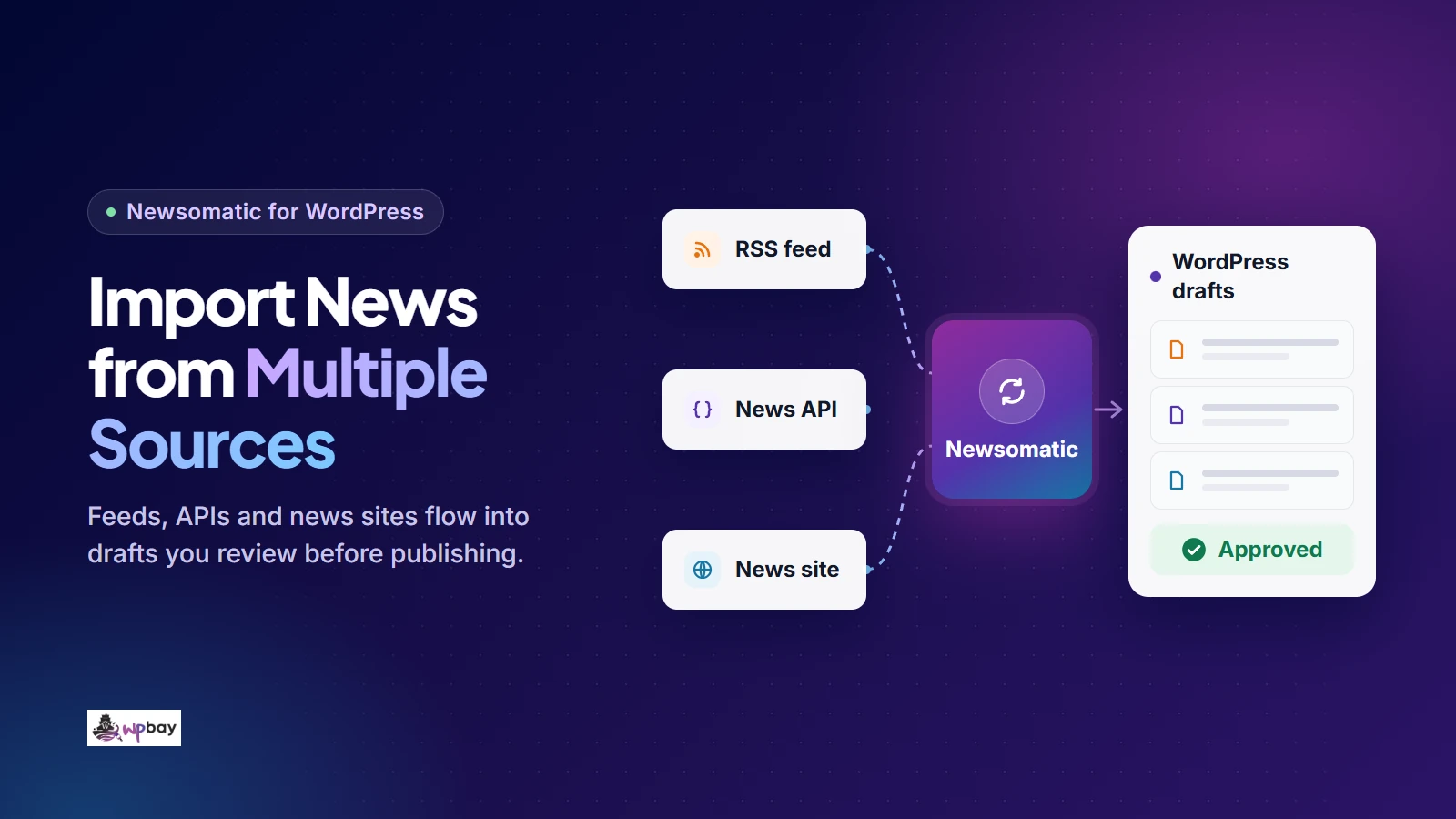
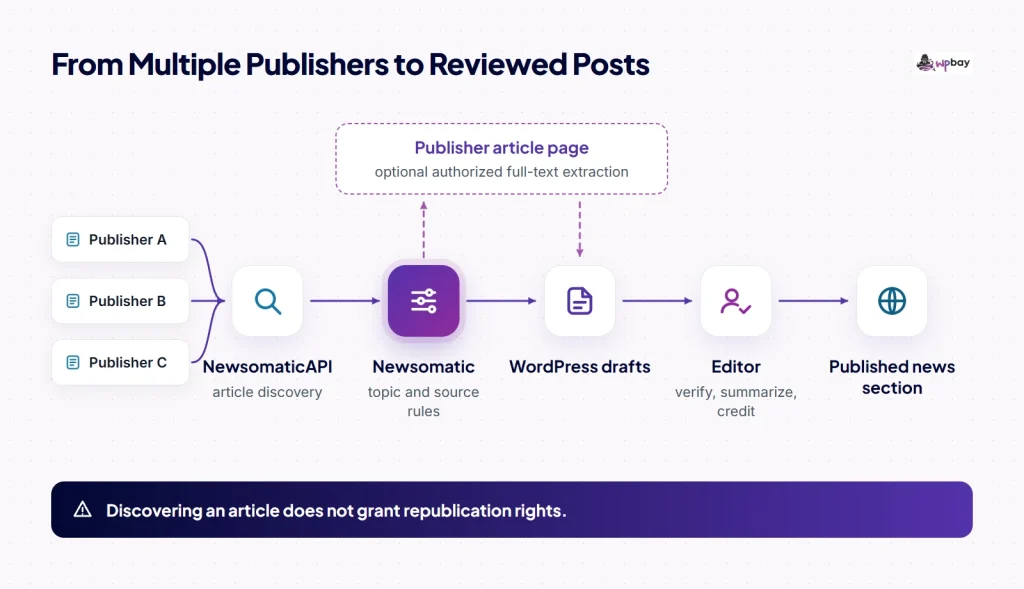
To import news from several publishers into WordPress, create one Newsomatic rule per publisher. Each rule searches NewsomaticAPI for a topic, restricts results to one domain and saves the matches as drafts, and an editor approves them before anything goes live. In this WordPress news scraper setup, Newsomatic finds articles through its own NewsomaticAPI, and your post template turns each match into a source-linked draft. The example builds a moderated battery-storage news section fed by three publishers. Disclosure: I develop Newsomatic and I’m a cofounder of WPBay, which sells it (see the About WPBay page). The rule settings below are a configuration plan built from the plugin’s documentation and support answers. They aren’t results from a tested installation, and the sample post is fictional.
How a WordPress news scraper imports from multiple sources
Newsomatic turns API results into WordPress content through importing rules. A rule is a saved search plus its output settings: what to look for, which publishers to allow, how many posts to create per run, and the status, author, category and template to use. Discovery happens through the API. Pulling the full article text from the publisher’s page is a separate, optional step, which this tutorial covers near the end. API discovery is the right choice when you want topic searches across several publishers. When publishers offer good feeds, or when they aren’t indexed at all, other methods fit better:
| Approach | How articles are found | Best fit | Main weakness |
|---|---|---|---|
| News API discovery (Newsomatic) | Searches an indexed news database by keyword, domain, language, country or category | Topic sections drawing on several publishers | Only covers indexed publishers, so coverage has to be checked one publisher at a time |
| RSS importing | Reads the feeds a publisher exposes | Publishers with complete, stable feeds | You find and maintain every feed URL, and the publisher decides what each feed contains |
| Direct HTML extraction | Requests pages and extracts the elements you specify | Sites with no API or feed coverage | Breaks when the page structure changes |
For feed-based sources, see our roundup of RSS importing options for publishers with feeds. For sites outside the API, compare WordPress scraping tools that support direct HTML extraction. You also need to decide between posts and a listing. Newsomatic can create real WordPress posts, or it can show results through a separate shortcode or block that displays news without creating a post for each item (the developer’s aggregator announcement says the listing caches results). Posts take more editorial work, but they give you room to add context, so this tutorial builds posts.
Each rule creates drafts from API matches. If you turn on full-text extraction, it runs before the draft reaches an editor.
What to prepare before installing
Pick one niche and a few candidate publishers. For the battery-storage example I’m using Energy-Storage.news (energy-storage.news), Utility Dive (utilitydive.com) and Canary Media (canarymedia.com). I haven’t confirmed that any of them is indexed, so you’ll check coverage after connecting the API. Keep a short worksheet with one row per publisher. Record the domain, the date and result of the coverage check, the topic you want from that publisher, the fields you’re allowed to reuse, your image rights and the destination category.
Keep coverage and permission in separate columns, because being indexed says nothing about whether you may republish anything. Fill in the permission column from the publisher’s terms, any agreement you have and the law that applies to you. This tutorial’s proposed output is the headline, a link, the publisher’s name and a factual summary written by your editor. You still have to check that against each source. Check your host too. As of November 14, 2026, the WPBay listing shows Newsomatic 3.3.4 and lists PHP 7.4 or newer and the PHP cURL extension as requirements. Do the setup on a staging site, since one misconfigured rule can create a pile of unwanted posts in a single run.
1. Install Newsomatic and connect the API
You need three things in this order: the installed plugin, a verified purchase code and a separately generated API key. Upload the ZIP under Plugins > Add New > Upload Plugin and activate it, following the standard WordPress procedure. Then verify your WPBay purchase code inside Newsomatic. The changelog says the plugin has required this since version 3.3.2 (released July 12, 2025). Next, follow the official onboarding and exchange the same purchase code for an API key on the NewsomaticAPI registration page. As of November 14, 2026, that key allows 500 API calls per day.
Keep the two credentials apart. In a support thread about posts not generating, the developer explains that Main Settings > NewsomaticAPI API Key takes the generated key and not the purchase code. That thread also shows the unrecognized-response error you get when the wrong value goes in. After saving the key, turn on Enable Logging for Rules and, while you test, Enable Detailed Logging for Rules. The developer’s troubleshooting note explains how the log shows items your filters skipped, which helps you tell a filter problem apart from an empty search.
The developer’s video below walks through setup, including the NewsomaticAPI connection. Its knowledge-base page labels it a 2021 walkthrough, so it predates purchase-code verification. Watch it for the general layout, but take credentials and labels from the current documentation and your installed screens. Tutorials that mention NewsAPI are older than the v3 switch to NewsomaticAPI.
2. Check that each publisher is covered
Test coverage with a domain-restricted article search before you build any rules. Here’s the request with a placeholder key:
curl "https://newsomaticapi.com/apis/news/v1/all?apikey=YOUR_API_KEY&q=%22battery%20storage%22&domains=energy-storage.news&pageSize=5"According to the API documentation, the response includes callcount (the calls your key has left today), a pagination object with total_results, and an articles array. Each article has source, author, title, description, url, urlToImage, publishedAt and content. The /all endpoint searches the last 60 days. Don’t rely on /sources for this check, because the documentation describes it as the subset of publishers that top headlines are available from.
If the response is an error, fix your credentials before anything else. A successful response with zero results means this search found no matching indexed articles. It doesn’t prove the publisher is unindexed. The publisher may word things differently, and the developer has acknowledged past indexing problems that hid articles from supported sources. Repeat the request with only domains and no q. Then search for a distinctive word from a headline the publisher ran in the past few weeks. If both come back empty, move that publisher to an RSS or scraper workflow and write down the date, because indexing changes. Every check uses one request from your allowance. A key in a URL also ends up in shell history and server logs, so clear your history afterward. RapidAPI credentials go in headers instead.
3. Create your first publisher-restricted rule
The developer’s support answers describe the route from a tested query to a rule. Open the Custom News to Posts menu and add a new importing rule. Set Article Source to Any, then open the rule’s Settings. Put your query in Search Query String (query instructions) and your domain in Include Only These Domains in Results, which takes a comma-separated list (domain instructions). Those answers date from 2019 onward, and the changelog also records domain restrictions. Even so, check each label against your installed 3.3.4 screens before you rely on it.
Watch for a naming trap. The full-text extraction settings also have a field called Search Query String, and that one targets an HTML element on the publisher’s page. Your news search belongs in the rule’s main search field, not the extraction field. If you can’t find a domain field in your version, update the plugin first. If it’s still missing, contact support with your version number before giving up on a publisher that passed the API check.
Here’s the complete first rule for the example:
- Rule type: Custom News to Posts, with Article Source set to Any.
- Search query:
"battery storage". - Domain filter:
energy-storage.news. - Post Status: draft (or pending, if your team reviews from that queue).
- Max Posts At A Time: 3.
- Category: Storage News, using the rule’s category option.
- Template: the one in the next step, entered in Generated Post Title and Generated Post Content.
- Post Author: a local account such as “News Desk”.
- Save, then use the rule’s run action to import once manually.
The documentation supports quoted phrases, a + prefix for required words and a - prefix for excluded words. It doesn’t document AND, OR or parentheses, so don’t rely on them. To confirm that prefixes reach the API intact, run the rule once and read the detailed log. Required Words List and Banned Words List sit in Main Settings, according to the help documentation, so they apply to every rule. Ban only words that are wrong for the whole site there, such as “smartphone” for a grid-storage section.
The date cutoff, Skip Posts Older Than a Selected Date, is also global. While you test, set it to a recent past date, such as two weeks ago, so that existing articles can still import. A future cutoff excludes every story already published and produces exactly the empty results this tutorial tries to diagnose. Just before launch, move it to the day before you go live so the first scheduled runs don’t fill the queue with older stories. Read every test draft. The title should match the article, the link should open the publisher’s page and nothing should be off-topic.
4. Build a source-linked post template
Put %%item_title%% in Generated Post Title so the headline stays accurate. The documented placeholders also include %%item_description%%, %%item_url%% and %%author%% (the API’s author name for the article). Here’s a minimal content template for a single-publisher rule:
<p>%%item_description%%</p>
<p><strong>Editor's note:</strong> [REMOVE BEFORE APPROVAL: explain why this matters to our readers.]</p>
<p>Originally reported by %%author%% at Energy-Storage.news. <a href="%%item_url%%" rel="noopener">Read the full article at the source</a>.</p>
WordPress will publish the bracketed reminder if nobody removes it, so put “no brackets left” on your approval checklist. Only use %%item_description%% where you’re allowed to reuse it. Otherwise delete that line and have the reviewer write a two- or three-sentence factual summary. Compare %%author%% with the byline on the publisher’s page and fix the credit when they differ. If the source names no individual, credit the publisher alone. The Post Author is the WordPress account that created the draft, not the reporter, and the NewsomaticAPI terms prohibit misrepresenting sources or deleting author attributions.
If you don’t have image rights, leave Automatically Get Featured Image for Generated Post off. Set Default Featured Image if No Image Available for Item to an image you own and turn on Strip Images From Content. A reviewed draft for a fictional publisher might read like this:
Example Grid Co. files plans for 200 MW battery project at retiring gas plant
Example Grid Co. has applied for county permits for a 200-megawatt, four-hour battery system on the site of a gas plant due to close in 2027, according to Example Storage Wire. Editor’s note: if the county and utility accept reuse of the plant’s grid connection, other developers may skip a new interconnection queue.
Originally reported by Jane Example at Example Storage Wire. Read the full article at the source.
5. Add the second and third publishers
Once the first rule produces clean drafts, add the other publishers as separate rules. Separate rules let each publisher have its own query, category, batch size and schedule, and when junk shows up, the log tells you which rule produced it. Here’s a hypothetical split:
| Rule | Domain (pending coverage check) | Query | Category | Max posts per run | Schedule (hours) |
|---|---|---|---|---|---|
| 1 | energy-storage.news | "battery storage" | Storage News | 3 | 6 |
| 2 | utilitydive.com | "battery storage" +tariff | Storage Policy | 2 | 12 |
| 3 | canarymedia.com | "battery storage" | Storage News | 2 | 12 |
Rule 2 is deliberately narrow. If you also want regulation or auction stories, add another rule rather than loosening this one. I haven’t set a country filter, because each rule already targets one publisher. At the API level, domains accepts a comma-separated list, so one rule could cover several publishers. You’d lose per-publisher categories and caps, though. Test each new rule on its own, with a manual run and draft output, before you schedule all three.
6. Test repeated imports and overlapping coverage
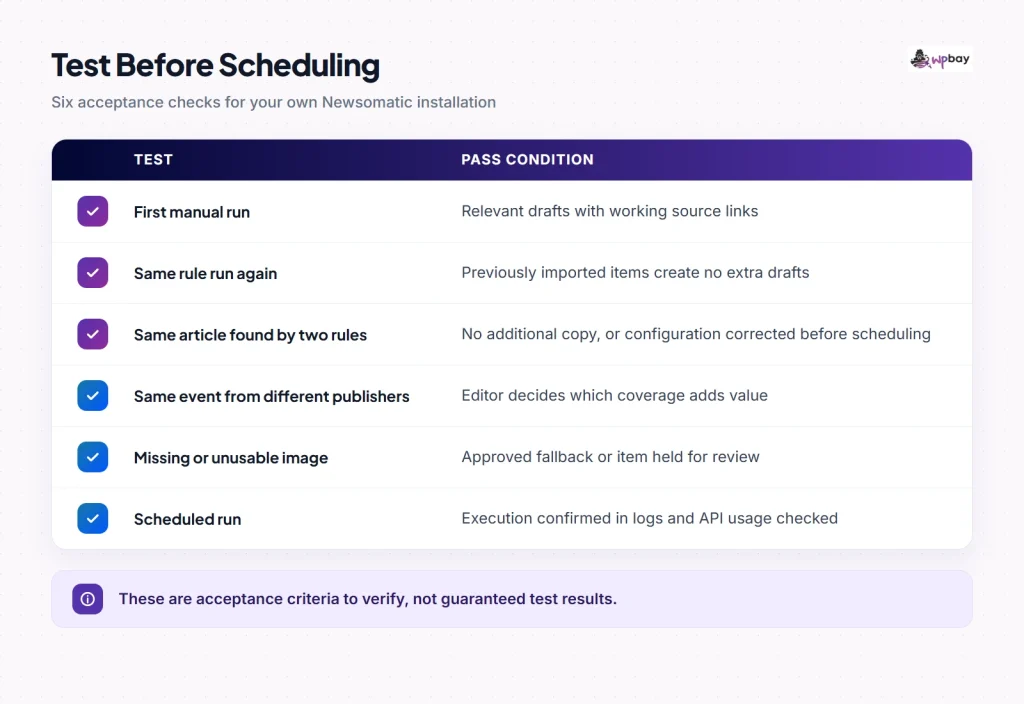
Leave Do Not Check For Duplicate Posts in Main Settings unchecked, because selecting it turns duplicate checking off. The help documentation doesn’t say what the check matches on or whether it works across rules, so keep a record instead of counting drafts. For each imported item, log the source URL, the rule ID, the WordPress post ID and the run time, then run the same rule again. Draft counts alone mislead you, because with a small Max Posts At A Time, the second run can correctly import items the first run never reached. The test passes when no source URL already in your log gets a second post ID.
Next, import an article that matches two rules and see whether you get one draft or two. Try a URL that differs only by tracking parameters or a trailing slash. Trash one imported draft and run again, then permanently delete one and run again, noting whether each comes back. If a publisher updates a story you imported, don’t assume your draft will change too. When you’re done, use the post IDs in your log to remove only the test imports, and keep the log so later runs can show whether trashed items return.
An article imported twice is a technical duplicate, and your settings should stop it. Three publishers reporting the same battery-plant fire is a different problem, and it needs an editor to decide whether to approve one draft or write a single post that links to all three. Confirm these results before enabling scheduled imports.
For feed-specific identity problems such as GUIDs and changed URLs, see how to prevent duplicate posts in an RSS import.
7. Schedule within your request allowance and review capacity
API requests, articles per request, imported posts and the per-run cap are four different numbers. As of November 14, 2026, the NewsomaticAPI pricing page gives purchase-code holders 500 requests per day and points to RapidAPI subscriptions for more. The developer’s cron guidance treats Schedule as an interval in hours, with the post maximum as a separate per-run limit.
Base your caps on review capacity. Suppose an editor can review 30 drafts a day and you keep 10 in reserve. The table’s schedule then allows at most 4 × 3 + 2 × 2 + 2 × 2 = 20 drafts a day, from 8 runs. Running all three rules hourly at the same caps could produce up to 168 drafts a day from 72 runs. Decide on a pause threshold now. In this example, if more than 30 drafts sit unreviewed, uncheck Active on all three rules. The documentation says this deactivates a rule without deleting it.
Requests per run are a guess until you measure them. The developer describes callcount as the requests your key has left for the current day, and says an exhausted key stops working until the day passes. The linked NewsomaticAPI documentation doesn’t say when the daily count resets or in which timezone, so take your measurement in one short window while nothing else uses the key. In a hypothetical test, a diagnostic request shows 499 remaining. You run one rule manually three times, and a second diagnostic shows 492. That’s 7 requests, minus 1 for the second diagnostic, so 6 across three runs, or 2 per run. At that rate, the 8 scheduled runs would use about 16 requests a day, before manual tests and other usage. If the second value comes out higher than the first, the counter reset during the test and you need to repeat it.
Newsomatic schedules through WP-Cron, which, as the WordPress Plugin Handbook explains, checks for due tasks on page loads. On a quiet site, or one where full-page caching serves pages without running PHP, imports can slip well past their interval. The developer recommends a host-configured server cron in that case. Following the WordPress system-scheduler instructions, have your host set up the replacement trigger before you disable page-load spawning. Then confirm in the rule log that a scheduled run actually happened. For intervals under an hour, CodeRevolution sells a separate Schedule Minute/Hour Switcher, but shorter intervals burn through requests faster.
When you need full articles instead of summaries
Full text is a separate operation from discovery. The plugin requests the publisher’s page and tries to extract the article body. The help documentation lists Try to Get Full Article Content in a rule’s advanced settings, and the extracted text goes into %%item_content%%. The template above uses only the description, so nothing changes in your posts until you add %%item_content%% to Generated Post Content. To target a specific page element, use Full Content Query Type and the extraction Search Query String. The changelog also records a visual content selector added in 3.1.1.
Pages that render their text with JavaScript need a browser. HeadlessBrowserAPI runs one remotely, but it requires its own API key and subscription. The PhantomJS and Puppeteer integrations need those browsers installed on your server, so ask your host whether that’s possible within your memory and process limits. Test each publisher separately and check the extracted text for missing paragraphs and cookie notices. Don’t try to get around paywalls or logins, and enable full text only where you have permission to republish the whole article.
Troubleshooting missing, irrelevant or delayed imports
Read the rule log line in full before you change anything. An authentication problem shows up as an error. A successful search with no matches reports that no posts were found. The wording varies between versions.
| Symptom | Check, in order |
|---|---|
| No results, error in the log | Purchase code verified in the plugin; generated API key in Main Settings; remaining callcount |
| No results, search reported as empty | Domain-only and known-headline checks; 60-day window; Skip Posts Older Than a Selected Date not set in the future; global required words |
| Irrelevant posts | Phrase query rather than a single word; global banned words; prefixes reaching the API in the detailed log |
| Manual runs work, scheduled runs don’t | Rule marked Active; WP-Cron firing; full-page caching; server cron set up by your host |
| Full text missing | %%item_content%% in the template; extraction settings; changed page structure; restricted access |
| Missing images | urlToImage populated; your image rights; default-image setting; Skip Posts That Do Not Have Images |
WPBay buyers can open a request from the product’s Get Support link under My Downloads. Include the rule ID, your plugin version and the relevant log lines, with the API key, the purchase code and any site credentials removed.
Publishing imported news responsibly
API access and a source link don’t give you rights to a publisher’s text, and photos are often licensed separately again. The NewsomaticAPI terms say that protected third-party content needs a license or another legal basis. No excerpt length is automatically safe, either. The U.S. Copyright Office says fair use is decided case by case, with no fixed percentage or word count (that’s U.S. guidance only). Google’s spam policies treat scaled, low-value publishing meant to manipulate rankings as spam. Their examples include scraped content run through synonym replacement or translation, and republication that adds nothing for users. Spinning, translating or importing more often won’t fix that. What helps a battery-storage reader is something like an explanation of how a reported tariff change affects project costs.
Frequently asked questions
Can I import from any news website?
Only from publishers the API returns. A single empty search doesn’t prove a site is missing, so run the checks in step 2 first. For sites that still fail, use an RSS importer or a scraper. Coverage doesn’t authorize republication.
Does Newsomatic use NewsAPI or NewsomaticAPI?
Current versions use NewsomaticAPI, with a key generated from your purchase code, and they also verify the purchase code inside the plugin. Ignore the credential steps in tutorials that mention NewsAPI.
Do 500 API calls mean 500 posts?
No. The allowance counts requests, while your caps and the duplicate check decide how many articles become posts. One run can use more than one request, so measure it as described in step 7.
Can Newsomatic combine different sources into one article?
This workflow creates one source-linked draft per article. To combine reports, an editor writes the post, explains where the reports agree or differ, and links each source.
Should I publish everything automatically?
Not during setup. Keep Post Status set to draft and leave automatic publishing disabled until your duplicate and overlap tests pass. Even after that, auto-publishing only makes sense for sources where you hold full reuse rights.
Before you turn on the first schedule, write the pause threshold (30 unreviewed drafts in this example) at the top of your review queue, so the person approving drafts knows when to deactivate the rules.
Last reviewed: November 14, 2026. Prices, request allowances and terms may change.