



RockHeron – Lead Source Attribution and UTM Campaign Tracking for Forms and WooCommerce

 Recently Updated
Well Documented
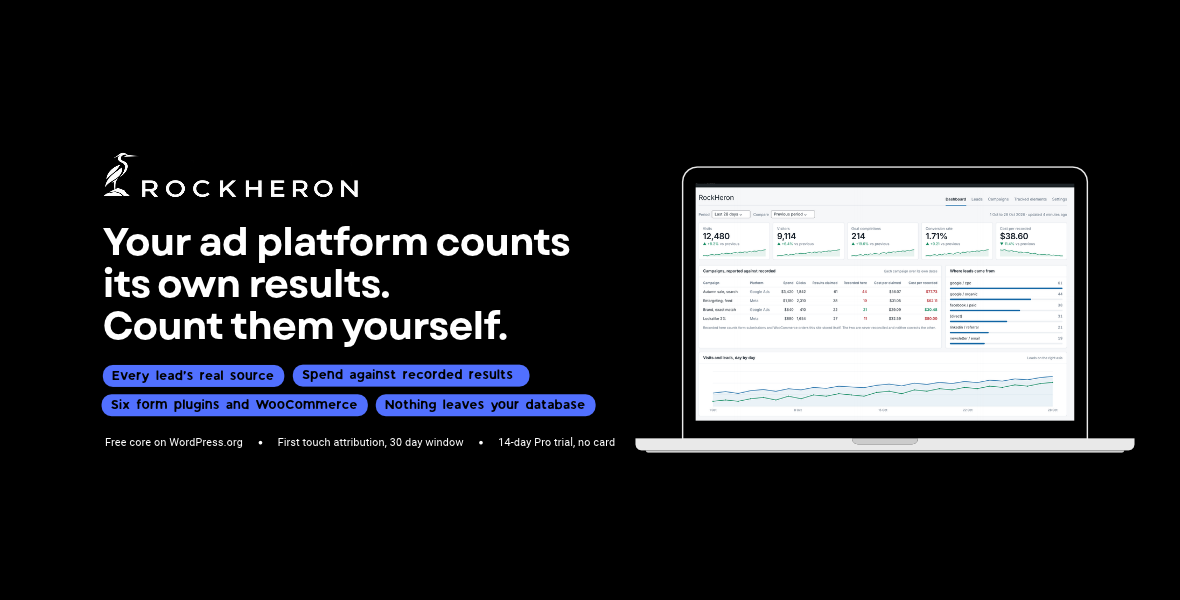
Your ad platform counts its own results. RockHeron counts them on your site, and puts the two numbers next to each other. It records which campaign introduced every form submission and every WooCommerce order, in your own database, on your own hosting. Then it shows what the platform claimed beside what your site actually recorded, so you can see the gap rather than take a dashboard’s word for it. This edition is the complete plugin. There is no license key to enter, no free tier and no paid tier. Every feature below is included, and nothing is locked.
Lead source attribution
- First touch attribution: the campaign that introduced a visitor is remembered for thirty days, and the first one keeps the credit
- Source, medium, campaign, term and content, plus which parameter identified them
- Six form plugins: Contact Form 7, WPForms, Gravity Forms, Elementor Forms, Fluent Forms and WooCommerce
- WooCommerce orders, read from WooCommerce’s own order attribution rather than collecting a second copy
- A leads table showing every submission and the campaign behind it
- Results broken down by source, medium and campaign
What advertising actually cost
- Enter what each campaign spent, by hand or from a CSV the platform exported, and the dashboard puts the platform’s claimed results beside what your site recorded over the campaign’s own dates
- Cost per claimed result and cost per recorded result, side by side, because they are rarely the same number
- Campaigns that ran over the same days are reported as one piece of spending, because nothing can tell which of two simultaneous campaigns a result came from
What else it records on your site
- Visits, visitors and page views, with the previous period next to every number
- Goals: calls, emails, WhatsApp clicks, form sends, add to cart, or any element you name
- Clicks on any element you choose, by CSS selector, on all pages or only the ones you pick
- Elements seen on screen, video plays, scroll depth, outbound clicks, downloads, site searches
- Where visits come from: search, AI assistants, social, referral, campaigns, direct
- Devices, browsers, operating systems, countries, landing pages, top pages
- A live count of visitors in the last thirty minutes
Google data next to it
- Google Site Kit is used automatically when it is installed, so you do not connect Google twice
- No Site Kit? Connect Analytics 4 directly with your own Google Cloud OAuth client
- Search Console clicks, impressions, CTR and average position when Site Kit is present
- Import past months from Google Analytics so the dashboard is not empty on day one
- Import sixteen months of Search Console history with one button when Site Kit is connected, or from the export file when it is not
- Export any period as CSV or PDF, with the caveats carried into the file
For agencies
- Put your own name and logo on a report, and a line saying who prepared it. There is no RockHeron branding on a report to remove: it already carries the client’s own site name and nothing of ours
- Send the report by email every Monday or on the first of the month, to as many addresses as you like. It carries the figures in the message and attaches the full report, which opens in any browser and prints to PDF
- Read every site you look after in one table. Each site hands out its own key, so adding a site to the hub does not give that site anything back, and a site the hub cannot reach is shown as an error rather than as a zero
Privacy
- No cookies are set for analytics, and no IP address is ever stored
- The one cookie RockHeron does set is first party and holds campaign details only: no name, no email address, no telephone number, nothing anybody typed into your form, and no advertising click identifier
- Visitors are counted with a one way hash that changes every day
- Do Not Track and Global Privacy Control are respected
- Works with CookiePile, the WP Consent API, or any consent cookie you name
- Raw events are cleared on your own retention schedule while daily totals keep the history
Languages
Ships with a full Hebrew translation and a right to left layout. Any further language can be added from the included POT file.What this edition contacts
Nothing, on its own. It carries no licensing, update or analytics code of any kind. There is no account to create, nothing phones home, and no script or stylesheet is loaded from a CDN. Everything it ships runs from your own server. It makes two kinds of connection, and only ones you set up yourself. Reading your own reports, from your server. If you connect Google Analytics 4 or Google Ads with your own Google Cloud OAuth client, RockHeron reads your figures in. Nothing it recorded about your visitors or your leads goes out that way: no visit, no lead, no form entry, no email address, no name, no IP address. The Google tag, in your visitors’ browsers, and it does send visitor data to Google. This is off by default. Switch it on and enter a measurement ID and every page your visitors load reports to Google on their behalf: the page and its title, the referring page, their IP address, device, browser, operating system and screen size, their approximate location, and whatever Google’s own cookies already identify. That is what the Google tag always sends, and RockHeron neither chooses nor limits it. It is skipped when Site Kit or another plugin already tags the same property, and it is not loaded until that visitor has allowed it, with consent and Do Not Track evaluated in their own browser so a cached page cannot serve one visitor’s answer to the next. Switching it on is a decision about your visitors’ data, and your privacy policy should say so.Installing
- Download the zip from your WPBay account.
- In WordPress open Plugins, Add New, Upload Plugin, and choose the zip.
- Activate it. There is no license key to enter and nothing to connect.
- Open RockHeron. Visits start appearing within a minute.
- Optional: open Settings to connect Google, or install Site Kit and it is picked up on its own.
Changelog:
1.1.2
- A fix for paid sites running PHP 7.4, where the PDF could not be produced at all. Nothing else changed.
- On PHP 7.4, making a PDF failed outright. The PDF renderer bundled since 1.1.0 brought a set of supporting libraries with it, and two of them, psr/log and myclabs/deep-copy, were the releases that require PHP 8.0. They use a kind of type declaration PHP 7.4 cannot read at all, so on a 7.4 server the attempt stopped before it began. Both are now the versions that support 7.4, which is the version this plugin has always said it needs. Downloading a report, downloading the leads, and the scheduled report attachment all work on 7.4 again.
- Sites on PHP 8.0 or newer were never affected, and nothing about the documents themselves has changed.
- The build now refuses to package a bundled library whose own requirements exclude the PHP version this plugin declares, or whose code uses a signature that version cannot read, and it checks the plugin header and the readme still agree about which version that is.
1.1.1
- Documentation only. No code changed in this release, so nothing about what your site records, or what it reports, is different.
- The bundled credits now cover the PDF renderer. This edition has carried mPDF 8.3.2, setasign/fpdi 2.6.9, five further MIT packages and four DejaVu Sans font faces since 1.1.0, and the credits still said nothing else was bundled. Every one of them is now named with its version, its license and where it sits inside the plugin.
- The DejaVu license notice, which until now existed only inside the font files themselves, is written out beside them as a file you can read.
- The PDF is documented: where a PDF comes from, what your server needs in order to make one, what is capped and the measurements behind those caps, and exactly what happens when a PDF cannot be produced on your server, which is that you are told so and the printable page is still there.
1.1.0
* A campaign could still be attached to a form submission after the visitor had withdrawn consent. The browser stops measuring the moment consent is withdrawn, which was working, but the cookie it had already written keeps being sent with every later request, and the plugin was still reading it when a form was submitted. So somebody who accepted your banner, was tagged by a campaign, then changed their mind, still had that campaign copied onto their next inquiry. Do Not Track and Global Privacy Control had the same gap from the other side: they stopped the cookie being written and never stopped an existing one being read. The same was true of the source WooCommerce records for an order, which is a separate route to the same information.
* Consent and Do Not Track are now checked before any campaign detail is read, on every route a visitor's own request can take. The submission is still recorded, with no campaign on it, and appears as Not known, so your totals still match your form plugin's. Importing past orders from the Settings screen is unaffected: that is you asking, over orders WooCommerce already attributed, and it is not a visitor request.
* Exports now carry everything the site knows, not the part that happened to be on screen. The file used to be built from the cards you had switched on, so a card you had hidden could not be exported at all even though the figures were sitting in the same table. Hiding a card is a decision about a screen, not about what the site knows.
* Your results are in the export. The plugin is called lead source attribution and the one thing you could not get out of it was the leads. Every result in the period is now in the file, with its campaign, its channel, where it landed, what it was worth and what the source was worked out from.
* An Excel export, next to the CSV. Figures arrive as figures, so you can sort and total them, and a campaign named =1+1 arrives as text rather than as something your spreadsheet tries to calculate.
* The Leads screen has its own CSV and Excel, separate from the dashboard's. It carries that screen and nothing else: the headline figures, the four ways of cutting them, and the results themselves. The file is named after the screen it came from, so the two do not land in your downloads folder as copies of each other.
* All three formats are built from one description of the report, so a figure you read on screen, a figure in the spreadsheet and a figure in the PDF cannot come to disagree.
* The report is now a real PDF rather than a printable page. It is laid out for the page: a running footer with page numbers, a table heading that repeats when a table runs over a break and says what it is, the results on a landscape page of their own, and the day by day figures drawn as a line. Scheduled reports arrive with that PDF attached instead of a file to open and print.
* The PDF shows the newest 500 results and the 100 largest rows of each breakdown, and says so under each table. It is a document to read and hand over, and a report of several thousand rows is hundreds of pages that most servers will not finish building. The CSV and the Excel file are not limited and carry everything.
* Hebrew sites get a right to left report, with page paths, campaign tags and search terms printed the way round they were recorded. A value like /landing or =1+1 sitting in a Hebrew row is laid out as what it is rather than being reordered into something else.
* Spanish, French, German and Portuguese are included alongside Hebrew. Only the Hebrew has been read by a native speaker; the other four are machine translation against the English, checked for placeholders and for the terms this plugin reuses, and offered on that basis.
* The agency panel answered in English on a translated site. Saving white label settings, sending a test report and adding or removing a site in the rollup all replied in English whatever language the rest of the screen was in. Those are translated now.
1.0.0
* Agency rollups could report a period that was not asked for, and show it as though it had been. A rollup asks each site on the list for its figures and totals what comes back. It asked by range name, not by dates, and a custom period has no name to send: the other site heard nothing, answered with its own last 28 days, and those figures were totaled and displayed under the chosen dates. Two sites in different timezones had the same problem on a named range, because each resolved it against its own clock. Nothing on the card said the period was different, because figures carry no dates once they are on it, and the wrong answer was cached for fifteen minutes under the key for the right one. The figures looked entirely normal, which is the whole difficulty: an agency could send a client a report covering dates it did not cover.
* The dates are now sent as dates. The receiving site uses the ones it is given rather than working its own out, refuses anything that is not a pair of real dates in the right order, and returns the period it answered for. The asking site checks that what came back covers exactly what it asked for, and if it does not, that site is left out of the total and named, with both periods shown, rather than quietly folded in. The check happens before the cache, so a wrong answer is never stored under the right key.
* Exporting while looking at a custom period could give you a different period. The dashboard and the API can both be asked for any pair of dates, but the CSV and the printable report could only be asked for one of the named periods, and an unrecognized period was answered with the last 28 days rather than with a complaint. So a custom period could be exported as 28 days, named with the 28 day dates, and sent to somebody. Both now carry the dates, and a period neither recognizes is refused instead of being quietly swapped. Nobody could reach this from the dashboard, which offers only the named periods, and it is fixed before anybody could.
* Every list is now stored complete. Lists like top pages and referrers keep their busiest rows for each day by name, and until now everything past that point was simply dropped. So a page that sat just below the line every day of a month was counted nowhere, and nothing said so: the figures were right at the top of the list and quietly short further down. Each day now also stores one "everything else" figure holding the rest, so the stored rows add up to the whole day whatever the cap. The lists themselves look the same, because that figure is never ranked among the named rows.
* How many rows each list keeps is now yours to set, in Settings, Stored data, instead of being fixed in the code. It was 50 for every list, which is more than device or country can ever produce and too few for the pages of a real site. The defaults are now chosen per list, 200 a day for pages and landing paths and 100 for referrers and campaigns, and one field sets a single number for all of them. Bear in mind that each extra row is kept for good, since the daily totals outlive the raw events behind them.
0.9.9
* The protection added in 0.9.8 could be undone by the first clearing of old events after updating, and the way to trigger it was to lengthen retention. 0.9.8 learned how far back raw data is still complete and refused to rebuild past it, writing that boundary down whenever events were cleared. On a site updating from an earlier version there was nothing written down yet, so the boundary had to be worked out from the data. It was, correctly, when rebuilding. It was not when clearing: that step recorded the new cutoff on its own. Clear at 90 days on the old version, update, raise retention to 180 days and clear again, and the stored boundary landed 90 days behind the truth. Everything in that gap had already been cleared by the earlier run, so the next rebuild emptied all of it, which is the fault 0.9.8 was released to stop.
* Clearing events now works out the boundary already in force before it deletes anything, and keeps whichever is later, that or the new cutoff. It is resolved first because the surviving raw rows are the only thing that knows where the last clearing stopped, and deleting them takes that knowledge with it. It also writes a worked-out boundary down the first time it sees one, so the site stops having to infer it. The boundary can still only ever move forward.
* Anything already worked out earlier in the same request is discarded before clearing, rather than reused. A boundary worked out from rows that have since gone reads as "nothing to protect", which is the most expensive thing it could be wrong about.
0.9.8
* Rebuilding the daily totals could destroy the history it was meant to rebuild. The daily table is what keeps a site's history after raw events pass the retention window and are cleared: that is the whole point of it. But the rebuild worked by reading the raw events for a date, writing what it found, and clearing whatever that date no longer produced. Run it over a date whose raw events had already been cleared and it found nothing, so it wrote zeros over the real figures and deleted the rest. The rebuild runs from the Settings screen and from the REST maintenance tool, and the second is reachable by anything automating the site, so it could be set off with nobody watching. There was no warning and no way back: the rows it overwrote were the only copy left.
* RockHeron now knows how far back its raw data is still complete, and refuses to rebuild past it. The boundary is written down whenever events are cleared, and for a site that cleared them under an earlier version it is worked out from the oldest raw row still present. The check sits in the one place every rebuild goes through, so the Settings screen, the REST tool, the hourly task and the dashboard's own refresh are all covered by it. Dates behind the boundary are left exactly as they are.
* The rebuild now says what it did not do. It reports how many days it rebuilt, how many earlier days it left alone, and the date raw data is complete from, rather than reporting a number that quietly means something else. Clearing events past retention says the same thing: from that point those earlier days cannot be rebuilt, because there is nothing left to rebuild them from.
0.9.7
* Accepting a consent banner started the measurement straight away on some sites and not on others, and the difference was invisible. The shared consent module listened for the events CookiePile and the WP Consent API announce an answer with. The custom consent cookie option announces nothing: the visitor accepts, some other plugin writes its cookie, and nothing tells us. So on those sites the page view the visitor had just consented to was never recorded, and with it went the campaign that introduced them, which on a single page visit is the entire record of that lead. The module now also watches the cookie itself for the two cookie based modes, which is the only way to see a cookie appear. It is a string comparison once a second, it does nothing at all while the tab is in the background, and it stops the moment the answer becomes yes. The other two modes start no timer, because they have an event.
* The browser and the server disagreed about consent values. The server compared the cookie's value without regard to case and the browser compared it exactly, so a consent plugin writing YES where the setting said yes was accepted by one and refused by the other: the server would have stored a visit the browser never sent. Both are case insensitive now, which is what the server always did.
* The agency rollup sent its shared key in the address. Each site on the list is reached with a key that proves the hub is allowed to read it, and that key was a query parameter, which means it was written into the other site's access log, into any proxy in front of it, into a Referer header, and into the browser history of anybody who pasted the address to test it. None of those are places people think to go and clean. The key now travels in a request header, where none of them record it, and the receiving site accepts it only from the header: sending it the old way no longer works, even with the right key. Connections must also be HTTPS now. Adding a site with an http:// address is refused with an explanation, and a site saved before this release that still has one is refused at fetch time rather than quietly sending the key in the open.
0.9.6
* The admin menu sat above everything in WordPress. RockHeron registered its top level item at position 3, which is directly under Dashboard and above Posts, so it came ahead of every core screen and every other plugin. WordPress's admin order is something people navigate by habit and a plugin that inserts itself at the top of it is taking attention rather than earning it. It now sits at 100, below Settings. The screens and their addresses are unchanged, so existing bookmarks still work.
* Translations are loaded only where there is a catalog to load. The plugin called load_plugin_textdomain() on every request, at plugin load time, which is how a plugin triggers WordPress's notice about loading a text domain too early. The call is now made on init, and only when a catalog for the current locale is actually sat in the plugin, which is the case for this build. Hebrew is unaffected.
0.9.5
The built in tracker started measuring before the visitor had answered the consent banner. Consent was checked on the server, so no visit was stored without it, but the script itself ran on page load regardless: it wrote a session id into the browser's session storage and sent the page view, and then every click, to the site's own endpoint, where each one was discarded. The part a site owner could see was what happened next. Somebody who accepted afterwards was not measured at all, because their page view had already been sent and thrown away and nothing sent it again. The tracker now asks the shared consent module before it stores or sends anything, and WordPress loads that module first because the tracker declares it as a dependency. It is also given the whole consent configuration rather than the mode alone, so the cookie a cookie mode is pointed at can actually be read in the browser instead of the mode denying everything by default. On acceptance the tracker starts and records the page the visitor is standing on, exactly once, with time on page counted from that moment rather than from the banner. Consent is asked again before every send, so withdrawing it part way through a visit stops the measurement there. With no module to ask, nothing is measured. Do Not Track and Global Privacy Control are now read in the one shared place instead of a second copy in the tracker that could drift away from it. The server side checks are unchanged.
0.9.4
- A configuration guide is bundled with the plugin. The readme told you how to install it and then stopped, so anything beyond the first five minutes meant guessing or asking. There is now a Configuration guide section covering the screens and what each is for, what Google is and is not used for and exactly which credentials a direct connection needs, the campaign CSV columns, how consent and Do Not Track are evaluated and what happens when a consent plugin disappears, what is stored and the three retention settings that control it, how to delete everything with and without uninstalling, the common reasons a dashboard looks empty, and where to get support.
0.9.3
- A visitor could put a formula in your spreadsheet. A search term, a campaign name, a page title and a referrer are all written by somebody else, and a CSV cell that opens with =, +, - or @ is treated as a formula by Excel, LibreOffice and Sheets. Somebody searching your site for =1+1 had that evaluated when you opened the export, and the same opening is how a cell reaches out to a URL. Every cell is now made inert at the one point rows are written. Numbers are still numbers, so a negative figure stays a figure and the totals still add up.
- Deactivating left a scheduled job armed. Deactivation cleared two cron events by name, and any other event this plugin had registered stayed in WordPress's schedule and went on firing against a plugin that was no longer running. Deactivation now clears every event this plugin owns, found by name prefix rather than from a list, which is the same correction the uninstaller had. Your settings and your recorded data are untouched, so switching the plugin back on restores the schedule.
0.9.2
- Contact Form 7 with Flamingo: the lead could be linked to somebody else's message, and a second lead could be dropped. 0.9.1 found Flamingo's record by reading back the newest one and accepting it if it was written in the last minute. That is guessing by recency: two people submitting within the same minute are handed the same record, which both mislinks the lead and collides on the key that keeps one submission from being written twice, so the second lead is refused. It reintroduced, in a narrower window, the bug 0.9.1 was written to fix. The link is gone and every submission gets its own identifier for the life of its request. Linking to Flamingo properly means hooking Flamingo's own save and matching the record to the submission, not guessing, and that is not written yet. A lead with no link beats a lead pointing at a stranger's message.
- Chart.js is credited. The charts are drawn with Chart.js 4.6.1, MIT licensed, bundled in the plugin, and the readme said the charts were our own code and used no third party library. A new Third party credits section names it, its license and its source.
- Screens called themselves Analytics. The menu has been called RockHeron since 0.8.0, but the dashboard's own heading, the settings heading and the admin bar link were never carried over, so the sidebar said one thing and the page it opened said another. The readme repeated the old name too. All of them say RockHeron now.
- The dashboard sat blank while it loaded. The headline figures, the cards and the first run panel are all drawn in the browser, and until they arrived the page reserved their height and showed nothing in it, which on a slow host reads as a broken screen rather than a loading one. Each of those areas now shows the shape of what is coming.
- The changelog had two entries numbered 0.7.0. The fork note has been folded into the real one.
- Upgrade notices for 0.9.1 and 0.9.2.
0.9.1
- Contact Form 7 leads were being lost. Every submission of one form was recorded under the same identifier, CF7's
unit_tag, which names the form's place on the page rather than the submission. Leads carry a unique key so that a form plugin firing its hook twice cannot write the lead twice, and that key was refusing the second visitor and everybody after them. Each submission now gets its own identifier: Flamingo's record id where Flamingo is storing the entry, so the lead links to something real, and otherwise an identifier held for the rest of that one request, which keeps the double-fire protection without treating two people as one. - WooCommerce block checkout orders were never attributed. Only the classic checkout was listened for, and the block checkout goes through the Store API and fires its own hook and nothing else. It is the default on a new store, so on a new store none of the orders were attributed. Both checkouts now land in the same recording path, and the order id is still the key, so an order cannot be recorded twice.
- The Google tag was gated on the server. Whether a visitor had consented was decided in PHP, and the answer was then written into the cached page and served to the next visitor. On a cached site, warming the cache with somebody who consented served Google's tag to everybody who refused, and warming it with a refusal stopped the tag loading for anybody. Consent and Do Not Track are now evaluated in the visitor's own browser, which is where they were already evaluated for the attribution cookie, and the tag also loads for somebody who accepts after the page has loaded instead of making them reload.
- One consent evaluator instead of three. The rules existed in PHP, in the attribution script and, by implication, in the Google tag gating. They are in one file that both scripts load.
- The external services section promised that nothing about your visitors is ever sent to Google, which was true of the four reporting connections and not true of the Google tag, which sends Google exactly what the Google tag always sends. The two are now described separately, what the tag sends is listed, the consent requirement is stated, and the settings screen says it too at the point you switch it on.
0.9.0
- Lead sources. When somebody arrives from a tagged link, an advert or a newsletter, RockHeron keeps the campaign in one first-party cookie for thirty days, and if that visitor later submits a form or places an order the campaign is recorded next to a reference to their submission. First touch, so the campaign that introduced somebody keeps the credit rather than whatever they last clicked.
- What is recorded is the campaign and a pointer to the form plugin's own entry. No name, no email address, no telephone number, and no advertising click identifier.
- A click identifier fills in a source the advertiser forgot to tag, and the screen says it was inferred rather than declared. A Google click identifier only ever rides on a click on a Google advert, so it reads as paid. A Facebook one is added to any outbound link including an ordinary shared post, so it reads as a referral.
- A result nobody could attribute is recorded as unknown rather than dropped, so the totals cannot quietly disagree with the form plugin's own count.
- Consent and Do Not Track are evaluated in the browser rather than on the server, because a consent decision made in PHP is written into the page cache and then served to the next visitor, whose answer may be the opposite.
- Six form plugins are read: Contact Form 7, WPForms, Gravity Forms, Elementor Forms, Fluent Forms and WooCommerce. Read, never written to.
- A Leads screen showing results by source, medium, campaign and channel, with every count stating what it covers.
- WooCommerce orders use the same first touch reading as forms. WooCommerce's own order attribution is read only as a fallback for a shopper who arrived before this was switched on, and the row says so rather than passing last click off as first touch.
- The screen lists which supported form plugins are present and which are being listened to, so an empty screen says why it is empty.
0.8.0
- Renamed every identifier to carry the full plugin slug, across functions, classes, defines, options, transients, hooks and script handles.
- Assets are versioned by their own modification time rather than the plugin version, so a browser holding the old stylesheet stops serving it after an update.
0.7.1
- The heron in the admin menu now takes its color from whichever admin color scheme the reader uses. The mark is used as a mask and colored with currentColor, so hover, focus and current states follow by themselves. A plain image is still registered and shows unchanged on a browser with no mask support.
0.7.0
- Campaigns have a screen of their own. The dashboard follows a date picker and a campaign does not: it has its own start and end, so each campaign is reported over its own dates, with the platform's count beside this site's own and the gap between them.
- Campaigns that ran over the same days are reported as one piece of spending, because adding them separately would count the same results twice.
- No spend line is drawn per day. A platform reports one total for a campaign and nothing per day, and dividing that total across its days would draw a straight line that looks exactly as certain as a measured one.
0.6.5
- Hebrew sites now write the written shekel form rather than the glyph, and the browser is handed the arrangement PHP already decided instead of guessing at it again.
0.6.4
- Money carries its currency. The symbol follows WooCommerce, then your site language, and you can set it yourself in Settings.
0.6.0
- Campaigns. Record what an advertising platform says a campaign did and the dashboard keeps it next to what this site actually recorded over the same dates.
- Add campaigns by hand or import a CSV. Column order does not matter and the headings are matched in English or Hebrew.
- Point the dashboard at where your results actually live. Pick the post type in Settings and it gets counted, including from dates before this plugin existed. Developers can register any other source with the rockheron_goal_sources filter.
Only logged in customers who have purchased this product may leave a review.
Loading...
Email support
 Support by Miotix
Miotix provides support by email
Contact the seller directly by email for product questions and issue reports.
Email support
Opens your default email app.
What support includes
- Answers to product-related questions
- Help with reported bugs and issues
- Guidance for included third-party assets
What support does not include
- Customizations or new features
- Installation or setup services
Plugin
Maintenance snapshot
See recent updates, compatibility, support, and developer activity.
- Updated today
- Developer active recently
- Email support available
- WordPress 7.1 tested
Snapshot updated 19 hours ago
View details Hide details
Maintenance details
This is maintenance data. It does not measure product quality or sales.
- Last update Updated today
- Compatibility WordPress 7.1 tested · PHP 8.5 tested · WooCommerce 11 tested
- Releases 16 releases in the 5 days since listing
- Developer activity Developer active recently
- Support Support is offered by email, not through WPBay tickets
- Docs and demo Documentation available · Changelog available · No demo listed
How this snapshot works
Plugin Health
The score is out of 100 and uses data WPBay can check. Ratings, popularity, and sales are not used.
- Last update 30 points
-
Plugins receive full recency points under 30 days, then step down at 90, 180, 365, and 545 days.
- Compatibility 20 points
-
WordPress, PHP, and WooCommerce (when relevant) are scored separately. The latest two PHP lines count as current. Nearby previous versions keep most of the points.
- Current version 100%
- One version behind 75%
- Two versions behind 50%
- Three versions behind 25%
- Older or not listed 0%
- Releases 15 points
-
One release earns 10, two or three earn 13, and four or more earn 15. Each accepted product ZIP counts once; reprocessing the same upload and listing-only edits do not count.
- Developer activity 15 points
-
Based on WPBay login and dashboard activity. Exact last-login dates are never shown.
- Support Not scored
-
WPBay cannot measure response times for email or support on another site, so support is not scored.
- Docs and demo 5 points
-
Documentation: 2. Changelog: 1. Working demo or preview: 2.
Score ranges
- 90–100 Excellent
- 75–89 Healthy
- 60–74 Fair
- 40–59 Needs attention
- 0–39 Limited
Long gaps
WPBay also checks for long gaps between updates, developer activity, support replies, and releases. Buyers do not see this score.
- Time since update 35 points
- Last developer activity 25 points
- WordPress compatibility 15 points
- Support replies Not scored
- Fewer releases 10 points
-
Quality verified by WPBay
WPBay review- Reviewed version
- 1.1.2
- Review completed
- Reviewer
- CodeRevolution
- Review type
- Initial
No unresolved approval blocker was identified during WPBay’s proportionate review of this release. This is not a security certification or a guarantee that the product contains no defects.
-
 Future updates
-
Email support from Miotix
-
Fully GPL licensed
-
Covered by the WPBay refund policy
-
Plugin maintenance snapshot
Relevant picks
You may also like
Similar products selected by category, features, popularity and freshness.



From this seller
View seller store
More by Miotix
Explore more bestselling products from this creator.

Reviews
There are no reviews yet.