



NextlerAI Publisher – AI Content Automation WP

 Recently Updated
Well Documented
Recently Updated
Well Documented
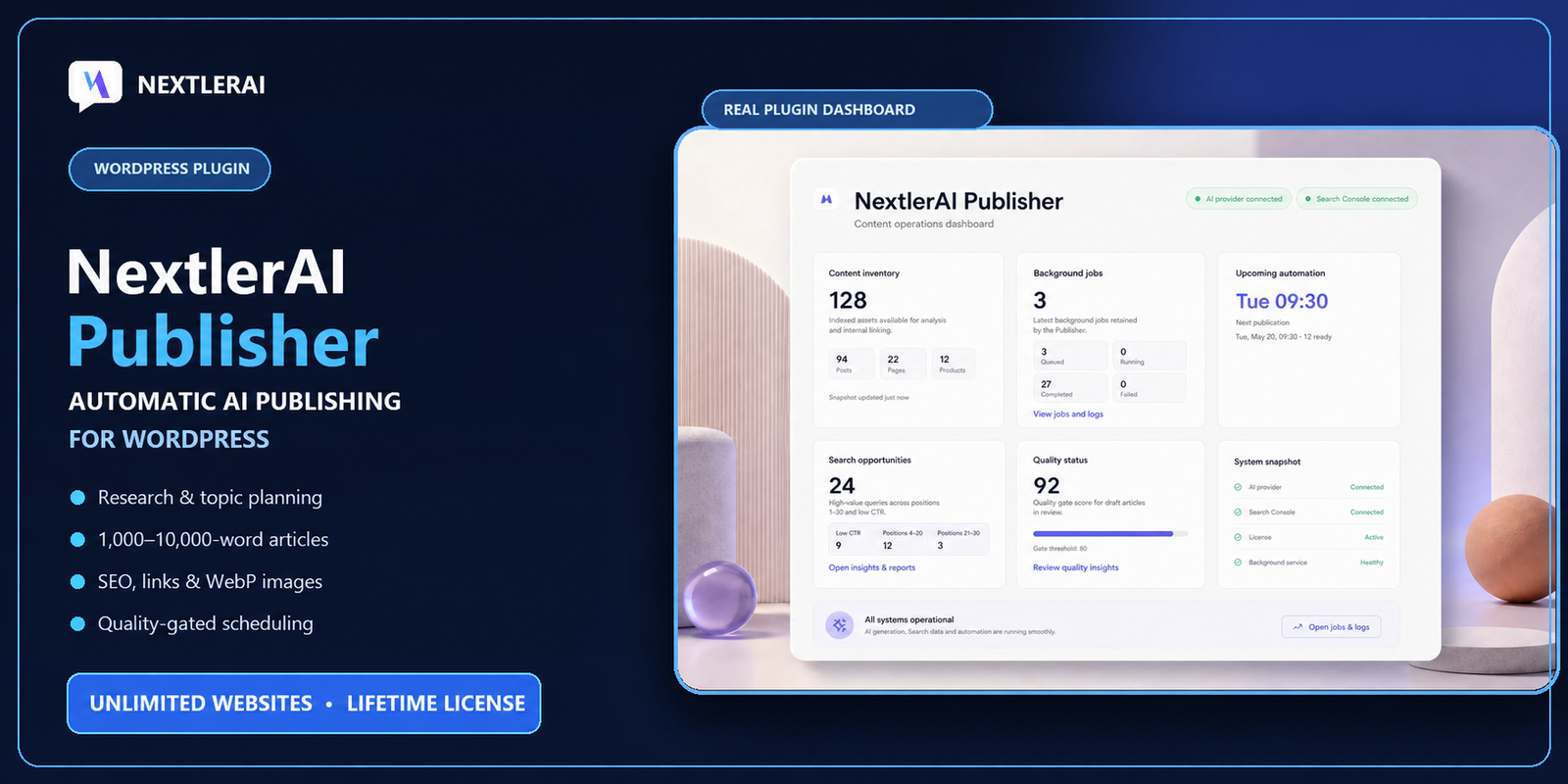
Turn WordPress Into a Complete AI Publishing Operation
NextlerAI Publisher is an advanced WordPress content-operations plugin that researches content opportunities, plans complete articles, writes them section by section, adds contextual links and images, audits quality, and publishes through native WordPress workflows.
This is more than a one-click AI writer. Publisher uses your existing website content, publishing rules, brand voice, target language, optional search evidence, and preferred AI provider to create structured, editable WordPress posts that fit the website they are joining.
Plan topics, research opportunities, generate complete articles, add links and media, check quality, and schedule publication without leaving WordPress.
From Content Opportunity to Published Article
- Discover: Inventory public posts, pages, WooCommerce products, and eligible public custom post types.
- Plan: Create topic clusters, score opportunities, and detect keyword or search-intent overlap.
- Research: Combine existing website context with optional Google Search Console and live SERP evidence.
- Create: Generate structured 1,000-10,000-word articles using varied sections, tables, lists, comparisons, workflows, and FAQs.
- Enrich: Add relevant internal links, verified external sources, featured images, and inline WebP media.
- Optimise: Prepare compatible SEO metadata and run a complete article-quality audit.
- Publish: Save as a draft, send for editorial review, or schedule quality-approved native WordPress posts automatically.
A Visible and Controlled Publishing Workflow
Automatic publishing does not have to mean invisible publishing. The Publisher dashboard keeps the complete workflow visible inside WordPress.
Monitor:
- Website content inventory
- Topic clusters and approval status
- Queued and active background jobs
- Article-generation progress
- Upcoming publication slots
- Search opportunities
- Quality scores and publication blockers
- Provider and integration status
- Generated, scheduled, and published articles
Every generated article includes a report covering word count, structure, links, sources, media, warnings, blockers, quality score, and publication status.
Bring Your Preferred AI Provider
Connect your own API account from one of the supported text providers:
- OpenAI
- Google Gemini
- Anthropic Claude
- xAI Grok
OpenAI and Google Gemini can also be used for optional AI image generation.
Choose the provider and model that match your quality, speed, and cost requirements. Compatible custom model identifiers can also be configured where supported by the selected provider.
AI credits are not included. Requests are billed or quota-limited by the provider account connected by the website administrator.
Encrypted Server-Side API-Key Storage
All provider requests are made server-side in PHP. Provider API keys are encrypted at rest using OpenSSL and installation-specific WordPress salts. Saved provider keys are not intentionally exposed in public browser code.
If OpenSSL is unavailable, NextlerAI Publisher blocks API-key storage and displays a clear administrator warning instead of storing the key without encryption.
Native and Editable WordPress Output
Publisher creates normal, editable WordPress posts. Generated content is not locked inside a proprietary external editor.
Each generated article can include:
- Native WordPress title and content
- Selected WordPress author
- Categories and tags
- Comment settings
- Language assignment
- Featured image
- Inline WebP media
- SEO metadata
- Draft, pending-review, future, or published status
Administrators can open every generated article in the normal WordPress editor and make any required changes before publication.
Website Content Inventory
Publisher creates a local inventory of public and searchable content already available on the website.
The inventory can include:
- Published WordPress posts
- Published pages
- Published WooCommerce products
- Guides and portfolio items
- Other eligible public and searchable custom post types
- Relevant categories and taxonomy terms
The inventory supports topic planning, content-overlap checks, contextual internal linking, sitemap discovery, and post-publication verification.
Smart Topic Strategy and Approval Queue
Create individual topics manually, build manual topic clusters, or let Publisher prepare an AI-assisted topic strategy using website context and optional search evidence.
Each managed topic can include:
- Primary topic or target keyword
- Topic cluster
- Target language
- Opportunity score
- Search-intent information
- Approval and queue status
- Conflict or overlap status
- Resulting WordPress post
Suggested topics remain under administrator control. Review, approve, queue, retry, archive, or remove topics from the Publisher interface.
Keyword and Search-Intent Cannibalisation Protection
Publisher compares planned topics with existing website content and other managed topics.
High keyword overlap or matching search intent can be detected before another competing article is created. This helps reduce accidental content duplication and SEO cannibalisation.
One managed topic is connected to one resulting WordPress post, making publication history easier to follow.
Research-First Article Planning
Publisher does not begin by requesting one enormous article from an AI provider. It first prepares a research brief and article plan.
The planning and writing process can use:
- Existing website content
- Relevant WooCommerce products and taxonomy
- Topic and cluster information
- Preferred authoritative domains
- Optional live SERP evidence
- Optional Google Search Console opportunities
- Verified external sources
- Brand voice and custom instructions
Section-by-Section Resumable Generation
Articles are written section by section using distinct section context and deterministic word budgets. Each completed section is checkpointed before the next section begins.
If a temporary provider problem, timeout, rate limit, or hosting interruption stops the process, Publisher can continue from the most recent completed checkpoint instead of restarting the complete article.
This workflow helps preserve completed work and reduces unnecessary repeated API usage.
Configurable 1,000-10,000-Word Articles
Configure the minimum and maximum article length between 1,000 and 10,000 words.
Publisher adapts the following elements to the selected length:
- Number of body sections
- Individual section word budgets
- Heading density
- Article modules
- Table and comparison opportunities
- FAQ size
- Introduction and conclusion length
A recovery stage can expand underdeveloped sections while rejecting repetitive filler, unsafe claims, and output that exceeds the configured article range.
Varied Article Structures
Publisher is designed to avoid producing the same visible structure for every article.
Depending on the topic, available evidence, and selected article length, an article may include:
- Useful introduction
- Accessible linked table of contents
- Descriptive H2 and H3 sections
- Comparison tables
- Implementation workflows
- Decision criteria
- Diagnostic or risk sections
- Checklists and practical examples
- Actionable steps
- Non-duplicative FAQs
- Concise conclusion
Recent article structures and media layouts are considered to reduce repetitive outlines across consecutive publications.
Contextual Internal Links
Publisher ranks relevant same-language internal-link candidates using titles, headings, SEO keywords, categories, taxonomy terms, body content, language compatibility, and topic relevance.
Selected internal links are distributed naturally inside suitable article paragraphs instead of being added as a generic block of unrelated links.
Posts, pages, WooCommerce products, guides, portfolio items, and other eligible public content types can become internal-link targets.
Verified External Sources
Publisher can discover, verify, and insert authoritative external sources into relevant article sections.
Preferred domains follow the priority order configured by the administrator. Official and primary sources are prioritised where appropriate.
When the requested number of suitable sources is unavailable, Publisher reports the shortfall instead of inserting unrelated or invented references.
Optional Live SERP Research
Connect your own Serper.dev API key to add live Google search evidence to the research process.
Live SERP research can provide:
- Search-result evidence
- Competitor heading patterns
- Related questions
- Search-intent information
- Candidate authoritative URLs
Serper is optional. When graceful fallback is enabled, generation can continue using website context and other available evidence when Serper is unavailable.
Optional Google Search Console Integration
Connect Google Search Console through OAuth to analyse first-party search opportunities.
Publisher can surface information such as:
- Useful query positions
- Low click-through-rate opportunities
- Relevant query and landing-page combinations
- Potential content topics
- Search opportunity counts
Google Search Console is optional and requires the administrator’s own Google OAuth configuration and verified property access.
SEO Metadata Compatibility
Publisher prepares compatible SEO metadata for supported installations of:
- SEOPress
- Yoast SEO
- Rank Math
- All in One SEO
Generated metadata can include an SEO title, meta description, focus keyword, canonical information, and social metadata.
A third-party SEO plugin is optional. Publisher avoids adding duplicate schema output.
Featured and Inline AI Images
Use OpenAI or Google Gemini for optional AI image generation.
Configure:
- Image provider and model
- Generation quality
- Visual mode
- Image dimensions
- WebP compression quality
- Featured-image generation
- Minimum and maximum inline-image count
Available visual directions include editorial mix, photography, diagrams, and no-people imagery.
Inline images are planned for relevant body sections and kept away from the introduction, table of contents, FAQ, and conclusion. Image prompts remain connected to the destination section.
Completed media stages are checkpointed so interrupted jobs can reuse images that were already created.
Advanced Publication Scheduling
Publisher separates article-generation time from publication time. Articles can be prepared hours or days before their scheduled release.
Available scheduling controls include:
- Disabled automation
- Daily publication
- Selected publishing weekdays
- Every-X-days publishing
- Weekly publishing
- First publication date
- Up to 12 publication times per active day
- Articles per publication time
- Maximum generated articles per day
- Generation lead time
- Missed-slot behaviour
- Pause control
All publication times use the WordPress website timezone.
Choose the Editorial Workflow
- Automatic publication: Generate an article and publish it automatically after it passes the configured quality gate.
- Pending review: Generate the article and send it to the WordPress editorial-review queue.
- Draft only: Generate editable drafts without automatic publication.
Quality-approved automatic articles are scheduled as native WordPress future posts. A separate Publisher watchdog can recover a missed WordPress publication schedule.
Recommended: Start with draft-only or pending-review production. Enable automatic publication only after reviewing several complete articles.
Reliable Background Processing
Publisher uses Action Scheduler when it is available and falls back to WordPress Cron.
The background system includes:
- Atomic worker locking
- Safe article checkpoints
- Section-level progress
- Media checkpoints
- Retry handling
- Provider-error backoff
- Stale-worker recovery
- Cancellation controls
- Generation and publication history
Cancelling a job prevents future generation stages after the current external provider request returns. Any WordPress draft already created remains available for review.
Articles and Quality Reports
The Articles workspace separates content by operational state:
- Generated
- Ready
- Pending review
- Scheduled
- Published
- Archived
- WordPress Trash
Archive, restore, and WordPress Trash actions remain separate to reduce accidental content loss.
Article reports can include:
- Word count and configured range
- Quality score and threshold
- Structure and module checks
- Internal-link results
- Verified external sources
- Featured-image and inline-media status
- SERP and Search Console status
- Sitemap verification
- Warnings and publication blockers
- Generated, scheduled, and published timestamps
Multilingual WordPress Publishing
Publisher supports the active WordPress site language and works with Polylang and WPML language detection and assignment.
Content inventory, topic planning, category selection, and internal-link candidates respect compatible language context. This helps reduce accidental cross-language linking and duplicate translated targets.
Native WordPress Publishing Controls
Configure how generated posts are saved:
- Select an eligible WordPress author
- Create or reuse suitable categories
- Generate tags automatically
- Use existing tags only
- Disable automatic tags
- Set the maximum tag count
- Use default, open, or closed comment settings
Main Features
- Complete AI-assisted research-to-publication workflow inside WordPress
- Topic Manager with topic clusters and queue states
- Manual topics, manual clusters, and AI-assisted topic strategy
- Opportunity scoring and topic approval workflow
- Website inventory for posts, pages, products, and eligible custom post types
- Keyword-overlap and search-intent cannibalisation protection
- One managed topic per resulting WordPress post
- OpenAI, Google Gemini, Anthropic Claude, and xAI Grok text providers
- OpenAI and Google Gemini image generation
- OpenSSL-encrypted server-side API-key storage
- Research-first article briefs
- Section-by-section resumable generation
- Configurable 1,000-10,000-word article range
- Deterministic section word budgets
- Adaptive heading and section counts
- Varied article structures and module sequences
- Duplicate-outline and repetitive-content protection
- Automatic section-level repair
- Accessible linked table of contents
- Tables, workflows, comparisons, checklists, FAQs, and action modules
- Optional Serper.dev live SERP research
- Optional Google Search Console integration
- Automatic and manual sitemap discovery
- Preferred authoritative source domains
- Verified contextual external citations
- Contextual same-language internal links
- WooCommerce products as optional internal-link candidates
- SEO metadata for SEOPress, Yoast SEO, Rank Math, and All in One SEO
- Optional featured and inline image generation
- Automatic WebP conversion and configurable compression
- Editorial, photography, diagram, and no-people visual modes
- Action Scheduler background processing with WP-Cron fallback
- Safe checkpoints, retries, backoff, and watchdog recovery
- Native WordPress draft, pending, future, and published posts
- Daily, selected-weekday, interval, and weekly schedules
- Up to 12 publication times per active day
- Advance article generation before publication
- Automatic-publish, pending-review, and draft-only workflows
- Configurable quality threshold
- Detailed quality and evidence reports
- Native WordPress author, category, tag, comment, and language controls
- Polylang and WPML compatibility
- Responsive WordPress administration interface
Unlimited Websites Lifetime
The WPBay edition includes lifetime use on unlimited websites owned or managed by the purchaser, including client websites. This is a one-time purchase with no monthly or annual plugin subscription.
The plugin works immediately after normal WordPress activation. It has no customer-facing License page, does not request a marketplace key, requires no domain-deactivation step, imposes no site-count activation limit, and does not contact the NextlerAI license server.
Technical Requirements
- WordPress 6.0 or newer
- Tested with WordPress 7.1
- PHP 7.4 or newer
- PHP mbstring extension
- PHP OpenSSL extension
- HTTPS-enabled WordPress website for production use
- WordPress administrator access
- Outbound HTTPS access for enabled AI providers and optional integrations
- An API key for OpenAI, Google Gemini, Anthropic Claude, or xAI Grok
- Working WordPress Cron or Action Scheduler for reliable background processing
OpenAI or Google Gemini is required only when AI image generation is enabled.
WooCommerce is optional, tested with WooCommerce 11.0, and adds published products to the content inventory and internal-link candidates.
Google Search Console, Serper.dev, Polylang, WPML, SEOPress, Yoast SEO, Rank Math, and All in One SEO are optional integrations.
AI-provider fees, Serper usage, image-generation costs, hosting, and all other third-party service costs are not included.
Installation
- Log in to the WordPress administration dashboard.
- Go to Plugins > Add New Plugin > Upload Plugin.
- Select the installable NextlerAI Publisher ZIP downloaded from WPBay.
- Click Install Now.
- When installation is complete, click Activate Plugin.
- Open NextlerAI Publisher or NAI Publisher from the WordPress administration menu.
The WPBay edition is ready after normal WordPress plugin activation. No separate marketplace-key entry or external activation request is required.
Basic Configuration
- Open Publisher > Settings > AI Providers.
- Select OpenAI, Google Gemini, Anthropic Claude, or xAI Grok.
- Enter the provider API key.
- Select a supported model or enter a compatible custom model ID.
- Save the settings and test the connection.
- Select the target content language.
- Set the minimum and maximum article length.
- Configure the brand voice and article instructions.
- Select the WordPress author, comment behaviour, and tag mode.
- Set the quality threshold and required article modules.
Configure Research, Links, SEO, and Images
- Set the internal-link and verified external-source targets.
- Add preferred authoritative source domains where required.
- Confirm automatic sitemap detection or enter a manual sitemap URL.
- Enable compatible SEO metadata when required.
- Optionally connect Serper.dev or Google Search Console.
- Optionally enable featured-image and inline-image generation.
- Select OpenAI or Google Gemini as the image provider.
- Choose the image model, quality, visual mode, dimensions, and WebP quality.
- Set the minimum and maximum number of inline images.
Build the Website Inventory and Topic Queue
- Open the Publisher dashboard.
- Rebuild the website content inventory.
- Review the discovered posts, pages, products, and eligible custom post types.
- Verify the detected sitemap when sitemap checks are required.
- Open Publisher > Topics.
- Create a manual topic, manual cluster, or AI-assisted topic strategy.
- Review keywords, clusters, language, score, and overlap warnings.
- Approve suitable topics and queue them for generation.
Generate and Review the First Article
- Keep the manual output status set to Draft.
- Generate one approved topic.
- Follow the background progress in Jobs and Logs.
- Review the generated WordPress post and complete article report.
- Check facts, structure, links, sources, images, SEO metadata, and language.
Configure Automatic Publishing
- Open the Publisher schedule workspace.
- Select the publishing frequency and active weekdays.
- Choose the first publication date.
- Add up to 12 publication times for each active day.
- Set the articles per publication time and maximum generated articles per day.
- Set how many hours before publication articles should be generated.
- Choose automatic publication, pending review, or draft-only production.
- Save the schedule and review the upcoming generation and publication slots.
Start with draft-only or pending-review mode. Test multiple complete articles on a staging website before enabling automatic publication on a production website.
Only logged in customers who have purchased this product may leave a review.
Loading...
WPBay support
 Support by NextlerAI
Support by NextlerAI
NextlerAI supports this product through WPBay
Questions are handled in WPBay's private ticket system, keeping your purchase details and support conversation together.
Go to My Downloads
After purchase, open this item in My Downloads and choose Get Support.
What support includes
- Answers to product-related questions
- Help with reported bugs and issues
- Guidance for included third-party assets
What support does not include
- Customizations or new features
- Installation or setup services
Plugin
Maintenance snapshot
See recent updates, compatibility, support, and developer activity.
- Updated 48 days ago
- Developer active recently
- WPBay support available
- WordPress 7.1 tested
Snapshot updated 4 hours ago
View details Hide details
Maintenance details
This is maintenance data. It does not measure product quality or sales.
- Last update Updated 48 days ago
- Compatibility WordPress 7.1 tested · PHP 8.3 tested, one version behind · WooCommerce 11 tested
- Releases 5 releases in the 51 days since listing
- Developer activity Developer active recently
- Support No recent support tickets to measure
- Docs and demo Documentation available · Changelog missing · No demo listed
Health reflects increased activity during the last 90 days.
How this snapshot works
Plugin Health
The score is out of 100 and uses data WPBay can check. Ratings, popularity, and sales are not used.
- Last update 30 points
-
Plugins receive full recency points under 30 days, then step down at 90, 180, 365, and 545 days.
- Compatibility 20 points
-
WordPress, PHP, and WooCommerce (when relevant) are scored separately. The latest two PHP lines count as current. Nearby previous versions keep most of the points.
- Current version 100%
- One version behind 75%
- Two versions behind 50%
- Three versions behind 25%
- Older or not listed 0%
- Releases 15 points
-
One release earns 10, two or three earn 13, and four or more earn 15. Each accepted product ZIP counts once; reprocessing the same upload and listing-only edits do not count.
- Developer activity 15 points
-
Based on WPBay login and dashboard activity. Exact last-login dates are never shown.
- Support 15 points
-
There are no recent WPBay tickets to measure.
- Docs and demo 5 points
-
Documentation: 2. Changelog: 1. Working demo or preview: 2.
Score ranges
- 90–100 Excellent
- 75–89 Healthy
- 60–74 Fair
- 40–59 Needs attention
- 0–39 Limited
Long gaps
WPBay also checks for long gaps between updates, developer activity, support replies, and releases. Buyers do not see this score.
- Time since update 35 points
- Last developer activity 25 points
- WordPress compatibility 15 points
- Support replies 15 points
- Fewer releases 10 points
-
Quality verified by WPBay
WPBay review- Reviewed version
- 3.7.6
- Review completed
- Reviewer
- CodeRevolution
- Review type
- Initial
No unresolved approval blocker was identified during WPBay’s proportionate review of this release. This is not a security certification or a guarantee that the product contains no defects.
-
 Future updates
-
WPBay support from NextlerAI
-
Fully GPL licensed
-
Covered by the WPBay refund policy
-
Plugin maintenance snapshot
Relevant picks
You may also like
Similar products selected by category, features, popularity and freshness.

 1 month free
From this seller
View seller store
More by NextlerAI
Explore more bestselling products from this creator.
Reviews
There are no reviews yet.