



Kronos Automatic Post Expirator Plugin for WordPress

 Recently Updated
Well Documented
Recently Updated
Well Documented
Automatically delete posts based on a multitude of settings
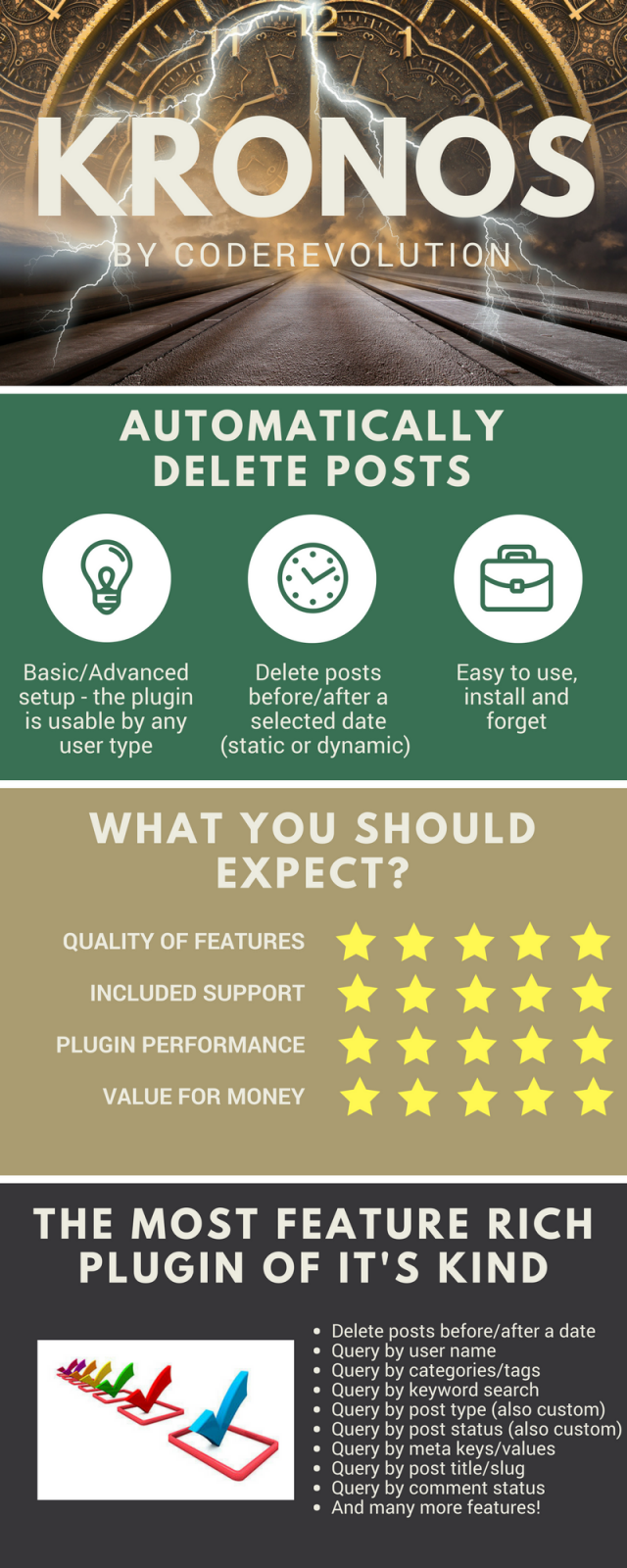

 Kronos is the personification of Time in pre-Socratic philosophy and later literature. Kronos governed linear, chronological time. Starting from now, you can use the powers of Kronos to automatically delete old posts from your WordPress blog!
What Can You Do With This Plugin?
Kronos Automatic Post Expirator Plugin for WordPress is a breaking edge post expirator (auto deleter) plugin. It uses a built-in wp-cron engine to automatically delete posts, as you define in it’s settings! Kronos Post Expirator plugin allows the page admin to set expiration dates for both posts and pages and any custom post type you have active on the current WordPress installation. There are a number of different ways that the posts can expire:
- older/newer selection
- by fixed date – posts older/newer than 21/01/2010
- by relative date – posts older than 30 days
Other post filtering options:
- post author name
- post category
- post tags
- post title
- post comment status
- post ping status
- ignore sticky posts
- post meta key/meta value
- post type
- post status
- post slug
- post search keywords
Other plugin features:
- republish old posts
- delete posts permanently or move them to trash
- set old posts as draft or pending
- reset publish date for old posts, to the current time (refresh posts) – video
- detailed plugin activity logging
- scheduled cleanup running (using wp-cron)

Testing this plugin
- You can test the plugin’s functionality using the ‘Test Site Expirator’. Here you can try the plugin’s full functionality. Note that the generated testing blog will be deleted automatically after 24 hours.


Need support?
Please check our knowledge base, it may have the answer to your question or a solution for your issue. If not, just email me at [email protected] and I will respond as soon as I can.


Are you already a customer?


Changelog:
Changelog:
Version 1.0 Release Date 2017-08-10
First version released!
Version 1.1 Release Date 2017-08-13
Fixed some issues
Version 1.1.1 Release Date 2017-08-17
Fix some minor issues
Version 1.1.2 Release Date 2017-10-22
Bugfixes
Version 1.1.3 Release Date 2017-10-25
Fixed some css
Version 1.1.4 Release Date 2017-10-27
Made the plugin timezone aware
Added some more logging
Added an option to specify the batch size for post deletion
Version 1.1.5 Release Date 2018-01-01
Added option to skip posts from selected categories
Version 1.1.6 Release Date 2018-02-24
Fixed trashing of woocommerce products not functioning
Added the ability to set posts as 'draft' or 'pending' instead of deleting them
Version 1.1.7 Release Date 2018-04-24
Added the ability to 'reset post publish date', if post older than specified date
Version 1.1.8 Release Date 2018-05-20
Added the ability to assign random post date to 'reset post publish date' feature
Version 1.1.9 Release Date 2018-06-20
Added more flexibility to plugin auto running
Version 1.2.0 Release Date 2018-07-15
Added the ability to republish old posts
Version 1.2.1 Release Date 2019-02-24
Improved post search query
Version 1.2.2 Release Date 2019-04-19
Security update
Version 1.2.3 Release Date 2019-11-15
WordPress 5.3 compatibility update
Version 1.2.4 Release Date 2020-05-11
New features added for content templates
Bugfix update
Version 1.2.5 Release Date 2021-01-16
PHP 8 compatibility update
Version 1.2.6 Release Date 2021-04-22
Feature update: added the ability to set date range selection
Added the ability to select to query post creation date or post update date
Version 1.2.7 Release Date 2021-08-30
Added the ability to filter posts to be expired by custom taxonomy slugs/values
Version 1.2.7.1 Release Date 2022-03-21
Bugfix update
Version 1.2.8 Release Date 2022-07-22
Added the ability to skip posts from expiring, by ID
Version 1.2.8.1 Release Date 2023-10-18
Fixed PHP 8.2 related errors
Version 1.2.9 Release Date 2024-01-18
Fixed issue with post expiration times
Version 1.2.9.1 Release Date 2025-09-18
Fixed reported issues
Only logged in customers who have purchased this product may leave a review.
Loading...
WPBay support
 Support by CodeRevolution
Support by CodeRevolution
CodeRevolution supports this product through WPBay
Questions are handled in WPBay's private ticket system, keeping your purchase details and support conversation together.
Go to My Downloads
After purchase, open this item in My Downloads and choose Get Support.
What support includes
- Answers to product-related questions
- Help with reported bugs and issues
- Guidance for included third-party assets
What support does not include
- Customizations or new features
- Installation or setup services
Plugin
Maintenance snapshot
See recent updates, compatibility, support, and developer activity.
- Updated 53 days ago
- Developer active recently
- WPBay support available
- WordPress 7.1 tested
Snapshot updated 4 hours ago
View details Hide details
Maintenance details
This is maintenance data. It does not measure product quality or sales.
- Last update Updated 53 days ago
- Compatibility WordPress 7.1 tested · PHP 8.5 tested · WooCommerce 11 tested
- Releases 1 release in the 276 days since listing
- Developer activity Developer active recently
- Support No recent support tickets to measure
- Docs and demo Documentation available · Changelog available · Demo available
Health reflects increased activity during the last 90 days.
How this snapshot works
Plugin Health
The score is out of 100 and uses data WPBay can check. Ratings, popularity, and sales are not used.
- Last update 30 points
-
Plugins receive full recency points under 30 days, then step down at 90, 180, 365, and 545 days.
- Compatibility 20 points
-
WordPress, PHP, and WooCommerce (when relevant) are scored separately. The latest two PHP lines count as current. Nearby previous versions keep most of the points.
- Current version 100%
- One version behind 75%
- Two versions behind 50%
- Three versions behind 25%
- Older or not listed 0%
- Releases 15 points
-
One release earns 10, two or three earn 13, and four or more earn 15. Each accepted product ZIP counts once; reprocessing the same upload and listing-only edits do not count.
- Developer activity 15 points
-
Based on WPBay login and dashboard activity. Exact last-login dates are never shown.
- Support 15 points
-
There are no recent WPBay tickets to measure.
- Docs and demo 5 points
-
Documentation: 2. Changelog: 1. Working demo or preview: 2.
Score ranges
- 90–100 Excellent
- 75–89 Healthy
- 60–74 Fair
- 40–59 Needs attention
- 0–39 Limited
Long gaps
WPBay also checks for long gaps between updates, developer activity, support replies, and releases. Buyers do not see this score.
- Time since update 35 points
- Last developer activity 25 points
- WordPress compatibility 15 points
- Support replies 15 points
- Fewer releases 10 points
-
Quality verified by WPBay
WPBay review- Reviewed version
- 1.2.9.1
- Review completed
- Reviewer
- CodeRevolution
- Review type
- Initial
No unresolved approval blocker was identified during WPBay’s proportionate review of this release. This is not a security certification or a guarantee that the product contains no defects.
-
 Future updates
-
WPBay support from CodeRevolution
-
GPL code, proprietary assets
-
Covered by the WPBay refund policy
-
Plugin maintenance snapshot
Relevant picks
You may also like
Similar products selected by category, features, popularity and freshness.



From this seller
View seller store
More by CodeRevolution
Explore more bestselling products from this creator.


Reviews
There are no reviews yet.