


WooCommerce Inline Order Notes

 Recently Updated
Well Documented
Recently Updated
Well Documented
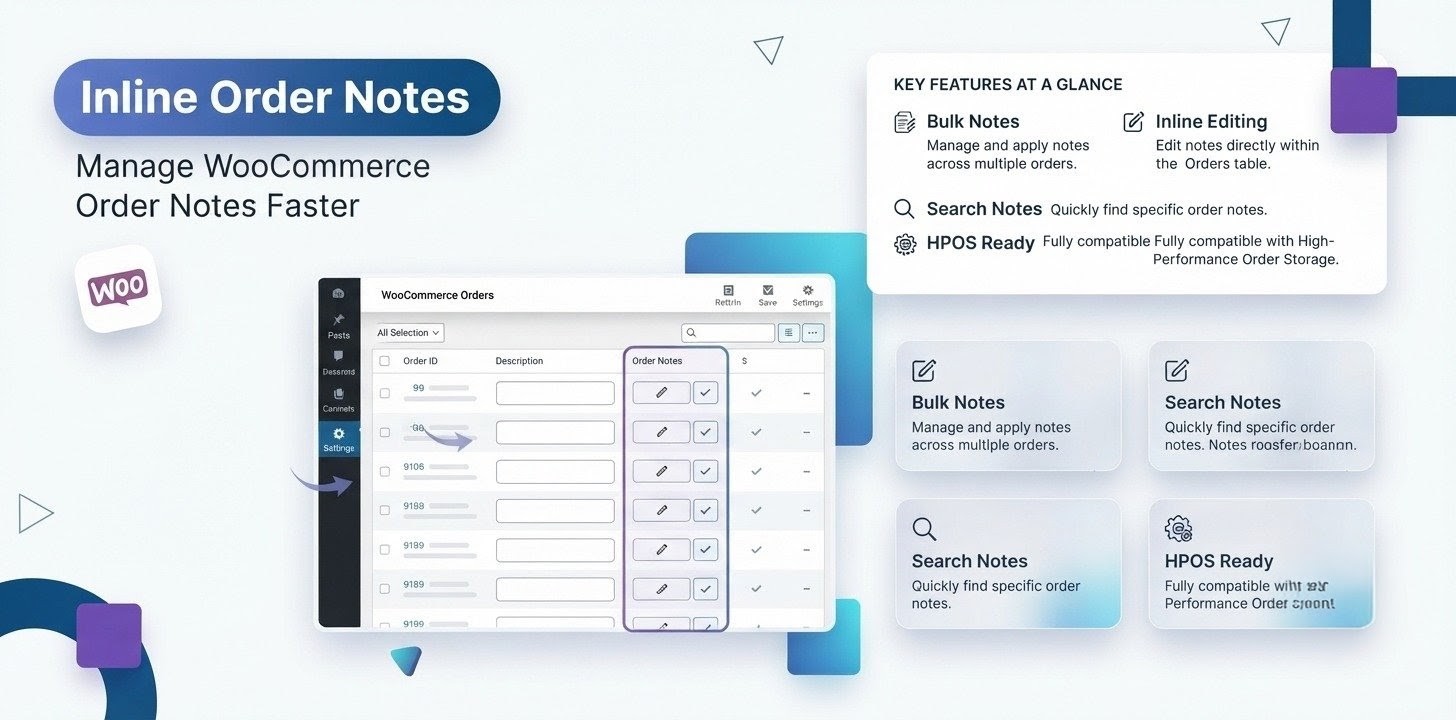
Inline Order Notes for WooCommerce is a professional WooCommerce order management plugin that helps online store owners organize customer orders using internal order notes, reusable templates, staff assignments, reminders, due dates, workflow tracking, and team collaboration directly from the WooCommerce Orders screen.
Built for modern WooCommerce stores, the plugin transforms the default WooCommerce order notes system into a complete order workflow management solution for administrators, warehouse teams, fulfillment staff, customer support representatives, and shop managers.
Whether you process 20 orders per day or thousands of WooCommerce orders each week, Inline Order Notes improves productivity, reduces manual work, and ensures every order moves smoothly through your fulfillment process.
The plugin fully supports both WooCommerce High-Performance Order Storage (HPOS) and Legacy Order Storage, providing fast performance and complete compatibility with current and future WooCommerce versions.
Key Features
Internal WooCommerce Order Notes
Create private internal order notes that are only visible to store staff.
Keep important processing information organized without exposing it to customers.
Order Categories
Organize order notes using custom categories.
Examples include:
- Shipping
- Returns
- Warehouse
- Customer Support
- Finance
- Billing
- Quality Control
- Inventory
- Production
Categories make searching and filtering significantly easier.
Staff Assignment
Assign WooCommerce orders to specific users or team members.
Clearly identify responsibility for every task, reducing confusion and duplicate work.
Reusable Order Note Templates
Create templates for frequently used notes such as:
- Awaiting Payment
- Address Verification
- Packing Complete
- Quality Check
- Shipment Delayed
- Customer Contact Required
- Refund Approved
- Replacement Sent
Templates eliminate repetitive typing and help maintain consistency across your organization.
Due Dates
Assign due dates to important order tasks.
Never miss critical shipping deadlines or customer follow-ups again.
Order Reminders
Schedule reminders for pending actions.
Receive visual notifications to help your team stay on schedule.
Workflow Status Tracking
Track every assignment using built-in status indicators.
Supported statuses include:
- Pending
- Completed
- Overdue
Managers can quickly identify bottlenecks in the fulfillment process.
Bulk Actions
Save time by applying actions to multiple WooCommerce orders simultaneously.
Bulk operations include:
- Writing order notes
- Assigning staff
- Applying templates
- Updating workflow information
Perfect for stores processing hundreds of orders every day.
WooCommerce Orders Columns
Additional columns provide important order information without opening individual orders.
Available columns include:
- Order Notes
- Assigned To
- Templates
- Due Date
- Status
Everything is visible directly from the Orders list.
HPOS Compatible
Inline Order Notes is fully optimized for WooCommerce High-Performance Order Storage (HPOS).
The plugin delivers excellent performance on large WooCommerce databases while remaining fully compatible with legacy order storage.
Benefits
Using Inline Order Notes helps your business:
- Improve WooCommerce order management
- Increase staff productivity
- Reduce fulfillment mistakes
- Improve warehouse communication
- Track order responsibilities
- Reduce missed deadlines
- Standardize internal processes
- Speed up order fulfillment
- Simplify customer support workflows
- Reduce repetitive manual work
- Improve collaboration across departments
- Scale WooCommerce operations efficiently
Typical Use Cases
Store owners use Inline Order Notes for many different workflows.
Warehouse Management
Assign packing staff, add packing instructions, and track shipping progress.
Customer Support
Leave internal notes about customer conversations, replacement requests, refunds, and follow-up actions.
Quality Assurance
Flag orders requiring manual inspection before shipping.
Returns Processing
Assign return requests to support agents and monitor completion.
Wholesale Orders
Coordinate large orders across sales, warehouse, and logistics teams.
Dropshipping
Track supplier communication and shipment confirmations using internal notes.
Team Collaboration
Allow administrators, managers, warehouse staff, and support representatives to collaborate without leaving WooCommerce.
Why Store Owners Love Inline Order Notes?
Managing WooCommerce orders often requires communication between multiple team members.
The default WooCommerce order notes feature is useful for basic comments, but it lacks advanced workflow management capabilities such as:
- Staff assignments
- Internal task tracking
- Due dates
- Order reminders
- Reusable templates
- Team collaboration
- Workflow status management
- Bulk order actions
Inline Order Notes fills these gaps by providing a centralized order management system designed specifically for WooCommerce stores.
Instead of relying on spreadsheets, sticky notes, or third-party project management software, your team can manage every order directly inside WooCommerce.
| Without Plugin | With Plugin |
| Basic notes | Workflow management |
| No assignments | Staff assignments |
| No reminders | Due dates |
| No templates | Reusable templates |
| No tracking | Status management |
Perfect For
Inline Order Notes is ideal for:
- WooCommerce Store Owners
- Shop Managers
- Warehouse Teams
- Packing & Shipping Staff
- Customer Support Teams
- Order Fulfillment Teams
- Dropshipping Businesses
- Wholesale Stores
- Multi-user WooCommerce Stores
- Large WooCommerce Businesses
- High-volume eCommerce Stores
- Agencies Managing Multiple WooCommerce Shops
Frequently Asked Questions
Does this plugin work with WooCommerce HPOS?
Yes. Inline Order Notes is fully compatible with WooCommerce High-Performance Order Storage (HPOS) and legacy order tables.
Can I assign orders to staff members?
Yes. You can assign one or multiple team members to WooCommerce orders for better accountability and collaboration.
Can I create reusable order note templates?
Yes. Templates allow you to quickly insert frequently used notes, reducing repetitive manual work and improving consistency.
Are order notes visible to customers?
Internal order notes created with the plugin are intended for store staff and internal workflow management.
Does the plugin support large WooCommerce stores?
Absolutely. Inline Order Notes is optimized for scalability and performs efficiently on high-volume WooCommerce stores processing hundreds or thousands of orders.
Can I manage due dates and reminders?
Yes. You can assign due dates, schedule reminders, and track pending or overdue tasks directly from the WooCommerce Orders screen.
Changelog:
2026-08-08 - version 1.0.1
* Introduced version control.
2026-07-26 - version 1.0.0
* Initial release of the plugin.Woohoo!
Only logged in customers who have purchased this product may leave a review.
Loading...
WPBay support
 Support by WPStoreTools
Support by WPStoreTools
WPStoreTools supports this product through WPBay
Questions are handled in WPBay's private ticket system, keeping your purchase details and support conversation together.
Go to My Downloads
After purchase, open this item in My Downloads and choose Get Support.
What support includes
- Answers to product-related questions
- Help with reported bugs and issues
- Guidance for included third-party assets
What support does not include
- Customizations or new features
- Installation or setup services
Plugin
Maintenance snapshot
See recent updates, compatibility, support, and developer activity.
- Updated 17 days ago
- Developer active recently
- WPBay support available
- WordPress 7.0 tested
Snapshot updated 21 hours ago
View details Hide details
Maintenance details
This is maintenance data. It does not measure product quality or sales.
- Last update Updated 17 days ago
- Compatibility WordPress 7.0 tested, one version behind · PHP 8.5 tested · WooCommerce 10 tested, one version behind
- Releases 1 release in the 56 days since listing
- Developer activity Developer active recently
- Support No recent support tickets to measure
- Docs and demo Documentation available · Changelog available · No demo listed
Health reflects increased activity during the last 90 days.
How this snapshot works
Plugin Health
The score is out of 100 and uses data WPBay can check. Ratings, popularity, and sales are not used.
- Last update 30 points
-
Plugins receive full recency points under 30 days, then step down at 90, 180, 365, and 545 days.
- Compatibility 20 points
-
WordPress, PHP, and WooCommerce (when relevant) are scored separately. The latest two PHP lines count as current. Nearby previous versions keep most of the points.
- Current version 100%
- One version behind 75%
- Two versions behind 50%
- Three versions behind 25%
- Older or not listed 0%
- Releases 15 points
-
One release earns 10, two or three earn 13, and four or more earn 15. Each accepted product ZIP counts once; reprocessing the same upload and listing-only edits do not count.
- Developer activity 15 points
-
Based on WPBay login and dashboard activity. Exact last-login dates are never shown.
- Support 15 points
-
There are no recent WPBay tickets to measure.
- Docs and demo 5 points
-
Documentation: 2. Changelog: 1. Working demo or preview: 2.
Score ranges
- 90–100 Excellent
- 75–89 Healthy
- 60–74 Fair
- 40–59 Needs attention
- 0–39 Limited
Long gaps
WPBay also checks for long gaps between updates, developer activity, support replies, and releases. Buyers do not see this score.
- Time since update 35 points
- Last developer activity 25 points
- WordPress compatibility 15 points
- Support replies 15 points
- Fewer releases 10 points
-
Quality verified by WPBay
WPBay review- Reviewed version
- 1.0.1
- Review completed
- Reviewer
- CodeRevolution
- Review type
- Initial
No unresolved approval blocker was identified during WPBay’s proportionate review of this release. This is not a security certification or a guarantee that the product contains no defects.
-
 Future updates
-
WPBay support from WPStoreTools
-
GPL code, proprietary assets
-
Covered by the WPBay refund policy
-
Plugin maintenance snapshot
Relevant picks
You may also like
Similar products selected by category, features, popularity and freshness.


 15 days free
From this seller
View seller store
More by WPStoreTools
Explore more bestselling products from this creator.
Reviews
There are no reviews yet.