


STM Smart Checkout Pro for WooCommerce

 Recently Updated
Well Documented
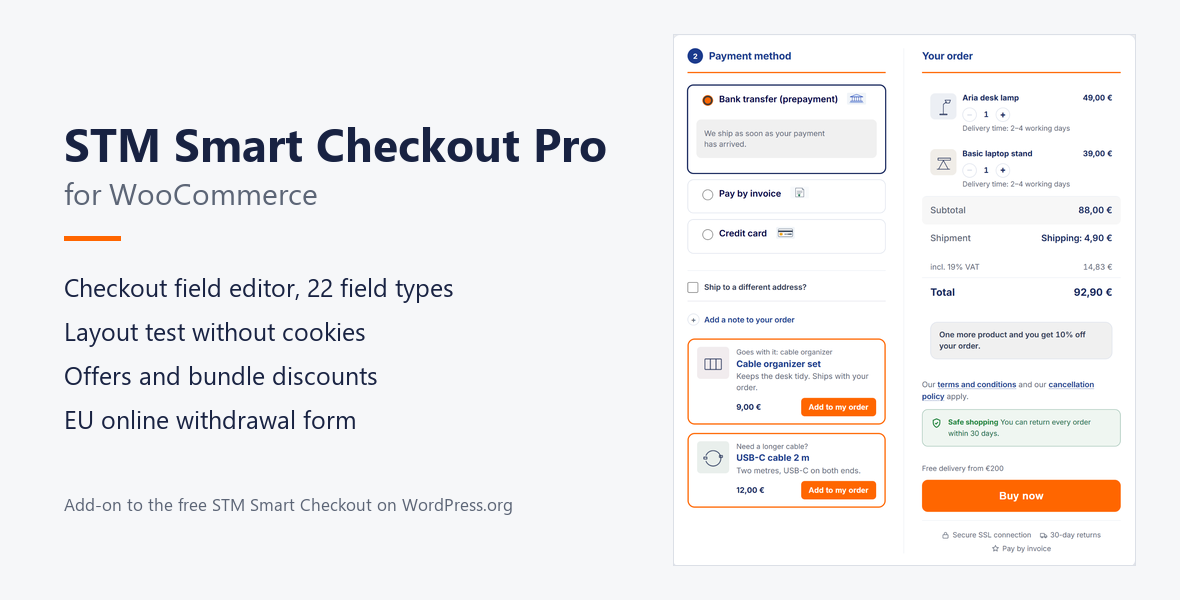
The paid add-on to the free STM Smart Checkout for WooCommerce. The free plugin turns the checkout into a focused buying page and covers the German and EU checkout essentials. Pro adds the parts that make the checkout your own: a field editor, a layout test, field analysis, offers and bundle discounts, and the online withdrawal function that EU law requires since 19 June 2026.
Requires: the free plugin STM Smart Checkout for WooCommerce 0.1.55 recommended (0.1.31 at least, the settings sections need 0.1.54) from WordPress.org, WordPress 6.5 or newer, PHP 7.4 or newer and WooCommerce 8.3 or newer (tested up to WooCommerce 11.2). One feature needs more: the VAT ID field on the Checkout block needs WooCommerce 10.9 or newer; on the classic checkout it works from 8.3. Pro adds to the free plugin; it does not replace it. WordPress activates Pro only while WooCommerce and the free plugin are active; with an older free plugin, Pro stays switched off and says so in the admin.
What the free plugin brings
Pro builds on everything in the free plugin: three-, two- and one-column layouts, progress bar, distraction-free mode, checkout footer, header band with trust claims and your own icons, consent as a box or a notice with links, your own buy button label and colours, mandatory notices, VAT statement, delivery time per item, legal texts in an overlay, a server-side check of required boxes, postcode autofill for Germany, Austria and Switzerland, mobile keyboards, logo, colours and fonts without any outside server, own CSS, the checkout check, and backup and transfer of all settings.What Pro adds
Checkout field editor Add your own fields in 22 field types by drag and drop, and move, rename, widen or hide WooCommerce’s fields, with conditions, checks and a live preview of the chosen layout. Answers appear on the order, in the mails and in the customer account. Layout test Two checkout layouts take turns in blocks of five hours, so no visitor has to be recognised: no cookie, no identifier. Before the start it says how long the test will take in your shop, a test runs for at least 28 days, and a result appears only once enough checkouts are counted. You adopt the better layout with one click. Field analysis Shows at which field and with which payment method orders fail. Daily sums on your own server, started by you: no names, no IP addresses, no cookies, nothing sent anywhere. Card testing protection Limits order attempts and failed payments per connection, adds a hidden trap and a minimum time for bots, and warns you by mail when failed payments pile up. Off until you switch it on, your own staff are never limited, and connections are kept only as short-lived salted hashes. Bundle discounts A percentage off the cart once it holds enough different products. No coupon field needed, and PayPal receives it as a real discount rather than an unexplained total. A progress hint tells customers how close they are. Checkout offers Up to three cards at the checkout: below the payment methods in the three-column layouts and ultra-compact, above the buy button otherwise. One click adds the product to the order as a real line item, with its own tax class, stock and delivery time — and one click removes it again. Payment method customizer Your own name, note, symbol and sort order for each payment method, through documented WooCommerce filters, with 33 bundled symbols. Payment-dependent required fields Invoice purchase may ask for a phone number, prepayment need not. Re-checked on the server. Express zone One defined band above the form for the wallet buttons of your payment providers, steered there through the providers’ own filters — never rebuilt, never moved in the page. Mobile sticky order bar and ultra-compact layout The buy button stays in reach on small screens, and dense checkouts get a tighter layout. VAT ID with live VIES check and reverse charge A VAT ID field at the checkout, checked live against the EU’s VIES service. A confirmed VAT ID from another EU country takes the VAT off the order. If the EU service cannot be reached, no exemption is granted: the order goes through with VAT and says why. Every order keeps the number, the result and the date. Works on the classic checkout with WooCommerce 8.3 or newer and on the Checkout block with WooCommerce 10.9 or newer. Switched off until you turn it on. Safe mode If the checkout hits a fatal error while rendering, Smart Checkout steps aside and the standard WooCommerce checkout takes over — visibly and reversibly. Online withdrawal form (EU directive 2023/2673) A public page that guests can reach and logged-in customers find pre-filled. Each submission notifies the shop, sends the customer a receipt and lands in a management screen under WooCommerce → Withdrawals. A submission is never refused because an order cannot be matched. Built-in abuse protection: at most 5 submissions per connection in 10 minutes and 20 per day, at most 3 receipts per email address per day (adjustable by filter, with a hook for CAPTCHA plugins).Good to know
- Checkout types: The withdrawal form works with any checkout. The VAT ID check works on the classic checkout, and on the Checkout block with WooCommerce 10.9 or newer; on older versions the Checkout block has no VAT ID field, VAT is charged as usual and customers read a short notice. Express zone and checkout offers are made for the classic checkout and stay out of the block checkout.
- Legal plugins: Runs next to WooCommerce Germanized and German Market. Where Germanized Pro runs its own VAT ID check, or EuroB2B shows its VAT ID field, Pro’s check stays silent, so a cart is never exempted twice.
- Privacy: No tracking, no external fonts. Field analysis and layout test store sums on your own server only. External requests only where a feature needs them: the VIES service of the EU for the VAT ID check (when switched on), and WPBay for licence and updates.
- HPOS compatible and declared as such, like the Checkout block compatibility.
- Licence and updates through your WPBay purchase code. The checkout keeps working without an active licence; only updates stop.
Changelog:
0.9.2
- Security: the list of connections that are never limited now applies to the real connection (REMOTE_ADDR) only. Forged X-Real-IP or X-Forwarded-For headers no longer get past the card testing limits. The exemption for staff stays.
- New: "Trusted proxies" for shops behind a CDN, load balancer or reverse proxy. Forwarded addresses count only from connections on this list. If a listed connection sits behind a proxy, enter the proxy here, otherwise the entry no longer applies.
- Fixed: checkbox and consent fields. WooCommerce turns every value posted for a checkbox into 1, also "0" or "off", and such a request showed as accepted. Only an affirmative value counts now, for required fields too. Unticked fields leave nothing on the order, and a consent stores its time.
- Fixed: a consent is never prefilled from an earlier order, and a remembered checkbox is forgotten when it is unticked.
0.9.1
- Changed: in the three-column layouts the offer cards now sit below the payment methods, which shortens the checkout and moves the buy button up.
- Fixed: with Germanized a card stayed on "add" after it was added. The cards now refresh with every checkout update.
0.9.0
- New: checkout field editor with 22 field types, conditions, checks, layout preview, and answers on the order, in mails and in the account.
- New: field analysis. Where orders fail, field by field and payment method by payment method, as sums on your own server.
- New: layout test. Two layouts take turns in time blocks, without a cookie or visitor identifier, with a forecast before the start and a result computed from the blocks.
- New: card testing protection. Limits per connection, also against forged address headers, hidden trap, minimum time and a warning mail. Off by default.
- Backup and transfer of the free plugin includes the checkout fields.
- All Pro settings are in sections of the Smart Checkout screen (with Smart Checkout 0.1.54).
- Bundle discounts: a hint longer than the column no longer runs over the edge of the checkout.
- Withdrawal form redesigned; it no longer loads its design values from a missing file.
- Fixed: the switches of the withdrawal form, the mobile order bar and the express zone did not work as saved. Where such a setting differs from the default, the update changes behaviour.
0.8.5
- Withdrawal form: street, postcode and city from the customer account and from an owned order are filled in again. Blank defaults used to overwrite them. The fields stay editable and keep what was typed after a validation error; an order without an address no longer empties the address saved on the account.
- VAT ID on the Checkout block: on WooCommerce 8.9 to 10.8 an order with a confirmed VAT ID kept its VAT while it said reverse charge. The Checkout block now shows the field from WooCommerce 10.9, the first version that shows the exemption before the order is placed. Below that version it shows no field and customers read a short notice above the form; the new filter
stmcp_b2b_block_noticechanges the wording. The classic checkout still works from WooCommerce 8.3. - Reverse charge: only orders actually booked without VAT carry the reverse-charge note.
- The settings screen states the minimum version for the Checkout block and says so clearly when the shop runs an older one.
0.8.4
- Bundle discounts: when a cart meets several rules, the saving is now measured instead of estimated. WooCommerce calculates the order total without a bundle discount and with each rule, and the rule with the lowest total wins. This is exact for mixed tax rates, because WooCommerce spreads the tax of a discount across all tax classes of the cart. It also holds for non-taxable lines, VAT-exempt customers and Germanized in gross or net mode.
- Checkout offers: "Remove" now takes out only the cart line the offer card added. A line of the same product bought the normal way stays in the cart, in any configuration, and the card is not shown while the product is in the cart that way.
0.8.3
- Bundle discounts: of all rules the cart meets, the one that saves the customer the most money now applies, not the one with the highest percentage; the comparison uses what the customer actually pays less (net fee plus the tax of its rate, gross fee with Germanized, net amount for VAT-exempt customers).
- Checkout offers: the product for each card is chosen with WooCommerce's product search (name or SKU) instead of a list of the first 200 products, so every product of the catalogue can be offered, and the saved product is kept when other settings are saved.
0.8.2
- HPOS and Checkout block compatibility are now declared to WooCommerce.
- Links from a withdrawal request to its order use the order's own edit address, so they open the right screen with HPOS.
- The withdrawal form limits submissions per connection and receipts per email address; every accepted request is still stored and reaches the shop. New filters
stmcp_withdrawal_rate_limits,stmcp_withdrawal_client_ipandstmcp_withdrawal_check_submission(CAPTCHA and anti-spam). - Entering the number of a refund in the withdrawal form no longer ends in an error.
- Requirements unified: WordPress 6.5, PHP 7.4, WooCommerce 8.3 (tested up to 11.0), STM Smart Checkout 0.1.31.
- The bundled payment and shipping symbols are Storetown Media's own work under GPL-2.0-or-later; CREDITS.txt now says so.
0.8.1
- The VAT ID check stays off while EuroB2B shows its own VAT ID field, so a checkout never has two VAT ID fields.
- A field made required by the chosen payment method no longer also reads "(optional)".
- License and updates through WPBay.
0.8.0
- New: VAT ID field at the checkout with live VIES check, on the classic checkout and the Checkout block.
- New: a confirmed VAT ID from another EU country removes VAT from the order (reverse charge).
- New: every order stores VAT ID, result, consultation number and date; confirmation, order overview and e-mail show the VAT ID.
- An unreachable VIES service never grants an exemption; the order goes through with VAT.
- Stays silent where Germanized Pro runs its own VAT ID check. Off until switched on.
0.7.0
- New: checkout offers — up to three cards above the buy button that add a real product to the order.
Only logged in customers who have purchased this product may leave a review.
Loading...
Email support
 Support by Storetown Media
Storetown Media provides support by email
Contact the seller directly by email for product questions and issue reports.
Email support
Opens your default email app.
What support includes
- Answers to product-related questions
- Help with reported bugs and issues
- Guidance for included third-party assets
What support does not include
- Customizations or new features
- Installation or setup services
Plugin
Maintenance snapshot
See recent updates, compatibility, support, and developer activity.
- Updated today
- Developer active recently
- Email support available
- WordPress 7.1 tested
Snapshot updated 31 minutes ago
View details Hide details
Maintenance details
This is maintenance data. It does not measure product quality or sales.
- Last update Updated today
- Compatibility WordPress 7.1 tested · PHP 8.5 tested · WooCommerce 11 tested
- Releases 10 releases in the 6 days since listing
- Developer activity Developer active recently
- Support Support is offered by email, not through WPBay tickets
- Docs and demo Documentation available · Changelog available · Demo available
Health reflects increased activity during the last 90 days.
How this snapshot works
Plugin Health
The score is out of 100 and uses data WPBay can check. Ratings, popularity, and sales are not used.
- Last update 30 points
-
Plugins receive full recency points under 30 days, then step down at 90, 180, 365, and 545 days.
- Compatibility 20 points
-
WordPress, PHP, and WooCommerce (when relevant) are scored separately. The latest two PHP lines count as current. Nearby previous versions keep most of the points.
- Current version 100%
- One version behind 75%
- Two versions behind 50%
- Three versions behind 25%
- Older or not listed 0%
- Releases 15 points
-
One release earns 10, two or three earn 13, and four or more earn 15. Each accepted product ZIP counts once; reprocessing the same upload and listing-only edits do not count.
- Developer activity 15 points
-
Based on WPBay login and dashboard activity. Exact last-login dates are never shown.
- Support Not scored
-
WPBay cannot measure response times for email or support on another site, so support is not scored.
- Docs and demo 5 points
-
Documentation: 2. Changelog: 1. Working demo or preview: 2.
Score ranges
- 90–100 Excellent
- 75–89 Healthy
- 60–74 Fair
- 40–59 Needs attention
- 0–39 Limited
Long gaps
WPBay also checks for long gaps between updates, developer activity, support replies, and releases. Buyers do not see this score.
- Time since update 35 points
- Last developer activity 25 points
- WordPress compatibility 15 points
- Support replies Not scored
- Fewer releases 10 points
-
Quality verified by WPBay
WPBay review- Reviewed version
- 0.9.2
- Review completed
- Reviewer
- CodeRevolution
- Review type
- Initial
No unresolved approval blocker was identified during WPBay’s proportionate review of this release. This is not a security certification or a guarantee that the product contains no defects.
-
 Future updates
-
Email support from Storetown Media
-
Fully GPL licensed
-
Covered by the WPBay refund policy
-
Plugin maintenance snapshot
Relevant picks
You may also like
Similar products selected by category, features, popularity and freshness.




Reviews
There are no reviews yet.