



WooCommerce Smart Payment Gateway Optimizer

 Recently Updated
Well Documented
Recently Updated
Well Documented
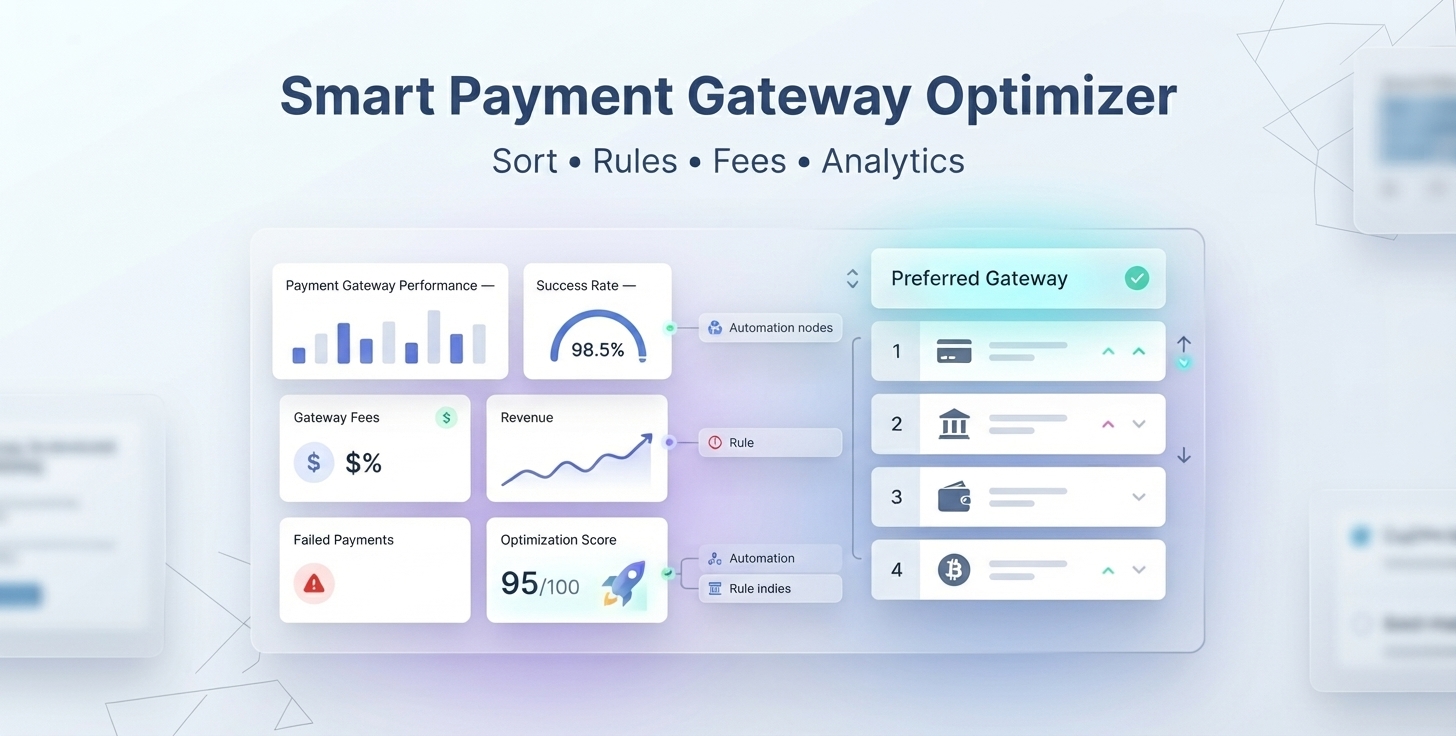
Smart Payment Gateway Optimizer for WooCommerce
WooCommerce Payment Gateway Fees, Offer Discount, Sorting & Optimization with smart analytics.
Automatically sort, hide, recommend, and optimize payment gateways based on your store’s rules while tracking gateway fees, revenue, performance, and checkout profitability.
Take control of your WooCommerce payment methods with a powerful payment gateway optimization engine designed to help merchants make smarter checkout decisions.
Create rules based on cart total, products, categories, tags, brands, customer roles, cart quantity, cart weight, and other checkout conditions. Then automatically prioritize the right payment gateways, apply configurable fees, and analyze gateway performance from one centralized dashboard.
Don’t just add payment gateway fees. Optimize your entire payment gateway strategy.
Optimize Every Payment Gateway Decision
Different payment gateways have different transaction costs, success rates, and business value.
Why show every payment method in the same order to every customer?
Smart Payment Gateway Optimizer lets you dynamically control how payment gateways behave at checkout.
You can:
- Sort payment gateways
- Prioritize preferred gateways
- Hide payment gateways when conditions are not met
- Recommend preferred payment methods
- Apply conditional payment gateway fees
- Create advanced gateway rules
- Track gateway revenue and fees
- Monitor successful and failed payments
- Analyze gateway performance
- Identify expensive or underperforming gateways
- Optimize checkout profitability
Key Features
1. Smart Payment Gateway Sorting
Put the right payment method first.
Automatically reorder WooCommerce payment gateways according to your business rules.
Prioritize low-cost, high-performing, or preferred payment methods without requiring customers to manually search through payment options.
Example:
Show Stripe first for orders above $100, while placing Cash on Delivery lower in the payment method list.
2. Dynamic Payment Gateway Fees
Recover payment processing costs intelligently.
Create configurable payment gateway fee rules instead of relying on a one-size-fits-all fee strategy.
Use your store’s conditions to determine when a payment gateway fee should apply.
Example:
Apply a 2.9% payment processing fee to selected payment methods for qualifying orders.
3. Advanced Gateway Rules Engine
Build payment gateway rules around your business.
Create conditional rules using factors such as:
- Order total
- Cart quantity
- Cart weight
- Products
- Product categories
- Product tags
- Product brands
- Customer roles
- Guest customers
Combine these conditions to create targeted checkout strategies.
4. Gateway Visibility & Recommendations
Show customers the payment methods that make sense.
Control gateway availability according to your configured rules.
Depending on your strategy, you can prioritize preferred gateways, hide unsuitable payment methods, or recommend specific payment options.
Example:
For wholesale customers, prioritize bank transfer while reducing the priority of higher-cost payment methods.
5. Payment Gateway Analytics
Know which gateways actually perform.
Move beyond basic payment gateway configuration with actionable performance analytics.
Monitor:
- Gateway revenue
- Gateway fees
- Successful payments
- Failed payments
- Success rates
- Gateway profitability
- Rule performance
- Fee percentages
- Estimated savings
- Optimization score
Use real store data to improve your payment strategy.
6. Gateway Performance Comparison
Compare payment methods side by side.
Identify which gateways generate the most revenue, which cost the most, and which deliver better payment success rates.
Compare gateway:
Revenue → Fees → Success → Failures → Profitability
7. Rule Performance Analytics
Measure the impact of your payment gateway rules.
Track how your optimization rules perform over time.
Understand which rules generate revenue and which payment strategies provide the best financial outcome.
8. Profitability Insights
Turn payment data into better decisions.
The dashboard helps identify:
- Best-performing gateways
- Most expensive gateways
- High-failure gateways
- High-fee payment methods
- Top-performing optimization rules
- Potential savings opportunities
Instead of guessing which payment gateway is best, use your store’s data.
9. Optimization Score
Get a quick view of your payment strategy.
Use the optimization score to understand the overall efficiency of your configured payment gateway strategy and identify areas that may require attention.
10. WooCommerce Checkout Optimization
Optimize payment methods without changing your checkout flow.
The plugin works with your WooCommerce payment gateway environment and applies your configured rules during checkout.
Your payment strategy becomes dynamic while your customers continue using the familiar WooCommerce checkout experience.
Why Use Smart Payment Gateway Optimizer?
Reduce Payment Processing Costs
Different payment gateways can have different transaction costs.
Use gateway rules and prioritization to encourage payment methods that better fit your cost structure.
Improve Checkout Profitability
Payment processing costs directly affect your margins.
Optimize gateway selection and fee strategies to help retain more revenue from every eligible order.
Make Smarter Payment Gateway Decisions
Don’t rely on assumptions.
Use gateway revenue, fees, success rates, failures, and profitability data to make informed decisions.
Automate Your Payment Strategy
Stop manually changing gateway order for different customers or products.
Create your rules once and let the optimization engine apply them automatically.
Improve Payment Method Visibility
Place your preferred payment gateway where customers are most likely to see it.
Give priority to payment methods that are more suitable for particular carts, customers, or products.
Identify Expensive Payment Methods
Analytics can help reveal which gateways consume the most revenue through fees and which gateways provide better financial performance.
How It Works
Step 1 — Configure Your Payment Gateways
Install and activate your preferred WooCommerce payment gateways.
The plugin works with the payment methods available in your WooCommerce store.
Step 2 — Create Your Rules
Create payment gateway optimization rules based on your store requirements.
For example:
IF
Order total is greater than $100
THEN
Prioritize Stripe
Step 3 — Configure Gateway Actions
Define what should happen when a rule matches.
Depending on your configuration, you can control gateway priority, visibility, recommendations, and applicable fee behavior.
Step 4 — Let the Optimization Engine Work
When customers reach checkout, the plugin evaluates the applicable rules and dynamically applies your configured payment gateway strategy.
Step 5 — Analyze Performance
Use the analytics dashboard to monitor:
- Revenue
- Fees
- Success rate
- Failed transactions
- Gateway profitability
- Rule performance
- Optimization opportunities
Then refine your rules based on actual results.
Real-World Use Cases
Use Case 1: Promote Lower-Cost Payment Gateways
Suppose your store supports:
- Stripe
- PayPal
- Bank Transfer>
- Cash on Delivery
You may want to prioritize Bank Transfer or another lower-cost option.
Create a rule that places the preferred gateway higher in the checkout payment method list.
Result:
Customers see your preferred payment option first.
Use Case 2: Optimize High-Value Orders
High-value orders can have a significant impact on payment processing costs.
Create a rule:
Order total > $500
→ Prioritize your preferred payment gateway.
This lets you create different gateway strategies for different order values.
Use Case 3: Add a Payment Gateway Fee
If a payment provider creates additional processing costs, configure a gateway fee rule.
For example:
Payment method: Selected gateway
Fee: 2.9%
Condition: Orders meeting your configured criteria
The fee can help recover eligible payment processing costs.
Use Case 4: Wholesale Payment Optimization
Wholesale customers may have different payment preferences from retail customers.
Create a rule such as:
Customer role = Wholesale
→ Prioritize Bank Transfer.
This creates a payment experience specifically suited to your wholesale business model.
Use Case 5: Category-Based Gateway Strategy
Different product categories may have different margins and payment requirements.
For example:
Category = Electronics
→ Prioritize a selected payment gateway.
This gives merchants greater control over payment strategies for specific product categories.
Use Case 6: Optimize Heavy Orders
Shipping-heavy or bulky products can have different operational costs.
Create a rule based on cart weight and apply your preferred payment gateway strategy.
Cart weight > configured threshold
→ Prioritize selected payment method.
Use Case 7: Identify Your Best Payment Gateway
After collecting transaction data, use the analytics dashboard to compare gateways.
You may discover that one gateway:
- generates strong revenue
- has fewer failed payments
- has lower effective fees
- produces better profitability
You can then prioritize that gateway using your optimization rules.
Payment Gateway Optimization vs. Basic Fee Plugins
Traditional payment gateway fee plugins primarily focus on adding a fee or discount based on the selected payment method. That functionality is useful, but payment costs are only one part of a merchant’s payment strategy.
Smart Payment Gateway Optimizer takes a broader approach.
| Capability | Basic Gateway Fee Plugin | Smart Payment Gateway Optimizer |
|---|---|---|
| Payment gateway fees | ✓ | ✓ |
| Conditional rules | Limited/varies | ✓ |
| Gateway sorting | — | ✓ |
| Gateway prioritization | — | ✓ |
| Gateway visibility strategy | — | ✓ |
| Gateway recommendations | — | ✓ |
| Revenue analytics | — | ✓ |
| Fee analytics | — | ✓ |
| Success/failure tracking | — | ✓ |
| Gateway performance comparison | — | ✓ |
| Rule performance analytics | — | ✓ |
| Profitability insights | — | ✓ |
| Optimization score | — | ✓ |
The goal isn’t simply to charge a payment fee.
The goal is to optimize the payment method strategy of your WooCommerce store.
Built for Growing WooCommerce Stores
Smart Payment Gateway Optimizer is designed for merchants who use multiple payment methods and need more control over their checkout strategy.
Ideal for:
- Online retailers
- High-volume WooCommerce stores
- Stores using multiple payment gateways
- Wholesale stores
- Stores with different customer roles
- Stores selling different product categories
- Merchants looking to reduce payment costs
- Businesses focused on checkout optimization
Turn Payment Gateway Data Into Business Decisions
Your payment gateways generate valuable operational data.
Instead of looking only at completed orders, understand:
Which gateway generates the most revenue?
Which gateway costs the most?
Which gateway has the highest success rate?
Which gateway generates the most failed payments?
Which optimization rules perform best?
Where could your store potentially reduce payment costs?
Smart Payment Gateway Optimizer brings these insights together in one WooCommerce dashboard.
Designed for Modern WooCommerce
Built with modern WooCommerce stores in mind.
WooCommerce Compatibility
Designed to work with modern WooCommerce payment gateway environments, including stores using multiple third-party payment methods.
Cart & Checkout Blocks
Built with modern WooCommerce checkout experiences in mind.
HPOS Ready
Designed for stores using WooCommerce High-Performance Order Storage.
Scalable Architecture
Analytics and rule processing are designed with growing WooCommerce stores in mind.
Your Payment Gateways. Your Rules. Your Strategy.
Every WooCommerce business has different payment costs, customers, products, margins, and payment preferences.
That’s why a single static payment gateway configuration isn’t enough.
Create your rules.
Optimize your gateways.
Measure the results.
Improve your checkout strategy.
Frequently Asked Questions
What is a payment gateway optimizer for WooCommerce?
A payment gateway optimizer helps WooCommerce merchants control and optimize how payment methods are presented and managed during checkout. Smart Payment Gateway Optimizer combines gateway sorting, conditional rules, payment gateway fee management, and performance analytics.
Can I sort WooCommerce payment gateways?
Yes. You can create rules that dynamically prioritize and reorder payment gateways based on configured checkout conditions.
Can I add payment gateway fees in WooCommerce?
Yes. The plugin provides configurable payment gateway fee functionality that can be incorporated into your gateway optimization strategy.
Can I apply payment gateway rules based on cart total?
Yes. Cart/order total can be used as a condition for your payment gateway rules.
Can I create rules based on products?
Yes. You can configure rules based on products in the customer’s cart.
Can I create rules based on product categories?
Yes. Product categories can be used to determine how payment gateways should be optimized at checkout.
Can I use customer roles in payment gateway rules?
Yes. Customer roles can be used to create different payment gateway strategies for different customer groups.
For example, you can prioritize bank transfer for wholesale customers.
Can I use cart weight as a condition?
Yes. Cart weight can be used as part of your gateway optimization rules.
Can I use product tags and brands?
Yes. Product tags and brands can be incorporated into your gateway rules where supported by your store’s product configuration.
Can I hide payment gateways?
Yes. Gateway visibility can be controlled according to your configured optimization rules.
Can I recommend a payment gateway?
Yes. You can configure your gateway strategy to prioritize preferred payment methods for specific checkout scenarios.
Does the plugin provide payment gateway analytics?
Yes. The analytics dashboard provides gateway performance information including revenue, fees, successful transactions, failed transactions, and success rates.
Can I compare payment gateways?
Yes. Gateway comparison helps you evaluate payment methods based on revenue, fees, transaction performance, and success rates.
Can I track failed payments?
Yes. The analytics system tracks successful and failed gateway transactions so you can identify payment methods that may require attention.
Can I see which payment gateway is performing best?
Yes. Gateway performance analytics can help identify your best-performing and most expensive payment methods.
Can I track payment gateway rule performance?
Yes. Rules can be tracked so you can analyze their performance and understand how your payment optimization strategy is performing.
Does the plugin work with third-party payment gateways?
The plugin is designed to work with WooCommerce payment gateways available in your store, including gateways provided by third-party WooCommerce extensions.
Gateway-specific behavior can depend on how the individual payment gateway integrates with WooCommerce.
Is this plugin only for adding payment gateway fees?
No.
Fee management is one part of the plugin.
Its broader purpose is payment gateway optimization, combining gateway sorting, conditional rules, visibility/recommendation strategies, and analytics.
Does the plugin replace my payment gateway?
No.
The plugin does not process payments or replace your payment provider. It works alongside your WooCommerce payment gateways to optimize how they are managed and presented.
Can I use multiple payment gateways?
Yes. The plugin is designed specifically for stores that use multiple WooCommerce payment methods and need greater control over their payment gateway strategy.
Is coding required?
No. Gateway rules and optimization settings are designed to be configured from the WordPress/WooCommerce administration interface.
Start Optimizing Your WooCommerce Payment Gateways
Stop treating every payment method the same.
Reduce unnecessary payment costs.
Prioritize better payment methods.
Create smarter gateway rules.
Understand gateway performance.
Optimize checkout profitability.
Smart Payment Gateway Optimizer for WooCommerce
Payment Gateway Fees. Smart Gateway Sorting. Powerful Rules. Actionable Analytics.
Build a smarter payment strategy for your WooCommerce store.
Changelog:
*** WooCommerce Smart Payment Gateway Optimizer Changelog ***
2026-06-11 - version 1.0.0
* First release submission!
Only logged in customers who have purchased this product may leave a review.
Loading...
WPBay support
 Support by WPStoreTools
Support by WPStoreTools
WPStoreTools supports this product through WPBay
Questions are handled in WPBay's private ticket system, keeping your purchase details and support conversation together.
Go to My Downloads
After purchase, open this item in My Downloads and choose Get Support.
What support includes
- Answers to product-related questions
- Help with reported bugs and issues
- Guidance for included third-party assets
What support does not include
- Customizations or new features
- Installation or setup services
Plugin
Maintenance snapshot
See recent updates, compatibility, support, and developer activity.
- Updated 44 days ago
- Developer active recently
- WPBay support available
- WordPress 7.1 tested
Snapshot updated 16 hours ago
View details Hide details
Maintenance details
This is maintenance data. It does not measure product quality or sales.
- Last update Updated 44 days ago
- Compatibility WordPress 7.1 tested · PHP 8.5 tested · WooCommerce 11 tested
- Releases 3 releases in the 46 days since listing
- Developer activity Developer active recently
- Support No recent support tickets to measure
- Docs and demo Documentation available · Changelog available · No demo listed
Health reflects increased activity during the last 90 days.
How this snapshot works
Plugin Health
The score is out of 100 and uses data WPBay can check. Ratings, popularity, and sales are not used.
- Last update 30 points
-
Plugins receive full recency points under 30 days, then step down at 90, 180, 365, and 545 days.
- Compatibility 20 points
-
WordPress, PHP, and WooCommerce (when relevant) are scored separately. The latest two PHP lines count as current. Nearby previous versions keep most of the points.
- Current version 100%
- One version behind 75%
- Two versions behind 50%
- Three versions behind 25%
- Older or not listed 0%
- Releases 15 points
-
One release earns 10, two or three earn 13, and four or more earn 15. Each accepted product ZIP counts once; reprocessing the same upload and listing-only edits do not count.
- Developer activity 15 points
-
Based on WPBay login and dashboard activity. Exact last-login dates are never shown.
- Support 15 points
-
There are no recent WPBay tickets to measure.
- Docs and demo 5 points
-
Documentation: 2. Changelog: 1. Working demo or preview: 2.
Score ranges
- 90–100 Excellent
- 75–89 Healthy
- 60–74 Fair
- 40–59 Needs attention
- 0–39 Limited
Long gaps
WPBay also checks for long gaps between updates, developer activity, support replies, and releases. Buyers do not see this score.
- Time since update 35 points
- Last developer activity 25 points
- WordPress compatibility 15 points
- Support replies 15 points
- Fewer releases 10 points
-
Quality verified by WPBay
WPBay review- Reviewed version
- 1.0.0
- Review completed
- Reviewer
- CodeRevolution
- Review type
- Initial
No unresolved approval blocker was identified during WPBay’s proportionate review of this release. This is not a security certification or a guarantee that the product contains no defects.
-
 Future updates
-
WPBay support from WPStoreTools
-
GPL code, proprietary assets
-
Covered by the WPBay refund policy
-
Plugin maintenance snapshot
Relevant picks
You may also like
Similar products selected by category, features, popularity and freshness.

 15 days free
From this seller
View seller store
More by WPStoreTools
Explore more bestselling products from this creator.
Reviews
There are no reviews yet.