



Gryphon AutoBlog SEO Tools

 Recently Updated
Well Documented
Recently Updated
Well Documented


The Gryphon is a legendary creature with the body, tail, and back legs of a lion; the head and wings of an eagle; and an eagle’s talons as it’s front feet. It is a symbol of divine power and a guardian of the divine. In our case, it will symbolize the power of your website’s SEO. It will guard it and also it will greatly increase it’s value!
What is this plugin about?
Gryphon SEO Tools Plugin is a powerful tool to improve your autoblog and help you with improving your SEO ranking for your automated blogs or web sites. High search engine ranking will drive more visitors to your website, without you further moving a muscle. If your content is SEO friendly, afterwards, visitors can converted to your subscribers (making them recurring visitors) or to your online shoppers.
Check out the plugin’s update log!
New features highlights in version 1.4:
- Added readability score testing for posts (Post Letter Count, Post Word Count, Sentence Count, Avarage Words Per Sentence, Readability Score, Grade Level Needed to Understand the Text)
- Quick in-post Broken Link Checker
- Option to automatically add ‘alt’ and ‘title’ tags to all images!
- In post URL scanner – check for non-ASCII characters, check for underscores, check for too long URLs
- Some minor fixes and improvements
New features in version 1.2:
- Included brand new SEO Redirect Module!
Now you have the possibility to assign ‘Redirection Rules’ for your pages in a brand new ‘Page Redirection Manager’. Redirect old, inexistent pages to brand new pages, with more SEO value. You can also use this feature to migrate your blog to a new one, with ease.
Other new features include:
- Extended 404 Nearest Match Redirect (if a users misspells the URL, he gets automatically redirected to the nearest matched URL)
- Enable ‘404 Page Not Found’ Redirect (you can assign a custom ‘Page Not Found 404’ page)
- ‘HTTP/HTTPS’ Redirect – avoids SEO duplicate content – forces site to be used only with preferred protocol
- ‘www/non-www’ Redirect (forces site to be used only with preferred version (www/non-www) – avoids SEO duplicate content problems
- Enable ‘Attachment Page Redirect’ – redirects attachment pages to their parent page – fixing a SEO issue in WordPress
- ‘Bad Bot’ Blocker (blocking a wide range (300+) of known aggressive crawlers and spiders – as a result, your website will have increased performance!)
Other cool features
The plugin is also “plug and play” – you can activate it, and without a single configuration, you can profit from the major part of the plugin main features. Packed with a serious amount of features like Google bot website crawl simulation, a wide range of SEO friendly meta tags, breadcrumbs, Google Analytics and much more. All the available features makes Gryphon SEO Tools Plugin the best and most flexible SEO plugin available on sale.
Gryphon SEO Tools Plugin main features:
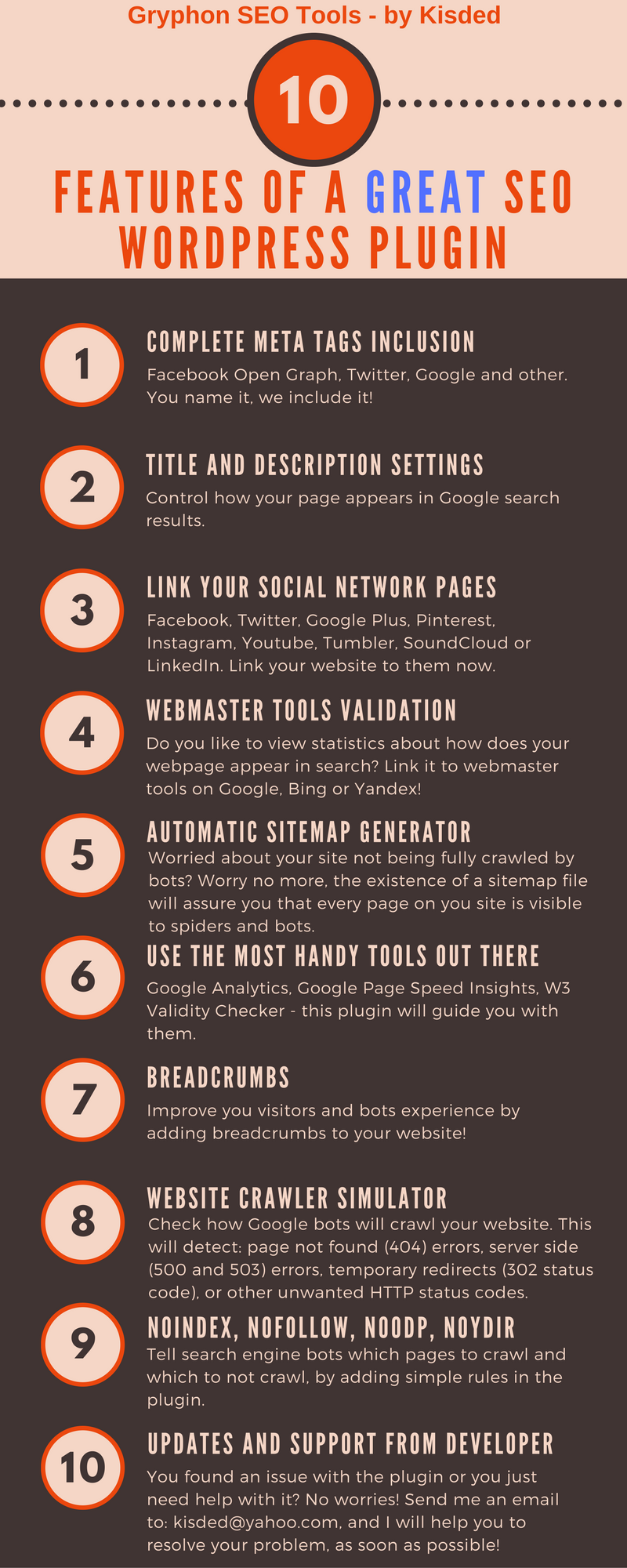
+ Generate Sitemaps — The plugin will set up a Google XML sitemap for your blog, allowing search engines to tag the content from your blog more easily
+ Generate Google News Sitemaps — New feature in the 2.4.0 update for the plugin
+ Setting Up the Title Tag Properly — This is a key factor for SEO. Your title should contain the keyword you optimize your autoblog for.
+ SEO Text Analysis module included in v1.4 (read above for more info)
+ In post Link Analysis (broken link, non-ASCII characters detector, too long link detector, underscore in link detector) module included in v1.4 (read above for more info)
+ Options to automatically add ‘alt’ and ‘title’ tags to images that do not have these tags included in v1.4 (read above for more info)
+ SEO for autoblogs
+ SEO Redirect features included in v1.2 (read above for more info)
+ Bad Bot Blocker included in v1.2 (read above for more info)
+ 404 Page Not Found Redirect included in v1.2 (read above for more info)
+ HTTP/HTTPS and www/non-www Redirects included in v1.2 (read above for more info)
+ Page title and page description settings – with SEO optimisations
+ Facebook meta tags inclusion (Open Graph)
+ Facebook Pixel tracking code inclusion (v1.9 update)
+ Twitter meta tags inclusion
+ Google meta tags inclusion
+ Other common meta tags inclusion
+ Link your website to all your social networking pages, like Facebook, Twitter, Google Plus, Pinterest, Instagram, Youtube, Tumbler, SoundCloud or LinkedIn
+ Add webmaster validation keys for popular webmaster tools (Google, Bing, Yandex) with only one click and validate your site for Pinterest with ease
+ Create and edit your sitemap – the tool that tells the crawling search engine bots where to find all pages of your site
+ Analyse your incoming visitors traffic with Google Analytics integrition
+ Improve your page loading speed by following recommandations by Google Page Speed Insights Analysis
+ Check the validity of your page HTML code syntax with the W3 HTML Validity checker
+ Improve visitor experience and also crawling bots experience by adding breadcrumbs to your website
+ File editor for your local server – you can edit with ease your robots.txt or .htaccess files (feature recommended only for advanced users!)
+ Website Crawler to check how Google bots will crawl your website. This will detect: page not found (404) errors, serverside (500 and 503) errors, temporary redirects (302 status code), or other unwanted HTTP status codes.
+ Link your website to a Facebook App ID a Facebook Admin ID.
+ Add Dublin Core meta tags (some SEO value) with just one click
+ Tell search engine bots which pages to crawl and which to not, by adding simple rules
+ Remove query strings from your URL, in this way, making your web site more SEO friendly
+ Other minor SEO settings and hacks that will improve your SEO
+ Optimized for speed – as less as possible page speed impact.
+ Expert SEO guide included with the plugin
+ Functionality is language independent – the plugin automatically detects relevant information from your website. Additional information can be entered in any language you want – so, the plugin is functional in any language
+ Lifetime plugin updates and support from the developer

Need support?
Please check our knowledge base, it may have the answer to your question or a solution for your issue. If not, just email me at [email protected] and I will respond as soon as I can.


Changelog:
Version 1.0 Release Date 2016-10-28
First version released!
Version 1.1 Release Date 2016-11-08
Updated included SEO Guide
Updated auto-update module to latest version
Removed some debug messages
Other minor fixes
Version 1.2 Release Date 2016-12-05
Included brand new SEO Redirect Module!
Updated included documentation
Removed some obsolete code
Other minor fixes and enhancements
Version 1.3 Release Date 2016-12-14
Fixed a critical issue in the build-in file editor
Version 1.4 Release Date 2017-01-10
Added readability score testing for posts (Post Letter Count, Post Word Count, Sentence Count, Average Words Per Sentence, Readability Score, Grade Level Needed to Understand the Text)
Added detailed documentation on how to improve your text readability score
Quick in-post Broken Link Checker
Option to automatically add 'alt' and 'title' tags to all images!
In post URL scanner - check for: non-ASCII characters, underscores and too long URLs
Some minor fixes and improvements
Version 1.5 Release Date 2017-02-02
Some major fixes in meta tag generation process
Version 1.6 Release Date 2017-02-03
Minor fix in file editor
Version 1.7 Release Date 2017-02-04
Added multisite support
Version 1.8 Release Date 2017-02-22
Fixed plugin auto-updating process
Some minor fixes and enhancements
Version 1.9 Release Date 2017-02-24
Added the ability to add Facebook Pixel tracking code
Version 2.0 Release Date 2017-04-03
Rewritten plugin backend and core components
Major performance & speed improvement
Version 2.1 Release Date 2017-08-07
Improved og:image tag generation
Minor fixes
Version 2.2 Release Date 2017-08-18
Added WooCommerce og meta tags support
Minor fixes
Version 2.2.1 Release Date 2017-08-28
Fixed og:image tags
Version 2.2.2 Release Date 2017-09-28
Fixed some sitemap issues
Version 2.2.3 Release Date 2018-02-15
Bugfixes
Version 2.2.4 Release Date 2018-02-27
Improved crawler module
Version 2.2.5 Release Date 2018-04-16
New keyword editing feature
Version 2.2.6 Release Date 2018-08-15
Added the ability to add custom code to head section of pages
Version 2.2.7 Release Date 2018-10-31
Updated Angular module to the latest version
Version 2.2.8 Release Date 2019-01-16
Added Gutenberg sidebar widget support
Version 2.2.9 Release Date 2019-04-19
Security update
Version 2.3.0 Release Date 2019-11-15
WordPress 5.3 compatibility update
Version 2.3.1 Release Date 2020-05-11
New features added for content templates
Bugfix update
Version 2.3.2 Release Date 2021-01-16
PHP 8 compatibility update
Version 2.4.0 Release Date 2021-03-27
New feature: added the ability to create Google News Sitemaps
Version 2.4.0.1 Release Date 2023-10-18
Fixed PHP 8.2 related errors
Are you already a customer?
If you already bought this and you have tried it out, please contact me in the item’s comment section and give me feedback, so I can make it a better WordPress plugin!
WordPress 7.0 and PHP 8.5 Tested!

Changelog:
Version 1.0 Release Date 2016-10-28
First version released!
Version 1.1 Release Date 2016-11-08
Updated included SEO Guide
Updated auto-update module to latest version
Removed some debug messages
Other minor fixes
Version 1.2 Release Date 2016-12-05
Included brand new SEO Redirect Module!
Updated included documentation
Removed some obsolete code
Other minor fixes and enhancements
Version 1.3 Release Date 2016-12-14
Fixed a critical issue in the build-in file editor
Version 1.4 Release Date 2017-01-10
Added readability score testing for posts (Post Letter Count, Post Word Count, Sentence Count, Average Words Per Sentence, Readability Score, Grade Level Needed to Understand the Text)
Added detailed documentation on how to improve your text readability score
Quick in-post Broken Link Checker
Option to automatically add 'alt' and 'title' tags to all images!
In post URL scanner - check for: non-ASCII characters, underscores and too long URLs
Some minor fixes and improvements
Version 1.5 Release Date 2017-02-02
Some major fixes in meta tag generation process
Version 1.6 Release Date 2017-02-03
Minor fix in file editor
Version 1.7 Release Date 2017-02-04
Added multisite support
Version 1.8 Release Date 2017-02-22
Fixed plugin auto-updating process
Some minor fixes and enhancements
Version 1.9 Release Date 2017-02-24
Added the ability to add Facebook Pixel tracking code
Version 2.0 Release Date 2017-04-03
Rewritten plugin backend and core components
Major performance & speed improvement
Version 2.1 Release Date 2017-08-07
Improved og:image tag generation
Minor fixes
Version 2.2 Release Date 2017-08-18
Added WooCommerce og meta tags support
Minor fixes
Version 2.2.1 Release Date 2017-08-28
Fixed og:image tags
Version 2.2.2 Release Date 2017-09-28
Fixed some sitemap issues
Version 2.2.3 Release Date 2018-02-15
Bugfixes
Version 2.2.4 Release Date 2018-02-27
Improved crawler module
Version 2.2.5 Release Date 2018-04-16
New keyword editing feature
Version 2.2.6 Release Date 2018-08-15
Added the ability to add custom code to head section of pages
Version 2.2.7 Release Date 2018-10-31
Updated Angular module to the latest version
Version 2.2.8 Release Date 2019-01-16
Added Gutenberg sidebar widget support
Version 2.2.9 Release Date 2019-04-19
Security update
Version 2.3.0 Release Date 2019-11-15
WordPress 5.3 compatibility update
Version 2.3.1 Release Date 2020-05-11
New features added for content templates
Bugfix update
Version 2.3.2 Release Date 2021-01-16
PHP 8 compatibility update
Version 2.4.0 Release Date 2021-03-27
New feature: added the ability to create Google News Sitemaps
Version 2.4.0.1 Release Date 2023-10-18
Fixed PHP 8.2 related errors
Only logged in customers who have purchased this product may leave a review.
Loading...
WPBay support
 Support by CodeRevolution
Support by CodeRevolution
CodeRevolution supports this product through WPBay
Questions are handled in WPBay's private ticket system, keeping your purchase details and support conversation together.
Go to My Downloads
After purchase, open this item in My Downloads and choose Get Support.
What support includes
- Answers to product-related questions
- Help with reported bugs and issues
- Guidance for included third-party assets
What support does not include
- Customizations or new features
- Installation or setup services
Plugin
Maintenance snapshot
See recent updates, compatibility, support, and developer activity.
- Updated 71 days ago
- Developer active recently
- WPBay support available
- WordPress 7.1 tested
Snapshot updated 14 hours ago
View details Hide details
Maintenance details
This is maintenance data. It does not measure product quality or sales.
- Last update Updated 71 days ago
- Compatibility WordPress 7.1 tested · PHP 8.5 tested · WooCommerce 11 tested
- Releases 1 release in the 279 days since listing
- Developer activity Developer active recently
- Support No recent support tickets to measure
- Docs and demo Documentation available · Changelog available · Demo available
Health reflects increased activity during the last 90 days.
How this snapshot works
Plugin Health
The score is out of 100 and uses data WPBay can check. Ratings, popularity, and sales are not used.
- Last update 30 points
-
Plugins receive full recency points under 30 days, then step down at 90, 180, 365, and 545 days.
- Compatibility 20 points
-
WordPress, PHP, and WooCommerce (when relevant) are scored separately. The latest two PHP lines count as current. Nearby previous versions keep most of the points.
- Current version 100%
- One version behind 75%
- Two versions behind 50%
- Three versions behind 25%
- Older or not listed 0%
- Releases 15 points
-
One release earns 10, two or three earn 13, and four or more earn 15. Each accepted product ZIP counts once; reprocessing the same upload and listing-only edits do not count.
- Developer activity 15 points
-
Based on WPBay login and dashboard activity. Exact last-login dates are never shown.
- Support 15 points
-
There are no recent WPBay tickets to measure.
- Docs and demo 5 points
-
Documentation: 2. Changelog: 1. Working demo or preview: 2.
Score ranges
- 90–100 Excellent
- 75–89 Healthy
- 60–74 Fair
- 40–59 Needs attention
- 0–39 Limited
Long gaps
WPBay also checks for long gaps between updates, developer activity, support replies, and releases. Buyers do not see this score.
- Time since update 35 points
- Last developer activity 25 points
- WordPress compatibility 15 points
- Support replies 15 points
- Fewer releases 10 points
-
Quality verified by WPBay
WPBay review- Reviewed version
- 2.4.1.2
- Review completed
- Reviewer
- CodeRevolution
- Review type
- Initial
No unresolved approval blocker was identified during WPBay’s proportionate review of this release. This is not a security certification or a guarantee that the product contains no defects.
-
 Future updates
-
WPBay support from CodeRevolution
-
GPL code, proprietary assets
-
Covered by the WPBay refund policy
-
Plugin maintenance snapshot
Relevant picks
You may also like
Similar products selected by category, features, popularity and freshness.



From this seller
View seller store
More by CodeRevolution
Explore more bestselling products from this creator.



Reviews
There are no reviews yet.