



Editor Post Finder – Search & Insert Related Posts in Block Editor

 Recently Updated
Well Documented
Recently Updated
Well Documented
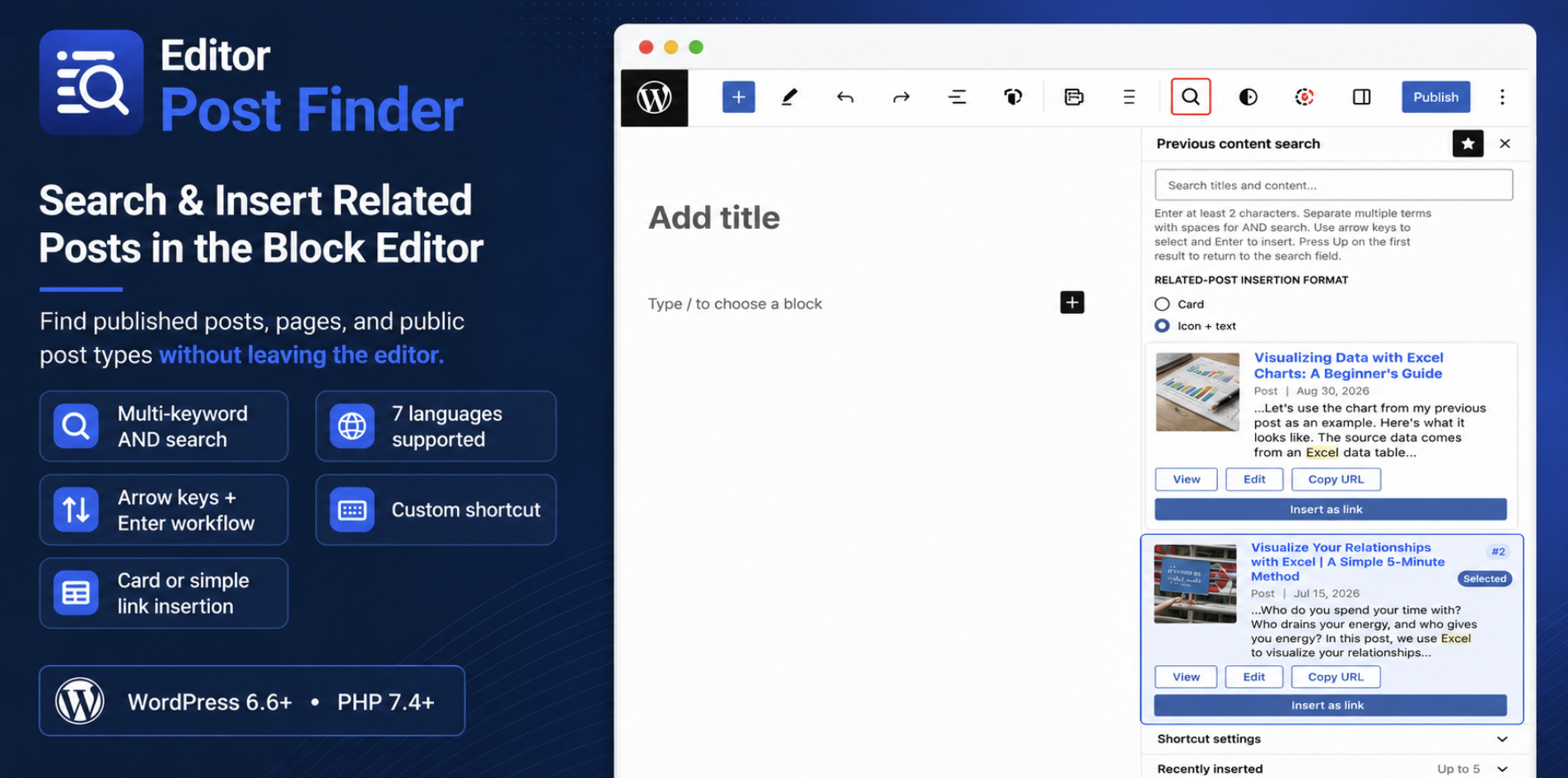
Find and insert related posts without leaving the WordPress Block Editor.
Editor Post Finder adds a fast search panel to the editor sidebar, so you can find published posts, pages, and public custom post types by title, content, or excerpt and insert them while you write.
Key Features
- Search post titles, content, and excerpts
- Multi-keyword AND search using half-width or full-width spaces
- Relevance ranking with title matches prioritized
- Highlight matched keywords in titles and excerpts
- Show total hit count, top 10 results, and load more results
- Filter results by post type
- View recently inserted posts
- Detect links already used in the current article
- Insert a related-post card
- Insert a simple icon + text link
- Copy URLs directly from search results
- Open or edit matched posts
- Customizable keyboard shortcut (default: Alt+S)
- Navigate results with arrow keys and insert with Enter
- 7-language support: English, Japanese, Spanish, French, German, Simplified Chinese, and Korean
- Uses WordPress core blocks only, so inserted content remains even after the plugin is deactivated or removed
- No external API, telemetry, or account required
Requirements
- WordPress 6.6 or later
- PHP 7.4 or later
- WordPress Block Editor
Notes
Only published content is searchable.
Search speed may vary on very large sites depending on server resources and content volume.
The default Alt+S shortcut may conflict with browser or operating-system shortcuts in some environments. The shortcut can be changed in the plugin settings.
Changelog:
Version 1.0.0
- Initial stable release
- Search published posts, pages, and public custom post types from the Block Editor sidebar
- Multi-keyword AND search, relevance ranking, keyword highlighting, total result count, and load more
- Related-post card and icon + text link insertion
- Customizable keyboard shortcut and arrow-key navigation
- 7-language support
Only logged in customers who have purchased this product may leave a review.
Loading...
WPBay support
 Support by free to design
Support by free to design
free to design supports this product through WPBay
Questions are handled in WPBay's private ticket system, keeping your purchase details and support conversation together.
Go to My Downloads
After purchase, open this item in My Downloads and choose Get Support.
What support includes
- Answers to product-related questions
- Help with reported bugs and issues
- Guidance for included third-party assets
What support does not include
- Customizations or new features
- Installation or setup services
Plugin
Maintenance snapshot
See recent updates, compatibility, support, and developer activity.
- Updated 45 days ago
- Developer active recently
- WPBay support available
- WordPress 7.1 tested
Snapshot updated 17 hours ago
View details Hide details
Maintenance details
This is maintenance data. It does not measure product quality or sales.
- Last update Updated 45 days ago
- Compatibility WordPress 7.1 tested · PHP 8.4 tested
- Releases 2 releases in the 45 days since listing
- Developer activity Developer active recently
- Support No recent support tickets to measure
- Docs and demo Documentation available · Changelog available · No demo listed
Health reflects recent activity during the last 90 days.
How this snapshot works
Plugin Health
The score is out of 100 and uses data WPBay can check. Ratings, popularity, and sales are not used.
- Last update 30 points
-
Plugins receive full recency points under 30 days, then step down at 90, 180, 365, and 545 days.
- Compatibility 20 points
-
WordPress, PHP, and WooCommerce (when relevant) are scored separately. The latest two PHP lines count as current. Nearby previous versions keep most of the points.
- Current version 100%
- One version behind 75%
- Two versions behind 50%
- Three versions behind 25%
- Older or not listed 0%
- Releases 15 points
-
One release earns 10, two or three earn 13, and four or more earn 15. Each accepted product ZIP counts once; reprocessing the same upload and listing-only edits do not count.
- Developer activity 15 points
-
Based on WPBay login and dashboard activity. Exact last-login dates are never shown.
- Support 15 points
-
There are no recent WPBay tickets to measure.
- Docs and demo 5 points
-
Documentation: 2. Changelog: 1. Working demo or preview: 2.
Score ranges
- 90–100 Excellent
- 75–89 Healthy
- 60–74 Fair
- 40–59 Needs attention
- 0–39 Limited
Long gaps
WPBay also checks for long gaps between updates, developer activity, support replies, and releases. Buyers do not see this score.
- Time since update 35 points
- Last developer activity 25 points
- WordPress compatibility 15 points
- Support replies 15 points
- Fewer releases 10 points
-
Quality verified by WPBay
WPBay review- Reviewed version
- 1.0.0
- Review completed
- Reviewer
- CodeRevolution
- Review type
- Initial
No unresolved approval blocker was identified during WPBay’s proportionate review of this release. This is not a security certification or a guarantee that the product contains no defects.
-
 Future updates
-
WPBay support from free to design
-
Fully GPL licensed
-
Covered by the WPBay refund policy
-
Plugin maintenance snapshot
Relevant picks
You may also like
Similar products selected by category, features, popularity and freshness.


From this seller
View seller store
More by free to design
Explore more bestselling products from this creator.
Reviews
There are no reviews yet.