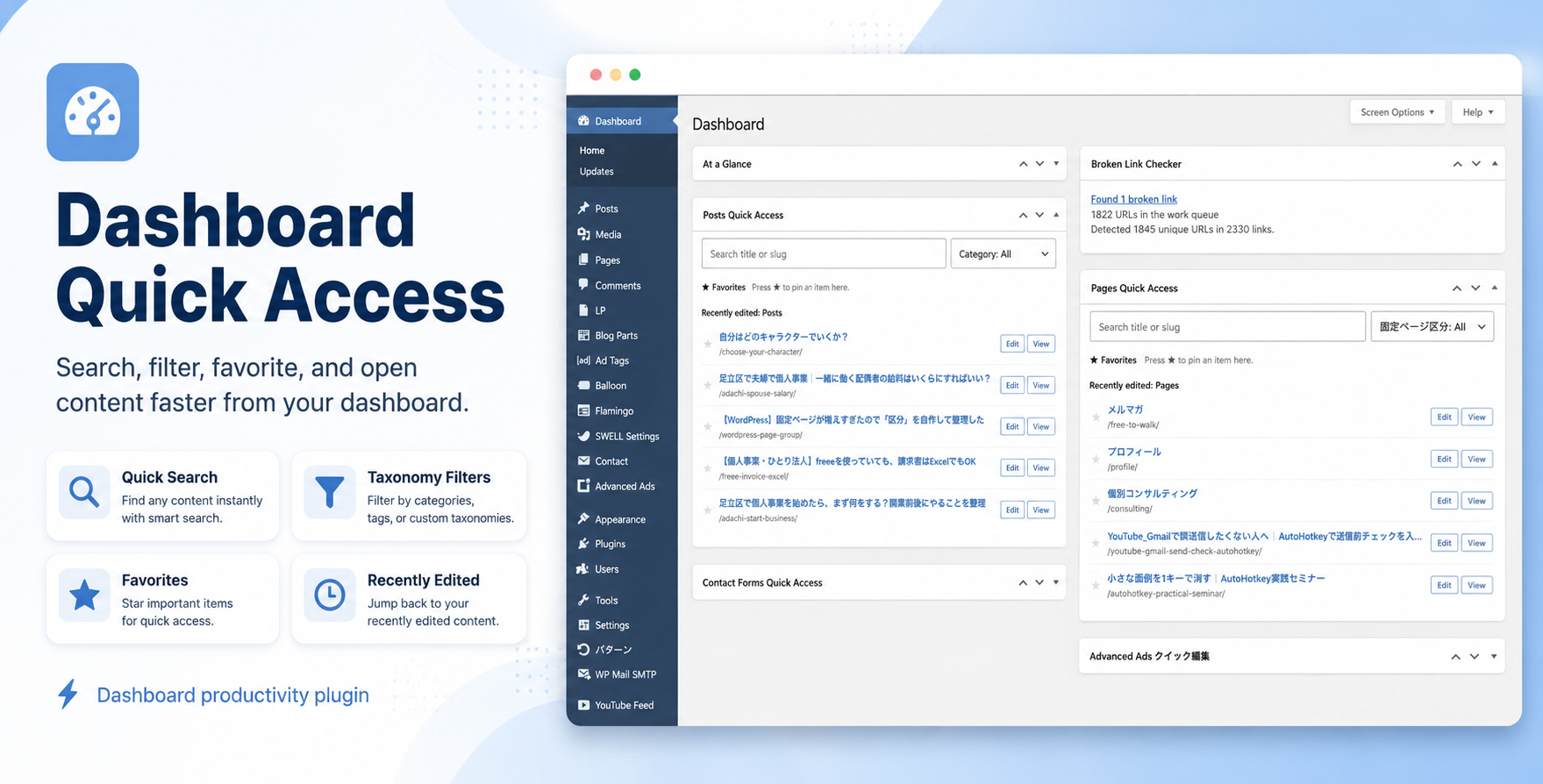
Dashboard Quick Access

Find and open content faster from your WordPress dashboard

Dashboard Quick Access adds simple quick-access widgets to your WordPress dashboard, helping you find and open the content you use most without repeatedly navigating through admin menus and long content lists.

Search posts, pages, WooCommerce products, custom post types, and Contact Form 7 forms directly from the dashboard.

Key Features

  • Quick search from the WordPress dashboard
    Search by title or slug without opening the standard content list first.
  • Posts, pages, products, and custom post types
    Choose which content types you want to display as dashboard quick-access widgets.
  • Automatic custom post type detection
    Registered post types with an admin interface are automatically detected and can be enabled individually.
  • Taxonomy filtering
    Filter content by categories, product categories, or custom taxonomies when available.
  • Favorites
    Mark frequently used items with a star and keep them easily accessible at the top of the widget.
  • Recently edited items
    Quickly return to recently updated content without searching for it again.
  • Direct Edit and View links
    Jump straight to the editor or front-end page with a single click.
  • Contact Form 7 support
    When Contact Form 7 is installed, forms can be added as their own quick-access widget with search, favorites, and recently edited items.
  • WooCommerce support
    WooCommerce products can be searched and accessed just like other WordPress content.
  • Choose only what you need
    Enable or disable each quick-access widget from the plugin settings.
  • AJAX-powered search
    Search results are loaded only when needed instead of preloading every post, page, or product into the dashboard.
  • Accessibility improvements
    Search fields and favorite controls are designed for keyboard and assistive-technology use, with visible focus indicators and accessible control states.
  • 7 languages included
    English, Japanese, Spanish, French, German, Simplified Chinese, and Korean.

Built for everyday WordPress management

Dashboard Quick Access is useful for sites with growing amounts of content, where finding the right post, page, product, form, or custom post type can become a small but repetitive task.

Instead of:

Admin menu → Content list → Search → Open

you can simply:

Dashboard → Search → Edit

Favorites and recently edited items can make frequently accessed content even faster to reach.

Works with your existing WordPress setup

Dashboard Quick Access does not create a new content management system. It works with the content types and taxonomies already registered on your WordPress site.

If a post type has no taxonomy available for filtering, the filter option is simply not shown.

If WooCommerce or Contact Form 7 is not installed, their related functionality stays out of the way.

Privacy-friendly

The plugin does not require an external account or external service to perform its dashboard search and quick-access functions.

Install the plugin, choose the content types you want to access, and use your WordPress dashboard as a faster starting point for everyday site management.

Changelog:


Version 1.5.0 — Marketplace review update

  • Renamed the product to Dashboard Quick Access
  • Unified the technical slug, plugin folder, main file, text domain, and translation filenames
  • Improved accessibility for dashboard controls
  • Added accessible labels to search fields
  • Added aria-pressed states to favorite buttons
  • Restored visible keyboard-focus indicators
  • Improved star icon color contrast
  • Limited taxonomy term loading on dashboard initialization to improve performance on sites with large taxonomies
  • Expanded documentation with settings storage, favorites storage, uninstall behavior, required user capabilities, and support information
  • Updated readmes, documentation, interface text, and translations to match the new product name

Reviews

There are no reviews yet.

Only logged in customers who have purchased this product may leave a review.

Loading...
WPBay support Support by free to design

free to design supports this product through WPBay

Questions are handled in WPBay's private ticket system, keeping your purchase details and support conversation together.

Go to My Downloads

After purchase, open this item in My Downloads and choose Get Support.

What support includes

  • Answers to product-related questions
  • Help with reported bugs and issues
  • Guidance for included third-party assets

What support does not include

  • Customizations or new features
  • Installation or setup services
Plugin

Maintenance snapshot

See recent updates, compatibility, support, and developer activity.

  • Updated today
  • Developer active recently
  • WPBay support available
  • WordPress 7.1 tested

Snapshot updated 4 hours ago

View details Hide details

Maintenance details

This is maintenance data. It does not measure product quality or sales.

  • Last update Updated today
  • Compatibility WordPress 7.1 tested · PHP 8.4 tested · WooCommerce 11 tested
  • Releases 2 releases in the last 12 months
  • Developer activity Developer active recently
  • Support No recent support tickets to measure
  • Docs and demo Documentation available · Changelog available · No demo listed
How this snapshot works

Plugin Health

The score is out of 100 and uses data WPBay can check. Ratings, popularity, and sales are not used.

Last update 30 points

Plugins receive full recency points under 30 days, then step down at 90, 180, 365, and 545 days.

Compatibility 20 points

WordPress, PHP, and WooCommerce (when relevant) are scored separately. The latest two PHP lines count as current. Nearby previous versions keep most of the points.

  • Current version 100%
  • One version behind 75%
  • Two versions behind 50%
  • Three versions behind 25%
  • Older or not listed 0%
Releases 15 points

One release earns 10, two or three earn 13, and four or more earn 15. Each accepted product ZIP counts once; reprocessing the same upload and listing-only edits do not count.

Developer activity 15 points

Based on WPBay login and dashboard activity. Exact last-login dates are never shown.

Support 15 points

There are no recent WPBay tickets to measure.

Docs and demo 5 points

Documentation: 2. Changelog: 1. Working demo or preview: 2.

Score ranges

  • 90–100 Excellent
  • 75–89 Healthy
  • 60–74 Fair
  • 40–59 Needs attention
  • 0–39 Limited

Long gaps

WPBay also checks for long gaps between updates, developer activity, support replies, and releases. Buyers do not see this score.

  • Time since update 35 points
  • Last developer activity 25 points
  • WordPress compatibility 15 points
  • Support replies 15 points
  • Fewer releases 10 points

Pricing Plans 

$9
1 Site

Prices are in US dollars and exclude taxes

No Badges Acquired View Store
  • Last Updated 30 Aug 2026
  • Type Plugin
  • Version 1.5.0
Compare with similar plugins

© All Rights Reserved - free to design
Contact WPBay Market's Help Team