


 1 month free

 Well Documented
Sold Only On WPBay
Well Documented
Sold Only On WPBay
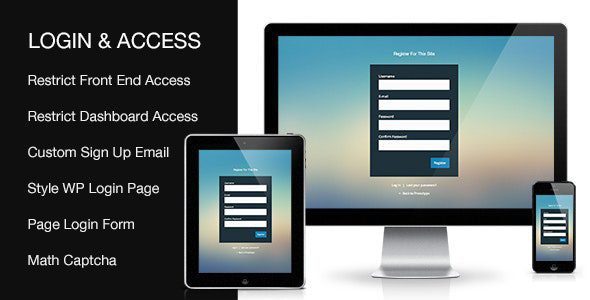
The Custom Login & Access plugin gives you full control over how users interact with your WordPress site’s login and access experience. Whether you’re running a membership site, a private client portal, or simply want more control over user permissions and interface, this plugin offers a complete solution without the need for complex coding or third-party services.
1. Style the Default WordPress Login Page
Easily customize the look and feel of the default WP login screen to match your branding. Modify colors, logo, background, and layout to create a seamless transition from your site to the login page, providing a professional and cohesive user experience.
2. Add Login, Register, and Forgotten Password Forms to Any Page
Embed fully functional login, registration, and password reset forms directly into your pages using shortcodes. This allows you to maintain complete design consistency and keeps users on your site, rather than redirecting them to the default WordPress forms.
3. Modal Login and Register Forms
Improve user experience with sleek, responsive modal windows for login and registration. Users can authenticate or sign up without leaving the page, reducing friction and increasing engagement.
4. Restrict Front-End Access for Non-Logged-In Users
Take full control over who can view your content. Restrict access to specific pages, posts, custom post types, categories, or taxonomies, or even lock down your entire site to registered users only. This is ideal for private communities, membership platforms, or sensitive content.
5. Restrict WordPress Dashboard Access for Subscribers
Prevent low-level users such as Subscribers from accessing the WordPress dashboard. Keep their experience limited to the front end of the site, enhancing security and keeping your admin area clean.
6. Redirect Users After Login and Logout
Guide users to the right destination with custom redirects after login or logout. You can define unique redirect URLs based on user roles, providing a tailored and intuitive flow depending on their needs and permissions.
7. Allow Users to Set Their Own Password During Registration
Streamline the registration process by allowing users to set their password during sign-up. No more waiting for password reset emails, users can access your site immediately after registering.
8. Enable CAPTCHA for Login, Register, and Forgotten Password Forms
Protect your site from spam and brute-force attacks by adding CAPTCHA validation to all user-facing forms. This ensures only legitimate users can interact with your site, without disrupting the user experience.
9. Regular Product Updates
Stay compatible with the latest versions of WordPress. The Custom Login & Access plugin is actively maintained and regularly updated to ensure stability, security, and compatibility with evolving WP standards.
Only logged in customers who have purchased this product may leave a review.
 Support by PressApps
Questions are handled in WPBay's private ticket system, keeping your purchase details and support conversation together.
After purchase, open this item in My Downloads and choose Get Support.
See recent updates, compatibility, support, and developer activity.
Snapshot updated 10 hours ago
This is maintenance data. It does not measure product quality or sales.
Health reflects recent activity during the last 90 days.
The score is out of 100 and uses data WPBay can check. Ratings, popularity, and sales are not used.
Plugins receive full recency points under 30 days, then step down at 90, 180, 365, and 545 days.
WordPress, PHP, and WooCommerce (when relevant) are scored separately. The latest two PHP lines count as current. Nearby previous versions keep most of the points.
One release earns 10, two or three earn 13, and four or more earn 15. Each accepted product ZIP counts once; reprocessing the same upload and listing-only edits do not count.
Based on WPBay login and dashboard activity. Exact last-login dates are never shown.
There are no recent WPBay tickets to measure.
Documentation: 2. Changelog: 1. Working demo or preview: 2.
Score ranges
WPBay also checks for long gaps between updates, developer activity, support replies, and releases. Buyers do not see this score.
No unresolved approval blocker was identified during WPBay’s proportionate review of this release. This is not a security certification or a guarantee that the product contains no defects.
 Future updates
WPBay support from PressApps
GPL code, proprietary assets
Covered by the WPBay refund policy
Plugin maintenance snapshot
Future updates
WPBay support from PressApps
GPL code, proprietary assets
Covered by the WPBay refund policy
Plugin maintenance snapshot
Similar products selected by category, features, popularity and freshness.

Reviews
There are no reviews yet.