



Ordrivo Booking Super Pro – Appointment Booking & Live Admin Terminal

 Recently Updated
Well Documented
Sold Only On WPBay
Recently Updated
Well Documented
Sold Only On WPBay
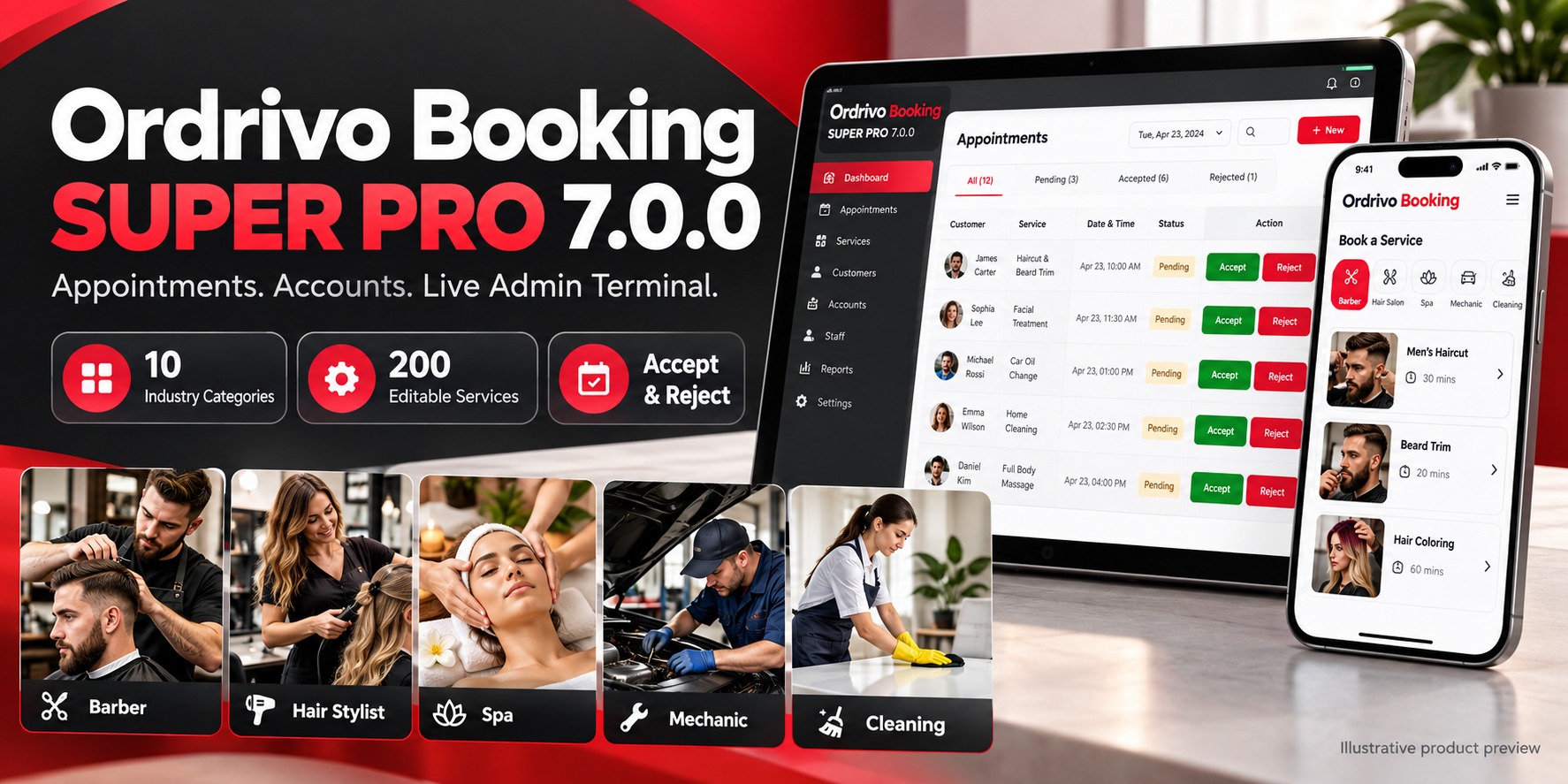
Ordrivo Booking Super Pro Appointment Booking & Live Admin Terminal for WordPress Give customers a convenient way to request appointments—and give your business a clear place to manage them. Ordrivo Booking Super Pro combines an editable service catalog, verified customer accounts, appointment requests and an administrator terminal. Customers can choose a service, select an available time and follow their booking status from their phone. Administrators can accept or reject requests and manage appointments through completion. 10 Business Categories. 200 Editable Service Examples. Start with twenty service examples for each of these industries: – Barbershops – Hair salons – Massage studios – Spas – Tattoo studios – Car workshops – Therapists – Private clinics – Beauty salons – Cleaning companies Customize service names, descriptions, photos, prices and appointment durations through WordPress. Rename categories, replace their images and draft services your business does not offer. Ten realistic category images are included. Services share their category image by default, and each service can be assigned its own photo. A Clear Administrator Terminal Review appointment details and make decisions with straightforward controls: – Accept or Reject pending requests. – Start, Complete or Cancel appointments through the supported status flow. – View appointments by date or open the queue of future pending requests. – Filter appointments by status. – See service, time, price, customer contact details, postcode and notes. – Enable sound alerts for newly detected requests. The terminal checks for updates every five seconds while the page is visible. Customer Accounts and My Appointments Customers can create an email/password account and verify their email before booking. Google, Microsoft—including Hotmail and Outlook—and Facebook sign-in connections are also available when configured with the website owner’s provider app credentials. The My Appointments page shows the signed-in customer’s latest 100 bookings. Customers can open an appointment to view its current status or request a different available time. Booking access is restricted to the verified appointment owner or an administrator. Rescheduled appointments return to Pending for fresh administrator acceptance. Availability That Accounts for Service Duration Appointment availability considers the full treatment duration, not just the starting time. Overlapping requests are blocked, and database locking coordinates competing requests for the same schedule. Configure opening and closing times, operating weekdays, slot intervals and whether the business is accepting new appointments. This version uses one shared appointment resource per website. It does not provide separate schedules for multiple employees, rooms or independent businesses. Postcode and Spam Controls Configure permitted postcode prefixes for your service area. The booking form also includes: – A hidden honeypot. – A signed, expiring arithmetic challenge. – Protection against challenge reuse. – Submission throttling. – WordPress nonce checks. Postcode rules are an operator-maintained prefix allowlist, not an official address-validation service. Built Around WordPress – Editable services and categories. – Configurable currency label and notification email. – WordPress email notifications. – Personal-data export and erasure support. – English source strings and an included translation template. – Customer booking, account dashboard and terminal shortcodes. – Included installation guide, configuration instructions and test results. Requirements and Setup Requires WordPress 6.4+ and PHP 7.4+, with MySQL/MariaDB named-lock support. Use HTTPS for customer accounts and social sign-in. Working WordPress email delivery is required for email verification, password recovery and notifications. Social providers require the buyer’s own app registration, credentials and applicable provider approvals. Demo services and prices should be reviewed before launch. Currency labels do not convert numeric prices. The plugin manages appointment requests; it does not process payments or provide medical-record management. Version 7.0.0 — Validation WordPress and database integration tests passed for registration, email verification, booking submission, administrator acceptance/rejection, customer rescheduling, ownership checks, concurrent booking protection and privacy export/erasure. Social-provider callbacks were tested with simulated responses. Live provider sign-in, actual inbox delivery and visual mobile/browser verification remain pending. The included test report records these limits. Ordrivo Booking Super Pro brings your service catalog, customer appointments and administrator decisions together on your own WordPress website.
Changelog:
Version 7.0.0 — 12 October 2026
- Introduced Ordrivo Booking Super Pro, based on Booking Lite 1.0.0.
- Added 10 editable industry categories with 20 service examples each—200 services in total.
- Included 10 realistic category images and individual service-photo editing.
- Added editable prices, descriptions, durations, opening hours, weekdays and currency.
- Added an administrator terminal with Accept, Reject, Start, Complete and Cancel controls.
- Added date/status filters, a pending-request queue and automatic five-second polling.
- Added optional user-enabled sound alerts.
- Added email/password customer registration, email verification and password recovery.
- Added configurable Google, Microsoft/Hotmail/Outlook and Facebook sign-in.
- Added My Appointments and authenticated owner-only booking access.
- Added customer rescheduling with fresh administrator acceptance.
- Added duration-aware availability and database locking for competing requests.
- Added postcode-prefix restrictions, signed arithmetic challenges, replay protection, honeypot and submission throttling.
- Added notifications, personal-data export/erasure, an English translation template and documentation.
Validation: WordPress/database integration tests passed. Live social-provider sign-in, inbox delivery and visual mobile/browser verification remain pending.
Only logged in customers who have purchased this product may leave a review.
Loading...
WPBay support
 Support by Ordrivo
Support by Ordrivo
Ordrivo supports this product through WPBay
Questions are handled in WPBay's private ticket system, keeping your purchase details and support conversation together.
Go to My Downloads
After purchase, open this item in My Downloads and choose Get Support.
What support includes
- Answers to product-related questions
- Help with reported bugs and issues
- Guidance for included third-party assets
What support does not include
- Customizations or new features
- Installation or setup services
Plugin
Maintenance snapshot
See recent updates, compatibility, support, and developer activity.
- Updated 1 day ago
- Developer active recently
- WPBay support available
- Documentation available
Snapshot updated 14 hours ago
View details Hide details
Maintenance details
This is maintenance data. It does not measure product quality or sales.
- Last update Updated 1 day ago
- Compatibility WordPress 7.1 not marked as tested · PHP 8.5 not marked as tested
- Releases 17 releases in the 16 days since listing
- Developer activity Developer active recently
- Support No recent support tickets to measure
- Docs and demo Documentation available · Changelog available · Demo available
Health reflects increased activity during the last 90 days.
How this snapshot works
Plugin Health
The score is out of 100 and uses data WPBay can check. Ratings, popularity, and sales are not used.
- Last update 30 points
-
Plugins receive full recency points under 30 days, then step down at 90, 180, 365, and 545 days.
- Compatibility 20 points
-
WordPress, PHP, and WooCommerce (when relevant) are scored separately. The latest two PHP lines count as current. Nearby previous versions keep most of the points.
- Current version 100%
- One version behind 75%
- Two versions behind 50%
- Three versions behind 25%
- Older or not listed 0%
- Releases 15 points
-
One release earns 10, two or three earn 13, and four or more earn 15. Each accepted product ZIP counts once; reprocessing the same upload and listing-only edits do not count.
- Developer activity 15 points
-
Based on WPBay login and dashboard activity. Exact last-login dates are never shown.
- Support 15 points
-
There are no recent WPBay tickets to measure.
- Docs and demo 5 points
-
Documentation: 2. Changelog: 1. Working demo or preview: 2.
Score ranges
- 90–100 Excellent
- 75–89 Healthy
- 60–74 Fair
- 40–59 Needs attention
- 0–39 Limited
Long gaps
WPBay also checks for long gaps between updates, developer activity, support replies, and releases. Buyers do not see this score.
- Time since update 35 points
- Last developer activity 25 points
- WordPress compatibility 15 points
- Support replies 15 points
- Fewer releases 10 points
-
Quality verified by WPBay
WPBay review- Reviewed version
- 7.0.15
- Review completed
- Reviewer
- CodeRevolution
- Review type
- Initial
No unresolved approval blocker was identified during WPBay’s proportionate review of this release. This is not a security certification or a guarantee that the product contains no defects.
-
 Future updates
-
WPBay support from Ordrivo
-
GPL code, proprietary assets
-
Covered by the WPBay refund policy
-
Plugin maintenance snapshot
Relevant picks
You may also like
Similar products selected by category, features, popularity and freshness.



From this seller
View seller store
More by Ordrivo
Explore more bestselling products from this creator.

Reviews
There are no reviews yet.