


MemberHub for Paid Memberships Pro

 Recently Updated
Well Documented
Recently Updated
Well Documented
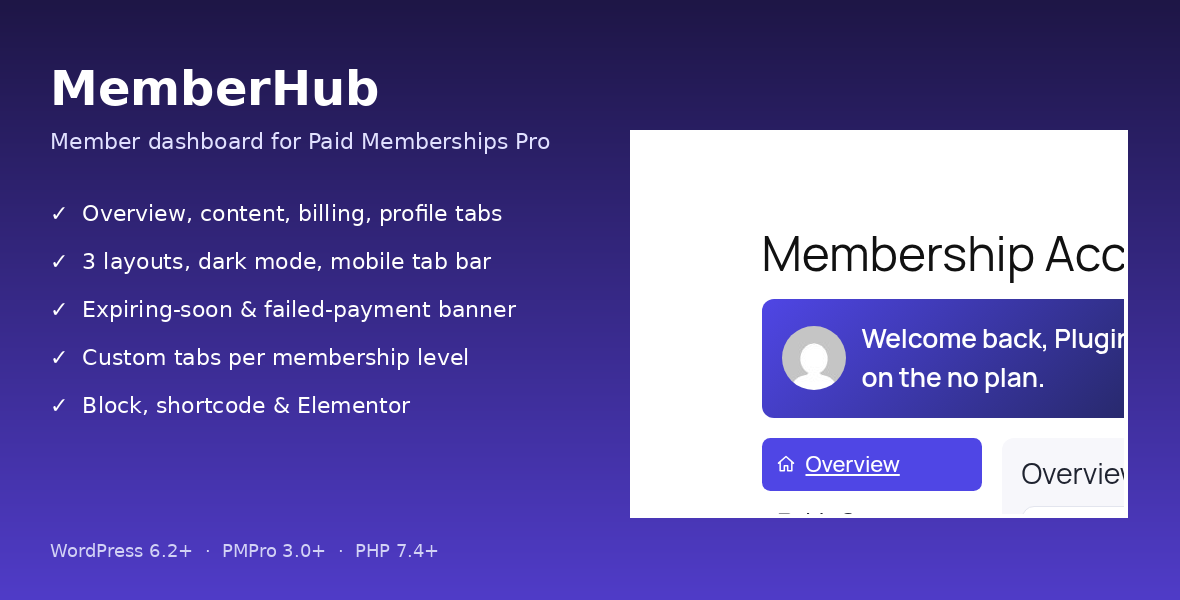
A real member dashboard for Paid Memberships Pro
The stock PMPro Membership Account page is a plain list of links. MemberHub replaces it with a tabbed, mobile-friendly portal where members can see their plan, open the content they’ve paid for, check invoices and edit their profile. It reads PMPro’s own data and never handles payments, so billing changes and cancellations still go through PMPro’s pages.What members see
- Overview: a card per level with a status chip (Active, Expiring, Cancelled, Pending), next payment date and amount, expiry date, days left, and Upgrade / Update billing / Cancel buttons.
- My Content: posts and pages their level unlocks (from PMPro’s page and category restrictions), “New since your last visit” badges, and a locked teaser row that links to the right checkout level.
- Billing: their own orders with status and a printable invoice view.
- Profile: name, display name, email, PMPro User Fields, profile picture (JPG/PNG/WebP up to 2 MB) and password change.
- Upgrade: a compact level comparison with the current plan highlighted.
- Custom tabs: up to 10, each showing a shortcode, a page or a link, visible only to the levels you pick.
- An expiring-soon banner a set number of days before a membership ends, or after a failed renewal.
- A bottom tab bar on phones (under 768px).
Settings
- General: replace the PMPro Account page automatically (on by default, and turning it off restores the stock page), and expiring-banner timing.
- Tabs: show, hide and order the built-in tabs and add custom tabs.
- Design: sidebar, top tabs or card grid layout; light, dark or auto mode; accent color, corner radius, density, hero image, and a welcome text with merge tags
{first_name},{level_name},{expiration_date},{days_left}. - My Content: which post types count as member content.
- Integrations: tabs for PMPro Membership Card, Member Badges, Series, Courses for Membership and Member Directory, each detected automatically and hidden when the add-on isn’t active.
- Tools: export and import settings as JSON.
Example
A coaching site sells Basic and Pro levels. After activating MemberHub, the wizard sets the card-grid layout and the Account page turns into the dashboard. Under Tabs the owner adds a “Live Calls” tab that shows a Zoom schedule page to Pro members only, and under Design sets the welcome text to “Hi {first_name}, {days_left} days left on {level_name}”. A Basic member now sees their Pro-only lessons as locked rows with an upgrade link, and gets a banner seven days before their plan expires. Use it automatically on the Account page, or place it anywhere with[ajmh_dashboard] (layout="sidebar|tabs|cards"), the MemberHub Dashboard block, or the Elementor widget. It’s translation-ready with RTL support and developer hooks.
Requires the free Paid Memberships Pro plugin 3.0+. Paid Memberships Pro is a trademark of Stranger Studios, LLC. This add-on is not affiliated with or endorsed by them.
Changelog:
1.0.4 - Password-protected posts no longer show excerpts in My Content; My Content pagination now pages through accessible items only.
1.0.3 – Custom page tabs now enforce PMPro membership access before rendering; members without access see a message and an upgrade link.
1.0.2 – Upgrade action checks its target and falls back to the PMPro Levels page; paginated billing history (20 per page); paginated course and series tabs with full access checks; labelled teaser limit.
1.0.1: Guard against nested dashboard rendering, batched and paginated content index so no items are dropped, and a docs Support section.
1.0.0 – Initial release: tabbed member dashboard (Overview, My Content, Billing, Profile, Upgrade), custom tabs per level, expiring-soon banner, 3 layouts, dark mode, mobile tab bar, PMPro add-on tabs, shortcode, block and Elementor widget, settings import/export.
Only logged in customers who have purchased this product may leave a review.
Loading...
WPBay support
 Support by 007AJ.com
Support by 007AJ.com
007AJ.com supports this product through WPBay
Questions are handled in WPBay's private ticket system, keeping your purchase details and support conversation together.
Go to My Downloads
After purchase, open this item in My Downloads and choose Get Support.
What support includes
- Answers to product-related questions
- Help with reported bugs and issues
- Guidance for included third-party assets
What support does not include
- Customizations or new features
- Installation or setup services
Plugin
Maintenance snapshot
See recent updates, compatibility, support, and developer activity.
- Updated today
- Developer active recently
- WPBay support available
- WordPress 7.1 tested
Snapshot updated 14 hours ago
View details Hide details
Maintenance details
This is maintenance data. It does not measure product quality or sales.
- Last update Updated today
- Compatibility WordPress 7.1 tested · PHP 8.5 tested
- Releases 5 releases in the 1 days since listing
- Developer activity Developer active recently
- Support No recent support tickets to measure
- Docs and demo Documentation available · Changelog available · Demo available
How this snapshot works
Plugin Health
The score is out of 100 and uses data WPBay can check. Ratings, popularity, and sales are not used.
- Last update 30 points
-
Plugins receive full recency points under 30 days, then step down at 90, 180, 365, and 545 days.
- Compatibility 20 points
-
WordPress, PHP, and WooCommerce (when relevant) are scored separately. The latest two PHP lines count as current. Nearby previous versions keep most of the points.
- Current version 100%
- One version behind 75%
- Two versions behind 50%
- Three versions behind 25%
- Older or not listed 0%
- Releases 15 points
-
One release earns 10, two or three earn 13, and four or more earn 15. Each accepted product ZIP counts once; reprocessing the same upload and listing-only edits do not count.
- Developer activity 15 points
-
Based on WPBay login and dashboard activity. Exact last-login dates are never shown.
- Support 15 points
-
There are no recent WPBay tickets to measure.
- Docs and demo 5 points
-
Documentation: 2. Changelog: 1. Working demo or preview: 2.
Score ranges
- 90–100 Excellent
- 75–89 Healthy
- 60–74 Fair
- 40–59 Needs attention
- 0–39 Limited
Long gaps
WPBay also checks for long gaps between updates, developer activity, support replies, and releases. Buyers do not see this score.
- Time since update 35 points
- Last developer activity 25 points
- WordPress compatibility 15 points
- Support replies 15 points
- Fewer releases 10 points
-
Quality verified by WPBay
WPBay review- Reviewed version
- 1.0.4
- Review completed
- Reviewer
- CodeRevolution
- Review type
- Initial
No unresolved approval blocker was identified during WPBay’s proportionate review of this release. This is not a security certification or a guarantee that the product contains no defects.
-
 Future updates
-
WPBay support from 007AJ.com
-
GPL code, proprietary assets
-
Covered by the WPBay refund policy
-
Plugin maintenance snapshot
Relevant picks
You may also like
Similar products selected by category, features, popularity and freshness.

From this seller
View seller store
More by 007AJ.com
Explore more bestselling products from this creator.
Reviews
There are no reviews yet.