


Bright Addons Pro: 154 Elementor Widgets, Theme Builder, Popups, Mega Menu and WooCommerce Builder

 Recently Updated
Well Documented
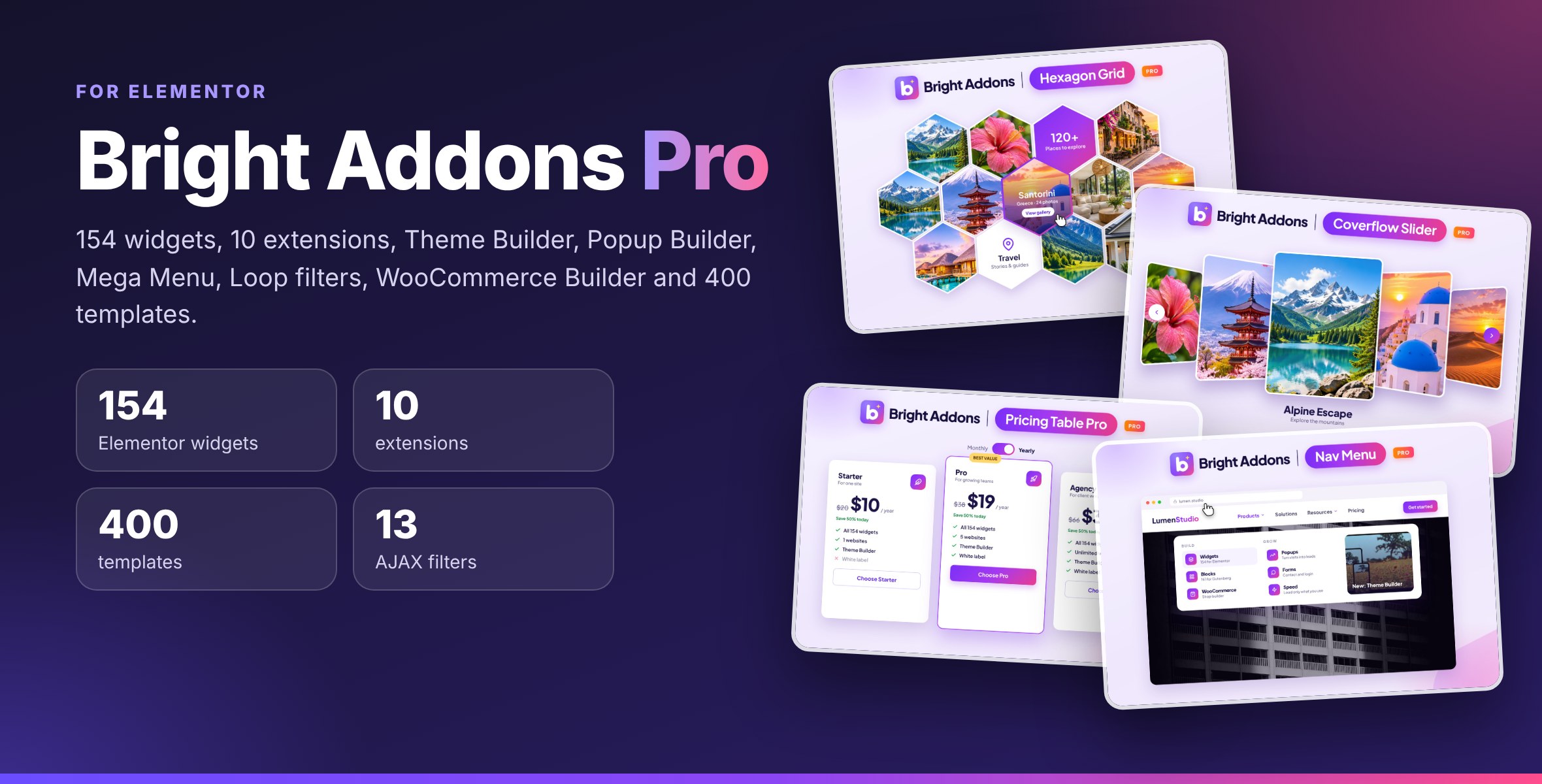
Bright Addons Pro adds 154 widgets to Elementor: 98 Pro widgets plus all 56 widgets of the free Bright Addons plugin, in one plugin. It also gives you 10 extensions for every element, a Theme Builder, Popup Builder, Loop Builder with AJAX filters, WooCommerce Builder, page transitions, site tools and 400 ready made templates you insert with one click.
Every widget has full Content, Style, hover and responsive controls for desktop, tablet and phone. Each widget loads its own small CSS and JavaScript only on the pages that use it, and widgets you switch off load nothing, so your site stays fast.
It is accessible (keyboard support, visible focus, screen reader labels, reduced motion), translation ready, and works with any theme that supports Elementor, including Hello Elementor.
Files sent with the Contact Form are stored privately on Apache, LiteSpeed, Nginx and IIS, and the plugin checks that storage is private before it keeps any file.
Requirements: WordPress 6.5 or newer, PHP 7.4 or newer and Elementor 3.20 or newer (the free Elementor works). WooCommerce 8.0 or newer for the WooCommerce widgets and builder.
Features
- 154 Elementor widgets: 98 Pro widgets plus the 56 widgets of the free Bright Addons plugin
- Sliders, carousels, galleries (filterable, masonry, justified, coverflow), hotspots, timelines, marquees, charts, data tables, maps and hexagon grids
- Pricing tables, comparison tables, price lists, countdowns, modal popups, announcement bars and social proof
- 11 WooCommerce widgets plus a WooCommerce Builder for shop, category and product pages
- Loop Grid and Loop Carousel with 13 AJAX filter widgets (search, checkboxes, range, sort, tabs, load more and more)
- 10 extensions for every element: Display Conditions, Sticky, Particles, Animated Gradient, Glass Effect, Scroll Effects, Mouse and Float Effects, Tooltip, Wrapper Link and Custom CSS
- Theme Builder: header, footer, single posts, archives, search results and 404 pages
- Popup Builder with triggers: delay, scroll, exit intent, click and more
- Mega menus and a Nav Menu with off-canvas mobile menu
- Contact Form with multi step forms, file uploads, email notifications, saved entries and spam protection
- Site tools: Redirects with 404 log, Custom Fonts, Custom Icons, Custom Code, Import and Export, template shortcodes and dynamic tags
- 400 ready made pages and sections with one click insert
- Page transitions between pages
- Responsive settings for desktop, tablet and phone
- Each widget loads its files only where it is used
- Translation ready, works with any Elementor theme
- Full documentation included
Plans
Every plan has all 154 widgets, every extension, the Theme Builder, Popup Builder, Loop Builder, WooCommerce Builder, site tools and 400 templates. Plans differ only in the number of sites: 1 site, 5 sites or unlimited sites.
Updates and support
New versions are added here on WPBay for you to download, and support is given through the WPBay support system. This WPBay edition has no license key, no activation and no account screen, and it sends no data to the author or to any licensing service.
External services and requirements
All widgets work without any account, except the optional features below. They use an outside service and work only after you set them up or use them:
- Template Library: only when you open it, the template list and the templates you insert load from brightaddons.com, and the photos of an inserted template are copied from images.unsplash.com into your media library. Nothing about your site is sent.
- Google Reviews widget: needs your own Google Cloud project with a billing account, the “Places API (New)” switched on and an API key, added in Bright Addons Pro > Integrations. Google gives a free monthly amount and charges per request beyond it. Requests are made by your server and cached.
- Instagram Feed widget: needs an Instagram Business or Creator account and an access token from the “Instagram API with Instagram Login” product, added in Bright Addons Pro > Integrations. Free. Images load from Instagram.
- Contact Form reCAPTCHA (optional): needs Google reCAPTCHA keys. Free for normal use. The visitor’s browser loads the reCAPTCHA script from Google.
- Contact Form webhook (optional): sends each entry to an endpoint you enter (for example Zapier, Make or your own app).
- Advanced Data Table remote CSV (optional): downloads the CSV file from the address you enter, cached for an hour.
- Store Locator widget: map pictures come from OpenStreetMap by default (free; the tile server receives the visitor IP address), or from Google Map Tiles with your own key, or from a tile address you enter.
- Video Box and Video Playlist: load the YouTube or Vimeo player, and YouTube thumbnails, only for videos you add.
- Share links: open Facebook, X, LinkedIn and other networks only when a visitor clicks them.
Full details are in the documentation, section “External services and requirements”.
Installation
- Make sure Elementor (free) is installed and active.
- In WordPress, go to Plugins > Add New Plugin > Upload Plugin, choose the zip you downloaded from WPBay and press Install Now, then Activate.
- If the free Bright Addons plugin is active, it is switched off automatically. Your pages and settings stay as they are, because Pro includes the same widgets.
- Open Bright Addons Pro in the admin menu to switch widgets on or off and set up the Theme Builder, popups and site tools.
- Edit a page with Elementor and find the widgets in the Bright Addons and Bright Addons Pro categories, or press the Bright Addons button next to Add Template for ready made templates.
- Open the documentation for the full guide to every widget and feature.
Changelog:
2.1.1
- Fixed: translations. All texts of the bundled Bright Addons widgets now use the bright-addons-pro text domain, which the plugin loads, so every widget label and front end text can be translated.
- New: languages/bright-addons-pro.pot translation template is included, matching the Domain Path header.
2.1.0
- New in Social Proof Notification: "When Closed" setting. By default the close button now closes only the current notification, and the next one comes after a wait you choose (6 seconds by default), so the notifications keep running. Choose "Stop for the rest of the visit" for the earlier behaviour.
2.0.9
- Fixed: Social Proof Notification vanished less than a second after it appeared on sites where a page cache, CSS optimisation plugin or CDN still served the stylesheet of an older version. The widget now uses its own class names and its own file names (proof-toast.css and proof-toast.js), so an older stylesheet or script can never apply to it.
2.0.8
- Fixed: Social Proof Notification closed every notification after less than a second on sites where an optimisation plugin or the page builder changed the widget's settings attribute. The widget now keeps its settings in its own attribute and always uses safe times (6 seconds shown, 8 seconds between, 5 seconds before the first) when they can not be read.
2.0.7
- Fixed: Social Proof Notification could show a notification for less than a second and switch to the next one when two notification widgets (or the same one twice, from a template) were on one page. Now only one notification is shown per corner at a time, and a widget printed twice runs once.
- New in Social Proof Notification: an animated Bright Addons logo (GIF) is the default picture for items without an image. You can choose your own image or GIF, or an icon, instead.
- New in Social Proof Notification: animated GIF images keep moving (the full file is used), and an Image Quality setting for other pictures.
- New in Social Proof Notification: 24 ready demo notifications for a new widget, for Bright Addons Pro for Elementor, Blocks Pro, WooCommerce Pro and Media Cleaner Pro, in all six layouts.
2.0.6
- Improved: Social Proof Notification has a new premium design. Six layouts (card, rounded pill, purchase, review with stars, image on top, text only), and every item can have its own layout, picture animation, stars, badge, accent color and background.
- New in Social Proof Notification: light, dark and frosted glass styles, 6 entrance animations, 9 picture animations, a live dot, a Verified badge, a time bar that pauses on hover, top and bottom center positions, and styling for the name, badge, stars, picture border and shadow.
- New in Social Proof Notification: close button position (corner, middle or outside), show on hover, its own icon, and size, colors, border, radius and shadow for normal and hover.
- Fixed: the close button of Social Proof Notification took the theme's button style (a large colored pill) on some sites.
2.0.5
- Security: files sent with the Contact Form are now private on every server, including Nginx. A file that is only emailed is never written to the site. A file kept with an entry is saved in a format that a browser can not open (administrators download it in Form Entries), and the plugin checks over HTTP that the folder is private before it keeps any file; otherwise files are only emailed and Form Entries explains how to block the folder. Files of older versions are converted the first time an administrator opens the dashboard. The BRIGHT_ADDONS_FORMS_DIR constant keeps the files outside the web root.
- Fixed: file uploads in the Contact Form could stop with an error.
- Includes Bright Addons 2.0.6.
Only logged in customers who have purchased this product may leave a review.
Loading...
WPBay support
 Support by Bright Addons
Bright Addons supports this product through WPBay
Questions are handled in WPBay's private ticket system, keeping your purchase details and support conversation together.
Go to My Downloads
After purchase, open this item in My Downloads and choose Get Support.
What support includes
- Answers to product-related questions
- Help with reported bugs and issues
- Guidance for included third-party assets
What support does not include
- Customizations or new features
- Installation or setup services
Plugin
Maintenance snapshot
See recent updates, compatibility, support, and developer activity.
- Updated today
- Developer active recently
- WPBay support available
- WordPress 7.1 tested
Snapshot updated 3 hours ago
View details Hide details
Maintenance details
This is maintenance data. It does not measure product quality or sales.
- Last update Updated today
- Compatibility WordPress 7.1 tested · PHP 8.5 tested · WooCommerce 11 tested
- Releases 2 releases in the 1 days since listing
- Developer activity Developer active recently
- Support No recent support tickets to measure
- Docs and demo Documentation available · Changelog available · Demo available
How this snapshot works
Plugin Health
The score is out of 100 and uses data WPBay can check. Ratings, popularity, and sales are not used.
- Last update 30 points
-
Plugins receive full recency points under 30 days, then step down at 90, 180, 365, and 545 days.
- Compatibility 20 points
-
WordPress, PHP, and WooCommerce (when relevant) are scored separately. The latest two PHP lines count as current. Nearby previous versions keep most of the points.
- Current version 100%
- One version behind 75%
- Two versions behind 50%
- Three versions behind 25%
- Older or not listed 0%
- Releases 15 points
-
One release earns 10, two or three earn 13, and four or more earn 15. Each accepted product ZIP counts once; reprocessing the same upload and listing-only edits do not count.
- Developer activity 15 points
-
Based on WPBay login and dashboard activity. Exact last-login dates are never shown.
- Support 15 points
-
There are no recent WPBay tickets to measure.
- Docs and demo 5 points
-
Documentation: 2. Changelog: 1. Working demo or preview: 2.
Score ranges
- 90–100 Excellent
- 75–89 Healthy
- 60–74 Fair
- 40–59 Needs attention
- 0–39 Limited
Long gaps
WPBay also checks for long gaps between updates, developer activity, support replies, and releases. Buyers do not see this score.
- Time since update 35 points
- Last developer activity 25 points
- WordPress compatibility 15 points
- Support replies 15 points
- Fewer releases 10 points
-
Quality verified by WPBay
WPBay review- Reviewed version
- 2.1.1
- Review completed
- Reviewer
- CodeRevolution
- Review type
- Initial
No unresolved approval blocker was identified during WPBay’s proportionate review of this release. This is not a security certification or a guarantee that the product contains no defects.
-
 Future updates
-
WPBay support from Bright Addons
-
GPL code, proprietary assets
-
Covered by the WPBay refund policy
-
Plugin maintenance snapshot
Relevant picks
You may also like
Similar products selected by category, features, popularity and freshness.

Reviews
There are no reviews yet.