


WP Post Modules for NewsPaper and Magazine Layouts (Elementor Addon)

 Recently Updated
Well Documented
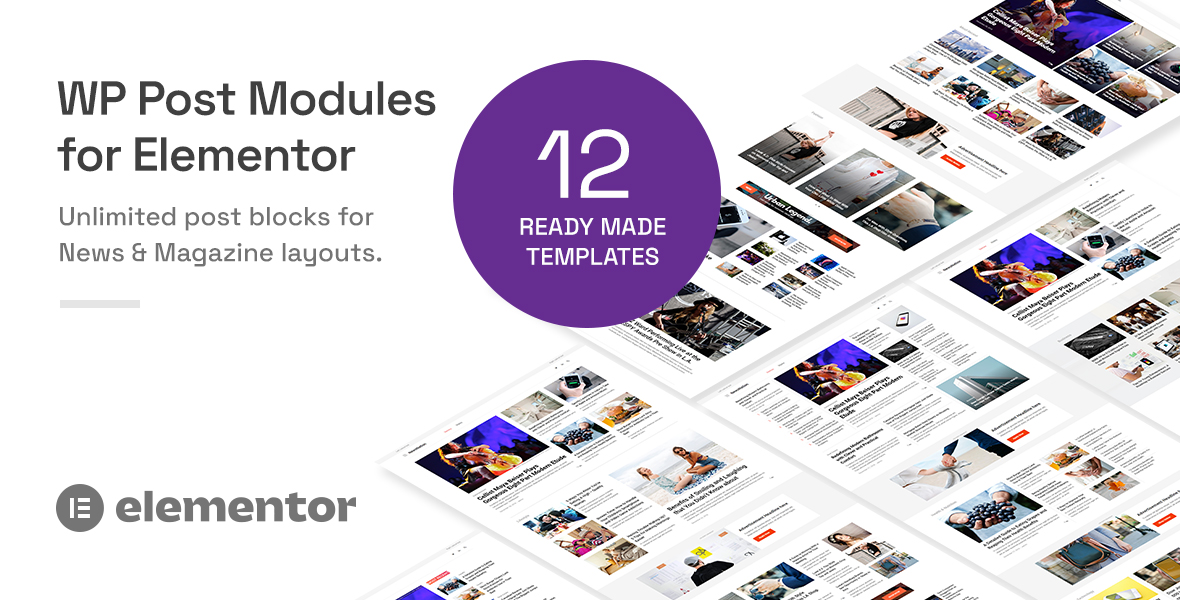
WP Post Modules – Elementor Addon for Magazine, Newspaper & Blog Layouts
WP Post Modules is a powerful Elementor addon designed to help you create stunning online magazines, newspaper websites, creative portfolios, and blogs with ease.
Featuring an intuitive drag-and-drop interface and extensive customization options, the plugin allows you to build versatile post modules without writing a single line of code. Choose from multiple display styles, layouts, and styling options to create professional, magazine-style content sections that perfectly complement your website.
Whether you’re building a news portal, an online publication, or a personal blog, WP Post Modules provides an all-in-one solution for presenting your content beautifully.
Key Features
Responsive & Ready-to-Use Designs
-
Fully responsive design, optimized for high-resolution Retina displays.
-
Includes 12 professionally designed homepage layouts, provided as ready-to-import Elementor JSON templates.
-
RTL Ready: Full support for right-to-left languages and layouts.
Multiple Post Display Styles
Choose from a variety of display styles, each offering extensive customization options.
Grid Layout
-
Four built-in grid sub-styles.
-
Support for unlimited column configurations.
-
Customizable column gutters and spacing.
List Layout
-
Customizable thumbnail-to-content split ratios.
-
Flexible thumbnail sizes, from compact to large.
-
Circular thumbnail images.
-
Three content border options: full border, half border, or no border.
-
Multi-column list layouts.
Tile Layout
-
Multiple column configurations.
-
Customizable gutters and spacing.
-
Content overlays with custom background colors and gradients.
-
Adjustable overlay margins and padding.
-
Control overlay visibility: always visible, on hover, or hidden.
-
Image zoom and rotation effects on hover.
Ticker
-
Customizable ticker title length.
-
Adjustable ticker animation duration.
-
Customizable ticker label text.
-
Background and foreground color pickers for ticker labels.
Bullet List
-
Simple, clean bullet-list layouts.
-
Customizable bullet size and color.
-
Adjustable spacing between list items.
Advanced Responsive Controls
-
Responsive controls for typography, columns, grid dimensions, gutters, and more.
-
Fine-tune layouts for desktop, tablet, and mobile devices.
-
Customize individual elements to achieve the perfect content presentation.
Advanced Typography & Styling
-
Access the complete Google Fonts library.
-
Customize font size, line height, font weight, letter spacing, and more.
-
Apply responsive typography settings across different screen sizes.
-
Set custom colors for post titles, excerpts, category links, post metadata, and other content elements.
Custom WordPress Query Builder
Build highly customized post queries with an intuitive query interface.
-
Retrieve posts by categories, tags, custom post types, taxonomies, post IDs, author IDs, and more.
-
Use post offsets to control where your queries begin.
-
Exclude specific posts to avoid displaying duplicate content across modules.
-
Customize sorting with WordPress
OrderandOrderbyparameters.
jQuery Owl Carousel Slider
Add interactive sliders to your Grid, List, and Tile layouts, including their respective sub-styles.
Available slider controls include:
-
Customize the number of slides displayed per view.
-
Enable or disable infinite animation loops.
-
Enable or disable autoplay.
-
Set custom autoplay intervals.
-
Adjust animation speed.
-
Choose from Slide, Zoom, and Fade animation effects.
-
Enable or disable automatic height adjustment.
-
Toggle previous/next navigation arrows.
-
Toggle pagination dots.
-
Configure stage padding for additional layout flexibility.
On-the-Fly Image Processing
Powered by the BFI Thumb image-resizing library, the plugin provides advanced image customization options.
-
Resize images dynamically with custom width and height settings.
-
Enable hard cropping for precise image dimensions.
-
Adjust image quality from 1 to 100 for optimal performance and image quality.
-
Automatically convert images to grayscale.
-
Apply custom image colors using an integrated color picker.
Flexible Text & Content Options
Take complete control over how your post content is displayed.
-
Choose semantic heading tags from H1 to H6 or P for better SEO control.
-
Customize main title font size and weight.
-
Configure paragraph tags and font sizes.
-
Automatically trim post excerpts to your preferred word count.
-
Enable or disable Read More links with customizable link text.
-
Show or hide individual post metadata elements, including categories, author, date, excerpts, and comments.
-
Automatically convert category links into expandable dropdowns when their number exceeds a specified limit.
-
Display author avatars alongside post metadata.
-
Built-in styling and functionality support for the WP Review and Post Views Counter plugins.
Social Sharing
Enable social sharing buttons on individual post modules to help readers share your content across popular platforms.
Supported networks:
-
X (formerly Twitter)
-
Facebook
-
WhatsApp
-
LinkedIn
-
Pinterest
-
VK
-
Reddit
-
Email
SEO & Structured Data
-
Generates valid Schema.org microdata for plugin-generated post content.
-
Customize schema properties directly from individual widget settings.
-
Provides W3C-valid HTML markup for generated content.
AJAX Navigation & Load More
Deliver a smoother browsing experience with AJAX-powered content loading.
-
AJAX-based Next and Previous navigation.
-
Load More functionality for Grid, List, and Tile display styles.
-
Load additional posts without requiring a full page reload.
Compatibility & Localization
-
Compatible with Google Chrome, Mozilla Firefox, and Apple Safari.
-
Translation-ready with included POT and PO/MO language files.
-
Supports multilingual websites and RTL layouts.
Requirements
-
WordPress 6.0 or above
-
php 7.4 or above
-
Elementor(Free) v4.0.0 or above
-
Browsers: Chrome, Safari, Firefox
Installation
-
Download the plugin zip from your WPBay account’s Downloads section.
-
In WordPress admin go to Plugins → Add New → Upload Plugin.
-
Click Choose File, select the plugin zip, then click Install Now.
-
After successful installation, activate the plugin.
For more details, please refer to the `index.html` in the documentation zip archive. It provides step-by-step instructions for installation, setup, and usage.
License Activation
WP Post Modules uses the WPBay licensing system. Activating your license unlocks automatic updates, support eligibility, and full functionality.
Activate inside your website’s WordPress admin
- Once you activate the plugin, License activation can be done from the “Activate License” link on the Plugins screen.
- Click on the “Activate License” link.
- You will be asked for the WPBay.com purchase code. Paste the product purchase code in that field and click “Register”.
Where to find your license key
- Log in to your WPBay account.
- Go to your account dashboard and open the License Manager section. (https://wpbay.com/my-account/license-manager/)
- Locate WP Post Modules and copy the purchase code / license key provided for your order.
Documentation & Support
-
Comprehensive, step-by-step documentation covering plugin installation, configuration, and usage.
-
Professional and dedicated support with a focus on quick response times and effective solutions.
Credits
WP Post Modules incorporates the following open-source libraries and resources:
-
jQuery – JavaScript library.
-
BFI Thumb – Dynamic image resizing and processing.
-
jQuery Marquee – Scrolling ticker functionality.
-
Owl Carousel 2 – Responsive carousel functionality.
-
jQuery Easing – Animation easing effects.
Changelog:
= 2.9.9 =
### Fixed: AJAX pagination drops the author-archive restriction
= 2.9.8 =
### 1\. Fixed: Custom comment metadata inserts post titles into an unescaped attribute
* Also scanned and escaped data wherever applicable in the plugin
### 2\. Fixed: Relative-date filters return incorrect periods and fail at calendar boundaries
* Uses `wp_timezone()` + `DateTimeImmutable` (site timezone, not server `date()`).
* **Today / Yesterday**: full `year` + `month` + `day` (no same-day-number matches in other months).
* **Previous month**: `first day of last month` so January correctly becomes December of the prior year.
* **Previous week**: inclusive `after` from the start of the day 7 days ago.
* **Current / previous year**: calendar year only, computed in site TZ.
### 3\. Fixed: AJAX navigation loses the single-post context used for related posts results
* On single posts, `render()` stores `_wppm_source_post_id`.
* `wppm_el_build_ajax_nav_params()` includes `wppm_source_post_id` in the client payload.
* HMAC signature binds `document|widget|num|source_post` so the client cannot retarget another post.
* `wppm_el_resolve_ajax_nav_settings()` restores a validated published public source post into settings.
* Related-term filtering and hide-current run from that source post **without** requiring `is_single()`, so Next / Previous / Load More keep the same related set and never reintroduce the current post.
= 2.9.7 =
### 1\. Custom-field / meta-box excerpt sanitization (`wppm.functions.php`)
* Added `wppm_el_excerpt_allowed_html()` — explicit KSES allowlist for common formatting (`a`, `p`, `br`, `em`, `strong`, lists, etc.) with no scripts, event handlers, or unsafe attributes.
* Added `wppm_el_sanitize_excerpt_html()` — applies that allowlist via `wp_kses()`.
* Updated `wppm_el_generate_excerpt()` so custom-field and meta-box values are sanitized **after** `do_shortcode()` and optional `the_content` filters, so any markup they produce is also constrained.
Ordinary formatting is preserved; payloads like `onerror=` / `<script>` cannot execute on initial render or AJAX.
### 2\. Fixed: AJAX navigation re-enables disabled thumbnails
### 3\. Related-post term filtering (`widget-wppm.php`)
* Normalized `$terms` to an **array** before collecting current-post terms (fixes appending to a string from `shortcode_atts`).
* Used `$post->ID` (with fallback to `get_the_ID()`) instead of `$post->id`.
* Guarded against missing `$post`, empty taxonomies, `WP_Error` from `get_the_terms()`, and posts with no terms.
* Deduplicated term slugs and normalized `$terms` again before building `tax_query` so empty results stay safe on PHP 7.4 and 8.x.
### 4\. Fxed: textdomain in custom comment metadata
### 5\. Updated WPBay SDK to v1.0.8
* Re enabled license activation in WPBay SDK settings
= 2.9.6 =
* In WPBay SDK params, set 'no_activation_required' to 'true'
= 2.9.5 =
* In WPBay SDK params, set 'activation_redirect' to 'plugins.php'
= 2.9.4 =
* Set 'disable_analytics' to true= 2.9.3 =
### 1\. Title attribute XSS
* **Title attributes** use `esc_attr( wp_strip_all_tags( $title ) )` in grid, list, tile, bullet-list, ticker, and image templates
* **Visible link text** uses `esc_html( $title )` so custom-field titles with quotes/event handlers stay inert
### 2\. AJAX empty results for logged-out users
* `posts_results` filter is **scoped** via `wppm_el_module_query` (only this module’s `WP_Query`)
* **Published + no password** → always included (works logged out)
* **Password-protected** → only if unlocked (`! post_password_required()`)
* **Private/draft/other** → `current_user_can( 'read_post', $id )`
### 3\. Frontend debug logging removed
* console.log removed and replaced with an alert()
= 2.9.2 =
### 1\. Reflected XSS / attacker-controlled display settings
**Preferred fix implemented:** AJAX no longer trusts client presentation/query options.
* On render, `data-params` only exposes:
* `wppm_document_id`, `wppm_widget_id`, `num`, `offset`, `wppm_sig` (HMAC)
* AJAX handler loads **saved Elementor widget settings** via document + widget ID
* Only **offset** is taken from the request
* Signature binds document/widget/`num` so payloads cannot be retargeted
* Invalid/missing IDs or bad signatures → **403**
* `htag` / `ptag` whitelist: `h1–h6`, `p`, `div`, `span`
* `meta_format`, `loadmore_text` escaped with `esc_html`
* Client-supplied `ad_list` / `ad_code` / presentation keys are stripped
### 2\. Unauthenticated post meta reads
* `psource`, `cust_field_key`, `meta_box` ignored from the client (loaded from saved settings only)
* `wppm_el_is_allowed_meta_key()` blocks **protected** meta (`is_protected_meta()`) unless allowlisted via `wppm_el_allowed_protected_meta_keys`
* Custom-field / meta-box title + excerpt paths use the same gate
### 3\. `edit_posts` bypass of public sanitizer
* **Every** AJAX request runs `wppm_el_sanitize_public_query_args()`
* Non-`publish` status only from **saved** settings, and only if the user has `read_private_posts` or `edit_others_posts`
* Client `post_status` is never trusted
* `posts_results` filter enforces `current_user_can( 'read_post', $id )` on each result (blocks other users’ drafts/private posts for Contributors)
### 4\. Unbounded BFI image generation
* Image params are **not accepted** from public AJAX (stripped + reloaded from saved settings)
* `wppm_el_sanitize_image_args()` clamps:
* dimensions to max **2000px** (filter: `wppm_el_max_image_dimension`)
* quality to **1–100**
* Applied in both widget and main shortcode render paths
### 5\. Meta Box excerpt (`$meta_box` undefined)
* `wppm_el_generate_excerpt()` accepts `$meta_box` as a 6th parameter
* `grid.php`, `list.php`, `tile.php` pass `$meta_box`
* Empty / disallowed keys fall back to the normal excerpt (no PHP warning)
### Templates updated
`grid.php`, `list.php`, `tile.php`, `bullet-list.php` — minimal signed `data-params`, escaping, meta box argument, tag whitelist.
### 6\. Debug console.log left in the frontend script
* Removed debug console.log and regenerated minified JS file
= 2.9.1 =
* Template selection restricted to an allowlist in both the widget and the main plugin rendering path.
* New helpers in includes/wppm.functions.php
- wppm_el_allowed_templates() — allowlist of layout IDs: grid, list, tile, ticker, bullet-list, slider, image (filterable via wppm_el_allowed_templates)
- wppm_el_sanitize_template() — strips path segments/extensions, lowercases, keeps only [a-z0-9_-], falls back to grid if not on the allowlist
- wppm_el_locate_template_file() — resolves a safe file path:
- Theme overrides still work via locate_template()
- Plugin fallback uses realpath checks so inclusion stays under the templates directory
- Basename must match {template}.php
* Applied in:
- includes/widget-wppm.php (wppm_shortcode) — template sanitized before use; inclusion goes through wppm_el_locate_template_file()
- wp-post-modules-el.php (main shortcode renderer) — same sanitization; slider and non-slider layouts both use the safe locator
- Public AJAX query sanitizer — template in public AJAX params is also forced through the allowlist
= 2.9.0 =
* Secured public AJAX post navigation (wppm_ajaxnav_action)
- Public (unauthenticated / non-editor) requests now force post_status = publish.
- post_type is restricted to publicly queryable types only.
- Incoming params are validated (order, orderby, numeric fields, etc.).
- Multisite blog_id is validated: only existing public, non-archived/spam/deleted sites can be switched to for public requests.
* Resource limits on AJAX queries
- posts_per_page / num capped at 50 (filterable via wppm_el_max_ajax_posts_per_page).
- offset capped at 5000 (filterable via wppm_el_max_ajax_offset).
- Limits apply to both public and authenticated AJAX requests.
- Second-line enforcement inside the shortcode/query builders when the request is flagged as public AJAX.
* Restricted public shortcode execution (wppm_tabs_action)
- Removed unrestricted do_shortcode() + the_content processing of submitted content.
- New helper wppm_el_sanitize_public_html() strips shortcodes and runs wp_kses_post() only.
- Arbitrary shortcodes can no longer be executed through this endpoint.
* Multisite context restoration
- restore_current_blog() is now called on every path (including no-results) in both:
WP_Post_Modules_El::wppm_shortcode()
Widget_WP_Post_Modules_El::wppm_shortcode()
- Blog switch only occurs when the target site is valid and public (or the user has network/site management capability).
* New helpers in includes/wppm.functions.php
- wppm_el_sanitize_public_html() – safe HTML for untrusted AJAX content
- wppm_el_sanitize_public_query_args() – central sanitization for public query args
- Normal page/widget rendering is unchanged. Only the public AJAX endpoints and the multisite restore paths were hardened.
* Elementor tested upto 4.4.0
Only logged in customers who have purchased this product may leave a review.
Loading...
WPBay support
 Support by intothedesign
intothedesign supports this product through WPBay
Questions are handled in WPBay's private ticket system, keeping your purchase details and support conversation together.
Go to My Downloads
After purchase, open this item in My Downloads and choose Get Support.
What support includes
- Answers to product-related questions
- Help with reported bugs and issues
- Guidance for included third-party assets
What support does not include
- Customizations or new features
- Installation or setup services
Plugin
Maintenance snapshot
See recent updates, compatibility, support, and developer activity.
- Updated 1 day ago
- Developer active recently
- WPBay support available
- WordPress 7.1 tested
Snapshot updated 14 hours ago
View details Hide details
Maintenance details
This is maintenance data. It does not measure product quality or sales.
- Last update Updated 1 day ago
- Compatibility WordPress 7.1 tested · PHP 8.5 tested
- Releases 11 releases in the 8 days since listing
- Developer activity Developer active recently
- Support No recent support tickets to measure
- Docs and demo Documentation available · Changelog available · Demo available
Health reflects increased activity during the last 90 days.
How this snapshot works
Plugin Health
The score is out of 100 and uses data WPBay can check. Ratings, popularity, and sales are not used.
- Last update 30 points
-
Plugins receive full recency points under 30 days, then step down at 90, 180, 365, and 545 days.
- Compatibility 20 points
-
WordPress, PHP, and WooCommerce (when relevant) are scored separately. The latest two PHP lines count as current. Nearby previous versions keep most of the points.
- Current version 100%
- One version behind 75%
- Two versions behind 50%
- Three versions behind 25%
- Older or not listed 0%
- Releases 15 points
-
One release earns 10, two or three earn 13, and four or more earn 15. Each accepted product ZIP counts once; reprocessing the same upload and listing-only edits do not count.
- Developer activity 15 points
-
Based on WPBay login and dashboard activity. Exact last-login dates are never shown.
- Support 15 points
-
There are no recent WPBay tickets to measure.
- Docs and demo 5 points
-
Documentation: 2. Changelog: 1. Working demo or preview: 2.
Score ranges
- 90–100 Excellent
- 75–89 Healthy
- 60–74 Fair
- 40–59 Needs attention
- 0–39 Limited
Long gaps
WPBay also checks for long gaps between updates, developer activity, support replies, and releases. Buyers do not see this score.
- Time since update 35 points
- Last developer activity 25 points
- WordPress compatibility 15 points
- Support replies 15 points
- Fewer releases 10 points
-
Quality verified by WPBay
WPBay review- Reviewed version
- 2.9.9
- Review completed
- Reviewer
- CodeRevolution
- Review type
- Initial
No unresolved approval blocker was identified during WPBay’s proportionate review of this release. This is not a security certification or a guarantee that the product contains no defects.
-
 Future updates
-
WPBay support from intothedesign
-
GPL code, proprietary assets
-
Covered by the WPBay refund policy
-
Plugin maintenance snapshot
Relevant picks
You may also like
Similar products selected by category, features, popularity and freshness.



Reviews
There are no reviews yet.