


Bright Addons Blocks Pro: 161 Gutenberg Blocks, Theme Builder, Popups and WooCommerce Blocks

 Recently Updated
Well Documented
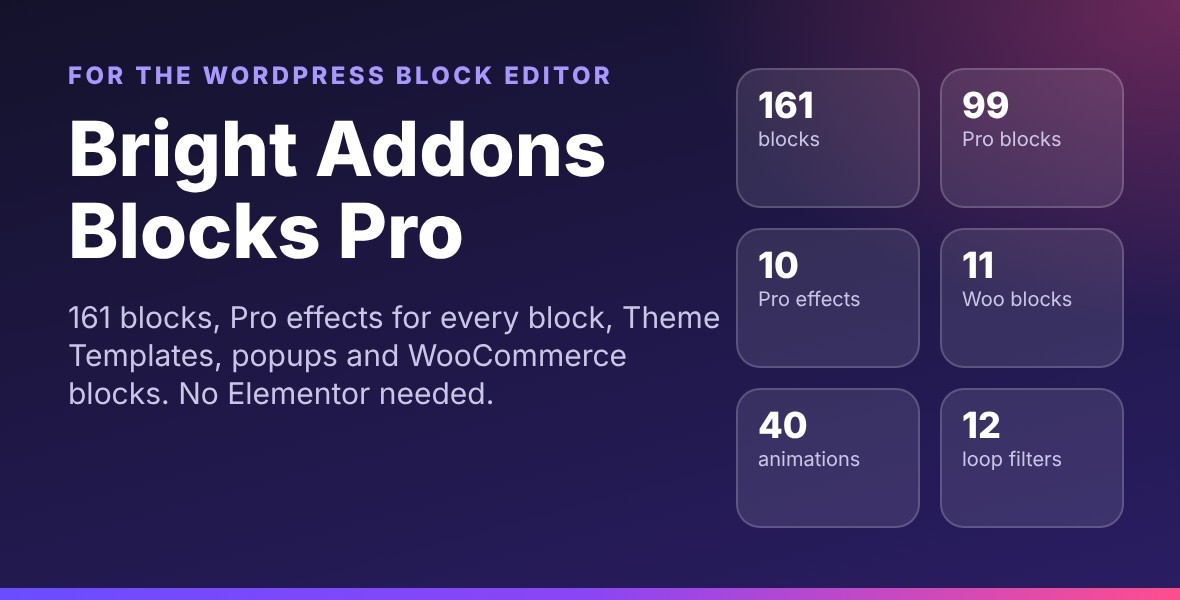
Bright Addons Blocks Pro: 161 blocks for the WordPress block editor
Build complete websites in the block editor (Gutenberg) without Elementor. Bright Addons Blocks Pro has 99 Pro blocks plus all 62 blocks of the free Bright Addons for Gutenberg Blocks, Pro effects for every block, Theme Templates, popups, a Header and Footer Builder with mega menus, and site tools.
Highlights
- 161 blocks: sliders, carousels, galleries, popups, off-canvas panels, timelines, pricing and comparison tables, charts, maps, marquees, hotspots, forms, login and register forms and more.
- 11 WooCommerce blocks: product grid, carousel, list, deal, details, tabs, category grid, add to cart, mini cart, product filter and store pages.
- Loop Grid and Loop Carousel with 12 filter blocks.
- 10 Pro effects for every block, core blocks too: Display Conditions, Sticky, Particles, Animated Gradient, Glass Effect, Scroll Effects, Mouse and Float Effects, Tooltip, Wrapper Link and Custom CSS.
- Theme Templates for single posts, pages, products, archives, shop, search and 404, plus popup templates with triggers.
- Header and Footer Builder with display rules, sticky headers and mega menus.
- Site tools: Custom Code, Custom Fonts, Custom Icons, Redirects with 404 log, Page Transitions, Import and Export, template shortcode, dynamic data and form entries.
- Button colors with hover colors on every block with buttons, and 40 entrance animations on every block.
- Fast: each block loads its own small CSS and JavaScript only on pages that use it. No jQuery on the front end.
- Accessible: keyboard support, visible focus, screen reader labels and reduced motion support.
- Works with block themes and classic themes. Translation ready, WPML compatible.
Requirements
WordPress 6.5 or newer, PHP 7.4 or newer. WooCommerce 8.5 or newer for the WooCommerce blocks.
Live demo and guides
Every block has a live demo page and a guide: brightaddons.com/blocks
Plans
Every plan has all 161 blocks, every Pro effect, Theme Templates, popups and site tools. Plans differ only in the number of sites: 1 site, 5 sites or unlimited sites.
Updates and support
New versions are added here on WPBay for you to download, and support is given through the WPBay support system. This WPBay edition has no license key, no activation and no account screen, and it sends no data to the author or to any licensing service.
External services and requirements
All blocks work without any account, except the optional features below. They use an outside service and work only after you set them up:
- Google Reviews block: needs your own Google Cloud project with a billing account, the “Places API (New)” switched on and an API key, added in Bright Blocks > Integrations. Google gives a free monthly amount and charges per request beyond it. Requests are made by your server and cached.
- Instagram Feed block: needs an Instagram Business or Creator account, a Meta developer app with “Instagram API with Instagram Login” and a long-lived access token, added in Bright Blocks > Integrations. Free. Images load from Instagram.
- Contact Form Pro reCAPTCHA (optional): needs Google reCAPTCHA keys (v2, invisible v2 or v3). Free for normal use. The visitor’s browser loads the reCAPTCHA script from Google.
- Contact Form Pro webhook (optional): sends each entry to an endpoint you enter (for example Zapier, Make or your own app).
- Store Locator block: map pictures come from OpenStreetMap by default (free; the tile server receives the visitor IP address), or from Google Map Tiles (needs a Google Cloud API key with billing), or from a tile address you enter. Directions links open Google Maps or Apple Maps only when clicked.
- Video Box, Video Playlist and Modal Popup: load the YouTube (youtube-nocookie.com) or Vimeo player only when a visitor presses play.
- Share links: open Facebook, X, LinkedIn and other networks only when a visitor clicks them.
Full details are in the included documentation, section “External services and requirements”.
Changelog:
1.1.9
- Fix: the bundled blocks of Bright Addons for Gutenberg Blocks (free/) now use the plugin's own text domain, bright-addons-blocks-pro, in PHP, JavaScript and block.json. One translation file (languages/bright-addons-blocks-pro.pot, 6,608 strings) now covers every block, the editor and the admin pages, and the domain is loaded on plugins_loaded. Before, the bundled strings used a domain that was never loaded, so they could not be translated.
- Fix: the editor scripts of the layout, Theme Builder and Theme Templates panels pass the text domain as text, so their strings are in the .pot file and in the JavaScript translations.
- Hardening: every block asset file (*.asset.php) now stops when opened directly, like all other PHP files.
1.1.8
- Documentation: the External services section is now "External services and requirements". It lists every optional outside service (Google Places API (New), Instagram API, Google reCAPTCHA, webhooks, OpenStreetMap or Google map tiles, YouTube and Vimeo, share links), what you need for each (accounts, API keys, billing) and what it costs, and notes that these blocks work only after they are set up.
- Marketplace editions: confirmed to contain no licensing SDK, activation screen or license check, and to send no data to the author or any licensing company.
1.1.7
- Security: the conversion of form files kept by 1.1.5 and older is only marked as finished when every old file is protected and the old temporary folder is gone. If a file cannot be converted (for example a folder that is not writable), the plugin tries again on every admin page load and in the daily clean-up, and Form Entries shows a notice with the number of files that are not protected yet.
- Security: protected files are written to a temporary file in the same folder (also protected), checked, and then renamed, so an interrupted write never leaves a damaged or unprotected file. A complete copy from an interrupted run is reused, a damaged one is written again, and leftovers of interrupted writes are removed.
- Documentation: new "Form files and server setup" section (protected storage, the storage check, Nginx rule, BABP_FORMS_DIR, upgrading from older versions).
1.1.6
- Security: files sent with Contact Form Pro are protected on every web server (Apache, LiteSpeed, Nginx and IIS). Each kept file now starts with a PHP stop line, so a direct web request returns nothing of the file even where .htaccess rules are ignored. The folder also gets index.php and web.config deny rules.
- Security: before a file is kept, the plugin checks over HTTP that files in the storage folder cannot be read. If the check fails or cannot run, files are no longer kept on the site: they are still attached to the notification email, and the entry shows the file name with "sent by email only". Form Entries shows a notice with the fix and a Check again button.
- Security: files that are only emailed are no longer written to the uploads folder at all. They are attached straight from the PHP upload temp folder, which is outside the web root, so the old bapro-forms/tmp folder is removed.
- New: define BABP_FORMS_DIR in wp-config.php to keep form files in a folder outside the web root.
- Files kept by older versions are converted to the protected format once after the update. Admins still download them from Form Entries as before.
1.1.5
- Improved: Page Transitions and the template shortcode copy button load their JavaScript from files instead of inline scripts.
- Improved: Button colors are printed with the page styles instead of next to each block.
- Improved: small JavaScript clean-ups in the editor and in the Country Map, Container Carousel, Thumbnail Slider, Loop Grid, News Ticker, Text Marquee and Table of Contents blocks (no change in how they work).
- Includes Bright Addons for Gutenberg Blocks 1.7.3 (the new name of Bright Addons Blocks Library).
Only logged in customers who have purchased this product may leave a review.
Loading...
WPBay support
 Support by Bright Addons
Bright Addons supports this product through WPBay
Questions are handled in WPBay's private ticket system, keeping your purchase details and support conversation together.
Go to My Downloads
After purchase, open this item in My Downloads and choose Get Support.
What support includes
- Answers to product-related questions
- Help with reported bugs and issues
- Guidance for included third-party assets
What support does not include
- Customizations or new features
- Installation or setup services
Plugin
Maintenance snapshot
See recent updates, compatibility, support, and developer activity.
- Updated today
- Developer active recently
- WPBay support available
- WordPress 7.1 tested
Snapshot updated 1 hour ago
View details Hide details
Maintenance details
This is maintenance data. It does not measure product quality or sales.
- Last update Updated today
- Compatibility WordPress 7.1 tested · PHP 8.5 tested · WooCommerce 11 tested
- Releases 6 releases in the 3 days since listing
- Developer activity Developer active recently
- Support No recent support tickets to measure
- Docs and demo Documentation available · Changelog available · Demo available
How this snapshot works
Plugin Health
The score is out of 100 and uses data WPBay can check. Ratings, popularity, and sales are not used.
- Last update 30 points
-
Plugins receive full recency points under 30 days, then step down at 90, 180, 365, and 545 days.
- Compatibility 20 points
-
WordPress, PHP, and WooCommerce (when relevant) are scored separately. The latest two PHP lines count as current. Nearby previous versions keep most of the points.
- Current version 100%
- One version behind 75%
- Two versions behind 50%
- Three versions behind 25%
- Older or not listed 0%
- Releases 15 points
-
One release earns 10, two or three earn 13, and four or more earn 15. Each accepted product ZIP counts once; reprocessing the same upload and listing-only edits do not count.
- Developer activity 15 points
-
Based on WPBay login and dashboard activity. Exact last-login dates are never shown.
- Support 15 points
-
There are no recent WPBay tickets to measure.
- Docs and demo 5 points
-
Documentation: 2. Changelog: 1. Working demo or preview: 2.
Score ranges
- 90–100 Excellent
- 75–89 Healthy
- 60–74 Fair
- 40–59 Needs attention
- 0–39 Limited
Long gaps
WPBay also checks for long gaps between updates, developer activity, support replies, and releases. Buyers do not see this score.
- Time since update 35 points
- Last developer activity 25 points
- WordPress compatibility 15 points
- Support replies 15 points
- Fewer releases 10 points
-
Quality verified by WPBay
WPBay review- Reviewed version
- 1.1.9
- Review completed
- Reviewer
- CodeRevolution
- Review type
- Initial
No unresolved approval blocker was identified during WPBay’s proportionate review of this release. This is not a security certification or a guarantee that the product contains no defects.
-
 Future updates
-
WPBay support from Bright Addons
-
GPL code, proprietary assets
-
Covered by the WPBay refund policy
-
Plugin maintenance snapshot
Relevant picks
You may also like
Similar products selected by category, features, popularity and freshness.


Reviews
There are no reviews yet.