



AutoBlog Iframe Extension Plugin for WordPress

 Recently Updated
Well Documented
Recently Updated
Well Documented

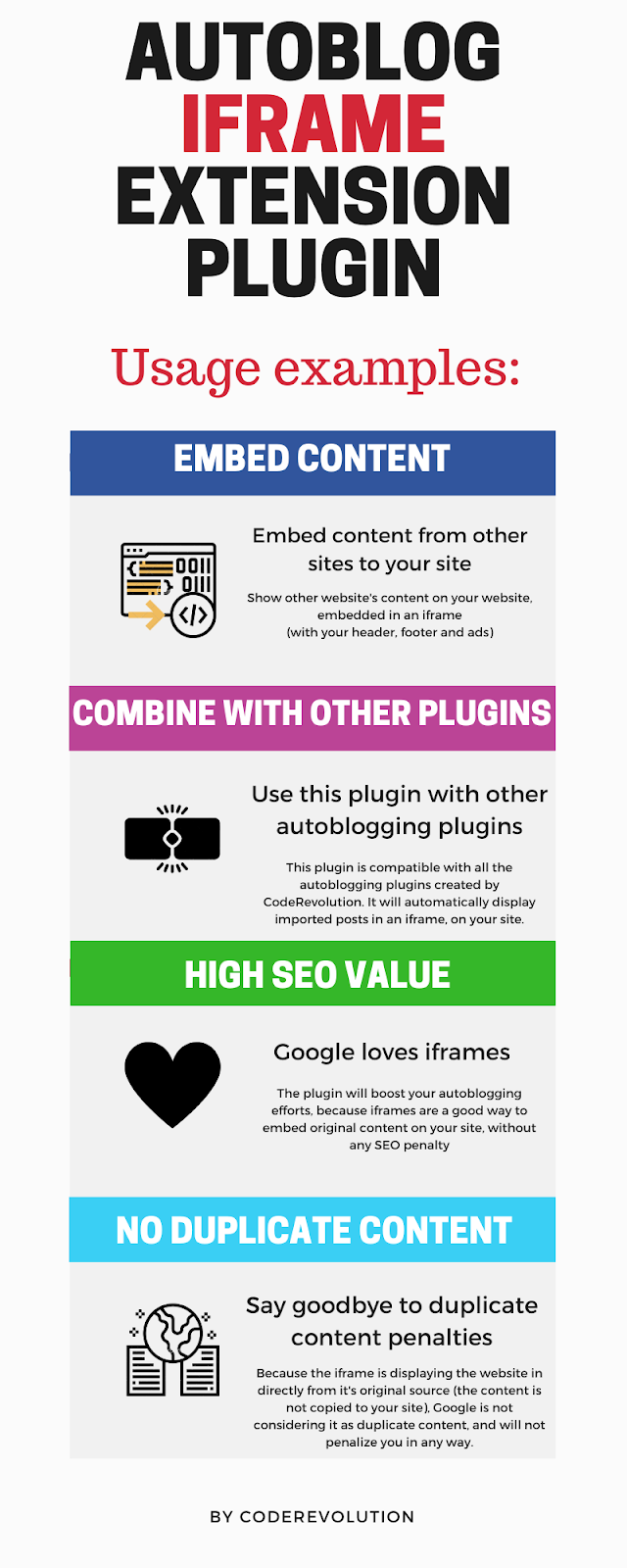


What Can You Do With This Plugin?
AutoBlog Iframe Extension Plugin for WordPress is a breaking edge iframe content embedder. It will use iframes to automatically embed original article posts to your site! The goal is to achieve the following: AutoBlog Iframe Extension will automatically create content for your site, using iframes to embed the original content automatically to your site. Iframes are really loved by Google, because they are categorized as “fair use” of the original content – thus your site will not get any duplicate content SEO penalties.
Plugin update log
v1.1.1 update: added the ability to disable the iframe functionality for rules from other plugins – video tutorial. v1.1 update: added the ability to add text and images next to the displayed iframe from pages.
Why do you need iframes on your site?
To truly answer this question, we first need to know what an iframe is. iFrames allow you to embed a separate HTML documents (from other websites) on the pages from your site. As a result, you will automatically get content from other URLs on your own web page. Search engines love iframes, because they are used in many situations on the web. Here are some examples:
- Built-in videos, presentations and other visual content.
- For embedding examples of code fragments.
- To optimize the appearance of support service tools.
- To generate background traffic through affiliate programs. The use of the tag is due to the increase of visits that are recorded by analytics systems and overstate traffic results.
- Used in software applications.
- Often helpful for technical support departments.
Other autoblogging plugins with which this plugin will work?
The plugin will work with any autoblogging plugin from my portfolio. The autoblogging plugins will generate the content, while this plugin will display the imported content using iframes. Here are only some examples from them: Newsomatic, Echo RSS, Fbomatic, Youtubomatic, Crawlomatic, Instamatic, Recipeomatic, Redditomatic, and many more, check my full portfolio, here.
Do iframes cause duplicate content issues ?
Since iframes reference a different web page, rather than replicating the content, they will not create duplicate content penalties from search engines. The crawling robots recognize the <iframe> tag and don’t register the content as duplicate.
Does Google consider iframes as “cloaking” ?
“Cloaking” refers to a black hat tactic in which you present different content to search engine robots than to users who visit your page. Since iframes clearly mark the source of the content in the HTML syntax, search engine robots understand that the content the user sees is the same content referred to in the source URL. Iframes are therefore completely distinct from cloaking, so don’t worry about being carded for black hat tactics. 
Testing this plugin
- You can test the plugin’s functionality using the ‘‘Plugin Test Site’’. Here you can try the plugin’s full functionality. Note that the generated testing blog will be deleted automatically after 24 hours.


Need support?
Please check our knowledge base, it may have the answer to your question or a solution for your issue. If not, just email me at [email protected] and I will respond as soon as I can.


Changelog:
Version 1.0 Release Date 2020-02-05
First version released!
Version 1.1 Release Date 2020-02-17
Added the ability to modify the displayed content (add more text next to the displayed iframe)
Version 1.1.1 Release Date 2020-03-03
Added the ability to disable the iframe functionality for rules from other plugins
Version 1.1.2 Release Date 2020-05-11
Bugfix update
Version 1.1.3 Release Date 2020-05-19
The plugin does not require any more to add it's shortcode on a specific page - nice SEO URLs update
Version 1.1.4 Release Date 2020-05-21
Added X-Frame Origin check for pages that have iframe embedding disabled
Version 1.1.5 Release Date 2021-01-16
PHP 8 compatibility update
Version 1.1.6 Release Date 2022-07-16
Added a new readability module to replace iframe content - use the %%show_readability%% shortcode in the 'Post Content Template' settings field to activate this new feature
Version 1.1.7 Release Date 2023-02-10
Added a new parameter to the [aiex-dispay-iframe] shortcode: iframe_url - using it, you will be able to manually define the URL which should be displayed in the iframe the plugin generates
Version 1.1.7.1 Release Date 2023-10-18
Fixed PHP 8.2 related errors
Are you already a customer?
If you already bought this and you have tried it out, please contact me in the item’s comment section and give me feedback, so I can make it a better WordPress plugin! WordPress 7.0 and PHP 8.5 Tested!



Changelog:
Version 1.0 Release Date 2020-02-05
First version released!
Version 1.1 Release Date 2020-02-17
Added the ability to modify the displayed content (add more text next to the displayed iframe)
Version 1.1.1 Release Date 2020-03-03
Added the ability to disable the iframe functionality for rules from other plugins
Version 1.1.2 Release Date 2020-05-11
Bugfix update
Version 1.1.3 Release Date 2020-05-19
The plugin does not require any more to add it's shortcode on a specific page - nice SEO URLs update
Version 1.1.4 Release Date 2020-05-21
Added X-Frame Origin check for pages that have iframe embedding disabled
Version 1.1.5 Release Date 2021-01-16
PHP 8 compatibility update
Version 1.1.6 Release Date 2022-07-16
Added a new readability module to replace iframe content - use the %%show_readability%% shortcode in the 'Post Content Template' settings field to activate this new feature
Version 1.1.7 Release Date 2023-02-10
Added a new parameter to the [aiex-dispay-iframe] shortcode: iframe_url - using it, you will be able to manually define the URL which should be displayed in the iframe the plugin generates
Version 1.1.7.1 Release Date 2023-10-18
Fixed PHP 8.2 related errors
Only logged in customers who have purchased this product may leave a review.
Loading...
WPBay support
 Support by CodeRevolution
Support by CodeRevolution
CodeRevolution supports this product through WPBay
Questions are handled in WPBay's private ticket system, keeping your purchase details and support conversation together.
Go to My Downloads
After purchase, open this item in My Downloads and choose Get Support.
What support includes
- Answers to product-related questions
- Help with reported bugs and issues
- Guidance for included third-party assets
What support does not include
- Customizations or new features
- Installation or setup services
Plugin
Maintenance snapshot
See recent updates, compatibility, support, and developer activity.
- Updated 68 days ago
- Developer active recently
- WPBay support available
- WordPress 7.1 tested
Snapshot updated 14 hours ago
View details Hide details
Maintenance details
This is maintenance data. It does not measure product quality or sales.
- Last update Updated 68 days ago
- Compatibility WordPress 7.1 tested · PHP 8.5 tested · WooCommerce 11 tested
- Releases 1 release in the 277 days since listing
- Developer activity Developer active recently
- Support No recent support tickets to measure
- Docs and demo Documentation available · Changelog available · Demo available
Health reflects increased activity during the last 90 days.
How this snapshot works
Plugin Health
The score is out of 100 and uses data WPBay can check. Ratings, popularity, and sales are not used.
- Last update 30 points
-
Plugins receive full recency points under 30 days, then step down at 90, 180, 365, and 545 days.
- Compatibility 20 points
-
WordPress, PHP, and WooCommerce (when relevant) are scored separately. The latest two PHP lines count as current. Nearby previous versions keep most of the points.
- Current version 100%
- One version behind 75%
- Two versions behind 50%
- Three versions behind 25%
- Older or not listed 0%
- Releases 15 points
-
One release earns 10, two or three earn 13, and four or more earn 15. Each accepted product ZIP counts once; reprocessing the same upload and listing-only edits do not count.
- Developer activity 15 points
-
Based on WPBay login and dashboard activity. Exact last-login dates are never shown.
- Support 15 points
-
There are no recent WPBay tickets to measure.
- Docs and demo 5 points
-
Documentation: 2. Changelog: 1. Working demo or preview: 2.
Score ranges
- 90–100 Excellent
- 75–89 Healthy
- 60–74 Fair
- 40–59 Needs attention
- 0–39 Limited
Long gaps
WPBay also checks for long gaps between updates, developer activity, support replies, and releases. Buyers do not see this score.
- Time since update 35 points
- Last developer activity 25 points
- WordPress compatibility 15 points
- Support replies 15 points
- Fewer releases 10 points
-
Quality verified by WPBay
WPBay review- Reviewed version
- 1.1.7.3
- Review completed
- Reviewer
- CodeRevolution
- Review type
- Initial
No unresolved approval blocker was identified during WPBay’s proportionate review of this release. This is not a security certification or a guarantee that the product contains no defects.
-
 Future updates
-
WPBay support from CodeRevolution
-
GPL code, proprietary assets
-
Covered by the WPBay refund policy
-
Plugin maintenance snapshot
Relevant picks
You may also like
Similar products selected by category, features, popularity and freshness.


From this seller
View seller store
More by CodeRevolution
Explore more bestselling products from this creator.


Reviews
There are no reviews yet.