



Advanced Category Listing for Elementor

 Well Documented
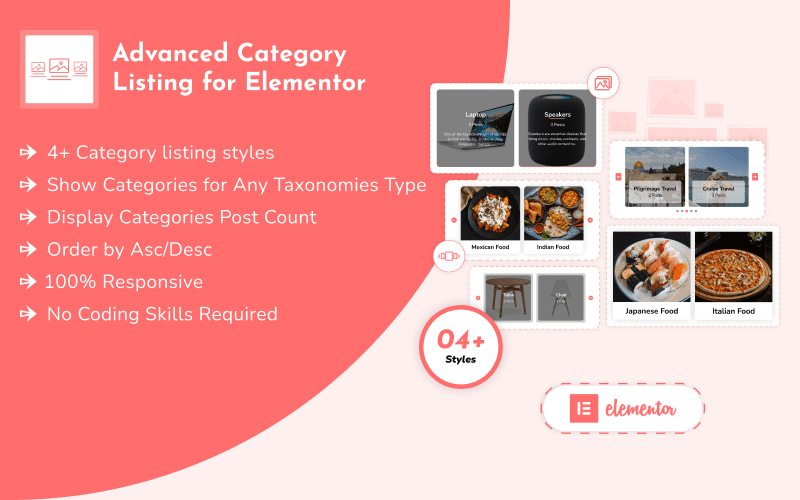
Looking to organize and present your website’s categories in a visually engaging and highly functional way? The Advanced Category Listing for Elementor plugin is a powerful tool designed to help you display your post categories, product categories, or any custom taxonomies seamlessly within the Elementor page builder, all without needing any coding skills. This plugin empowers you to create attractive, intuitive category lists that guide your visitors directly to the content or products they’re looking for. Perfect for blogs, online stores, portfolios, and any WordPress site with a structured content hierarchy, it enhances user experience and improves site navigation.
Who Can Benefit from Advanced Category Listing for Elementor?
This Elementor widget is ideal for:- eCommerce Store Owners: Highlight product categories to facilitate Browse and boost sales.
- Bloggers & Publishers: Organize blog posts by topic, making content easily discoverable.
- Portfolio Creators: Categorize projects or services for a clean and professional presentation.
- Directory Websites: List various categories of businesses or listings effectively.
- Web Designers & Developers: Quickly implement stylish and customizable category displays for clients.
- Anyone with an Elementor Website:If you have structured content and want to improve its visual presentation and navigability, this plugin is for you.
Key Features & Highlights of Advanced Category Listing for Elementor:
This Elementor plugin is designed for flexibility, ease of use, and stunning results:- No Coding Required:Create and customize beautiful category lists using Elementor’s intuitive drag-and-drop interface, with no coding knowledge needed.
- Dynamic Category Sources: Display categories from your WordPress posts, WooCommerce products, or any custom taxonomy you have set up.
- Multiple Layout Options: Choose from various display layouts including versatile grid and carousel modes, and potentially horizontal or vertical orientations, to best suit your design needs.
- Extensive Customization Options:
- Styling: Full control over design, colors, typography, padding, margins, and button styles for categories, titles, descriptions, and badges.
- Content: Easily show/hide elements like category titles, descriptions, images, and item counts.
- Filtering: Include or exclude specific taxonomy terms, and even display empty categories if desired.
- Interactive Elements: Add engaging features like hover effects for a dynamic user experience.
- Responsive & Compatible: Ensures your category lists look perfect and function flawlessly across all devices (desktops, tablets, smartphones) and are compatible with any WordPress theme that uses Elementor.
- Easy to Use: Simply drag and drop the widget onto your Elementor page and start configuring.
Elevate Your Website’s Navigation & Engagement!
The Advanced Category Listing for Elementor is more than just a list; it’s a strategic tool to enhance your website’s organization and user flow. By presenting your categories in a visually appealing and easy-to-navigate manner, you can significantly improve user engagement, reduce bounce rates, and help visitors find exactly what they need. Transform your website’s content presentation today. Get Advanced Category Listing for Elementor and make your categories a powerful asset for discovery and conversion!Only logged in customers who have purchased this product may leave a review.
Loading...
Email support
 Support by Coderkart Technologies
Support by Coderkart Technologies
Coderkart Technologies provides support by email
Contact the seller directly by email for product questions and issue reports.
Email support
Opens your default email app.
What support includes
- Answers to product-related questions
- Help with reported bugs and issues
- Guidance for included third-party assets
What support does not include
- Customizations or new features
- Installation or setup services
Plugin
Maintenance snapshot
See recent updates, compatibility, support, and developer activity.
- Updated 463 days ago
- Email support available
- Documentation available
- Demo or preview available
Snapshot updated 4 hours ago
View details Hide details
Maintenance details
This is maintenance data. It does not measure product quality or sales.
- Last update Updated 463 days ago
- Compatibility WordPress 6.8 tested, three versions behind · PHP 8.5 not marked as tested
- Releases 0 releases in the last 12 months
- Developer activity No recent developer activity
- Support Support is offered by email, not through WPBay tickets
- Docs and demo Documentation available · Changelog missing · Demo available
Health reflects recent activity during the last 90 days.
How this snapshot works
Plugin Health
The score is out of 100 and uses data WPBay can check. Ratings, popularity, and sales are not used.
- Last update 30 points
-
Plugins receive full recency points under 30 days, then step down at 90, 180, 365, and 545 days.
- Compatibility 20 points
-
WordPress, PHP, and WooCommerce (when relevant) are scored separately. The latest two PHP lines count as current. Nearby previous versions keep most of the points.
- Current version 100%
- One version behind 75%
- Two versions behind 50%
- Three versions behind 25%
- Older or not listed 0%
- Releases 15 points
-
One release earns 10, two or three earn 13, and four or more earn 15. Each accepted product ZIP counts once; reprocessing the same upload and listing-only edits do not count.
- Developer activity 15 points
-
Based on WPBay login and dashboard activity. Exact last-login dates are never shown.
- Support Not scored
-
WPBay cannot measure response times for email or support on another site, so support is not scored.
- Docs and demo 5 points
-
Documentation: 2. Changelog: 1. Working demo or preview: 2.
Score ranges
- 90–100 Excellent
- 75–89 Healthy
- 60–74 Fair
- 40–59 Needs attention
- 0–39 Limited
Long gaps
WPBay also checks for long gaps between updates, developer activity, support replies, and releases. Buyers do not see this score.
- Time since update 35 points
- Last developer activity 25 points
- WordPress compatibility 15 points
- Support replies Not scored
- Fewer releases 10 points
-
Quality verified by WPBay
WPBay review- Reviewed version
- 1.0.4
- Review completed
- Reviewer
- CodeRevolution
- Review type
- Initial
No unresolved approval blocker was identified during WPBay’s proportionate review of this release. This is not a security certification or a guarantee that the product contains no defects.
-
 Future updates
-
Email support from Coderkart Technologies
-
MIT licensed
-
Covered by the WPBay refund policy
-
Plugin maintenance snapshot
Relevant picks
You may also like
Similar products selected by category, features, popularity and freshness.



 15 days free
From this seller
View seller store
More by Coderkart Technologies
Explore more bestselling products from this creator.
Reviews
There are no reviews yet.